


3 Post Moderation Rule for New Boarders (25 Jan 2021)
New boarders will have their posts moderated - Don't worry if you cannot see your post immediately.
How would one Backup FCPX Events and FCPX Projects while editing
- Tom Wolsky
-

- Offline
- Moderator
-

Please Log in to join the conversation.
- mliebergot
-
 Topic Author
- Offline
- Premium Member
-

- Posts: 84
- Thank you received: 3
It was just confusing, as it was aid earlier that you should let FCPX copy files and folder structures to make backups.
I guess that was meant when you wanted to duplicate or move Event's or Projects.
And not necessarily actual backup practices.
Please Log in to join the conversation.
Please Log in to join the conversation.

Please Log in to join the conversation.

But Carbon Copy Cloner is a great way to go and used throughout the industry.
Sean Lander - Editing since 1982 - AVID 1991 - FCP 1999 - FCPX 2011
Please Log in to join the conversation.
Please Log in to join the conversation.

Creating history....one edit at a time !
Please Log in to join the conversation.
It runs once an hour making a back up, only of any files that have been changed, and normally this can take anything between 30 seconds and a minute or 2. If I've done any reasonable amount of capturing or rendering it can obviously take longer, but it has never affected my editing and I was fine with the autosave in 10.0.2 combined with it before the 10.0.3 addition.
I'd also like to hear reason why I shouldn't use it or what would make Carbon Copy Cloner better for me.
Please Log in to join the conversation.
If I have a folder containing 10 GB worth of data and I drag that folder to another drive I will get a backup of the entire 10 GB. If I change one small file in the folder and I again drag then folder to another drive it will again backup the entire 10 GB. That may be what I want. Or not. Some backup software is smart enough to only backup the (possibly small) data that changed. It sounds to me that backing up only the portion of the data that changed is what is being asked.
Please Log in to join the conversation.
- FilipVandoorne
-
- Offline
- New Member
-

- Posts: 3
- Thank you received: 0
You can also make filters, so to backup only certain files types- tri backup will recreate the filetreestructure - good for fcpx as the its always the same name CurrentVersion.fcpproject.
You can also exclude certain folders - render files for example.
If you would use diskimages, incremental backups of the image file will not work. it will backup
the complete imagefile each time, even if only 1 thing is changed.
Also as for now, we cannot force a target folder for the renderfiles, which could be a problem, as this folder can become big and will be in the diskimage.
This is the biggest problem for using network attached storage in FCPX. You can put the moviefiles on this storage, but no eventfolders or projects. Moviefiles can be referenced to the networkstorage, but you still have local eventfolders with renderfiles. you could use diskimages on the network, but beware if another user opens the same image file over the network at the same time... things will go bad..
XSAN is better for working with shared projects in fcpx, but still has big limitations, much morenthan in fcp7 for using the same project at the same time by multiple users. XSAN shared storage is also much more expensive than networked storage.
i hope that Apple will make some kind of middleware to manage multiple users and multiple projects over the network - as with a Avid unity of FCPserver, checking in an out.
This is really needed for postproduction facilities that will use fcpx.
Please Log in to join the conversation.
Please Log in to join the conversation.
I've been aware of this for some time and have been thinking of ways round it. Whenever I move events from the "Final Cut Events" to the "Final Cut Events Not in Use" folder "Time Machine" creates a new backup taking up unnecessary time and space.
At first, as a temporary measure, I deleted them occasionally from the backup to take less space, but then it's just time machine backs them up, I delete them, back and forward.
At the moment I have a second back up drive plugged in, I've excluded the 2 Final Cut Events folders from time machine backup and have them copied up to the second backup drive, where I manually put any relevant "CurrentVersion.fcpevent" files in periodically.
I've been meaning to get a chance to look into Automator to see if taking care of this (and the Project folders) action can be taken care of with a "Service", I'm assuming it would be possible but I've never used it before.
Does anyone know if any of the previously mentioned backup solutions could make this easier/more straight forward, if there's another solution or if I'd be waisting my time with Automator?
Please Log in to join the conversation.
I'm thinking to set automator to put anything in the "Final Cut Events" and "Final Cut Events Not In Use" folders into a single "Final Cut Events BACKUP" folder and the same for the project folders.
I know as much that if I create an automatic folder action in Automator it will put anything added to the proper Events/Project folders into the backup versions, but will it do the same for any files that are already in the Events/Project folders as they are updated?
I'm assuming that even if it does having them overwrite the previous backups won't be so straight forward.
Please Log in to join the conversation.
I have discovered the same issues you point out with using time machine.
Almost any backup software such as Carbon Copy Cloner would allow you to backup specific files on a schedule and not perform the backup if the particular file exists. Automator could also probably be programmed to execute on a schedule and I'll bet you could also have it compare file creation dates (although I never tried this) to determine whether or not to back something up.
Whether using automator or a specific backup program, system resources would obviously be used, so either solution performed while you are editing may decrease FCPX or Motion performance. Depending on your system speed, this may or may not be a concern to you.
Also, since the inception of FCPX 10.0.3, there are automatic project backups in the backup folder. This is on the same drive as the original FCPX project, so if the drive fails, that is of no use.
Here is my philosphy, given the above.
I never edit in the field, so for those who do, this may not be optimum, but for my purpose, it works.
Whenever I begin a new project, I am either using footage that I already have archived on three external storage drives, or I am importing new footage (and immediately archiving to at least two external drives).
So now, my raw footage is backed up and safe. Then I begin importing from one of the backup drives into FCPX (and optimizing) so I have prores footage in the final cut folder. As I edit, I rely on the fcpx backup to protect my project and if it's a complicated project, I will periodically copy that via the finder to another location. At the end of an evening or long period of editing, I may choose to duplicate the entire project and referenced events and move them to a storage location.
As for time machine, when I retire for the evening or need to take a long break, I turn it on and let it copy my media scratch drive (which I try to keep as small as possible with number of projects at any one time). So, if it copies an event in the "final cut events" folder and next time that file is in the "final cut events not in use folder", I don't worry about it. It eats the time machine capacity a bit quicker, but using a 1TB drive still retains quite a bit of info that I can always get back to.
Anyway, that seems to suit my workflow. Maybe that gives you a few more thoughts on the whole process.
Creating history....one edit at a time !
Please Log in to join the conversation.
Even after moving stuff back and forward through "Event Manager X" once it's all done, it's all done. Just leaving the obvious issue of having the 2 complete backups on the same drive being pointless and a waist of resources. The hourly backups then just update the smaller files.
Now that I wrote it down and thought about it more the only issue really is getting what ever is being used for backup to ignore any movement between the main and not in use folders.
An hourly/manual option backup that takes care of this to a FCPX dedicated backup drive would be a great update to "Event Manager X".
I'm going to see what I can do with Automator, I'll do some experiments tomorrow to see if a folder action deals with files as they are updated and not just added, even if so the backup files look like they will need dealt with differently.
If it does it should just take time when importing and as with any backup solution, then updating the CurrentVersion and backup files are quick and regular. Thanks for bringing the backup files to my attention, I had forgot about them.
By the way, Automator can be set up to operate on an iCal event, which can be scheduled.
Please Log in to join the conversation.
- Lee Patterson
-
- Offline
- Elite Member
-

- Posts: 239
- Thank you received: 20
Please Log in to join the conversation.
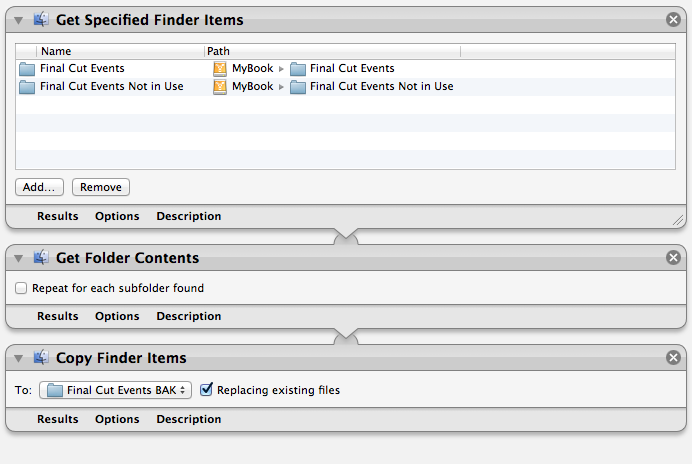
This alone takes all the event files and creates a back up maintaing the folder structure for each individual event on the backup drive. When ever it is run it replaces any updated files including the back up files, and deletes any files from the previous backup that were since deleted from within the FCPX Event Library, which is ideal.
But it copy's/overwrites all the files every time it's ran, which is far from ideal.
As a temporary measure, while finding a solution, it's better than what I had yesterday and I can run it every night.
But when I try to clean it up adding a "Filter Finder Items" based on "Date Last Modified" it doesn't filter properly. It's the first time I've used Automator, so maybe I'm missing something and I'm hoping if anyone knows they can point it out.
Also, given that FCPX needs the events and projects to be at root level it looks like a separate workflow for projects and events is necessary.
Please Log in to join the conversation.
www.bombich.com/index.html
Please Log in to join the conversation.
Are you able to tell me if Carbon Copy Cloner could definitely deal with the constant swapping of files between the "Final Cut Events" and the "Final Cut Event Not In Use" folders without a duplicate backup?
In the long term I'm looking for a completely automatic backup solution that ideally runs every hour.
Please Log in to join the conversation.
