


- Posts: 222
- Thank you received: 4
3 Post Moderation Rule for New Boarders (25 Jan 2021)
New boarders will have their posts moderated - Don't worry if you cannot see your post immediately.
Workflow to grade Sony Slog3 in FCPx
- FinalCutdown
-
 Topic Author
- Offline
- Elite Member
-

Less
More
13 Aug 2023 20:57 #126802
by FinalCutdown
Workflow to grade Sony Slog3 in FCPx was created by FinalCutdown
Does anyone grade Sony Slog3 footage directly in FCPx?
I added the LUT from my camera (FX3) to the footage and now the exposure controls dont really work as intended anymore. They correct the original footage without the lut right but for the footage with the lut applied they are act more like an offset - pushing the whole levels up and down instead of only affecting the regions (highlights, midtones, black), like lift, gamma and gain are intended to work. Is there a way around to work with Slog in FCPx? I can use some third party apps to roundtrip but that eliminates some effects I already applied and makes it more complicated.
I added the LUT from my camera (FX3) to the footage and now the exposure controls dont really work as intended anymore. They correct the original footage without the lut right but for the footage with the lut applied they are act more like an offset - pushing the whole levels up and down instead of only affecting the regions (highlights, midtones, black), like lift, gamma and gain are intended to work. Is there a way around to work with Slog in FCPx? I can use some third party apps to roundtrip but that eliminates some effects I already applied and makes it more complicated.
Please Log in to join the conversation.


13 Aug 2023 22:10 #126803
by VTC
Replied by VTC on topic Workflow to grade Sony Slog3 in FCPx
I grade Slog 3 from a A7Siii just fine via Color Finale because I can finesse things more. If you LUT things up too early in the process you're likely to strip away data you can't effectively bring back later on which sounds like what you're experiencing.
This is Resolve oriented but explains clearly the order things that get applied (3:17 or 4:42) make a difference.
This is Resolve oriented but explains clearly the order things that get applied (3:17 or 4:42) make a difference.
Please Log in to join the conversation.
- FinalCutdown
-
Topic Author
- Offline
- Elite Member
-
Less
More
- Posts: 222
- Thank you received: 4
14 Aug 2023 05:42 #126806
by FinalCutdown
Replied by FinalCutdown on topic Workflow to grade Sony Slog3 in FCPx
Thanks for you help, I dont think FCPx works the same way as Resolve. My LUT applied at clip level doesnt clip highlights or shadows. In contrary, the controls lift, gamma gain affect only the original image, which means that the controls are not detailed enough and lift for example will crush the blacks immediately: instead of compressing them they will just vanish to values sub -16. So I need color finale to be able to handle those controls?
Please Log in to join the conversation.
14 Aug 2023 15:45 #126814
by VTC
Not necessarily. It all depends on how deep you want to dive into controlling LUT properties. I believe CF offers a 30 day trial to check things out.
While Davinci handles color differently than FCP the concept I was promoting is that one adjustment early on in the chain will affect things later on and may not be recoverable. That's why I cringe when people bake in a favorite or specific LUT while recording. Good luck changing it from Tectite to Cinnabar (Lutify) later on.
Replied by VTC on topic Workflow to grade Sony Slog3 in FCPx
So I need color finale to be able to handle those controls?
Not necessarily. It all depends on how deep you want to dive into controlling LUT properties. I believe CF offers a 30 day trial to check things out.
While Davinci handles color differently than FCP the concept I was promoting is that one adjustment early on in the chain will affect things later on and may not be recoverable. That's why I cringe when people bake in a favorite or specific LUT while recording. Good luck changing it from Tectite to Cinnabar (Lutify) later on.
Please Log in to join the conversation.
- FinalCutdown
-
Topic Author
- Offline
- Elite Member
-
Less
More
- Posts: 222
- Thank you received: 4
14 Aug 2023 17:34 #126818
by FinalCutdown
Replied by FinalCutdown on topic Workflow to grade Sony Slog3 in FCPx
Thats right, baking in a Lut while recording makes no sense at all. Still for Log you always need a base correction to get you in the ballpark for the lut (or offset) and then you need fine control of lift, gamma gain - and thats whats missing in FCPx. I was looking at CF2 - is it right, that its not possible to copy grades from previous clips via shortcut?
Please Log in to join the conversation.

14 Aug 2023 21:23 - 14 Aug 2023 21:35 #126824
by DaveM
Replied by DaveM on topic Workflow to grade Sony Slog3 in FCPx
@FinalCutdown, if you apply the LUT as a "Camera LUT" in FCP, the color space is transformed. Anything beyond very slight corrections after that don't work very well (as the LUT has "clamped" the levels/colors in the source). Unless the original footage is properly exposed and white balanced out-of-the-camera, and you don't need to add any sort of custom "look", the LUT applied via the Camera LUT feature in FCP isn't going to yield the best possible result.
In other words, if you add the LUT later in the "color processing pipeline", either as a "Custom LUT" at the clip level (last in the chain of effects applied) or via an adjustment layer, any corrections you make will have access to the source's wider gamut.
What I've described is approximately what is referred to as a "scene referred" workflow, which means that adjustments to the image are made in the original/camera gamut and gamma before the transformation into the output (or display) color space. Here is more info:
Color Grading Workspaces
So, emulating a scene-referred workflow in FCP is the best way to work with the full color space (gamut and gamma) of the original/camera source media. This doesn't mean you need to even use a LUT, at all. Technical/transformation LUTs are designed for a specific exposure, levels, and gamma setting, so they aren't some magic fix or universally applicable (for the highest quality) in all situations.
In other words, if you add the LUT later in the "color processing pipeline", either as a "Custom LUT" at the clip level (last in the chain of effects applied) or via an adjustment layer, any corrections you make will have access to the source's wider gamut.
What I've described is approximately what is referred to as a "scene referred" workflow, which means that adjustments to the image are made in the original/camera gamut and gamma before the transformation into the output (or display) color space. Here is more info:
Color Grading Workspaces
So, emulating a scene-referred workflow in FCP is the best way to work with the full color space (gamut and gamma) of the original/camera source media. This doesn't mean you need to even use a LUT, at all. Technical/transformation LUTs are designed for a specific exposure, levels, and gamma setting, so they aren't some magic fix or universally applicable (for the highest quality) in all situations.
Last edit: 14 Aug 2023 21:35 by DaveM.
Please Log in to join the conversation.
- FinalCutdown
-
Topic Author
- Offline
- Elite Member
-
Less
More
- Posts: 222
- Thank you received: 4
15 Aug 2023 05:52 #126826
by FinalCutdown
Replied by FinalCutdown on topic Workflow to grade Sony Slog3 in FCPx
Thanks for your help: I already tried to apply it the "Custom LUT" in the timeline and then I added color correction effects (nodes in resolve) to see how they behave. The color wheels seem to behave slightly different when they are applied before or after the custom lut. But still it doesn't seem possible to have very fine control over the regions to adjust lift, gamma gain like in resolve. I vill try CF or maybe I will roundtrip to resolve or switch completely.
Please Log in to join the conversation.
- FinalCutdown
-
Topic Author
- Offline
- Elite Member
-
Less
More
- Posts: 222
- Thank you received: 4
15 Aug 2023 08:57 #126828
by FinalCutdown
Replied by FinalCutdown on topic Workflow to grade Sony Slog3 in FCPx
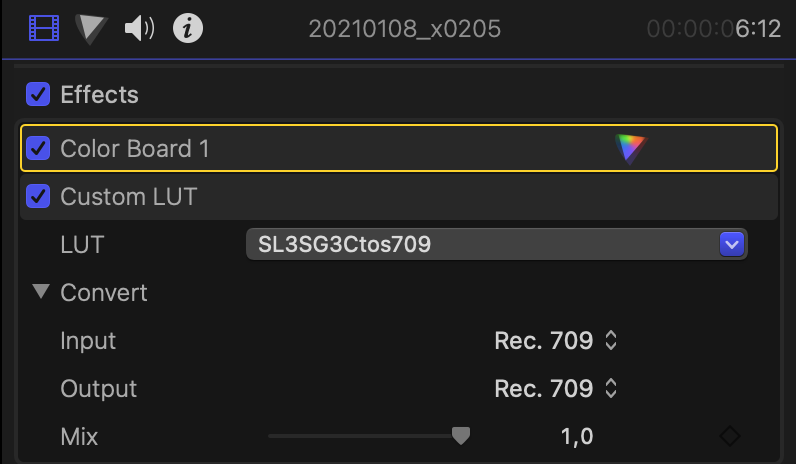
DaveM - you were right! When i add the LUT on Clip level in the inspecor I get maybe a stop less DR on an overexposed image. So I need to add the custom LUT in the timeline and the correction has to be on top of the LUT in the effects tab. Then the color wheels behave as they should: If you drag shadows down they compress the shadows instead of just moving them in a linear way to sub zero values!
Please Log in to join the conversation.


15 Aug 2023 09:28 #126830
by foxytom
Replied by foxytom on topic Workflow to grade Sony Slog3 in FCPx
Have you had a look at Alister Chapman's LUTs?
www.xdcam-user.com/picture-settings-and-.../alisters-free-luts/
I say that as, not only do they look good (less green) but out has variations for each 1/2 stop of exposure (with Cine EI in mind.)
Sony even have some of his LUTs as downloads on their site. He does their instruction videos.
The one I use is the Arri Look one but having just gone back to the above page he also has a bunch of "offset LUTs" which are ostensibly just for exposure compensation.
www.xdcam-user.com/picture-settings-and-.../alisters-free-luts/
I say that as, not only do they look good (less green) but out has variations for each 1/2 stop of exposure (with Cine EI in mind.)
Sony even have some of his LUTs as downloads on their site. He does their instruction videos.
The one I use is the Arri Look one but having just gone back to the above page he also has a bunch of "offset LUTs" which are ostensibly just for exposure compensation.
Please Log in to join the conversation.
- FinalCutdown
-
Topic Author
- Offline
- Elite Member
-
Less
More
- Posts: 222
- Thank you received: 4
15 Aug 2023 12:08 #126832
by FinalCutdown
Replied by FinalCutdown on topic Workflow to grade Sony Slog3 in FCPx
Thanks! I will try the Arri Lut!
Please Log in to join the conversation.

15 Aug 2023 12:32 #126833
by joema
His V-Look V3 SLog3 "V-Look" (V=Venice) LUTs are in three versions: V3 (regular), G1 (mild green reduction), and G2 (stronger green reduction). They all have +/- 3-stop offsets at 1/2-stop intervals. It is easy to switch between them and select a version and exposure offset for the shot.
The build-in offsets can avoid having to manually offset exposure before hitting the LUT in the effects stack.
They work very well on SLog3 FX6 material in FCP. That said, Resolve Studio 18.5 has a new feature that allows RAW controls for MXF XAVC-I. With that you can adjust color temp and other settings almost equal to ProRes RAW. It unfortunately does not work for the MP4 XAVC-SI format from the FX3, A7SIII, etc.
Replied by joema on topic Workflow to grade Sony Slog3 in FCPx
...not only do they look good (less green) but out has variations for each 1/2 stop of exposure (with Cine EI in mind.)...
His V-Look V3 SLog3 "V-Look" (V=Venice) LUTs are in three versions: V3 (regular), G1 (mild green reduction), and G2 (stronger green reduction). They all have +/- 3-stop offsets at 1/2-stop intervals. It is easy to switch between them and select a version and exposure offset for the shot.
The build-in offsets can avoid having to manually offset exposure before hitting the LUT in the effects stack.
They work very well on SLog3 FX6 material in FCP. That said, Resolve Studio 18.5 has a new feature that allows RAW controls for MXF XAVC-I. With that you can adjust color temp and other settings almost equal to ProRes RAW. It unfortunately does not work for the MP4 XAVC-SI format from the FX3, A7SIII, etc.
Please Log in to join the conversation.
- FinalCutdown
-
Topic Author
- Offline
- Elite Member
-
Less
More
- Posts: 222
- Thank you received: 4
15 Aug 2023 12:59 #126835
by FinalCutdown
Replied by FinalCutdown on topic Workflow to grade Sony Slog3 in FCPx
Thanks, I am not shooting in Cine Ei, so I think its easier for me to adjust exposure manually for each shot.
I think this will be my workflow:
1. Apply Video Roles for each camera for the clips in the bins, apply clip LUTs and start editing.
2. When finished: Select all clips in the Timeline and remove the clip LUTs in the inspector plus add the color effect by touching the color control so it will apply before the LUT.
3. Open the Timeline Index and add the Row "Video Roles".
4. Search for the Role "FX3" for examle, select all and add the timeline-effect "Custom LUT" with the corresponding LUT.
5. Continue.. For example I search for A7SIIII and add the cine2 Leeming LUT.
6. Start grading with those effects.
I think this will be my workflow:
1. Apply Video Roles for each camera for the clips in the bins, apply clip LUTs and start editing.
2. When finished: Select all clips in the Timeline and remove the clip LUTs in the inspector plus add the color effect by touching the color control so it will apply before the LUT.
3. Open the Timeline Index and add the Row "Video Roles".
4. Search for the Role "FX3" for examle, select all and add the timeline-effect "Custom LUT" with the corresponding LUT.
5. Continue.. For example I search for A7SIIII and add the cine2 Leeming LUT.
6. Start grading with those effects.
Please Log in to join the conversation.
- FinalCutdown
-
Topic Author
- Offline
- Elite Member
-
Less
More
- Posts: 222
- Thank you received: 4
16 Aug 2023 08:23 #126839
by FinalCutdown
Replied by FinalCutdown on topic Workflow to grade Sony Slog3 in FCPx
The only disadvantage:
When I copy the color effect from the previous clip via shortcut, the color effect gets updated, but moves to the bottom position in the effects panel, so I have to drag it back up over the custom LUT effect manually. I usually use those shortcuts to copy the color information from 1, 2 or 3 clips prior automatically very often, it's a huge timesaver.
I guess when I use an adjustment layer instead it will get even more complicated as I cannot affect the underlying clip when I just use the color dials - I guess color effect will then be applied to adjustment layer itself. So I am afraid I will have to live with it. That's strange that there is no clean workflow to grade a clip which has a LUT applied on clip level.
I tried out CF2 as well but its too slow clicking through all these menus and has no real advantage agains the inbuilt color correction.
I also tried Colourlab.ai and that has cost me a LOT of time! The AI does not really work for exposure, I have to dial everything back manually, then going back to FCPx it removes all my audio effects from the timeline I had already applied, and then playback got so slow on an M2 Mac Pro max 32gb ram that I couldn't play back in realtime and had to start over again grading in FCPx. I think for me the options are using FCPx internal tools or going to resolve and render out the graded files.
When I copy the color effect from the previous clip via shortcut, the color effect gets updated, but moves to the bottom position in the effects panel, so I have to drag it back up over the custom LUT effect manually. I usually use those shortcuts to copy the color information from 1, 2 or 3 clips prior automatically very often, it's a huge timesaver.
I guess when I use an adjustment layer instead it will get even more complicated as I cannot affect the underlying clip when I just use the color dials - I guess color effect will then be applied to adjustment layer itself. So I am afraid I will have to live with it. That's strange that there is no clean workflow to grade a clip which has a LUT applied on clip level.
I tried out CF2 as well but its too slow clicking through all these menus and has no real advantage agains the inbuilt color correction.
I also tried Colourlab.ai and that has cost me a LOT of time! The AI does not really work for exposure, I have to dial everything back manually, then going back to FCPx it removes all my audio effects from the timeline I had already applied, and then playback got so slow on an M2 Mac Pro max 32gb ram that I couldn't play back in realtime and had to start over again grading in FCPx. I think for me the options are using FCPx internal tools or going to resolve and render out the graded files.
Please Log in to join the conversation.
- FinalCutdown
-
Topic Author
- Offline
- Elite Member
-
Less
More
- Posts: 222
- Thank you received: 4
18 Aug 2023 13:16 #126867
by FinalCutdown
Replied by FinalCutdown on topic Workflow to grade Sony Slog3 in FCPx
Hmm, ist a little annoying that everytime I copy the colour correction data from previous clips via shortcut, the effect moves to the top again. Does anyone know a workaroud for this behaviour.
Or does anyone know how to add an adjustment layer thats locked, so moving the color dials will only affect clips underneath?
Or does anyone know how to add an adjustment layer thats locked, so moving the color dials will only affect clips underneath?
Please Log in to join the conversation.
18 Aug 2023 21:14 #126875
by VTC
There's another suggestion somewhere on this linked page but this is how I done it.
fcp.co/forum/4-final-cut-pro-x-fcpx/3754...-beneath-them#123232
Replied by VTC on topic Workflow to grade Sony Slog3 in FCPx
Or does anyone know how to add an adjustment layer thats locked, so moving the color dials will only affect clips underneath?
There's another suggestion somewhere on this linked page but this is how I done it.
fcp.co/forum/4-final-cut-pro-x-fcpx/3754...-beneath-them#123232
Please Log in to join the conversation.
- FinalCutdown
-
Topic Author
- Offline
- Elite Member
-
Less
More
- Posts: 222
- Thank you received: 4
19 Aug 2023 17:51 #126879
by FinalCutdown
Replied by FinalCutdown on topic Workflow to grade Sony Slog3 in FCPx
Thanks for your help. I just can't see how this could help me on this issue. The adjustment layer with a LUT should affect all clips underneath. I just want to be able to control the color effects controls of the clips underneath it automatically with the faders so that it doesn't change the color effect of the adjustment layer.
Or I need an option that the color effect doesn't move its position as a clip effect so it stays over the custom LUT effect in the clip effects tab.
Or I need an option that the color effect doesn't move its position as a clip effect so it stays over the custom LUT effect in the clip effects tab.
Please Log in to join the conversation.
