


- Posts: 2609
- Thank you received: 696
3 Post Moderation Rule for New Boarders (25 Jan 2021)
New boarders will have their posts moderated - Don't worry if you cannot see your post immediately.
Canon C70 Intra-Frame 240Mbps & 600Mbps footage not recognized by FCPX
04 Jul 2023 17:40 #126257
by joema
Thanks for the information and the links. It's my understanding that the designer or inventor of a codec/format typically sets the standards for its operation, which includes determining whether it uses video levels or data levels. They provide the specification for how to encode and decode the data. This specification should also explain the format's metadata and interpretation of that, which may include level information.
E.g, Sony invented S-Log3 and they define it as being data level, not video level. Even if it is transcoded from the camera's MXF container to ProRes 422, and even if ProRes is often interpreted as video levels, it's the responsibility of the transcoding software and final video software to maintain both levels and metadata.
I know from much testing that FCP correctly interprets S-Log3 in the MXF container, at least from the FX6. If a connected Atomos recorder is configured correctly, it will record those in ProRes format correctly and the ProRes metadata will be set correctly (I think). The Sony S-Log3 data is interpreted correctly by FCP as data levels, even though it's encoded as ProRes and inside a Quicktime container. This assumes the Atomos was configured correctly.
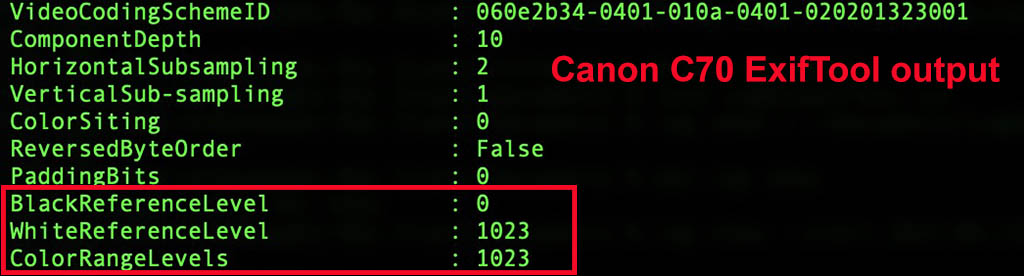
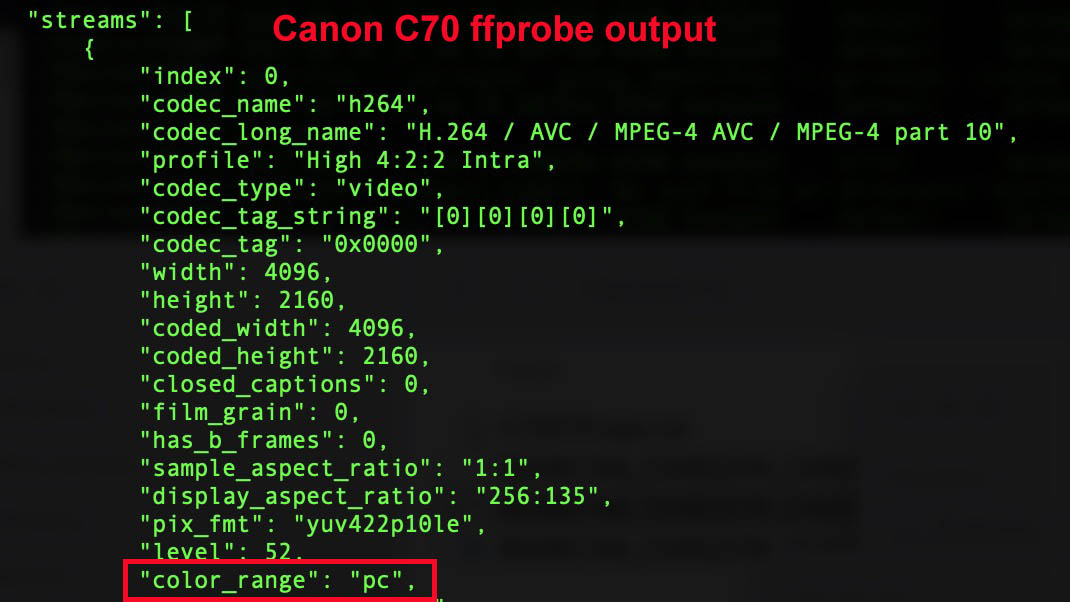
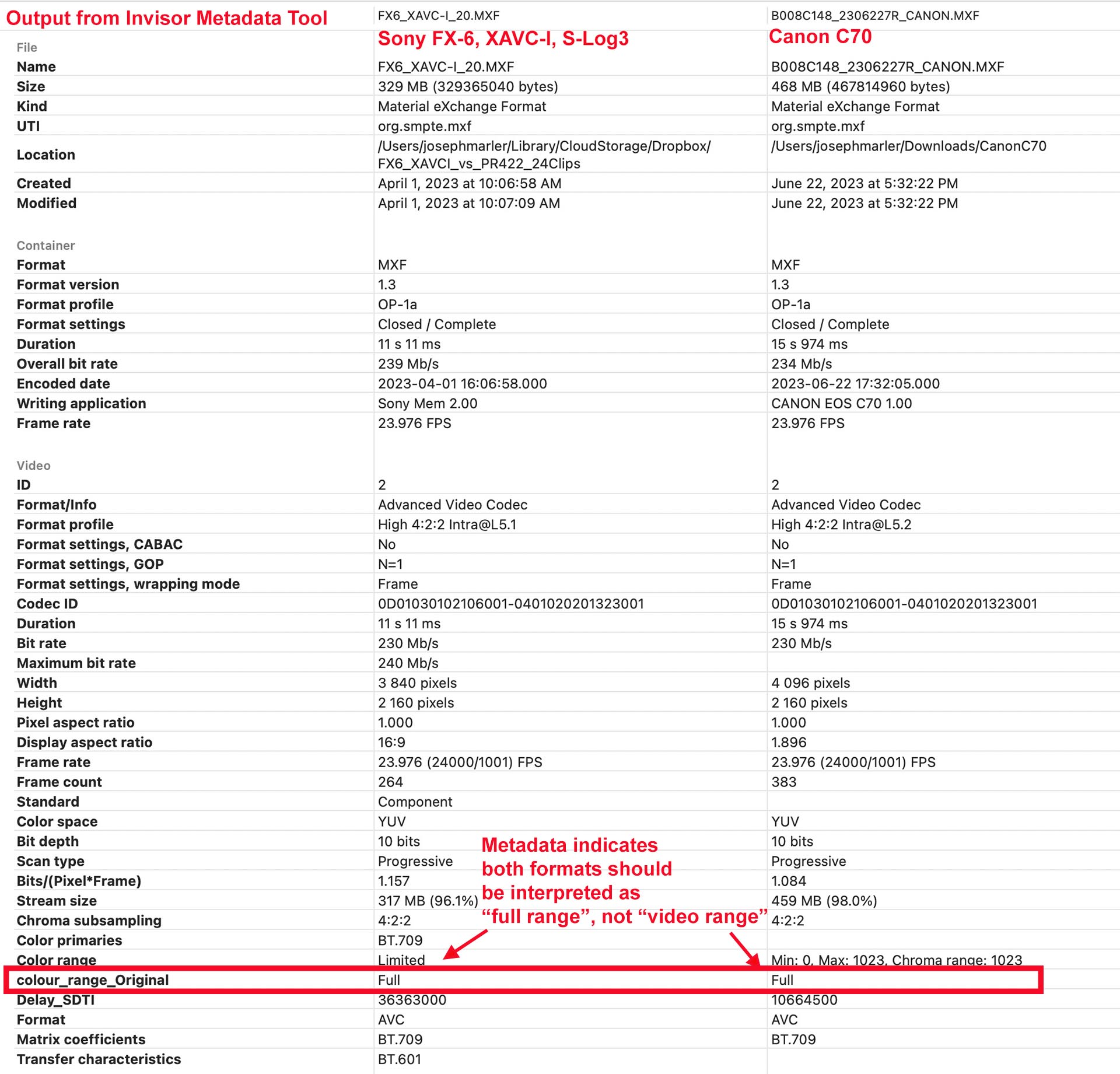
I only have one C70 MXF test clip, but the metadata is tagged as "full range", aka "data level", or "pc color range". This is similar to the MXF S-Log3 material from a Sony FX6. See attached.
Unlike Sony who consistently defines SLog, S-Log2 and S-Log3 as data levels, I think Canon defines C-Log and C-Log3 as video levels, whereas C-Log2 as data levels. But I'm not totally certain.
I don't have material from a Sony Venice to test. However if it's RAW video from the Venice, FCP will not read that so something must have transcoded it. If so it's the responsibility of that software to handle the levels and metadata correctly. If the Venice or an outboard device is recording ProRes, that should also be encoded according to whatever Sony's standard is for the gamma profile they are using. If it's a new codec, it's Sony's responsibility to convey that via the usual technical documentation standards, and it's the responsibility of the downstream video tools to implement that.
Replied by joema on topic Canon C70 Intra-Frame 240Mbps & 600Mbps footage not recognized by FCPX
...FCP, a widely used editing tool, struggles with interpreting MXF files from the Sony Venice camera. This issue is not limited to a specific camera model or format. In my latest exploration, I played with the Canon C70 sample provided in a post, only to encounter similar results. The MXF file from the Canon C70 has a Full Data Level, causing incorrect interpretation in certain applications....once FCP fixes the import issue with Canon C70 files, we will still need to ensure that the video levels are interpreted correctly...
Thanks for the information and the links. It's my understanding that the designer or inventor of a codec/format typically sets the standards for its operation, which includes determining whether it uses video levels or data levels. They provide the specification for how to encode and decode the data. This specification should also explain the format's metadata and interpretation of that, which may include level information.
E.g, Sony invented S-Log3 and they define it as being data level, not video level. Even if it is transcoded from the camera's MXF container to ProRes 422, and even if ProRes is often interpreted as video levels, it's the responsibility of the transcoding software and final video software to maintain both levels and metadata.
I know from much testing that FCP correctly interprets S-Log3 in the MXF container, at least from the FX6. If a connected Atomos recorder is configured correctly, it will record those in ProRes format correctly and the ProRes metadata will be set correctly (I think). The Sony S-Log3 data is interpreted correctly by FCP as data levels, even though it's encoded as ProRes and inside a Quicktime container. This assumes the Atomos was configured correctly.
I only have one C70 MXF test clip, but the metadata is tagged as "full range", aka "data level", or "pc color range". This is similar to the MXF S-Log3 material from a Sony FX6. See attached.
Unlike Sony who consistently defines SLog, S-Log2 and S-Log3 as data levels, I think Canon defines C-Log and C-Log3 as video levels, whereas C-Log2 as data levels. But I'm not totally certain.
I don't have material from a Sony Venice to test. However if it's RAW video from the Venice, FCP will not read that so something must have transcoded it. If so it's the responsibility of that software to handle the levels and metadata correctly. If the Venice or an outboard device is recording ProRes, that should also be encoded according to whatever Sony's standard is for the gamma profile they are using. If it's a new codec, it's Sony's responsibility to convey that via the usual technical documentation standards, and it's the responsibility of the downstream video tools to implement that.
Please Log in to join the conversation.

04 Jul 2023 18:25 #126259
by Token
Replied by Token on topic Canon C70 Intra-Frame 240Mbps & 600Mbps footage not recognized by FCPX
Here's a post on the Canon USA Forum with a user who tested all the C70 formats in FCP and posted the results as well as a copy of SD card.
community.usa.canon.com/t5/Professional-...highlight/true#M3066
Please Log in to join the conversation.
- antoinedelaroche
-

- Offline
- New Member
-

Less
More
- Posts: 8
- Thank you received: 2
04 Jul 2023 19:19 #126260
by antoinedelaroche
FCP and Compressor in my testing are not able to interpret the levels of the video of MXF file from Sony Venice camera for example. This is not true for other cases also in MXF container.
(see A005C010 file in sonycine.com/testfootage/ )
Anyway in my article there's a benchmark I've done using several transcoding tools.
You're right it has so many definitions but at the end is the scale of the levels of the video stream.
To all of this questions see my post in my blog "Mad About Metadata".
Replied by antoinedelaroche on topic Canon C70 Intra-Frame 240Mbps & 600Mbps footage not recognized by FCPX
Does FCP always properly handle levels when importing a file?
Which 3rd party tools, or even Compressor, properly maintain levels during processing/transcoding?
Do some video formats explicitly only support certain level types?
FCP and Compressor in my testing are not able to interpret the levels of the video of MXF file from Sony Venice camera for example. This is not true for other cases also in MXF container.
(see A005C010 file in sonycine.com/testfootage/ )
Anyway in my article there's a benchmark I've done using several transcoding tools.
By the way, when you say "video level(s)" I'm guessing you are referring to what might be better put as "levels in video", whereas video levels and full/data levels are two differnt things.
You're right it has so many definitions but at the end is the scale of the levels of the video stream.
But, yes, the idea girding all of this discussion is how do we maintain the fidelity of the original source media throughout the post-production pipeline. Are there certain codecs to avoid? Which NLEs properly handle data levels? Which video processing tools properly handle data levels? Do NLEs and tools do a proper conversion of data levels when producing a deliverable media file? Any other gotchas? These are things I'm interested in knowing as a user who is concerned with creating/maintaining the best quality possible end-results.
conversions.
To all of this questions see my post in my blog "Mad About Metadata".
Please Log in to join the conversation.
- antoinedelaroche
-
- Offline
- New Member
-
Less
More
- Posts: 8
- Thank you received: 2
04 Jul 2023 19:34 #126261
by antoinedelaroche
You're right, generally video recorded in log flavours in MXF or MP4 or even MOV using H264/H265 codec are recorded in Full Level. ProRes are generally recorded as Limited/Video Level and editing tool presume how to handle using those "Standard". But when transcoding from one codec to another this does not mean that a transcoded H264 in Full Level became a Full Level in ProRes. Each transcoding tool has to know, first which type of media including the level of the video and then apply the right formula to transcode into a new codec using the standard specifications. The content of the transcoded video has to be the same regarding the final destination.
If you go to sonycine.com/testfootage/ see 4K XAVC-I C480 file from Venice and you can do your test.
For sure FCP and Compressor has some problem handling correctly the level of that video.
Replied by antoinedelaroche on topic Canon C70 Intra-Frame 240Mbps & 600Mbps footage not recognized by FCPX
Thanks for the information and the links. It's my understanding that the designer or inventor of a codec/format typically sets the standards for its operation, which includes determining whether it uses video levels or data levels. They provide the specification for how to encode and decode the data. This specification should also explain the format's metadata and interpretation of that, which may include level information.
E.g, Sony invented S-Log3 and they define it as being data level, not video level. Even if it is transcoded from the camera's MXF container to ProRes 422, and even if ProRes is often interpreted as video levels, it's the responsibility of the transcoding software and final video software to maintain both levels and metadata.
You're right, generally video recorded in log flavours in MXF or MP4 or even MOV using H264/H265 codec are recorded in Full Level. ProRes are generally recorded as Limited/Video Level and editing tool presume how to handle using those "Standard". But when transcoding from one codec to another this does not mean that a transcoded H264 in Full Level became a Full Level in ProRes. Each transcoding tool has to know, first which type of media including the level of the video and then apply the right formula to transcode into a new codec using the standard specifications. The content of the transcoded video has to be the same regarding the final destination.
You're right but it seems that not all the transcoding software use the same rule.I know from much testing that FCP correctly interprets S-Log3 in the MXF container, at least from the FX6. If a connected Atomos recorder is configured correctly, it will record those in ProRes format correctly and the ProRes metadata will be set correctly (I think). The Sony S-Log3 data is interpreted correctly by FCP as data levels, even though it's encoded as ProRes and inside a Quicktime container. This assumes the Atomos was configured correctly.
I only have one C70 MXF test clip, but the metadata is tagged as "full range", aka "data level", or "pc color range". This is similar to the MXF S-Log3 material from a Sony FX6. See attached.
Unlike Sony who consistently defines SLog, S-Log2 and S-Log3 as data levels, I think Canon defines C-Log and C-Log3 as video levels, whereas C-Log2 as data levels. But I'm not totally certain.
I don't have material from a Sony Venice to test. However if it's RAW video from the Venice, FCP will not read that so something must have transcoded it. If so it's the responsibility of that software to handle the levels and metadata correctly. If the Venice or an outboard device is recording ProRes, that should also be encoded according to whatever Sony's standard is for the gamma profile they are using. If it's a new codec, it's Sony's responsibility to convey that via the usual technical documentation standards, and it's the responsibility of the downstream video tools to implement that.
If you go to sonycine.com/testfootage/ see 4K XAVC-I C480 file from Venice and you can do your test.
For sure FCP and Compressor has some problem handling correctly the level of that video.
Please Log in to join the conversation.
- antoinedelaroche
-
- Offline
- New Member
-
Less
More
- Posts: 8
- Thank you received: 2
04 Jul 2023 19:37 #126262
by antoinedelaroche
Replied by antoinedelaroche on topic Canon C70 Intra-Frame 240Mbps & 600Mbps footage not recognized by FCPX
For example in my benchmark EditReady was not able to interpret correctly even a GH5 mov file recorded in Full Level. The issue is case by case, camera by camera.
Please Log in to join the conversation.
- antoinedelaroche
-
- Offline
- New Member
-
Less
More
- Posts: 8
- Thank you received: 2
04 Jul 2023 19:41 #126263
by antoinedelaroche
Replied by antoinedelaroche on topic Canon C70 Intra-Frame 240Mbps & 600Mbps footage not recognized by FCPX
and not to mention Audio. Also Audio is converted not as you expected in term of tracks for example. See my post and you'll understand.
Please Log in to join the conversation.
- antoinedelaroche
-
- Offline
- New Member
-
Less
More
- Posts: 8
- Thank you received: 2
05 Jul 2023 15:02 #126265
by antoinedelaroche
Replied by antoinedelaroche on topic Canon C70 Intra-Frame 240Mbps & 600Mbps footage not recognized by FCPX
Here the Canon C70 sample transcoded with evrExpanse

Please Log in to join the conversation.
05 Jul 2023 15:28 #126267
by joema
Thanks for posting your results. I did a quick, superficial look and the "data vs video" levels for that Sony Venice codec do seem interpreted differently between FCP and Resolve Studio 18.5. Without documented exposure levels on a test card, it's hard to be 100% certain, but the waveform black level seems elevated so that is a sign it's being incorrectly interpreted as video levels.
Keep in mind this is a user forum and we are simply FCP users like you. Something like this should be reported directly to Apple using the appropriate technical channels. If you or anyone you work with is an Apple application developer, you can file a bug using the MacOS Feedback Assistant app and attach supporting files, plus you can contact Apple Developer Support directly. If not there are various other channels, or you can call Apple Product Support.
Replied by joema on topic Canon C70 Intra-Frame 240Mbps & 600Mbps footage not recognized by FCPX
...If you go to sonycine.com/testfootage/ see 4K XAVC-I C480 file from Venice and you can do your test. For sure FCP and Compressor has some problem handling correctly the level of that video.
Thanks for posting your results. I did a quick, superficial look and the "data vs video" levels for that Sony Venice codec do seem interpreted differently between FCP and Resolve Studio 18.5. Without documented exposure levels on a test card, it's hard to be 100% certain, but the waveform black level seems elevated so that is a sign it's being incorrectly interpreted as video levels.
Keep in mind this is a user forum and we are simply FCP users like you. Something like this should be reported directly to Apple using the appropriate technical channels. If you or anyone you work with is an Apple application developer, you can file a bug using the MacOS Feedback Assistant app and attach supporting files, plus you can contact Apple Developer Support directly. If not there are various other channels, or you can call Apple Product Support.
Please Log in to join the conversation.

07 Jul 2023 07:48 #126286
by BrianM
Replied by BrianM on topic Canon C70 Intra-Frame 240Mbps & 600Mbps footage not recognized by FCPX
First post. I signed up to this board to help shed more light on this situation as there doesn't seem to be much information about this floating around online (I've seen the Reddit thread too). I'm having issues too. I have two C70s and tested various codecs. Most work natively (with Preview & Quicktime) and one doesn't on my 2021 MacBook Pro M1 Max (Ventura).
I've found that this one codec version: XF-AVC 422 in 4096x2160 Intra-frame @ 240Mbps DOES NOT playback natively (Preview & QT). However, this file works just fine in Resolve, Premiere, Media Encoder, etc.
All the other codecs work as expected: XF-AVC 422 in 4096x2160 Intra-frame @ 400, 3840x2160 Intra-frame @ 240 & 400.
The ONLY one that isn't working correctly, for my setup, is that 240Mbps 4096x2160 Intra-frame version. Hope this somehow helps shed more light on the issue.
I've found that this one codec version: XF-AVC 422 in 4096x2160 Intra-frame @ 240Mbps DOES NOT playback natively (Preview & QT). However, this file works just fine in Resolve, Premiere, Media Encoder, etc.
All the other codecs work as expected: XF-AVC 422 in 4096x2160 Intra-frame @ 400, 3840x2160 Intra-frame @ 240 & 400.
The ONLY one that isn't working correctly, for my setup, is that 240Mbps 4096x2160 Intra-frame version. Hope this somehow helps shed more light on the issue.
Please Log in to join the conversation.
07 Jul 2023 14:49 #126293
by Token
Replied by Token on topic Canon C70 Intra-Frame 240Mbps & 600Mbps footage not recognized by FCPX
Intra-frame 4096 x 2160 59.94P (600 Mpbs) doesn't work in FCP either.
Please Log in to join the conversation.
14 Aug 2023 02:15 #126804
by Token
Replied by Token on topic Canon C70 Intra-Frame 240Mbps & 600Mbps footage not recognized by FCPX
Does anyone know if 10.6.7 or 10.6.8 has fixed this problem?
Please Log in to join the conversation.
- Tom Wolsky
-

- Offline
- Moderator
-

14 Aug 2023 12:07 #126812
by Tom Wolsky
Replied by Tom Wolsky on topic Canon C70 Intra-Frame 240Mbps & 600Mbps footage not recognized by FCPX
The audio is recognized only. No video.
Please Log in to join the conversation.
