



- Posts: 12
- Thank you received: 1
3 Post Moderation Rule for New Boarders (25 Jan 2021)
New boarders will have their posts moderated - Don't worry if you cannot see your post immediately.
Canon C70 Intra-Frame 240Mbps & 600Mbps footage not recognized by FCPX
25 Jun 2023 02:11 - 25 Jun 2023 18:59 #126111
by Token
Recently shot Canon C70 Intra-Frame 240Mbps 23.98 and 600Mbps 59.94 footage will not import into FCPX, only recognizes the audio. Canon XF Utility recognizes the footage. Premiere Pro sees it too. Tried it on two different computers with the same result. Mac Studio M2 Max, Ventura 13.4.1, FCPX 10.6.6. Also same problem with Mac Pro 2013, FCPX 10.6.5, OS 12.6.2. I used Shutter Encoder to rewrap the files to .mov and was then able to import into FCPX. Anyone else having these issues? Any other solutions? Why hasn't this been fixed yet?? Not finding too much online about this problem.
Last edit: 25 Jun 2023 18:59 by Token.
Please Log in to join the conversation.


25 Jun 2023 12:40 #126113
by joema
Replied by joema on topic Canon C70 Intra-Frame 240Mbps footage not recognized by FCPX
My team has a Canon R5C and all the codecs I've tested so far work on current versions of FCP and Ventura on Apple Silicon. I just verified 10-bit 4:2:2 All-Intra 4096x2160 at 23.98 fps, 400 megabit/sec in a MXF wrapper works on FCP 10.6.6, Ventura 13.4.1 on an M1 Ultra Mac Studio.
I don't have any special Canon workflow software installed, but I think that's necessary for some Canon formats (don't remember which).
I don't have a C70 or easy access to test material in your exact format. If you could upload to a file-sharing site an unaltered camera clip, we can examine that on various software and hardware versions.
I don't have any special Canon workflow software installed, but I think that's necessary for some Canon formats (don't remember which).
I don't have a C70 or easy access to test material in your exact format. If you could upload to a file-sharing site an unaltered camera clip, we can examine that on various software and hardware versions.
Please Log in to join the conversation.
25 Jun 2023 13:29 #126114
by Token
Replied by Token on topic Canon C70 Intra-Frame 240Mbps footage not recognized by FCPX
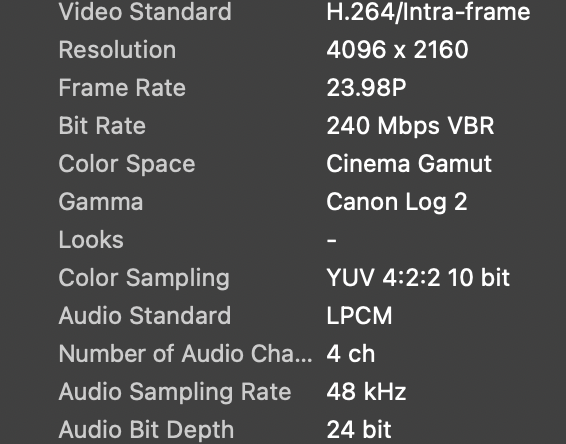
Thank you. I'd appreciate that. Here's a short clip from the C70 and attached are the properties.
www.dropbox.com/s/yn35fb0oyqetbpb/CanonC70.zip?dl=0
Please Log in to join the conversation.
25 Jun 2023 14:08 #126115
by joema
Replied by joema on topic Canon C70 Intra-Frame 240Mbps footage not recognized by FCPX
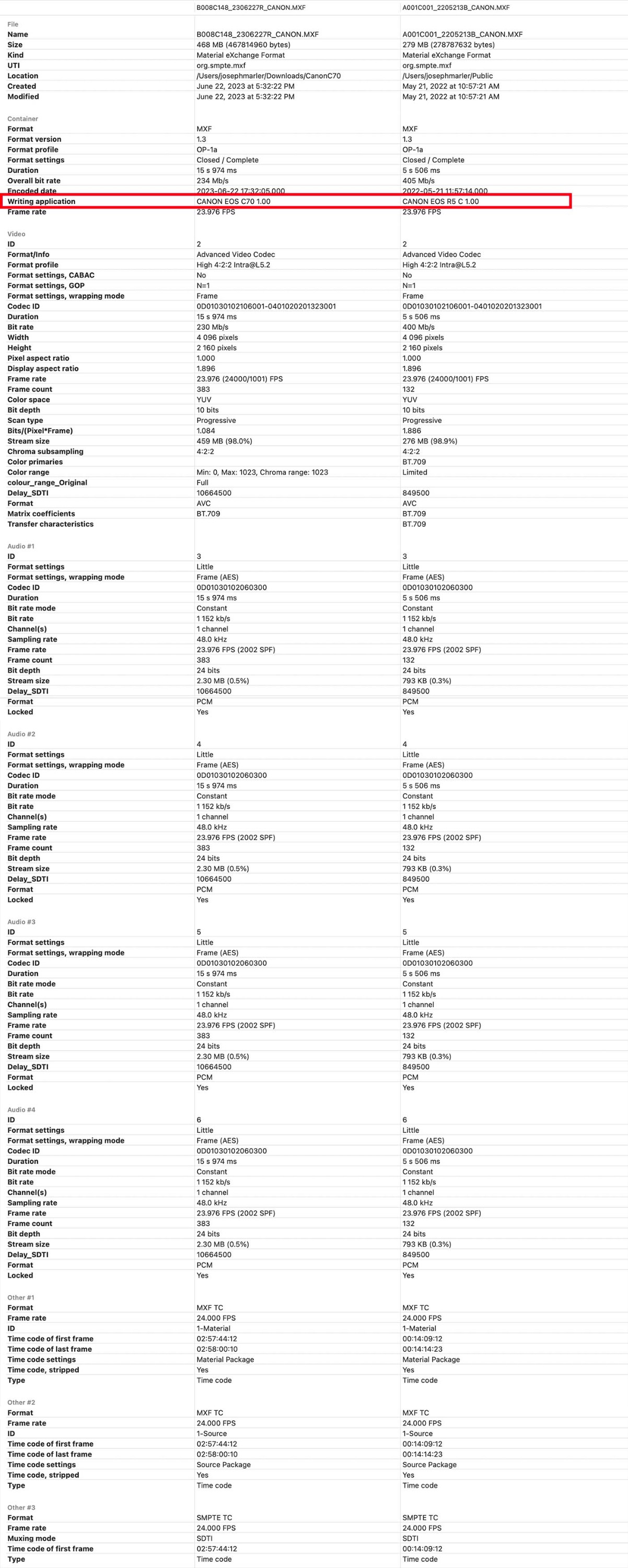
I confirm it is audio-only on my M1 Ultra Mac Studio and 2017 iMac 27, both running FCP 10.6.6 and Ventura 13.4.1. See attached metadata C70 clip comparing it to the R5C clip; they appear very similar.
Except for the R5C my team mostly uses Sony and RED, so I haven't seen this before.
Did this formerly work in some past version of FCP or MacOS? What is the problem history?
Except for the R5C my team mostly uses Sony and RED, so I haven't seen this before.
Did this formerly work in some past version of FCP or MacOS? What is the problem history?
Please Log in to join the conversation.
25 Jun 2023 14:20 #126116
by Token
Replied by Token on topic Canon C70 Intra-Frame 240Mbps footage not recognized by FCPX
No, it's a new camera so this is my first time shooting this specific format. I shot H.264/Long GOP 108Mbps previously and that imported without issue. There's also a thread on Reddit from 4-5 mo. ago without solution other than rewrapping the footage.
Please Log in to join the conversation.

25 Jun 2023 15:11 - 25 Jun 2023 15:16 #126117
by DaveM
FCP 10.6.5, Monterey 12.6.7 here and it doesn't play with video in QTP, Finder, or FCP. After rewrapping or transcoding with EditReady, the file plays video just fine in FCP, etc.
I always use EditReady for Rewrapping and Transcoding as a first choice, as it seems to do a more rigorous job, and certainly does better than Shutter Encoder in terms of passing along metadata. Shutter Encoder would be my third choice, behind EditReady and Compressor, if direct FCP import isn't working. Another alternative would be to use Canon's own tools for rewrapping or transcoding, though I don't know how robust and standards-compliant the output created is.
@Token, have you updated the firmware in the C70?
Just looked inside the included XML file and it seems that the firmware is current...
Replied by DaveM on topic Canon C70 Intra-Frame 240Mbps footage not recognized by FCPX
I confirm it is audio-only on my M1 Ultra Mac Studio and 2017 iMac 27, both running FCP 10.6.6 and Ventura 13.4.1. See attached metadata C70 clip comparing it to the R5C clip; they appear very similar.
Except for the R5C my team mostly uses Sony and RED, so I haven't seen this before.
Did this formerly work in some past version of FCP or MacOS? What is the problem history?
FCP 10.6.5, Monterey 12.6.7 here and it doesn't play with video in QTP, Finder, or FCP. After rewrapping or transcoding with EditReady, the file plays video just fine in FCP, etc.
I always use EditReady for Rewrapping and Transcoding as a first choice, as it seems to do a more rigorous job, and certainly does better than Shutter Encoder in terms of passing along metadata. Shutter Encoder would be my third choice, behind EditReady and Compressor, if direct FCP import isn't working. Another alternative would be to use Canon's own tools for rewrapping or transcoding, though I don't know how robust and standards-compliant the output created is.
Last edit: 25 Jun 2023 15:16 by DaveM.
Please Log in to join the conversation.
25 Jun 2023 15:33 #126118
by Token
Replied by Token on topic Canon C70 Intra-Frame 240Mbps footage not recognized by FCPX
Thanks for taking a look. C70 firmware is current. I'll try EditReady and Compressor.
Please Log in to join the conversation.
25 Jun 2023 16:17 #126119
by Token
Replied by Token on topic Canon C70 Intra-Frame 240Mbps footage not recognized by FCPX
Compressor doesn't read it either. Looks like I may need to fork over $100 to EditReady. Can't figure out how to rewrap the footage in Media Encoder.
Please Log in to join the conversation.
25 Jun 2023 17:55 #126121
by Token
Replied by Token on topic Canon C70 Intra-Frame 240Mbps footage not recognized by FCPX
Also, Intra-frame 59.94p 600 Mbps not supported by FCPX
Please Log in to join the conversation.
25 Jun 2023 18:27 #126122
by DaveM
Replied by DaveM on topic Canon C70 Intra-Frame 240Mbps footage not recognized by FCPX
@Token, any reason you aren't using Canon XF Utility or Canon's Cineama RAW Development applications to re-wrap or transcode?
DaVinci Resolve Studio 18.1.4 imports the file just fine. I don't know if the free version would work (you could convert the media in Resolve).
DaVinci Resolve Studio 18.1.4 imports the file just fine. I don't know if the free version would work (you could convert the media in Resolve).
Please Log in to join the conversation.
25 Jun 2023 18:41 #126123
by Token
Replied by Token on topic Canon C70 Intra-Frame 240Mbps footage not recognized by FCPX
I use Canon XF Utility to import from the card to hard drive but it still doesn't fix the FCPX problem. I have Canon Raw Dev installed and that doesn't read the footage either, probably because it's not RAW. Premiere imports the footage just fine but I use FCPX. Will Resolve wrap the footage and not re-encode?
Please Log in to join the conversation.
25 Jun 2023 18:55 - 25 Jun 2023 18:56 #126124
by DaveM
I don't use Resolve for DIT-oriented tasks, like rewrapping or transcoding, so I can't say for sure. Resolve imports the file without changing it but I don't see an obvious way to export it without transcoding. Sorry, someone else may be more helpful...
Replied by DaveM on topic Canon C70 Intra-Frame 240Mbps footage not recognized by FCPX
Will Resolve wrap the footage and not re-encode?
I don't use Resolve for DIT-oriented tasks, like rewrapping or transcoding, so I can't say for sure. Resolve imports the file without changing it but I don't see an obvious way to export it without transcoding. Sorry, someone else may be more helpful...
Last edit: 25 Jun 2023 18:56 by DaveM.
Please Log in to join the conversation.
25 Jun 2023 21:11 #126125
by joema
Replied by joema on topic Canon C70 Intra-Frame 240Mbps footage not recognized by FCPX
Apparently, these new Canon formats were added by a relatively recent firmware update to the C70. I see several discussions about this over the past few months, where customers were asked to provide additional details and they never followed up.
On the Reddit discussion a customer said he'll just wait until Apple updates FCP to fix this. He apparently never told Apple or even used the FCP menu "Provide Final Cut Feedback". I don't see any discussion indicating any customer has contacted Apple or opened a support call.
FCP is supposed to support XF-AVC from the C70, but apparently, these new formats added by the firmware update do not yet work. If it hasn't been reported, It is conceivable FCP development doesn't even know about it.
Another possibility is it might be implemented in the next version of Apple Pro Video Updates, maybe released with Ventura 13.5. The problem is we don't know.
It could be reported immediately, and in the meantime rewrapping with EditReady works well. That utility is also useful for other things such as transcoding from BRAW, resetting timecode on clips, etc. I just tested EditReady ver. 23.1 on that C70 MXF 10-bit 4:2:2 All-Intra XF-AVC clip. It ran very quickly and the rewrapped clip seems to work OK in FCP 10.6.6 on Apple Silicon.
On the Reddit discussion a customer said he'll just wait until Apple updates FCP to fix this. He apparently never told Apple or even used the FCP menu "Provide Final Cut Feedback". I don't see any discussion indicating any customer has contacted Apple or opened a support call.
FCP is supposed to support XF-AVC from the C70, but apparently, these new formats added by the firmware update do not yet work. If it hasn't been reported, It is conceivable FCP development doesn't even know about it.
Another possibility is it might be implemented in the next version of Apple Pro Video Updates, maybe released with Ventura 13.5. The problem is we don't know.
It could be reported immediately, and in the meantime rewrapping with EditReady works well. That utility is also useful for other things such as transcoding from BRAW, resetting timecode on clips, etc. I just tested EditReady ver. 23.1 on that C70 MXF 10-bit 4:2:2 All-Intra XF-AVC clip. It ran very quickly and the rewrapped clip seems to work OK in FCP 10.6.6 on Apple Silicon.
Please Log in to join the conversation.
25 Jun 2023 21:34 #126126
by Token
Replied by Token on topic Canon C70 Intra-Frame 240Mbps footage not recognized by FCPX
Wow, ok. I just left Apple some feedback!! Thanks.
Please Log in to join the conversation.

30 Jun 2023 14:53 - 30 Jun 2023 15:38 #126213
by dmetz
Replied by dmetz on topic Canon C70 Intra-Frame 240Mbps & 600Mbps footage not recognized by FCPX
Something potentially interesting... the camera source file IDs stream 1 as TC, whereas both EditReady and ffmpeg rewraps (and most everything else) puts the video stream at ID 1.
EDIT: Okay, not that interesting. Looked at other MXF containers from other projects, TC gets ID 1 in that container regardless. As you were!
EDIT: Okay, not that interesting. Looked at other MXF containers from other projects, TC gets ID 1 in that container regardless. As you were!
Last edit: 30 Jun 2023 15:38 by dmetz.
Please Log in to join the conversation.
- antoinedelaroche
-

- Offline
- New Member
-

Less
More
- Posts: 8
- Thank you received: 2
04 Jul 2023 15:38 #126251
by antoinedelaroche
Replied by antoinedelaroche on topic Canon C70 Intra-Frame 240Mbps & 600Mbps footage not recognized by FCPX
I wanted to share a discovery I made while exploring video level interpretation in various applications. It appears that popular software like FCP, Compressor, and others renowned in the industry are not as robust as we might expect when it comes to accurately interpreting video levels.
In fact, I recently conducted tests and found that even FCP, a widely used editing tool, struggles with interpreting MXF files from the Sony Venice camera. This issue is not limited to a specific camera model or format. In my latest exploration, I played with the Canon C70 sample provided in a post, only to encounter similar results. The MXF file from the Canon C70 has a Full Data Level, causing incorrect interpretation in certain applications.
To shed more light on this problem, I have written an article discussing the challenges of video level interpretation and presenting benchmarks. You can find the article at www.evrapp.cloud/blog/benchmarks .
It's important to highlight that once FCP fixes the import issue with Canon C70 files, we will still need to ensure that the video levels are interpreted correctly. While it is encouraging to anticipate a resolution for the file recognition problem, it is equally important to address the potential ramifications of inaccurate video level interpretation. Incorrectly interpreted video levels can lead to visual discrepancies and ultimately impact the overall quality of our footage.
I encourage all of you to read the article I've written, as it provides valuable insights into the challenges we face with video level interpretation. Let's continue to explore solutions and develop effective workflows to tackle this issue collectively.
Feel free to share your thoughts and experiences on this topic. Together, we can improve our video production processes and overcome these challenges.
Thank you for your attention and support.
In fact, I recently conducted tests and found that even FCP, a widely used editing tool, struggles with interpreting MXF files from the Sony Venice camera. This issue is not limited to a specific camera model or format. In my latest exploration, I played with the Canon C70 sample provided in a post, only to encounter similar results. The MXF file from the Canon C70 has a Full Data Level, causing incorrect interpretation in certain applications.
To shed more light on this problem, I have written an article discussing the challenges of video level interpretation and presenting benchmarks. You can find the article at www.evrapp.cloud/blog/benchmarks .
It's important to highlight that once FCP fixes the import issue with Canon C70 files, we will still need to ensure that the video levels are interpreted correctly. While it is encouraging to anticipate a resolution for the file recognition problem, it is equally important to address the potential ramifications of inaccurate video level interpretation. Incorrectly interpreted video levels can lead to visual discrepancies and ultimately impact the overall quality of our footage.
I encourage all of you to read the article I've written, as it provides valuable insights into the challenges we face with video level interpretation. Let's continue to explore solutions and develop effective workflows to tackle this issue collectively.
Feel free to share your thoughts and experiences on this topic. Together, we can improve our video production processes and overcome these challenges.
Thank you for your attention and support.
Please Log in to join the conversation.
04 Jul 2023 16:05 #126252
by Token
Replied by Token on topic Canon C70 Intra-Frame 240Mbps & 600Mbps footage not recognized by FCPX
Thank you for this research. Need to get some eyes on this.
Please Log in to join the conversation.
04 Jul 2023 16:09 - 04 Jul 2023 16:10 #126253
by DaveM
Replied by DaveM on topic Canon C70 Intra-Frame 240Mbps & 600Mbps footage not recognized by FCPX
Antonio(?), please consider moving your post to a new topic/thread, as it is an issue beyond the scope of the Canon C70. It is an important issue, no doubt. Thanks for your work.
Last edit: 04 Jul 2023 16:10 by DaveM.
Please Log in to join the conversation.
- antoinedelaroche
-
- Offline
- New Member
-
Less
More
- Posts: 8
- Thank you received: 2
04 Jul 2023 16:34 #126255
by antoinedelaroche
Replied by antoinedelaroche on topic Canon C70 Intra-Frame 240Mbps & 600Mbps footage not recognized by FCPX
DaveM, thank you for your response and suggestion. I apologize if my post seemed to divert the discussion from the Canon C70 topic. I understand that the issue of video level interpretation extends beyond a specific camera model and deserves its own dedicated thread.
However, my intention in bringing up the video level interpretation issue was not to start a separate discussion but rather to highlight a potential consequence of trying to find a solution for the Canon C70 MXF file playback problem in FCP. Transcoding the files with certain applications may appear to solve the initial problem but can introduce a new issue related to video level interpretation.
In essence, I wanted to emphasize that addressing the bug in FCP that prevents it from playing Canon C70 MXF files is crucial, but it is equally important to ensure that when the import issue is resolved, the interpretation of video levels is accurate.
Once again, I apologize if my original post caused any confusion, and I appreciate your understanding and support.
Best regards,Antonio
However, my intention in bringing up the video level interpretation issue was not to start a separate discussion but rather to highlight a potential consequence of trying to find a solution for the Canon C70 MXF file playback problem in FCP. Transcoding the files with certain applications may appear to solve the initial problem but can introduce a new issue related to video level interpretation.
In essence, I wanted to emphasize that addressing the bug in FCP that prevents it from playing Canon C70 MXF files is crucial, but it is equally important to ensure that when the import issue is resolved, the interpretation of video levels is accurate.
Once again, I apologize if my original post caused any confusion, and I appreciate your understanding and support.
Best regards,Antonio
Please Log in to join the conversation.
04 Jul 2023 17:31 - 04 Jul 2023 17:47 #126256
by DaveM
Replied by DaveM on topic Canon C70 Intra-Frame 240Mbps & 600Mbps footage not recognized by FCPX
Antonio, thanks for the additional clarification. My perspective is that this is a potentially important or critical issue, even possibly for files directly "importable" into FCP.
Does FCP always properly handle levels when importing a file?
Which 3rd party tools, or even Compressor, properly maintain levels during processing/transcoding?
Do some video formats explicitly only support certain level types?
By the way, when you say "video level(s)" I'm guessing you are referring to what might be better put as "levels in video", whereas video levels and full/data levels are two differnt things.
But, yes, the idea girding all of this discussion is how do we maintain the fidelity of the original source media throughout the post-production pipeline. Are there certain codecs to avoid? Which NLEs properly handle data levels? Which video processing tools properly handle data levels? Do NLEs and tools do a proper conversion of data levels when producing a deliverable media file? Any other gotchas? These are things I'm interested in knowing as a user who is concerned with creating/maintaining the best quality possible end-results.
-Dave
P.S. - A related topic is the handling of color spaces (or color models, e.g. RGB vs. Y'CbCr, etc.) and their conversions.
Does FCP always properly handle levels when importing a file?
Which 3rd party tools, or even Compressor, properly maintain levels during processing/transcoding?
Do some video formats explicitly only support certain level types?
By the way, when you say "video level(s)" I'm guessing you are referring to what might be better put as "levels in video", whereas video levels and full/data levels are two differnt things.
But, yes, the idea girding all of this discussion is how do we maintain the fidelity of the original source media throughout the post-production pipeline. Are there certain codecs to avoid? Which NLEs properly handle data levels? Which video processing tools properly handle data levels? Do NLEs and tools do a proper conversion of data levels when producing a deliverable media file? Any other gotchas? These are things I'm interested in knowing as a user who is concerned with creating/maintaining the best quality possible end-results.
-Dave
P.S. - A related topic is the handling of color spaces (or color models, e.g. RGB vs. Y'CbCr, etc.) and their conversions.
Last edit: 04 Jul 2023 17:47 by DaveM.
Please Log in to join the conversation.
