


- Posts: 134
- Thank you received: 9
3 Post Moderation Rule for New Boarders (25 Jan 2021)
New boarders will have their posts moderated - Don't worry if you cannot see your post immediately.
M1Ultra Shared error 12905 FS7 and FX3
- Ponponpostprod
-
 Topic Author
- Offline
- Premium Member
-

Less
More
30 Mar 2023 08:32 #124802
by Ponponpostprod
Replied by Ponponpostprod on topic M1Ultra Shared error 12905 FS7 and FX3
NoIt only happens if a timeline clip contains several trim or through edits, is made a compound clip, then that compound clip is retimed. It happens on FCP 10.5.2 through 10.6.5 and both Intel and Apple Silicon. Are you doing anything like that?
Please Log in to join the conversation.
- Ponponpostprod
-
Topic Author
- Offline
- Premium Member
-
Less
More
- Posts: 134
- Thank you received: 9
30 Mar 2023 08:38 #124803
by Ponponpostprod
Replied by Ponponpostprod on topic M1Ultra Shared error 12905 FS7 and FX3
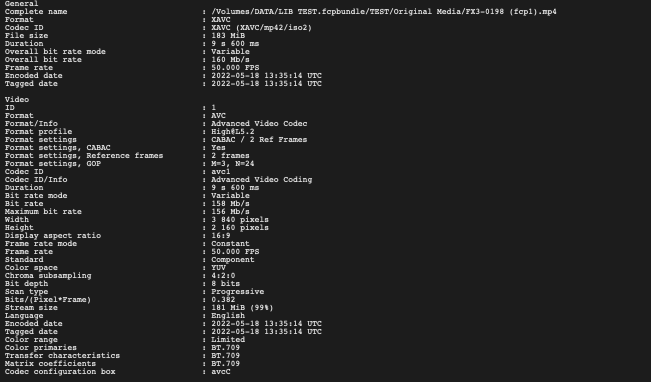
I just send the library with media on your Dropbox.
Export in other ProRes also failed.
Export in other ProRes also failed.
Please Log in to join the conversation.


30 Mar 2023 13:33 - 30 Mar 2023 13:39 #124806
by joema
Thanks for sending those. On my M1 Ultra running Ventura 13.3 and FCP 10.6.5, your project also fails to export ProRes 422, but there is no error -- it just does not do it. Running FCP under XCode shows no assertions or logged errors.
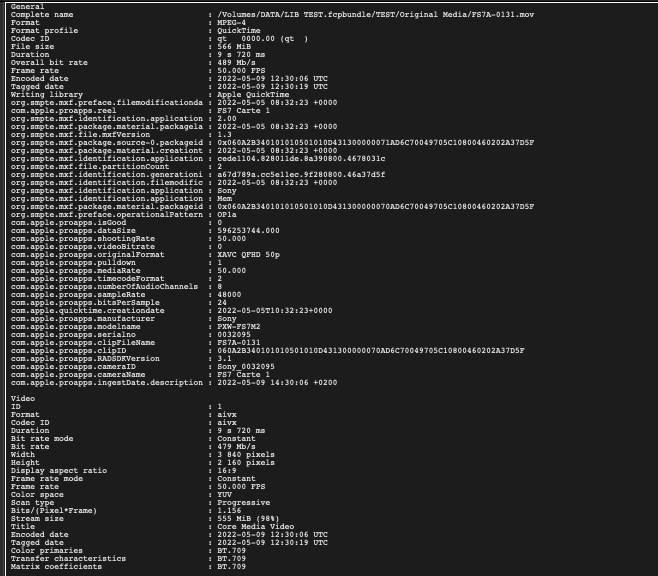
On my machine if I send that project to Compressor and use a ProRes 422 or 422 HQ preset, it seems to work. You could try that as a workaround. Your FX3 and FS7 files were imported within the library, so FCP rewrapped them. That prevents me from seeing the original camera metadata. However -- there are AiVX metadata tags within the FS7 file. That may imply the file is not an original camera file but has been transcoded or processed by FFMPEG or some other utility. Such utilities are notorious for injecting non-standard metadata or creating other subtle encoding problems that causes erratic unpredictable problems downstream.
OTOH the AiVX tag might be something that the FS7 used or FCP added upon import via "copy to library". We need to figure that out.
Reason: if the data or metadata has been damaged or made non-standard, those problems can cause one NLE to fail and another to not fail, or only certain decode/encode modes to fail. This could be likened to a contaminated gasoline (petrol) supply only affecting certain cars. The solution isn't to fix the cars but find and eliminate the source of contamination. Otherwise mechanics will be chasing mysterious problems forever. That is the reason stringent QC standards exist for gasoline and (theoretically) video files.
Large media companies have QC utilities that scan all incoming and outgoing media files to check for encoding and metadata irregularities. They are all expensive, e.g:
Telestream Vidchecker: https://www.telestream.net/vidchecker/overview.htm#vidchecker
This also likely explains why if I transcode the FS7 file to ProRes 422 using EditReady, it then works. Transcoding with a quality tool will in some cases clean up illegal or non-standard metadata or encoding. Do you know anything about the "chain of custody" for the original camera files? Were they processed by some intermediate software? If so we need to know every detail. If you have the original, untouched camera files, you could upload those to me for examination.
As stated above, in the meantime you might be able to use Compressor as a workaround. I don't know why it works and FCP does not, since FCP and Compressor both use most of the same software code.
Replied by joema on topic M1Ultra Shared error 12905 FS7 and FX3
...I'll send tomorrow the Library with media (just short one). Thanks a lot...
Thanks for sending those. On my M1 Ultra running Ventura 13.3 and FCP 10.6.5, your project also fails to export ProRes 422, but there is no error -- it just does not do it. Running FCP under XCode shows no assertions or logged errors.
On my machine if I send that project to Compressor and use a ProRes 422 or 422 HQ preset, it seems to work. You could try that as a workaround. Your FX3 and FS7 files were imported within the library, so FCP rewrapped them. That prevents me from seeing the original camera metadata. However -- there are AiVX metadata tags within the FS7 file. That may imply the file is not an original camera file but has been transcoded or processed by FFMPEG or some other utility. Such utilities are notorious for injecting non-standard metadata or creating other subtle encoding problems that causes erratic unpredictable problems downstream.
OTOH the AiVX tag might be something that the FS7 used or FCP added upon import via "copy to library". We need to figure that out.
Reason: if the data or metadata has been damaged or made non-standard, those problems can cause one NLE to fail and another to not fail, or only certain decode/encode modes to fail. This could be likened to a contaminated gasoline (petrol) supply only affecting certain cars. The solution isn't to fix the cars but find and eliminate the source of contamination. Otherwise mechanics will be chasing mysterious problems forever. That is the reason stringent QC standards exist for gasoline and (theoretically) video files.
Large media companies have QC utilities that scan all incoming and outgoing media files to check for encoding and metadata irregularities. They are all expensive, e.g:
Telestream Vidchecker: https://www.telestream.net/vidchecker/overview.htm#vidchecker
This also likely explains why if I transcode the FS7 file to ProRes 422 using EditReady, it then works. Transcoding with a quality tool will in some cases clean up illegal or non-standard metadata or encoding. Do you know anything about the "chain of custody" for the original camera files? Were they processed by some intermediate software? If so we need to know every detail. If you have the original, untouched camera files, you could upload those to me for examination.
As stated above, in the meantime you might be able to use Compressor as a workaround. I don't know why it works and FCP does not, since FCP and Compressor both use most of the same software code.
Last edit: 30 Mar 2023 13:39 by joema.
Please Log in to join the conversation.
30 Mar 2023 13:51 - 30 Mar 2023 13:57 #124807
by joema
Replied by joema on topic M1Ultra Shared error 12905 FS7 and FX3
I think this is the same issue that DaveM worked on in this thread:
fcp.co/forum/4-final-cut-pro-x-fcpx/3740...-footage-in-premiere
Alleged FX6 material had problems (that time on FCP to Premiere workflow), showed AiVX in the metadata, customer claimed it was an FX6 camera clip, yet it had an MOV suffix not MXF. It was apparently processed by some upstream step which I don't think was ever identified.
We need to know the complete processing history and chain of custody for how the original FS7 MXF file became an MOV file with AiVX metadata.
This is why all my laborious attempts to reproduce the problem with my own FX6 and A7SIII have failed -- those produce actual legitimate camera files. The supposed FS7 file in this case may have originated in an FS7 but something else was done to it which is causing problems.
It could be as simple as an FS7 Mark I with old firmware, or maybe someone trimmed the clips with Premiere or FFMPEG which did something to the file, or maybe somebody edited it on a Hackintosh with a really old version of FCP back before it had good MXF support.
Alleged FX6 material had problems (that time on FCP to Premiere workflow), showed AiVX in the metadata, customer claimed it was an FX6 camera clip, yet it had an MOV suffix not MXF. It was apparently processed by some upstream step which I don't think was ever identified.
We need to know the complete processing history and chain of custody for how the original FS7 MXF file became an MOV file with AiVX metadata.
This is why all my laborious attempts to reproduce the problem with my own FX6 and A7SIII have failed -- those produce actual legitimate camera files. The supposed FS7 file in this case may have originated in an FS7 but something else was done to it which is causing problems.
It could be as simple as an FS7 Mark I with old firmware, or maybe someone trimmed the clips with Premiere or FFMPEG which did something to the file, or maybe somebody edited it on a Hackintosh with a really old version of FCP back before it had good MXF support.
Last edit: 30 Mar 2023 13:57 by joema.
Please Log in to join the conversation.
- Ponponpostprod
-
Topic Author
- Offline
- Premium Member
-
Less
More
- Posts: 134
- Thank you received: 9
30 Mar 2023 15:23 #124808
by Ponponpostprod
Replied by Ponponpostprod on topic M1Ultra Shared error 12905 FS7 and FX3
Hi Jo,
Effectivly, for this documentary, the producer gave me the folder with extracted medias and not the original camera files. Up to yesterday it wasn't a problem, (even if i always ask camera card for the ingest), because the trash can MacPro render the master without failed. Today i've tested the export in another part of the film with success. I guess he didn't always have the same method. The director said me that it was an old FS7 so, it's certainly part of the problem.
No need to look further, I'm reassured that it's not an hardware problem, and yes, compressor do the job !
Thank you very much for the time you give to me and long life to FCP !
Effectivly, for this documentary, the producer gave me the folder with extracted medias and not the original camera files. Up to yesterday it wasn't a problem, (even if i always ask camera card for the ingest), because the trash can MacPro render the master without failed. Today i've tested the export in another part of the film with success. I guess he didn't always have the same method. The director said me that it was an old FS7 so, it's certainly part of the problem.
No need to look further, I'm reassured that it's not an hardware problem, and yes, compressor do the job !
Thank you very much for the time you give to me and long life to FCP !
Please Log in to join the conversation.
- Betancourt
-

- Offline
- Premium Member
-
30 Mar 2023 20:37 #124810
by Betancourt
Pablo Betancourt
Replied by Betancourt on topic M1Ultra Shared error 12905 FS7 and FX3
You may want to check the way you imported the files to fcpx as well. I remembered having performance issues with some FX9 files, because I just imported the video files and not the entire folder structure from the card. If that is nto possible, let's say you never copied the entire card structure but just the video files, try the app EditReady to re-wrap the files (NO transcoding, just re-wrap the video container).
Pablo Betancourt
Please Log in to join the conversation.
30 Mar 2023 21:15 #124811
by joema
That is a good thing to keep in mind. Some past codecs such as AVCHD would incur a tremendous performance penalty on FCP if imported without the folder tree. To a lesser degree I saw a few cases where XAVC-S would cause that on older versions of FCP. I haven't see it recently.
However the OP case was not poor performance but a FCP failure to export. I also could reproduce that with his media on various machines. Although described as FS7 media I think it had been transcoded by someone else, maybe using FFMPEG or who knows what. It was not in the normal MXF container and the metadata had significant differences between normal FS7 or FX6 XAVC-I material.
I tried using EditReady to rewrap it which did not eliminate the error. That is because rewrapping passes through the encoding and only alters the wrapper. Only transcoding to some other codec such as ProRes would prevent the problem.
Replied by joema on topic M1Ultra Shared error 12905 FS7 and FX3
You may want to check the way you imported the files to fcpx as well. I remembered having performance issues with some FX9 files, because I just imported the video files and not the entire folder structure from the card...
That is a good thing to keep in mind. Some past codecs such as AVCHD would incur a tremendous performance penalty on FCP if imported without the folder tree. To a lesser degree I saw a few cases where XAVC-S would cause that on older versions of FCP. I haven't see it recently.
However the OP case was not poor performance but a FCP failure to export. I also could reproduce that with his media on various machines. Although described as FS7 media I think it had been transcoded by someone else, maybe using FFMPEG or who knows what. It was not in the normal MXF container and the metadata had significant differences between normal FS7 or FX6 XAVC-I material.
I tried using EditReady to rewrap it which did not eliminate the error. That is because rewrapping passes through the encoding and only alters the wrapper. Only transcoding to some other codec such as ProRes would prevent the problem.
Please Log in to join the conversation.
- Betancourt
-
- Offline
- Premium Member
-
30 Mar 2023 21:25 #124812
by Betancourt
Pablo Betancourt
Replied by Betancourt on topic M1Ultra Shared error 12905 FS7 and FX3
Thanks Joema for the test and the clarification!
Pablo Betancourt
Please Log in to join the conversation.
