


- Posts: 134
- Thank you received: 9
3 Post Moderation Rule for New Boarders (25 Jan 2021)
New boarders will have their posts moderated - Don't worry if you cannot see your post immediately.
M1Ultra Shared error 12905 FS7 and FX3
- Ponponpostprod
-
 Topic Author
- Offline
- Premium Member
-

Less
More
28 Mar 2023 08:35 #124763
by Ponponpostprod
M1Ultra Shared error 12905 FS7 and FX3 was created by Ponponpostprod
Hi expert users,
I have edited a 52' Documentary for French TV with an old MacPro 2013 and FCPX 10.5.3.
I Have media in UHD 50p from FS7(XAVC Intra 422/10 Class 300) and FX3(AVC Coding).
Export with no problem.
Yesterday i've received a new M1 Ultra MacStudio. Fresh Install FCPX 10.6.2. I have updated my library to test the new config. No problem to read UHD50p without proxy, waou ... but unable to export ! Error 12905
I've made a new library, consolidate my project in, deleted all render file...
I've done a few test :
If i export in mp4 : no problem,
If i export in ProRes 422 HQ : shared failed with error 12905
if i export in Pro Res 422HQ FX3 media only: no problem,
if i export in Pro Res 422HQ FS7 media only : no problem.
The problem occur when FS7+FX3 media are mixed on the same project.
What can i do ?
I have edited a 52' Documentary for French TV with an old MacPro 2013 and FCPX 10.5.3.
I Have media in UHD 50p from FS7(XAVC Intra 422/10 Class 300) and FX3(AVC Coding).
Export with no problem.
Yesterday i've received a new M1 Ultra MacStudio. Fresh Install FCPX 10.6.2. I have updated my library to test the new config. No problem to read UHD50p without proxy, waou ... but unable to export ! Error 12905
I've made a new library, consolidate my project in, deleted all render file...
I've done a few test :
If i export in mp4 : no problem,
If i export in ProRes 422 HQ : shared failed with error 12905
if i export in Pro Res 422HQ FX3 media only: no problem,
if i export in Pro Res 422HQ FS7 media only : no problem.
The problem occur when FS7+FX3 media are mixed on the same project.
What can i do ?
Please Log in to join the conversation.
- Ponponpostprod
-
Topic Author
- Offline
- Premium Member
-
Less
More
- Posts: 134
- Thank you received: 9
28 Mar 2023 09:42 #124765
by Ponponpostprod
Replied by Ponponpostprod on topic M1Ultra Shared error 12905 FS7 and FX3
I have made new test :
With a MB Pro intel i9 (Monterey and FCPX 10.6.5), no problem to export.
on M1 Ultra, If i make optimised media for Fx3 or FS7 no problem.
on M1 Ultra, same project export with xml in Resolve, is exported by Resolve without problem.
So I think that there's a major bug with thoses 2 codecs together in the same project when you edit with M1 Mac.
Are you agree with this ?
With a MB Pro intel i9 (Monterey and FCPX 10.6.5), no problem to export.
on M1 Ultra, If i make optimised media for Fx3 or FS7 no problem.
on M1 Ultra, same project export with xml in Resolve, is exported by Resolve without problem.
So I think that there's a major bug with thoses 2 codecs together in the same project when you edit with M1 Mac.
Are you agree with this ?
Please Log in to join the conversation.


28 Mar 2023 14:15 #124768
by DaveM
Replied by DaveM on topic M1Ultra Shared error 12905 FS7 and FX3
Are you using any external drives with the new computer? How are they formatted?
Please Log in to join the conversation.

28 Mar 2023 15:16 #124769
by joema
On an M1 Ultra Mac Studio, I regularly edit large amounts of 4k/23.98 XAVC-I from the FX6, which is the same codec you are using. I also have intermixed on the same timeline various AVC codecs from the A7SIII, which is the same as the FX3. So far I haven't seen any problems when exporting those to ProRes 422.
However there were several very important fixes in FCP since 10.6.2. There was also a MacOS bug which caused FCP crashes which began in Ventura 13.2 that was fixed in Ventura 13.2.1.
If you are not on FCP 10.6.5, I strongly suggest upgrading to that version. If you are on Ventura 13.2, it is vital you upgrade to 13.2.1.
Besides the above, another possibility is you are just running out of disk space. Obviously, ProRes 422 HQ is much larger than MP4. If the problem only happens when exporting both FX3 and FS7 material on a long timeline to ProRes 422 HQ, it might be only that case is consuming the disk space.
Another possible issue is a damaged or corrupt render file. As an optimization, during export FCP will not read and decode the source files if current versions of those exist in the render cache. If that render cache is somehow damaged it could cause a repetitive problem. An easy troubleshooting step is delete all render files via File>Delete Generated Library Files>Delete Render Files>All. I'd suggest doing that, make sure you have plenty of extra disk space on all volumes, then rebooting the entire machine, then try your export.
Replied by joema on topic M1Ultra Shared error 12905 FS7 and FX3
...M1 Ultra MacStudio. Fresh Install FCPX 10.6.2...UHD 50p from FS7(XAVC Intra 422/10 Class 300) and FX3(AVC Coding)..If i export in ProRes 422 HQ : shared failed with error 12905...So I think that there's a major bug with thoses 2 codecs together in the same project when you edit with M1 Mac...
On an M1 Ultra Mac Studio, I regularly edit large amounts of 4k/23.98 XAVC-I from the FX6, which is the same codec you are using. I also have intermixed on the same timeline various AVC codecs from the A7SIII, which is the same as the FX3. So far I haven't seen any problems when exporting those to ProRes 422.
However there were several very important fixes in FCP since 10.6.2. There was also a MacOS bug which caused FCP crashes which began in Ventura 13.2 that was fixed in Ventura 13.2.1.
If you are not on FCP 10.6.5, I strongly suggest upgrading to that version. If you are on Ventura 13.2, it is vital you upgrade to 13.2.1.
Besides the above, another possibility is you are just running out of disk space. Obviously, ProRes 422 HQ is much larger than MP4. If the problem only happens when exporting both FX3 and FS7 material on a long timeline to ProRes 422 HQ, it might be only that case is consuming the disk space.
Another possible issue is a damaged or corrupt render file. As an optimization, during export FCP will not read and decode the source files if current versions of those exist in the render cache. If that render cache is somehow damaged it could cause a repetitive problem. An easy troubleshooting step is delete all render files via File>Delete Generated Library Files>Delete Render Files>All. I'd suggest doing that, make sure you have plenty of extra disk space on all volumes, then rebooting the entire machine, then try your export.
Please Log in to join the conversation.
- Ponponpostprod
-
Topic Author
- Offline
- Premium Member
-
Less
More
- Posts: 134
- Thank you received: 9
29 Mar 2023 07:52 #124779
by Ponponpostprod
Replied by Ponponpostprod on topic M1Ultra Shared error 12905 FS7 and FX3
Library test with only 2 clips on internal drive of mac studio, external drive LaCie Raid0 MacOS Extended, SSD T7 ExFat, Same results.Are you using any external drives with the new computer? How are they formatted?
Please Log in to join the conversation.
- Ponponpostprod
-
Topic Author
- Offline
- Premium Member
-
Less
More
- Posts: 134
- Thank you received: 9
29 Mar 2023 08:01 #124780
by Ponponpostprod
Replied by Ponponpostprod on topic M1Ultra Shared error 12905 FS7 and FX3
I've made a mistake, i'm on the 10.6.5 version of FCP but as I said, I'm on Monterey 12.6.2.
I have made a library test with only 2 clips, no render at all and a lot of space in the drives i've tested.
I have made a library test with only 2 clips, no render at all and a lot of space in the drives i've tested.
Please Log in to join the conversation.
- Ponponpostprod
-
Topic Author
- Offline
- Premium Member
-
Less
More
- Posts: 134
- Thank you received: 9
29 Mar 2023 08:17 #124781
by Ponponpostprod
Replied by Ponponpostprod on topic M1Ultra Shared error 12905 FS7 and FX3
Same project tested with my Mac Book Air M1 on Ventura 13.2.1, no problem to export in Pro Res.
Please Log in to join the conversation.
29 Mar 2023 12:21 #124787
by joema
Replied by joema on topic M1Ultra Shared error 12905 FS7 and FX3
I have an M1 Max MBP 16 running Monterey 12.6.3 and FCP 10.6.5. I edit Sony 4k/23.98 XAVC-I Class 300 files and various Sony MP4 files from the A7SIII, and have so far not seen this.
You might verify what version of Pro Video Formats you're using. That is in About this Mac>System Report>Software>Installations>Pro Video Formats. It should be version 2.2.4. If not update it.
In your test try with only a single library loaded, located on internal SSD. Have the two test clips AND the output file BOTH on the external LaCie MacOS Extended volume. For purposes of this test avoid using the ExFAT drive.
If that doesn't work, go to System Preferences>Security & Privacy>Full Disk Access, and make sure FCP is granted that.
If that doesn't work, run Disk Utility>First Aid on the external MacOS Extended drive.
If that doesn't work run Disk Utility>First Aid on the system drive from recovery mode. Doing that from recovery mode enables better results since it locks the drive.
Mac startup key combinations to access recovery mode: support.apple.com/en-us/HT201255
There is a specific procedure for running Disk Utility on APFS drives, which involves running it three times from the bottom-listed item to the top. It is documented here: support.apple.com/en-us/HT210898
After doing that rebuild Spotlight indexes on the system drive and the external MacOS drive: support.apple.com/en-us/HT201716
To monitor the progress of the index rebuild, do CMD+space bar to invoke Spotlight, and type "index". A blue progress bar will show the status. When the progress bar goes away, the index rebuild is finished.
You might verify what version of Pro Video Formats you're using. That is in About this Mac>System Report>Software>Installations>Pro Video Formats. It should be version 2.2.4. If not update it.
In your test try with only a single library loaded, located on internal SSD. Have the two test clips AND the output file BOTH on the external LaCie MacOS Extended volume. For purposes of this test avoid using the ExFAT drive.
If that doesn't work, go to System Preferences>Security & Privacy>Full Disk Access, and make sure FCP is granted that.
If that doesn't work, run Disk Utility>First Aid on the external MacOS Extended drive.
If that doesn't work run Disk Utility>First Aid on the system drive from recovery mode. Doing that from recovery mode enables better results since it locks the drive.
Mac startup key combinations to access recovery mode: support.apple.com/en-us/HT201255
There is a specific procedure for running Disk Utility on APFS drives, which involves running it three times from the bottom-listed item to the top. It is documented here: support.apple.com/en-us/HT210898
After doing that rebuild Spotlight indexes on the system drive and the external MacOS drive: support.apple.com/en-us/HT201716
To monitor the progress of the index rebuild, do CMD+space bar to invoke Spotlight, and type "index". A blue progress bar will show the status. When the progress bar goes away, the index rebuild is finished.
Please Log in to join the conversation.
- Ponponpostprod
-
Topic Author
- Offline
- Premium Member
-
Less
More
- Posts: 134
- Thank you received: 9
29 Mar 2023 14:09 #124789
by Ponponpostprod
Replied by Ponponpostprod on topic M1Ultra Shared error 12905 FS7 and FX3
I have ever done a simple library with only 2 clips on the internal drive and it don't change anything and i don't think it has something to do with disk format or default, because as i said, i managed to export h264 without error from and to every disk i have used for the test.
I'm on ProVideo format 2.2.4.
I'll ask to the admin if i could at least go to 12.6.3 Monterey OS...
I'm on ProVideo format 2.2.4.
I'll ask to the admin if i could at least go to 12.6.3 Monterey OS...
Please Log in to join the conversation.
29 Mar 2023 15:21 - 29 Mar 2023 15:29 #124790
by DaveM
Replied by DaveM on topic M1Ultra Shared error 12905 FS7 and FX3
As Joe stated earlier in the thread, make sure you have deleted all Library generated files (render, etc.).
I've seen reports from others saying that they had used ExFAT formatted external drives with older Macs and then had issues when they got a new M1/M2-based Mac and then tried using the ExFAT drives.
Clearing all temporary files and reformatting the external drive (HFS+ for HDD and APFS for SSD) seemed to fix the issues.
A specific example was someone who was successfully using ExFAT formatted external drives with an older MBP then moved to a new M1 Pro MBP. Things worked fine on the older Mac. On the new MBP with the same external drives the user experienced render/share/export errors. It seems that there were a few spots where things didn't render properly. After removing the Library generated media, and moving media off of the ExFAT drives (or reformatting the drives), the render/share process was successful.
This may be something to consider...
P.S. - Apple specifically states that drives used with FCP should be HFS+ or APFS formatted.
I've seen reports from others saying that they had used ExFAT formatted external drives with older Macs and then had issues when they got a new M1/M2-based Mac and then tried using the ExFAT drives.
Clearing all temporary files and reformatting the external drive (HFS+ for HDD and APFS for SSD) seemed to fix the issues.
A specific example was someone who was successfully using ExFAT formatted external drives with an older MBP then moved to a new M1 Pro MBP. Things worked fine on the older Mac. On the new MBP with the same external drives the user experienced render/share/export errors. It seems that there were a few spots where things didn't render properly. After removing the Library generated media, and moving media off of the ExFAT drives (or reformatting the drives), the render/share process was successful.
This may be something to consider...
P.S. - Apple specifically states that drives used with FCP should be HFS+ or APFS formatted.
Last edit: 29 Mar 2023 15:29 by DaveM.
Please Log in to join the conversation.
- Ponponpostprod
-
Topic Author
- Offline
- Premium Member
-
Less
More
- Posts: 134
- Thank you received: 9
29 Mar 2023 15:29 #124791
by Ponponpostprod
Replied by Ponponpostprod on topic M1Ultra Shared error 12905 FS7 and FX3
I've done it. I have created a new library with only 2 clips(1 AVC and one XAVC) on the internal drive. No render or anything generated in the library. Export H264 ok, export ProRes Failed.
Please Log in to join the conversation.
29 Mar 2023 15:35 - 29 Mar 2023 15:37 #124792
by DaveM
Was this done with no external (or at least no ExFAT) drives connected? No other Libraries open at the same time?
As Joe mentioned, have you tried reinstalling the Pro Video formats? You might also try trashing preferences if you already haven't and reinstalling FCP. In more recent macOS versions, some video codecs are bundled with macOS itself, so reinstalling macOS might help (or even updating to 12.6.3 or 12.6.4).
P.S. - Double check that the Library storage settings don't include any external drives, i.e., that everything is contained within the Library itself.
Replied by DaveM on topic M1Ultra Shared error 12905 FS7 and FX3
I've done it. I have created a new library with only 2 clips(1 AVC and one XAVC) on the internal drive. No render or anything generated in the library. Export H264 ok, export ProRes Failed.
Was this done with no external (or at least no ExFAT) drives connected? No other Libraries open at the same time?
As Joe mentioned, have you tried reinstalling the Pro Video formats? You might also try trashing preferences if you already haven't and reinstalling FCP. In more recent macOS versions, some video codecs are bundled with macOS itself, so reinstalling macOS might help (or even updating to 12.6.3 or 12.6.4).
P.S. - Double check that the Library storage settings don't include any external drives, i.e., that everything is contained within the Library itself.
Last edit: 29 Mar 2023 15:37 by DaveM.
Please Log in to join the conversation.
- Ponponpostprod
-
Topic Author
- Offline
- Premium Member
-
Less
More
- Posts: 134
- Thank you received: 9
29 Mar 2023 16:11 #124793
by Ponponpostprod
Replied by Ponponpostprod on topic M1Ultra Shared error 12905 FS7 and FX3
Yes to all. It's a fresh install on a new MacStudio. I'll ask to install 12.6.4 to the admin I think there's sonething to do with this.
Please Log in to join the conversation.
29 Mar 2023 16:38 - 29 Mar 2023 17:06 #124794
by DaveM
Replied by DaveM on topic M1Ultra Shared error 12905 FS7 and FX3
It seems that only ProRes RAW flavors of the ProRes codecs are installed as part of the Pro Video Formats. The main set of ProRes codecs seem to be part of macOS itself (at least for me, on macOS 12.6.3) and are located in
/System/Library/Video/Plug-Ins/
FCP itself has at least one ProRes codec plugin in its application bundle, as well, which is why re-installing FCP is often recommended in many troubleshooting situations (though it may not apply here)...
/System/Library/Video/Plug-Ins/
FCP itself has at least one ProRes codec plugin in its application bundle, as well, which is why re-installing FCP is often recommended in many troubleshooting situations (though it may not apply here)...
Last edit: 29 Mar 2023 17:06 by DaveM.
Please Log in to join the conversation.
29 Mar 2023 17:26 - 29 Mar 2023 17:29 #124795
by joema
Can you export a project XML and send that to me? Even without the media I can examine the project parameters and see if it matches some previous or known problems. You can drop it on this secure write-only Dropbox link: www.dropbox.com/request/CiqDfFZwqO9GcHCvsifF
Can you also please send the codec parameters of each clip as revealed by MediaInfo or Invisor:
MediaInfo: apps.apple.com/us/app/mediainfo/id510620098?mt=12
Invisor: apps.apple.com/us/app/invisor-media-file...or/id442947586?mt=12
I'm a little suspicious it only happens on M1 Ultra and only if using those codecs and only if exporting to MP4, and not if using optimized media. The M1 Ultra and M1 Max and M2 Max are the only CPUs with multiple parallel video engines. There was previously an incorrect-frame-order bug fixed on FCP 10.6.4 which was unique to Ultra and Max video acceleration. I think we mostly tested 23.98, 29.97 and 59.94, not 25.0 or 50.0. Maybe there is some unfixed edge case but instead of wrong frame order it causes an export failure?
For optimized media that would bypass the regular media engine and be handled by the ProRes engine, likewise for export to ProRes. The fact it seems to happen if either import or output codec is not ProRes could imply some niche case with the media engine, maybe unique to Ultra and maybe Max.
When I get your codec and XML info I'll create a similar test and run it on M1 Ultra on Ventura 13.3, M1 Max on Monterey 12.6.3, and several other machines. I have the Sony FX6 and A7SIII so those should produce the exact same codecs you are using, I just need to know the specific details for clips and project.
Replied by joema on topic M1Ultra Shared error 12905 FS7 and FX3
Yes to all. It's a fresh install on a new MacStudio. I'll ask to install 12.6.4 to the admin I think there's sonething to do with this.
Can you export a project XML and send that to me? Even without the media I can examine the project parameters and see if it matches some previous or known problems. You can drop it on this secure write-only Dropbox link: www.dropbox.com/request/CiqDfFZwqO9GcHCvsifF
Can you also please send the codec parameters of each clip as revealed by MediaInfo or Invisor:
MediaInfo: apps.apple.com/us/app/mediainfo/id510620098?mt=12
Invisor: apps.apple.com/us/app/invisor-media-file...or/id442947586?mt=12
I'm a little suspicious it only happens on M1 Ultra and only if using those codecs and only if exporting to MP4, and not if using optimized media. The M1 Ultra and M1 Max and M2 Max are the only CPUs with multiple parallel video engines. There was previously an incorrect-frame-order bug fixed on FCP 10.6.4 which was unique to Ultra and Max video acceleration. I think we mostly tested 23.98, 29.97 and 59.94, not 25.0 or 50.0. Maybe there is some unfixed edge case but instead of wrong frame order it causes an export failure?
For optimized media that would bypass the regular media engine and be handled by the ProRes engine, likewise for export to ProRes. The fact it seems to happen if either import or output codec is not ProRes could imply some niche case with the media engine, maybe unique to Ultra and maybe Max.
When I get your codec and XML info I'll create a similar test and run it on M1 Ultra on Ventura 13.3, M1 Max on Monterey 12.6.3, and several other machines. I have the Sony FX6 and A7SIII so those should produce the exact same codecs you are using, I just need to know the specific details for clips and project.
Last edit: 29 Mar 2023 17:29 by joema.
Please Log in to join the conversation.
29 Mar 2023 17:33 - 29 Mar 2023 17:41 #124796
by DaveM
Replied by DaveM on topic M1Ultra Shared error 12905 FS7 and FX3
Joe, from what I can tell, the OP is only having problems with ProRes exports:
Unless I missed something...
I've done a few test :
If i export in mp4 : no problem,
If i export in ProRes 422 HQ : shared failed with error 12905
if i export in Pro Res 422HQ FX3 media only: no problem,
if i export in Pro Res 422HQ FS7 media only : no problem.
The problem occur when FS7+FX3 media are mixed on the same project.
Unless I missed something...
Last edit: 29 Mar 2023 17:41 by DaveM.
Please Log in to join the conversation.
- Ponponpostprod
-
Topic Author
- Offline
- Premium Member
-
Less
More
- Posts: 134
- Thank you received: 9
29 Mar 2023 17:41 - 29 Mar 2023 17:43 #124797
by Ponponpostprod
Replied by Ponponpostprod on topic M1Ultra Shared error 12905 FS7 and FX3
I'm no more in my work office, I'll send tomorow the Library with media (just short one). Thanks a lot.
For information I've tested on our two new Mac Studio : one Max and one Ultra : same result, export in MP4 is OK but failed in Pro Res. One other thing I've seen this afternoon, I can read in real time all UHD 50p clips avc and in xavc in the same timeline, even if there is a title on it, but if I render the title, then I miss frames !
For information I've tested on our two new Mac Studio : one Max and one Ultra : same result, export in MP4 is OK but failed in Pro Res. One other thing I've seen this afternoon, I can read in real time all UHD 50p clips avc and in xavc in the same timeline, even if there is a title on it, but if I render the title, then I miss frames !
Last edit: 29 Mar 2023 17:43 by Ponponpostprod.
Please Log in to join the conversation.
29 Mar 2023 18:13 - 29 Mar 2023 18:15 #124798
by joema
Replied by joema on topic M1Ultra Shared error 12905 FS7 and FX3
There is an unresolved open bug in FCP 10.6.5 involving dropped frames or incorrect frame order on export. Unlike the previous frame order bug, this one is fairly narrow and not confined to M1 Ultra/Max.
It only happens if a timeline clip contains several trim or through edits, is made a compound clip, then that compound clip is retimed. It happens on FCP 10.5.2 through 10.6.5 and both Intel and Apple Silicon. Are you doing anything like that?
There is another open bug which produces incorrect frame cadence, not actual dropped frames. However wrong cadence can look like dropped frames. This one is also narrow and only happens if using FCP built-in noise reduction and only if certain frame rate clips are both rate conformed and retimed. E.g, 23.98 fps clip in a 29.97 fps timeline, NR applied, then retimed using automatic speed. This one has existed since at least 10.5.2 through 10.6.3 (haven't re-tested on 10.6.5), and I think both Intel and Apple Silicon.
There are many variations of this depending on the clip and project frame rates and retiming factor, but they all require FCP noise reduction, retiming and rate conforming. For the above case, frames
become
. This representation uses alphabetic frame notation, e.g, frames 1,2,3,4 are denoted as ABCD, etc.
It only happens if a timeline clip contains several trim or through edits, is made a compound clip, then that compound clip is retimed. It happens on FCP 10.5.2 through 10.6.5 and both Intel and Apple Silicon. Are you doing anything like that?
There is another open bug which produces incorrect frame cadence, not actual dropped frames. However wrong cadence can look like dropped frames. This one is also narrow and only happens if using FCP built-in noise reduction and only if certain frame rate clips are both rate conformed and retimed. E.g, 23.98 fps clip in a 29.97 fps timeline, NR applied, then retimed using automatic speed. This one has existed since at least 10.5.2 through 10.6.3 (haven't re-tested on 10.6.5), and I think both Intel and Apple Silicon.
There are many variations of this depending on the clip and project frame rates and retiming factor, but they all require FCP noise reduction, retiming and rate conforming. For the above case, frames
Code:
ABCDEFGHIJK
Code:
ABCDDFHIJJL
Last edit: 29 Mar 2023 18:15 by joema.
Please Log in to join the conversation.
30 Mar 2023 01:36 #124800
by joema
Replied by joema on topic M1Ultra Shared error 12905 FS7 and FX3
Dave's post reminds me: try exporting other ProRes variants. Is it only ProRes 422 HQ that fails? What about regular ProRes 422, ProRes 422 LT and ProRes 422 Proxy? This doesn't mean you must use those, this is just troubleshooting.
Please Log in to join the conversation.
30 Mar 2023 02:21 - 30 Mar 2023 02:21 #124801
by joema
Replied by joema on topic M1Ultra Shared error 12905 FS7 and FX3
I just tested a 60 sec. UHD 50p XAVC-I clip from a Sony FX6 and a 60 sec. UHD 50p XAVC-S 10-bit 4:2:2 clip from an A7SIII (same as FX3) on a UHD 50p timeline. They exported to UHD 50p ProRes 422 HQ w/o problem on the M1 Ultra running FCP 10.6.5 and Ventura 13.3, and also OK on the M1 Max MacBook Pro 16 running FCP 10.6.5 and Monterey 12.6.3.
The A7SIII/FX3 has several different Long GOP codec variants, including H264 (AVC), H265 (HEVC) and XAVC-SI (All Intra). For H264 and HEVC it can do 8-bit 4:2:0, 10-bit 4:2:0 and 10-bit 4:2:2, all in MP4 wrappers. So there are a lot of permutations. By contrast the 4k XAVC-I 300 codec used by the FX6 (and I think FS7) is 10-bit 4:2:2 in an MXF wrapper.
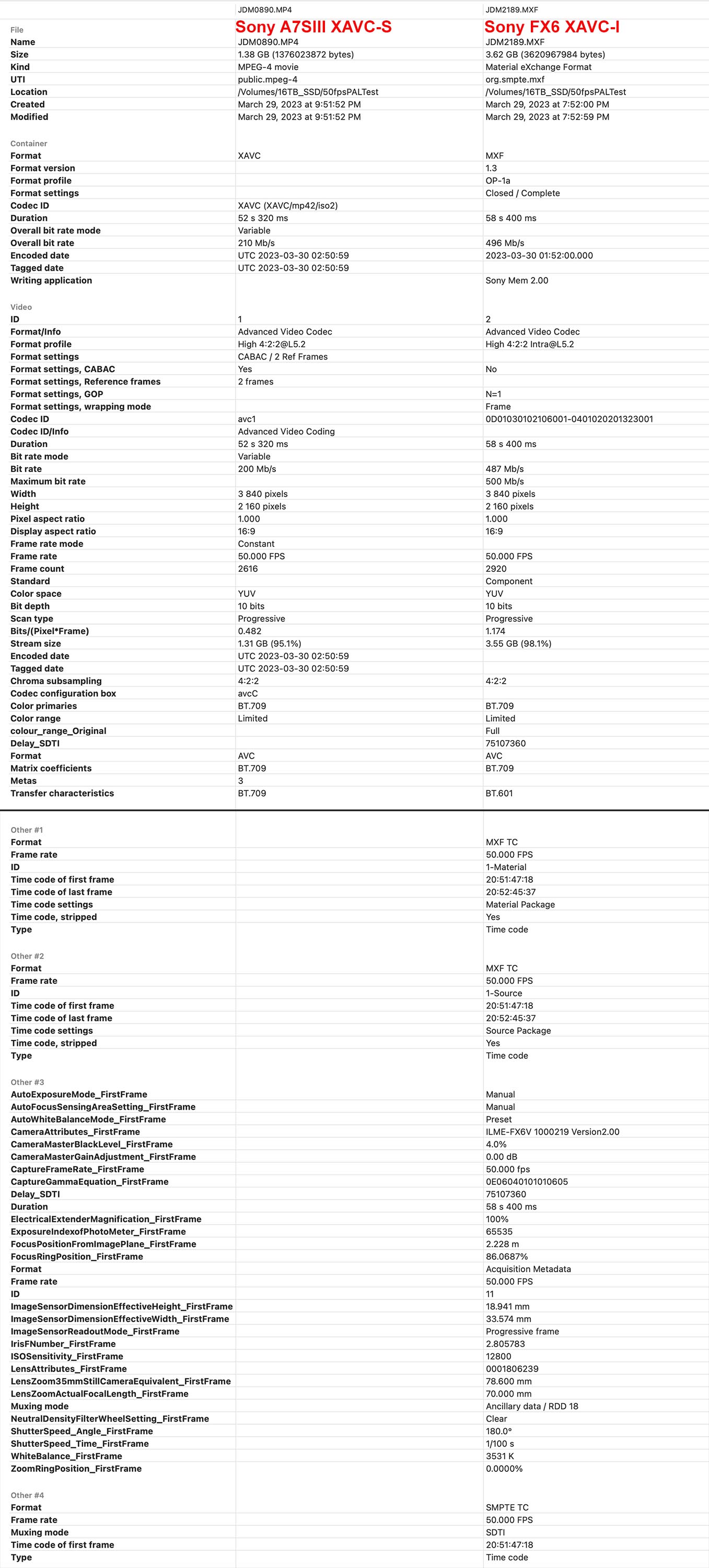
If there is some dependency on clip length, FX3 codec details, project characteristics or 3rd-party plugins (whether used in timeline or not), we need to know those details. Attached is the Invisor side-by-side metadata from the A7SIII XAVC-S file vs the FX6 XAVC-I file.
The A7SIII/FX3 has several different Long GOP codec variants, including H264 (AVC), H265 (HEVC) and XAVC-SI (All Intra). For H264 and HEVC it can do 8-bit 4:2:0, 10-bit 4:2:0 and 10-bit 4:2:2, all in MP4 wrappers. So there are a lot of permutations. By contrast the 4k XAVC-I 300 codec used by the FX6 (and I think FS7) is 10-bit 4:2:2 in an MXF wrapper.
If there is some dependency on clip length, FX3 codec details, project characteristics or 3rd-party plugins (whether used in timeline or not), we need to know those details. Attached is the Invisor side-by-side metadata from the A7SIII XAVC-S file vs the FX6 XAVC-I file.
Last edit: 30 Mar 2023 02:21 by joema.
Please Log in to join the conversation.
