


- Posts: 636
- Thank you received: 167
3 Post Moderation Rule for New Boarders (25 Jan 2021)
New boarders will have their posts moderated - Don't worry if you cannot see your post immediately.
Choppy Timeline Editing - Getting Back to Fluidity?
05 Jan 2023 05:52 #123507
by DaveM
Replied by DaveM on topic Choppy Timeline Editing - Getting Back to Fluidity?
As a point of reference for further testing and analysis, I'll add a few more tidbits of info:
- I restarted FCP, which loaded my test Library (and others) along with the test sequence/Project/timeline, and everything loaded within 30 seconds. This is referring to the Project "with effects removed" after removing all "to do" markers.
- While not buttery smooth/fluid, the UI responsiveness on my system was very good. And, because I primarily use the keyboard to navigate and edit sequences, I didn't notice any difference doing some test edits compared with other projects I'm currently working on.
- The test Library and all associated files are on an external, USB 3.2 SSD. macOS 12.6.2, FCP 10.6.5.
- The current size of the Library file on my system is around 390 MB.
Of course, there are many other variables involved that could contribute to overall performance. Let me know if I can try anything else to help.
- I restarted FCP, which loaded my test Library (and others) along with the test sequence/Project/timeline, and everything loaded within 30 seconds. This is referring to the Project "with effects removed" after removing all "to do" markers.
- While not buttery smooth/fluid, the UI responsiveness on my system was very good. And, because I primarily use the keyboard to navigate and edit sequences, I didn't notice any difference doing some test edits compared with other projects I'm currently working on.
- The test Library and all associated files are on an external, USB 3.2 SSD. macOS 12.6.2, FCP 10.6.5.
- The current size of the Library file on my system is around 390 MB.
Of course, there are many other variables involved that could contribute to overall performance. Let me know if I can try anything else to help.
Please Log in to join the conversation.

05 Jan 2023 12:50 #123508
by joema
Dave this and all the previous points you made were very good (as usual). Editing the timeline with keyboard and copy/paste can present a very different user experience than using mouse drag-and-drop.
However when this library is in the slow config, even doing CMD plus and minus to expand/shrink the timeline is laggy. In the worst state you can zoom in with CMD plus then do a CMD+Z to fit to screen and that takes forever.
On my machine, each successive improvement - deleting the markers, repairing the project, etc, makes it incrementally faster. After I did those and deleted 1/2 the timeline is was almost OK (on an M1 Ultra).
Re how much various machines might impact the performance in this situation, the Instruments trace I did showed the single "run loop" thread is often spinning repetitively through a sequence of functions. During that interval the UI is unresponsive.
It eventually gets done but that entire period is characterized by single-thread execution, not multi-thread, not I/O and not GPU. This implies even a M1 Ultra will not be that much faster than a MacBook with the M1 Pro CPU. That is because the single-core performance is the same from that up through the M1 Ultra.
Relative to an iMac Pro an M1 would be about 50% faster on single-core (which is this situation).
Relative to a 2013 Mac Pro an M1 would be a lot faster, since the Xeon in that machine had relatively low single-core performance. I'd say the M1 would be roughly 2x faster single core than the 2013 Mac Pro.
However -- 2x faster does not alleviate a 15-sec lag when resizing the timeline. If it improves to 7 seconds that's still too long. So hardware definitely helps but due to the single-threaded nature of this problem the improvement is limited to the single-thread perf. increase.
I will try to examine this more today or tomorrow if I get finished with my main job.
Replied by joema on topic Choppy Timeline Editing - Getting Back to Fluidity?
... because I primarily use the keyboard to navigate and edit sequences, I didn't notice any difference doing some test edits compared with other projects I'm currently working on...
Dave this and all the previous points you made were very good (as usual). Editing the timeline with keyboard and copy/paste can present a very different user experience than using mouse drag-and-drop.
However when this library is in the slow config, even doing CMD plus and minus to expand/shrink the timeline is laggy. In the worst state you can zoom in with CMD plus then do a CMD+Z to fit to screen and that takes forever.
On my machine, each successive improvement - deleting the markers, repairing the project, etc, makes it incrementally faster. After I did those and deleted 1/2 the timeline is was almost OK (on an M1 Ultra).
Re how much various machines might impact the performance in this situation, the Instruments trace I did showed the single "run loop" thread is often spinning repetitively through a sequence of functions. During that interval the UI is unresponsive.
It eventually gets done but that entire period is characterized by single-thread execution, not multi-thread, not I/O and not GPU. This implies even a M1 Ultra will not be that much faster than a MacBook with the M1 Pro CPU. That is because the single-core performance is the same from that up through the M1 Ultra.
Relative to an iMac Pro an M1 would be about 50% faster on single-core (which is this situation).
Relative to a 2013 Mac Pro an M1 would be a lot faster, since the Xeon in that machine had relatively low single-core performance. I'd say the M1 would be roughly 2x faster single core than the 2013 Mac Pro.
However -- 2x faster does not alleviate a 15-sec lag when resizing the timeline. If it improves to 7 seconds that's still too long. So hardware definitely helps but due to the single-threaded nature of this problem the improvement is limited to the single-thread perf. increase.
I will try to examine this more today or tomorrow if I get finished with my main job.
Please Log in to join the conversation.
05 Jan 2023 13:27 - 05 Jan 2023 13:32 #123509
by DaveM
Thanks for the update, Joe.
I should have state things a bit more clearly.
After doing the DB "verify and repair" and deleting all "to do" markers, I restarted FCP. Launching FCP and loading everything took less than 30 seconds (versus the ~6 min. it took to import the XML and the ~5 min. it took to load the Project the first time).
After relaunching, doing command "-" and "+" was very fast. Shift-Z took less than 5 seconds to go from the most zoomed in state to showing the entire Project.
Using the cursor to move and trim clips was very responsive for me.
---
So, my system seems to work well with the test Project after the changes I've made. I hesitate to even guess what else could be affecting things (fonts, 3rd-party SW, etc.).
P.S. - I did get an error on import of the XML file. I also did the "verify and repair" before doing the deletion of the "to do" markers, in case that specific order of operations matters.
Cheers.
Replied by DaveM on topic Choppy Timeline Editing - Getting Back to Fluidity?
However when this library is in the slow config, even doing CMD plus and minus to expand/shrink the timeline is laggy. In the worst state you can zoom in with CMD plus then do a CMD+Z to fit to screen and that takes forever.
On my machine, each successive improvement - deleting the markers, repairing the project, etc, makes it incrementally faster. After I did those and deleted 1/2 the timeline is was almost OK (on an M1 Ultra).
. . .
I will try to examine this more today or tomorrow if I get finished with my main job.
Thanks for the update, Joe.
I should have state things a bit more clearly.
After doing the DB "verify and repair" and deleting all "to do" markers, I restarted FCP. Launching FCP and loading everything took less than 30 seconds (versus the ~6 min. it took to import the XML and the ~5 min. it took to load the Project the first time).
After relaunching, doing command "-" and "+" was very fast. Shift-Z took less than 5 seconds to go from the most zoomed in state to showing the entire Project.
Using the cursor to move and trim clips was very responsive for me.
---
So, my system seems to work well with the test Project after the changes I've made. I hesitate to even guess what else could be affecting things (fonts, 3rd-party SW, etc.).
P.S. - I did get an error on import of the XML file. I also did the "verify and repair" before doing the deletion of the "to do" markers, in case that specific order of operations matters.
Cheers.
Last edit: 05 Jan 2023 13:32 by DaveM.
Please Log in to join the conversation.
- Oliver Peters
-

- Offline
- Platinum Member
-

Less
More
- Posts: 335
- Thank you received: 62
05 Jan 2023 15:12 #123511
by Oliver Peters
Replied by Oliver Peters on topic Choppy Timeline Editing - Getting Back to Fluidity?
I've found that 3 things improve timeline performance behavior, other than codecs, etc. Turn off A/V output. Turn off snapping. Set the timeline view to the "chiclet" view. Also set to "performance" rather than "quality" view.
Please Log in to join the conversation.
05 Jan 2023 16:02 - 05 Jan 2023 16:06 #123512
by DaveM
Replied by DaveM on topic Choppy Timeline Editing - Getting Back to Fluidity?
FYI (for Joe and Tangier), I have A/V Output turned "on", timeline clips shrunken to "chiclet" mode, and snapping turned "off". Even with no media for the test timeline, I have the View menu's Media Playback set to "Proxy Only" (which also disables the Quality setting).
Oliver, good call on the snapping. If one isn't aware of snapping being turned "on", the responsiveness of the timeline to cursor operations can seem to be jerky/laggy when there are lots of clips/layers...
Oliver, good call on the snapping. If one isn't aware of snapping being turned "on", the responsiveness of the timeline to cursor operations can seem to be jerky/laggy when there are lots of clips/layers...
Last edit: 05 Jan 2023 16:06 by DaveM.
Please Log in to join the conversation.


05 Jan 2023 21:18 - 05 Jan 2023 21:20 #123519
by tangierc
Replied by tangierc on topic Choppy Timeline Editing - Getting Back to Fluidity?
Thanks Oliver. I have all of those options set as you described except I perhaps snapping. It doesn't impact the GUI performance of this particular project too much. I'll have to check again just toggling snapping off and on.
Last edit: 05 Jan 2023 21:20 by tangierc.
Please Log in to join the conversation.
05 Jan 2023 21:23 #123520
by tangierc
Replied by tangierc on topic Choppy Timeline Editing - Getting Back to Fluidity?
I'll post some further updates later today after work and provide updated files.
Please Log in to join the conversation.
06 Jan 2023 02:35 #123525
by tangierc
Replied by tangierc on topic Choppy Timeline Editing - Getting Back to Fluidity?
Here are a few more tests (linked below) and updated XML sample now that I've reduced the timeline deleting most of the duplicate and crippled audio attached storylines and reduced the markers to a little over 40. The video transforms and audio gain effects remain on all clips from their original in Premiere Pro.
Summary:
The Mac Pro is clearly has the least responsive UI. I expect it to be the slowest of all the computers, but not necessarily in the UI issues we've been discussing.
The Mac Pro used the OWC Gemini over thunderbolt 2
The M1MacBook Pro test was using a LaCie portable RAID over thunderbolt 2
The M1 Pro MacBook Pro was using the OWC Gemini over thunderbolt 3 and the only one with macOS Ventura
2013 Mac Pro-Full Library UI Performance
M1 MBP-Full Library UI Performance
M1 MBP-Lean Library UI Performance
M1 Pro MBP-Full Library UI Performance
New Reduced Timeline
Summary:
The Mac Pro is clearly has the least responsive UI. I expect it to be the slowest of all the computers, but not necessarily in the UI issues we've been discussing.
The Mac Pro used the OWC Gemini over thunderbolt 2
The M1MacBook Pro test was using a LaCie portable RAID over thunderbolt 2
The M1 Pro MacBook Pro was using the OWC Gemini over thunderbolt 3 and the only one with macOS Ventura
2013 Mac Pro-Full Library UI Performance
M1 MBP-Full Library UI Performance
M1 MBP-Lean Library UI Performance
M1 Pro MBP-Full Library UI Performance
New Reduced Timeline
Please Log in to join the conversation.
06 Jan 2023 15:47 #123531
by joema
It is better but it still doesn't behave as desired. I don't know the lowest-level cause but at a higher level the FCP UI mandates a fluid, interactive response. IOW a slow skimmer is no good. Supposedly Randy Ubillos didn't want any built-in effects that did not execute rapidly, to maintain the overall responsive feel.
From a programmer's perspective, the main "run loop" which accepts user input and dispatches work to other threads must remain light and responsive. If it gets bogged down the UI will lag then eventually the window manager will invoke the beachball.
Apparently part of the design "user experience" is no progress bars or wait indicators are allowed during normal editing or browsing. The code path is simply supposed to remain responsive enough that never happens.
That's OK but it's a difficult challenge to maintain with increasing timeline and data complexity. From a design standpoint it is permitted (but undesired) for the frame rate or viewer update rate to lag. The UI is still active and responsive. It's not OK for fundamental UI interactions such as drag and drop or head/tail trimming to lock up for 5 seconds.
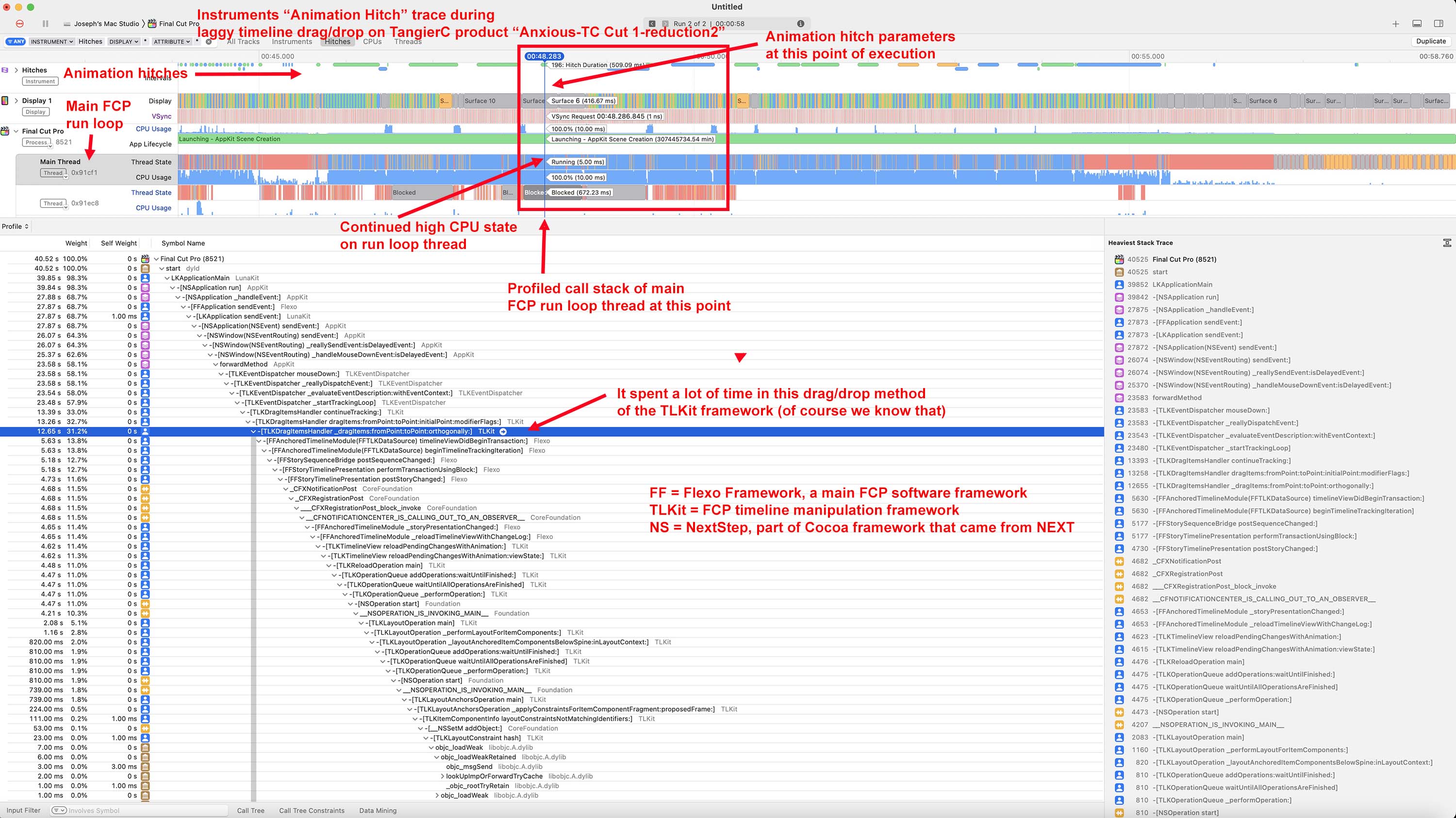
That's caused by something the run loop calls getting bogged down. It's not just one thing, it proceeds on a deeply nested call path but generally spends excessive time in the FCP private TLKit framework, which in turn calls the MacOS Core Animation framework to manipulate on-screen timeline animation.
But it's not the animation itself that is slow, as if a faster GPU would prevent that. It's all the underlying metadata that's attached to timeline elements that is slow, and that in turn limits how fast the timeline animation can respond. The source of that slowdown is not in the SQLite database, it's somewhere else I haven't yet pinned down.
See attached Instruments "animation hitch" trace. To an application developer an animation hitch is an undesired excessive on-screen lag. In some traces it's making a tremendous number of audio API calls. It might tell us something if as a test if you could just delete most of the audio and see if the complex timeline minus the audio is still slow.
I have to work on my actual job for a while but I'll get back to this ASAP.
Replied by joema on topic Choppy Timeline Editing - Getting Back to Fluidity?
Here are a few more tests (linked below) and updated XML sample now that I've reduced the timeline deleting most of the duplicate and crippled audio attached storylines and reduced the markers to a little over 40....
It is better but it still doesn't behave as desired. I don't know the lowest-level cause but at a higher level the FCP UI mandates a fluid, interactive response. IOW a slow skimmer is no good. Supposedly Randy Ubillos didn't want any built-in effects that did not execute rapidly, to maintain the overall responsive feel.
From a programmer's perspective, the main "run loop" which accepts user input and dispatches work to other threads must remain light and responsive. If it gets bogged down the UI will lag then eventually the window manager will invoke the beachball.
Apparently part of the design "user experience" is no progress bars or wait indicators are allowed during normal editing or browsing. The code path is simply supposed to remain responsive enough that never happens.
That's OK but it's a difficult challenge to maintain with increasing timeline and data complexity. From a design standpoint it is permitted (but undesired) for the frame rate or viewer update rate to lag. The UI is still active and responsive. It's not OK for fundamental UI interactions such as drag and drop or head/tail trimming to lock up for 5 seconds.
That's caused by something the run loop calls getting bogged down. It's not just one thing, it proceeds on a deeply nested call path but generally spends excessive time in the FCP private TLKit framework, which in turn calls the MacOS Core Animation framework to manipulate on-screen timeline animation.
But it's not the animation itself that is slow, as if a faster GPU would prevent that. It's all the underlying metadata that's attached to timeline elements that is slow, and that in turn limits how fast the timeline animation can respond. The source of that slowdown is not in the SQLite database, it's somewhere else I haven't yet pinned down.
See attached Instruments "animation hitch" trace. To an application developer an animation hitch is an undesired excessive on-screen lag. In some traces it's making a tremendous number of audio API calls. It might tell us something if as a test if you could just delete most of the audio and see if the complex timeline minus the audio is still slow.
I have to work on my actual job for a while but I'll get back to this ASAP.
Please Log in to join the conversation.
06 Jan 2023 19:09 #123533
by tangierc
Replied by tangierc on topic Choppy Timeline Editing - Getting Back to Fluidity?
Thanks Joema. I am learning a lot about this through your efforts. You too DaveM. I'll remove the audio and report back later after work.
Please Log in to join the conversation.
07 Jan 2023 02:50 - 07 Jan 2023 15:53 #123538
by DaveM
Replied by DaveM on topic Choppy Timeline Editing - Getting Back to Fluidity?
Tangier and Joe, thanks for the updates.
I did a bit of "qualitative" testing on the "reduction2" XML file that Tangier posted along with the screen movies.
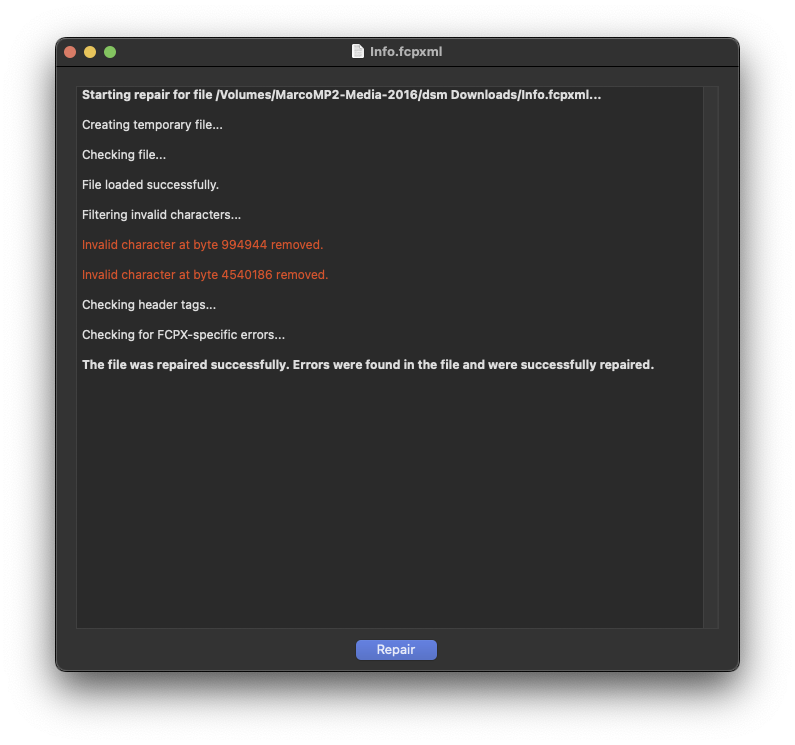
Out of curiosity, I used Digital Rebellion's "XML Repair" on the XML file. It found some "Invalid characters" and fixed them. (See below.)
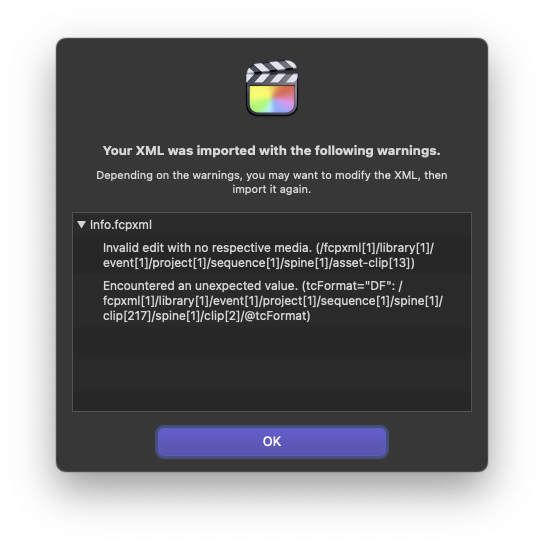
On import into FCP, there were errors mentioned. (See below.)
I wonder if the XML output by Premiere Pro is in any way problematic (or what SendToX produces), such as causing some of the slowdowns (besides adding the "to do" markers, as well as creating connected storylines and compound clips).
After import, using the Timeline Index, I selected all connected storylines (searched for "story"). I broke apart 439 storylines. I then searched for compound clips (searched for "compound") and broke apart 97.
With the timeline clip appearance set to "labels only" and the smallest vertical height, things were very quick and responsive, though not "buttery smooth". Shift-Z took around 1 second. Horizontal scrolling was super fast, as was zooming the timeline with command-+/-. Cursor dragging to trim clips was fast too. The only slowish operation was moving a clip via drag and drop (a bit jerky but quite usable). Keyboard-based operations were zippy.
I then set the clip appearance to the second icon from the left (smallest video with audio waveforms) and increased the clip height a bit. I could then see the "missing proxy" red overlays on most clips. In this state, when I did horizontal scrolling of the timeline (using the trackball wheel and Shift), it took several seconds for the "missing proxy" overlays to redraw after scrolling to new (previously hidden) parts of the timeline. All of my CPU cores were over 90% during scrolling.
[I didn't try to delete any of the audio, either standalone clips or audio from A-V clips.]
It does seem that FCP has a bug (or bugs) that is causing the lagginess, especially for more complex timelines. I wonder if the clip appearance settings have something to do with this. You would think that with the media playback not being a factor that the GUI should be fast and fluid doing everything.
I imported the XML file into Resolve 18.1.2 and the timeline responsiveness was perfect (with track heights and clip "adornments" minimized to be similar to FCP).
It would be nice if Joe can isolate something. Or, maybe it would be good to pass along the XML file to Apple to have them test it. Joe seems to have good luck getting Apple to respond to reported issues.
---
I'm so used to working in mostly 10 to 20 minute timelines (going back 20+ years), and primarily using the keyboard for editing, that UI responsiveness issues like what we've been seeing with this test case are not relevant to me. The only performance-related issue I usually see is playback of multiple streams of complex video.
---
If you need me to do anything specific, please let me know. I can use ScreenFlow to record examples of UI behavior/responsiveness, if needed...
Cheers.
I did a bit of "qualitative" testing on the "reduction2" XML file that Tangier posted along with the screen movies.
Out of curiosity, I used Digital Rebellion's "XML Repair" on the XML file. It found some "Invalid characters" and fixed them. (See below.)
On import into FCP, there were errors mentioned. (See below.)
I wonder if the XML output by Premiere Pro is in any way problematic (or what SendToX produces), such as causing some of the slowdowns (besides adding the "to do" markers, as well as creating connected storylines and compound clips).
After import, using the Timeline Index, I selected all connected storylines (searched for "story"). I broke apart 439 storylines. I then searched for compound clips (searched for "compound") and broke apart 97.
With the timeline clip appearance set to "labels only" and the smallest vertical height, things were very quick and responsive, though not "buttery smooth". Shift-Z took around 1 second. Horizontal scrolling was super fast, as was zooming the timeline with command-+/-. Cursor dragging to trim clips was fast too. The only slowish operation was moving a clip via drag and drop (a bit jerky but quite usable). Keyboard-based operations were zippy.
I then set the clip appearance to the second icon from the left (smallest video with audio waveforms) and increased the clip height a bit. I could then see the "missing proxy" red overlays on most clips. In this state, when I did horizontal scrolling of the timeline (using the trackball wheel and Shift), it took several seconds for the "missing proxy" overlays to redraw after scrolling to new (previously hidden) parts of the timeline. All of my CPU cores were over 90% during scrolling.
[I didn't try to delete any of the audio, either standalone clips or audio from A-V clips.]
It does seem that FCP has a bug (or bugs) that is causing the lagginess, especially for more complex timelines. I wonder if the clip appearance settings have something to do with this. You would think that with the media playback not being a factor that the GUI should be fast and fluid doing everything.
I imported the XML file into Resolve 18.1.2 and the timeline responsiveness was perfect (with track heights and clip "adornments" minimized to be similar to FCP).
It would be nice if Joe can isolate something. Or, maybe it would be good to pass along the XML file to Apple to have them test it. Joe seems to have good luck getting Apple to respond to reported issues.
---
I'm so used to working in mostly 10 to 20 minute timelines (going back 20+ years), and primarily using the keyboard for editing, that UI responsiveness issues like what we've been seeing with this test case are not relevant to me. The only performance-related issue I usually see is playback of multiple streams of complex video.
---
If you need me to do anything specific, please let me know. I can use ScreenFlow to record examples of UI behavior/responsiveness, if needed...
Cheers.
Last edit: 07 Jan 2023 15:53 by DaveM.
Please Log in to join the conversation.
07 Jan 2023 04:46 #123539
by tangierc
Replied by tangierc on topic Choppy Timeline Editing - Getting Back to Fluidity?
Dave thank you for taking the time to do this. I sincerely appreciate it. I tried something similar before this post, but not as extensive.
One thing that I have noticed is that performance doesn't see to change much if at all water the media is online or offline.
Also before posting this topic I did attempt to do delete everything except the main storyline and performance was much much better. I am going to do it again in order to confirm for Joe and to reassure myself that I get the intend better UI performance.
My last few projects were similar in length, but not as complex. They were also laggy in UI performance, but not this bad. I learned to live with it and just kept working through it. Only one of these projects originated in Premiere Pro, but it was nowhere near as complex, yet still a little laggy. I used SendToX on that one as well. This project on the other hand was so bad in UI performance I had to reach out on this forum.
One thing that I have noticed is that performance doesn't see to change much if at all water the media is online or offline.
Also before posting this topic I did attempt to do delete everything except the main storyline and performance was much much better. I am going to do it again in order to confirm for Joe and to reassure myself that I get the intend better UI performance.
My last few projects were similar in length, but not as complex. They were also laggy in UI performance, but not this bad. I learned to live with it and just kept working through it. Only one of these projects originated in Premiere Pro, but it was nowhere near as complex, yet still a little laggy. I used SendToX on that one as well. This project on the other hand was so bad in UI performance I had to reach out on this forum.
Please Log in to join the conversation.
07 Jan 2023 05:10 #123540
by tangierc
Replied by tangierc on topic Choppy Timeline Editing - Getting Back to Fluidity?
Dave and Joe, I tried removing all of the attached clips below the main storyline completely. It's still laggy with or without the media online between two computers, the second having a much smaller library (just a few testing events...if that matters). Perhaps it's a length issue (which shouldn't be the case. I thought for sure removing all of those elements would make it very fluid. Dave, I too have gotten that error on importing the XML, but I did the verify and repair command.
I took it one step further. I duplicated this timeline, then removed all video attributes (scale, rotation, position, anchor, crop). Results were still a laggy UI even with media off-line. Then I removed all of the audio attributes (gain effect brought over from Premiere Pro via SendToX). Same UI performance. There may have been a very slight performance difference, but not enough to feel like there was a noticeable difference when using key commands to zoom in/out of the timeline or trimming clips from head or tail.
Here's an XML if you want to test it out for yourself.
Anxious-TC Cut 1-Main Storyline Only.
I took it one step further. I duplicated this timeline, then removed all video attributes (scale, rotation, position, anchor, crop). Results were still a laggy UI even with media off-line. Then I removed all of the audio attributes (gain effect brought over from Premiere Pro via SendToX). Same UI performance. There may have been a very slight performance difference, but not enough to feel like there was a noticeable difference when using key commands to zoom in/out of the timeline or trimming clips from head or tail.
Here's an XML if you want to test it out for yourself.
Anxious-TC Cut 1-Main Storyline Only.
Please Log in to join the conversation.
09 Jan 2023 21:21 #123573
by joema
Tangier/Dave, I tested that on my M1 Ultra Mac Studio, M1 Max MacBook Pro 16, and a 2017 i7 iMac 27, all running FCP 10.6.5 and Monterey 12.6.2. Likely due to the simplified timeline, it was considerably faster on the M1 Max & Ultra, I'd say mostly OK. It was pretty slow on the 2017 iMac 27, even though that was a top-spec machine.
I then pulled from an archive a complex project I edited. It was "only" 23 min but it contained 600 clips, many audio lanes and lots of 4k H.264 multicam, lots of keyframed Fx, inc'l 4-way 4k splitscreen. It probably has 5,000 total edits, about 400 markers and most clips have 4-6 color effects. I removed all the 3rd-party Fx and left in all the FCP built-in Fx.
I duplicated that on the timeline to 1 hr 25 min, and on the M1 Ultra it is somewhat sluggish but not like Tangier's timeline. However it does not use tons of compound clips. When I first edited the 23 min. version on a 10-core iMac Pro using 50% ProRes proxies, it was so sluggish I barely got it finished. So the M1 Ultra is a lot faster through brute horsepower but I don't think FCP should be sluggish on a machine that fast, outside of truly extreme situations.
I am examining my timeline vs Tangier's using the Instruments trace tool. We already know several things:
- It is not related to I/O, so no amount of disk performance will help.
- It's not related to RAM -- it's also slow on my M1 Ultra Mac Studio which has 128 GB. Neither Activity Monitor nor Instruments show a memory leak or excessive memory usage.
- At least some manifestations seem related to a bottleneck on the FCP main "run loop", so in that case lots of CPU cores won't help much.
- It's not related to the codec because it happens without any media.
- It's not caused by the lack of media because it happens *with* media.
- It doesn't seem related to inadequate GPU performance because the main run loop thread is in a high CPU state, not waiting on the GPU.
My goal is to determine several things:
- Why is my timeline somewhat sluggish? What functions is FCP spending that time in?
- Why is Tangier's timeline even worse? Is the CPU-intensive code path the same as mine but worse, or is it spending time in something obviously related to compound clips? We've seen dramatic perf. issues on compound clips before, so I'm fairly certain that is an issue, I just don't know the parameters.
- What are the key factors that cause the performance degradation? Timeline length? Number of edits? Compound clips?
- Is there any possible workaround?
- To what degree does faster hardware (e.g, M1 Max or M1 Ultra) help?
It's likely I will ultimately file a bug with Pro Apps Development, but it should be better defined than "big timeline is slow". The better defined the condition is, the more likely they are to take action.
I will post more results tomorrow.
Replied by joema on topic Choppy Timeline Editing - Getting Back to Fluidity?
... I duplicated this timeline, then removed all video attributes (scale, rotation, position, anchor, crop). Results were still a laggy UI even with media off-line. Then I removed all of the audio attributes (gain effect brought over from Premiere Pro via SendToX). Same UI performance. There may have been a very slight performance difference, but not enough to feel like there was a noticeable difference when using key commands to zoom in/out of the timeline or trimming clips from head or tail.
Here's an XML if you want to test it out for yourself.
Tangier/Dave, I tested that on my M1 Ultra Mac Studio, M1 Max MacBook Pro 16, and a 2017 i7 iMac 27, all running FCP 10.6.5 and Monterey 12.6.2. Likely due to the simplified timeline, it was considerably faster on the M1 Max & Ultra, I'd say mostly OK. It was pretty slow on the 2017 iMac 27, even though that was a top-spec machine.
I then pulled from an archive a complex project I edited. It was "only" 23 min but it contained 600 clips, many audio lanes and lots of 4k H.264 multicam, lots of keyframed Fx, inc'l 4-way 4k splitscreen. It probably has 5,000 total edits, about 400 markers and most clips have 4-6 color effects. I removed all the 3rd-party Fx and left in all the FCP built-in Fx.
I duplicated that on the timeline to 1 hr 25 min, and on the M1 Ultra it is somewhat sluggish but not like Tangier's timeline. However it does not use tons of compound clips. When I first edited the 23 min. version on a 10-core iMac Pro using 50% ProRes proxies, it was so sluggish I barely got it finished. So the M1 Ultra is a lot faster through brute horsepower but I don't think FCP should be sluggish on a machine that fast, outside of truly extreme situations.
I am examining my timeline vs Tangier's using the Instruments trace tool. We already know several things:
- It is not related to I/O, so no amount of disk performance will help.
- It's not related to RAM -- it's also slow on my M1 Ultra Mac Studio which has 128 GB. Neither Activity Monitor nor Instruments show a memory leak or excessive memory usage.
- At least some manifestations seem related to a bottleneck on the FCP main "run loop", so in that case lots of CPU cores won't help much.
- It's not related to the codec because it happens without any media.
- It's not caused by the lack of media because it happens *with* media.
- It doesn't seem related to inadequate GPU performance because the main run loop thread is in a high CPU state, not waiting on the GPU.
My goal is to determine several things:
- Why is my timeline somewhat sluggish? What functions is FCP spending that time in?
- Why is Tangier's timeline even worse? Is the CPU-intensive code path the same as mine but worse, or is it spending time in something obviously related to compound clips? We've seen dramatic perf. issues on compound clips before, so I'm fairly certain that is an issue, I just don't know the parameters.
- What are the key factors that cause the performance degradation? Timeline length? Number of edits? Compound clips?
- Is there any possible workaround?
- To what degree does faster hardware (e.g, M1 Max or M1 Ultra) help?
It's likely I will ultimately file a bug with Pro Apps Development, but it should be better defined than "big timeline is slow". The better defined the condition is, the more likely they are to take action.
I will post more results tomorrow.
Please Log in to join the conversation.
10 Jan 2023 02:19 #123574
by joema
I updated my M1 Ultra Mac Studio from Monterey 12.6.2 to Ventura 13.1, and at least on this machine it made a definite improvement. My own timeline was also faster. I'd say the lag during trimming and drag/drop was cut to about to 1/3 of before, also SHIFT+Z was a lot faster. I don't know why. All I did was the update, plus I ran Disk Utility First Aid on all drives (no errors found), then I rebuilt Spotlight indexes on all drives. That's it.
Your first timeline version with the 6,000+ markers is still slow but less so. It's still too slow to comfortably use. The 2nd one "Reduction 2" is laggy but usable and "Main Storyline Only" is almost normal. I wish I'd kept more methodical performance data before the upgrade but I wasn't really expecting it to make a difference.
I know your M1 Pro MBP is on Ventura. Maybe you could run First Aid and rebuild Spotlight indexes like I did. I ran First Aid from recovery mode. On Apple Silicon you hold down the power button when booting until you see a message that says "Loading startup options."
To rebuild Spotlight indexes, see below. Note: I think there was formerly a bug whereby selecting multiple drives to rebuild in a batch would cause indexing problems. I don't know if that's fixed in Ventura but I rebuilt the indexes one drive at a time.
My M1 Max MBP 16 is still on Monterey. Tomorrow I will take more precise performance data using your timelines on Monterey, then update it to Ventura and run the exact same tests with Instruments.
There is nonetheless unquestionably a performance issue in FCP with some timeline configurations, even on the top-spec M1 Ultra running Ventura 13.1.
That said, I formerly owned a 12-core D700 2013 Mac Pro, and the M1 Max and esp. M1 Ultra are a *lot* faster. I edit a lot of 8k R3D from a V-Raptor (with no proxies) and I'd hate to do that on an Intel machine. Not saying its time to upgrade but there are various considerations here.
Replied by joema on topic Choppy Timeline Editing - Getting Back to Fluidity?
I duplicated this timeline, then removed all video attributes (scale, rotation, position, anchor, crop). Results were still a laggy UI even with media off-line. Then I removed all of the audio attributes (gain effect brought over from Premiere Pro via SendToX). Same UI performance. There may have been a very slight performance difference, but not enough to feel like there was a noticeable difference when using key commands to zoom in/out of the timeline or trimming clips from head or tail.. .
I updated my M1 Ultra Mac Studio from Monterey 12.6.2 to Ventura 13.1, and at least on this machine it made a definite improvement. My own timeline was also faster. I'd say the lag during trimming and drag/drop was cut to about to 1/3 of before, also SHIFT+Z was a lot faster. I don't know why. All I did was the update, plus I ran Disk Utility First Aid on all drives (no errors found), then I rebuilt Spotlight indexes on all drives. That's it.
Your first timeline version with the 6,000+ markers is still slow but less so. It's still too slow to comfortably use. The 2nd one "Reduction 2" is laggy but usable and "Main Storyline Only" is almost normal. I wish I'd kept more methodical performance data before the upgrade but I wasn't really expecting it to make a difference.
I know your M1 Pro MBP is on Ventura. Maybe you could run First Aid and rebuild Spotlight indexes like I did. I ran First Aid from recovery mode. On Apple Silicon you hold down the power button when booting until you see a message that says "Loading startup options."
To rebuild Spotlight indexes, see below. Note: I think there was formerly a bug whereby selecting multiple drives to rebuild in a batch would cause indexing problems. I don't know if that's fixed in Ventura but I rebuilt the indexes one drive at a time.
My M1 Max MBP 16 is still on Monterey. Tomorrow I will take more precise performance data using your timelines on Monterey, then update it to Ventura and run the exact same tests with Instruments.
There is nonetheless unquestionably a performance issue in FCP with some timeline configurations, even on the top-spec M1 Ultra running Ventura 13.1.
That said, I formerly owned a 12-core D700 2013 Mac Pro, and the M1 Max and esp. M1 Ultra are a *lot* faster. I edit a lot of 8k R3D from a V-Raptor (with no proxies) and I'd hate to do that on an Intel machine. Not saying its time to upgrade but there are various considerations here.
Please Log in to join the conversation.
10 Jan 2023 03:07 - 10 Jan 2023 03:14 #123575
by tangierc
Replied by tangierc on topic Choppy Timeline Editing - Getting Back to Fluidity?
Thanks. For several reasons related to my how I use my laptop daily and now my desktop station is setup I intended to edit this on my 2013 Mac Pro using proxies which is just fine other than this UI performance issue. Though I can't upgrade to a Ventura on it to realize those performance gains you mentioned. As much as I'd love to hold off I did start configuring a Mac Studio online to see pricing. It's unfortunate that FCP gets bogged down this much for an unknown reason.
I find that with large projects like this, doing shift-F or searching for a clip using the browser search field can take a really long time. I waited more than 4 minutes after typing a clip name in the search field before FCP returned results. It started by loading projects first and was hung on that operation for a long time. This has happened with multiple large projects. It eludes my what's loaded into memory and why operations like Reveal in Browser are allowed (from a programming standpoint) to take this long. Scrolling the left side of the browser to reveal all of my events will cause a hangup for a while too.
Thanks for all of this exploration and help. I hope someone at Apple gets wind of this post and your findings.
I find that with large projects like this, doing shift-F or searching for a clip using the browser search field can take a really long time. I waited more than 4 minutes after typing a clip name in the search field before FCP returned results. It started by loading projects first and was hung on that operation for a long time. This has happened with multiple large projects. It eludes my what's loaded into memory and why operations like Reveal in Browser are allowed (from a programming standpoint) to take this long. Scrolling the left side of the browser to reveal all of my events will cause a hangup for a while too.
Thanks for all of this exploration and help. I hope someone at Apple gets wind of this post and your findings.
Last edit: 10 Jan 2023 03:14 by tangierc.
Please Log in to join the conversation.
10 Jan 2023 13:57 #123581
by joema
There is a known issue if you have lots of projects, snapshots, duplicates, etc. it may cause slowdowns like you describe. There is no specific number but it seems if you have more than 30 to 50 it can happen. How many total projects of all types do you have in your library?
Obviously that is not an issue with the projects you sent -- that slowdown behavior manifests in a new library with only that one project. But you may be seeing slowdowns from various sources blended together.
That should not happen. I haven't see that very much. I have seen some of the other behaviors like sluggish timeline, slow opening events and slow searching if lots of project exist.
Re why super-slow Reveal in Browser should be allowed from a programming standpoint, it ideally should not be. I don't see that on your slowest project. I suspect there are other things causing it, e.g, an event or library with a large number of projects.
Each project, snapshot or duplicate is stored internally as a separate SQLite database. Also each event is a separate SQLite database. When an app opens a SQLite database, that entails memory and CPU overhead. Unlike a conventional SQL app, FCP uses an object-oriented graph database managed by the Core Data framework which must be translated to SQL. That in turn entails overhead. I believe the SQL interface is single threaded so they can't have multiple parallel threads opening and querying a bunch of project databases simultaneously. That's likely why they don't maintain an open database connection for each project. They apparently try to do deferred opening, so a few database connections are fast, and beyond that you'll see a message about "opening projects..." or something. That is FCP opening all those databases (probably sequentially on a single thread) to perform the search or other operation.
So the slow timeline is likely from one cause and the slow search, slow SHIFT+F, and slow Browser scroll to reveal all events are probably another issue.
You've already made some progress on the timeline itself. If you have tons of projects, examine which ones you need and which can be deleted or saved to XML. Make a test copy of the full library (assuming a lean library) and experiment by deleting a bunch of projects. If the library is too big to duplicate at a file level, export a library XML and import that to a test library.
On one of your projects, I cut the length in half and it became much faster. Test that. If you need the full content in a single timeline, see if you can get edit lock on the first half, export that half as a ProRes file, re-import and use that. Then only the last half will be the individual clips. Of course that is a workaround.
No need to rely on the luck of them seeing this; I will contact them myself after I collect enough info and file a well-annotated bug report.
Replied by joema on topic Choppy Timeline Editing - Getting Back to Fluidity?
...I find that with large projects like this, doing shift-F or searching for a clip using the browser search field can take a really long time. I waited more than 4 minutes after typing a clip name in the search field before FCP returned results. It started by loading projects first and was hung on that operation for a long time....
There is a known issue if you have lots of projects, snapshots, duplicates, etc. it may cause slowdowns like you describe. There is no specific number but it seems if you have more than 30 to 50 it can happen. How many total projects of all types do you have in your library?
Obviously that is not an issue with the projects you sent -- that slowdown behavior manifests in a new library with only that one project. But you may be seeing slowdowns from various sources blended together.
... why operations like Reveal in Browser are allowed (from a programming standpoint) to take this long. Scrolling the left side of the browser to reveal all of my events will cause a hangup for a while too....
That should not happen. I haven't see that very much. I have seen some of the other behaviors like sluggish timeline, slow opening events and slow searching if lots of project exist.
Re why super-slow Reveal in Browser should be allowed from a programming standpoint, it ideally should not be. I don't see that on your slowest project. I suspect there are other things causing it, e.g, an event or library with a large number of projects.
Each project, snapshot or duplicate is stored internally as a separate SQLite database. Also each event is a separate SQLite database. When an app opens a SQLite database, that entails memory and CPU overhead. Unlike a conventional SQL app, FCP uses an object-oriented graph database managed by the Core Data framework which must be translated to SQL. That in turn entails overhead. I believe the SQL interface is single threaded so they can't have multiple parallel threads opening and querying a bunch of project databases simultaneously. That's likely why they don't maintain an open database connection for each project. They apparently try to do deferred opening, so a few database connections are fast, and beyond that you'll see a message about "opening projects..." or something. That is FCP opening all those databases (probably sequentially on a single thread) to perform the search or other operation.
So the slow timeline is likely from one cause and the slow search, slow SHIFT+F, and slow Browser scroll to reveal all events are probably another issue.
You've already made some progress on the timeline itself. If you have tons of projects, examine which ones you need and which can be deleted or saved to XML. Make a test copy of the full library (assuming a lean library) and experiment by deleting a bunch of projects. If the library is too big to duplicate at a file level, export a library XML and import that to a test library.
On one of your projects, I cut the length in half and it became much faster. Test that. If you need the full content in a single timeline, see if you can get edit lock on the first half, export that half as a ProRes file, re-import and use that. Then only the last half will be the individual clips. Of course that is a workaround.
...Thanks for all of this exploration and help. I hope someone at Apple gets wind of this post and your findings.
No need to rely on the luck of them seeing this; I will contact them myself after I collect enough info and file a well-annotated bug report.
Please Log in to join the conversation.
10 Jan 2023 17:08 #123587
by tangierc
Replied by tangierc on topic Choppy Timeline Editing - Getting Back to Fluidity?
Thanks for articulating in more detail what's happening with FCP (X). The way FCP delays loading certain data has had a significant impact on large or complex projects performance will doing a Reveal in Browser or searching for a clip in the browser. I've even tried paying close attention to how large my font library since I wasn't certain what FCP loads into memory when launching a library. However these problems typically only happen the first time (the first Reveal in Browser, scrolling to reveal events and keywords collections, and searching for a clip). Sadly the workaround may be to Reveal in Browser, scroll all events, and do a search for a clip right after launching a library and before getting started editing. Perhaps even selecting a smart keyword collection while I'm at it since that invokes FCP to load (not open) projects too. That way these things won't impede the flow of the work itself.
I have been progressively reducing my library and project starting with deleting projects like you've mentioned Currently the library has twenty eight events and ten projects; six of them being the larger approximately ninety-minute edits used to test and get setup - the various PPro XML or AAF to FCP via Sync-N-Link or Resolve edits. Additionally I am separating attached compound clips and lifting clips from so many of those attached storylines. Things are getting marginally better right now, but I will say that even if I make one edit adjustment such as trimming audio, and my RAID is not working before that moment, once I make that one edit, I can hear the RAID drives getting to work for quite a while just after one edit like that...and an FCP backup is not happening (at least not in the task monitor). This isn't related to the issue for this thread, but it is peculiar that every edit is incurring so much drive load.
I'v been holding onto some of those other preparatory edits for the sake of referring back to them if need be as I work on the current edit, but for the sake of performance I'll do what you suggest and just keep the one I need.
Thanks for pointing out that events are their own database and the detailed explanation of the relationship between the SQL database(s), Core Data, and overhead. This makes a lot of sense. Not that it matters at this juncture, but I do wonder if PostgreSQL would yield significantly better results. For years I've actually preferred using only one event and leveraging keyword collections rather than having multiple events. Though that was mostly due to my annoyance with the libraries having so many duplicate clips when I had multiple events, and FCP didn't have a feature to really manage those and keep the library lean. I never wanted to see more than one instance of a clip in my library. I haven't done that with this project, but maybe I will.
Also, thanks for reporting your findings to Apple. If you need additional files from me for testing please let me know.
I have been progressively reducing my library and project starting with deleting projects like you've mentioned Currently the library has twenty eight events and ten projects; six of them being the larger approximately ninety-minute edits used to test and get setup - the various PPro XML or AAF to FCP via Sync-N-Link or Resolve edits. Additionally I am separating attached compound clips and lifting clips from so many of those attached storylines. Things are getting marginally better right now, but I will say that even if I make one edit adjustment such as trimming audio, and my RAID is not working before that moment, once I make that one edit, I can hear the RAID drives getting to work for quite a while just after one edit like that...and an FCP backup is not happening (at least not in the task monitor). This isn't related to the issue for this thread, but it is peculiar that every edit is incurring so much drive load.
I'v been holding onto some of those other preparatory edits for the sake of referring back to them if need be as I work on the current edit, but for the sake of performance I'll do what you suggest and just keep the one I need.
Thanks for pointing out that events are their own database and the detailed explanation of the relationship between the SQL database(s), Core Data, and overhead. This makes a lot of sense. Not that it matters at this juncture, but I do wonder if PostgreSQL would yield significantly better results. For years I've actually preferred using only one event and leveraging keyword collections rather than having multiple events. Though that was mostly due to my annoyance with the libraries having so many duplicate clips when I had multiple events, and FCP didn't have a feature to really manage those and keep the library lean. I never wanted to see more than one instance of a clip in my library. I haven't done that with this project, but maybe I will.
Also, thanks for reporting your findings to Apple. If you need additional files from me for testing please let me know.
Please Log in to join the conversation.
10 Jan 2023 18:54 #123592
by DaveM
Replied by DaveM on topic Choppy Timeline Editing - Getting Back to Fluidity?
Tangier, earlier in this thread you mentioned that your media is stored on an OWC Gemini RAID (RAID-1, mirrored). Is that correct? Also, where is your Library file stored? Sorry for the bother and thanks!
Please Log in to join the conversation.
10 Jan 2023 19:52 #123595
by joema
Replied by joema on topic Choppy Timeline Editing - Getting Back to Fluidity?
Dave beat me to it, I was going to confirm the RAID config and where the library *and* cache are located. They should be on a separate SSD, not on a mechanical drive.
FCP exhibits two starkly different I/O profiles: for reading media it uses large sequential reads (no writes), e.g, 500 KB or 1 MB. For waveforms, thumbnails, SQLite, etc, it does lots of small, random I/O, roughly around 16 KB. The random nature means it's difficult to cache. This can be exacerbated on some RAID systems with a large "stripe size" which are optimized for large sequential I/Os.
However -- EVEN in cases where and cache and library are on SSDs, FCP can get into situations where it must re-read the media to rebuild thumbnails. In that case it must do many little I/Os to obtain that data from the mechanical drives.
That said, the other perf. issues involving slow redraw of the complex timeline happen even if all media is on SSD. If FCP also must sometimes issue lots of small random reads from the mechanical drives hosting the media to rebuild thumbnails, that would further contribute to the slowdown. You can test that by putting the timeline into the "no thumbnail" mode and by putting the Event Browser into list view. That will at least eliminate or greatly reduce I/O for thumbnails.
I don't think that is the main problem but it might be a contributor.
FCP exhibits two starkly different I/O profiles: for reading media it uses large sequential reads (no writes), e.g, 500 KB or 1 MB. For waveforms, thumbnails, SQLite, etc, it does lots of small, random I/O, roughly around 16 KB. The random nature means it's difficult to cache. This can be exacerbated on some RAID systems with a large "stripe size" which are optimized for large sequential I/Os.
However -- EVEN in cases where and cache and library are on SSDs, FCP can get into situations where it must re-read the media to rebuild thumbnails. In that case it must do many little I/Os to obtain that data from the mechanical drives.
That said, the other perf. issues involving slow redraw of the complex timeline happen even if all media is on SSD. If FCP also must sometimes issue lots of small random reads from the mechanical drives hosting the media to rebuild thumbnails, that would further contribute to the slowdown. You can test that by putting the timeline into the "no thumbnail" mode and by putting the Event Browser into list view. That will at least eliminate or greatly reduce I/O for thumbnails.
I don't think that is the main problem but it might be a contributor.
Please Log in to join the conversation.
