


- Posts: 129
- Thank you received: 3
3 Post Moderation Rule for New Boarders (25 Jan 2021)
New boarders will have their posts moderated - Don't worry if you cannot see your post immediately.
Choppy Timeline Editing - Getting Back to Fluidity?
02 Jan 2023 14:59 #123461
by tangierc
Choppy Timeline Editing - Getting Back to Fluidity? was created by tangierc
You all know how FCP can be very fluid and free manipulating clips on the timeline? I've had issues where large projects significantly reduce timeline editing performance; even projects where all of the video in use are ProRes proxies. Playback and scrubbing are fine, but manipulating clips in the timeline are choppy and slow; counter to what many longtime FCP users are used to with the application. Most searches online yield the same results about making FCP faster, but none of them have worked for me. I am specifically targeting timeline editing performance and Not the application as a whole (though there are some beach balling issues at times). Think manipulating heads and tails of clips, moving them around. Even on an older 2013 Mac Pro this was not an issue working on multicam 4K projects. I found similar problematic performance from the same project on an M1 Mac as well using a faster thunderbolt connection to the RAID I was using and form a single drive with the same project.
Any thoughts?
FCP 10.6.5
2013 Mac Pro / M1 Pro MacBook Pro....same results
macOS Ventura 12.6.2
Any thoughts?
FCP 10.6.5
2013 Mac Pro / M1 Pro MacBook Pro....same results
macOS Ventura 12.6.2
Please Log in to join the conversation.


02 Jan 2023 15:59 #123462
by joema
Tangier, I've seen this reported a few times, inc'l Intel, M1 Max and M1 Ultra. I had one user send me his 1 hr timeline and he had a ton of compound clips and was using Color Finale.
What if you duplicate that project, open the duplicate, then delete all effects by CMD+A then Edit>Remove Effects. Does that make any difference?
What if you then export the XML of that project w/o effects, create a test library and load that project XML (minus effects) to the test library? Does it happen then?
My first question is whether it's something caused by timeline construction such as vast numbers of compound clips, retimed clips, certain timeline length, or is it a 3rd-party effect or plugin?
From a programming standpoint, the main "run loop" thread which handles UI events is not supposed to block for any extended period. Doing so would cause sluggish UI behavior. You are moving the mouse, selecting a clip, moving a clip border, and that should always be fluid and smooth.
Under the covers at the level of the main run loop, something is interfering with it processing new events such as redraw the clip on screen. We don't know what that is. It could be something like calling SQLite to log the change, and that is slow. Or it could be it's calling a plugin and that is slow to respond.
For a longer-term hang (e.g, 15 sec) it's possible to take a SpinDump and evaluate that. For short delays (2-3 sec) SpinDump is not fast enough. If I could reproduce it, in theory I could run FCP under XCode and even without source code or full symbols, might be able to find something. If you can reproduce a portable scenario small enough to send me I'm willing to try it, but I'm on a project right now that will take about a week to finish.
Replied by joema on topic Choppy Timeline Editing - Getting Back to Fluidity?
You all know how FCP can be very fluid and free manipulating clips on the timeline? I've had issues where large projects significantly reduce timeline editing performance; even projects where all of the video in use are ProRes proxies. Playback and scrubbing are fine, but manipulating clips in the timeline are choppy and slow...
Tangier, I've seen this reported a few times, inc'l Intel, M1 Max and M1 Ultra. I had one user send me his 1 hr timeline and he had a ton of compound clips and was using Color Finale.
What if you duplicate that project, open the duplicate, then delete all effects by CMD+A then Edit>Remove Effects. Does that make any difference?
What if you then export the XML of that project w/o effects, create a test library and load that project XML (minus effects) to the test library? Does it happen then?
My first question is whether it's something caused by timeline construction such as vast numbers of compound clips, retimed clips, certain timeline length, or is it a 3rd-party effect or plugin?
From a programming standpoint, the main "run loop" thread which handles UI events is not supposed to block for any extended period. Doing so would cause sluggish UI behavior. You are moving the mouse, selecting a clip, moving a clip border, and that should always be fluid and smooth.
Under the covers at the level of the main run loop, something is interfering with it processing new events such as redraw the clip on screen. We don't know what that is. It could be something like calling SQLite to log the change, and that is slow. Or it could be it's calling a plugin and that is slow to respond.
For a longer-term hang (e.g, 15 sec) it's possible to take a SpinDump and evaluate that. For short delays (2-3 sec) SpinDump is not fast enough. If I could reproduce it, in theory I could run FCP under XCode and even without source code or full symbols, might be able to find something. If you can reproduce a portable scenario small enough to send me I'm willing to try it, but I'm on a project right now that will take about a week to finish.
Please Log in to join the conversation.
02 Jan 2023 16:10 #123464
by tangierc
Replied by tangierc on topic Choppy Timeline Editing - Getting Back to Fluidity?
Joema you beat to my next post which I thought would help (see below). Here are the details of the current project. Your are absolutely correct on the compound clips. This project has a lot. It came from Premiere Pro and I used Intelligent Assistance's SendToX to convert it. However those compound clips are mostly audio since I flattened the Premiere Pro timeline before exporting the XML (Multicam clips included). There are some connected clips as compound clips that have video in them, but not most. They're there only for the audio and I am reducing those. I looking your suggestions. Thank you.
Project, Computer, and Software Details:
Project, Computer, and Software Details:
- Original Media: 8K, 7K, 6K, RED Raw, along with 6K BRAW
- Working (Editing) Media: Apple ProRes Proxy no larger than 2048 X 864, synced 48 kHz audio.
- Timeline: All video footage flattened from their multicam originals (rough edit made in Premiere Pro). No multicam on the FCP timeline.
- Timeline Length: Approximately 90 minutes
- Working computer: Late 2013 Mac Pro 3.5 GHz 6-Core Intel Xeon E5 with 64 GB RAM
- OS: macOS 12.6.2
- FCP Version: 10.6.5
- FCP Library size: Approx 300 MB. Using FCP Library as unmanaged.
- Full project media size (proxy video plus audio): Approximately 1.6 TB
- Working Drive: OWC Gemini using in RAID 1 over Thunderbolt 2 (using Thunderbolt 3 adapter)
- Same Gemini RAID drive as above over Thunderbolt 3 on Apple M1 Pro MacBook Pro with 10-core CPU, 16-core GPU, 16-core Neural Engine 16GB unified memory
- Same project on a LaCie Rugged Raid Thunderbolt two drive on the Mac 2013 Pro and M1 Pro MacBook Pro
- Same project on a Novus Oyen Digital USB-C (USB 3.1) connected to the 2013 Mac Pro
Please Log in to join the conversation.
02 Jan 2023 18:31 #123466
by joema
Replied by joema on topic Choppy Timeline Editing - Getting Back to Fluidity?
Tangier, this is that previous problem. After the last post here, I worked with him off line for quite a while:
fcp.co/forum/4-final-cut-pro-x-fcpx/3703...arge-project?start=0
There was some apparent metadata damage related to a retimed clip in a timeline that combined 24.0 fps and 25.0 fps clips. When that was deleted it started working better but still hand periodic beachballs and hangs.
In your case, evaluate what plugins you are using, are any old, etc. Have you tried resetting FCP preferences? I know you are a pro at FCP, I just wanted to mention that anyway.
If FCP hangs unresponsively for over about 20 sec (beachball or not) that's enough time to take a spindump. You can drop that here and I'll examine it as I have time: www.dropbox.com/request/p2dFJSGNlcIYZBnQul4x
Spindump procedure (this is for Adobe, but same for FCP): helpx.adobe.com/photoshop/kb/how-to-get-...ple-or-spindump.html
If it's not caused by a plugin or damaged library, I'm concerned there could be some kind of non-linear performance degradation as number of compound clips increase. I currently don't think it's your machine, hardware, disk, etc.
Unfortunately I won't have much time until next week.
There was some apparent metadata damage related to a retimed clip in a timeline that combined 24.0 fps and 25.0 fps clips. When that was deleted it started working better but still hand periodic beachballs and hangs.
In your case, evaluate what plugins you are using, are any old, etc. Have you tried resetting FCP preferences? I know you are a pro at FCP, I just wanted to mention that anyway.
If FCP hangs unresponsively for over about 20 sec (beachball or not) that's enough time to take a spindump. You can drop that here and I'll examine it as I have time: www.dropbox.com/request/p2dFJSGNlcIYZBnQul4x
Spindump procedure (this is for Adobe, but same for FCP): helpx.adobe.com/photoshop/kb/how-to-get-...ple-or-spindump.html
If it's not caused by a plugin or damaged library, I'm concerned there could be some kind of non-linear performance degradation as number of compound clips increase. I currently don't think it's your machine, hardware, disk, etc.
Unfortunately I won't have much time until next week.
Please Log in to join the conversation.
03 Jan 2023 01:03 #123469
by tangierc
Replied by tangierc on topic Choppy Timeline Editing - Getting Back to Fluidity?
Joema thanks for that reply. I never have a hang very long to show the beachball except when loading a project timeline or during a search for clips in the browser. I've been working on this throughout the day. Here's where things stand after following some of your tips, Larry Jordans, and Tom Wolsky's on the Apple Support community (same subject).
What is slow and laggy:
What is slow and laggy:
- Vertical scrolling
- Horizontal scrolling
- Moving clips
- Trimming clips
- Zoom in/ zoom out using keyboard commands
- Effect and Transition pane reveal when buttons clicked
- Free up internal drive space: No change in timeline performance
- Remove problematic files per EtreCheck report: No change in timeline performance
- Duplicate timeline and remove all effects: No change in timeline performance
- Create new library from effects-free timeline imported from XML: No change in timeline performance
- Remove all 6141 markers from above timeline (created by SendToX): No change in timeline performance
- Removed Workflow Extensions: SimonSays, BRAW ToolBox, Frame.IO, Color Finale Transcoder, Postlab Merge: No change in timeline performance
- Removed 817 attached storylines (originally created by SendToX), many of which have compound clips in them There are 157 attached compound clips total: Slight performance improvement but not quite fluid. Still a little laggy dragging and trimming clips. Zoom In/Zoom out is a little faster.
- Deleted FCP preferences: No change in timeline performance from above result.
Please Log in to join the conversation.
03 Jan 2023 03:17 #123471
by joema
Thanks for doing all that work. Above you said no improvement until you removed 817 attached storylines, then slight improvement. But you also said afterward it's "a little laggy". I know you get used to a certain state, but can you reevaluate it vs the original state? Is it a little faster or significantly faster? Is the current state a little laggy or difficult to use?
Can you export a project XML, load it on a machine without the data, and does it show the same laggy performance on red "missing data" clips? If so that implies it's not the data or Fx, but some FCP performance issue due to a certain timeline size and structure.
On the previous similar problem I worked on, it would gradually get faster as I trimmed down the timeline, but there was no threshold where it suddenly became fast. It's odd because FCP can handle very large timelines OK. I think the previous problem was related to a large number of nested compound clips.
What is the size of the FCP auto backups of that library in /Movies/Final Cut Backups/Your Library Name ?
Normally that should be very small since it does not contain data, cache or even symlinks. If it contains a backup library 400 MB in size (for example) that implies a very large number of edits or objects in the library. Those consist of rows in a series of SQLite database tables. It's conceivable there is some bottleneck in some situations, either in the database or the FCP code that accesses it.
Replied by joema on topic Choppy Timeline Editing - Getting Back to Fluidity?
...
- Removed 817 attached storylines (originally created by SendToX), many of which have compound clips in them There are 157 attached compound clips total: Slight performance improvement but not quite fluid. Still a little laggy dragging and trimming clips. Zoom In/Zoom out is a little faster.
- Deleted FCP preferences: No change in timeline performance from above result.
Thanks for doing all that work. Above you said no improvement until you removed 817 attached storylines, then slight improvement. But you also said afterward it's "a little laggy". I know you get used to a certain state, but can you reevaluate it vs the original state? Is it a little faster or significantly faster? Is the current state a little laggy or difficult to use?
Can you export a project XML, load it on a machine without the data, and does it show the same laggy performance on red "missing data" clips? If so that implies it's not the data or Fx, but some FCP performance issue due to a certain timeline size and structure.
On the previous similar problem I worked on, it would gradually get faster as I trimmed down the timeline, but there was no threshold where it suddenly became fast. It's odd because FCP can handle very large timelines OK. I think the previous problem was related to a large number of nested compound clips.
What is the size of the FCP auto backups of that library in /Movies/Final Cut Backups/Your Library Name ?
Normally that should be very small since it does not contain data, cache or even symlinks. If it contains a backup library 400 MB in size (for example) that implies a very large number of edits or objects in the library. Those consist of rows in a series of SQLite database tables. It's conceivable there is some bottleneck in some situations, either in the database or the FCP code that accesses it.
Please Log in to join the conversation.
03 Jan 2023 04:34 #123473
by tangierc
Replied by tangierc on topic Choppy Timeline Editing - Getting Back to Fluidity?
Yes it's still laggy, but better. I think these videos will show it better. It is true you get used to a certain state and I've worked on previous large projects where FCP was fluid, but this is definitely different.
This video is the full library with (currently) 26 events. In this video there will be a moment where it seems like nothing is happening around 47 seconds. It's actually me doing a SHIFT+Z to show the entire timeline. Wait for it....
Full Project Performance Screen Recording
This video is the performance using the library created from the XML after removing effects, then the attached storylines.
Full Project - No Effects, Attached Storylines Removed
The attached storylines are translated via SendToX this way because the first pass edit was in Premiere Pro using a lot of multicam clip sequences and so there's a lot of storylines of the audio attached to the flattened video clips. It seems a lot of these storylines are the audio channels fully separated even though I can still expand audio components to see each channel in just one storyline of audio. It's like it was repeated five times below itself for every channel and yet each of those I can expand the components. I am going through and cleaning these up.
I exported an XML of the timeline with no effects and storylines deleted to another computer (2016 MacBook Pro at hand, M1 Pro MBP currently in use by family member) and even with no media at all, everything being offline, the performance is horrible. Very choppy in all regards like mentioned above.
I've done large projects before and haven't seen it get this choppy. As you mentioned I think that as I keep removing unneeded elements from the SendToX translation, the performance should get better. Most of the effects brought over by SendToX were audio gain adjustments.
Auto Backup Size: The most recent back of the full library is 932 MB. They take a long time to write (as I hear the RAID working hard)
One really odd thing I just noticed is that selecting all and removing all effects removed the video transforms that were keyframed; size, position, rotation, cropping. Those were brought over in the translation from PPro's XML to FCP. I'm surprised as I wouldn't think of that as an effect. The audio gain brought over is actually listed in the inspector under "Effects". So I should have only selected everything beneath the main storyline and then applied "Remove Effects" from the Edit menu. Using this feature definitely shouldn't have touched anything that isn't an applied effect.
This video is the full library with (currently) 26 events. In this video there will be a moment where it seems like nothing is happening around 47 seconds. It's actually me doing a SHIFT+Z to show the entire timeline. Wait for it....
Full Project Performance Screen Recording
This video is the performance using the library created from the XML after removing effects, then the attached storylines.
Full Project - No Effects, Attached Storylines Removed
The attached storylines are translated via SendToX this way because the first pass edit was in Premiere Pro using a lot of multicam clip sequences and so there's a lot of storylines of the audio attached to the flattened video clips. It seems a lot of these storylines are the audio channels fully separated even though I can still expand audio components to see each channel in just one storyline of audio. It's like it was repeated five times below itself for every channel and yet each of those I can expand the components. I am going through and cleaning these up.
I exported an XML of the timeline with no effects and storylines deleted to another computer (2016 MacBook Pro at hand, M1 Pro MBP currently in use by family member) and even with no media at all, everything being offline, the performance is horrible. Very choppy in all regards like mentioned above.
I've done large projects before and haven't seen it get this choppy. As you mentioned I think that as I keep removing unneeded elements from the SendToX translation, the performance should get better. Most of the effects brought over by SendToX were audio gain adjustments.
Auto Backup Size: The most recent back of the full library is 932 MB. They take a long time to write (as I hear the RAID working hard)
One really odd thing I just noticed is that selecting all and removing all effects removed the video transforms that were keyframed; size, position, rotation, cropping. Those were brought over in the translation from PPro's XML to FCP. I'm surprised as I wouldn't think of that as an effect. The audio gain brought over is actually listed in the inspector under "Effects". So I should have only selected everything beneath the main storyline and then applied "Remove Effects" from the Edit menu. Using this feature definitely shouldn't have touched anything that isn't an applied effect.
Please Log in to join the conversation.
03 Jan 2023 13:13 #123475
by joema
Can you please send me that XML? Just zip it and put it on this write-only DropBox: www.dropbox.com/request/p2dFJSGNlcIYZBnQul4x
I also have. That is the dilemma. The question is did something get slower in FCP or are we exercising some new aspect? My concern is without knowing the boundaries of this problem I could find myself in this situation.
That is consistent with the other similar case I saw. The auto backup was about 600 MB.
That might be consistent with a bottleneck on the SQLite database. Make sure your library is on an SSD, not a mechanical drive. However the previous case would manifest even with the library on the internal SSD of a M1 Max and M1 Ultra machine.
I think the basic issue is the main "run loop" of the FCP application is a single thread that's only supposed to accept incoming UI events and redraw the screen. It's not generally supposed to issue "blocking" calls such as disk or network. Those calls are handed off to another thread. But it needs very frequent read/write access to the SQLite database. Those calls are done indirectly via CoreData which presents to the programmer a graph-oriented database, and lower layers translate those to SQL calls.
Normally with a client/server SQL database there's going to be some latency so you wouldn't design a responsive UI system that waited on each database call. However SQLite is a code library in the address space of FCP and can be accessed faster. It appears they designed FCP to expect almost instant results from the data layer, and most of the time it delivers that. However if it (or something related) does not deliver that instantly, the UI will lag.
It's nonetheless a SQL database, and it has tables, various indexes on columns in those tables, etc. As the row count increases, the index b-trees grow and update overhead increases.
That is only one possibility, it could be the code path before reaching the Core Data calls has become convoluted and time consuming.
It's conceivable (maybe within a few days) I could load your XML and run FCP under XCode and maybe figure out enough of the problem to file a bug or devise a better workaround.
Replied by joema on topic Choppy Timeline Editing - Getting Back to Fluidity?
...I exported an XML of the timeline with no effects and storylines deleted to another computer (2016 MacBook Pro at hand, M1 Pro MBP currently in use by family member) and even with no media at all, everything being offline, the performance is horrible. Very choppy in all regards like mentioned above.
Can you please send me that XML? Just zip it and put it on this write-only DropBox: www.dropbox.com/request/p2dFJSGNlcIYZBnQul4x
...I've done large projects before and haven't seen it get this choppy.
I also have. That is the dilemma. The question is did something get slower in FCP or are we exercising some new aspect? My concern is without knowing the boundaries of this problem I could find myself in this situation.
...Auto Backup Size: The most recent back of the full library is 932 MB. They take a long time to write (as I hear the RAID working hard)
That is consistent with the other similar case I saw. The auto backup was about 600 MB.
That might be consistent with a bottleneck on the SQLite database. Make sure your library is on an SSD, not a mechanical drive. However the previous case would manifest even with the library on the internal SSD of a M1 Max and M1 Ultra machine.
I think the basic issue is the main "run loop" of the FCP application is a single thread that's only supposed to accept incoming UI events and redraw the screen. It's not generally supposed to issue "blocking" calls such as disk or network. Those calls are handed off to another thread. But it needs very frequent read/write access to the SQLite database. Those calls are done indirectly via CoreData which presents to the programmer a graph-oriented database, and lower layers translate those to SQL calls.
Normally with a client/server SQL database there's going to be some latency so you wouldn't design a responsive UI system that waited on each database call. However SQLite is a code library in the address space of FCP and can be accessed faster. It appears they designed FCP to expect almost instant results from the data layer, and most of the time it delivers that. However if it (or something related) does not deliver that instantly, the UI will lag.
It's nonetheless a SQL database, and it has tables, various indexes on columns in those tables, etc. As the row count increases, the index b-trees grow and update overhead increases.
That is only one possibility, it could be the code path before reaching the Core Data calls has become convoluted and time consuming.
It's conceivable (maybe within a few days) I could load your XML and run FCP under XCode and maybe figure out enough of the problem to file a bug or devise a better workaround.
Please Log in to join the conversation.
03 Jan 2023 23:24 #123478
by tangierc
Replied by tangierc on topic Choppy Timeline Editing - Getting Back to Fluidity?
Thanks. I posted the XML. It's not the full version that still has the effects on, but the subsequent one with two projects in it, effects removed and still was choppy on my laptop with no media.
Please Log in to join the conversation.
03 Jan 2023 23:33 #123480
by tangierc
Replied by tangierc on topic Choppy Timeline Editing - Getting Back to Fluidity?
Just for the sake of curiosity, I opened the same XML with offline media I sent you on an M1 iMac. Same results of choppy GUI usability.
Please Log in to join the conversation.

04 Jan 2023 04:34 #123485
by DaveM
Replied by DaveM on topic Choppy Timeline Editing - Getting Back to Fluidity?
Tangier, if you don't mind sharing that XML file via Dropbox (or something similar), I'd like to try a few tests before suggesting something...
Please Log in to join the conversation.
04 Jan 2023 04:40 #123486
by tangierc
Replied by tangierc on topic Choppy Timeline Editing - Getting Back to Fluidity?
Sent.
Please Log in to join the conversation.
04 Jan 2023 05:45 - 04 Jan 2023 05:50 #123487
by tangierc
Replied by tangierc on topic Choppy Timeline Editing - Getting Back to Fluidity?
joema I know this doesn't really get at the issue, but thought I'd share. Here are some images of what is plaguing the FCP timeline. The tracks in Premiere Pro and the converted versions in FCP. Each audio track in Premiere Pro has three audio channels. I only need one instance of those tracks. SendToX converted those tracks to attached storylines, many of them are compound clips. I am working on getting rid of a lot of these duplicate tracks in FCP and cleaning things up and GUI performance should be better.
This still doesn't get at what is FCP's limit or threshold for slowing down. Granted they're coded very different, but PPro has no issue with moving, trimming, scrolling, etc. that FCP does even with visual frames and audio waveforms turn off in the timeline. Though PPro is much slower in other ways. It's ironic that (at least in this case) the fluidity that I have long been used to in FCP for a project this size is much more GUI- responsive in Premiere Pro and Resolve (I tested it in there too).
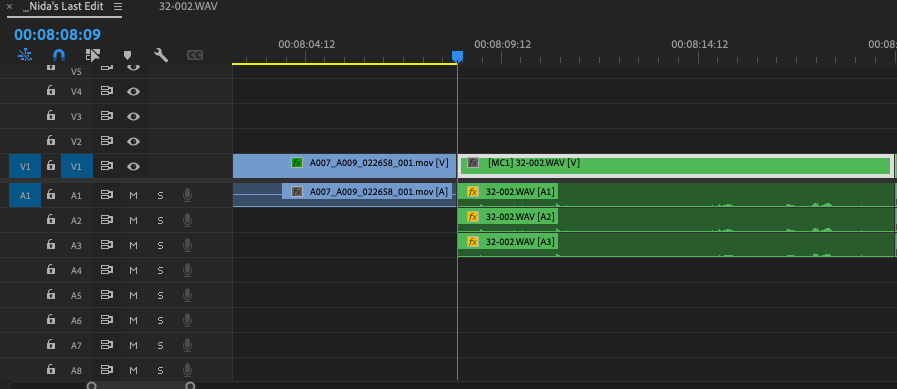
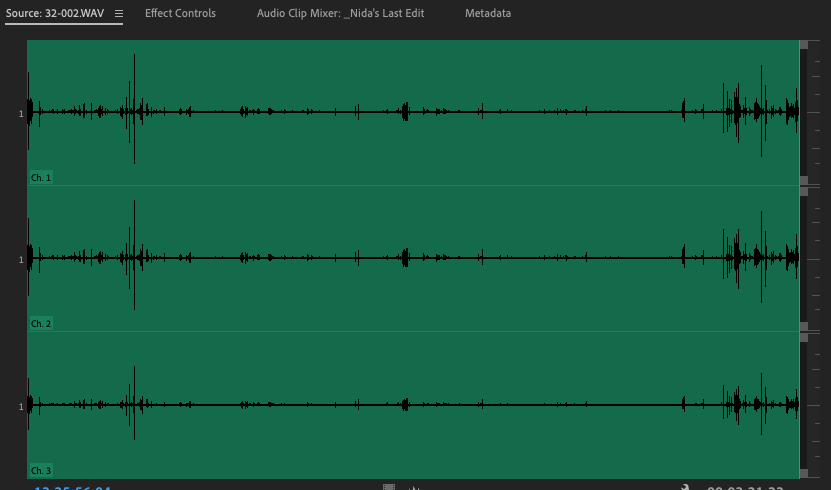
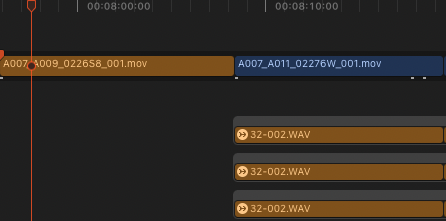
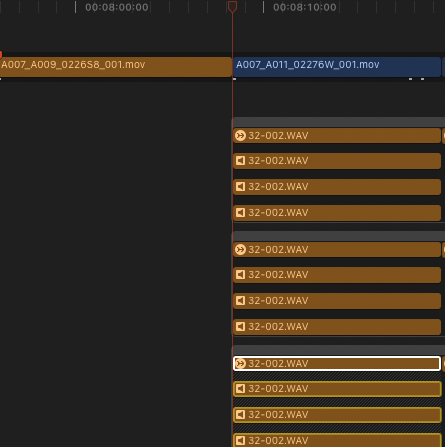
This still doesn't get at what is FCP's limit or threshold for slowing down. Granted they're coded very different, but PPro has no issue with moving, trimming, scrolling, etc. that FCP does even with visual frames and audio waveforms turn off in the timeline. Though PPro is much slower in other ways. It's ironic that (at least in this case) the fluidity that I have long been used to in FCP for a project this size is much more GUI- responsive in Premiere Pro and Resolve (I tested it in there too).
Last edit: 04 Jan 2023 05:50 by tangierc. Reason: Adding images
Please Log in to join the conversation.
04 Jan 2023 19:35 #123492
by joema
I ran FCP under XCode and Instruments to study it while using your library. One issue (as you already mentioned) is there were over 6,000 "To Do" markers. I could see in the call stacks it was spending a lot of time processing those.
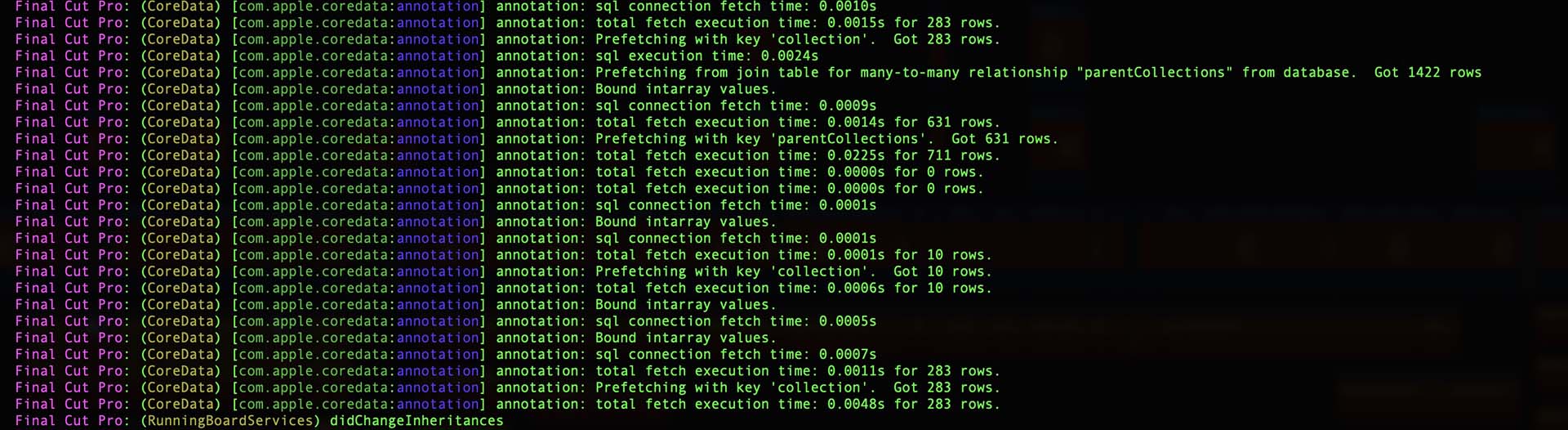
However even when those were removed it was still sluggish, just less so. I studied the SQL statements send to SQLite, and (contrary to my previous guess) they don't appear that slow. They are apparently executing within a few milliseconds (see attached).
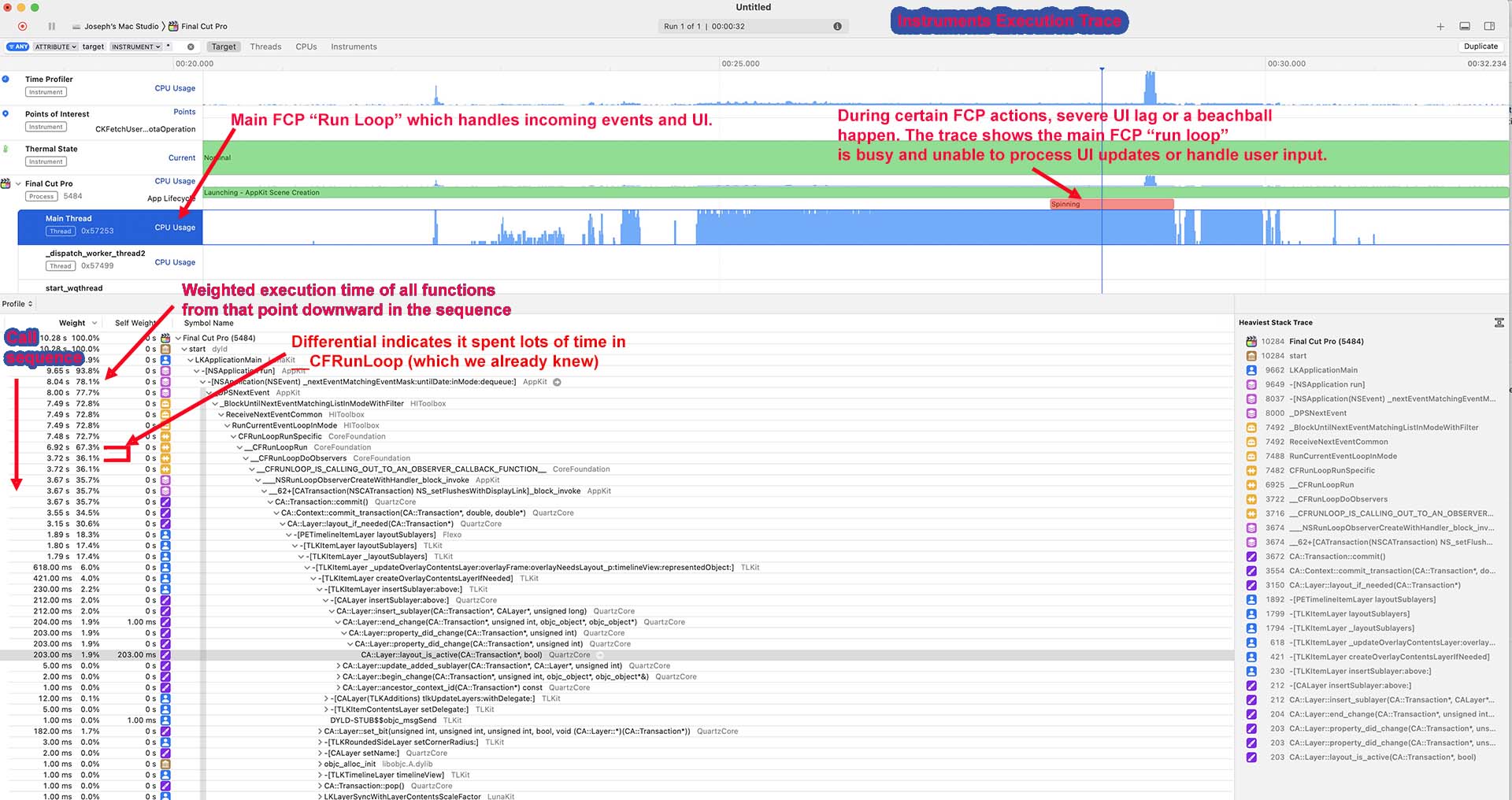
Using the Instruments tracing tool, I monitored FCP when the UI was lagging on your library, and attached is one example. The main "run loop" (which on any MacOS app is supposed to not become blocked or enter a time-consuming phase) is spinning through a sequence of apparently UI-related functions. I don't know why.
I will study this more tomorrow.
Replied by joema on topic Choppy Timeline Editing - Getting Back to Fluidity?
...This still doesn't get at what is FCP's limit or threshold for slowing down....
I ran FCP under XCode and Instruments to study it while using your library. One issue (as you already mentioned) is there were over 6,000 "To Do" markers. I could see in the call stacks it was spending a lot of time processing those.
However even when those were removed it was still sluggish, just less so. I studied the SQL statements send to SQLite, and (contrary to my previous guess) they don't appear that slow. They are apparently executing within a few milliseconds (see attached).
Using the Instruments tracing tool, I monitored FCP when the UI was lagging on your library, and attached is one example. The main "run loop" (which on any MacOS app is supposed to not become blocked or enter a time-consuming phase) is spinning through a sequence of apparently UI-related functions. I don't know why.
I will study this more tomorrow.
Please Log in to join the conversation.
04 Jan 2023 21:45 - 05 Jan 2023 00:11 #123496
by DaveM
Replied by DaveM on topic Choppy Timeline Editing - Getting Back to Fluidity?
Thanks for the update, Joe.
Here's my brief test report:
I wonder why FCP(X) has trouble (at least for me) with so many "to do" markers affecting the UI responsiveness.
Tangier, from your latter posts it seems that you exported an XML and also imported things into Resolve. Did you go directly from the Premiere Pro exported XML or did you import the XML created by 7toX/SendToX into Resolve?
So, for me at least, it seems that FCP has an issue with large numbers of "to do" markers. Perhaps Joe can try to look into this a bit more.
Hope this helps. It was quite helpful for me to learn about the "to do" markers. I am working on an old project that was edited in FCP 7, so I'll keep an eye out for any UI issues (haven't seen anything noticeable yet). That project is 26 minutes long (far fewer "to do" makers from 7toX/SendToX).
Cheers.
Here's my brief test report:
- I used an empty, newly-formatted (APFS) Gen. 1 Sandisk Extreme Pro external SSD, on which I put a test library and all associated storage locations.
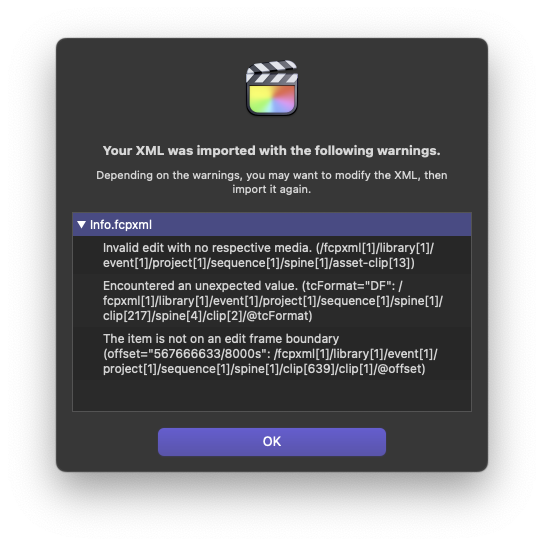
- I imported the XML, which took about 5 to 6 minutes (on my 2019 Mac Pro). An error dialogue appeared at the end of the import (see attached image).
- I loaded the Project/timeline, which took about 5 minutes. I had my View menu Media Playback set to Proxy Only and minimized the timeline clips to not show any waveforms (as you did in your screenshot movies, Tangier). Background rendering turned off, as well.
- Initially, scrolling up and down was a bit less laggy/jerky than it appeared in your movies, Tangier. Trimming clip durations was laggy/jerky like in your movies. Using the keyboard exclusively was a bit less so (not much). I had Activity Monitor open on my other display and when resizing the timeline (via Shift-Z) or trimming or moving clips with the cursor, the FCP process in Activity Monitor frequently showed as being non-responsive. I saw beachballs for 5 to 10 seconds for some operations.
- I ran the "Verify and Repair Project" command on the loaded sequence ("Project/timeline"). A dialogue reported that errors were found and asked to go ahead and repair them. I did.
- UI responsiveness was much better after doing the "Verify and Repair Project".
- I noticed Joe's message and then deleted the 6100-odd "to do" markers, leaving a handful of regular markers. That made a huge difference. UI responsiveness was then very good, as good as I've seen with a larger/complex project. Cursor/UI scrolling and clip trimming was very responsive.
I wonder why FCP(X) has trouble (at least for me) with so many "to do" markers affecting the UI responsiveness.
Tangier, from your latter posts it seems that you exported an XML and also imported things into Resolve. Did you go directly from the Premiere Pro exported XML or did you import the XML created by 7toX/SendToX into Resolve?
So, for me at least, it seems that FCP has an issue with large numbers of "to do" markers. Perhaps Joe can try to look into this a bit more.
Hope this helps. It was quite helpful for me to learn about the "to do" markers. I am working on an old project that was edited in FCP 7, so I'll keep an eye out for any UI issues (haven't seen anything noticeable yet). That project is 26 minutes long (far fewer "to do" makers from 7toX/SendToX).
Cheers.
Last edit: 05 Jan 2023 00:11 by DaveM.
Please Log in to join the conversation.
04 Jan 2023 23:10 - 04 Jan 2023 23:13 #123498
by joema
Dave thanks for the testing. Interesting find about "Verify and Repair Project". After you mentioned it I tried that and maybe it sped things up, but I'd already deleted all the To Do markers. It was still quite sluggish, but I think faster.
I then deleted the first 1/2 of the timeline, leaving about 50 min, and it was considerably better. Then I reversed that, deleting the last 1/2 of the original timeline, leaving the same amount. Both cases were significantly faster, although a bit laggy (esp. considering I'm on a top-spec M1 Ultra Mac Studio).
There is no doubt the original timeline was pathologically slow. I don't see how someone could use that.
We've had various reports of this over the years, OTOH people successfully work on long timeline -- but there's a difference between "long" and "large" (IOW complex).
Re the 6,000+ markers, they aren't just simple GUI objects. There are data structures underlying all that. I can see in the stack traces it loading Core Animation support layers when those are referenced.
There is a private framework called TLKit (TimeLine Kit) that apparently manages much of the timeline, and which in turn calls Core Animation. Something about how that's written causes exponential performance degradation as certain timeline complexity parameters increase.
Although FCP is very fluid and fast in many cases, when this situation happens the main "run loop" thread gets stuck in repetitive time-consuming functions, during which it's not updating the UI or handling other events. A well-designed GUI app should never do that.
It's typical to blame plugins or hardware for this (with some justification), but it might be an intrinsic timeline scalability problem. That said, the apparent project damage could be a factor.
The problem might be lack of parallelization, IOW the run loop thread should be handing off work to other worker threads, then receiving notification when they complete a task. During that waiting period, the run loop can service UI events and redraw the app window. Or it might be the functions (aka methods) it's calling are bogged down due to some kind of malformed data.
I will try to work on it more tomorrow.
Replied by joema on topic Choppy Timeline Editing - Getting Back to Fluidity?
... I am working on an old project that was edited in FCP 7, so I'll keep an eye out for any UI issues (haven't seen anything noticeable yet). That project is 26 minutes long (far fewer "to do" makers from 7toX/SendToX)....
Dave thanks for the testing. Interesting find about "Verify and Repair Project". After you mentioned it I tried that and maybe it sped things up, but I'd already deleted all the To Do markers. It was still quite sluggish, but I think faster.
I then deleted the first 1/2 of the timeline, leaving about 50 min, and it was considerably better. Then I reversed that, deleting the last 1/2 of the original timeline, leaving the same amount. Both cases were significantly faster, although a bit laggy (esp. considering I'm on a top-spec M1 Ultra Mac Studio).
There is no doubt the original timeline was pathologically slow. I don't see how someone could use that.
We've had various reports of this over the years, OTOH people successfully work on long timeline -- but there's a difference between "long" and "large" (IOW complex).
Re the 6,000+ markers, they aren't just simple GUI objects. There are data structures underlying all that. I can see in the stack traces it loading Core Animation support layers when those are referenced.
There is a private framework called TLKit (TimeLine Kit) that apparently manages much of the timeline, and which in turn calls Core Animation. Something about how that's written causes exponential performance degradation as certain timeline complexity parameters increase.
Although FCP is very fluid and fast in many cases, when this situation happens the main "run loop" thread gets stuck in repetitive time-consuming functions, during which it's not updating the UI or handling other events. A well-designed GUI app should never do that.
It's typical to blame plugins or hardware for this (with some justification), but it might be an intrinsic timeline scalability problem. That said, the apparent project damage could be a factor.
The problem might be lack of parallelization, IOW the run loop thread should be handing off work to other worker threads, then receiving notification when they complete a task. During that waiting period, the run loop can service UI events and redraw the app window. Or it might be the functions (aka methods) it's calling are bogged down due to some kind of malformed data.
I will try to work on it more tomorrow.
Last edit: 04 Jan 2023 23:13 by joema.
Please Log in to join the conversation.
04 Jan 2023 23:51 - 05 Jan 2023 00:20 #123501
by tangierc
Replied by tangierc on topic Choppy Timeline Editing - Getting Back to Fluidity?
joema thanks for this investigation. I really appreciate it. I've been progressively removing a lot of the markers from the SendToX translation as well as the multiples of audio storylines. Still laggy, but getting minutely better. Hopefully others will benefit from this information too.
Those sql executions seem pretty fast and not anything that would cause this GUI performance problem.
Those sql executions seem pretty fast and not anything that would cause this GUI performance problem.
Last edit: 05 Jan 2023 00:20 by tangierc.
Please Log in to join the conversation.
05 Jan 2023 00:06 #123502
by DaveM
Replied by DaveM on topic Choppy Timeline Editing - Getting Back to Fluidity?
Joe, I had been thinking about the source and converted XML files since the discussion started.
Perhaps, Premiere Pro isn't outputting an XML file that is of high fidelity. Or, maybe 7toX/SendToX is doing a poor translation. Or both.
I do tend to think that expecting a high fidelity transfer from one NLE to another is not going to be as successful as one might want/think, especially for anything more than a set of clips in a sequence. Once you start adding effects, titles, markers, notes, etc., the fidelity of the converted project is going to decrease. Think of transferring a complex, but typical, project from QuarkXPress to InDesign, or a Photoshop project to Affinity Photo. No matter the interchange format, some things just don't transfer well, if at all. It's probably more difficult when one has to use an intermediary format like XML, which in turn has to be converted itself. I recall reading somewhere that Philip Hodgetts mentioned that the FCP XML DTD doesn't fully cover the functionality of FCP, making it a less than optimal way of transferring project data.
And, for each one of those "to do" makers added by 7toX/SendToX, it indicates something that had to be changed, interpreted, or ignored from the source XML file. Each instance is potentially something that when imported into FCP might cause a problem.
I've been lucky, I guess, that I have worked on rather complex projects in FCP with final durations of up to 2 or 3 hours without noticing any unexpected UI slowdowns. Tangier mentions this, too. So, it may well be that the source or converted XML contains objects that could lead to slowdowns in FCP.
I wonder if "to do" markers are "heavier" than normal markers, in terms of resource utilization in FCP. Or, if there is a design or implementation issue for "to do" markers numbering over a few hundred...
Perhaps, Premiere Pro isn't outputting an XML file that is of high fidelity. Or, maybe 7toX/SendToX is doing a poor translation. Or both.
I do tend to think that expecting a high fidelity transfer from one NLE to another is not going to be as successful as one might want/think, especially for anything more than a set of clips in a sequence. Once you start adding effects, titles, markers, notes, etc., the fidelity of the converted project is going to decrease. Think of transferring a complex, but typical, project from QuarkXPress to InDesign, or a Photoshop project to Affinity Photo. No matter the interchange format, some things just don't transfer well, if at all. It's probably more difficult when one has to use an intermediary format like XML, which in turn has to be converted itself. I recall reading somewhere that Philip Hodgetts mentioned that the FCP XML DTD doesn't fully cover the functionality of FCP, making it a less than optimal way of transferring project data.
And, for each one of those "to do" makers added by 7toX/SendToX, it indicates something that had to be changed, interpreted, or ignored from the source XML file. Each instance is potentially something that when imported into FCP might cause a problem.
I've been lucky, I guess, that I have worked on rather complex projects in FCP with final durations of up to 2 or 3 hours without noticing any unexpected UI slowdowns. Tangier mentions this, too. So, it may well be that the source or converted XML contains objects that could lead to slowdowns in FCP.
I wonder if "to do" markers are "heavier" than normal markers, in terms of resource utilization in FCP. Or, if there is a design or implementation issue for "to do" markers numbering over a few hundred...
Please Log in to join the conversation.
05 Jan 2023 00:09 #123503
by joema
Tangier, Dave mentioned he used the undocumented "Repair Project" command and it seemed a lot faster afterward. To access that, first make a file-level backup of the library. It should be safe but you never know.
Then select the project in FCP and do OPT+Clip>Verify & Repair Project.
Replied by joema on topic Choppy Timeline Editing - Getting Back to Fluidity?
... I've been progressively removing a lot of the markers from the SendToX translation as well as the multiples of audio storylines. Still laggy, but getting minutely better...
Tangier, Dave mentioned he used the undocumented "Repair Project" command and it seemed a lot faster afterward. To access that, first make a file-level backup of the library. It should be safe but you never know.
Then select the project in FCP and do OPT+Clip>Verify & Repair Project.
Please Log in to join the conversation.
05 Jan 2023 00:44 - 05 Jan 2023 01:01 #123504
by tangierc
Replied by tangierc on topic Choppy Timeline Editing - Getting Back to Fluidity?
Thanks for testing Dave. Here's my results so far and replies to your questions:
Tested on 2013 Mac Pro (desktop station) on OWC Gemini in RAID 1 over Thunderbolt 2 with the full FCP library that includes all of my 26 events.
I'll test this on my M1 Pro MacBook Pro over Thunderbolt 3 instead, but if testing so far is any indication through this process, UI responsiveness hasn't been greatly improved by moving the library to Apple Silicon (even with all of the media offline). I tried it on an M1 iMac as well. There are things that were faster such as scrubbing and load times of the libraries and projects however. That being said, I've held off replacing my desktop with a Mac Studio because [last year] I was hoping to at least see what a new Mac Pro would offer first (which we still don't know)...likely beyond what I'd want to spend, but at the time I wanted to wait never the less and my 2013 MP has still been great for for 4K multicam projects. It seems even if I did upgrade my desktop to a Mac Studio in the near future, that this issue would still be present with this library. I can't say that definitively though since the only Apple Silicon machine I have / have access to are an M1 Pro MacBook Pro and an M1 iMac.
Tested on 2013 Mac Pro (desktop station) on OWC Gemini in RAID 1 over Thunderbolt 2 with the full FCP library that includes all of my 26 events.
- I deleted just about all of the duplicate and triples of attached storyline audio up to an hour( out of 97 minutes) of the timeline.
- Relaunched library and FCP. This took 5:53 to open with the project timeline (already there from previous launch)
- Did the Verify and Repair and got the dialogue window informing me of "Inconsistencies found in the project. Repair is Recommended". This took about 12 sec. to complete.
- At this point trimming and moving clips is still laggy and marginally improved (almost unnoticeable)
- I reduced the markers to just 41 markers. Trimming and moving clips is still laggy. Vertical and horizontal scrolling has improved quite a bit sine reducing the markers and deleting a lot of the audio as described above.
I'll test this on my M1 Pro MacBook Pro over Thunderbolt 3 instead, but if testing so far is any indication through this process, UI responsiveness hasn't been greatly improved by moving the library to Apple Silicon (even with all of the media offline). I tried it on an M1 iMac as well. There are things that were faster such as scrubbing and load times of the libraries and projects however. That being said, I've held off replacing my desktop with a Mac Studio because [last year] I was hoping to at least see what a new Mac Pro would offer first (which we still don't know)...likely beyond what I'd want to spend, but at the time I wanted to wait never the less and my 2013 MP has still been great for for 4K multicam projects. It seems even if I did upgrade my desktop to a Mac Studio in the near future, that this issue would still be present with this library. I can't say that definitively though since the only Apple Silicon machine I have / have access to are an M1 Pro MacBook Pro and an M1 iMac.
Last edit: 05 Jan 2023 01:01 by tangierc.
Please Log in to join the conversation.
