




- Posts: 272
- Thank you received: 2
3 Post Moderation Rule for New Boarders (25 Jan 2021)
New boarders will have their posts moderated - Don't worry if you cannot see your post immediately.
10.6.5: STILL doesn't remember waveform, clip size browser settings on opening
10 Dec 2022 23:16 - 11 Dec 2022 02:18 #123251
by Slaughter
10.6.5: STILL doesn't remember waveform, clip size browser settings on opening was created by Slaughter
Further to:
fcp.co/forum/4-final-cut-pro-x-fcpx/3539...-settings-on-opening
My understanding was that this glitch was fixed some time after 10.4.1?
ie every time I resume work, FCPX decides to maximise the size and view of clips in the browser, so every single time I have manually resize them in the browser, scroll it all back up etc.
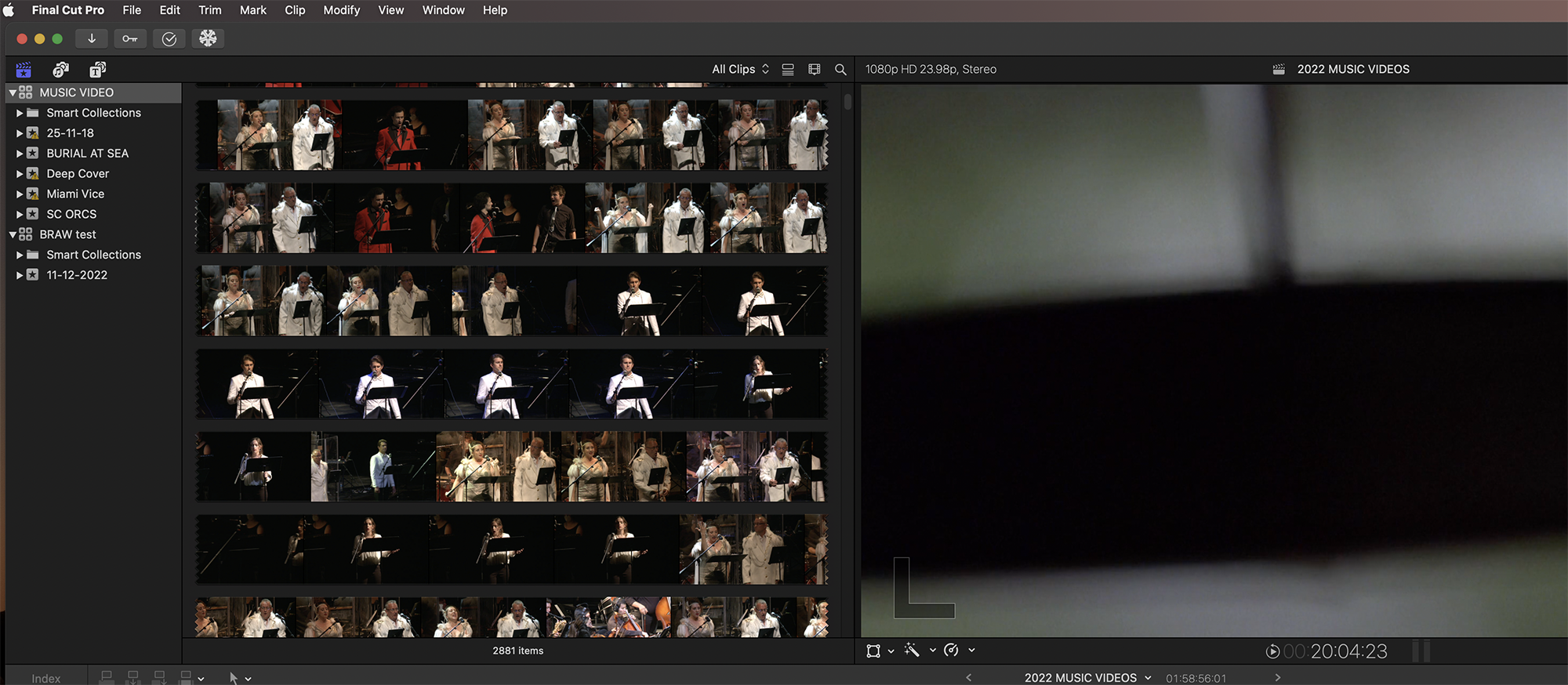
Here's an example of what I am greeted with. Every time. I did *not* leave my browser like this when I left my last session:
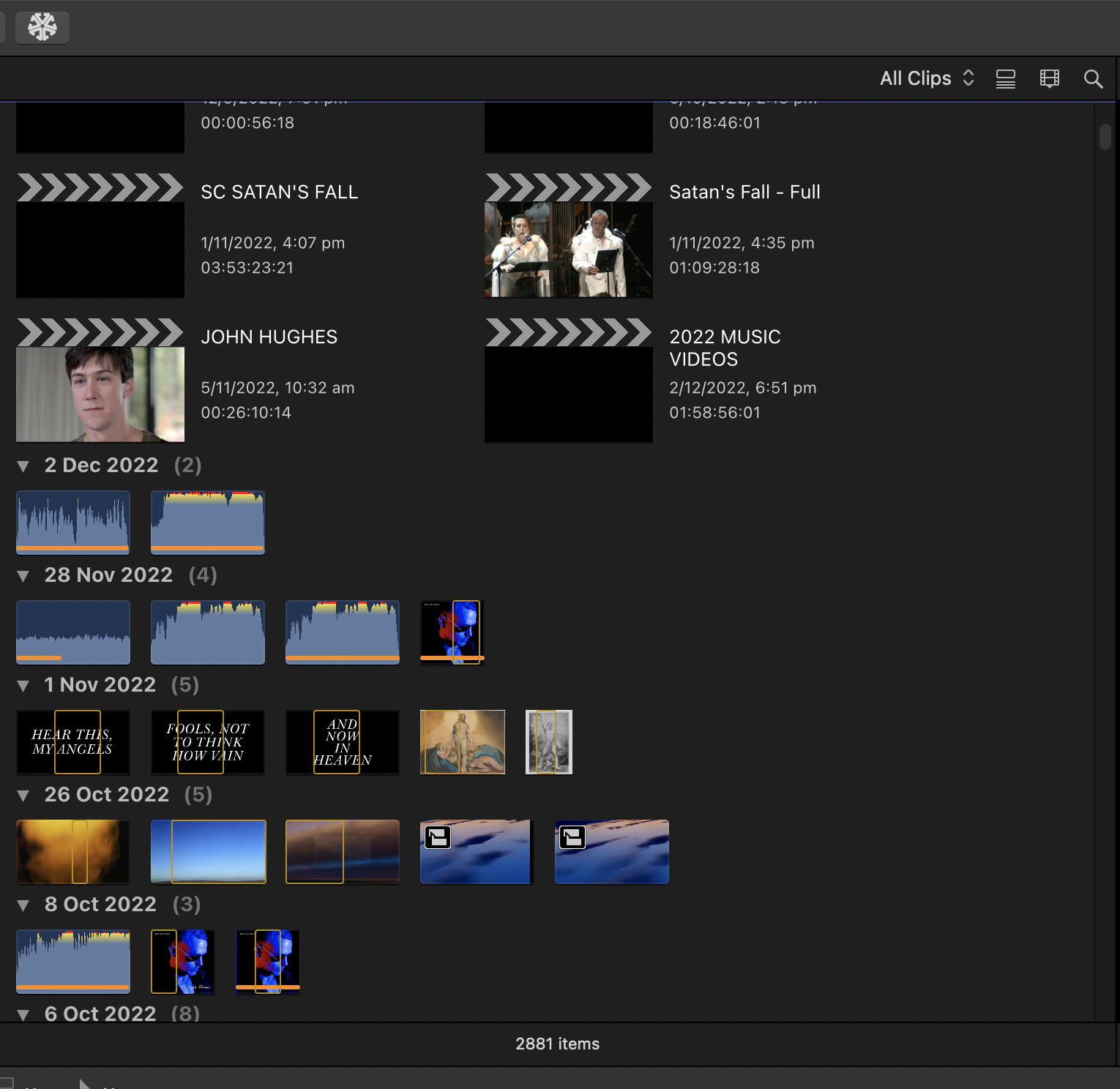
Here's how I *do* leave my workspace before quitting:
Given that surely FCPX fixed this a while ago, it must be a problem in my libraries... but... all of them? All of them on every separate external SSD? I run a pretty minimal system, regularly scan for viruses and am struggling to work out how corruption could have occurred for every single project I have on every single drive.
I suspect there might be a corrupt FCP preference or cache which I need to trash - but I don't want to accidentally destroy important workflow information.
Any ideas?
Cheers
___
imac pro 2017
Monterey 12.6.1
FCPX 10.6.5
fcp.co/forum/4-final-cut-pro-x-fcpx/3539...-settings-on-opening
My understanding was that this glitch was fixed some time after 10.4.1?
ie every time I resume work, FCPX decides to maximise the size and view of clips in the browser, so every single time I have manually resize them in the browser, scroll it all back up etc.
Here's an example of what I am greeted with. Every time. I did *not* leave my browser like this when I left my last session:
Here's how I *do* leave my workspace before quitting:
Given that surely FCPX fixed this a while ago, it must be a problem in my libraries... but... all of them? All of them on every separate external SSD? I run a pretty minimal system, regularly scan for viruses and am struggling to work out how corruption could have occurred for every single project I have on every single drive.
I suspect there might be a corrupt FCP preference or cache which I need to trash - but I don't want to accidentally destroy important workflow information.
Any ideas?
Cheers
___
imac pro 2017
Monterey 12.6.1
FCPX 10.6.5
Last edit: 11 Dec 2022 02:18 by Slaughter.
Please Log in to join the conversation.


11 Dec 2022 04:30 #123253
by dgwvideo
Creating history....one edit at a time !
Replied by dgwvideo on topic 10.6.5: STILL doesn't remember waveform, clip size browser settings on opening
This bug was never fixed. It still exists today in the latest version of FCP (10.6.5) as of this post, and with the latest Ventura OS. It has been intermittent over the last few releases - IOW, on rare occasions I have noticed it did in fact retain the last layout state when starting back up. Most of the time, sadly, it always resets to the state you describe. Apple must certainly be aware of it by now. I have reported it numerous times as I am sure others have. I am speaking strictly of my experience on Intel Mac machines. I don't know if Silicon Macs act differently, but I doubt it.
Creating history....one edit at a time !
Please Log in to join the conversation.
11 Dec 2022 05:39 #123256
by Slaughter
Replied by Slaughter on topic 10.6.5: STILL doesn't remember waveform, clip size browser settings on opening
Gosh! That is.... disappointing. Whilst not a content destructive glitch, it very negatively impacts on user experience. If your introduction to every edit is to be greeted by a clip view browser set to zoomed-in, enlarged clips, scrolled all the way to the bottom of the screen, requiring you to manually reset it, this is not going to instil you with great confidence in the application itself. It feels like eating grits of sand in a breadroll.
Please Log in to join the conversation.
- Tom Wolsky
-

- Offline
- Moderator
-

11 Dec 2022 05:57 #123257
by Tom Wolsky
Replied by Tom Wolsky on topic 10.6.5: STILL doesn't remember waveform, clip size browser settings on opening
I haven’t seen this in a very long time. The problem may be specific to certain hardware setups including drives and storage locations.
Please Log in to join the conversation.
11 Dec 2022 11:38 #123260
by Slaughter
Replied by Slaughter on topic 10.6.5: STILL doesn't remember waveform, clip size browser settings on opening
I didn't think my config was particularly odd. 2017 imac pro, external SSD's.
Please Log in to join the conversation.
- Tom Wolsky
-
- Offline
- Moderator
-
11 Dec 2022 12:10 #123261
by Tom Wolsky
Replied by Tom Wolsky on topic 10.6.5: STILL doesn't remember waveform, clip size browser settings on opening
It depends on the specifics, drives, formatting, media types, library and media location.
Please Log in to join the conversation.
11 Dec 2022 16:32 #123263
by dgwvideo
Creating history....one edit at a time !
Replied by dgwvideo on topic 10.6.5: STILL doesn't remember waveform, clip size browser settings on opening
Tom, FYI...I am using an iMac Pro 2017 with attached storage. Thunderbay 8 with OWC SSD's and an OWC 8TB Pro 2 dual U.2 NVME SSD. Library and Media is located on the U.2 NVME and also on the Thunderbay 8 SSD's, but each project has Library and media in only one of the 2 locations, never split between them. My FCP cache is on a fast SSD in the Thunderbay 8. Occasionally on short projects I'll use the iMac Pro internal 8TB drive for Library and Media, but cache remains on the Thunderbay SSD. All connections are via Thunderbolt 3. The media type is typically Sony XAVC-I 400 to 600 mbps, Prores 422 and 422HQ from BlackMagic Pocket Cinema Pro cameras, GoPro Hero 9 Black 4K 60 and 5K30 footage, and Panasonic DVX200 P2 H.264 footage. I have noticed that sometimes the layout sticks and most times it doesn't, so I'll have to pay attention to what project types and media are used to see if there is any correlation.
Creating history....one edit at a time !
Please Log in to join the conversation.

12 Dec 2022 17:37 #123275
by dmetz
Replied by dmetz on topic 10.6.5: STILL doesn't remember waveform, clip size browser settings on opening
I must be lucky or something. Literally have never seen this behavior.
Previous machine was a loaded trashcan, currently running an M1 Mini w/Monterey and pro apps current. Trashcan had an Areca 8050T2, the Mini's got an OWC Thunderbay 8 w/SSDs.
Previous machine was a loaded trashcan, currently running an M1 Mini w/Monterey and pro apps current. Trashcan had an Areca 8050T2, the Mini's got an OWC Thunderbay 8 w/SSDs.
Please Log in to join the conversation.
06 May 2023 00:25 #125267
by Slaughter
Replied by Slaughter on topic 10.6.5: STILL doesn't remember waveform, clip size browser settings on opening
Just keeping this one alive in the hope that Apple is held to account. It's been a problem since at least 2017:
discussions.apple.com/thread/8157576
Preaching to the choir here, but god damn it is an ugly welcome to open FCPX and see an absolute dogs breakfast in your browser window: Clip browser scrolled to bottom, clip size made enormous etc. Nope, didn't leave it that way. FCPX. As per link above, doesn't matter how often you trash prefs or whether you are using an external library or not. FCPX *has a mind of its own and will randomly mess up your browser every time.*
Please. For our sanity. Can the universe send a bolt of lightning over to Apple as a kick up the bum and do something about this!
discussions.apple.com/thread/8157576
Preaching to the choir here, but god damn it is an ugly welcome to open FCPX and see an absolute dogs breakfast in your browser window: Clip browser scrolled to bottom, clip size made enormous etc. Nope, didn't leave it that way. FCPX. As per link above, doesn't matter how often you trash prefs or whether you are using an external library or not. FCPX *has a mind of its own and will randomly mess up your browser every time.*
Please. For our sanity. Can the universe send a bolt of lightning over to Apple as a kick up the bum and do something about this!
Please Log in to join the conversation.
08 May 2023 15:26 #125311
by dmetz
Replied by dmetz on topic 10.6.5: STILL doesn't remember waveform, clip size browser settings on opening
This may be a dumb question, but I haven't seen it mentioned... have you tried setting it all up and saving as a new workspace?
Again, I've literally never seen this issue on my rig, but I've set up a custom workspace long ago that I use as my default.
Again, I've literally never seen this issue on my rig, but I've set up a custom workspace long ago that I use as my default.
Please Log in to join the conversation.
09 May 2023 03:17 #125327
by Slaughter
Replied by Slaughter on topic 10.6.5: STILL doesn't remember waveform, clip size browser settings on opening
Not a dumb question, and yes I have...
as per the link + other comments, this is sadly a known glitch for many users which Apple evidently doesn't care about fixing. It's like walking into your office every morning and finding that the cleaners have messed everything up, despite your notes and requests. Sigh...
as per the link + other comments, this is sadly a known glitch for many users which Apple evidently doesn't care about fixing. It's like walking into your office every morning and finding that the cleaners have messed everything up, despite your notes and requests. Sigh...
Please Log in to join the conversation.
13 May 2023 01:14 #125443
by Slaughter
Replied by Slaughter on topic 10.6.5: STILL doesn't remember waveform, clip size browser settings on opening
Truly. Truly. Truly irked by FCPX messing up my office *every single time I sit down to start work*. God I hope this egregious glitch is fixed in the next update.
Please Log in to join the conversation.
12 Jun 2023 00:19 #125883
by Slaughter
Replied by Slaughter on topic 10.6.5: STILL doesn't remember waveform, clip size browser settings on opening
For the love of god. Please. Someone tell me this has been addressed with version 10.6.6. Please.
Please Log in to join the conversation.


12 Jun 2023 12:18 #125890
by Ian Brown
Replied by Ian Brown on topic 10.6.5: STILL doesn't remember waveform, clip size browser settings on opening
No improvement in 10.6.6.
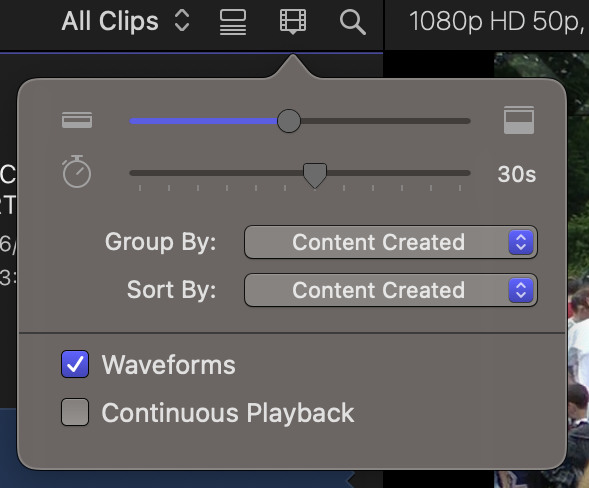
It reverts to the default setting whenever you shutdown and relaunch FCP.
It reverts to the default setting whenever you shutdown and relaunch FCP.
Please Log in to join the conversation.
13 Jun 2023 00:19 #125907
by Slaughter
Replied by Slaughter on topic 10.6.5: STILL doesn't remember waveform, clip size browser settings on opening
Oh, my god. It's the one thing I truly detest about FCPX - that it messes up my office every single time I go to work. Mnnggghhhhhhhhhhhhhhhhhhhhhhhhhhhhhhhhhhhhhhhhhh
Please Log in to join the conversation.
13 Jun 2023 07:27 - 13 Jun 2023 07:28 #125908
by Ian Brown
Replied by Ian Brown on topic 10.6.5: STILL doesn't remember waveform, clip size browser settings on opening
Can't you leave FCP open whilst the Mac is sleeping overnight?
Is it really a problem as it only takes 5 seconds to open the Clip Appearance Menu and drag the slider to the left hand side?
Is it really a problem as it only takes 5 seconds to open the Clip Appearance Menu and drag the slider to the left hand side?
Last edit: 13 Jun 2023 07:28 by Ian Brown.
Please Log in to join the conversation.
13 Jun 2023 08:03 #125909
by Slaughter
Replied by Slaughter on topic 10.6.5: STILL doesn't remember waveform, clip size browser settings on opening
> Can't you leave FCP open whilst the Mac is sleeping overnight?
I'm not one of those folks that leaves their machine running 24/7.
Especially when there is *any* chance of a power failure overnight (and heading into winter here,
there have been some probs with this recently).
> Is it really a problem as it only takes 5 seconds to open the Clip Appearance Menu and drag the slider to the left hand side?
Yes. Yes it really is a problem.
I don't like my office being messed up. Do you?
I don't like FCPX forgetting how everything was left every single time I open it.
It makes FCPX feel unreliable and unstable.
It is not just a case of dragging the clip slider over. FCPX randomly widens clips view AND enlarges clip size AND scrolls the browser to the bottom. Every effing time.
It looks *horrible* seeing my clip browser with these massive clip sizes and wave forms every time I open the application. Ugh. I want reliability, not random "I'm doing whatever I like" from this application.
This community is great but this is probably the first comment I've come across where the user is sort of being blamed for the short comings of the application. It's not helpful.
It *is* reasonable to find issue with the fact that FCPX forgets user settings, creating an atmosphere of unreliability.
I'm not one of those folks that leaves their machine running 24/7.
Especially when there is *any* chance of a power failure overnight (and heading into winter here,
there have been some probs with this recently).
> Is it really a problem as it only takes 5 seconds to open the Clip Appearance Menu and drag the slider to the left hand side?
Yes. Yes it really is a problem.
I don't like my office being messed up. Do you?
I don't like FCPX forgetting how everything was left every single time I open it.
It makes FCPX feel unreliable and unstable.
It is not just a case of dragging the clip slider over. FCPX randomly widens clips view AND enlarges clip size AND scrolls the browser to the bottom. Every effing time.
It looks *horrible* seeing my clip browser with these massive clip sizes and wave forms every time I open the application. Ugh. I want reliability, not random "I'm doing whatever I like" from this application.
This community is great but this is probably the first comment I've come across where the user is sort of being blamed for the short comings of the application. It's not helpful.
It *is* reasonable to find issue with the fact that FCPX forgets user settings, creating an atmosphere of unreliability.
Please Log in to join the conversation.
13 Jun 2023 09:21 - 13 Jun 2023 09:21 #125911
by Ian Brown
Replied by Ian Brown on topic 10.6.5: STILL doesn't remember waveform, clip size browser settings on opening
dmetz provided the solution . . . create a new workspace and use that as the default.
I have created one which I imaginatively called "Keep Clip Appearance" and now every time I open FCP the clips are all as I left them in the browser.
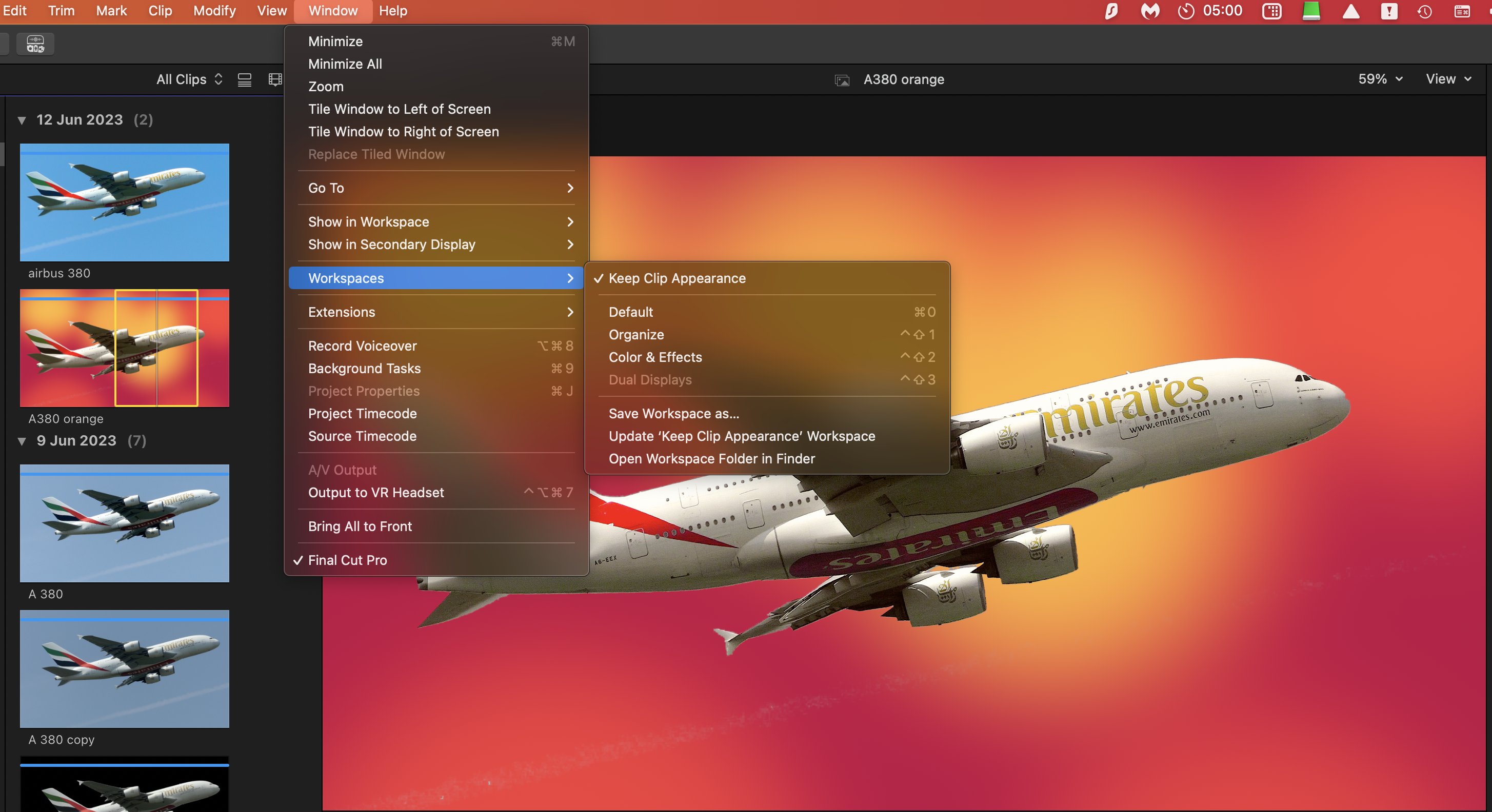
I have created one which I imaginatively called "Keep Clip Appearance" and now every time I open FCP the clips are all as I left them in the browser.
Last edit: 13 Jun 2023 09:21 by Ian Brown.
Please Log in to join the conversation.
13 Jun 2023 09:24 #125912
by Slaughter
Replied by Slaughter on topic 10.6.5: STILL doesn't remember waveform, clip size browser settings on opening
If only this worked.
I assure you, I'm not insane or lazy -
I have tried saving a new workspace like this and FCPX doesn't give an eff.
I've trashed prefs, I've done everything any reasonable and diligent person would
do. It doesn't work. None of it works. And I'm not the only one this happens to.
It's egregious that after all this time (*years*) no update has addressed it.
I assure you, I'm not insane or lazy -
I have tried saving a new workspace like this and FCPX doesn't give an eff.
I've trashed prefs, I've done everything any reasonable and diligent person would
do. It doesn't work. None of it works. And I'm not the only one this happens to.
It's egregious that after all this time (*years*) no update has addressed it.
dmetz provided the solution . . . create a new workspace and use that as the default.
I have created one which I imaginatively called "Keep Clip Appearance" and now every time I open FCP the clips are all as I left them in the browser.
Please Log in to join the conversation.
13 Jun 2023 09:53 #125913
by Ian Brown
Replied by Ian Brown on topic 10.6.5: STILL doesn't remember waveform, clip size browser settings on opening
My apologies.
You are correct in saying that creating a new workspace doesn't work.
I have just noticed that all the projects I tested it on had clips shorter than 59 seconds.
Up to that time the clip appears as a single icon but anything longer triggers the extended icons.
I must admit that I find it a minor irritation but I don't let it get me down.
It certainly isn't unreliable as you can always rely on it happening every time you launch FCP!!!!
You are correct in saying that creating a new workspace doesn't work.
I have just noticed that all the projects I tested it on had clips shorter than 59 seconds.
Up to that time the clip appears as a single icon but anything longer triggers the extended icons.
I must admit that I find it a minor irritation but I don't let it get me down.
It certainly isn't unreliable as you can always rely on it happening every time you launch FCP!!!!
Please Log in to join the conversation.
