



- Posts: 272
- Thank you received: 2
3 Post Moderation Rule for New Boarders (25 Jan 2021)
New boarders will have their posts moderated - Don't worry if you cannot see your post immediately.
10.4.10: STILL doesn't remember waveform, clip size browser settings on opening.
12 Jun 2021 04:19 #114966
by Slaughter
10.4.10: STILL doesn't remember waveform, clip size browser settings on opening. was created by Slaughter
FCPX 10.4.10 / Mojave 10.14.6 (and I can't update beyond this due to how expensive it is to update Pro Tools - I need to stay with Mojave and therefore 10.4.10 is the latest FCPX version I can use for now).
For the love of god.
Why. Why does FCPX still reset my frickin' wave form to maximum length and clip icon size in its browser, and set its browser to being scrolled to the very bottom - requiring a manual re-scroll back to top and reset of clip size EVERY FRICKING TIME I OPEN THE APPLICATION? Why does it not remember?
Why hasn't this infuriating glitch been fixed?
Not that it is anybody at this forum's fault... just venting. It is seriously un-effing-believable that this is still a problem. I've just done a clean re-install of my entire system and update fron 10.4.6 to 10.4.10... and eff me this still hasn't been fixed.
Has anyone managed to solve this?
For the love of god.
Why. Why does FCPX still reset my frickin' wave form to maximum length and clip icon size in its browser, and set its browser to being scrolled to the very bottom - requiring a manual re-scroll back to top and reset of clip size EVERY FRICKING TIME I OPEN THE APPLICATION? Why does it not remember?
Why hasn't this infuriating glitch been fixed?
Not that it is anybody at this forum's fault... just venting. It is seriously un-effing-believable that this is still a problem. I've just done a clean re-install of my entire system and update fron 10.4.6 to 10.4.10... and eff me this still hasn't been fixed.
Has anyone managed to solve this?
Please Log in to join the conversation.


12 Jun 2021 11:10 - 12 Jun 2021 11:11 #114968
by JoeEditor
Replied by JoeEditor on topic 10.4.10: STILL doesn't remember waveform, clip size browser settings on opening.
I'm on the latest macOS and FCP and they still occasionally do this. After 11 years, still not fixed...
Last edit: 12 Jun 2021 11:11 by JoeEditor.
Please Log in to join the conversation.
13 Jun 2021 01:04 #114976
by Slaughter
Replied by Slaughter on topic 10.4.10: STILL doesn't remember waveform, clip size browser settings on opening.
Wow. It's a small problem in the grand scheme of things, but what garbage. It's a completely needless irritation.
FIX THIS, Apple.
FIX THIS, Apple.
Please Log in to join the conversation.
- ronny courtens
-

- Offline
- Moderator
-

Less
More
- Posts: 4455
- Thank you received: 962
13 Jun 2021 10:20 #114978
by ronny courtens
Replied by ronny courtens on topic 10.4.10: STILL doesn't remember waveform, clip size browser settings on opening.
I usually work in List mode, so I have never paid attention to this. But after reading your rant, I did a test in Filmstrip mode. In Filmstrip mode, Clip height and Clip length settings are stored individually for each Event. Other settings such as Group by and Sort by are cross-Library settings.
So I chose 3 Events in my Library, changed the Clip height and Clip length settings for each Event, closed the app and launched it again. I did this 4-5 times, each time changing something in a particular Event. FCP never lost the settings and also remembered each time what Event I had selected before closing the app. I have recorded the test:
Test was done with the latest version of FCP and the latest version of Big Sur. So it won't help you with your older versions of FCP and OS. But it shows that FCP 10.5 has no issues remembering the Browser settings in Filmstrip mode. So there is no cause for Apple to "fix this". I believe Ben when he says that this might occasionally still happen, but I don't see it. And even if it did, it certainly is not "every freaking time" you re-open the app.
- Ronny
So I chose 3 Events in my Library, changed the Clip height and Clip length settings for each Event, closed the app and launched it again. I did this 4-5 times, each time changing something in a particular Event. FCP never lost the settings and also remembered each time what Event I had selected before closing the app. I have recorded the test:
Test was done with the latest version of FCP and the latest version of Big Sur. So it won't help you with your older versions of FCP and OS. But it shows that FCP 10.5 has no issues remembering the Browser settings in Filmstrip mode. So there is no cause for Apple to "fix this". I believe Ben when he says that this might occasionally still happen, but I don't see it. And even if it did, it certainly is not "every freaking time" you re-open the app.
- Ronny
Please Log in to join the conversation.

13 Jun 2021 18:40 #114980
by VTC
Replied by VTC on topic 10.4.10: STILL doesn't remember waveform, clip size browser settings on opening.
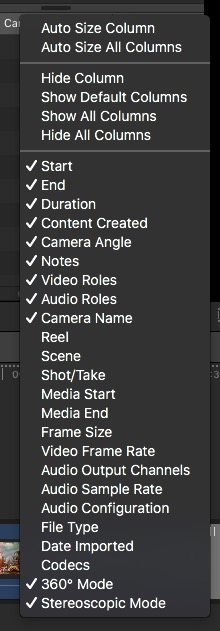
My complaint is THIS idiocy that resets! I'd like to determine on my own how I work and the things I use and KEEP them that way. Who's the moron that coded 360º (and other useless irritants) always be checked?
Please Log in to join the conversation.
14 Jun 2021 00:00 #114983
by JoeEditor
Replied by JoeEditor on topic 10.4.10: STILL doesn't remember waveform, clip size browser settings on opening.
Ronny, I work in list mode most of the time, and half the time FCP opens to the default configuration, not what I set it too.
Please Log in to join the conversation.
14 Jun 2021 00:37 #114985
by Slaughter
Replied by Slaughter on topic 10.4.10: STILL doesn't remember waveform, clip size browser settings on opening.
Thanks for taking the time to test this out at your end.
Sadly, it's very much still a problem under 10.4.10 and absolutely should have been fixed a long time ago.
Having only updated from 10.4.6 to 10 a week or so back, I was disappointed that this irritating glitch was still allowed to occur. I like to have all my settings nailed down for my work, and looks like I'm stuck having to clean up this annoying little mess 90% of the time I open FCPX.
Sadly, it's very much still a problem under 10.4.10 and absolutely should have been fixed a long time ago.
Having only updated from 10.4.6 to 10 a week or so back, I was disappointed that this irritating glitch was still allowed to occur. I like to have all my settings nailed down for my work, and looks like I'm stuck having to clean up this annoying little mess 90% of the time I open FCPX.
Please Log in to join the conversation.
