


- Posts: 222
- Thank you received: 4
3 Post Moderation Rule for New Boarders (25 Jan 2021)
New boarders will have their posts moderated - Don't worry if you cannot see your post immediately.
broadcast safe filter effect settings in FCPX
- FinalCutdown
-
 Topic Author
- Offline
- Elite Member
-

Less
More
18 Nov 2022 17:21 #122946
by FinalCutdown
broadcast safe filter effect settings in FCPX was created by FinalCutdown
I need to render a file for a broadcast station in germany. They require a Black Ref Level of 16 and a White Ref Level of 235 and a Color Range of 225.
(MXF Profile with XDCAM HD422, 1080i/25
and 8 mono AES3 audio tracks)
To get this profile, I will render a MXF in FCPX and transcode in compressor later. But first I have to apply a broadcast safe filter. Which "Amount"-setting do I need in the effect?
I guess Amount 0 is not enough as it will go from 0 to 256. So how can I be sure to deliver with broadcast requirements?
(MXF Profile with XDCAM HD422, 1080i/25
and 8 mono AES3 audio tracks)
To get this profile, I will render a MXF in FCPX and transcode in compressor later. But first I have to apply a broadcast safe filter. Which "Amount"-setting do I need in the effect?
I guess Amount 0 is not enough as it will go from 0 to 256. So how can I be sure to deliver with broadcast requirements?
Please Log in to join the conversation.


18 Nov 2022 23:33 - 18 Nov 2022 23:39 #122952
by DaveM
Replied by DaveM on topic broadcast safe filter effect settings in FCPX
There are "full" levels and "video" levels. In terms of 8-bit video, video levels are 16 to 235 and full range values are 0 to 255. IRE is always 0 to 100. I'm not sure how FCP handles levels on import, internally, and on export (it may be somewhat automatic).
Here's a nice article that discusses the topic:
www.thepostprocess.com/2019/09/24/how-to...evels-full-vs-video/
DaVinci Resolve is more transparent about how it handles levels.
So, as far as the Broadcast Safe effect in FCP goes, it clamps levels at 0 and 100 IRE. The Amount slider adds up to 10% headroom, which should equate to 10 and 90 IRE.
If you apply the Broadcast Safe effect as the last effect on a timeline/clip, or via an adjustment layer, then export, you could look at the resulting file with Invisor or MediaInfo and see what the color range metadata tag shows. If "limited/legal" you should be fine (16 to 235).
Here's a nice article that discusses the topic:
www.thepostprocess.com/2019/09/24/how-to...evels-full-vs-video/
DaVinci Resolve is more transparent about how it handles levels.
So, as far as the Broadcast Safe effect in FCP goes, it clamps levels at 0 and 100 IRE. The Amount slider adds up to 10% headroom, which should equate to 10 and 90 IRE.
If you apply the Broadcast Safe effect as the last effect on a timeline/clip, or via an adjustment layer, then export, you could look at the resulting file with Invisor or MediaInfo and see what the color range metadata tag shows. If "limited/legal" you should be fine (16 to 235).
Last edit: 18 Nov 2022 23:39 by DaveM.
Please Log in to join the conversation.
- FinalCutdown
-
Topic Author
- Offline
- Elite Member
-
Less
More
- Posts: 222
- Thank you received: 4
19 Nov 2022 08:30 #122954
by FinalCutdown
Replied by FinalCutdown on topic broadcast safe filter effect settings in FCPX
You are absolutely right! It should clamp to 16-135. But I am not sure how reliable the effect really is. In different forum I hear very different reactions. Some say their film got rejected from QC although the effect was applied. Does anybody know a 100 percent reliable filter? Maybe I can try to convert the film with avid instead of compressor and add an additional filter there.
Please Log in to join the conversation.
19 Nov 2022 18:24 #122956
by DaveM
Replied by DaveM on topic broadcast safe filter effect settings in FCPX
I haven't heard of the Broadcast Safe effect not working. Perhaps, something else was involved in the other reported cases, where someone wasn't applying, or using, it properly. If it isn't the last effect in the Effects stack, or the last effect applied to a timeline, levels could be changed by another effect, etc.
You could try using QCTools to verify your master before submitting it (it's in the App Store). DaVinci Resolve could also be used...
You could try using QCTools to verify your master before submitting it (it's in the App Store). DaVinci Resolve could also be used...
Please Log in to join the conversation.
- FinalCutdown
-
Topic Author
- Offline
- Elite Member
-
Less
More
- Posts: 222
- Thank you received: 4
19 Nov 2022 18:29 #122957
by FinalCutdown
Replied by FinalCutdown on topic broadcast safe filter effect settings in FCPX
Thanks QCTools looks very nice. You mean using DaVinci Resolve to look at the scopes?
Please Log in to join the conversation.
19 Nov 2022 19:23 #122959
by DaveM
Yes, sorry about not being clear enough. You could also export a ProRes from FCP and do "finishing" there. You could just check scopes or you could apply final adjustments in Resolve, then export/transcode...
Replied by DaveM on topic broadcast safe filter effect settings in FCPX
Thanks QCTools looks very nice. You mean using DaVinci Resolve to look at the scopes?
Yes, sorry about not being clear enough. You could also export a ProRes from FCP and do "finishing" there. You could just check scopes or you could apply final adjustments in Resolve, then export/transcode...
Please Log in to join the conversation.
- FinalCutdown
-
Topic Author
- Offline
- Elite Member
-
Less
More
- Posts: 222
- Thank you received: 4
20 Nov 2022 17:43 #122970
by FinalCutdown
Replied by FinalCutdown on topic broadcast safe filter effect settings in FCPX
I dont get it. I applied broadcast safe to every clip. Levels seem perfectly fine in the FCPX and resolve scopes - but the QCTool still shows a lot of pixels out of broadcast range for the BRNG filter. Mediainfo finds no color range metadata info for the XDCAM file (i can see the metadata info "legal" when I export as H264 though.. but still in QCTool its the same problem. Do you know whats going on?
Please Log in to join the conversation.
- FinalCutdown
-
Topic Author
- Offline
- Elite Member
-
Less
More
- Posts: 222
- Thank you received: 4
20 Nov 2022 17:49 - 20 Nov 2022 17:51 #122971
by FinalCutdown
Replied by FinalCutdown on topic broadcast safe filter effect settings in FCPX
Here are four pictures. Broadcast safe is on the bottom of the clip effects so its processed last. I tried to add an adjustment layer and placed the effect there - but its exactly the same.
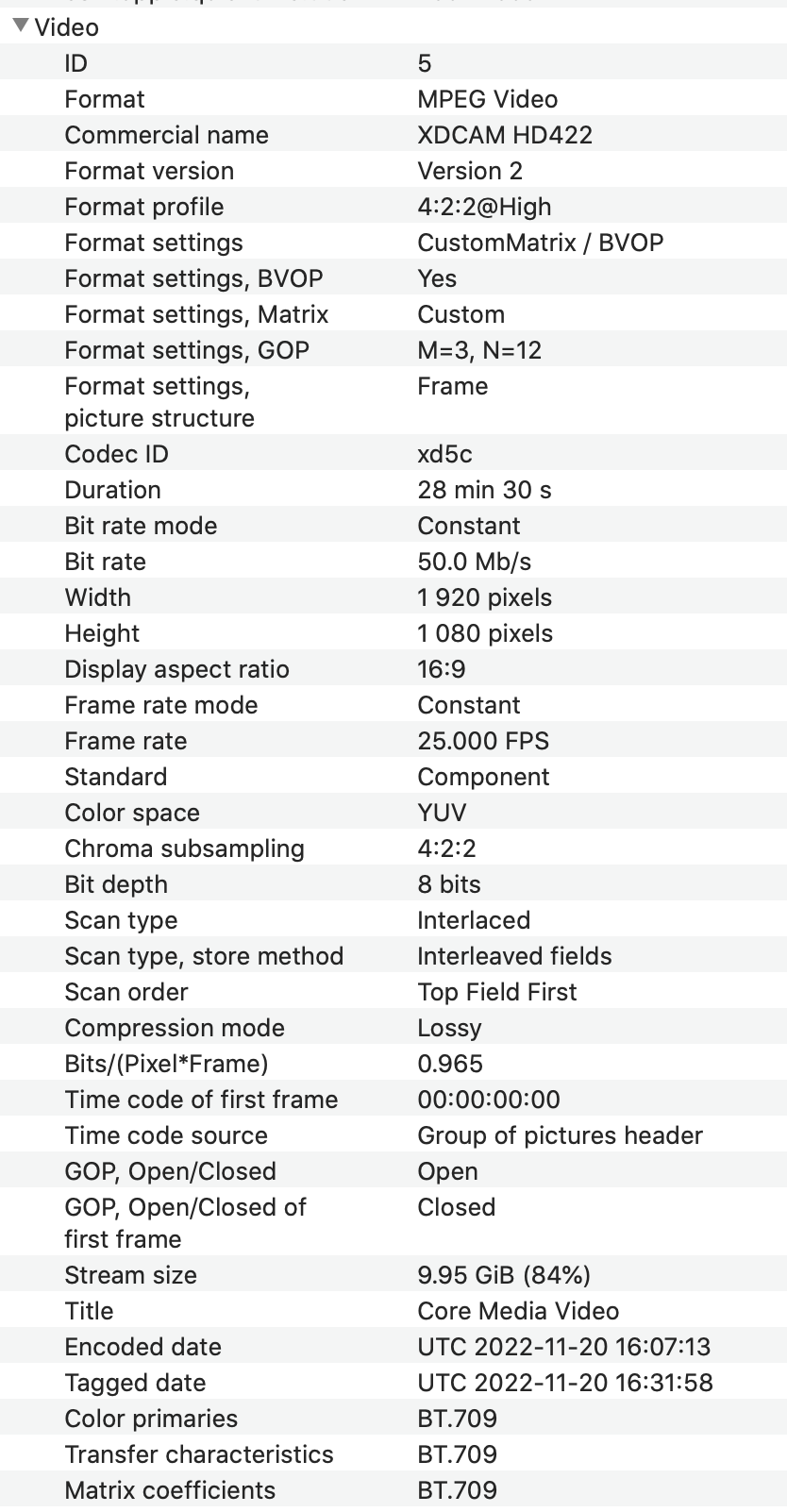
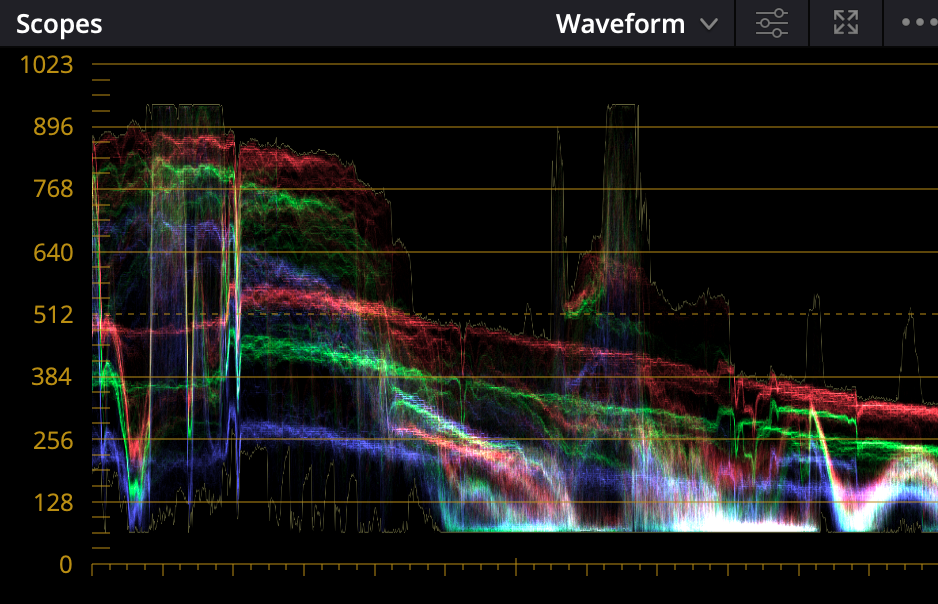


Last edit: 20 Nov 2022 17:51 by FinalCutdown.
Please Log in to join the conversation.
- FinalCutdown
-
Topic Author
- Offline
- Elite Member
-
Less
More
- Posts: 222
- Thank you received: 4
20 Nov 2022 18:00 #122972
by FinalCutdown
Replied by FinalCutdown on topic broadcast safe filter effect settings in FCPX
Resolve shows a lot highlighted in the display when I select "Display broadcast safe exeptions". I cannot see it in the scopes though. I will try to filter via resolve.
Please Log in to join the conversation.
20 Nov 2022 18:34 - 20 Nov 2022 18:39 #122973
by DaveM
Replied by DaveM on topic broadcast safe filter effect settings in FCPX
There are two many variables for me to be able to give you any sort of concrete advice. Settings or configuration of FCP or Resolve (in particular) can drastically affect what's happening.
The metadata listing in your first graphic (for XDCAM 422) shows no "color range" info but does indicate that the video is 8-bit. In the scopes screenshot, which appears to be from Resolve, the scale is set to display 10-bit. The last screen shot shows the color range as "limited" but it appears to be from a different file. I'm confused about which image corresponds to which file...
Resolve adds several layers of complexity to the situation, in that you need to have it configured properly or you may not get the proper display or export result you'd expect. Project settings, color management settings, and export settings need to be properly configured to ensure the correct end result.
It might be helpful to see the full specs that the broadcaster is requesting, in as much detail as possible. Also, it might be helpful to get a sample file to look at. At the risk of seeming a bit too pedantic, it might be good to draw a flow chart of every step you can identify in the signal flow in order to help pin down where things are going awry... this stuff borders on, or into, the realm of very technical stuff. If you have a point-of-contact you can reach out to at the broadcaster's QA department, he/she may be able to give you some advice.
Perhaps, it might be good to focus on a "simple" test case. If you could work with the QA department to test a few sample files, that might be helpful. I have no idea if QCTools provides accurate results from its tests, or if there could be certain constraints in its use.
Sorry if I'm not being clear enough. If we can simplify things, it would be easier to provide further advice...
The metadata listing in your first graphic (for XDCAM 422) shows no "color range" info but does indicate that the video is 8-bit. In the scopes screenshot, which appears to be from Resolve, the scale is set to display 10-bit. The last screen shot shows the color range as "limited" but it appears to be from a different file. I'm confused about which image corresponds to which file...
Resolve adds several layers of complexity to the situation, in that you need to have it configured properly or you may not get the proper display or export result you'd expect. Project settings, color management settings, and export settings need to be properly configured to ensure the correct end result.
It might be helpful to see the full specs that the broadcaster is requesting, in as much detail as possible. Also, it might be helpful to get a sample file to look at. At the risk of seeming a bit too pedantic, it might be good to draw a flow chart of every step you can identify in the signal flow in order to help pin down where things are going awry... this stuff borders on, or into, the realm of very technical stuff. If you have a point-of-contact you can reach out to at the broadcaster's QA department, he/she may be able to give you some advice.
Perhaps, it might be good to focus on a "simple" test case. If you could work with the QA department to test a few sample files, that might be helpful. I have no idea if QCTools provides accurate results from its tests, or if there could be certain constraints in its use.
Sorry if I'm not being clear enough. If we can simplify things, it would be easier to provide further advice...
Last edit: 20 Nov 2022 18:39 by DaveM.
Please Log in to join the conversation.
- FinalCutdown
-
Topic Author
- Offline
- Elite Member
-
Less
More
- Posts: 222
- Thank you received: 4
20 Nov 2022 18:54 #122974
by FinalCutdown
Replied by FinalCutdown on topic broadcast safe filter effect settings in FCPX
Thats right, that was a different file. The 8 bit file has the same problems. In resolve it was a very quick test. I havent been using it for some time when I switched to final cut. Here are the specs rearding color. Full specs are here:
www.google.com/url?sa=t&rct=j&q=&esrc=s&...k7eOvO5p1BmiHccehb4k
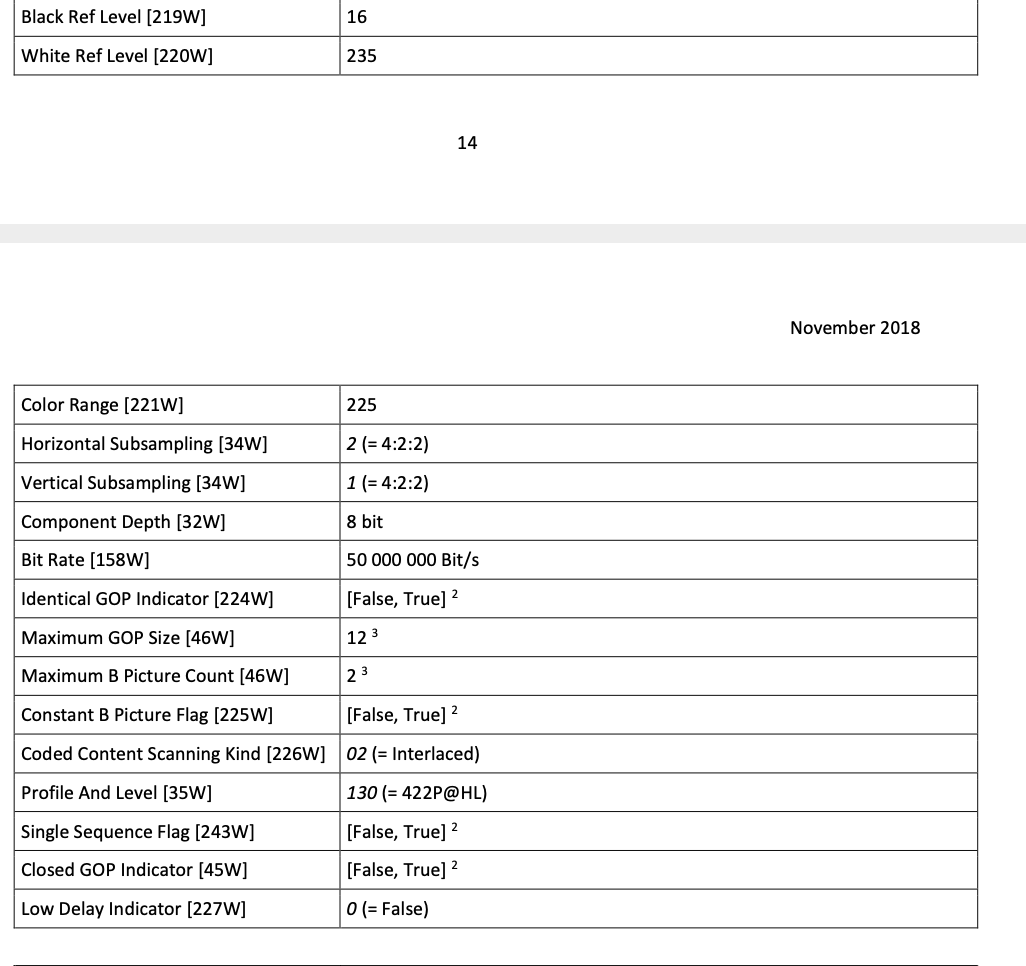
Please Log in to join the conversation.
- FinalCutdown
-
Topic Author
- Offline
- Elite Member
-
Less
More
- Posts: 222
- Thank you received: 4
20 Nov 2022 20:16 #122976
by FinalCutdown
Replied by FinalCutdown on topic broadcast safe filter effect settings in FCPX
Heres the description of the broadcast range filter of QCTool:
Broadcast Range (BRNG)
Filter Domain
Filter Name(s)
Range
Broadcast Range
BRNG
0-1
The BRNG filter is one that identifies the number of pixels which fall outside the standard video broadcast range of 16-235 (8-bit); 64-940 (10-bit) pixels. Normal, noise-free video would not trigger this filer, but noise occurring outside of these parameters would read as spikes in the graph. Typically anything with a value over 0.01 will read as an artifact. While the RANG filter is good at detecting the general presence of noise, it can be a bit non-specific in its identification of the causes.
BRNG = Broadcast Range
The spikes of the video have a value of 0,018. So I dont know if its a problem.
If I open the monitor, it detects issues in the dark parts of the image. seems like too much saturation in dark parts.
QC Tool looks for U and V values that are outside 16-140 for U and V. Is this right? Is it part of the specification?
Broadcast Range (BRNG)
Filter Domain
Filter Name(s)
Range
Broadcast Range
BRNG
0-1
The BRNG filter is one that identifies the number of pixels which fall outside the standard video broadcast range of 16-235 (8-bit); 64-940 (10-bit) pixels. Normal, noise-free video would not trigger this filer, but noise occurring outside of these parameters would read as spikes in the graph. Typically anything with a value over 0.01 will read as an artifact. While the RANG filter is good at detecting the general presence of noise, it can be a bit non-specific in its identification of the causes.
BRNG = Broadcast Range
The spikes of the video have a value of 0,018. So I dont know if its a problem.
If I open the monitor, it detects issues in the dark parts of the image. seems like too much saturation in dark parts.
QC Tool looks for U and V values that are outside 16-140 for U and V. Is this right? Is it part of the specification?
Please Log in to join the conversation.
21 Nov 2022 02:41 - 21 Nov 2022 02:50 #122977
by DaveM
Replied by DaveM on topic broadcast safe filter effect settings in FCPX
I have a test scene from a film project that is about 3 minutes long that I'm using as a test case. The timeline is set to ProRes 422 HQ.
I added a Broadcast Safe effect to the entire timeline using an adjustment layer, to which I applied the effect. The Amount is set to zero (no headroom or "footroom"), so 0 to 100 IRE.
I manually rendered the Project/timeline and exported three different formats: ProRes 422 HQ, Apple Devices 1080p (AVC/H.264), and MXF XDCAM 422 50Mbps. No changes were made to the default settings.
The exported ProRes 422 HQ file does not show as having a limited color range, whereas the other two exported files do show a limited color range in their metadata. The ProRes file is 10-bit and the other two are 8-bit.
It seems that only the ProRes 422 HQ exported file has colors close to being broadcast legal. The H.264 exported file shows color values ranging from near 0 up to 255 (not limited from 16 to 235). The MXF file I couldn't verify yet, as "Video Check" (an application that is part of Digital Rebellion's Pro Maintenance Tools) wouldn't read the file. I don't know how accurate Video Check is in its reporting.
QCTools is a bit of a mess. The scale of the graphs don't always jibe with the tooltip value when you hover over a given frame. The range for BRNG is given as 0 to 1. In some places, the BRNGc value, which is supposed to indicate frames that are out of range, is given as instances where it is greater than 0.02. I couldn't find any sort of in-depth discussion of how QCTools calculates the various values, such as BRNG. There may be typos in the various part of the application that further confuse things. I've used QCTools before, but not for rigorous analysis of broadcast color ranges.
As far as QCTools reports, the ProRes file seems to come out the best in terms of Y, U, V, and BRNG values. The MXF and H.264 files seem to fall slightly out of the brodcast range limits (it seems).
---
I guess a next step might be to create a graphic in FCP with specific RGB values, perhaps a line of colored bars. Then, export them to see what happens for a given export codec, with and without a Broadcast Safe effect having been applied. I have a suspicion that the Broadcast Safe filter may be doing the correct thing within FCP but that on export, depending on the codec/file choice, the range of color values may be expanded or kept at full rather than being limited to the legal/video range. I wonder if the timeline media being originally YUV or RGB makes any difference.
It's unfortunate that there is no explicit setting for the color range used (that I know of) when exporting from FCP. This is another instance of Apple "making it easier for most of us" but not all and the associated lack of transparency hurting most higher-end users...
I hope I'm missing something and invite others to chip in. I usually color correct/grade in Resolve, where there are more switches to flip but at least the UI and functionality is more transparent...
@FinalCutdown, I'd urge you to maybe complete a small section of your film, perhaps selecting a part that doesn't seem "valid" in QCTools and see if you can submit it for testing with the broadcaster's QA department. Depending the tools they use for testing (most likely an automated suite of test SW), your clip may pass (or not). Different broadcasters may have different amounts of leeway, etc. Unless you use the exact setup they have you won't know for sure if your project will pass their QA testing.
I added a Broadcast Safe effect to the entire timeline using an adjustment layer, to which I applied the effect. The Amount is set to zero (no headroom or "footroom"), so 0 to 100 IRE.
I manually rendered the Project/timeline and exported three different formats: ProRes 422 HQ, Apple Devices 1080p (AVC/H.264), and MXF XDCAM 422 50Mbps. No changes were made to the default settings.
The exported ProRes 422 HQ file does not show as having a limited color range, whereas the other two exported files do show a limited color range in their metadata. The ProRes file is 10-bit and the other two are 8-bit.
It seems that only the ProRes 422 HQ exported file has colors close to being broadcast legal. The H.264 exported file shows color values ranging from near 0 up to 255 (not limited from 16 to 235). The MXF file I couldn't verify yet, as "Video Check" (an application that is part of Digital Rebellion's Pro Maintenance Tools) wouldn't read the file. I don't know how accurate Video Check is in its reporting.
QCTools is a bit of a mess. The scale of the graphs don't always jibe with the tooltip value when you hover over a given frame. The range for BRNG is given as 0 to 1. In some places, the BRNGc value, which is supposed to indicate frames that are out of range, is given as instances where it is greater than 0.02. I couldn't find any sort of in-depth discussion of how QCTools calculates the various values, such as BRNG. There may be typos in the various part of the application that further confuse things. I've used QCTools before, but not for rigorous analysis of broadcast color ranges.
As far as QCTools reports, the ProRes file seems to come out the best in terms of Y, U, V, and BRNG values. The MXF and H.264 files seem to fall slightly out of the brodcast range limits (it seems).
---
I guess a next step might be to create a graphic in FCP with specific RGB values, perhaps a line of colored bars. Then, export them to see what happens for a given export codec, with and without a Broadcast Safe effect having been applied. I have a suspicion that the Broadcast Safe filter may be doing the correct thing within FCP but that on export, depending on the codec/file choice, the range of color values may be expanded or kept at full rather than being limited to the legal/video range. I wonder if the timeline media being originally YUV or RGB makes any difference.
It's unfortunate that there is no explicit setting for the color range used (that I know of) when exporting from FCP. This is another instance of Apple "making it easier for most of us" but not all and the associated lack of transparency hurting most higher-end users...
I hope I'm missing something and invite others to chip in. I usually color correct/grade in Resolve, where there are more switches to flip but at least the UI and functionality is more transparent...
@FinalCutdown, I'd urge you to maybe complete a small section of your film, perhaps selecting a part that doesn't seem "valid" in QCTools and see if you can submit it for testing with the broadcaster's QA department. Depending the tools they use for testing (most likely an automated suite of test SW), your clip may pass (or not). Different broadcasters may have different amounts of leeway, etc. Unless you use the exact setup they have you won't know for sure if your project will pass their QA testing.
Last edit: 21 Nov 2022 02:50 by DaveM.
Please Log in to join the conversation.
- FinalCutdown
-
Topic Author
- Offline
- Elite Member
-
Less
More
- Posts: 222
- Thank you received: 4
21 Nov 2022 07:10 #122979
by FinalCutdown
Replied by FinalCutdown on topic broadcast safe filter effect settings in FCPX
Thanks a lot for your effort DaveM!! I can even see the problems in FCPX when I show luma AND chroma exemptions on the display. Even with broadcast safe set to 2 they still show up in extreme shadow areas, some times when I crushed the blacks even more because of noise. So as a lot of people say the broadcast safe doesn’t protect from illegal chroma values. I tried bcc broadcast safe filter in resolve on the finished movie and it is better but still I have very small spikes. I wanted to avoid roundtripping but maybe I will go back to resolve. I will try „video check“ as well.
Please Log in to join the conversation.
- FinalCutdown
-
Topic Author
- Offline
- Elite Member
-
Less
More
- Posts: 222
- Thank you received: 4
21 Nov 2022 11:23 - 21 Nov 2022 11:24 #122982
by FinalCutdown
Replied by FinalCutdown on topic broadcast safe filter effect settings in FCPX
I tried to go back to resolve with a testclip. Timeline is set to 8 bit, the project setting to "make broadcast safe". In addition tried the gamut mapping and gamut limiter effect and the BCC broadcast safe effect - all even in the most extreme setting. When I render, I always have very tiny spikes inthe QCTool. Even When I switch to the viewer to shop those pixels out of range I cannot find them - because they are so few. Can you really get it to zero when you scan a movie in QCtool? To you think it will be rejected by the broadcast station with those errors?

Last edit: 21 Nov 2022 11:24 by FinalCutdown.
Please Log in to join the conversation.
21 Nov 2022 16:26 #122985
by DaveM
Replied by DaveM on topic broadcast safe filter effect settings in FCPX
@FinalCutdown, as I already mentioned, I'm not familiar enough with the plots in QCTools, especially the BRNG values, to know how things relate to "broadcast safe levels" for your broadcaster.
Some broadcasters allow some leeway and by different amounts. Some may not. Even if we knew exactly what to look for in QCTools, all that matters is how any given file fares when going through the broadcaster's QA department's testing suite.
In QCTools, the BRNGc value is supposed to represent the number of frames in the file containing pixels that are outside broadcast safe range. Using that criteria, my test files seem to pass, but in Video Check the broadcast range luma check (outside of 16 to 235) lists tons of instances. So, this discrepancy might suggest that one or both of the provided results is/are invalid.
But, again, the final arbiter is the QA department's testing. I would talk with them.
You might consider making a post on the Blackmagicdesign Resolve forum. There are many highly competent and experienced colorists that frequent the forum. You might get some good advice there.
---
My interest now is focused on the behavior of FCP. Is there a bug or something?
I am wondering whether internally FCP handles video as RGB and if there is an issue with moving between RGB and YUV?
Is the Broadcast Safe effect in FCP broken? With the luma and sat overlays turned on, I, too, see indications of out of range pixels after applying the Broadcast Safe effect.
I'd love to find a tool that help to definitively determine the actual broadcast range errors for a file.
I am a bit dazed and confused right now...
Some broadcasters allow some leeway and by different amounts. Some may not. Even if we knew exactly what to look for in QCTools, all that matters is how any given file fares when going through the broadcaster's QA department's testing suite.
In QCTools, the BRNGc value is supposed to represent the number of frames in the file containing pixels that are outside broadcast safe range. Using that criteria, my test files seem to pass, but in Video Check the broadcast range luma check (outside of 16 to 235) lists tons of instances. So, this discrepancy might suggest that one or both of the provided results is/are invalid.
But, again, the final arbiter is the QA department's testing. I would talk with them.
You might consider making a post on the Blackmagicdesign Resolve forum. There are many highly competent and experienced colorists that frequent the forum. You might get some good advice there.
---
My interest now is focused on the behavior of FCP. Is there a bug or something?
I am wondering whether internally FCP handles video as RGB and if there is an issue with moving between RGB and YUV?
Is the Broadcast Safe effect in FCP broken? With the luma and sat overlays turned on, I, too, see indications of out of range pixels after applying the Broadcast Safe effect.
I'd love to find a tool that help to definitively determine the actual broadcast range errors for a file.
I am a bit dazed and confused right now...
Please Log in to join the conversation.
- FinalCutdown
-
Topic Author
- Offline
- Elite Member
-
Less
More
- Posts: 222
- Thank you received: 4
21 Nov 2022 16:59 #122986
by FinalCutdown
Replied by FinalCutdown on topic broadcast safe filter effect settings in FCPX
Thanks! I will ask in the Resolve Forum as well and try to contact QC.
I already read on liftgammagain that some signals are almost impossible to filter.
"Signal Issues Certain operations and signal processing may produce relatively benign gamut overshoot errors in thepicture. Therefore, the EBU further recommends that measuring equipment should indicate an “Out-of-Gamut” occurrence only after the errorexceeds 1% of the image3."
If thats the case, those VERY small amounts should be no issue - but I still dont know.
www.google.com/url?sa=t&rct=j&q=&esrc=s&...O0CWC08XS8YekgHFVnlx
I already read on liftgammagain that some signals are almost impossible to filter.
"Signal Issues Certain operations and signal processing may produce relatively benign gamut overshoot errors in thepicture. Therefore, the EBU further recommends that measuring equipment should indicate an “Out-of-Gamut” occurrence only after the errorexceeds 1% of the image3."
If thats the case, those VERY small amounts should be no issue - but I still dont know.
www.google.com/url?sa=t&rct=j&q=&esrc=s&...O0CWC08XS8YekgHFVnlx
Please Log in to join the conversation.
21 Nov 2022 17:39 #122987
by DaveM
Replied by DaveM on topic broadcast safe filter effect settings in FCPX
@FinalCutdown, thanks for the link to the EBU R103 PDF file.
I knew that the transformation between YUV (Y'C_b'C_r') and RGB can produce "out of bounds" results. That could explain part of the issue.
When I entered the preferred values range in Video Check, my ProRes 422 HQ file didn't have any levels errors. I submitted a feature request / bug report to the developer to add support for MXF files.
When I tested the M4V (Apple Devices 1080p AVC/H.264) version file using the preferred range, it still had errors. This file shows as "limited" range in its metadata, though the file has full range values. This is an indication that FCP is not actually creating a file with limited/broadcast levels.
For you, at least, there is a question of the actual range of values produced when one exports an MXF file.
If I discover more info about this situation I'll report it here. Please let us know about your discoveries, too, if you don't mind. This is a good learning experience...
I knew that the transformation between YUV (Y'C_b'C_r') and RGB can produce "out of bounds" results. That could explain part of the issue.
When I entered the preferred values range in Video Check, my ProRes 422 HQ file didn't have any levels errors. I submitted a feature request / bug report to the developer to add support for MXF files.
When I tested the M4V (Apple Devices 1080p AVC/H.264) version file using the preferred range, it still had errors. This file shows as "limited" range in its metadata, though the file has full range values. This is an indication that FCP is not actually creating a file with limited/broadcast levels.
For you, at least, there is a question of the actual range of values produced when one exports an MXF file.
If I discover more info about this situation I'll report it here. Please let us know about your discoveries, too, if you don't mind. This is a good learning experience...
Please Log in to join the conversation.
- FinalCutdown
-
Topic Author
- Offline
- Elite Member
-
Less
More
- Posts: 222
- Thank you received: 4
21 Nov 2022 17:42 - 21 Nov 2022 17:43 #122988
by FinalCutdown
Replied by FinalCutdown on topic broadcast safe filter effect settings in FCPX
Thanks! I contacted the QCTools developers as well, they responded very fast and will forward my question. I think I will also try the QC from Pulsar and Telestream as both are pay per use.
Last edit: 21 Nov 2022 17:43 by FinalCutdown.
Please Log in to join the conversation.
- FinalCutdown
-
Topic Author
- Offline
- Elite Member
-
Less
More
- Posts: 222
- Thank you received: 4
21 Nov 2022 17:47 #122989
by FinalCutdown
Replied by FinalCutdown on topic broadcast safe filter effect settings in FCPX
I guess this passage in the QCTools manual corresponds to the 1% rule of the EBU-Guidelines: "Typically anything with a value over 0.01 will read as an artifact." BRNG = Broadcast Range When I push the button on the right to "hide spikes" everything turns green.

Please Log in to join the conversation.
