


- Posts: 15
- Thank you received: 0
3 Post Moderation Rule for New Boarders (25 Jan 2021)
New boarders will have their posts moderated - Don't worry if you cannot see your post immediately.
FCPX A/V Output - Show Custom Overlay (from Viewer menu)
- leonvisser
-
 Topic Author
- Offline
- New Member
-

Less
More
01 Oct 2022 15:13 #122335
by leonvisser
Replied by leonvisser on topic FCPX A/V Output - Show Custom Overlay (from Viewer menu)
Thanks Dave
The ATEM device might be a possible, yet expensive, solution. Will definitely look into it.
As for the UltraStudio, I have a few - Avid Artist DNxIQ (BM device with Avid brand slapped on), 4K TB2, 4K Mini and Monitor 3G - it all runs through the BlackMagic Desktop Video Driver. I have gone through all the manuals and there is zero mention of anything remotely close to what I need.
Hopefully Apple or BM will come to party and release an update of some sorts. I mean FCP only got the Custom Overlay feature in version 10.4.something, so there is hope!
The ATEM device might be a possible, yet expensive, solution. Will definitely look into it.
As for the UltraStudio, I have a few - Avid Artist DNxIQ (BM device with Avid brand slapped on), 4K TB2, 4K Mini and Monitor 3G - it all runs through the BlackMagic Desktop Video Driver. I have gone through all the manuals and there is zero mention of anything remotely close to what I need.
Hopefully Apple or BM will come to party and release an update of some sorts. I mean FCP only got the Custom Overlay feature in version 10.4.something, so there is hope!
Please Log in to join the conversation.

01 Oct 2022 15:32 - 01 Oct 2022 15:37 #122336
by DaveM
Replied by DaveM on topic FCPX A/V Output - Show Custom Overlay (from Viewer menu)
Leon, the BMD ATEM Mini or Mini Pro may work well enough and they're about $300 and $500, respectively.
You might try submitting a feature request via the "Provide FCP feedback..." item in the FCP menu. I may do the same. Apple needs a bit of pushing to implement more advanced features in FCP.
You might try submitting a feature request via the "Provide FCP feedback..." item in the FCP menu. I may do the same. Apple needs a bit of pushing to implement more advanced features in FCP.
Last edit: 01 Oct 2022 15:37 by DaveM.
Please Log in to join the conversation.
- leonvisser
-
Topic Author
- Offline
- New Member
-
Less
More
- Posts: 15
- Thank you received: 0
01 Oct 2022 15:45 #122337
by leonvisser
Replied by leonvisser on topic FCPX A/V Output - Show Custom Overlay (from Viewer menu)
Dave, thanks, yes, not too expensive, but limited to 4:2:2 HD output whereas the LG OLED supports 4:4:4 UHD. Will definitely explore the option as a possible solution though, will also chat with BlackMagic support.
Also logging a feature request with FCP.
It is really sad that such incredibly powerful software lacks basic functionality like this or AAF/OMF export support. For the most part it completely blows any other NLE out of the water!
Also logging a feature request with FCP.
It is really sad that such incredibly powerful software lacks basic functionality like this or AAF/OMF export support. For the most part it completely blows any other NLE out of the water!
Please Log in to join the conversation.

01 Oct 2022 15:50 - 01 Oct 2022 15:58 #122338
by dgwvideo
Creating history....one edit at a time !
Replied by dgwvideo on topic FCPX A/V Output - Show Custom Overlay (from Viewer menu)
We own the ATEM Mini Extreme ISO model which is 1080P, but periodically we also rent the BMD 4K Production Switcher. The exact same software (ATEM Control) is used in all of them, so if you think that solution could work for you, you could rent the 4K model for a few weeks. If you'd need it for a few months it probably would be cost prohibitive.
UPDATE - sorry, I guess this is still 4:2:2 just in 4K. I thought for sure it offered a 4:4:4 option for keying, but it doesn't appear so.
UPDATE - sorry, I guess this is still 4:2:2 just in 4K. I thought for sure it offered a 4:4:4 option for keying, but it doesn't appear so.
Creating history....one edit at a time !
Last edit: 01 Oct 2022 15:58 by dgwvideo.
Please Log in to join the conversation.
01 Oct 2022 16:06 - 01 Oct 2022 16:16 #122339
by DaveM
Replied by DaveM on topic FCPX A/V Output - Show Custom Overlay (from Viewer menu)
Thanks for the info Dan.
Sorry, Leon, I missed the specs further down the page for the ATEM Minis.
So, yeah, well over $1K for adding a widescreen overlay is a bit much.
I'd think that BMD might be more likely to add some sort of support for FCP in their Desktop Video Setup application than Apple making overlays show up on A/V Output, but who knows? I'll request that feature, too.
I do generally prefer editing in FCP, as well. Resolve and AVID are nice as some functionality isn't hidden or as opaque as it is in FCP (i.e., more knobs to turn and more ways to get in trouble or do something wrong). FCP's design to "keep things simple" tends to restrict, or leave out, some more advanced features, which tends to only frustrate some high-end users...
Sorry, Leon, I missed the specs further down the page for the ATEM Minis.
So, yeah, well over $1K for adding a widescreen overlay is a bit much.
I'd think that BMD might be more likely to add some sort of support for FCP in their Desktop Video Setup application than Apple making overlays show up on A/V Output, but who knows? I'll request that feature, too.
I do generally prefer editing in FCP, as well. Resolve and AVID are nice as some functionality isn't hidden or as opaque as it is in FCP (i.e., more knobs to turn and more ways to get in trouble or do something wrong). FCP's design to "keep things simple" tends to restrict, or leave out, some more advanced features, which tends to only frustrate some high-end users...
Last edit: 01 Oct 2022 16:16 by DaveM.
Please Log in to join the conversation.
- leonvisser
-
Topic Author
- Offline
- New Member
-
Less
More
- Posts: 15
- Thank you received: 0
01 Oct 2022 16:15 #122340
by leonvisser
Replied by leonvisser on topic FCPX A/V Output - Show Custom Overlay (from Viewer menu)
Thanks for the info Dan, will definitely look into those options, but it might not make sense to invest in something like that just for one tiny, but incredibly useful, feature.
Someone told me once that Avid, Premiere and Resolve is like playing and building with Lego blocks and FCPX is like molding with clay. Working with scripted narrative projects I much prefer molding clay than building blocks.
Here's hoping someone will come to the party and figure something out. Any plugin coders on here?
Someone told me once that Avid, Premiere and Resolve is like playing and building with Lego blocks and FCPX is like molding with clay. Working with scripted narrative projects I much prefer molding clay than building blocks.
Here's hoping someone will come to the party and figure something out. Any plugin coders on here?
Please Log in to join the conversation.

02 Oct 2022 03:34 #122342
by sc_fox
Replied by sc_fox on topic FCPX A/V Output - Overlays
I'm not exactly sure what you want... but I put together an effect for you. You don't add an "overlay" per se, but with this effect you can:
create a letterbox overlay (you will need to be able to calculate the aspect ratio w/r/t the project width to determine the required height) [For multiple overlays of different aspect ratios, you can save each one's settings as Effects Presets.]
letterbox overlay (lines) can be custom colored (and even turned off).
letterbox overlay uses an on screen control to position the lines with an optional in viewer Height value display (turn it on to position the overlay lines, turn it off for playback). [Dial down the corresponding OSC Control parameter for the Y parameter and hold down the option key as you drag the value for precision values.]
optional ability to actually turn on the letterboxing (cropping the original media to the aspect size).
The entire effect can be controlled from the Viewer, but the AV view will display the overlay lines and/or the letterboxing effect — whichever you want.
If using on multiple clips, use an "adjustment layer" and apply the effect to it.
If what you need is only temporary and should not affect the project clips you can uncheck the effect to disable it, but you don't have to remove it completely.
You can download the effect here if it will help you out:
fcpxtemplates.com/?smd_process_download=1&download_id=24010
create a letterbox overlay (you will need to be able to calculate the aspect ratio w/r/t the project width to determine the required height) [For multiple overlays of different aspect ratios, you can save each one's settings as Effects Presets.]
letterbox overlay (lines) can be custom colored (and even turned off).
letterbox overlay uses an on screen control to position the lines with an optional in viewer Height value display (turn it on to position the overlay lines, turn it off for playback). [Dial down the corresponding OSC Control parameter for the Y parameter and hold down the option key as you drag the value for precision values.]
optional ability to actually turn on the letterboxing (cropping the original media to the aspect size).
The entire effect can be controlled from the Viewer, but the AV view will display the overlay lines and/or the letterboxing effect — whichever you want.
If using on multiple clips, use an "adjustment layer" and apply the effect to it.
If what you need is only temporary and should not affect the project clips you can uncheck the effect to disable it, but you don't have to remove it completely.
You can download the effect here if it will help you out:
fcpxtemplates.com/?smd_process_download=1&download_id=24010
Please Log in to join the conversation.
- leonvisser
-
Topic Author
- Offline
- New Member
-
Less
More
- Posts: 15
- Thank you received: 0
02 Oct 2022 05:50 #122344
by leonvisser
Replied by leonvisser on topic FCPX A/V Output - Show Custom Overlay (from Viewer menu)
Thanks for the response sc_fox.
This option unfortunately still only works at a project/timeline level. I need it at library level so that everything I view has the overlay applied - Browser and Timeline.
This option unfortunately still only works at a project/timeline level. I need it at library level so that everything I view has the overlay applied - Browser and Timeline.
Please Log in to join the conversation.
02 Oct 2022 06:44 #122345
by sc_fox
Replied by sc_fox on topic FCPX A/V Output - Show Custom Overlay (from Viewer menu)
An adjustment layer with the effect applied covering the entire project will take care of every clip.
The problem is that NO overlay is displayed over AV output. Overlays will have to be "burned into" the video some kind of way.
If you need an adjustment layer, you can download one here:
fcpxtemplates.com/?smd_process_download=1&download_id=24013
Cover your entire timeline with it. Add Overlay Height Measure to Clone Layer. It can be saved as a compound clip and added to any project, ready to go. If you produce set length content, make the Clone Layer/Overlay setup as long as your programming.
You might want to Provide Final Cut Pro Feedback to Apple and request the feature that overlays can be (optionally) "broadcast" over AV Output.
The problem is that NO overlay is displayed over AV output. Overlays will have to be "burned into" the video some kind of way.
If you need an adjustment layer, you can download one here:
fcpxtemplates.com/?smd_process_download=1&download_id=24013
Cover your entire timeline with it. Add Overlay Height Measure to Clone Layer. It can be saved as a compound clip and added to any project, ready to go. If you produce set length content, make the Clone Layer/Overlay setup as long as your programming.
You might want to Provide Final Cut Pro Feedback to Apple and request the feature that overlays can be (optionally) "broadcast" over AV Output.
Please Log in to join the conversation.


03 Oct 2022 13:35 #122350
by MWoods
Replied by MWoods on topic FCPX A/V Output - Show Custom Overlay (from Viewer menu)
It sounds like all you need is a letterbox masking graphic rather than an adjustment layer. You can make one in any image editor. Just a black solid at the resolution of your project with an Alpha or PNG transparency cutout for your letterbox. Put the graphic over everything in your timeline. You can temporarily knock its opacity down a little bit if you want to see what is beneath it and tweak a shot's vertical framing.
Using a still image you can easily make any sort of overlay or template that you need and it should be visible in the AV output. I edit video for museum installations. I do a lot of projection mapping and often have some very unusual templating and masking requirements. I create a video role called "Overlays" for these layers so I can easily toggle them on and off. Final Cut handles these sort of overlay graphics very well, and will play things back underneath one with no perceptible performance impact.
This solution won't work at the library level, but you said that you want to be able to adjust vertical framing behind your letterbox. In that case I think you just need to train your eye to envision the letterbox where you need it. Applying the letterbox at the library level would limit you.
Using a still image you can easily make any sort of overlay or template that you need and it should be visible in the AV output. I edit video for museum installations. I do a lot of projection mapping and often have some very unusual templating and masking requirements. I create a video role called "Overlays" for these layers so I can easily toggle them on and off. Final Cut handles these sort of overlay graphics very well, and will play things back underneath one with no perceptible performance impact.
This solution won't work at the library level, but you said that you want to be able to adjust vertical framing behind your letterbox. In that case I think you just need to train your eye to envision the letterbox where you need it. Applying the letterbox at the library level would limit you.
Please Log in to join the conversation.
- Oliver Peters
-

- Offline
- Platinum Member
-

Less
More
- Posts: 335
- Thank you received: 62
03 Oct 2022 14:01 - 03 Oct 2022 15:56 #122351
by Oliver Peters
Replied by Oliver Peters on topic FCPX A/V Output - Show Custom Overlay (from Viewer menu)
I think there are 2 ways to deal with this - both old school. First, use a mask overlay in the viewer. This works for both the browser (played in the viewer) and your sequences. Then simply create a matching paper mask on the TV. Stupid but could work. The second method is to make your TV a desktop display - either the second or third on your system. This can be done with HDMI out of the Mac, not the BMD hardware. Then re-assign your FCP workspace so the viewer is full-screen on that display. This may or may not work conveniently, depending on how the display is situated.
PS: FWIW - On my system running the current version of Media Composer and BMD UltraStudio Express. Avid's mask margins also only show up on the UI viewer windows and not on the SDI output to the video display. So, Media Composer is doing the same as FCP.
PS: FWIW - On my system running the current version of Media Composer and BMD UltraStudio Express. Avid's mask margins also only show up on the UI viewer windows and not on the SDI output to the video display. So, Media Composer is doing the same as FCP.
Last edit: 03 Oct 2022 15:56 by Oliver Peters.
Please Log in to join the conversation.

04 Oct 2022 12:33 #122361
by sampl_e
Replied by sampl_e on topic FCPX A/V Output - Show Custom Overlay (from Viewer menu)
This topic has been a long standing feature request from Knut Hake as well. Our current workaround is far from perfect, but at least it gives you the final aspect ratio on all screens.
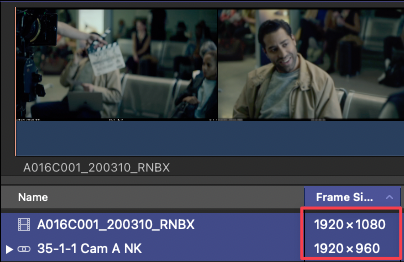
When syncing your dailies with Sync-N-Link there is an option "Synchronized clip video resolution", set it to "Match the project frame size". Place an empty project in your dailies event with the desired resolution (e.g. 1920 x 804). This will create synced clips at that resolution.
You can use these clips in a 1920 x 804 project where you do the assembly - which again shows the correct aspect ratio on all screens.
When you change the project resolution to 1920 x 1080 you get to view the entire original frame size. However there is one major downside to this workflow:
Transforms and Scales are not translated correctly when you change the timeline resolution from 1920 x 804 to 1920 x 1080. You need to manually adjust them.
When syncing your dailies with Sync-N-Link there is an option "Synchronized clip video resolution", set it to "Match the project frame size". Place an empty project in your dailies event with the desired resolution (e.g. 1920 x 804). This will create synced clips at that resolution.
You can use these clips in a 1920 x 804 project where you do the assembly - which again shows the correct aspect ratio on all screens.
When you change the project resolution to 1920 x 1080 you get to view the entire original frame size. However there is one major downside to this workflow:
Transforms and Scales are not translated correctly when you change the timeline resolution from 1920 x 804 to 1920 x 1080. You need to manually adjust them.
Please Log in to join the conversation.
- Oliver Peters
-
- Offline
- Platinum Member
-
Less
More
- Posts: 335
- Thank you received: 62
04 Oct 2022 12:52 #122362
by Oliver Peters
Replied by Oliver Peters on topic FCPX A/V Output - Show Custom Overlay (from Viewer menu)
"When syncing your dailies with Sync-N-Link there is an option "Synchronized clip video resolution", set it to "Match the project frame size". Place an empty project in your dailies event with the desired resolution (e.g. 1920 x 804). This will create synced clips at that resolution"
If I understand correctly, Leon's source clip resolution isn't 1920 x 804, it's 16:9 (or actually 17:9). The 1920 x 804 size would be after cropping the source clips. So would this workaround still work?
If I understand correctly, Leon's source clip resolution isn't 1920 x 804, it's 16:9 (or actually 17:9). The 1920 x 804 size would be after cropping the source clips. So would this workaround still work?
Please Log in to join the conversation.
04 Oct 2022 13:10 - 04 Oct 2022 13:12 #122363
by sampl_e
Replied by sampl_e on topic FCPX A/V Output - Show Custom Overlay (from Viewer menu)
Sorry if my reply was misleading - we receive 1920 x 1080 files from the DIT, same as Leon. With Sync-N-Link we "put" these files into synced clip containers with our final output resolution 1920 x 804 / 1:2.39.
This is covered in our FCP workflow page: www.notion.so/knuthake/Final-Cut-Pro-Wor...415e8f3ad8546db4ab89
This is covered in our FCP workflow page: www.notion.so/knuthake/Final-Cut-Pro-Wor...415e8f3ad8546db4ab89
Last edit: 04 Oct 2022 13:12 by sampl_e.
Please Log in to join the conversation.
- Oliver Peters
-
- Offline
- Platinum Member
-
Less
More
- Posts: 335
- Thank you received: 62
04 Oct 2022 13:31 #122364
by Oliver Peters
Replied by Oliver Peters on topic FCPX A/V Output - Show Custom Overlay (from Viewer menu)
Aah. I see. Thanks.
Please Log in to join the conversation.
04 Oct 2022 13:44 #122366
by MWoods
Replied by MWoods on topic FCPX A/V Output - Show Custom Overlay (from Viewer menu)
Why not work in 1920x1080 with a letterbox mask, then crop your final render to 1920x804? 1920x1080 is more compatible with output devices, and working in 1080 makes it easier to adjust the vertical positioning of the shots within the frame.
Please Log in to join the conversation.
04 Oct 2022 13:55 #122367
by sampl_e
Replied by sampl_e on topic FCPX A/V Output - Show Custom Overlay (from Viewer menu)
Because that crop is not visible on the A/V output of FCP. The OP wants his client to see the intended image aspect ratio on the AV output when he's skimming through files in the FCP browser. There is no way to display custom overlays in the AV output other than my described workaround.
This discussion is about previewing inside of FCP and not about outputting/exporting files, where your advice would work.
This discussion is about previewing inside of FCP and not about outputting/exporting files, where your advice would work.
Please Log in to join the conversation.
- Oliver Peters
-
- Offline
- Platinum Member
-
Less
More
- Posts: 335
- Thank you received: 62
04 Oct 2022 13:57 - 04 Oct 2022 13:57 #122368
by Oliver Peters
Replied by Oliver Peters on topic FCPX A/V Output - Show Custom Overlay (from Viewer menu)
MWoods: "Why not work in 1920x1080 with a letterbox mask, then crop your final render to 1920x804? "
I think you missed the fact that there is no final render. Leon's workflow is a film editorial workflow. The final render i.e. finishing, is going to be handled elsewhere, I presume. He'd like to be able to work through the edit and see a cropped image on his viewer (both browser clips and sequence) and on the SDI output to a video display. That last part is what everyone's suggestions are trying to solve. This is entirely an Apple issue, which could be solved if FCP enabled overlays on the a/v output.
I think you missed the fact that there is no final render. Leon's workflow is a film editorial workflow. The final render i.e. finishing, is going to be handled elsewhere, I presume. He'd like to be able to work through the edit and see a cropped image on his viewer (both browser clips and sequence) and on the SDI output to a video display. That last part is what everyone's suggestions are trying to solve. This is entirely an Apple issue, which could be solved if FCP enabled overlays on the a/v output.
Last edit: 04 Oct 2022 13:57 by Oliver Peters.
Please Log in to join the conversation.
- knurrrrrrt
-

- Offline
- Premium Member
-

Less
More
- Posts: 85
- Thank you received: 10
04 Oct 2022 13:59 #122369
by knurrrrrrt
Replied by knurrrrrrt on topic FCPX A/V Output - Show Custom Overlay (from Viewer menu)
Exactly Oliver! Apple has to fix this. Yesterday!
Please Log in to join the conversation.
04 Oct 2022 14:18 #122372
by MWoods
Replied by MWoods on topic FCPX A/V Output - Show Custom Overlay (from Viewer menu)
I guess its personal preference. I would rather see the full "as shot" frame when previewing in the browser and see it letterboxed in my edit. I can see where having the overlays in the browser might make it easier to visualize the framing though. Oliver's low tech solution of a paper mask, or just two pieces of string stretched over the client monitor to define the letterbox might be best for now. Does the concern about working in the final aspect ratio have to do with xml export when sending it to be finished?
Please Log in to join the conversation.
