


- Posts: 177
- Thank you received: 32
3 Post Moderation Rule for New Boarders (25 Jan 2021)
New boarders will have their posts moderated - Don't worry if you cannot see your post immediately.
Jittery Playback and Export / Frames Out of Order
14 Jul 2022 21:02 #121391
by TerryB
Replied by TerryB on topic Jittery Playback and Export / Frames Out of Order
After a recent iMac boot drive failure we are just about to pull the trigger on a Mac Studio with M1 Max but want to clarify the latest findings first.
joema, does your most recent test imply that any rate conformed footage exported to any codec, like H.264 and not just ProRes, runs the risk of frame jitter?
joema, does your most recent test imply that any rate conformed footage exported to any codec, like H.264 and not just ProRes, runs the risk of frame jitter?
Please Log in to join the conversation.


14 Jul 2022 21:10 #121392
by Redifer
Replied by Redifer on topic Jittery Playback and Export / Frames Out of Order
I get plenty of jitters without changing the timing or reconforming anything, though it has happened when connected to a clip that was time-stretched (though that particular clip wasn't ProRes). The only prerequisite for the jitters is being ProRes. I always use ProRes 422 HQ, specifically.
Please Log in to join the conversation.

14 Jul 2022 22:51 #121393
by joema
I understand your concern -- my team has several M1 Ultra and Max machines. In general they are really great. I think Apple understands this is a serious CPU-specific issue in FCP and/or MacOS and will fix it ASAP, but I don't know when that will be.
Despite the massive amount of testing Redifer, I and others have done, the exact contours of the problem are not fully defined. That is partially due to prioritizing a portable, reliable replication scenario and getting it to Apple. Part of it is the intermittent, elusive nature of the bug. Just nailing down any behavioral facet takes a tremendous amount of repetitive testing. The developers at Neat Video sent their scenario to Apple about two weeks ago, and I sent them mine yesterday. I will be discussing it with Apple tomorrow morning.
Today I did more testing, found it did not require a retimed clip, only rate conforming plus use of one more certain effects.
Just now, before answering you, I did some additional tests to see if I could reproduce it with H264 source files. One out of several tries I did. That was 4 x 1080p/59.94 stacked 50% scaled H264 clips in a 1080p/23.98 project, no retiming, built-in FCP "Trails" effect on each clip. I need to follow up with more testing tomorrow.
Like Redifer, I was under the impression it only happened with ProRes source files. But due to the urgency of getting Apple a reliable canned replication scenario I did not extensively test H264. I obviously need to.
OTOH it's important not to blow it out of proportion. I have delivered several small projects since I got the M1 Ultra in mid-April (using FCP 10.6.2) and I never saw this problem (enough to recognize it) until recently. I don't think anyone on my team using those machines has seen it yet, but maybe they have and didn't recognize it.
It appears that running FCP 10.6.1 is a workaround, maybe Redifer could comment on how reliable that is.
Replied by joema on topic Jittery Playback and Export / Frames Out of Order
...just about to pull the trigger on a Mac Studio with M1 Max but want to clarify the latest findings first...joema, does your most recent test imply that any rate conformed footage exported to any codec, like H.264 and not just ProRes, runs the risk of frame jitter?
I understand your concern -- my team has several M1 Ultra and Max machines. In general they are really great. I think Apple understands this is a serious CPU-specific issue in FCP and/or MacOS and will fix it ASAP, but I don't know when that will be.
Despite the massive amount of testing Redifer, I and others have done, the exact contours of the problem are not fully defined. That is partially due to prioritizing a portable, reliable replication scenario and getting it to Apple. Part of it is the intermittent, elusive nature of the bug. Just nailing down any behavioral facet takes a tremendous amount of repetitive testing. The developers at Neat Video sent their scenario to Apple about two weeks ago, and I sent them mine yesterday. I will be discussing it with Apple tomorrow morning.
Today I did more testing, found it did not require a retimed clip, only rate conforming plus use of one more certain effects.
Just now, before answering you, I did some additional tests to see if I could reproduce it with H264 source files. One out of several tries I did. That was 4 x 1080p/59.94 stacked 50% scaled H264 clips in a 1080p/23.98 project, no retiming, built-in FCP "Trails" effect on each clip. I need to follow up with more testing tomorrow.
Like Redifer, I was under the impression it only happened with ProRes source files. But due to the urgency of getting Apple a reliable canned replication scenario I did not extensively test H264. I obviously need to.
OTOH it's important not to blow it out of proportion. I have delivered several small projects since I got the M1 Ultra in mid-April (using FCP 10.6.2) and I never saw this problem (enough to recognize it) until recently. I don't think anyone on my team using those machines has seen it yet, but maybe they have and didn't recognize it.
It appears that running FCP 10.6.1 is a workaround, maybe Redifer could comment on how reliable that is.
Please Log in to join the conversation.
14 Jul 2022 23:19 #121394
by TerryB
Replied by TerryB on topic Jittery Playback and Export / Frames Out of Order
Thanks as always for your thoughtful and informative post joema. I'm subscribed and probably like many others here, anxiously await any developments.
Please Log in to join the conversation.

15 Jul 2022 10:26 #121419
by Sandro
Replied by Sandro on topic Jittery Playback and Export / Frames Out of Order
Hi everyone, just found this thread. I had the same problem exporting to prores LT. Short project, just over 30 minutes and starting from 28 minutes some frames are out of order in the export. source clips (prores proxy) are fine and playback in timeline is fine. This was on a MacBook Pro 16 inch max, fcpx 10.6.3, OS 12.4.
No effects on the clips affected, no retiming. Temporarily solved by using my older intel MacBook Pro 15 inch late 2017, also on fcpx 10.6.3, OS 12.4. Just exported the project and watched it, no problems.
Contacted Apple support, but after finding this thread I don't think reinstalling FCPX will solve this. (did trash preferences, no change, second export also had artefacts at the end, but not on the same place or clip)
Thanks everyone for testing,
No effects on the clips affected, no retiming. Temporarily solved by using my older intel MacBook Pro 15 inch late 2017, also on fcpx 10.6.3, OS 12.4. Just exported the project and watched it, no problems.
Contacted Apple support, but after finding this thread I don't think reinstalling FCPX will solve this. (did trash preferences, no change, second export also had artefacts at the end, but not on the same place or clip)
Thanks everyone for testing,
Please Log in to join the conversation.
15 Jul 2022 15:44 #121423
by joema
This is following up on my post from yesterday saying I reproduced it using H264 source files.
I've done more testing and after 20 attempts I only saw the jitter problem one time. By contrast with ProRes 422 source files it is easy to make happen on retimed or rate conformed clips if using certain FCP built-in effects such as "Trails".
Testing with Neat Video (which readily exposes the bug) shows it's much more likely to happen with a ProRes source clip vs H264. As you said, using ProRes source files is either a prerequisite or close to it. OTOH I have seen it happen with H264 source clips, just not nearly as often. So using H264 source doesn't mean you are guaranteed of never seeing it.
In my testing, the export codec seems less important. If the source is ProRes and the conditions are met, whether the export is ProRes, H264 or HEVC the error can be in the output file. However whether a visible jitter error in a cached timeline is preserved in an exported file tends to fluctuate.
Replied by joema on topic Jittery Playback and Export / Frames Out of Order
...The only prerequisite for the jitters is being ProRes...
This is following up on my post from yesterday saying I reproduced it using H264 source files.
I've done more testing and after 20 attempts I only saw the jitter problem one time. By contrast with ProRes 422 source files it is easy to make happen on retimed or rate conformed clips if using certain FCP built-in effects such as "Trails".
Testing with Neat Video (which readily exposes the bug) shows it's much more likely to happen with a ProRes source clip vs H264. As you said, using ProRes source files is either a prerequisite or close to it. OTOH I have seen it happen with H264 source clips, just not nearly as often. So using H264 source doesn't mean you are guaranteed of never seeing it.
In my testing, the export codec seems less important. If the source is ProRes and the conditions are met, whether the export is ProRes, H264 or HEVC the error can be in the output file. However whether a visible jitter error in a cached timeline is preserved in an exported file tends to fluctuate.
Please Log in to join the conversation.
15 Jul 2022 18:16 #121426
by TerryB
Replied by TerryB on topic Jittery Playback and Export / Frames Out of Order
Has anyone noticed jitter in exports using FX6 footage as source? We typically just edit with the XAVC straight from the FX6s.
Please Log in to join the conversation.
15 Jul 2022 19:07 #121427
by joema
I just tested some FX6 UHD 4k/23.98 footage using the same scenario that reliably causes it with ProRes files, and I did not see it. However I only did about 5 tests, not 20.
Replied by joema on topic Jittery Playback and Export / Frames Out of Order
Has anyone noticed jitter in exports using FX6 footage as source? We typically just edit with the XAVC straight from the FX6s.
I just tested some FX6 UHD 4k/23.98 footage using the same scenario that reliably causes it with ProRes files, and I did not see it. However I only did about 5 tests, not 20.
Please Log in to join the conversation.
15 Jul 2022 19:14 #121428
by TerryB
Replied by TerryB on topic Jittery Playback and Export / Frames Out of Order
Thank you very much joema! That makes me feel a little more comfortable purchasing a Mac Studio M1 Max.
Please Log in to join the conversation.
16 Jul 2022 20:47 - 16 Jul 2022 21:23 #121440
by joema
Replied by joema on topic Jittery Playback and Export / Frames Out of Order
This can also be triggered by CoreMelt Lock & Load stabilizer, version 4.0.2. However I could not reproduce it using Digital Anarchy's Flicker Free plugin. In these tests I used four layers and a 1080p 29.97 ProRes 422 clip, retimed to 25% speed. That is just to make it more frequent but I think in many of these cases it will happen with a single layer (single stream input) but it takes too long to test that.
Edit/Add: It also happens with the FCP built-in Keyer.
Edit/Add: It also happens with the FCP built-in Keyer.
Last edit: 16 Jul 2022 21:23 by joema.
Please Log in to join the conversation.
09 Aug 2022 20:29 #121768
by joema
I just noticed FCP 10.6.4 was just released. There is a single listed fix: "Fixes an issue where video frames may be out of order during playback or export". I suggest anyone in this thread who encountered the problem get 10.6.4 and test that.
Replied by joema on topic Jittery Playback and Export / Frames Out of Order
I get plenty of jitters without changing the timing or reconforming anything, though it has happened when connected to a clip that was time-stretched..
I just noticed FCP 10.6.4 was just released. There is a single listed fix: "Fixes an issue where video frames may be out of order during playback or export". I suggest anyone in this thread who encountered the problem get 10.6.4 and test that.
Please Log in to join the conversation.
09 Aug 2022 20:30 #121769
by Redifer
Replied by Redifer on topic Jittery Playback and Export / Frames Out of Order
Oh snap! Absolutely!
Please Log in to join the conversation.
09 Aug 2022 23:33 #121775
by TerryB
Replied by TerryB on topic Jittery Playback and Export / Frames Out of Order
Very curious to hear about your findings Redifer.
Please Log in to join the conversation.

10 Aug 2022 00:18 - 10 Aug 2022 00:21 #121779
by DaveM
Replied by DaveM on topic Jittery Playback and Export / Frames Out of Order
Me too.
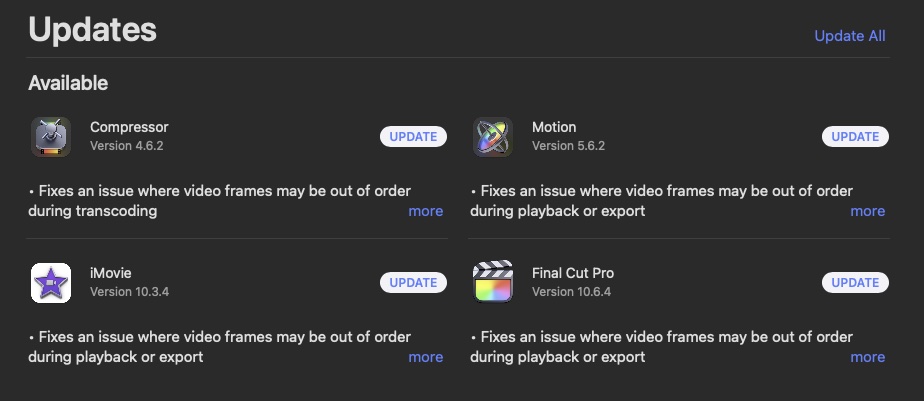
It appears that the issue goes (or went, hopefully) deeper than just FCP (or similar code/calls are used in all of the applications), as the new updates for Compressor, Motion, and iMovie also mention the fix.
For anyone not seeing the updates yet, open the App Store, select Updates, then reload the page (command-R) and the updates should appear.
It appears that the issue goes (or went, hopefully) deeper than just FCP (or similar code/calls are used in all of the applications), as the new updates for Compressor, Motion, and iMovie also mention the fix.
For anyone not seeing the updates yet, open the App Store, select Updates, then reload the page (command-R) and the updates should appear.
Last edit: 10 Aug 2022 00:21 by DaveM.
Please Log in to join the conversation.
10 Aug 2022 00:23 #121781
by Redifer
Replied by Redifer on topic Jittery Playback and Export / Frames Out of Order
The updates never appear for me, even with Command + R. I have to go to each product's page by searching for it and then the button will change from DOWNLOAD to UPDATE. I didn't know Compressor and Motion were updated as well. Will definitely update them now.
I've never been this excited for a bug fix. Can't wait to dig in for the next few days.
I've never been this excited for a bug fix. Can't wait to dig in for the next few days.
Please Log in to join the conversation.
10 Aug 2022 00:34 - 10 Aug 2022 00:42 #121783
by DaveM
Replied by DaveM on topic Jittery Playback and Export / Frames Out of Order
Redifer, I've experienced the same behavior before (with the App Store). I found that if I clicked on a different category or two, then select Updates again, then refresh (command-R), things show up. No guarantees...
Eagerly waiting for your report(s). Hope things are fixed...
And, big kudos again to joema for all the leg work in replicating the issue, setting up test cases, and reporting it to Apple!
Eagerly waiting for your report(s). Hope things are fixed...
And, big kudos again to joema for all the leg work in replicating the issue, setting up test cases, and reporting it to Apple!
Last edit: 10 Aug 2022 00:42 by DaveM.
Please Log in to join the conversation.
10 Aug 2022 01:05 #121784
by joema
This was a team effort; several of us did a lot of work on this. It is quite possible that Redifer posting it here then everyone pitching in and helping with testing has resulted in the rapid turnaround on this bug. Apple apparently did the 10.6.4 release just for this one bug.
I've now tested the public 10.6.4 release on M1 Ultra and M1 Max and the fix seems solid. I also did some rudimentary performance tests and I don't see any slowdowns in encode/decode performance. That was a concern since the symptoms implied a possible race condition or an unprotected critical section, and when those are in a "hot" code path, the fix can cost some performance. But it seems OK in this case.
Replied by joema on topic Jittery Playback and Export / Frames Out of Order
...And, big kudos again to joema for all the leg work in replicating the issue, setting up test cases, and reporting it to Apple!
This was a team effort; several of us did a lot of work on this. It is quite possible that Redifer posting it here then everyone pitching in and helping with testing has resulted in the rapid turnaround on this bug. Apple apparently did the 10.6.4 release just for this one bug.
I've now tested the public 10.6.4 release on M1 Ultra and M1 Max and the fix seems solid. I also did some rudimentary performance tests and I don't see any slowdowns in encode/decode performance. That was a concern since the symptoms implied a possible race condition or an unprotected critical section, and when those are in a "hot" code path, the fix can cost some performance. But it seems OK in this case.
Please Log in to join the conversation.


25 Oct 2022 07:47 #122577
by cocoua
Replied by cocoua on topic Jittery Playback and Export / Frames Out of Order
I'm experiencing the same issue... bad news are that I deleted original footage of some clips which suffer the glitch.
lots of lost footage in ma case. Crying at nights...
lots of lost footage in ma case. Crying at nights...
Please Log in to join the conversation.
