


- Posts: 636
- Thank you received: 167
3 Post Moderation Rule for New Boarders (25 Jan 2021)
New boarders will have their posts moderated - Don't worry if you cannot see your post immediately.
Jittery Playback and Export / Frames Out of Order
11 Jul 2022 20:04 - 11 Jul 2022 20:05 #121340
by DaveM
Replied by DaveM on topic Jittery Playback and Export / Frames Out of Order
joema, I have Neat Video and a 2019 Mac Pro. I could give your instructions a try if you would tell me the changes I need to make with your example, or if you provide me with a different test case. I'll try what you've already posted, for now.
Last edit: 11 Jul 2022 20:05 by DaveM.
Please Log in to join the conversation.

11 Jul 2022 20:23 - 11 Jul 2022 20:26 #121341
by dmetz
Replied by dmetz on topic Jittery Playback and Export / Frames Out of Order
UPDATE:
Tested per instructions on internal drive, ran each test 4 times, all OK. I couldn't make the problem occur. M1 Mini / 16GB RAM / 1TB Internal. Monitor is an LG 34" 5K connected to the Mini via Thunderbolt 3 dock (OWC).
Switching to the RAID now.
EDIT: Added monitor spec, just in case it matters.
Tested per instructions on internal drive, ran each test 4 times, all OK. I couldn't make the problem occur. M1 Mini / 16GB RAM / 1TB Internal. Monitor is an LG 34" 5K connected to the Mini via Thunderbolt 3 dock (OWC).
Switching to the RAID now.
EDIT: Added monitor spec, just in case it matters.
Last edit: 11 Jul 2022 20:26 by dmetz.
Please Log in to join the conversation.
11 Jul 2022 20:43 #121342
by dmetz
Replied by dmetz on topic Jittery Playback and Export / Frames Out of Order
UPDATE 2:
No amount of retries / changes could make the problem occur on my M1 Mini.
Moved the project over to the MBP Max, problem occurred on the first try.
No amount of retries / changes could make the problem occur on my M1 Mini.
Moved the project over to the MBP Max, problem occurred on the first try.
Please Log in to join the conversation.

11 Jul 2022 21:23 #121343
by joema
Thank you for doing this. The 2019 Mac Pro is the big question mark because the developers at Neat Video say a customer report this problem on that machine.
You should be able to use the exact test case I uploaded. On M1 Max and M1 Ultra it is very reproducible, as dmetz just posted.
That said, it's possible the problem has a complex "surface area" and my little test only probes one part. However if you see failure to reproduce on the 2019 Mac Pro, at least that tells us this specific scenario doesn't happen on that machine and config.
We currently think it can happen (at least on M1 Max & Ultra) with various multi-frame effects on retimed clips. My focus thus far has been on achieving a small reliable scenario with hopes that fixing that will broadly fix it in all cases. Typically the developer will fix a source code issue that has various manifestations.
The scenario is much more reliable if using multiple streams vs one stream. If it's truly isolated to Max and Ultra, that might imply it's a race condition exposed by the attempts to improve encode/decode performance on Max/Ultra in 10.6.2.
However to validate the fix it is always best to have other scenarios, not just one. I will try to obtain those.
Replied by joema on topic Jittery Playback and Export / Frames Out of Order
joema, I have Neat Video and a 2019 Mac Pro. I could give your instructions a try if you would tell me the changes I need to make with your example, or if you provide me with a different test case. I'll try what you've already posted, for now.
Thank you for doing this. The 2019 Mac Pro is the big question mark because the developers at Neat Video say a customer report this problem on that machine.
You should be able to use the exact test case I uploaded. On M1 Max and M1 Ultra it is very reproducible, as dmetz just posted.
That said, it's possible the problem has a complex "surface area" and my little test only probes one part. However if you see failure to reproduce on the 2019 Mac Pro, at least that tells us this specific scenario doesn't happen on that machine and config.
We currently think it can happen (at least on M1 Max & Ultra) with various multi-frame effects on retimed clips. My focus thus far has been on achieving a small reliable scenario with hopes that fixing that will broadly fix it in all cases. Typically the developer will fix a source code issue that has various manifestations.
The scenario is much more reliable if using multiple streams vs one stream. If it's truly isolated to Max and Ultra, that might imply it's a race condition exposed by the attempts to improve encode/decode performance on Max/Ultra in 10.6.2.
However to validate the fix it is always best to have other scenarios, not just one. I will try to obtain those.
Please Log in to join the conversation.
11 Jul 2022 21:25 - 11 Jul 2022 21:25 #121344
by joema
Thank you *very* much for doing those tests. This seems to indicate it's isolated to M1 Max and Ultra, pending the tests DaveM is doing on his 2019 Mac Pro.
Replied by joema on topic Jittery Playback and Export / Frames Out of Order
UPDATE 2:
No amount of retries / changes could make the problem occur on my M1 Mini.
Moved the project over to the MBP Max, problem occurred on the first try.
Thank you *very* much for doing those tests. This seems to indicate it's isolated to M1 Max and Ultra, pending the tests DaveM is doing on his 2019 Mac Pro.
Last edit: 11 Jul 2022 21:25 by joema.
Please Log in to join the conversation.

11 Jul 2022 21:36 #121345
by Redifer
Replied by Redifer on topic Jittery Playback and Export / Frames Out of Order
Interesting test! Good idea to have to of them onscreen at once to make the problem more apparent to the viewer. Of course it glitched on me the first time towards the latter half of the video, no rendering required (but it was still there after I rendered).
I'm surprised you didn't upload a 10.6.2 self-contained Library instead of an XML though. Was that to rule out the Library itself being the issue?
I'm surprised you didn't upload a 10.6.2 self-contained Library instead of an XML though. Was that to rule out the Library itself being the issue?
Please Log in to join the conversation.
11 Jul 2022 21:43 #121346
by joema
dmetz suddenly volunteered to help test it, so the XML was the first thing I thought of However you are correct the XML does help isolate from certain types of possible library damage. Redifer, thank you also for all the work to help isolate this.
Replied by joema on topic Jittery Playback and Export / Frames Out of Order
...I'm surprised you didn't upload a 10.6.2 self-contained Library instead of an XML though. Was that to rule out the Library itself being the issue?
dmetz suddenly volunteered to help test it, so the XML was the first thing I thought of
However you are correct the XML does help isolate from certain types of possible library damage. Redifer, thank you also for all the work to help isolate this. Please Log in to join the conversation.
11 Jul 2022 22:53 #121347
by DaveM
Replied by DaveM on topic Jittery Playback and Export / Frames Out of Order
Okay, I can report no issues after testing on my 2019 Mac Pro (12-core, 96 GB RAM, Afterburner, 2 x AMD Radeon Pro W5700X, macOS 12.4, FCP 10.6.3).
I also added NeatVideo SR 5.5.2 after the Trails effect to both clips in the timeline as a second test. No problems repeating the test steps.
Also, I tried everything after changing the Quality for the retiming to optical flow, with no glitches on playback.
I also added NeatVideo SR 5.5.2 after the Trails effect to both clips in the timeline as a second test. No problems repeating the test steps.
Also, I tried everything after changing the Quality for the retiming to optical flow, with no glitches on playback.
Please Log in to join the conversation.
11 Jul 2022 23:02 #121348
by joema
Replied by joema on topic Jittery Playback and Export / Frames Out of Order
Dave, thank you very much for all that work. It currently appears isolated to M1 Max and Ultra.
Please Log in to join the conversation.
11 Jul 2022 23:22 #121349
by DaveM
Replied by DaveM on topic Jittery Playback and Export / Frames Out of Order
joema, you deserve all the thanks for setting up and testing things, as well as for submitting the bug reports.
Cheers.
Cheers.
Please Log in to join the conversation.
12 Jul 2022 23:23 - 12 Jul 2022 23:23 #121368
by joema
Replied by joema on topic Jittery Playback and Export / Frames Out of Order
Further testing today indicates the "Jitter" cases involving built-in FCP effects may not be isolated to the Trails effect. I have also seen less severe cases during playback with these effects: Film Grain, Raster, Stencil and Subway Shadow. At least with Film Grain it can persist into an exported ProRes 422 file, similar to Trails.
It's probably not a bug in the source code of an individual effect, it just appears with some effects, inc'l some 3rd-party Fx like Neat Video. The fact it began with 10.6.2 implies something in the FCP application layer, the FxPlug 4 framework or how FCP interacts with the Video Toolbox framework and MacOS on specific hardware. FCP 10.6.2 required Monterey 12.3 or later, so there could have been changes in both application and OS layers that contributed, but I haven't seen it so far on Resolve.
It's probably not a bug in the source code of an individual effect, it just appears with some effects, inc'l some 3rd-party Fx like Neat Video. The fact it began with 10.6.2 implies something in the FCP application layer, the FxPlug 4 framework or how FCP interacts with the Video Toolbox framework and MacOS on specific hardware. FCP 10.6.2 required Monterey 12.3 or later, so there could have been changes in both application and OS layers that contributed, but I haven't seen it so far on Resolve.
Last edit: 12 Jul 2022 23:23 by joema.
Please Log in to join the conversation.
12 Jul 2022 23:29 - 12 Jul 2022 23:31 #121369
by Redifer
Replied by Redifer on topic Jittery Playback and Export / Frames Out of Order
In my personal opinion I think it's tied to how the OS itself or maybe just the Pro Apps are handling ProRes, specifically. I have yet to see the issue manifest with any other codec. I have made ProRes recordings via Quicktime's Movie Recording feature that have had issues. Often I will record lots of videogame footage (hours worth) via Quicktime and as you'd imagine the resulting files are giant. So I compress to HEVC and import those to FCP to edit. Sometimes after I encode to HEVC with Compressor, the last 5-10% of the file will have the jittery issue. I toss that encode in the trash and re-encode again with Compressor and it's fine.
Bottom Line: I don't think the issue is isolated to Final Cut Pro, I just hope it's not an issue with the OS itself.
Bottom Line: I don't think the issue is isolated to Final Cut Pro, I just hope it's not an issue with the OS itself.
Last edit: 12 Jul 2022 23:31 by Redifer.
Please Log in to join the conversation.
12 Jul 2022 23:56 #121370
by joema
Thanks for that info. Quicktime Player is likely using the same frameworks and methods that FCP does, so if there is a bug in (for example) the Video Toolbox framework or the calling convention for that framework it would affect them both.
You raise a good (albeit troubling) point: completely stand-alone video apps that use the same MacOS frameworks could be affected, if on M1 Max/Ultra. E.g, in that case, Handbrake could misorder frames when batch processing video files. OTOH it doesn't seem to happen before FCP 10.6.2 (which required Monterey 12.3). So does that mean Quicktime Player has had this problem since Monterey 12.3 on Max & Ultra?
Replied by joema on topic Jittery Playback and Export / Frames Out of Order
....I have made ProRes recordings via Quicktime's Movie Recording feature that have had issues...Bottom Line: I don't think the issue is isolated to Final Cut Pro, I just hope it's not an issue with the OS itself.
Thanks for that info. Quicktime Player is likely using the same frameworks and methods that FCP does, so if there is a bug in (for example) the Video Toolbox framework or the calling convention for that framework it would affect them both.
You raise a good (albeit troubling) point: completely stand-alone video apps that use the same MacOS frameworks could be affected, if on M1 Max/Ultra. E.g, in that case, Handbrake could misorder frames when batch processing video files. OTOH it doesn't seem to happen before FCP 10.6.2 (which required Monterey 12.3). So does that mean Quicktime Player has had this problem since Monterey 12.3 on Max & Ultra?
Please Log in to join the conversation.
13 Jul 2022 00:49 #121372
by DaveM
Replied by DaveM on topic Jittery Playback and Export / Frames Out of Order
I don't know if it's relevant, but I believe the "Pro Video codecs" has recently been bundled into the OS itself (so it's no longer a separate install package)...
Please Log in to join the conversation.
13 Jul 2022 12:40 #121376
by joema
Lots of people use Quicktime for trimming and transcoding, so (as you said) this is a broader issue than FCP. I will try to reproduce it but I wanted to use the same conditions to help ensure it happens.
Does it seem to require hours-long ProRes files? Are those 4k or 1080p? What is the recorded frame rate? Is the problem not in the ProRes source file, only in the HEVC output after transcoding with Quicktime? Can you estimate what % of time it happens in your case?
Replied by joema on topic Jittery Playback and Export / Frames Out of Order
...I have made ProRes recordings via Quicktime's Movie Recording feature that have had issues. Often I will record lots of videogame footage (hours worth) via Quicktime and as you'd imagine the resulting files are giant. So I compress to HEVC and import those to FCP to edit. Sometimes after I encode to HEVC with Compressor, the last 5-10% of the file will have the jittery issue....
Lots of people use Quicktime for trimming and transcoding, so (as you said) this is a broader issue than FCP. I will try to reproduce it but I wanted to use the same conditions to help ensure it happens.
Does it seem to require hours-long ProRes files? Are those 4k or 1080p? What is the recorded frame rate? Is the problem not in the ProRes source file, only in the HEVC output after transcoding with Quicktime? Can you estimate what % of time it happens in your case?
Please Log in to join the conversation.
13 Jul 2022 17:01 #121377
by joema
Replied by joema on topic Jittery Playback and Export / Frames Out of Order
I did three ProRes 422 to HEVC transcoding tests with Quicktime Player, and so far I don't see it. The file was UHD 4k/23.98, 1.5 hours, produced by EditReady from a BRAW file. Twice I did 4k HEVC and once 1080p HEVC. I mainly studied the last 10% of each file.
I will later make a Quicktime screen recording and try that.
I will later make a Quicktime screen recording and try that.
Please Log in to join the conversation.
13 Jul 2022 20:13 #121379
by Redifer
Replied by Redifer on topic Jittery Playback and Export / Frames Out of Order
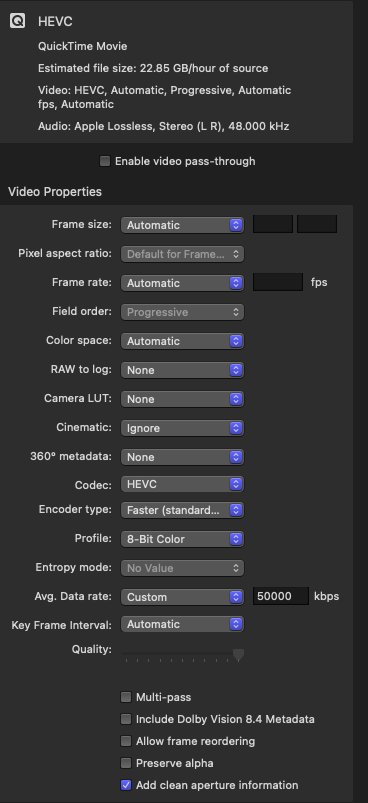
The files seem to need to be on the longer side, yes. Maybe not an hour but longer than a half hour. Is what I've noticed. I do have one where the jitteriness starts about 15-20 minutes in, however. I am recording at 1080p 60.00fps (not 59.94) using a Magewell USB Capture HDMI Gen 2 and Quicktime's Movie recording set to Maximum. I'd record straight to HEVC if I could but there's no option for that. My Compressor HEVC settings are as follows:
Please Log in to join the conversation.
13 Jul 2022 20:58 #121380
by joema
OK, thanks. I've had several email exchanges with Apple support and I need to get the current scenarios including the other Fx uploaded to them this afternoon. I have the Magewell Gen 2 card so I will try to reproduce that tomorrow using 1080p 60.0 fps Quicktime recording and if so file it as an addendum.
Just to be clear, you don't see it after the capture but only after you transcode to HEVC using Compressor? And you do not edit or trim the captured ProRes file or send from FCP to Compressor as a batch, but transcode to HEVC by opening the captured file with Compressor?
Replied by joema on topic Jittery Playback and Export / Frames Out of Order
The files seem to need to be on the longer side, yes. Maybe not an hour but longer than a half hour. Is what I've noticed. I do have one where the jitteriness starts about 15-20 minutes in, however. I am recording at 1080p 60.00fps (not 59.94) using a Magewell USB Capture HDMI Gen 2 and Quicktime's Movie recording set to Maximum.
OK, thanks. I've had several email exchanges with Apple support and I need to get the current scenarios including the other Fx uploaded to them this afternoon. I have the Magewell Gen 2 card so I will try to reproduce that tomorrow using 1080p 60.0 fps Quicktime recording and if so file it as an addendum.
Just to be clear, you don't see it after the capture but only after you transcode to HEVC using Compressor? And you do not edit or trim the captured ProRes file or send from FCP to Compressor as a batch, but transcode to HEVC by opening the captured file with Compressor?
Please Log in to join the conversation.
13 Jul 2022 21:46 #121382
by Redifer
Replied by Redifer on topic Jittery Playback and Export / Frames Out of Order
I can not be 100% sure it hasn't affected the ProRes files originally, as I have one HEVC file now that has the jitters, but I didn't notice it until I trashed the ProRes file. However in a few recent cases, the jitters only appeared after transcoding the ProRes file, and re-encoding fixed it. So I'm 90% sure it happens during encode, just not 100%.
Please Log in to join the conversation.
14 Jul 2022 18:50 #121390
by joema
I just verified it does not require clip retiming -- basic rate conforming will cause it. I took a UHD 4k/59.94 ProRes 422 clip, put it in a 4k/23.98 timeline, added the Trails effect, made 4 layers with 50% scaled output showing 2x2 on the viewer, rendered to cache and it happens. FCP rate conformed it but I did not retime the clip.
So there is no comfort if you never retime clips. I suspect the reliable replication using Trail, etc, and 4-layer 2x2 is only making it happen more often. There could be a probability curve with a long tail that spans many conditions. Your own tests including ProRes-to-HEVC using Compressor imply that.
I haven't had a chance to try your Quicktime ProRes capture and Compressor Transcode scenario yet. It takes a while to set it up and I'm waiting on a callback from Apple right now.
Replied by joema on topic Jittery Playback and Export / Frames Out of Order
...in a few recent cases, the jitters only appeared after transcoding the ProRes file, and re-encoding fixed it. So I'm 90% sure it happens during encode, just not 100%.
I just verified it does not require clip retiming -- basic rate conforming will cause it. I took a UHD 4k/59.94 ProRes 422 clip, put it in a 4k/23.98 timeline, added the Trails effect, made 4 layers with 50% scaled output showing 2x2 on the viewer, rendered to cache and it happens. FCP rate conformed it but I did not retime the clip.
So there is no comfort if you never retime clips. I suspect the reliable replication using Trail, etc, and 4-layer 2x2 is only making it happen more often. There could be a probability curve with a long tail that spans many conditions. Your own tests including ProRes-to-HEVC using Compressor imply that.
I haven't had a chance to try your Quicktime ProRes capture and Compressor Transcode scenario yet. It takes a while to set it up and I'm waiting on a callback from Apple right now.
Please Log in to join the conversation.
