



- Posts: 4
- Thank you received: 0
3 Post Moderation Rule for New Boarders (25 Jan 2021)
New boarders will have their posts moderated - Don't worry if you cannot see your post immediately.
Final Cut Pro HUGE Memory Use and Disabled Plugins with h.265 Footage
04 Apr 2022 15:23 #119783
by 6230
Replied by 6230 on topic Final Cut Pro HUGE Memory Use and Disabled Plugins with h.265 Footage
Hi, guys!
I’ve got the same issue. Yet, my problem is regarding Color Finale. I’ve contacted support and they told me that’s not a problem with the plug-in but with a codec. Of course, after reading a crash log. I was told to use prores and it should be fine. I gave it a try and it worked out. I’m using files from Sony a7s3. They also told me to report that issue to Apple so they can fix it.
Funny thing is that when I want to work on color with that plug-in app crashes instantly. I’m using latest versions of software.
Crashes happens on all machines I have access to: m1 mini, mbp 2013 and iMac 2017.
I’m planning to work on a longer video then I’m doing now (up to 10 min) and I’ma but confused. I like that plug-in but I think I’ll it go and stick to regular grading options for final cut. One workaround that comes to my mind is to transcode some video files and prepare luts to apply.
I’ve got the same issue. Yet, my problem is regarding Color Finale. I’ve contacted support and they told me that’s not a problem with the plug-in but with a codec. Of course, after reading a crash log. I was told to use prores and it should be fine. I gave it a try and it worked out. I’m using files from Sony a7s3. They also told me to report that issue to Apple so they can fix it.
Funny thing is that when I want to work on color with that plug-in app crashes instantly. I’m using latest versions of software.
Crashes happens on all machines I have access to: m1 mini, mbp 2013 and iMac 2017.
I’m planning to work on a longer video then I’m doing now (up to 10 min) and I’ma but confused. I like that plug-in but I think I’ll it go and stick to regular grading options for final cut. One workaround that comes to my mind is to transcode some video files and prepare luts to apply.
Please Log in to join the conversation.


04 Apr 2022 15:59 #119784
by noah.leon
Replied by noah.leon on topic Final Cut Pro HUGE Memory Use and Disabled Plugins with h.265 Footage
Hi 6230, if your problem is like mine, then I think the problem goes like this:
Too many short H.265 clips lead to memory issue, memory issue causes plugins to crash or be disabled.
For me this seems sort-of fixed by transcoding the source media to ProRes using the Transcode Media tool. Does yours crash even after transcoding everything to ProRes, or is it fine after? Can you monitor your memory usage and see if it peaks when the program crashes? It would be helpful to try and figure out if this is the same bug.
I am eagerly waiting for Plawson and Tom Wolsky to see if they can reliably duplicate the problem. If we can pinpoint it maybe we can raise awareness of the bug enough that Apple will fix it.
Too many short H.265 clips lead to memory issue, memory issue causes plugins to crash or be disabled.
For me this seems sort-of fixed by transcoding the source media to ProRes using the Transcode Media tool. Does yours crash even after transcoding everything to ProRes, or is it fine after? Can you monitor your memory usage and see if it peaks when the program crashes? It would be helpful to try and figure out if this is the same bug.
I am eagerly waiting for Plawson and Tom Wolsky to see if they can reliably duplicate the problem. If we can pinpoint it maybe we can raise awareness of the bug enough that Apple will fix it.
Please Log in to join the conversation.
04 Apr 2022 17:01 #119786
by 6230
Replied by 6230 on topic Final Cut Pro HUGE Memory Use and Disabled Plugins with h.265 Footage
I'll check it tomorrow when I'm at work.
My timeline consists of up to 10 min A-roll with some B-Roll on top of it. I think having too many short clips in h.265 is a problem. Crashes even happen when I'm in a compound clip consisting of a single 10 min clip. It crashes when I want to use CF. After transcoding it is working flawlessly.
On my MBP I have a Big Sur with FCP 10.6.1 and it also happens. I think FCP is having issues with that codec in connection with 3rd party plugins.
My timeline consists of up to 10 min A-roll with some B-Roll on top of it. I think having too many short clips in h.265 is a problem. Crashes even happen when I'm in a compound clip consisting of a single 10 min clip. It crashes when I want to use CF. After transcoding it is working flawlessly.
On my MBP I have a Big Sur with FCP 10.6.1 and it also happens. I think FCP is having issues with that codec in connection with 3rd party plugins.
Please Log in to join the conversation.
05 Apr 2022 06:15 #119802
by 6230
Replied by 6230 on topic Final Cut Pro HUGE Memory Use and Disabled Plugins with h.265 Footage
Hi,
I've checked my project at work and it seems to be working fine...................that's not good.
I can't reproduce the error. It usually happens when I switch on CF and this time the whole timeline is working fine. Don't get it. I had activity monitor opened in second window and I didn't notice anything disturbing.
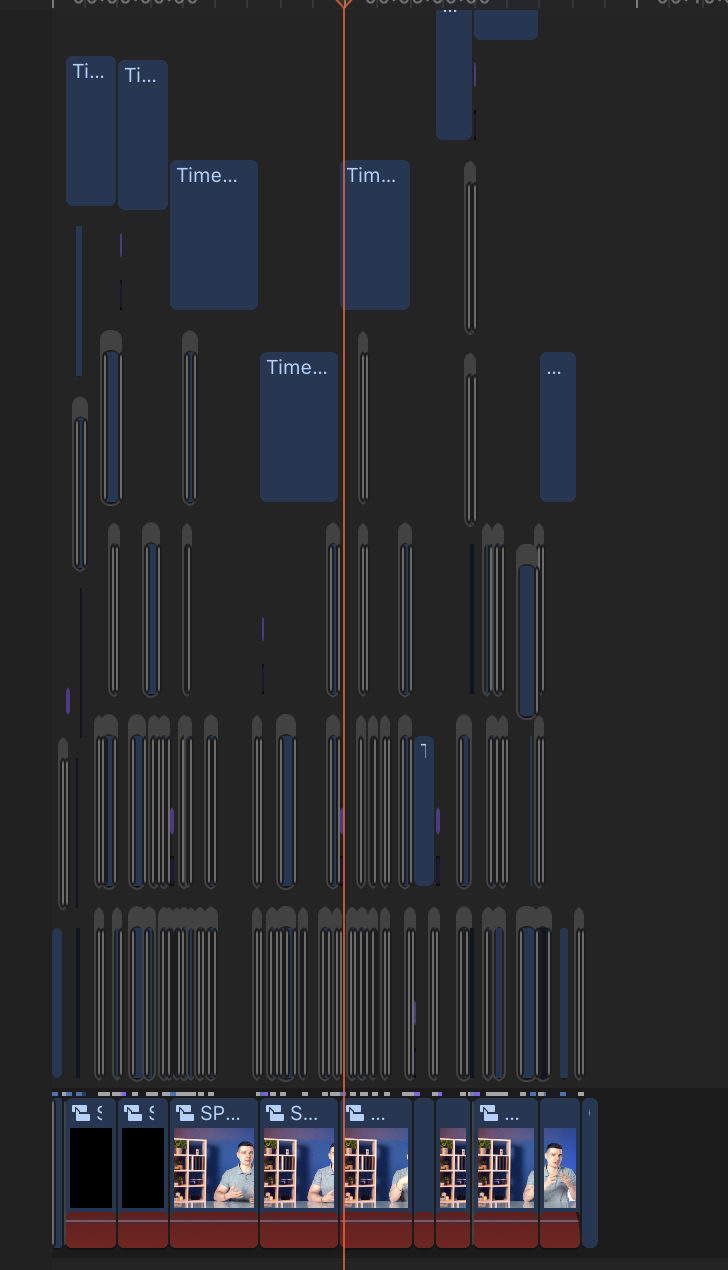
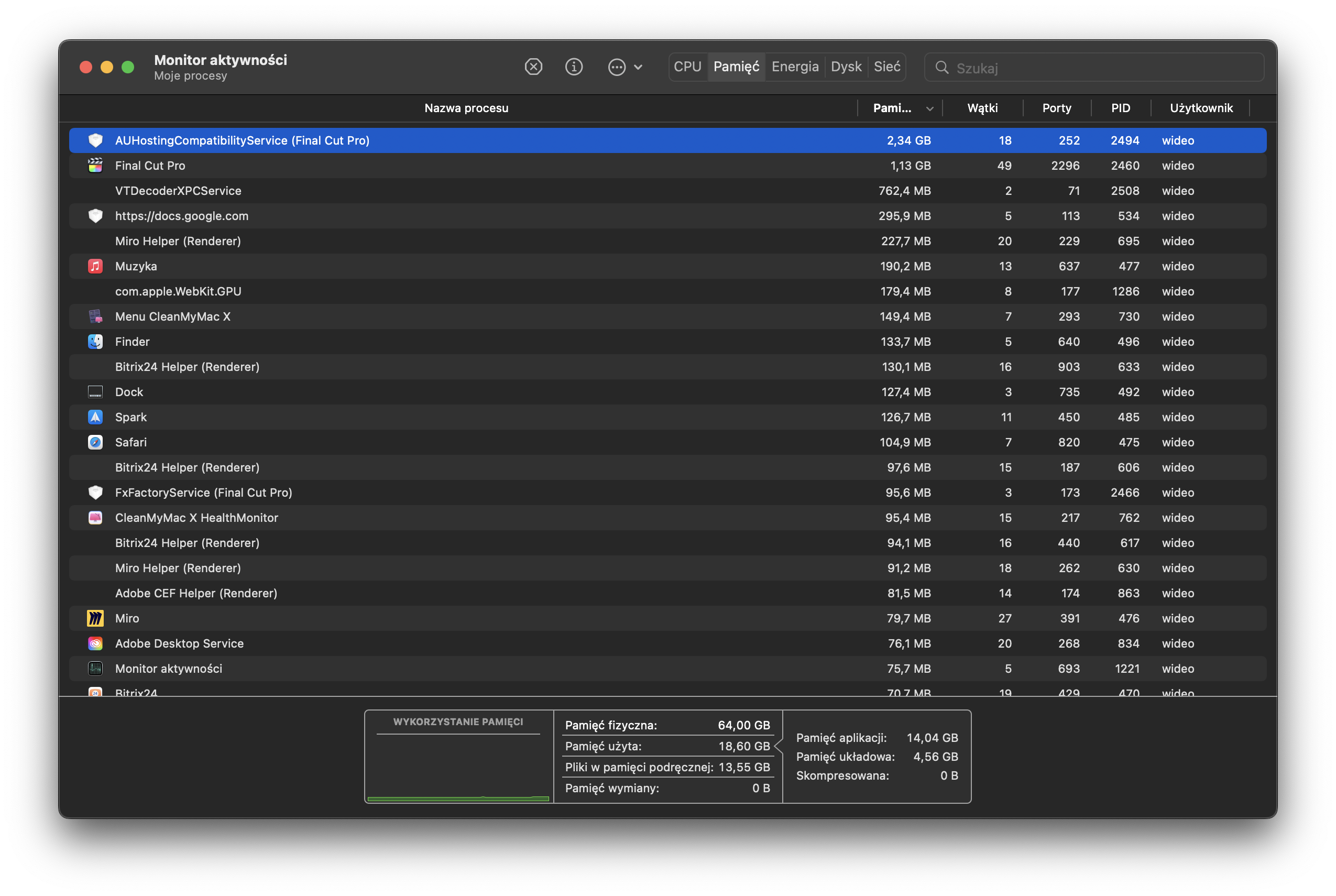
I'm attaching two screenshots: one is my timeline and second from activity monitor.
I've been wondering if it's not something connected with processor. This happened to me only in last project on my work iMac. For the past 3/4 projects since last CF update in January everything has been fine till last week. On the other hand, on M1 at home I've been having this issue for a long time. It worked from time to time, but mostly didn't. I remember that in summer I had a project that I exported on my MBP 2013 with that plugin because M1 kept on crashing. It took 72 hours to do so...yet it needed to be done and I lost all my patience at that time and wanted and needed to finish it asap.
I shall be working on a new video next week at work so I'll see how it behaves.
I've checked my project at work and it seems to be working fine...................that's not good.
I can't reproduce the error. It usually happens when I switch on CF and this time the whole timeline is working fine. Don't get it. I had activity monitor opened in second window and I didn't notice anything disturbing.
I'm attaching two screenshots: one is my timeline and second from activity monitor.
I've been wondering if it's not something connected with processor. This happened to me only in last project on my work iMac. For the past 3/4 projects since last CF update in January everything has been fine till last week. On the other hand, on M1 at home I've been having this issue for a long time. It worked from time to time, but mostly didn't. I remember that in summer I had a project that I exported on my MBP 2013 with that plugin because M1 kept on crashing. It took 72 hours to do so...yet it needed to be done and I lost all my patience at that time and wanted and needed to finish it asap.
I shall be working on a new video next week at work so I'll see how it behaves.
Please Log in to join the conversation.

05 Apr 2022 20:24 #119812
by plawson
Replied by plawson on topic Final Cut Pro HUGE Memory Use and Disabled Plugins with h.265 Footage
I'm still trying to get the files over to Tom but trying to upload/download a 50GB zip file is proving to be a bit awkward!
As a test, I tried seeing if this would happen if one video file was split up into short clips - if that would produce the memory leak. But memory usage stayed very reasonable at about 2GB. Seems like it needs to be short instances of different video files.
As a test, I tried seeing if this would happen if one video file was split up into short clips - if that would produce the memory leak. But memory usage stayed very reasonable at about 2GB. Seems like it needs to be short instances of different video files.
Please Log in to join the conversation.
05 Apr 2022 20:57 #119813
by 6230
Replied by 6230 on topic Final Cut Pro HUGE Memory Use and Disabled Plugins with h.265 Footage
Oh, man! My morning reply must have not submitted. Bummer.
I checked at work project that I had problems with and all worked well with CF. Had no issues on original files, not on ProRes. Before that it crashed when I added CF on a video and today it worked fine. I checked memory usage and it was fine around 2 gb. At work I have an iMac 2017 with 64 GB of ram.
On my timeline I have one main compound clip with A-Roll and on top of it 20-30 clips of B-Roll and titles, effects and generators.
I think it may be a problem with the codec and macOS. Until 12.3.1 I didn’t have issues with working on a project using CF and it has happened recently after updating to 12.3.1. Or maybe the project was damaged somehow since it happens on 3 machines and everyone is different with different macOS systems. Only two things in common are latest versions of FCP and CF.
I checked at work project that I had problems with and all worked well with CF. Had no issues on original files, not on ProRes. Before that it crashed when I added CF on a video and today it worked fine. I checked memory usage and it was fine around 2 gb. At work I have an iMac 2017 with 64 GB of ram.
On my timeline I have one main compound clip with A-Roll and on top of it 20-30 clips of B-Roll and titles, effects and generators.
I think it may be a problem with the codec and macOS. Until 12.3.1 I didn’t have issues with working on a project using CF and it has happened recently after updating to 12.3.1. Or maybe the project was damaged somehow since it happens on 3 machines and everyone is different with different macOS systems. Only two things in common are latest versions of FCP and CF.
Please Log in to join the conversation.

06 May 2022 14:36 #120429
by Dice7777
Replied by Dice7777 on topic Final Cut Pro HUGE Memory Use and Disabled Plugins with h.265 Footage
Anybody got a solution for this?
Please Log in to join the conversation.
06 May 2022 18:34 - 06 May 2022 18:35 #120431
by noah.leon
Replied by noah.leon on topic Final Cut Pro HUGE Memory Use and Disabled Plugins with h.265 Footage
Unfortunately I haven't been able to solve it except by transcoding everything to ProRes. I did set up a smart collection which only shows me the used clips in my project, and then I arrange it by codec (using the table headings) and select all the HEVC clips. Then I transcode just those to ProRes. This prevents me from having to transcode the entire project, which also includes h.264 footage and other material. Thanks to this, footage I am not directly using in my edit does not get transcoded, because I'm not using it anyway.
I tried updating to macOS Monterey, and the latest version of FCPX (10.6.2 I believe). It didn't help.
From now on I've set my camera to record h.264, instead of HEVC to avoid problems in the future. It's too bad.
I tried updating to macOS Monterey, and the latest version of FCPX (10.6.2 I believe). It didn't help.
From now on I've set my camera to record h.264, instead of HEVC to avoid problems in the future. It's too bad.
Last edit: 06 May 2022 18:35 by noah.leon.
Please Log in to join the conversation.


07 May 2022 00:44 - 08 Jul 2022 14:40 #120435
by DaveM
Replied by DaveM on topic Final Cut Pro HUGE Memory Use and Disabled Plugins with h.265 Footage
FCP is really built to use ProRes. The new M1 Macs have ProRes "engines" in them. Throughout the user manual, Apple prods users to use ProRes whenever possible. Though newer computers may handle H.264 and H.265 based codecs better, ProRes is always the ideal choice. And, yes, the only realy downside is needing more storage. For some reason, diving into the deep end of editing and buying plenty of storage is something many of us balk at.
Probably the only reason other codecs are supported for use within FCP (not just for importing) is due to marketing, in order to keep the bar of entry low. Like anything involving more complexity, you need to realize that the tools become more important (and the need for large amounts of fast storage).
But, to guarantee the best experience when using FCP or most any NLE application, you'd do yourself a favor and use ProRes (or maybe DNx codecs).
At least with more recent versions of FCP you can create very small ProRes proxies, which can help with people editing on the go...
P.S. - A large part of the issue is that Apple can't control the exact encoding settings used by camera makers (and others) when third-party H.264 and H.265 files are created. This used to be an issue 10+ years ago with MP3 files. Certain third-party files are problematic to decode and use optimally.
It's very likely that transcoding files into the H.264 format that is included in FCP will result in "more compatible" files than using something from a camera maker. So, there are some options to help keep storage requirements lower (with FCP's ProRes or H.264 proxies).
From a business standpoint, having a more robust and reliable editing system saves time and money. Getting more, faster (external) storage is a very good investment. By using ProRes almost exclusively you can avoid so many issues involved with third-party camera files...
Probably the only reason other codecs are supported for use within FCP (not just for importing) is due to marketing, in order to keep the bar of entry low. Like anything involving more complexity, you need to realize that the tools become more important (and the need for large amounts of fast storage).
But, to guarantee the best experience when using FCP or most any NLE application, you'd do yourself a favor and use ProRes (or maybe DNx codecs).
At least with more recent versions of FCP you can create very small ProRes proxies, which can help with people editing on the go...
P.S. - A large part of the issue is that Apple can't control the exact encoding settings used by camera makers (and others) when third-party H.264 and H.265 files are created. This used to be an issue 10+ years ago with MP3 files. Certain third-party files are problematic to decode and use optimally.
It's very likely that transcoding files into the H.264 format that is included in FCP will result in "more compatible" files than using something from a camera maker. So, there are some options to help keep storage requirements lower (with FCP's ProRes or H.264 proxies).
From a business standpoint, having a more robust and reliable editing system saves time and money. Getting more, faster (external) storage is a very good investment. By using ProRes almost exclusively you can avoid so many issues involved with third-party camera files...
Last edit: 08 Jul 2022 14:40 by DaveM.
Please Log in to join the conversation.
07 May 2022 01:56 #120436
by noah.leon
Replied by noah.leon on topic Final Cut Pro HUGE Memory Use and Disabled Plugins with h.265 Footage
Thanks DaviS,
When I switched from Final Cut Classic (which did ProRes very well) to Premiere ages ago, it was because of the Mercury Playback Engine. I no longer had to transcode my footage to ProRes, I could start editing right away.
When I switched back to Final Cut Pro (X), it was because it was faster than Premiere.
Building efficient editing systems based on these codecs is a good thing, and Apple should support it.
Here’s some fighting words: ProRes is an ancient and inefficient codec developed in the early 2000s.
I’m not willing to just accept FCPX as it is, I always want it to be better.
That said, my problem with the HEVC memory leak is still unresolved.
When I switched from Final Cut Classic (which did ProRes very well) to Premiere ages ago, it was because of the Mercury Playback Engine. I no longer had to transcode my footage to ProRes, I could start editing right away.
When I switched back to Final Cut Pro (X), it was because it was faster than Premiere.
Building efficient editing systems based on these codecs is a good thing, and Apple should support it.
Here’s some fighting words: ProRes is an ancient and inefficient codec developed in the early 2000s.
I’m not willing to just accept FCPX as it is, I always want it to be better.
That said, my problem with the HEVC memory leak is still unresolved.
Please Log in to join the conversation.

07 May 2022 13:33 #120439
by joema
Replied by joema on topic Final Cut Pro HUGE Memory Use and Disabled Plugins with h.265 Footage
To try and reproduce this I created a timeline with 200 short 4k/23.98 10-bit 4:2:2 HEVC clips from a Sony A7SIII, then added an adjustment layer and exported as: 4k H264, 4k ProRes 422, 4k HEVC 10-bit and 4k HEVC 8-bit. Background rendering was off and the files were imported from a copy of the camera card using "copy to library".
In no case did I see a memory leak, so the problem must be more complex than a lot of HEVC clips. This was on an M1 Ultra Mac Studio running Monterey 12.3.1, FCP 10.6.2 and Pro Video Formats 2.2.3.
Since 3rd-party plugins have a long history of destabilizing FCP and causing crashes, if anyone can reproduce this without any plugins, that would be useful. After that if you can duplicate the timeline, then progressively simplify it until the problem goes away, then restore the last thing you deleted and send me the media files and project XML, I will try to reproduce it. Provided I can reproduce it I can further simplify the scenario than file a bug with Apple.
It would also help to know if the problem is specific to a certain export type. E.g, only happens on H.264 but not HEVC or not ProRes 422 exports, or whether it happens on all export types.
You can upload the files to this write-only DropBox site (nobody else can see the files after upload): www.dropbox.com/request/6hUX6rbX9s584chMSmHD
I have 1 gig symmetrical fiber so any size is OK.
In no case did I see a memory leak, so the problem must be more complex than a lot of HEVC clips. This was on an M1 Ultra Mac Studio running Monterey 12.3.1, FCP 10.6.2 and Pro Video Formats 2.2.3.
Since 3rd-party plugins have a long history of destabilizing FCP and causing crashes, if anyone can reproduce this without any plugins, that would be useful. After that if you can duplicate the timeline, then progressively simplify it until the problem goes away, then restore the last thing you deleted and send me the media files and project XML, I will try to reproduce it. Provided I can reproduce it I can further simplify the scenario than file a bug with Apple.
It would also help to know if the problem is specific to a certain export type. E.g, only happens on H.264 but not HEVC or not ProRes 422 exports, or whether it happens on all export types.
You can upload the files to this write-only DropBox site (nobody else can see the files after upload): www.dropbox.com/request/6hUX6rbX9s584chMSmHD
I have 1 gig symmetrical fiber so any size is OK.
Please Log in to join the conversation.
- JasonFinalCut
-

- Offline
- New Member
-

Less
More
- Posts: 1
- Thank you received: 2
08 Jul 2022 00:15 #121266
by JasonFinalCut
Replied by JasonFinalCut on topic Final Cut Pro HUGE Memory Use and Disabled Plugins with h.265 Footage
Hi Friends,
I had this exact same problem. Shooting with a Sony A7iv. VTDecoderXPCservice would grow in memory as I was exporting to the point where it was taking up 140GB exporting an 18 minute project.
One thing to note for the repro is that this isn't a breaking problem unless you don't have space left on your machine. In my case, I had 100GB of memory left and so I could not export my project as VTDecoderXPCservice would overrun all of my memory at which point I would get a "your system has run out of application memory" error and the export would crash.
The way I got around this was very hacky but as mentioned above if you play a clip for longer than 15 seconds the memory drops. During export I would keep an eye on VTDecoderXPCservice and as it grew ~60GB I would play an unedited clip in my library for 20 seconds and then the memory would drop and final cut would continue rendering. Had to do this several times in my 18 minute project.
As this is only an issue at export time this is a more convenient solution than changing all of my footage to ProRes. In theory if you had unlimited storage on your device this should also not be an issue. Hopefully Apple can get a fix out soon... In the meantime I will be playing 15 second clips in the library to drop the memory. Hope this helps
I had this exact same problem. Shooting with a Sony A7iv. VTDecoderXPCservice would grow in memory as I was exporting to the point where it was taking up 140GB exporting an 18 minute project.
One thing to note for the repro is that this isn't a breaking problem unless you don't have space left on your machine. In my case, I had 100GB of memory left and so I could not export my project as VTDecoderXPCservice would overrun all of my memory at which point I would get a "your system has run out of application memory" error and the export would crash.
The way I got around this was very hacky but as mentioned above if you play a clip for longer than 15 seconds the memory drops. During export I would keep an eye on VTDecoderXPCservice and as it grew ~60GB I would play an unedited clip in my library for 20 seconds and then the memory would drop and final cut would continue rendering. Had to do this several times in my 18 minute project.
As this is only an issue at export time this is a more convenient solution than changing all of my footage to ProRes. In theory if you had unlimited storage on your device this should also not be an issue. Hopefully Apple can get a fix out soon... In the meantime I will be playing 15 second clips in the library to drop the memory. Hope this helps
Please Log in to join the conversation.
08 Jul 2022 13:53 #121270
by noah.leon
Replied by noah.leon on topic Final Cut Pro HUGE Memory Use and Disabled Plugins with h.265 Footage
Thanks for the info! To export my 30-minute documentary I ended up turning my timeline into a compound clip, then I selected it in the library and right-click-->transcode and put it all in ProRes. It took up a ton of space, but not as much as if I had transcoded everything in the library. Exporting still took a couple tries but was overall much smoother.
My current film is all shot in the older, h.264 codec with the same camera and everything seems to operate much more smoothly, I'll know for sure when I do the final export but I have not seen any plugins disabled or memory problems yet and I'm quite far along in the project.
It sucks if you have already shot everything in h.265, but a possible future solution is to avoid the codec for now.
My current film is all shot in the older, h.264 codec with the same camera and everything seems to operate much more smoothly, I'll know for sure when I do the final export but I have not seen any plugins disabled or memory problems yet and I'm quite far along in the project.
It sucks if you have already shot everything in h.265, but a possible future solution is to avoid the codec for now.
Please Log in to join the conversation.

24 Jul 2022 22:09 #121551
by kiskiru
Replied by kiskiru on topic Final Cut Pro HUGE Memory Use and Disabled Plugins with h.265 Footage
Dude it is worked, you just saved my ass 
Hope they will fix this swap memory fault during H265 rendering.....
Hope they will fix this swap memory fault during H265 rendering.....
Please Log in to join the conversation.
