


- Posts: 29
- Thank you received: 0
3 Post Moderation Rule for New Boarders (25 Jan 2021)
New boarders will have their posts moderated - Don't worry if you cannot see your post immediately.
Final Cut Pro HUGE Memory Use and Disabled Plugins with h.265 Footage
31 Mar 2022 17:38 - 01 Apr 2022 15:47 #119735
by noah.leon
Hardware: M1 Macbook Air, 16GB-1TB. Big Sur 11.6.5, FCP 10.6.1
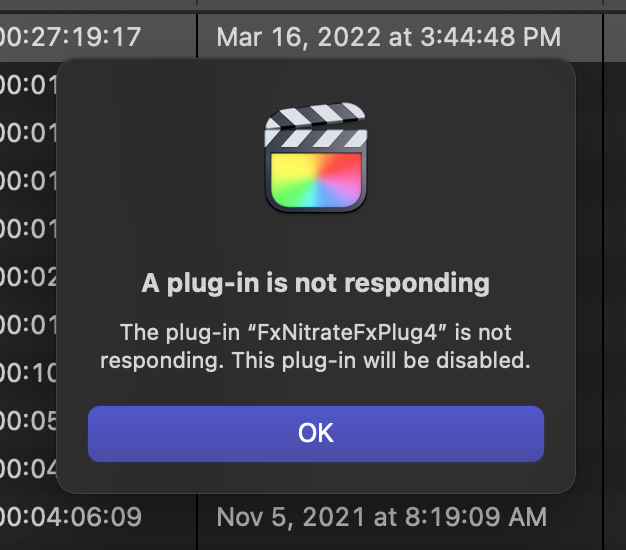
I'm having massive memory problems and problems with FCP disabling my plugins during exports and renders. Initially I thought it was the Filmconvert plugin.
I spent a good deal of time conversing with them about the issue before I ruled it out. It's not Filmconvert.In my case, I shot a documentary using the Sony A7siii in 10-bit, 4K, h.265 mode. The footage looks great and I had tiny files. Editing them is smooth as butter on the M1. HOWEVER when I go to export, the ram usage keeps climbing higher and higher until it hits some sort of maximum and the export fails. This huge RAM usage happens for exporting and also when rendering the timeline. I turned off all plugins, I'm now just using LUTs to apply grades to my footage, it still gets stuck.
The process using up all the RAM is called VTDecoderXPCService, when exporting it jumps up past 64GB on my 16GB machine. VTDecoderXPCService is the background process which also plays back h.265 HEVC content in QuickTime Player, it's a fundamental part of the OS which is responsible for decoding video. It is what talks to the M1's video hardware.
In the end, I solved it by transcoding my entire project (a hundred hours of video) into ProRes using the Transcode--->Optimized feature. This was a disappointing solution, since one of the great perks of the h.265 workflow was that it was very portable, and I didn't need a lot of space. However, I can confirm that this solves it, for now.
I would encourage you to submit feedback directly to Apple about the issue, because sticking with the h.265 is an excellent, lean workflow for long documentaries and for travelling.
ALSO if anyone has a better solution, I'm all ears. I also posted this on the Apple Support page, but it was suggested I post here instead.
* Here is some test footage from one of my projects if anyone would like to try to reproduce the problem*.
I'm having massive memory problems and problems with FCP disabling my plugins during exports and renders. Initially I thought it was the Filmconvert plugin.
I spent a good deal of time conversing with them about the issue before I ruled it out. It's not Filmconvert.In my case, I shot a documentary using the Sony A7siii in 10-bit, 4K, h.265 mode. The footage looks great and I had tiny files. Editing them is smooth as butter on the M1. HOWEVER when I go to export, the ram usage keeps climbing higher and higher until it hits some sort of maximum and the export fails. This huge RAM usage happens for exporting and also when rendering the timeline. I turned off all plugins, I'm now just using LUTs to apply grades to my footage, it still gets stuck.
The process using up all the RAM is called VTDecoderXPCService, when exporting it jumps up past 64GB on my 16GB machine. VTDecoderXPCService is the background process which also plays back h.265 HEVC content in QuickTime Player, it's a fundamental part of the OS which is responsible for decoding video. It is what talks to the M1's video hardware.
In the end, I solved it by transcoding my entire project (a hundred hours of video) into ProRes using the Transcode--->Optimized feature. This was a disappointing solution, since one of the great perks of the h.265 workflow was that it was very portable, and I didn't need a lot of space. However, I can confirm that this solves it, for now.
I would encourage you to submit feedback directly to Apple about the issue, because sticking with the h.265 is an excellent, lean workflow for long documentaries and for travelling.
ALSO if anyone has a better solution, I'm all ears. I also posted this on the Apple Support page, but it was suggested I post here instead.
* Here is some test footage from one of my projects if anyone would like to try to reproduce the problem*.
Last edit: 01 Apr 2022 15:47 by noah.leon.
Please Log in to join the conversation.
- Tom Wolsky
-

- Offline
- Moderator
-

31 Mar 2022 18:22 #119736
by Tom Wolsky
Replied by Tom Wolsky on topic Final Cut Pro HUGE Memory Use and Disabled Plugins with h.265 Footage
How long is the project we should test?
Please Log in to join the conversation.
- Tom Wolsky
-
- Offline
- Moderator
-
31 Mar 2022 18:33 #119737
by Tom Wolsky
Replied by Tom Wolsky on topic Final Cut Pro HUGE Memory Use and Disabled Plugins with h.265 Footage
Sorry. I couldn't download the files. The request stalls after a while and then times out.
Please Log in to join the conversation.
31 Mar 2022 19:28 - 01 Apr 2022 15:47 #119738
by noah.leon
Replied by noah.leon on topic Final Cut Pro HUGE Memory Use and Disabled Plugins with h.265 Footage
Sorry about that. Click here to try it via Dropbox.
To duplicate my workflow, apply one of the LUTS (or not, that could be interesting) and then duplicate the clip several times in a timeline, and maybe make it into an embedded compound clip for good measure.
To duplicate my workflow, apply one of the LUTS (or not, that could be interesting) and then duplicate the clip several times in a timeline, and maybe make it into an embedded compound clip for good measure.
Last edit: 01 Apr 2022 15:47 by noah.leon.
Please Log in to join the conversation.


01 Apr 2022 11:36 #119743
by joema
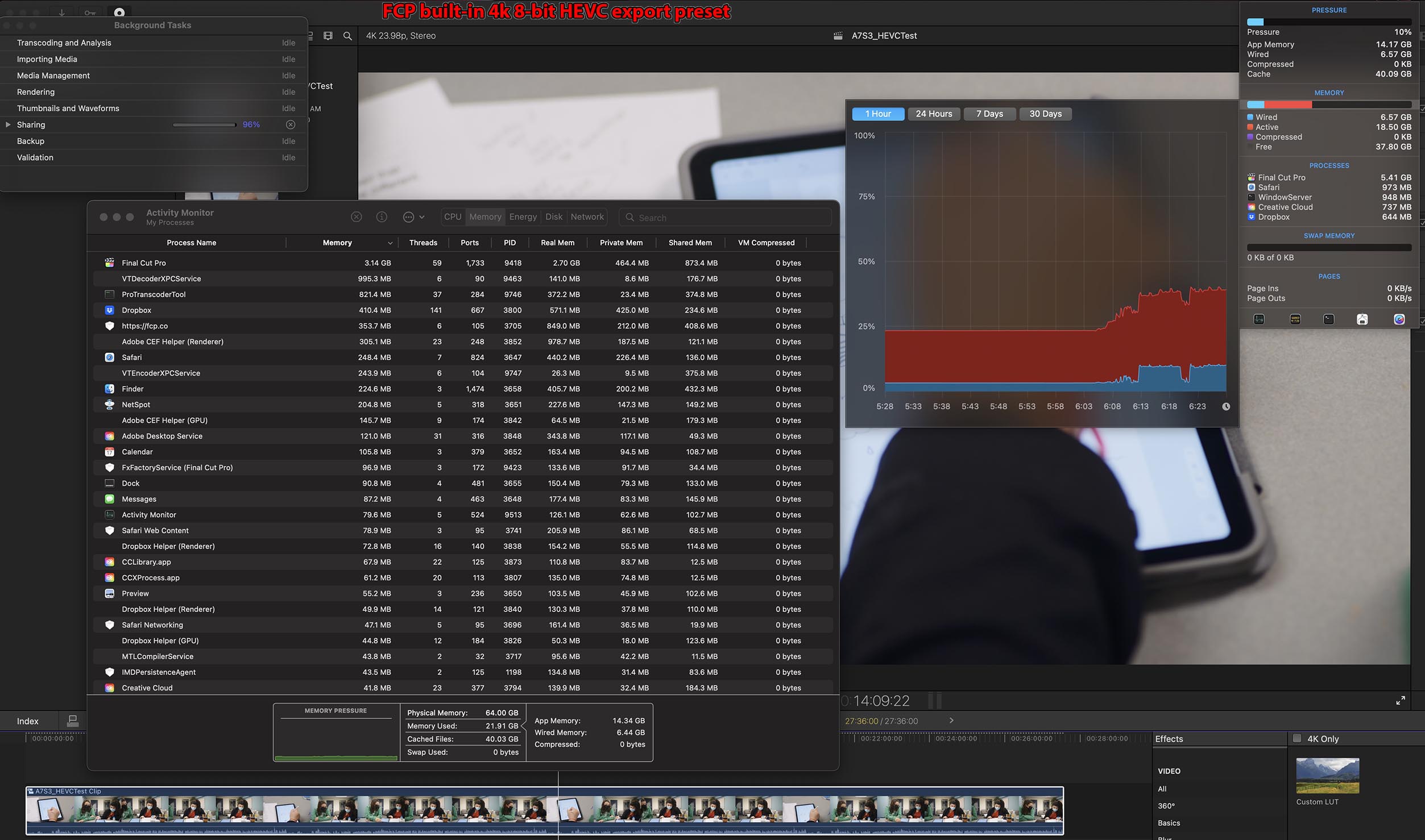
I did that and I don't see a problem on FCP 10.6.1, Monterey 12.3.1, M1 Max MacBook Pro 16. See attached.
Replied by joema on topic Final Cut Pro HUGE Memory Use and Disabled Plugins with h.265 Footage
...To duplicate my workflow, apply one of the LUTS (or not, that could be interesting) and then duplicate the clip several times in a timeline, and maybe make it into an embedded compound clip for good measure.
I did that and I don't see a problem on FCP 10.6.1, Monterey 12.3.1, M1 Max MacBook Pro 16. See attached.

Please Log in to join the conversation.
01 Apr 2022 14:04 #119744
by noah.leon
Replied by noah.leon on topic Final Cut Pro HUGE Memory Use and Disabled Plugins with h.265 Footage
That's very exciting. It means there is hope.
I had tried on a different machine running Monterey, and it had performed the same, so it must be something I am doing within the project.
Can you do me one more favour? What happens if you add a title (basic lower third, for example) within the compound clip, the entire length of the clip?
The reason I ask is because in a few of the clips I have added the colour corrections (using the built-in LUT effect) as an adjustment layer (which is basically just an empty title).
I will also try it on my end.
I had tried on a different machine running Monterey, and it had performed the same, so it must be something I am doing within the project.
Can you do me one more favour? What happens if you add a title (basic lower third, for example) within the compound clip, the entire length of the clip?
The reason I ask is because in a few of the clips I have added the colour corrections (using the built-in LUT effect) as an adjustment layer (which is basically just an empty title).
I will also try it on my end.
Please Log in to join the conversation.
- Tom Wolsky
-
- Offline
- Moderator
-
01 Apr 2022 14:19 #119745
by Tom Wolsky
Replied by Tom Wolsky on topic Final Cut Pro HUGE Memory Use and Disabled Plugins with h.265 Footage
Same as joema. No problem exporting a 27:36 project with LUTs and title inside a compound.
I would suggest posting an ErtreCheck report if you can to see with anything in the software stands out.
I would suggest posting an ErtreCheck report if you can to see with anything in the software stands out.
Please Log in to join the conversation.
01 Apr 2022 14:29 - 01 Apr 2022 15:46 #119746
by noah.leon
Replied by noah.leon on topic Final Cut Pro HUGE Memory Use and Disabled Plugins with h.265 Footage
Well this is embarassing.
I checked the codec for that clip and it turns out the footage I shared with you was accidentally some of the rare h.264 I shot (which seems to work fine), not the problematic h.265 HEVC.
I have updated the Dropbox with some more appropriate footage. If that doesn't cause you any problems, I'll concede defeat. I'll also run Etre check as suggested, but I'm not hopeful it will find anything as I tried this project on a relatively clean system (my daughter's new iMac) and it had the same problem.
If the footage is not there yet, it is because it is still uploading.
I checked the codec for that clip and it turns out the footage I shared with you was accidentally some of the rare h.264 I shot (which seems to work fine), not the problematic h.265 HEVC.
I have updated the Dropbox with some more appropriate footage. If that doesn't cause you any problems, I'll concede defeat. I'll also run Etre check as suggested, but I'm not hopeful it will find anything as I tried this project on a relatively clean system (my daughter's new iMac) and it had the same problem.
If the footage is not there yet, it is because it is still uploading.
Last edit: 01 Apr 2022 15:46 by noah.leon.
Please Log in to join the conversation.
01 Apr 2022 16:58 - 01 Apr 2022 17:41 #119748
by joema
Replied by joema on topic Final Cut Pro HUGE Memory Use and Disabled Plugins with h.265 Footage
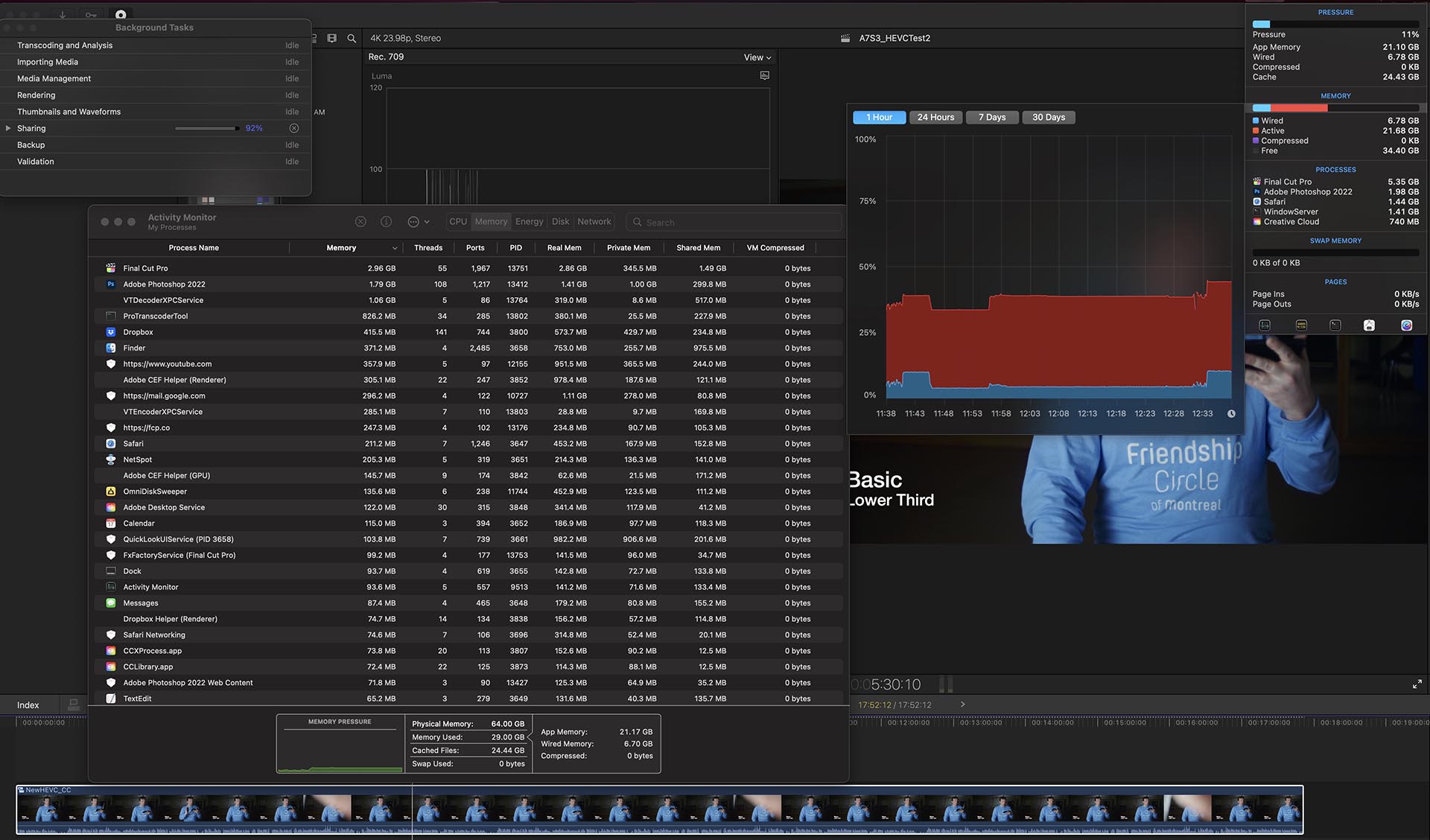
I tried the new HEVC clip, put three in a compound clip with your LUT, also added a basic lower thirds, and I don't see the problem. See attached.
Last edit: 01 Apr 2022 17:41 by joema.
Please Log in to join the conversation.
01 Apr 2022 17:39 #119749
by noah.leon
Replied by noah.leon on topic Final Cut Pro HUGE Memory Use and Disabled Plugins with h.265 Footage
Well then, that's very interesting.
I have three thoughts:
1: Must be some combination of factors specific to my project and setup (will run Etre check at the end of the workday. Already trashed prefs and deleted generated files, etc).
2: Maybe the sheer complexity of my project is an issue.
3: Maybe it's a hardware issue with the M1 hardware decoder and they fixed it in the M1 Max.
And maybe it's something I haven't thought of.
I can test number 3 on an Intel Mac Mini I still use as a fileserver.
In the meantime I should mention that I had background rendering "off" as I usually don't rely on it (since the machine can play back at full quality and the renders eat up space). Most of the time I can get this project to export if I render the timeline first (the RAM still spikes while rendering but it seems to successfully save the file 60% of the time) and then export in the same codec as the timeline settings (ProrRes 422).
Thanks for the help, if I figure it out I will report back.
I have three thoughts:
1: Must be some combination of factors specific to my project and setup (will run Etre check at the end of the workday. Already trashed prefs and deleted generated files, etc).
2: Maybe the sheer complexity of my project is an issue.
3: Maybe it's a hardware issue with the M1 hardware decoder and they fixed it in the M1 Max.
And maybe it's something I haven't thought of.
I can test number 3 on an Intel Mac Mini I still use as a fileserver.
In the meantime I should mention that I had background rendering "off" as I usually don't rely on it (since the machine can play back at full quality and the renders eat up space). Most of the time I can get this project to export if I render the timeline first (the RAM still spikes while rendering but it seems to successfully save the file 60% of the time) and then export in the same codec as the timeline settings (ProrRes 422).
Thanks for the help, if I figure it out I will report back.
Please Log in to join the conversation.
01 Apr 2022 18:04 #119751
by joema
Replied by joema on topic Final Cut Pro HUGE Memory Use and Disabled Plugins with h.265 Footage
Historically one of the most frequent problem areas is 3rd-party plugins which run "in process". That means plugins that are not Motion templates but are built from Objective-C or Swift source code, compiled to binary executable code using the FxPlug 3 framework and then which run within the FCP process address space.
Any bug in any thread of any such in-process plugin can potentially crash or destabilize FCP.
The updated FxPlug 4 framework is designed to reduce or eliminate that, but plugin developers have to re-write their code to run in an external host process. That way if it crashes or becomes unstable it normally should not affect FCP (or at least less often). I think on Apple Silicon, FxPlug 4 is mandated not optional, so plugins written to the previous FxPlug 3 spec will not run. Rosetta emulation cannot run mixed x86/ARM64 code within a single process. It must be all x86 or all ARM64.
I see that previously on FCP 10.5.x on Apple Silicon, some FilmConvert users would run FCP in "compatibility mode" (IOW force it to run on Apple Silicon under Rosetta emulation), to allow using the x86 FilmConvert plugin: www.cined.com/filmconvert-nitrate-apple-...acs-theres-an-issue/
I can't believe a plugin company would recommend doing that; it would seem to negatively affect reliability and performance.
Make sure you are not running FCP using the above method, and if you ever installed FilmConvert I'd suggest totally removing it as part of a troubleshooting procedure. If it turns out to not be involved you can later re-install it.
In general I'd recommend running the latest version of Monterey which is 12.3.1. Early versions of Monterey did have some memory leak problems but I haven't seen that on the latest version.
If you are running any x86 audio plugins using a similar "compatibility mode" workaround as FilmConvert, I suggest stopping that temporarily to troubleshoot this problem.
Any bug in any thread of any such in-process plugin can potentially crash or destabilize FCP.
The updated FxPlug 4 framework is designed to reduce or eliminate that, but plugin developers have to re-write their code to run in an external host process. That way if it crashes or becomes unstable it normally should not affect FCP (or at least less often). I think on Apple Silicon, FxPlug 4 is mandated not optional, so plugins written to the previous FxPlug 3 spec will not run. Rosetta emulation cannot run mixed x86/ARM64 code within a single process. It must be all x86 or all ARM64.
I see that previously on FCP 10.5.x on Apple Silicon, some FilmConvert users would run FCP in "compatibility mode" (IOW force it to run on Apple Silicon under Rosetta emulation), to allow using the x86 FilmConvert plugin: www.cined.com/filmconvert-nitrate-apple-...acs-theres-an-issue/
I can't believe a plugin company would recommend doing that; it would seem to negatively affect reliability and performance.
Make sure you are not running FCP using the above method, and if you ever installed FilmConvert I'd suggest totally removing it as part of a troubleshooting procedure. If it turns out to not be involved you can later re-install it.
In general I'd recommend running the latest version of Monterey which is 12.3.1. Early versions of Monterey did have some memory leak problems but I haven't seen that on the latest version.
If you are running any x86 audio plugins using a similar "compatibility mode" workaround as FilmConvert, I suggest stopping that temporarily to troubleshoot this problem.
Please Log in to join the conversation.
- Tom Wolsky
-
- Offline
- Moderator
-
01 Apr 2022 18:12 #119752
by Tom Wolsky
Replied by Tom Wolsky on topic Final Cut Pro HUGE Memory Use and Disabled Plugins with h.265 Footage
I was surprised the HEVC video exported quite a bit faster the H.264 original on an M1 Mac.
Please Log in to join the conversation.


03 Apr 2022 18:24 #119763
by plawson
Replied by plawson on topic Final Cut Pro HUGE Memory Use and Disabled Plugins with h.265 Footage
I have the same problem with h.265 files from a canon R5. It only happens when there are lots of cuts - memory is released if a clip is over 15 seconds long in the timeline (with no other clip above or below it).
To get a file to export I go play something else in final cut with a nice long continuous clip for about 30 seconds. The export pauses during this and then resumes with all the ram free.
I did a few tests and the effects and resolution have no effect on the excessive ram usage. It’s just lots of short clips resulting in ram never being released. For me anyway, but I’ve tested on 3 macs - two m1/m1 max and one intel mac - same thing on all of them.
To get a file to export I go play something else in final cut with a nice long continuous clip for about 30 seconds. The export pauses during this and then resumes with all the ram free.
I did a few tests and the effects and resolution have no effect on the excessive ram usage. It’s just lots of short clips resulting in ram never being released. For me anyway, but I’ve tested on 3 macs - two m1/m1 max and one intel mac - same thing on all of them.
Please Log in to join the conversation.
- Tom Wolsky
-
- Offline
- Moderator
-
03 Apr 2022 18:28 #119764
by Tom Wolsky
Replied by Tom Wolsky on topic Final Cut Pro HUGE Memory Use and Disabled Plugins with h.265 Footage
Would it be possible to get a piece of this media to test, perhaps through WeTransfer or Dropbox?
Please Log in to join the conversation.
04 Apr 2022 00:25 #119770
by noah.leon
This also describes my project. The entire first few minutes are very short clips, lots of cuts. I think you are on to something here!
I wonder if instead of sending you some media, Tom, one of us should prepare a sample project with media featuring the offensive behaviour?
Replied by noah.leon on topic Final Cut Pro HUGE Memory Use and Disabled Plugins with h.265 Footage
It only happens when there are lots of cuts
This also describes my project. The entire first few minutes are very short clips, lots of cuts. I think you are on to something here!
I wonder if instead of sending you some media, Tom, one of us should prepare a sample project with media featuring the offensive behaviour?
Please Log in to join the conversation.
- Tom Wolsky
-
- Offline
- Moderator
-
04 Apr 2022 01:24 #119771
by Tom Wolsky
Replied by Tom Wolsky on topic Final Cut Pro HUGE Memory Use and Disabled Plugins with h.265 Footage
That would be good. The media and an XML file, though I think I could reproduce it easily enough with the description given.
Please Log in to join the conversation.
04 Apr 2022 08:28 #119776
by plawson
Replied by plawson on topic Final Cut Pro HUGE Memory Use and Disabled Plugins with h.265 Footage
I've sent Tom over a project and original media by DM (hopefully you got it!). Hope you can shed some light on this!
Didn't see the request for an XML, hopefully the catalog will be fine! Had to delete some files inside the catalog so it would compress for sharing by dropbox, but I tested it and it does work after relinking media.
Didn't see the request for an XML, hopefully the catalog will be fine! Had to delete some files inside the catalog so it would compress for sharing by dropbox, but I tested it and it does work after relinking media.
Please Log in to join the conversation.
- Tom Wolsky
-
- Offline
- Moderator
-
04 Apr 2022 14:41 #119780
by Tom Wolsky
Replied by Tom Wolsky on topic Final Cut Pro HUGE Memory Use and Disabled Plugins with h.265 Footage
If you used messaging on the forum, it doesn't seem to work. WeTransfer or Dropbox or even Google Drive would be fine.
Thanks very much.
Thanks very much.
Please Log in to join the conversation.
04 Apr 2022 15:08 #119781
by plawson
Replied by plawson on topic Final Cut Pro HUGE Memory Use and Disabled Plugins with h.265 Footage
I can't publicly share the footage as it's someone's wedding. Does the send email option in the forum work?
Please Log in to join the conversation.
- Tom Wolsky
-
- Offline
- Moderator
-
04 Apr 2022 15:12 #119782
by Tom Wolsky
Replied by Tom Wolsky on topic Final Cut Pro HUGE Memory Use and Disabled Plugins with h.265 Footage
Understood. You can email me at info at fcpbook dot com.
Please Log in to join the conversation.
