


- Posts: 23
- Thank you received: 2
3 Post Moderation Rule for New Boarders (25 Jan 2021)
New boarders will have their posts moderated - Don't worry if you cannot see your post immediately.
Cinema Grade or Color Finale
- cortlander
-
 Topic Author
- Offline
- Junior Member
-

Less
More
26 Mar 2022 23:28 #119653
by cortlander
Cinema Grade or Color Finale was created by cortlander
I am trying to decide which plugin I should pick for FCPX.
I am a 'serious' hobbyist. I do not sell any of my work, it is all for myself, family and friends. There are videos taken over several decades which has brought much joy to me and my family. The objective here is to produce a quality of work that my children can enjoy.
My current equipment is an R5, several lenses like RF 100-500, RF 28-70, EF 11-24, EF 100 mm L macro etc plus a range of filters. I also use several lights etc for a home studio. I have an Apple M1 Max 16in/64GB for processing my work.
I have considerable experience with still photography, but am a novice with video. And I own no plugins.
So my question is which plugins would you recommend for shooting 8K raw movies:
Color Finale
Cinema Grade
None at all and stick with FCPX
I have seen hours of videos, experimented with trial versions and am more confused than before.
So, what do you folks use?
Have a nice weekend.
Best,
I am a 'serious' hobbyist. I do not sell any of my work, it is all for myself, family and friends. There are videos taken over several decades which has brought much joy to me and my family. The objective here is to produce a quality of work that my children can enjoy.
My current equipment is an R5, several lenses like RF 100-500, RF 28-70, EF 11-24, EF 100 mm L macro etc plus a range of filters. I also use several lights etc for a home studio. I have an Apple M1 Max 16in/64GB for processing my work.
I have considerable experience with still photography, but am a novice with video. And I own no plugins.
So my question is which plugins would you recommend for shooting 8K raw movies:
Color Finale
Cinema Grade
None at all and stick with FCPX
I have seen hours of videos, experimented with trial versions and am more confused than before.
So, what do you folks use?
Have a nice weekend.
Best,
Please Log in to join the conversation.

27 Mar 2022 01:29 #119654
by dgwvideo
Creating history....one edit at a time !
Replied by dgwvideo on topic Cinema Grade or Color Finale
Just so you are clear, both Cinema Grade and Color Final are color grading plugins and nothing more. Based on your description of your intended use, my suggestion would be to NOT purchase either plugin and use the built in color correcting tools in FCP. They are much improved over the last several releases. We have both Cinema Grade and Color Finale Pro and actually seldom use either anymore. For most things we find FCP does a pretty good job at grading footage and for more elaborate color control we use DaVinci Resolve anyway. DaVinci will probably give you the most flexibility with RAW footage, but still you may find FCP does what you need.
Creating history....one edit at a time !
Please Log in to join the conversation.

27 Mar 2022 15:34 #119656
by VTC
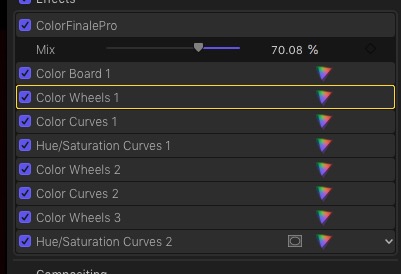
I'm the opposite here. I find CF gives me greater & faster control. And even if it didn't I waste less time because CF allows me to preview multiple LUTS or label each adjustment instead of the useless an uninformative Color Curves 2 or Color Wheels 3 instead of flipping switches guessing what parameter was tweaked where.
Replied by VTC on topic Cinema Grade or Color Finale
... We have both Cinema Grade and Color Finale Pro and actually seldom use either anymore...
I'm the opposite here. I find CF gives me greater & faster control. And even if it didn't I waste less time because CF allows me to preview multiple LUTS or label each adjustment instead of the useless an uninformative Color Curves 2 or Color Wheels 3 instead of flipping switches guessing what parameter was tweaked where.
Please Log in to join the conversation.
- Buhardilla
-

- Offline
- Premium Member
-

Less
More
- Posts: 105
- Thank you received: 16
27 Mar 2022 17:17 #119657
by Buhardilla
Replied by Buhardilla on topic Cinema Grade or Color Finale
Hi Cortlander
I've followed several courses by Ripple Training (advanced color correction in FCP and color grading in Resolve) and by Color Grade Central (for FCP, not for the plugin they sell). I'm also an amateur and my opinion doesn't come from a professional, but I think you can get excellent results with FCP color tools and CF2. I don't know Cinema Grade but this plugin doesn't support Metal or M1 (only Open CL). I'd recommend you to learn FCP's color tools well first and then knowing the possibilities that CF2 offers and that FCP does not have.
I use both!
I've followed several courses by Ripple Training (advanced color correction in FCP and color grading in Resolve) and by Color Grade Central (for FCP, not for the plugin they sell). I'm also an amateur and my opinion doesn't come from a professional, but I think you can get excellent results with FCP color tools and CF2. I don't know Cinema Grade but this plugin doesn't support Metal or M1 (only Open CL). I'd recommend you to learn FCP's color tools well first and then knowing the possibilities that CF2 offers and that FCP does not have.
I use both!
Please Log in to join the conversation.
- cortlander
-
Topic Author
- Offline
- Junior Member
-
Less
More
- Posts: 23
- Thank you received: 2
27 Mar 2022 17:56 #119658
by cortlander
Replied by cortlander on topic Cinema Grade or Color Finale
Thanks dgwvideo, this is interesting. When you need to use Resolve, do you mean you round trip from FCP to Resolve? How do you do that?
Please Log in to join the conversation.


27 Mar 2022 17:57 #119659
by Francois
Replied by Francois on topic Cinema Grade or Color Finale
Easy answer: COLOR FINALE
- FCP now has very good tools for basic CC
- Cinema grade is a good primary grade tool with unique UI but that is it
I did buy and try all CC plug ins ( I like color grading ) but the color science in CF is remarkable. COLOR FINALE PRO is the way to go most of the time it saves you a round trip to Davinci Resolve since it has excellent secondary grading tools and tracking!
- FCP now has very good tools for basic CC
- Cinema grade is a good primary grade tool with unique UI but that is it
I did buy and try all CC plug ins ( I like color grading ) but the color science in CF is remarkable. COLOR FINALE PRO is the way to go most of the time it saves you a round trip to Davinci Resolve since it has excellent secondary grading tools and tracking!
Please Log in to join the conversation.
- cortlander
-
Topic Author
- Offline
- Junior Member
-
Less
More
- Posts: 23
- Thank you received: 2
27 Mar 2022 17:58 #119660
by cortlander
Replied by cortlander on topic Cinema Grade or Color Finale
Hi VTC. The ability to see the effects of different LUT is also what attracted me to both the plugins. It is a strong point.
Thanks for the help.
Thanks for the help.
Please Log in to join the conversation.
- Frank Lancaster
-

- Offline
- Junior Member
-
Less
More
- Posts: 37
- Thank you received: 5
27 Mar 2022 17:59 #119661
by Frank Lancaster
Replied by Frank Lancaster on topic Cinema Grade or Color Finale
I have used Cinema Grade for quite some time and I find it quite intuitive and worth the price. BUT, one flaw right now IF you are on an M1 computer. Currently CG can only be used with FCPX in Rosetta mode. Not ideal at all! They state that a change is required in FCPX programming before they can convert it to M1 Native compliant. So while it worked well on my Intel Mac Pro, I won't be using it on my new Mac Studio Ultra until it's 'fixed'. Re. CF, I have contacted their support team 3 times now to ask if CF is M1 Native, but they haven't replied even once. Unacceptable. They infer on their site that it may be compatible, but I wanted to verify it. If they can't answer even a simple question, they obviously can't support a customer in other ways.
Please Log in to join the conversation.
- cortlander
-
Topic Author
- Offline
- Junior Member
-
Less
More
- Posts: 23
- Thank you received: 2
27 Mar 2022 18:01 #119662
by cortlander
Replied by cortlander on topic Cinema Grade or Color Finale
Thanks Buhardilla. I did view some of the Ripple videos on you tube in the past. With your recommendation, I am encouraged go through all of them.
Please Log in to join the conversation.
- cortlander
-
Topic Author
- Offline
- Junior Member
-
Less
More
- Posts: 23
- Thank you received: 2
27 Mar 2022 18:04 #119664
by cortlander
Replied by cortlander on topic Cinema Grade or Color Finale
Francois thanks for a very definitive recommendation. Great to get advice from an expert.
Please Log in to join the conversation.
- cortlander
-
Topic Author
- Offline
- Junior Member
-
Less
More
- Posts: 23
- Thank you received: 2
27 Mar 2022 18:10 #119665
by cortlander
Yes, starting FCPX thru the terminal window and running it in Intel is painful. Good point about Color Finale support. Exporting 8K ProRes from FCPX on metal is a breeze. Probably I do not want an extra step running it through Intel
I think I will start be trying to get better with FCPX.
Thanks for your help.
Replied by cortlander on topic Cinema Grade or Color Finale
I have used Cinema Grade for quite some time and I find it quite intuitive and worth the price. BUT, one flaw right now IF you are on an M1 computer. Currently CG can only be used with FCPX in Rosetta mode. Not ideal at all! They state that a change is required in FCPX programming before they can convert it to M1 Native compliant. So while it worked well on my Intel Mac Pro, I won't be using it on my new Mac Studio Ultra until it's 'fixed'. Re. CF, I have contacted their support team 3 times now to ask if CF is M1 Native, but they haven't replied even once. Unacceptable. They infer on their site that it may be compatible, but I wanted to verify it. If they can't answer even a simple question, they obviously can't support a customer in other ways.
Yes, starting FCPX thru the terminal window and running it in Intel is painful. Good point about Color Finale support. Exporting 8K ProRes from FCPX on metal is a breeze. Probably I do not want an extra step running it through Intel
I think I will start be trying to get better with FCPX.
Thanks for your help.
Please Log in to join the conversation.
- Buhardilla
-
- Offline
- Premium Member
-
Less
More
- Posts: 105
- Thank you received: 16
27 Mar 2022 18:37 #119666
by Buhardilla
Replied by Buhardilla on topic Cinema Grade or Color Finale
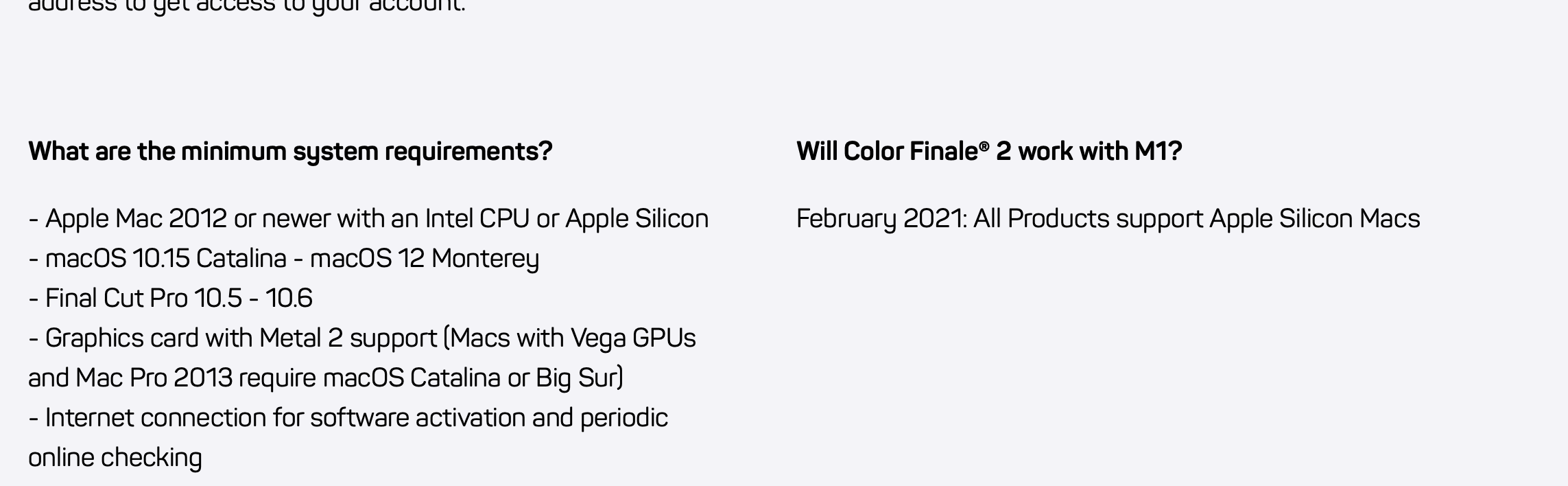
From CF website.... Re. CF, I have contacted their support team 3 times now to ask if CF is M1 Native, but they haven't replied even once. Unacceptable. They infer on their site that it may be compatible, but I wanted to verify it. If they can't answer even a simple question, they obviously can't support a customer in other ways.
Please Log in to join the conversation.
- cortlander
-
Topic Author
- Offline
- Junior Member
-
Less
More
- Posts: 23
- Thank you received: 2
27 Mar 2022 18:49 #119667
by cortlander
Replied by cortlander on topic Cinema Grade or Color Finale
Thanks Buhardilla, this is good news. Seems Color Finale will work with M1.
Please Log in to join the conversation.
- Frank Lancaster
-
- Offline
- Junior Member
-
Less
More
- Posts: 37
- Thank you received: 5
27 Mar 2022 18:51 - 27 Mar 2022 18:53 #119668
by Frank Lancaster
Replied by Frank Lancaster on topic Cinema Grade or Color Finale
Yes, thank you, Buhardilla; I saw that previously. BUT I have also seen sites where it's stated that something "works" with M1 computers or is "compatible"... and then finding out that they actually meant "if you use Rosetta". So my question to them was specific..Is your software M1 "Native " compatible or is Rosetta still required on M1 computers? Regardless of what I asked them though, a simple reply would have been appreciated. 😊
Last edit: 27 Mar 2022 18:53 by Frank Lancaster. Reason: correction
Please Log in to join the conversation.
- cortlander
-
Topic Author
- Offline
- Junior Member
-
Less
More
- Posts: 23
- Thank you received: 2
27 Mar 2022 18:55 #119669
by cortlander
Replied by cortlander on topic Cinema Grade or Color Finale
I agree, Frank.
Please Log in to join the conversation.
- Oliver Peters
-

- Offline
- Platinum Member
-

Less
More
- Posts: 335
- Thank you received: 62
27 Mar 2022 22:33 #119672
by Oliver Peters
Replied by Oliver Peters on topic Cinema Grade or Color Finale
There are a ton of color correction options, but if you are a hobbyist, I really see no reason to buy a color grading plug-in. I like Color Finale and have written several reviews, as well as aided in writing their user guide. However, Color Finale is intended to turn FCP into a serious color grading platform. If you don't really have this need, then the color tools within FCP is more than acceptable.
Furthermore, you can create plenty of "looks" and save them as color presets, which effectively does much of the same as most of the "look" LUTs that are out there. I also wouldn't recommend Resolve for this type of casual grading, because it's grading tools are complex. For most basic videos, I can get similar results within FCP and the roundtrip isn't worth the effort.
Here are a few articles of mine that might be helpful:
fcp.co/final-cut-pro/articles/2234-advan...-with-color-finale-2
fcp.co/final-cut-pro/tutorials/2261-colo...-for-final-cut-pro-x
digitalfilms.wordpress.com/2020/11/21/si...or-workflow-in-fcpx/
fcp.co/final-cut-pro/tutorials/2316-five...s-in-final-cut-pro-x
digitalfilms.wordpress.com/2013/03/30/fc...color-board-presets/
The last one is a bit dated, but these presets still work.
Furthermore, you can create plenty of "looks" and save them as color presets, which effectively does much of the same as most of the "look" LUTs that are out there. I also wouldn't recommend Resolve for this type of casual grading, because it's grading tools are complex. For most basic videos, I can get similar results within FCP and the roundtrip isn't worth the effort.
Here are a few articles of mine that might be helpful:
fcp.co/final-cut-pro/articles/2234-advan...-with-color-finale-2
fcp.co/final-cut-pro/tutorials/2261-colo...-for-final-cut-pro-x
digitalfilms.wordpress.com/2020/11/21/si...or-workflow-in-fcpx/
fcp.co/final-cut-pro/tutorials/2316-five...s-in-final-cut-pro-x
digitalfilms.wordpress.com/2013/03/30/fc...color-board-presets/
The last one is a bit dated, but these presets still work.
Please Log in to join the conversation.
- cortlander
-
Topic Author
- Offline
- Junior Member
-
Less
More
- Posts: 23
- Thank you received: 2
28 Mar 2022 00:00 - 28 Mar 2022 00:06 #119675
by cortlander
Replied by cortlander on topic Cinema Grade or Color Finale
Thank you so much, Oliver. Seems then for my needs I just need to stay with FCPX.
I bookmarked the links to my reading list, and will go through each one. Very good of you to post them.
Best,
I bookmarked the links to my reading list, and will go through each one. Very good of you to post them.
Best,
Last edit: 28 Mar 2022 00:06 by cortlander.
Please Log in to join the conversation.
28 Mar 2022 02:10 #119676
by dgwvideo
Well that depends. We shoot a lot of Blackmagic Raw footage for National Media firms, Marketing Companies and Post Production houses. Some of them want color graded footage, some want only basic corrections, and others prefer the braw files directly. For all braw footage requiring color grading we import to DaVinci Resolve, grade and export in whatever codec is required. If we are doing any editing, then we export to a Prores version and import that into FCP. We seldom edit anything in Resolve, but we might for very small and simple projects just to keep it all self contained.
We do have the Color Finale Transcoder plugin for FCP, and also Edit Ready standalone app which can process braw files and prepare them for FCP, but we have found on more than one occasion that saturation and contrast seems to get a bit off using those methods compared to letting Resolve handle the clips directly.
I agree with the many comments in this thread about the effectiveness of Color Finale (Pro), but still, considering how you are using the footage I stick with my initial suggestion to use FCP color tools. If you get familiar with them I think you'll find that they will be satisfactory for your needs. Also, you'll be in a better position to judge any shortcomings they may have and then determine if it makes sense to purchase another plugin. Best of luck on whatever you choose to do
Creating history....one edit at a time !
Replied by dgwvideo on topic Cinema Grade or Color Finale
Thanks dgwvideo, this is interesting. When you need to use Resolve, do you mean you round trip from FCP to Resolve? How do you do that?
Well that depends. We shoot a lot of Blackmagic Raw footage for National Media firms, Marketing Companies and Post Production houses. Some of them want color graded footage, some want only basic corrections, and others prefer the braw files directly. For all braw footage requiring color grading we import to DaVinci Resolve, grade and export in whatever codec is required. If we are doing any editing, then we export to a Prores version and import that into FCP. We seldom edit anything in Resolve, but we might for very small and simple projects just to keep it all self contained.
We do have the Color Finale Transcoder plugin for FCP, and also Edit Ready standalone app which can process braw files and prepare them for FCP, but we have found on more than one occasion that saturation and contrast seems to get a bit off using those methods compared to letting Resolve handle the clips directly.
I agree with the many comments in this thread about the effectiveness of Color Finale (Pro), but still, considering how you are using the footage I stick with my initial suggestion to use FCP color tools. If you get familiar with them I think you'll find that they will be satisfactory for your needs. Also, you'll be in a better position to judge any shortcomings they may have and then determine if it makes sense to purchase another plugin. Best of luck on whatever you choose to do
Creating history....one edit at a time !
Please Log in to join the conversation.
- cortlander
-
Topic Author
- Offline
- Junior Member
-
Less
More
- Posts: 23
- Thank you received: 2
28 Mar 2022 12:41 #119679
by cortlander
Replied by cortlander on topic Cinema Grade or Color Finale
dgwvideo, thank you so much for taking the time to explain in detail how your process works. You are quite right that I need to stay with FCP as my needs are quite simple.
Please Log in to join the conversation.
- Oliver Peters
-
- Offline
- Platinum Member
-
Less
More
- Posts: 335
- Thank you received: 62
28 Mar 2022 13:13 - 28 Mar 2022 13:15 #119680
by Oliver Peters
Replied by Oliver Peters on topic Cinema Grade or Color Finale
Just to add more options to the pile, here are some more quality color correction plug-ins:
fxfactory.com/products/colorcorrection/finalcutpro/
coremelt.com/products/chromatic
borisfx.com/products/continuumfcp/?colle...roduct=continuum-fcp
fxfactory.com/products/colorcorrection/finalcutpro/
coremelt.com/products/chromatic
borisfx.com/products/continuumfcp/?colle...roduct=continuum-fcp
Last edit: 28 Mar 2022 13:15 by Oliver Peters.
Please Log in to join the conversation.
