


- Posts: 28
- Thank you received: 3
3 Post Moderation Rule for New Boarders (25 Jan 2021)
New boarders will have their posts moderated - Don't worry if you cannot see your post immediately.
Rotate vertical footage in the browser?
09 Feb 2022 20:41 #118906
by enno
Rotate vertical footage in the browser? was created by enno
Editing a project that's shot with half the footage horizontal, half the footage in vertical orientation. Instead of transcoding, I'd like to rotate the footage in the browser, before adding it to the timeline. Do we have any tricks up our sleeve to make this happen?
Please Log in to join the conversation.


09 Feb 2022 22:03 - 09 Feb 2022 22:05 #118910
by VTC
Replied by VTC on topic Rotate vertical footage in the browser?
Quicktime Player 7 has a rotate function. (Command-J gets you there.) Rotate / Scale / Flip then Save.
Quicktime 10 has a rotate/flip function under EDIT but it saves as a new file which gets you thrown into the transcoding / time expenditure realm you're looking to avoid. (That's the everlasting beauty of Quicktime Player 7!)
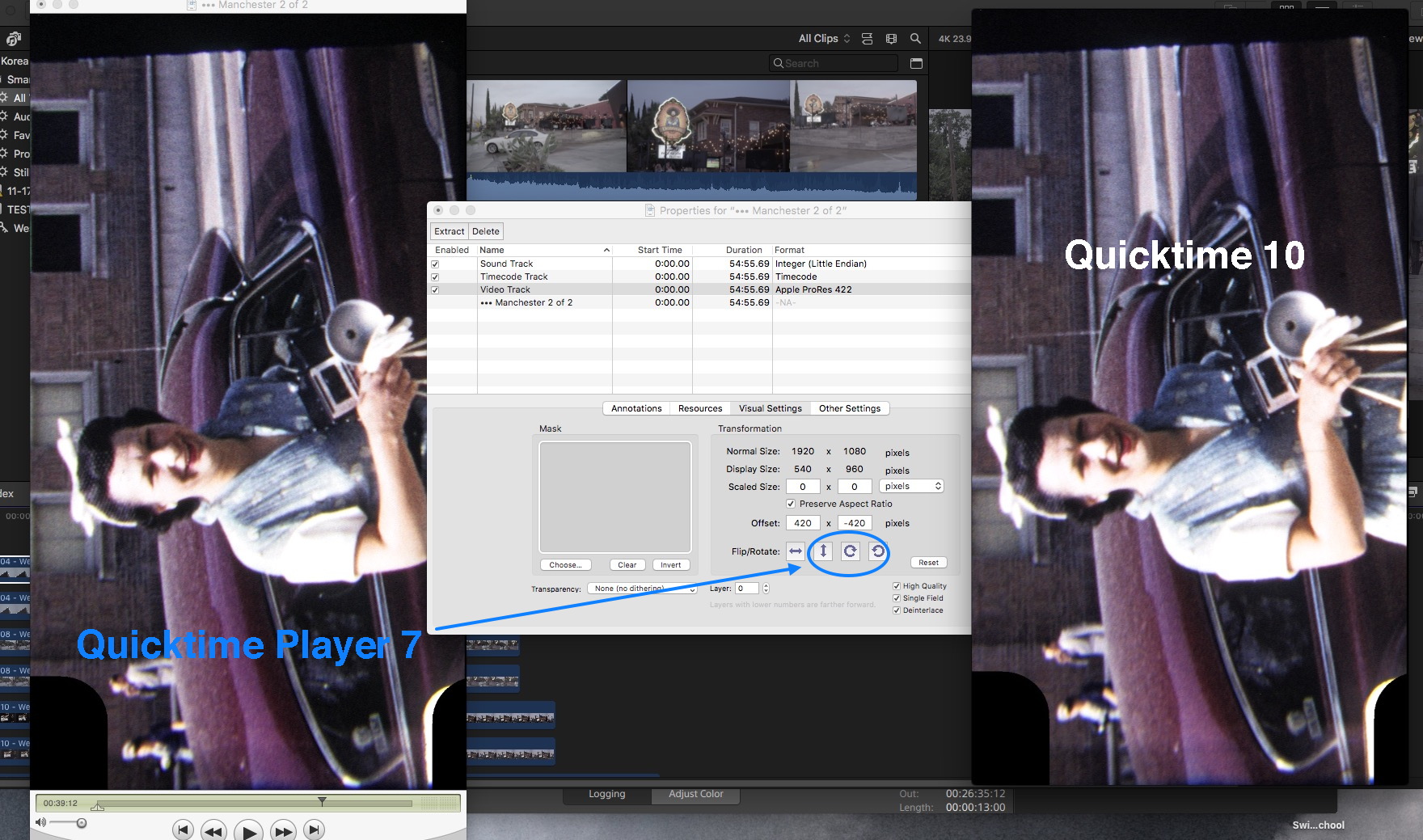
Might see if this offers a rotate without saving as a new file function.
fcp.co/forum/article-comments/36298-ulti...aker?start=20#118786
Quicktime 10 has a rotate/flip function under EDIT but it saves as a new file which gets you thrown into the transcoding / time expenditure realm you're looking to avoid. (That's the everlasting beauty of Quicktime Player 7!)
Might see if this offers a rotate without saving as a new file function.
fcp.co/forum/article-comments/36298-ulti...aker?start=20#118786
Last edit: 09 Feb 2022 22:05 by VTC.
Please Log in to join the conversation.


16 Apr 2023 19:11 #124974
by solitone
Replied by solitone on topic Rotate vertical footage in the browser?
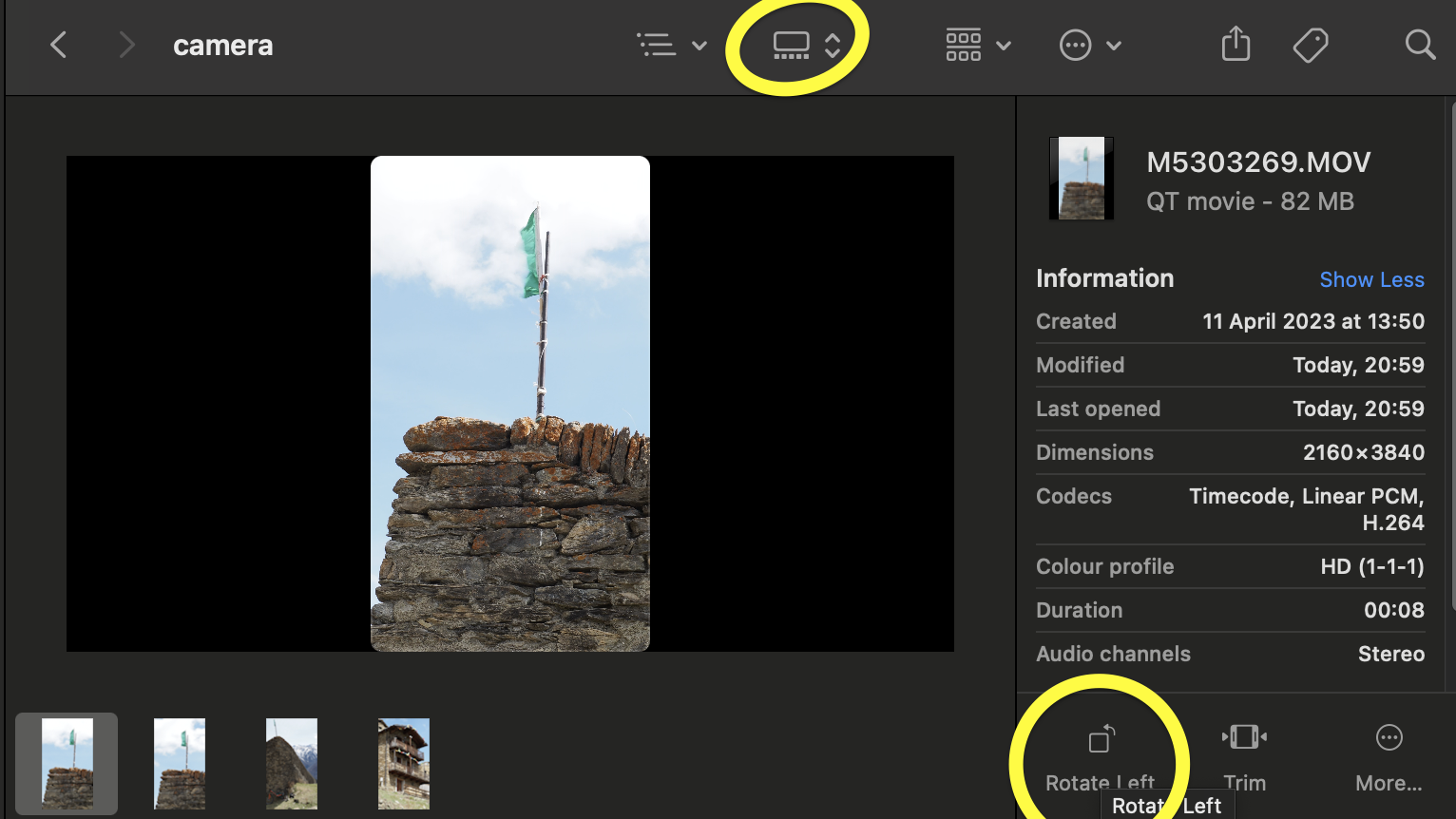
I'm a bit late, and I don't know whether this is possible in FCP, but you can do it in the Finder:
Please Log in to join the conversation.


20 Apr 2023 17:41 #125034
by Stu Wart
Replied by Stu Wart on topic Rotate vertical footage in the browser?
Before importing in FcpX
1-Launch... iMovie !
2-Do it there, you can batch
3-In iMovie (somewhere in the menus) you can generate a FcpX Project
1-Launch... iMovie !
2-Do it there, you can batch
3-In iMovie (somewhere in the menus) you can generate a FcpX Project
Please Log in to join the conversation.


27 Apr 2023 06:49 #125110
by sc_fox
Replied by sc_fox on topic Rotate vertical footage in the browser?
You could rotate the clips in the storyline by 90 or -90º and set the Spatial Conform to None. Then convert them to Compound Clips. You'll have the rotated clips in your Event Browser as CCs and be able to add them to subsequent storylines already rotated and "full screen" resolution.
As an alternative, after rotating and setting the Spatial Conform, you could Save Effects Preset on one of the clips, then all you would have to do is apply the saved effect to any vertical clip you add to the storyline -- even all of them at once! Name the Effect Preset something like Rotate Vertical 90 and Scale.
As an alternative, after rotating and setting the Spatial Conform, you could Save Effects Preset on one of the clips, then all you would have to do is apply the saved effect to any vertical clip you add to the storyline -- even all of them at once! Name the Effect Preset something like Rotate Vertical 90 and Scale.
Please Log in to join the conversation.
