


- Posts: 13
- Thank you received: 0
3 Post Moderation Rule for New Boarders (25 Jan 2021)
New boarders will have their posts moderated - Don't worry if you cannot see your post immediately.
FCPX doesn't read timecode from Sony A7S3
- ShootersFilmProduction
-
 Topic Author
- Offline
- New Member
-

Less
More
15 Jul 2023 21:54 #126396
by ShootersFilmProduction
Replied by ShootersFilmProduction on topic FCPX doesn't read timecode from Sony A7S3
Thanks, This seems like the first solution that might work (other than going thru EditReady). I'll give it a try. Thanks for including the video too.
Please Log in to join the conversation.
- Chris Hocking
-

- Offline
- Junior Member
-

Less
More
- Posts: 25
- Thank you received: 10
21 Jul 2023 10:52 #126481
by Chris Hocking
Replied by Chris Hocking on topic FCPX doesn't read timecode from Sony A7S3
...or you can use CommandPost to correct your FCPXML after the fact.
Please Log in to join the conversation.
- FinalCutdown
-

- Offline
- Elite Member
-

Less
More
- Posts: 222
- Thank you received: 4
22 Jul 2023 11:36 - 22 Jul 2023 12:04 #126494
by FinalCutdown
Replied by FinalCutdown on topic FCPX doesn't read timecode from Sony A7S3
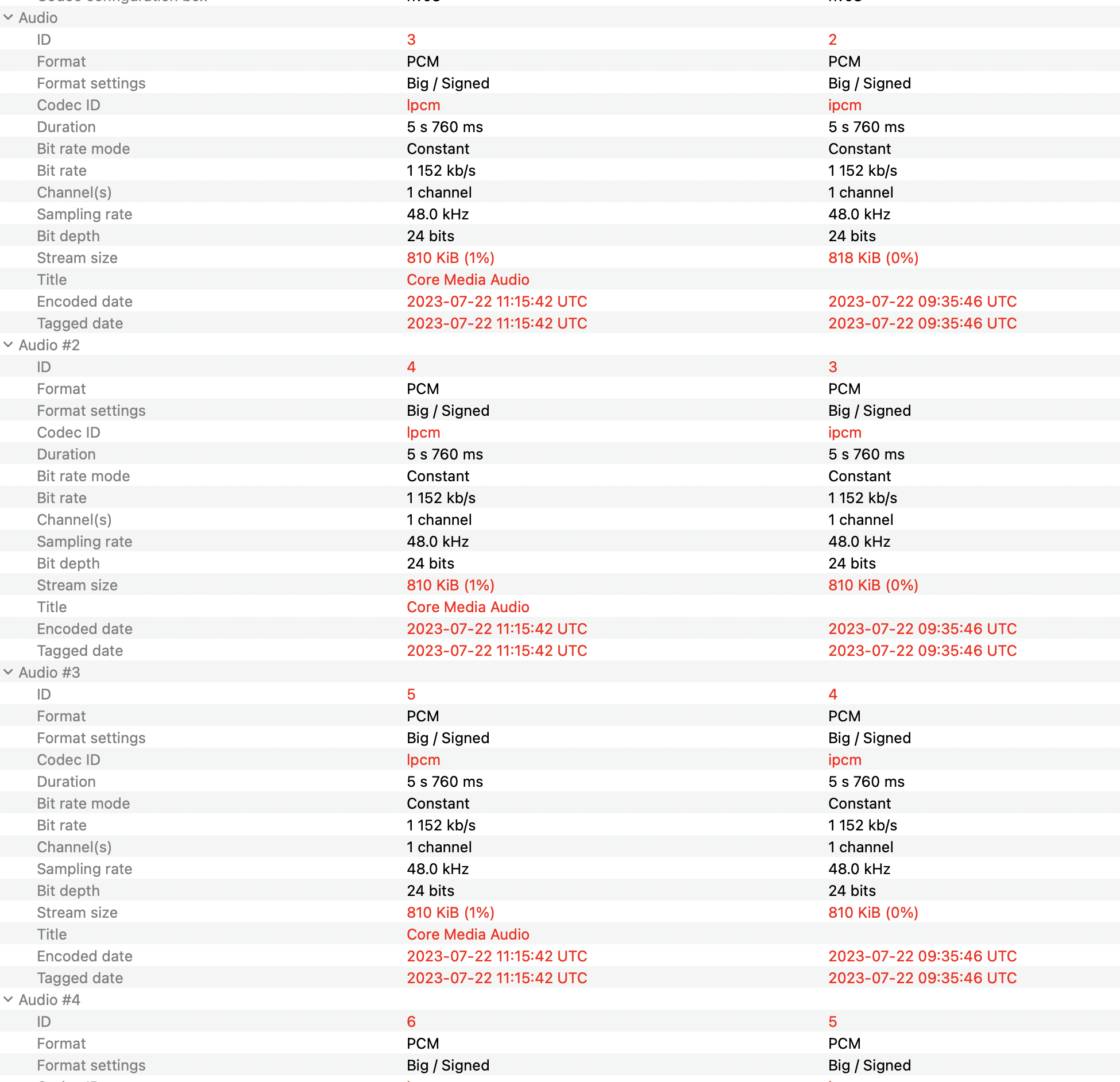
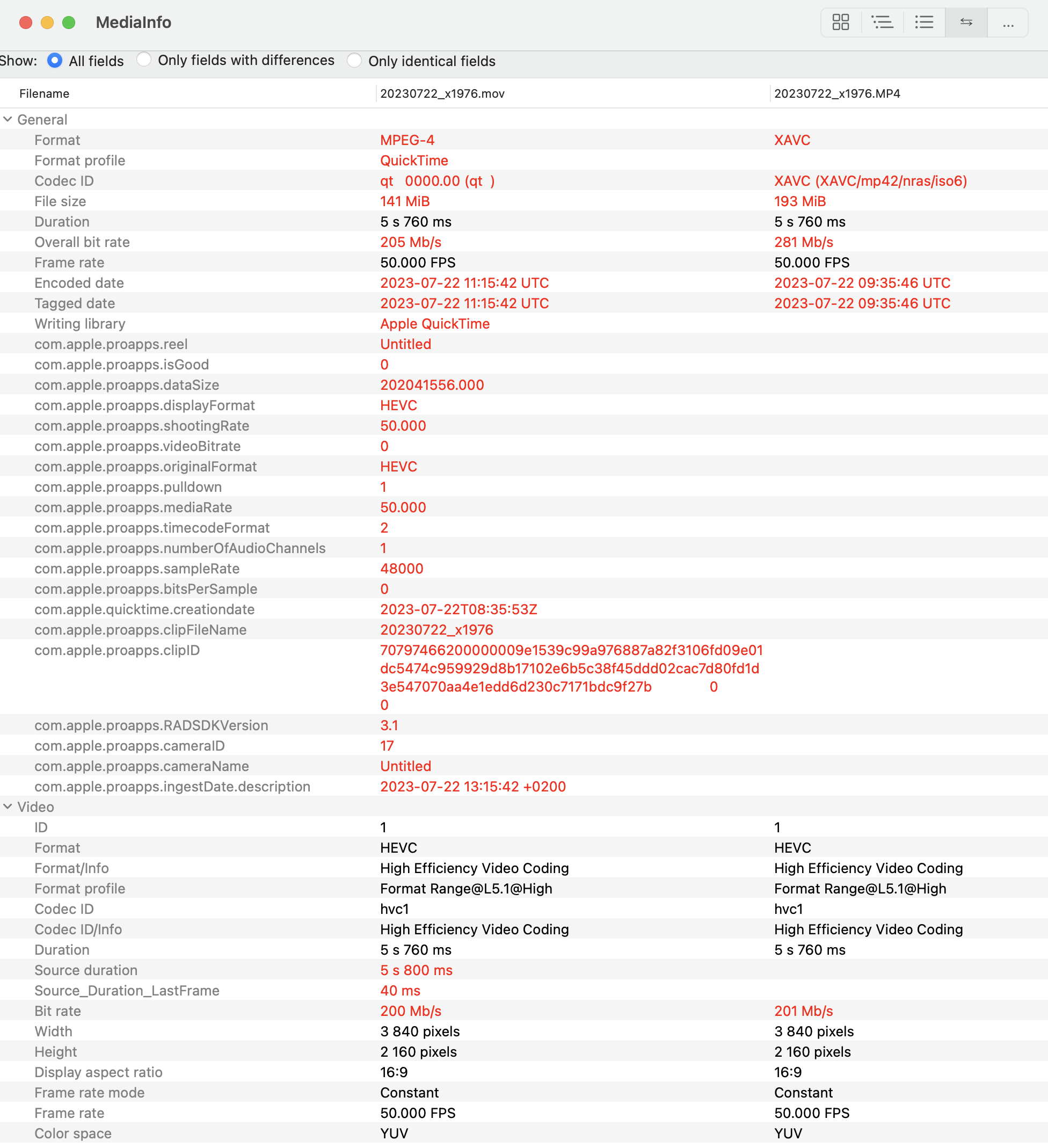
Thanks a lot for this fix!! The FX3 already has the right folder structure - it has a folder PRIVATE and then M4ROOT and CLIP.So when I Import it works but as cocoua mentioned it creates different new files in the library - I dont have the option to "leave files in place", I can only import and generate new files. See comparison in MediaInfo below.I can import straight from the card in FCPx from my FX3 (XAVC-HS) and I am getting timecode, I can even copy the whole folder in Finder to my hard drive and import and I am getting timecode as well. The problems arise when I use hedge with its rename-function. When I Import from a folder copied with hedge while renaming the files, the TC is gone on import.If I just copy using hedge without renaming and import while copying the folder it is gone as well.But then I closed FCPx and waited until copying is completed and then reopened it and used the import dialog to import from the copied folder and TC is still there.
As the FX3 has a function to add the date to the filename I dont think renaming in hedge is necessary anymore.
As the FX3 has a function to add the date to the filename I dont think renaming in hedge is necessary anymore.
Last edit: 22 Jul 2023 12:04 by FinalCutdown.
Please Log in to join the conversation.
- FinalCutdown
-
- Offline
- Elite Member
-
Less
More
- Posts: 222
- Thank you received: 4
22 Jul 2023 11:51 #126495
by FinalCutdown
Replied by FinalCutdown on topic FCPX doesn't read timecode from Sony A7S3
I was hoping that transcoding in catalyst browse to XAVC-L could fix it, but you loose gyro data as well when you do. So there doesnt seem any way to keep the original files with their original image quality and all metadata like gyro date while sill being able to read timecode in FCPx.. thats a pity. Anyways: Always backup original media before importing to FCPx!! Maybe that could really be a reason to switch to another application..
Please Log in to join the conversation.
- FinalCutdown
-
- Offline
- Elite Member
-
Less
More
- Posts: 222
- Thank you received: 4
22 Jul 2023 12:19 - 22 Jul 2023 12:22 #126496
by FinalCutdown
Replied by FinalCutdown on topic FCPX doesn't read timecode from Sony A7S3
Still I dont see why the files are so much smaller when Importing:
The mp4 was 193 mb, the new mov is 141 mb.
But the video stream is 200MB/S instead of 201 MB/S and the four ipcm audio streams stay exactly the same size plus there is a new time code track created..
So why are the files so much smaller? Is gyro data and other metada that big?
The mp4 was 193 mb, the new mov is 141 mb.
But the video stream is 200MB/S instead of 201 MB/S and the four ipcm audio streams stay exactly the same size plus there is a new time code track created..
So why are the files so much smaller? Is gyro data and other metada that big?
Last edit: 22 Jul 2023 12:22 by FinalCutdown.
Please Log in to join the conversation.
- FinalCutdown
-
- Offline
- Elite Member
-
Less
More
- Posts: 222
- Thank you received: 4
22 Jul 2023 12:35 - 22 Jul 2023 12:36 #126497
by FinalCutdown
"Sony Timecode RepairFinal Cut Pro currently doesn't correctly interpret timecode from certain Sony Cameras that are recording into an MP4 wrapper.This Toolbox will update a Project's FCPXML to use the correct timecode values from the XML sidecar file (or the MP4 itself if no sidecar file exists),so that you can more easily send timelines from Final Cut Pro to DaVinci Resolve, Baselight or Adobe Premiere (with XtoCC).
This Toolbox supports both Drop Frame (29.97fps, 59.94fps, 119.88fps) and Non-Drop Frame Timecode (i.e 24fps, 25fps, 120fps, etc).
This Toolbox was thrown together for Alister Robbie. Thanks George Elias, Jamie LeJeune & Valerio D'Andrassi."
Replied by FinalCutdown on topic FCPX doesn't read timecode from Sony A7S3
Thanks for the hint. At least on export, CommandPost can save your work. Funny that its such a well known issue and apple isnt doing anything to fix it....or you can use CommandPost to correct your FCPXML after the fact.
"Sony Timecode RepairFinal Cut Pro currently doesn't correctly interpret timecode from certain Sony Cameras that are recording into an MP4 wrapper.This Toolbox will update a Project's FCPXML to use the correct timecode values from the XML sidecar file (or the MP4 itself if no sidecar file exists),so that you can more easily send timelines from Final Cut Pro to DaVinci Resolve, Baselight or Adobe Premiere (with XtoCC).
This Toolbox supports both Drop Frame (29.97fps, 59.94fps, 119.88fps) and Non-Drop Frame Timecode (i.e 24fps, 25fps, 120fps, etc).
This Toolbox was thrown together for Alister Robbie. Thanks George Elias, Jamie LeJeune & Valerio D'Andrassi."
Last edit: 22 Jul 2023 12:36 by FinalCutdown.
Please Log in to join the conversation.

22 Jul 2023 13:27 #126498
by MJsanders
Replied by MJsanders on topic FCPX doesn't read timecode from Sony A7S3
So I suppose the obvious question is does anyone know why this fix works?
If you move the file you aren't changing anything to do with the file itself, so why does FCP X treat the same file differently if its inside the private folder?
If you move the file you aren't changing anything to do with the file itself, so why does FCP X treat the same file differently if its inside the private folder?
Please Log in to join the conversation.
- FinalCutdown
-
- Offline
- Elite Member
-
Less
More
- Posts: 222
- Thank you received: 4
22 Jul 2023 13:51 #126499
by FinalCutdown
Replied by FinalCutdown on topic FCPX doesn't read timecode from Sony A7S3
Because fcpx detects filetypes and metadata via the folder structure. It could be possible that it reads some metadata from sidecar files as well. But it doesn’t matter as it is not a real fix. It’s a workaround.
Please Log in to join the conversation.
22 Jul 2023 15:04 #126501
by MJsanders
Replied by MJsanders on topic FCPX doesn't read timecode from Sony A7S3
Yes you are right work around is right, its not a fix.
But it's weird that you aren't changing any info - so the files extension is the same as is the data in any sidecar file. Also in theory this file structure wouldn't be programmed into to FCP X as it doesn't normally exist right? Or does it? Its certainly not the same as the FX6 file structure which just has a folder marked XDROOT
But it's weird that you aren't changing any info - so the files extension is the same as is the data in any sidecar file. Also in theory this file structure wouldn't be programmed into to FCP X as it doesn't normally exist right? Or does it? Its certainly not the same as the FX6 file structure which just has a folder marked XDROOT
Please Log in to join the conversation.
- FinalCutdown
-
- Offline
- Elite Member
-
Less
More
- Posts: 222
- Thank you received: 4
22 Jul 2023 15:09 #126502
by FinalCutdown
Replied by FinalCutdown on topic FCPX doesn't read timecode from Sony A7S3
XDROOT is for XDCAM "professional" sony camcorders. "Private" and "M4root" for photo-cameras. I think the new a1 with its missing private folder is unknown to fcpx. But anyway, we need a workflow where we can link to originals and keep the timecode. Thats the only way to keep metadata and to be able to relink to different drives easily.
Please Log in to join the conversation.
22 Jul 2023 15:20 - 22 Jul 2023 15:20 #126503
by MJsanders
Replied by MJsanders on topic FCPX doesn't read timecode from Sony A7S3
Yeah I've just compared my FX6 and A7IV the folder structures are different. Using the workaround also fixes MP4 files from the A7IV.
But what I'm curious about is that why this workaround works. Is there a Sony camera that puts MP4 files in a directory called Private upon which FCP X is using as a template? Just curious to know how FCP X knows to treat these files differently.
As to relinking, Personally I wouldn't ingest direct from the card but would always offload via Hedge first. So I suppose you could move the M4ROOT file on the card then copy it via Hedge and then all your drives would have the same file structure.
But what I'm curious about is that why this workaround works. Is there a Sony camera that puts MP4 files in a directory called Private upon which FCP X is using as a template? Just curious to know how FCP X knows to treat these files differently.
As to relinking, Personally I wouldn't ingest direct from the card but would always offload via Hedge first. So I suppose you could move the M4ROOT file on the card then copy it via Hedge and then all your drives would have the same file structure.
Last edit: 22 Jul 2023 15:20 by MJsanders. Reason: Added detail
Please Log in to join the conversation.
- FinalCutdown
-
- Offline
- Elite Member
-
Less
More
- Posts: 222
- Thank you received: 4
22 Jul 2023 15:24 #126504
by FinalCutdown
Replied by FinalCutdown on topic FCPX doesn't read timecode from Sony A7S3
As I said in my last post, the FX3 uses a private folder. Thats why no workaround is necessary. Still I have to import and so rewrap my footage, erasing all sony metadata.
I think my old a7 iii and ZV1 use the private folder as well..
I think my old a7 iii and ZV1 use the private folder as well..
Please Log in to join the conversation.
22 Jul 2023 15:39 #126505
by MJsanders
Replied by MJsanders on topic FCPX doesn't read timecode from Sony A7S3
Ahh sorry I missed that. Wonder what the A7s3 does?
Please Log in to join the conversation.
- Chris Hocking
-
- Offline
- Junior Member
-
Less
More
- Posts: 25
- Thank you received: 10
23 Jul 2023 11:24 #126514
by Chris Hocking
Sony stores timecode in MP4 containers in a non-standard way, that Apple's AV Foundations cannot read by default. Blackmagic Resolve, Avid Media Composer, Adobe Premiere, EditReady, etc all support reading this non-standard timecode.
The timecode metadata is stored both in the MP4 file itself, and the XML sidecar file. CommandPost has the ability to read both.
There doesn't seem any interest on Apple's side to fix this issue, as it's been like this for over a decade now.
My suggestion is to just drag-and-drop the MP4s from Finder into Final Cut Pro to avoid any transcoding/processing/re-wrapping, then if you need to send to DaVinci Resolve or Baselight, just use CommandPost to "correct" the FCPXML (i.e. replace the 00:00:00:00 timecode with the correct timecode).
Replied by Chris Hocking on topic FCPX doesn't read timecode from Sony A7S3
So I suppose the obvious question is does anyone know why this fix works?
Sony stores timecode in MP4 containers in a non-standard way, that Apple's AV Foundations cannot read by default. Blackmagic Resolve, Avid Media Composer, Adobe Premiere, EditReady, etc all support reading this non-standard timecode.
The timecode metadata is stored both in the MP4 file itself, and the XML sidecar file. CommandPost has the ability to read both.
There doesn't seem any interest on Apple's side to fix this issue, as it's been like this for over a decade now.
My suggestion is to just drag-and-drop the MP4s from Finder into Final Cut Pro to avoid any transcoding/processing/re-wrapping, then if you need to send to DaVinci Resolve or Baselight, just use CommandPost to "correct" the FCPXML (i.e. replace the 00:00:00:00 timecode with the correct timecode).
Please Log in to join the conversation.
- FinalCutdown
-
- Offline
- Elite Member
-
Less
More
- Posts: 222
- Thank you received: 4
23 Jul 2023 11:27 - 23 Jul 2023 11:31 #126515
by FinalCutdown
Replied by FinalCutdown on topic FCPX doesn't read timecode from Sony A7S3
Thanks Chris, if this works 100 Percent reliable, it could be the next best workaround. Did you ever experience any issues with this workflow?
I have sent a feature request to apple anyway, although I dont think this will ever change anything.. Maybe you all could join me?
Still.. its a sony issue as well. As they dont want us to get those "professional" codecs on a "cheap" 5000 euro FX3.. Ive had many issues when I tried to convert footage in a broadcast station.. Timecode never passes through on their systems when using those mp4.
I have sent a feature request to apple anyway, although I dont think this will ever change anything.. Maybe you all could join me?
Still.. its a sony issue as well. As they dont want us to get those "professional" codecs on a "cheap" 5000 euro FX3.. Ive had many issues when I tried to convert footage in a broadcast station.. Timecode never passes through on their systems when using those mp4.
Last edit: 23 Jul 2023 11:31 by FinalCutdown.
Please Log in to join the conversation.
23 Jul 2023 12:40 #126516
by MJsanders
Replied by MJsanders on topic FCPX doesn't read timecode from Sony A7S3
So basically if the M4ROOT is in the folder called private FCP X applies a different method of ingest? Interesting that the A7s3 also puts the M4ROOT folder in the root folder.
Please Log in to join the conversation.
- FinalCutdown
-
- Offline
- Elite Member
-
Less
More
- Posts: 222
- Thank you received: 4
23 Jul 2023 14:11 - 23 Jul 2023 14:17 #126517
by FinalCutdown
Replied by FinalCutdown on topic FCPX doesn't read timecode from Sony A7S3
I guess CommandPost is only a one-way-workflow, right? Just tried it with the grading tool colorlab ai, because I had some issues with some clips from the FX3 not showing up right there. It works one way - the clips are correct in colorlab BUT I cannot send the timeline back anymore. If I select "push to FCP" it usually sends back the timeline plus the graded clips which are basically a link to the originals with a custom LUT applied. Pushing the timeline to FCP does not work as the timecode is different (as expected) and I dont seem able to relink my original timeline (which expects those clips starting at zero) to the clips in my browser window with LUT applied. I can only relink to the original files on my hard drive - which dont have a LUT applied. Is there any way to relink to clips in the browser instead of files on the hard drive? Is there any other way to go back?
Last edit: 23 Jul 2023 14:17 by FinalCutdown.
Please Log in to join the conversation.
- FinalCutdown
-
- Offline
- Elite Member
-
Less
More
- Posts: 222
- Thank you received: 4
23 Jul 2023 14:38 - 23 Jul 2023 14:42 #126518
by FinalCutdown
Replied by FinalCutdown on topic FCPX doesn't read timecode from Sony A7S3
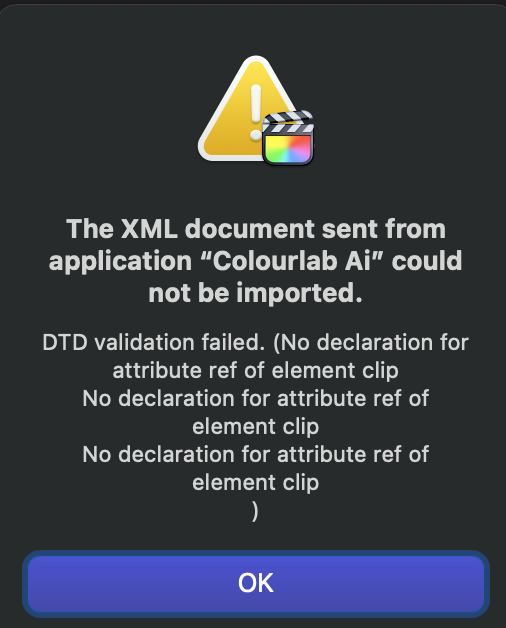
Now I tried to optimize media first in FCPx to zero out the timecode then export the original timeline (without commandpost) to colorlab and relink in Colorlab to the optimized media. It works there, but I am not able to send it back to FCPx.
Last edit: 23 Jul 2023 14:42 by FinalCutdown.
Please Log in to join the conversation.
- FinalCutdown
-
- Offline
- Elite Member
-
Less
More
- Posts: 222
- Thank you received: 4
23 Jul 2023 15:53 - 23 Jul 2023 16:46 #126520
by FinalCutdown
Replied by FinalCutdown on topic FCPX doesn't read timecode from Sony A7S3
Hmm... I tried to reimport the timeline i changed with commandpost and link it to my reimported clips with correct Sony-TC.. no way.. So looks like I am stuck. Is there any way to zero out the TC of the originals so it is identical in all applications? Moving the XML-Files does not help.
Edit: Joema already posted a solution in another post: QTchange64 from videotoolshed can add the real timecode to a clip or zero it out. The file stays the same, even no rewrap needed. The only problem still is that gyro data cannot be read after that. It can save you butt if you messed up, but I hope there will be an update including all metadata from sony so this would be the perfect workflow!
Edit: Joema already posted a solution in another post: QTchange64 from videotoolshed can add the real timecode to a clip or zero it out. The file stays the same, even no rewrap needed. The only problem still is that gyro data cannot be read after that. It can save you butt if you messed up, but I hope there will be an update including all metadata from sony so this would be the perfect workflow!
Last edit: 23 Jul 2023 16:46 by FinalCutdown.
Please Log in to join the conversation.
- FinalCutdown
-
- Offline
- Elite Member
-
Less
More
- Posts: 222
- Thank you received: 4
23 Jul 2023 16:18 #126521
by FinalCutdown
Replied by FinalCutdown on topic FCPX doesn't read timecode from Sony A7S3
Now I created optimized media, copied original media to an external drive an ejected it. I could grade in colorlab ai but cannot get the timeline back - same isse as before "DTD Validation failed"
Please Log in to join the conversation.
