


- Posts: 13
- Thank you received: 0
3 Post Moderation Rule for New Boarders (25 Jan 2021)
New boarders will have their posts moderated - Don't worry if you cannot see your post immediately.
FCPX doesn't read timecode from Sony A7S3
- ShootersFilmProduction
-
 Topic Author
- Offline
- New Member
-

Less
More
07 Feb 2022 02:49 #118844
by ShootersFilmProduction
FCPX doesn't read timecode from Sony A7S3 was created by ShootersFilmProduction
FCPX isn't reading the timecode embedded in footage imported from my Sony A7S3. I know it's there because Premiere can see it. Sony's file format is XAVC-S and I'm running FCP 10.6.1 in Monterey on an M1. Does anyone have a solution other than rewrapping all of the footage into a .mov - that's way too time consuming and painful.
Please Log in to join the conversation.

07 Feb 2022 17:20 #118857
by SKiD
Replied by SKiD on topic FCPX doesn't read timecode from Sony A7S3
Hi, are you importing the footage via the Import dialog? I noticed that the timecode doesn't work when I copy the footage from SD card to a HDD and then import. When I import the footage directly from a SD card, the clips are rewrapped to .MOV and the timecode works. After the import you can also roundtrip the edited clips to Resolve. If you do it with original MP4 clips, DR won't be able to find the timecode in the clips.
Please Log in to join the conversation.
- ShootersFilmProduction
-
Topic Author
- Offline
- New Member
-
Less
More
- Posts: 13
- Thank you received: 0
07 Feb 2022 18:20 #118858
by ShootersFilmProduction
Replied by ShootersFilmProduction on topic FCPX doesn't read timecode from Sony A7S3
Yes, I do import using the import dialog. When I shoot, here's the procedure I use. I copy the Clip folder onto an SSD using ShotPut Pro with checksum. Then I import the .MP4s into FCP using the dialog.
The folder and files on the SSD should be an exact duplicate of the ones on the camera card. Do you have any idea why the camera card files would re-wrap and the ones on the duplicate SSD would not?
The folder and files on the SSD should be an exact duplicate of the ones on the camera card. Do you have any idea why the camera card files would re-wrap and the ones on the duplicate SSD would not?
Please Log in to join the conversation.
- Tom Wolsky
-

- Offline
- Moderator
-

07 Feb 2022 18:23 #118860
by Tom Wolsky
Replied by Tom Wolsky on topic FCPX doesn't read timecode from Sony A7S3
You should copy the entire SSD to keep all the metadata together.
Please Log in to join the conversation.
- ShootersFilmProduction
-
Topic Author
- Offline
- New Member
-
Less
More
- Posts: 13
- Thank you received: 0
07 Feb 2022 18:28 #118861
by ShootersFilmProduction
Replied by ShootersFilmProduction on topic FCPX doesn't read timecode from Sony A7S3
Thanks. Would you know if there's additional metadata on the camera card that is used by FCP besides the .XML that is associated with each clip? There's often other data on the card that I don't need to import (stills etc).
Please Log in to join the conversation.
07 Feb 2022 18:56 #118864
by SKiD
Replied by SKiD on topic FCPX doesn't read timecode from Sony A7S3
well, copying the entire folder structure from SD card doesn't solve the problem with round tripping to DR, only rewrapping does. So maybe it will work in FCPX, but any FCPXML export will be most probably broken
Please Log in to join the conversation.
- ShootersFilmProduction
-
Topic Author
- Offline
- New Member
-
Less
More
- Posts: 13
- Thank you received: 0
07 Feb 2022 19:00 #118865
by ShootersFilmProduction
Replied by ShootersFilmProduction on topic FCPX doesn't read timecode from Sony A7S3
Thanks. I find it amazing that FCP hasn't fixed this since none of the other main editing systems don't have the same problem. There are alot of Sony users out there.
Please Log in to join the conversation.

09 Feb 2022 08:24 - 09 Feb 2022 08:25 #118893
by MJsanders
Replied by MJsanders on topic FCPX doesn't read timecode from Sony A7S3
The A7s3 records in MP4 format which doesn't support metadata. I think I am right in saying timecode in MP4 is just a value in the header, unlike constant LTC or VITC on a "real" camera. The way round it would be to use something like a Tentacle or Timecode Systems Ultra sync on an audio channel, and then use Resolve to read that audio TC and create ProRes files with TC.
This is why the FX6 (which is the same sensor and chipset as the A7s3) records in MXF which supports real timecode and metadata.
This is why the FX6 (which is the same sensor and chipset as the A7s3) records in MXF which supports real timecode and metadata.
Last edit: 09 Feb 2022 08:25 by MJsanders. Reason: grammer
Please Log in to join the conversation.
- ShootersFilmProduction
-
Topic Author
- Offline
- New Member
-
Less
More
- Posts: 13
- Thank you received: 0
09 Feb 2022 19:17 #118900
by ShootersFilmProduction
Replied by ShootersFilmProduction on topic FCPX doesn't read timecode from Sony A7S3
This is the best explanation I've received about why FCP can't read the timecode from the Sony A7s3. I do think it's a problem Apple needs to address since Premiere and the other major edit programs can all read the timecode from the camera. It just seems like a leftover from the early days of FCPX when it didn't have the professional capabilities of the other edit systems. Is superior in so many ways, but just falls flat in other important areas like this.
Please Log in to join the conversation.


09 Feb 2022 19:18 #118901
by joema
You have the right concept. VITC was an analog timecode standard that was replaced by digital "file timecode", but the same principle applies. The file timecode may be internally implemented as a virtual "track" or as a starting timecode number where the per-frame timecode is derived from frame count. In file-based video, timecode is typically implemented at the container level, not the lower codec level.
Many Sony Alpha mirrorless cameras internally have real timecode, and you can preset them to a certain value and/or use "free run". That SMPTE timecode value can be sent via HDMI to an Atomos recorder and encoded as ProRes in a Quicktime MOV container. That timecode wasn't conjured from nothing, the Atomos recorder did not originate it, rather it recorded the clip timecode sent by the Sony Alpha. So the Alpha cameras have "real" timecode. They just can't be jam-synced via external terminal, and for reasons stated below neither they (nor any other similar camera) can record the timecode using their internal MP4 codec in a standardized way.
As you said the root cause is the MP4 container used by Sony Alpha and many other "consumer grade" cameras does not officially support timecode. This was envisioned as a problem years ago and in 2013 Apple wrote Tech Note TN2174 which advised hardware and software developers to begin using aspects of the Quicktime timecode structures in future MP4 formats. Not Quicktime containers, just borrow pieces of that timecode layout, or else devise something else consistent. Without that there would be no standardization and any timecode in MP4 containers would be ad-hoc extensions which would not be universally compatible. It appears they didn't listen to Apple. The manufacturers, developers and standards organizations did not come up with some equivalent, and that's where we are today. developer.apple.com/library/archive/tech...s/tn2174/_index.html
It's a bigger issue than just not displaying MP4 timecode from certain cameras in FCP. FCP does timecode checks when relinking and if editing from 3rd-party proxies or other transcoded material, relink to the original camera files may fail. Resolve will relink an MP4 clip with zero'd out timecode to an original clip with non-zero SMPTE timecode but that means it's not checking it. Eventually that may cause an erroneous relink, maybe in a big timeline where you don't at first notice it.
The solution isn't simply to make FCP read source timecode from Sony Alpha MP4 files. FCP will read timecode from Panasonic GH4 and GH5 files right now. There may be other timecode formats in MP4 files that Resolve will not read. There is no universal fix because there is no timecode standard for MP4 containers. Studying various MP4 files with the command-line ffprobe utility shows many different timecode layouts. To address that, every MP4 variant in every codec in every model of every camera would require custom handling by every NLE and every transcoding utility. That is what Apple was warning the industry against in TN2174 all those years ago.
That said, as @ShootersFilmProduction mentioned, Sony Alpha cameras are very common, and this even includes the FX3 which is part of their "cinema" line, yet uses MP4 files. My own team probably has 15 Alpha cameras and 5-6 A7SIIIs, plus several FX6s. Even if it requires an ad-hoc tweak to FCP, it would seem worthwhile. I will make the request myself using the MacOS Feedback Assistant App (what replaced the Bug Reporter app for developers). However any change to FCP is unlikely to take place in a timeframe useful to any current task.
This is because as FCP is currently designed you are never supposed to import tree-oriented camera media without re-wrapping it. The FCP import dialog does not support that. True you can fake out FCP and copy bare files outside the bundle and import them in place. But various things (not just timecode) may not work right afterward. Even if you re-wrap every Alpha MP4 file, there may be other MP4 files from other sources which will not be fixed. There is no timecode standard for MP4 so if that metadata was mangled by a previous utility or if it's in some oddball format that EditReady hasn't reverse-engineered, the re-wrapped files won't have the original timecode.
However IMO the best near-term solution is re-wrap Alpha MP4 material using EditReady. It is re-wrapping, not transcoding so it's very fast and preserves the original codec. Yet it puts timecode in the resultant Quicktime MOV container so it works with FCP or downstream utilities that need clip timecode. The latest version of EditReady can also transcode BRAW and ProRes RAW material: hedge.video/editready
If you want clip timecode for collaborative editing, you can use the built-in FCP timecode effect to burn in project timecode, or two instances of it to burn in 00:00-based clip timecode plus project timecode.
Another solution is use Atomos recorders to record the Alpha material via HDMI, which embeds the timecode in a Quicktime container that can be consistently read. It also avoids the need of creating proxies or optimized media. Admittedly these are all workarounds.
Replied by joema on topic FCPX doesn't read timecode from Sony A7S3
The A7s3 records in MP4 format which doesn't support metadata. I think I am right in saying timecode in MP4 is just a value in the header, unlike constant LTC or VITC on a "real" camera. The way round it would be to use something like a Tentacle or Timecode Systems Ultra sync on an audio channel, and then use Resolve to read that audio TC and create ProRes files with TC...This is why the FX6 (which is the same sensor and chipset as the A7s3) records in MXF which supports real timecode and metadata.
You have the right concept. VITC was an analog timecode standard that was replaced by digital "file timecode", but the same principle applies. The file timecode may be internally implemented as a virtual "track" or as a starting timecode number where the per-frame timecode is derived from frame count. In file-based video, timecode is typically implemented at the container level, not the lower codec level.
Many Sony Alpha mirrorless cameras internally have real timecode, and you can preset them to a certain value and/or use "free run". That SMPTE timecode value can be sent via HDMI to an Atomos recorder and encoded as ProRes in a Quicktime MOV container. That timecode wasn't conjured from nothing, the Atomos recorder did not originate it, rather it recorded the clip timecode sent by the Sony Alpha. So the Alpha cameras have "real" timecode. They just can't be jam-synced via external terminal, and for reasons stated below neither they (nor any other similar camera) can record the timecode using their internal MP4 codec in a standardized way.
As you said the root cause is the MP4 container used by Sony Alpha and many other "consumer grade" cameras does not officially support timecode. This was envisioned as a problem years ago and in 2013 Apple wrote Tech Note TN2174 which advised hardware and software developers to begin using aspects of the Quicktime timecode structures in future MP4 formats. Not Quicktime containers, just borrow pieces of that timecode layout, or else devise something else consistent. Without that there would be no standardization and any timecode in MP4 containers would be ad-hoc extensions which would not be universally compatible. It appears they didn't listen to Apple. The manufacturers, developers and standards organizations did not come up with some equivalent, and that's where we are today. developer.apple.com/library/archive/tech...s/tn2174/_index.html
It's a bigger issue than just not displaying MP4 timecode from certain cameras in FCP. FCP does timecode checks when relinking and if editing from 3rd-party proxies or other transcoded material, relink to the original camera files may fail. Resolve will relink an MP4 clip with zero'd out timecode to an original clip with non-zero SMPTE timecode but that means it's not checking it. Eventually that may cause an erroneous relink, maybe in a big timeline where you don't at first notice it.
The solution isn't simply to make FCP read source timecode from Sony Alpha MP4 files. FCP will read timecode from Panasonic GH4 and GH5 files right now. There may be other timecode formats in MP4 files that Resolve will not read. There is no universal fix because there is no timecode standard for MP4 containers. Studying various MP4 files with the command-line ffprobe utility shows many different timecode layouts. To address that, every MP4 variant in every codec in every model of every camera would require custom handling by every NLE and every transcoding utility. That is what Apple was warning the industry against in TN2174 all those years ago.
That said, as @ShootersFilmProduction mentioned, Sony Alpha cameras are very common, and this even includes the FX3 which is part of their "cinema" line, yet uses MP4 files. My own team probably has 15 Alpha cameras and 5-6 A7SIIIs, plus several FX6s. Even if it requires an ad-hoc tweak to FCP, it would seem worthwhile. I will make the request myself using the MacOS Feedback Assistant App (what replaced the Bug Reporter app for developers). However any change to FCP is unlikely to take place in a timeframe useful to any current task.
This is because as FCP is currently designed you are never supposed to import tree-oriented camera media without re-wrapping it. The FCP import dialog does not support that. True you can fake out FCP and copy bare files outside the bundle and import them in place. But various things (not just timecode) may not work right afterward. Even if you re-wrap every Alpha MP4 file, there may be other MP4 files from other sources which will not be fixed. There is no timecode standard for MP4 so if that metadata was mangled by a previous utility or if it's in some oddball format that EditReady hasn't reverse-engineered, the re-wrapped files won't have the original timecode.
However IMO the best near-term solution is re-wrap Alpha MP4 material using EditReady. It is re-wrapping, not transcoding so it's very fast and preserves the original codec. Yet it puts timecode in the resultant Quicktime MOV container so it works with FCP or downstream utilities that need clip timecode. The latest version of EditReady can also transcode BRAW and ProRes RAW material: hedge.video/editready
If you want clip timecode for collaborative editing, you can use the built-in FCP timecode effect to burn in project timecode, or two instances of it to burn in 00:00-based clip timecode plus project timecode.
Another solution is use Atomos recorders to record the Alpha material via HDMI, which embeds the timecode in a Quicktime container that can be consistently read. It also avoids the need of creating proxies or optimized media. Admittedly these are all workarounds.
Please Log in to join the conversation.
- ShootersFilmProduction
-
Topic Author
- Offline
- New Member
-
Less
More
- Posts: 13
- Thank you received: 0
09 Feb 2022 19:26 #118904
by ShootersFilmProduction
Replied by ShootersFilmProduction on topic FCPX doesn't read timecode from Sony A7S3
Thanks for the explanation. It's too bad that FCP stands alone as the only major editing application that can not read the MP4 timecode generated from cameras like the A7s3 without going thru the extra step of re-wrapping.
Please Log in to join the conversation.

09 Feb 2022 21:36 #118909
by VTC
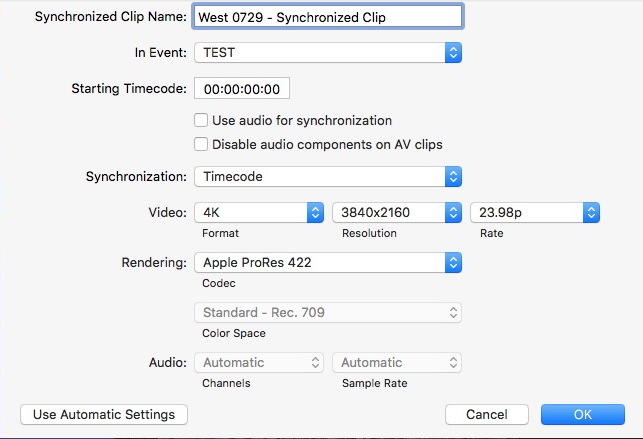
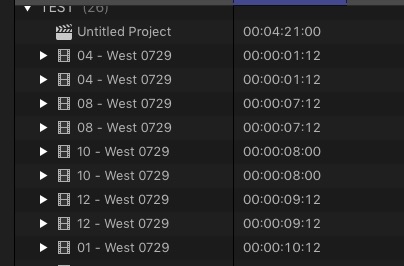
Just tried some 4K, XAVC-S mp4 clips from a Sony A7Sii that were also converted to ProRes via EditReady for this test. (Drag & Drop, not via 'import'.) FCP syncs the MP4/PR clips fine. Don't know why the TC data in a 7Siii mp4 file is any different from a 7Sii mp4 file but maybe it is.

Replied by VTC on topic FCPX doesn't read timecode from Sony A7S3
FCPX isn't reading the timecode embedded in footage imported from my Sony A7S3. I know it's there because Premiere can see it.
Just tried some 4K, XAVC-S mp4 clips from a Sony A7Sii that were also converted to ProRes via EditReady for this test. (Drag & Drop, not via 'import'.) FCP syncs the MP4/PR clips fine. Don't know why the TC data in a 7Siii mp4 file is any different from a 7Sii mp4 file but maybe it is.
Please Log in to join the conversation.
10 Feb 2022 02:18 #118917
by joema
VTC, your synced clips seem to be left-justified. If they are truly synced on timecode, why don't they have staggered offsets, similar to clips with different start times which are synced on audio?
Here is how to reproduce the problem: Set Alpha camera to free run timecode, have TC/UB display setting to TC so you can see it count on the LCD. Enter a preset timecode, say 00:08:00:00, observe it counting and immediately shoot a 10-sec clip. Then reset timecode back to 00:08:00:00, wait 5 sec and shoot another 10 sec clip. Thus they will have partially overlapping timecodes.
If you import those two clips using "copy to library" you can skim them and see the timecode, or sync on timecode and it will work. The synced clips will show a staggered start but have an overlapping synced region. In that region you can use the clip skimmer to inspect clip timecode and for a given timeline point, the clip timecodes should match. However if you import those clips using "leave files in place", you can skim the clips but you'll see start-at-zero timecode, and syncing the clips on timecode will apparently sync on clip start, not timecode.
It's possible the majority of mirrorless camera users don't use preset or free run timecode, or don't record in MP4 format, or the cameras use a flat folder structure and the MP4 files can be properly imported "in place", e.g, Panasonic GH4, GH5, etc. All those might never see the problem.
Even then it will only be an issue if you expect non-zero-starting preset or free run timecode, or try to sync on timecode. But FCP doesn't raise an error even if rewrapped and if there's no matching timecode. It seems to fall back on syncing on clip start. Some of those users probably say "Hey it didn't work, I'll just sync on audio".
I don't think the OP stated why he wanted the original source timecode preserved, but there are various reasons. The fact he's asking implies he's using free run or preset timecode, not rec run "start from zero".
You might want the free run timecode preset to time of day for logging. Also, if free run timecode is not consistently maintained you can't reliably sync on timecode, say between multiple Alpha cameras or those and an FX6. Both sets of clips have free run time of day timecode, but the Alpha clips (if imported "in place") aren't interpreted properly by FCP and show as starting from 00:00. This prevents sync on timecode.
Another issue is FCP does a timecode check for relink. If the original MP4 clips with time of day timecode were imported "in place", FCP sees those as all starting from 00:00, even though they contained time of day timecode. If matching ProRes clips were captured by an Atomos recorder those will have correct timecode which FCP reads properly. There are various scenarios where relink may fail with the error "The original file and new file have no shared media range". This is because FCP is not reading the correct preset or free run timecode value from the MP4 clips, rather a value starting with 00:00 on each clip. This creates a timecode mismatch between identical clips shot concurrently from the same camera.
Maybe the OP could specify the workflow issue this is causing, but there are several valid possibilities. The only immediate workaround is rewrap all files before import using EditReady.
Replied by joema on topic FCPX doesn't read timecode from Sony A7S3
....Don't know why the TC data in a 7Siii mp4 file is any different from a 7Sii mp4 file but maybe it is...
VTC, your synced clips seem to be left-justified. If they are truly synced on timecode, why don't they have staggered offsets, similar to clips with different start times which are synced on audio?
Here is how to reproduce the problem: Set Alpha camera to free run timecode, have TC/UB display setting to TC so you can see it count on the LCD. Enter a preset timecode, say 00:08:00:00, observe it counting and immediately shoot a 10-sec clip. Then reset timecode back to 00:08:00:00, wait 5 sec and shoot another 10 sec clip. Thus they will have partially overlapping timecodes.
If you import those two clips using "copy to library" you can skim them and see the timecode, or sync on timecode and it will work. The synced clips will show a staggered start but have an overlapping synced region. In that region you can use the clip skimmer to inspect clip timecode and for a given timeline point, the clip timecodes should match. However if you import those clips using "leave files in place", you can skim the clips but you'll see start-at-zero timecode, and syncing the clips on timecode will apparently sync on clip start, not timecode.
It's possible the majority of mirrorless camera users don't use preset or free run timecode, or don't record in MP4 format, or the cameras use a flat folder structure and the MP4 files can be properly imported "in place", e.g, Panasonic GH4, GH5, etc. All those might never see the problem.
Even then it will only be an issue if you expect non-zero-starting preset or free run timecode, or try to sync on timecode. But FCP doesn't raise an error even if rewrapped and if there's no matching timecode. It seems to fall back on syncing on clip start. Some of those users probably say "Hey it didn't work, I'll just sync on audio".
I don't think the OP stated why he wanted the original source timecode preserved, but there are various reasons. The fact he's asking implies he's using free run or preset timecode, not rec run "start from zero".
You might want the free run timecode preset to time of day for logging. Also, if free run timecode is not consistently maintained you can't reliably sync on timecode, say between multiple Alpha cameras or those and an FX6. Both sets of clips have free run time of day timecode, but the Alpha clips (if imported "in place") aren't interpreted properly by FCP and show as starting from 00:00. This prevents sync on timecode.
Another issue is FCP does a timecode check for relink. If the original MP4 clips with time of day timecode were imported "in place", FCP sees those as all starting from 00:00, even though they contained time of day timecode. If matching ProRes clips were captured by an Atomos recorder those will have correct timecode which FCP reads properly. There are various scenarios where relink may fail with the error "The original file and new file have no shared media range". This is because FCP is not reading the correct preset or free run timecode value from the MP4 clips, rather a value starting with 00:00 on each clip. This creates a timecode mismatch between identical clips shot concurrently from the same camera.
Maybe the OP could specify the workflow issue this is causing, but there are several valid possibilities. The only immediate workaround is rewrap all files before import using EditReady.
Please Log in to join the conversation.
10 Feb 2022 03:36 #118923
by VTC
That was a quick test to see if a solitary native Sony mp4 file and the ER generated PR file both contained timecode that would sync to each other. It stacked them from shortest to longest run time. Wasn't meant to generate a workable timeline although that tempts me to run a test of the Sony hooked to an Atomos hooked to a Blackmagic to see where all that sorts out. The camera can do free run / record run / zero start / date timecode options which intrigues me enough to scramble things up a bit timecode wise to see how things sort themselves out.
I found it odd OP mentioning the timecode out of his 7Siii file wasn't identified by FCP & therefore unsyncable. Discovered it was so tripping it through EditReady really isn't necessary.
Replied by VTC on topic FCPX doesn't read timecode from Sony A7S3
VTC, your synced clips seem to be left-justified. If they are truly synced on timecode, why don't they have staggered offsets, similar to clips with different start times which are synced on audio?
That was a quick test to see if a solitary native Sony mp4 file and the ER generated PR file both contained timecode that would sync to each other. It stacked them from shortest to longest run time. Wasn't meant to generate a workable timeline although that tempts me to run a test of the Sony hooked to an Atomos hooked to a Blackmagic to see where all that sorts out. The camera can do free run / record run / zero start / date timecode options which intrigues me enough to scramble things up a bit timecode wise to see how things sort themselves out.
I found it odd OP mentioning the timecode out of his 7Siii file wasn't identified by FCP & therefore unsyncable. Discovered it was so tripping it through EditReady really isn't necessary.
Please Log in to join the conversation.

26 May 2022 06:44 #120752
by MalaKaz
Replied by MalaKaz on topic FCPX doesn't read timecode from Sony A7S3
Yes that's true. For example for me, for the weddings I do, I use Sony cameras (Z150 a6300 a6500 a7s2 and a7s3). For years now I ve been using the z150 as my main camera and the others as secondaries where they shoot from other angles and with a stabilizer. So what I mainly did in FCPX is selecting all my clips and making a Multicam clip. leaving everything in auto and the audio sync box ticked everything was fine. Final cut did the job perfectly and all the clips where synchronised by audio. With the a7s3 final cut cannot sync by audio and I haven't figured out why yet. tried everything without any luck . soo my only workaround was to shoot on a free run so I can sync by timecode my smaller clips from s3 and the big clip from z150... it did work okay but now the problem I face is that fcpx sometimes reads the TC and sometimes not
Please Log in to join the conversation.

08 Nov 2022 18:31 #122805
by cocoua
Replied by cocoua on topic FCPX doesn't read timecode from Sony A7S3
HI! I tried importing the MP$ straight from the SD and it gets the timecode!!
the bad news is the imported media is transcoded, so is NOT the original footage, but a re encoded one. different size and bit rate, so I think Final Cut cant work with Sony's original footage+timecode.
SO this means, if you need Sony original footage+timecode, you better choose another software different to FCPX
the bad news is the imported media is transcoded, so is NOT the original footage, but a re encoded one. different size and bit rate, so I think Final Cut cant work with Sony's original footage+timecode.
SO this means, if you need Sony original footage+timecode, you better choose another software different to FCPX
Please Log in to join the conversation.
10 Nov 2022 12:38 #122817
by joema
Replied by joema on topic FCPX doesn't read timecode from Sony A7S3
Felipe Baez just did a tutorial about timecode workflow with Sony mirrorless cameras. In general the solution is rewrap with EditReady:
Sony A7 series workflow for FCP and DaVinci collaboration
Sony A7 series workflow for FCP and DaVinci collaboration
Please Log in to join the conversation.
- FinalCutdown
-

- Offline
- Elite Member
-

Less
More
- Posts: 222
- Thank you received: 4
10 Jul 2023 14:06 #126335
by FinalCutdown
Replied by FinalCutdown on topic FCPX doesn't read timecode from Sony A7S3
Thanks for the detailed explanation. I guess edit ready will make gyro data unreadable in catalyst? So I am afraid it’s not an ideal solution and you should always keep the originals unwrapped as a backup. I hope there will be a solution in fcpx soon..
Please Log in to join the conversation.
- FinalCutdown
-
- Offline
- Elite Member
-
Less
More
- Posts: 222
- Thank you received: 4
10 Jul 2023 14:14 #126336
by FinalCutdown
Replied by FinalCutdown on topic FCPX doesn't read timecode from Sony A7S3
By the way: if you use time of day to sync on sony cameras and you store your camera for a longer time without a battery inserted the internal battery for the clock can run out. In this case just charge the external battery inside the camera via usb and the internal battery will hopefully be restored as well.
Please Log in to join the conversation.
14 Jul 2023 13:29 #126381
by Steffen K
Replied by Steffen K on topic FCPX doesn't read timecode from Sony A7S3
For anybody still searching for a solution: There is an easy one!
Just copy your whole SD Card Content onto your drive. Then create a folder called "PRIVATE" and move the "M4ROOT" folder into this PRIVATE folder.
When you then import in FCPx via import dialog you should get timecode.
Thank you Felipe Baez!
Just copy your whole SD Card Content onto your drive. Then create a folder called "PRIVATE" and move the "M4ROOT" folder into this PRIVATE folder.
When you then import in FCPx via import dialog you should get timecode.
Thank you Felipe Baez!
Please Log in to join the conversation.
