




- Posts: 13
- Thank you received: 0
3 Post Moderation Rule for New Boarders (25 Jan 2021)
New boarders will have their posts moderated - Don't worry if you cannot see your post immediately.
Ongoing slow/stuttering issues
18 Sep 2021 16:01 #116333
by marchvet
Replied by marchvet on topic Ongoing slow/stuttering issues
Joe,
I really appreciate the information. Last night I cleaned up my iMac even further(it was already bare bones in regards to apps) and ran a program called onyx. After seeing your post today, I also ran the EtrecheckPro and that showed nothing out of the ordinary. Most critical was just my Automatic updates are turned off.
I had already removed chrome and also adobe creative suite as someone mentioned that it causes issues. After deleting the creative suite, my computers response was a lot faster.
My biggest question is why did it suddenly start after running fine for almost 2 years. The programs are all the same and had been running fine during that time.
Today I ran FCP and it loaded super fast, probably the fastest its ever loaded. The stuttering is still there so I will try to run proxy and see how that does.
I really appreciate the information. Last night I cleaned up my iMac even further(it was already bare bones in regards to apps) and ran a program called onyx. After seeing your post today, I also ran the EtrecheckPro and that showed nothing out of the ordinary. Most critical was just my Automatic updates are turned off.
I had already removed chrome and also adobe creative suite as someone mentioned that it causes issues. After deleting the creative suite, my computers response was a lot faster.
My biggest question is why did it suddenly start after running fine for almost 2 years. The programs are all the same and had been running fine during that time.
Today I ran FCP and it loaded super fast, probably the fastest its ever loaded. The stuttering is still there so I will try to run proxy and see how that does.
Please Log in to join the conversation.
- Tom Wolsky
-

- Offline
- Moderator
-

18 Sep 2021 16:18 #116335
by Tom Wolsky
Replied by Tom Wolsky on topic Ongoing slow/stuttering issues
I would suggest switching off automatic updates, except for security updates, and certainly all auto updates in the App Store.
Please Log in to join the conversation.
- ronny courtens
-

- Offline
- Moderator
-
Less
More
- Posts: 4455
- Thank you received: 962
18 Sep 2021 18:03 #116339
by ronny courtens
Replied by ronny courtens on topic Ongoing slow/stuttering issues
When your computer suddenly gets slower and you cannot find any obvious reasons: create a new admin user, launch fcpx from this new user account with the same media that gives you trouble and see if it performs better.
- Ronny
- Ronny
Please Log in to join the conversation.
18 Sep 2021 20:48 #116343
by marchvet
Replied by marchvet on topic Ongoing slow/stuttering issues
Thanks Ronny. I actually did that last night and still had the same stuttering. Today I installed a previous version of FCP and the problem persisted.
My system is super bare bones now, cleaned out, all checks passed... everything.
I would hate to do a clean install and find that its still having issues. My recent install is less than six months old.
My system is super bare bones now, cleaned out, all checks passed... everything.
I would hate to do a clean install and find that its still having issues. My recent install is less than six months old.
Please Log in to join the conversation.


18 Sep 2021 21:43 #116344
by joema
Replied by joema on topic Ongoing slow/stuttering issues
In reviewing all actions you've taken so far, I don't see where you've tried creating a new test library and importing just that one clip. The FCP library is composed of several SQLite databases: one for the library, one for each event and one for each project. There is some interaction between those separate databases.
Each library is totally stand alone from all other libraries. I suggest you create a new library, import that one clip, create a new default project, add that one clip to the project and examine the behavior. That eliminates any possible issues with damage or corruption in the library, event or project databases.
If it has more normal performance, that could imply some damage in your original library. If it's still abnormally (ie extremely) slow, that could imply a system-layer issue. E.g, buggy plugins, kernel extensions, hardware, etc.
However it is suspicious that you report Resolve (I assume ver. 17) is also abnormally slow, even worse than FCP. That of course is totally different application software, which implies a problem below the application layer is negatively affecting both FCP and Resolve.
Try running the GeekBench benchmark and see what numbers you get for single-core, multi-core and GPU. Also run the Blackmagic disk benchmark on your internal drive and the external drive and report your read/write numbers.
If your system has recently had a total hang, lockup or uncommanded reboot that implies a hardware problem or a kernel extension bug. Has that ever happened?
At this point it would not hurt to run Disk Utility First Aid on all volumes, both internal and external. If your internal drive is APFS there are two partitions and it must be run separately on each of them. To properly run First Aid on the internal drive the system should be booted into recovery mode by booting while holding CMD+R. That ensures it can get an exclusive lock on the boot volume to make changes. The external drive can be check when booted normally.
After doing that, if no errors rebuild the Spotlight indexes. I'm not sure if FCP uses those for media lookups but if you've never done that it's a good idea. Procedure: support.apple.com/en-us/HT201716
Each library is totally stand alone from all other libraries. I suggest you create a new library, import that one clip, create a new default project, add that one clip to the project and examine the behavior. That eliminates any possible issues with damage or corruption in the library, event or project databases.
If it has more normal performance, that could imply some damage in your original library. If it's still abnormally (ie extremely) slow, that could imply a system-layer issue. E.g, buggy plugins, kernel extensions, hardware, etc.
However it is suspicious that you report Resolve (I assume ver. 17) is also abnormally slow, even worse than FCP. That of course is totally different application software, which implies a problem below the application layer is negatively affecting both FCP and Resolve.
Try running the GeekBench benchmark and see what numbers you get for single-core, multi-core and GPU. Also run the Blackmagic disk benchmark on your internal drive and the external drive and report your read/write numbers.
If your system has recently had a total hang, lockup or uncommanded reboot that implies a hardware problem or a kernel extension bug. Has that ever happened?
At this point it would not hurt to run Disk Utility First Aid on all volumes, both internal and external. If your internal drive is APFS there are two partitions and it must be run separately on each of them. To properly run First Aid on the internal drive the system should be booted into recovery mode by booting while holding CMD+R. That ensures it can get an exclusive lock on the boot volume to make changes. The external drive can be check when booted normally.
After doing that, if no errors rebuild the Spotlight indexes. I'm not sure if FCP uses those for media lookups but if you've never done that it's a good idea. Procedure: support.apple.com/en-us/HT201716
Please Log in to join the conversation.
18 Sep 2021 22:35 #116346
by marchvet
Replied by marchvet on topic Ongoing slow/stuttering issues
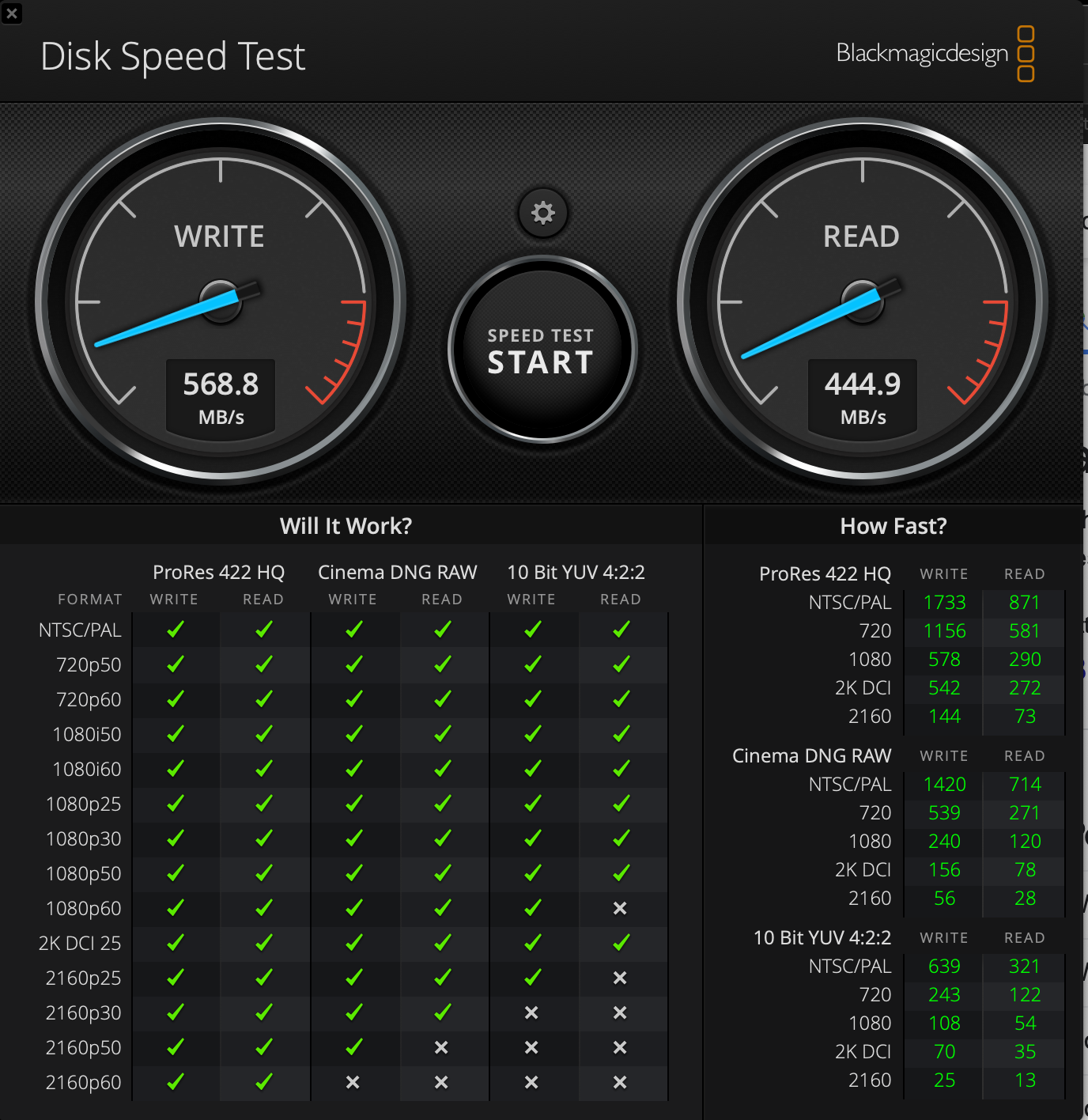
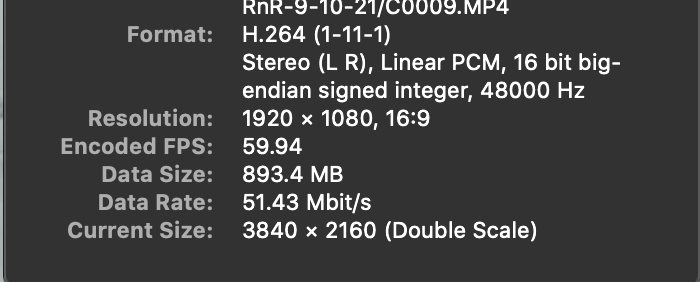
Joe,Here are some updates to this:1. I have created at least 7 different libraries while trying the new settings per the convos in these various threads. Still the same stutter.2. Today I loaded a mp4 from my Sony a6000 and it ran fine. The specs are: 1920x1080, 16:9, 59.4. 3. Installed a previous version of FCP and still got the stuttering with the GoPro files.4. I also have run disk utilities several times over the past few days during these test.5. Rebuilding the spotlight indexes now.See the attached images for speed test. There has to be something going on with my iMac vs whatever software editors, because it's happening in all of them. The thing I don't understand is what is it? My system is truly barebones now with nothing running but FCP(other than system resources etc).
Please Log in to join the conversation.
18 Sep 2021 23:12 #116347
by joema
Replied by joema on topic Ongoing slow/stuttering issues
The disk speed is OK. The A6000 1080p test isn't that meaningful because that resolution H264 is typically fast on almost anything.
It's important to clarify the symptoms. NLE "stuttering" by itself is not wrong for a difficult 4k/60 GoPro Hero 8 codec. What one person calls stuttering another person calls pretty good.
If you have a cell phone capable of recording 60 fps or better, can you try this test: put the same clip you sent me in a timeline. Set the viewer to "Better Performance". Put the playhead at the beginning. Press the L key twice to play at 4x normal speed. Verify the 2nd press of the L key makes it speed up more. Film the full screen with your cell phone, including FCP viewer and playhead. Upload that to me. That will let me test the playback frame rate at 4x of the same clip on various machines and NLEs.
To review: in general it's normal for that codec to be somewhat sluggish on many NLEs and platforms. The degree will vary based on the exact hardware and NLE.
It's also normal the playback frame rate will be faster if skimming in the event browser vs the playhead in the timeline. The skimmer uses a leaner, more optimized software code path.
After doing the above cell phone test, please right-click on that clip in the event browser, pick Transcode Media>Create Optimized Media. On my iMac Pro it takes 30 seconds to do that. Then examine the playback performance in the timeline.
It's important to clarify the symptoms. NLE "stuttering" by itself is not wrong for a difficult 4k/60 GoPro Hero 8 codec. What one person calls stuttering another person calls pretty good.
If you have a cell phone capable of recording 60 fps or better, can you try this test: put the same clip you sent me in a timeline. Set the viewer to "Better Performance". Put the playhead at the beginning. Press the L key twice to play at 4x normal speed. Verify the 2nd press of the L key makes it speed up more. Film the full screen with your cell phone, including FCP viewer and playhead. Upload that to me. That will let me test the playback frame rate at 4x of the same clip on various machines and NLEs.
To review: in general it's normal for that codec to be somewhat sluggish on many NLEs and platforms. The degree will vary based on the exact hardware and NLE.
It's also normal the playback frame rate will be faster if skimming in the event browser vs the playhead in the timeline. The skimmer uses a leaner, more optimized software code path.
After doing the above cell phone test, please right-click on that clip in the event browser, pick Transcode Media>Create Optimized Media. On my iMac Pro it takes 30 seconds to do that. Then examine the playback performance in the timeline.
Please Log in to join the conversation.

18 Sep 2021 23:17 #116348
by Mary
Replied by Mary on topic Ongoing slow/stuttering issues
By chance is this GoPro footage from a drone? Drone footage will pick up the motion of the blades which looks like flicker.
Another idea: Would you mind putting a short clip into Google Drive and send the group a link for downloading. We could maybe try the footage in our own FCPX systems?
I really think your system is fine so I'm thinking it's something to do with the footage, even I think you said it played fine earlier.
Another idea: Would you mind putting a short clip into Google Drive and send the group a link for downloading. We could maybe try the footage in our own FCPX systems?
I really think your system is fine so I'm thinking it's something to do with the footage, even I think you said it played fine earlier.
Please Log in to join the conversation.
19 Sep 2021 00:56 #116349
by joema
Replied by joema on topic Ongoing slow/stuttering issues
I think the footage is OK. As indicated above, I tested it on three different machines and on FCP, Premiere and Resolve Studio 17. It is 2.7k/59.94 8-bit 4:2:0 H264 GoPro Hero 8 footage shot from a drone but there is no flickering. It is typical highly-compressed GoPro material so playback is somewhat laggy depending on the exact machine type and NLE version.
If marchvet wants I could post a link to that.
It might be a machine problem or there could be a misunderstanding about what constitutes laggy playback. My previous post was directed at examining that.
If marchvet wants I could post a link to that.
It might be a machine problem or there could be a misunderstanding about what constitutes laggy playback. My previous post was directed at examining that.
Please Log in to join the conversation.
