




- Posts: 13
- Thank you received: 0
3 Post Moderation Rule for New Boarders (25 Jan 2021)
New boarders will have their posts moderated - Don't worry if you cannot see your post immediately.
Ongoing slow/stuttering issues
17 Sep 2021 14:01 #116299
by marchvet
Ongoing slow/stuttering issues was created by marchvet
Hi. I have used FCPX now for a few years, but only for basic videos and a few cuts/effects here and there. Ive never had issues up until recently with playback stuttering.
My current setup:
I have spent the last week trying to figure out why I get stuttering on playback. Following some online suggestions, I deleted the preferences, reinstalled FCPX, turned off a few other preferences with no luck.
Today after setting up a new project, the files play ok in the projects pane, but stutter and look horrible in the timeline. I have checked the view options and its set for better performance/optimized, but as soon as I drop a clip into the timeline, it plays back slow and stutters. This issue just started today as I type this. Before it would playback in the timeline ok, but stutter here and there.
I am at a loss as to what could be causing this after not having any issues for so many years.
My current setup:
- 2017 Imac - i5 - macOS Catalina(fresh install about 4 months ago) 40gig memory - Radeon Pro 570 4gb
- FCPX was reinstalled with no add-ons 2 days ago - 10.5.4
- Applications on iMac are minimal, main drive has: 702gb available
- Secondary external drive is a 2tb SSD that only is used as a temporary video file location. After the project is done, those files are saved off onto a regular external drive.
I have spent the last week trying to figure out why I get stuttering on playback. Following some online suggestions, I deleted the preferences, reinstalled FCPX, turned off a few other preferences with no luck.
Today after setting up a new project, the files play ok in the projects pane, but stutter and look horrible in the timeline. I have checked the view options and its set for better performance/optimized, but as soon as I drop a clip into the timeline, it plays back slow and stutters. This issue just started today as I type this. Before it would playback in the timeline ok, but stutter here and there.
I am at a loss as to what could be causing this after not having any issues for so many years.
Please Log in to join the conversation.
- Tom Wolsky
-

- Offline
- Moderator
-

17 Sep 2021 14:07 - 17 Sep 2021 14:08 #116300
by Tom Wolsky
Replied by Tom Wolsky on topic Ongoing slow/stuttering issues
Can you give the complete specs of the media, frame resolution, codec, frame rate, and bit depth? Can you give the settings from project properties?
P.S. Check the media specs in the QuickTime player inspector window.
P.S. Check the media specs in the QuickTime player inspector window.
Last edit: 17 Sep 2021 14:08 by Tom Wolsky.
Please Log in to join the conversation.
17 Sep 2021 14:35 #116301
by marchvet
Replied by marchvet on topic Ongoing slow/stuttering issues
I was able to see this information. I will leave a forewarning: I mostly set my camera to a good setting that some online articles suggest and go. I apologize if I dont understand all of the terminology or what's being asked.
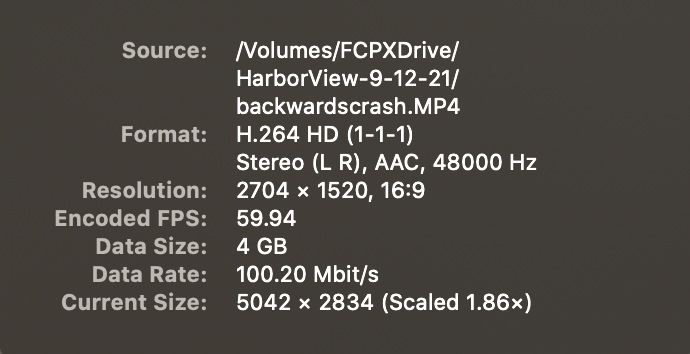
Please Log in to join the conversation.
17 Sep 2021 14:37 #116302
by marchvet
Replied by marchvet on topic Ongoing slow/stuttering issues
FCPX Project settings
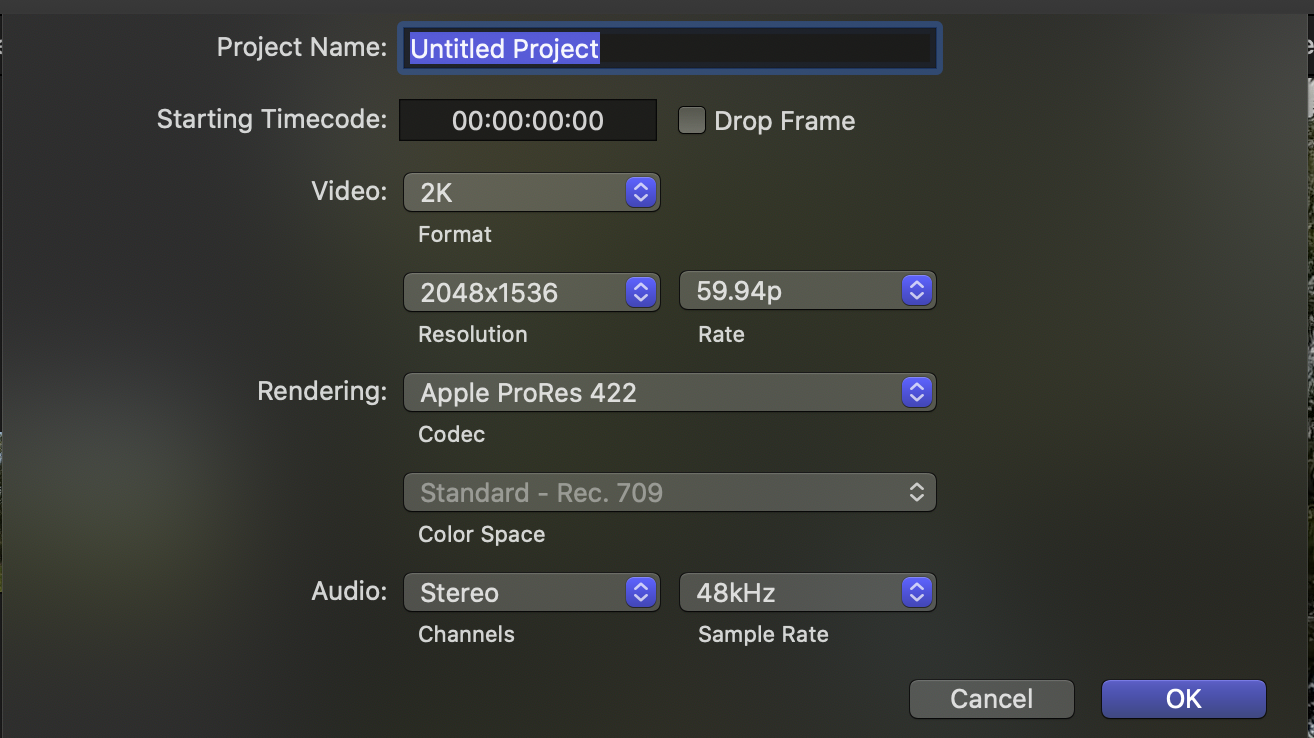
Please Log in to join the conversation.
- Tom Wolsky
-
- Offline
- Moderator
-
17 Sep 2021 14:53 #116304
by Tom Wolsky
Replied by Tom Wolsky on topic Ongoing slow/stuttering issues
One thing that stands out is the project properties don't match the clip resolution, so the media has to be sacked to play back. You would need to make a custom project size that matches the media. See how that works?
Please Log in to join the conversation.
- Tom Wolsky
-
- Offline
- Moderator
-
17 Sep 2021 14:53 #116305
by Tom Wolsky
Replied by Tom Wolsky on topic Ongoing slow/stuttering issues
One thing that stands out is the project properties don't match the clip resolution, so the media has to be sacked to play back. You would need to make a custom project size that matches the media. See how that works?
Please Log in to join the conversation.


17 Sep 2021 14:59 #116306
by joema
Replied by joema on topic Ongoing slow/stuttering issues
@marchvet: Please verify you have rebooted your machine. We have spent lots of time working on problems where the machine had never been rebooted; after doing so the problem vanished.
Also please specify what you mean by "looks horrible in the timeline". Do you mean it's not just laggy but visually degraded in some dramatic way?
In general highly-compressed media from DJI and GoPro are difficult to smoothly edit. This varies by machine, by version of MacOS, by version of FCP, and by exact variant of the codec. E.g, Intel's Quick Sync acceleration might work for standardized frame sizes like 1920 x 1080 or 3840 x 2160, but maybe not at 2.7k/60.
Do you mean that exact same GoPro codec at the same resolution, frame rate and bit rate previously worked smoothly on the same machine in FCP?
Are there any effects on the timeline clips? You normally don't put effects on clips in the Event Browser, but in the timeline. If there are any compute-intensive effects in the timeline clips, that would slow them down but not in the browser. As a test make a copy of the timeline, open that copy, select all clips with CMD+A, then remove all effects with Edit>Remove Effects. Then see how smoothly it plays.
Also please specify what you mean by "looks horrible in the timeline". Do you mean it's not just laggy but visually degraded in some dramatic way?
In general highly-compressed media from DJI and GoPro are difficult to smoothly edit. This varies by machine, by version of MacOS, by version of FCP, and by exact variant of the codec. E.g, Intel's Quick Sync acceleration might work for standardized frame sizes like 1920 x 1080 or 3840 x 2160, but maybe not at 2.7k/60.
Do you mean that exact same GoPro codec at the same resolution, frame rate and bit rate previously worked smoothly on the same machine in FCP?
Are there any effects on the timeline clips? You normally don't put effects on clips in the Event Browser, but in the timeline. If there are any compute-intensive effects in the timeline clips, that would slow them down but not in the browser. As a test make a copy of the timeline, open that copy, select all clips with CMD+A, then remove all effects with Edit>Remove Effects. Then see how smoothly it plays.
Please Log in to join the conversation.
17 Sep 2021 17:56 #116310
by marchvet
Replied by marchvet on topic Ongoing slow/stuttering issues
I never knew you could change it to match the video. So for example, I would just need to change the project video to custom and then type in the resolution from the GoPro information?
Please Log in to join the conversation.
17 Sep 2021 18:02 #116311
by marchvet
Replied by marchvet on topic Ongoing slow/stuttering issues
I have restarted my Mac a million times since this whole things started. I have reset the Macs SMC, PRAM etc.
The video stuttering originally came from the clip preview browser and also from the timeline. When I would drop a clip onto the timeline, it would look degraded as if I was looking at a 720p or less video and seem choppy.
I am going to play around with the project settings and see if things clear up. The choppiness in the timeline just started today whereas before it was just some stuttering in the browser and timeline.
The video stuttering originally came from the clip preview browser and also from the timeline. When I would drop a clip onto the timeline, it would look degraded as if I was looking at a 720p or less video and seem choppy.
I am going to play around with the project settings and see if things clear up. The choppiness in the timeline just started today whereas before it was just some stuttering in the browser and timeline.
Please Log in to join the conversation.
- Tom Wolsky
-
- Offline
- Moderator
-
17 Sep 2021 18:04 #116312
by Tom Wolsky
Replied by Tom Wolsky on topic Ongoing slow/stuttering issues
Like this
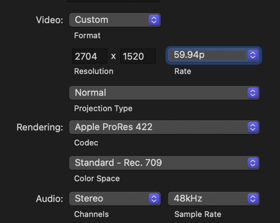
Please Log in to join the conversation.
17 Sep 2021 18:23 #116313
by marchvet
Replied by marchvet on topic Ongoing slow/stuttering issues
Tom. I try to click the rate field but it will not allow me to change it. I can change the resolution, but still see choppy/degraded video in the timeline. Viewing it in the browser looks normal.
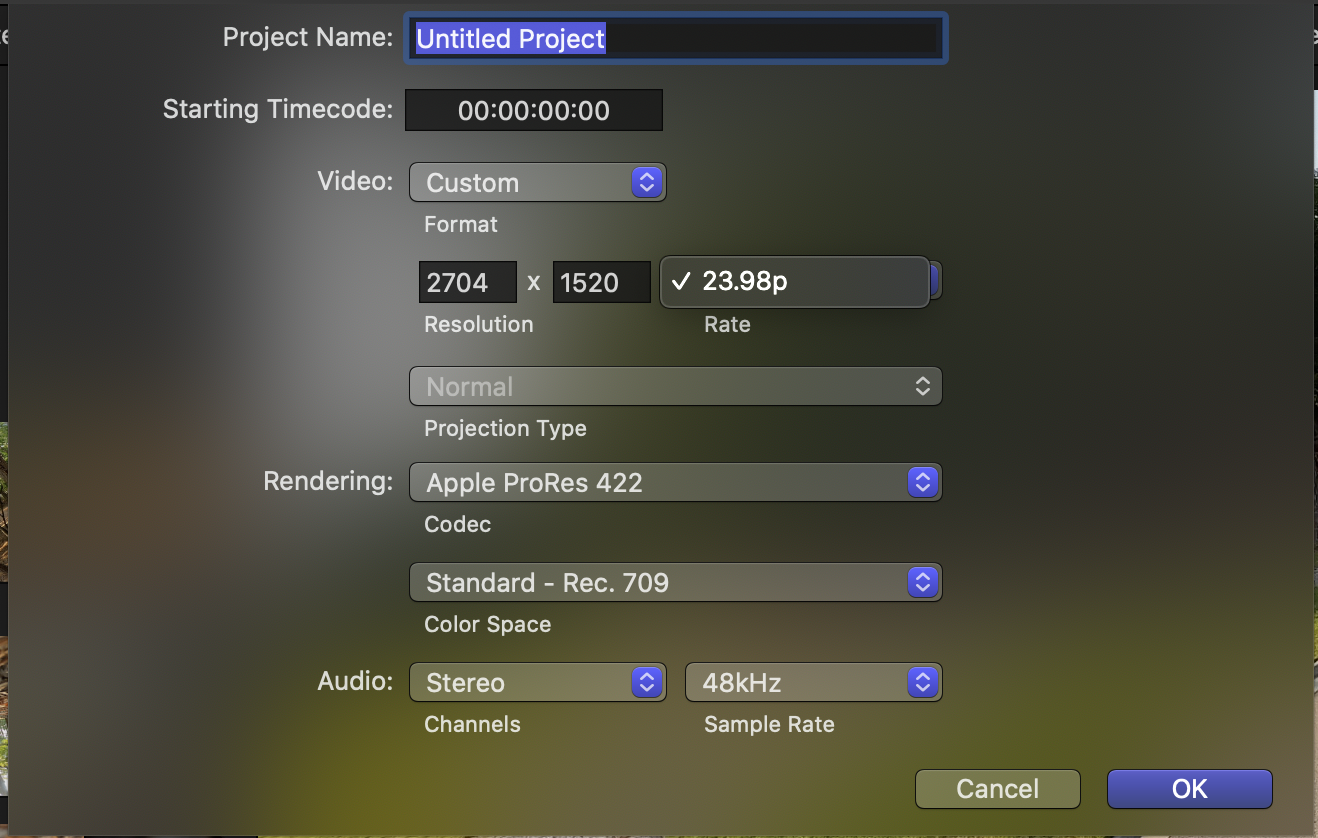
Please Log in to join the conversation.
17 Sep 2021 18:29 #116314
by joema
Replied by joema on topic Ongoing slow/stuttering issues
To change the frame rate, you create a new manual project with the desired characteristics, then copy/paste all clips from the old project to the new one. Due to rate conforming issues if the timeline is complex there might be some cases where in/out points of edits need adjusting a frame or two.
Please Log in to join the conversation.

17 Sep 2021 18:37 #116315
by Mary
Replied by Mary on topic Ongoing slow/stuttering issues
You can't change the frame rate etc once you've already started a timeline project. So start fresh. Open new project, select custom settings then place one of your clips in the new timeline. Now project settings should match your clip. Next go back to your original project, copy all, go to the new project you've started and simply paste in the old project. Hope that works.
Please Log in to join the conversation.
17 Sep 2021 19:15 #116317
by marchvet
Replied by marchvet on topic Ongoing slow/stuttering issues
I tried a few different things:
Installed iMovie and the same stuttering happens
Checked applications folder and deleted google chrome. Another user online suggested that it causes issues with FCP.
Took a video clip off of an SD card that I recorded yesterday and played it on my Mac. It plays fine with no stutters.
Started a new project and followed everyones advice. Changed projects settings BEFORE I dropped in any video clips and waited for them to render etc.
Still getting the random stuttering. I am at a loss and extremely frustrated. My Mac had a clean install a few months ago with Catalina as Big Sur was giving me major issues and I only have the basics of what's needed in regards to applications.
The only other thing that I could think of is the Bluetooth keyboard I have? Running a Keychron and have noticed my system will stutter a little when it goes into sleep mode. I am running a black magic mouse, but its an Apple mouse, not aftermarket.
Only other thing is: could a secondary monitor cause issues? I am running an AOC 19" off of a OWC thunderbolt 3 dock. All of my external drives are running directly off of the Macs thunderbolt connections.
Installed iMovie and the same stuttering happens
Checked applications folder and deleted google chrome. Another user online suggested that it causes issues with FCP.
Took a video clip off of an SD card that I recorded yesterday and played it on my Mac. It plays fine with no stutters.
Started a new project and followed everyones advice. Changed projects settings BEFORE I dropped in any video clips and waited for them to render etc.
Still getting the random stuttering. I am at a loss and extremely frustrated. My Mac had a clean install a few months ago with Catalina as Big Sur was giving me major issues and I only have the basics of what's needed in regards to applications.
The only other thing that I could think of is the Bluetooth keyboard I have? Running a Keychron and have noticed my system will stutter a little when it goes into sleep mode. I am running a black magic mouse, but its an Apple mouse, not aftermarket.
Only other thing is: could a secondary monitor cause issues? I am running an AOC 19" off of a OWC thunderbolt 3 dock. All of my external drives are running directly off of the Macs thunderbolt connections.
Please Log in to join the conversation.
17 Sep 2021 21:35 #116319
by marchvet
Replied by marchvet on topic Ongoing slow/stuttering issues
Another update: I unplugged the secondary monitor, unplugged the OWC dock and a bunch of other things. Created a new project with the correct settings and still getting stuttering.
At this point I have no clue what else it could be. I have literally turned off almost everything and only have 1 external SSD that's temp storage for the video files and projects. Its also brand new as of a week ago.
At a loss and spent almost 2 weeks back and forth trying to troubleshoot this.
At this point I have no clue what else it could be. I have literally turned off almost everything and only have 1 external SSD that's temp storage for the video files and projects. Its also brand new as of a week ago.
At a loss and spent almost 2 weeks back and forth trying to troubleshoot this.
Please Log in to join the conversation.
17 Sep 2021 22:52 - 17 Sep 2021 22:54 #116323
by joema
Replied by joema on topic Ongoing slow/stuttering issues
You say you never had this before. Previously were you using the exact same GoPro 2.7k/59.94 codec? Or had you never edited that material before?
Playback by skimmer in the event browser uses a different more optimized software code path than using the playhead in the timeline. It is not unknown that a difficult codec may feel more responsive when skimming vs scrubbing through the timeline with the playhead.
I also have a 2017 iMac 27, plus several other machines. If you can upload a short original camera clip using that codec to my file transfer site below, I will test it on several machines, also the latest versions of Premiere and Resolve Studio.
Drag/drop it to here: www.transferbigfiles.com/dropbox/joema
Playback by skimmer in the event browser uses a different more optimized software code path than using the playhead in the timeline. It is not unknown that a difficult codec may feel more responsive when skimming vs scrubbing through the timeline with the playhead.
I also have a 2017 iMac 27, plus several other machines. If you can upload a short original camera clip using that codec to my file transfer site below, I will test it on several machines, also the latest versions of Premiere and Resolve Studio.
Drag/drop it to here: www.transferbigfiles.com/dropbox/joema
Last edit: 17 Sep 2021 22:54 by joema.
Please Log in to join the conversation.
17 Sep 2021 23:44 #116324
by marchvet
Replied by marchvet on topic Ongoing slow/stuttering issues
I have been editing the same file format for a while(at least 1 year with the Hero  .
.
I installed Davinci Resolve earlier and it was worse than FCP. This stuttering seems to happen in all of the editors I have used(FCP, iMovie, Davinci). The file gets stuck at 5 min mark on uploading. Size is 719mb.
. I installed Davinci Resolve earlier and it was worse than FCP. This stuttering seems to happen in all of the editors I have used(FCP, iMovie, Davinci). The file gets stuck at 5 min mark on uploading. Size is 719mb.
Please Log in to join the conversation.
17 Sep 2021 23:49 #116325
by joema
Replied by joema on topic Ongoing slow/stuttering issues
Please Log in to join the conversation.
18 Sep 2021 00:46 #116326
by marchvet
Replied by marchvet on topic Ongoing slow/stuttering issues
Thanks Joe, its uploaded!
Please Log in to join the conversation.
18 Sep 2021 01:58 - 18 Sep 2021 02:01 #116328
by joema
Replied by joema on topic Ongoing slow/stuttering issues
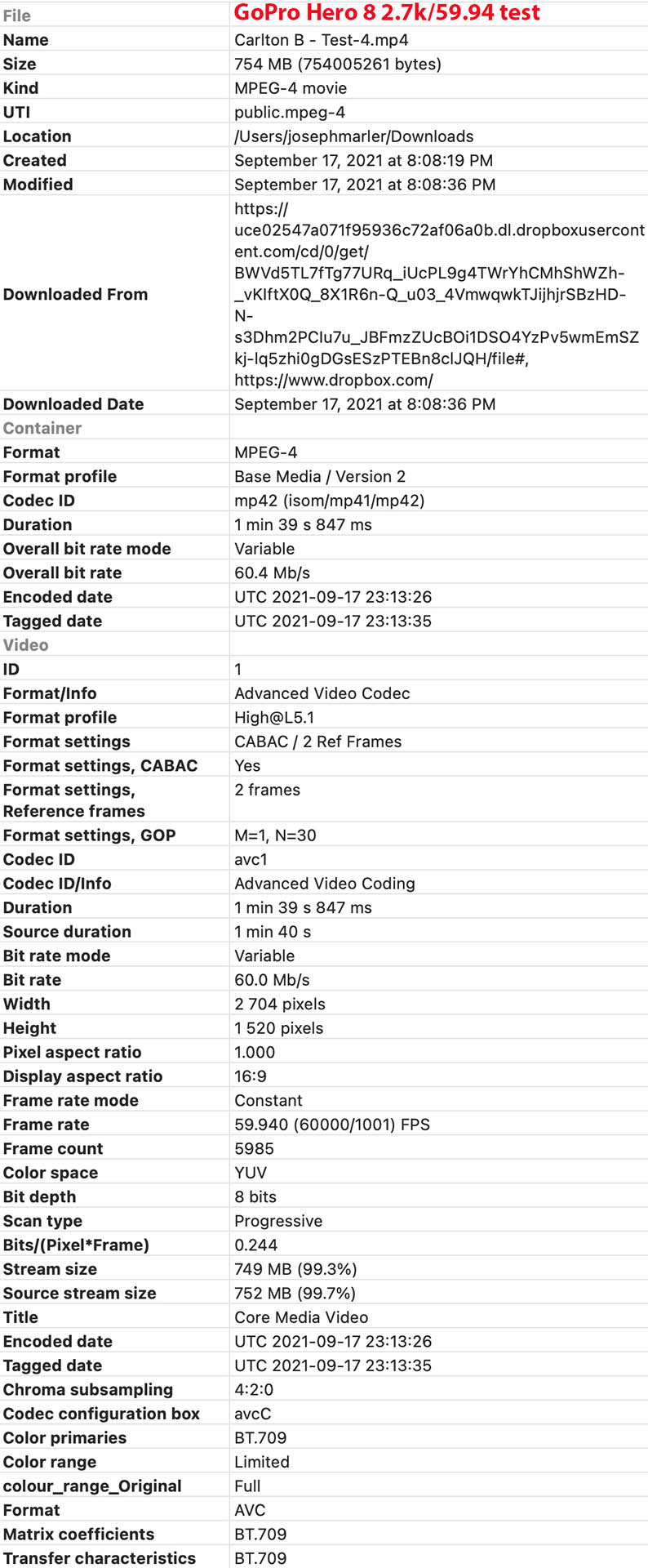
OK I got the file. See attached for full metadata. I tested it on a 10-core Vega 64 iMac Pro running Big Sur 11.6, and the following NLEs: FCP 10.5.4, Resolve Studio 17.3.1, and Premiere Pro 15.4.1.
I then tested it on a 2017 iMac 27, i7, 32GB, Radeon Pro 580, running Catalina 10.15.7. NLEs tested: FCP 10.5.4, Resolve Studio 17.3.1, Premiere Pro 14.5.0.
I then tested it on a 2019 MacBook Pro 16, 32GB, Radeon Pro 5500M, running Big Sur 11.6. NLEs tested: FCP 10.5.4 and Resolve Studio 17.2.2.
In all cases I used the default project size, which on FCP is 2048 x 1536. In Premiere I used 1/4 res on the viewer, and in FCP I switched the viewer between better performance and better quality, but didn't see much difference.
In general the clip worked OK on FCP and Resolve. It was quite sluggish on Premiere on the iMac Pro, and unusably slow in Premiere on the iMac 27. That is the general case: FCP and Resolve 17 are fast on most H264 codecs on most Mac platforms. Premiere is generally slow, esp. when doing JKL commands 4k H264 on Macs.
From a machine standpoint the iMac Pro was slowest on that codec. That is typically seen on several H264 codecs because Xeon does not have Quick Sync and the video accelerator in the T2 chip doesn't work that well. When I created proxies it was super fast, as expected. I didn't see any artifacts or resolution loss.
The iMac 27 was considerably smoother than the iMac Pro, and the MacBook Pro 16 was even smoother. Those differences are likely due to different versions of Intel's Quick Sync accelerator.
That codec is a typically difficult one to edit on many platforms. It is highly compressed and has a long "GOP length". However it was usable in FCP and Resolve on the 2017 iMac 27, and actually fairly smooth on the MBP 16.
It really shouldn't be super slow on your machine. There might be something wrong at the system level. You could try running Etrecheck: etrecheck.com
As a troubleshooting measure, I'd suggest removing the Chrome browser from your machine, also temporarily discontinuing use of any outboard audio or video hardware and any wireless audio devices.
External SSDs should use the original thick OEM cable, and go straight to the iMac, not go through any hub. Many performance problems have been caused by that. You can run Blackmagic disk test to check the performance. SSDs should be formatted APFS or Mac OS Extended Journaled, not ExFAT, NTFS or anything else.
I suggest trying proxies. They are designed for situations where the codec is sluggish to edit.
I then tested it on a 2017 iMac 27, i7, 32GB, Radeon Pro 580, running Catalina 10.15.7. NLEs tested: FCP 10.5.4, Resolve Studio 17.3.1, Premiere Pro 14.5.0.
I then tested it on a 2019 MacBook Pro 16, 32GB, Radeon Pro 5500M, running Big Sur 11.6. NLEs tested: FCP 10.5.4 and Resolve Studio 17.2.2.
In all cases I used the default project size, which on FCP is 2048 x 1536. In Premiere I used 1/4 res on the viewer, and in FCP I switched the viewer between better performance and better quality, but didn't see much difference.
In general the clip worked OK on FCP and Resolve. It was quite sluggish on Premiere on the iMac Pro, and unusably slow in Premiere on the iMac 27. That is the general case: FCP and Resolve 17 are fast on most H264 codecs on most Mac platforms. Premiere is generally slow, esp. when doing JKL commands 4k H264 on Macs.
From a machine standpoint the iMac Pro was slowest on that codec. That is typically seen on several H264 codecs because Xeon does not have Quick Sync and the video accelerator in the T2 chip doesn't work that well. When I created proxies it was super fast, as expected. I didn't see any artifacts or resolution loss.
The iMac 27 was considerably smoother than the iMac Pro, and the MacBook Pro 16 was even smoother. Those differences are likely due to different versions of Intel's Quick Sync accelerator.
That codec is a typically difficult one to edit on many platforms. It is highly compressed and has a long "GOP length". However it was usable in FCP and Resolve on the 2017 iMac 27, and actually fairly smooth on the MBP 16.
It really shouldn't be super slow on your machine. There might be something wrong at the system level. You could try running Etrecheck: etrecheck.com
As a troubleshooting measure, I'd suggest removing the Chrome browser from your machine, also temporarily discontinuing use of any outboard audio or video hardware and any wireless audio devices.
External SSDs should use the original thick OEM cable, and go straight to the iMac, not go through any hub. Many performance problems have been caused by that. You can run Blackmagic disk test to check the performance. SSDs should be formatted APFS or Mac OS Extended Journaled, not ExFAT, NTFS or anything else.
I suggest trying proxies. They are designed for situations where the codec is sluggish to edit.
Last edit: 18 Sep 2021 02:01 by joema.
Please Log in to join the conversation.
