


- Posts: 33
- Thank you received: 1
3 Post Moderation Rule for New Boarders (25 Jan 2021)
New boarders will have their posts moderated - Don't worry if you cannot see your post immediately.
Interlaced Material... Driving Me Crazy
- Anaximandus
-
 Topic Author
- Offline
- Junior Member
-

Less
More
24 Jan 2012 04:08 #3411
by Anaximandus
Replied by Anaximandus on topic Re: Interlaced Material... Driving Me Crazy
Ben,
this is not a display issue, it's an issue of converting videos from interlaced to progressive where they are supposed to stay interlaced.
All players I know on Windows are capable of doing a decent de-interlacing, even Windows Media Player. I've never seen combing effects on my source files when I played them there, so I do not expect to see them now.
this is not a display issue, it's an issue of converting videos from interlaced to progressive where they are supposed to stay interlaced.
All players I know on Windows are capable of doing a decent de-interlacing, even Windows Media Player. I've never seen combing effects on my source files when I played them there, so I do not expect to see them now.
Please Log in to join the conversation.

24 Jan 2012 04:13 #3412
by BenB
Replied by BenB on topic Re: Interlaced Material... Driving Me Crazy
"...from interlaced to progressive where they are supposed to stay interlaced."
This is confusing, it's either interlaced or progressive, not both. But you can export through Compressor and specify to change the field order to progressive. It will do the best job.
Not all players do a great job, some do, some don't on both platforms.
This is confusing, it's either interlaced or progressive, not both. But you can export through Compressor and specify to change the field order to progressive. It will do the best job.
Not all players do a great job, some do, some don't on both platforms.
Please Log in to join the conversation.
- Anaximandus
-
Topic Author
- Offline
- Junior Member
-
Less
More
- Posts: 33
- Thank you received: 1
24 Jan 2012 04:25 #3413
by Anaximandus
Replied by Anaximandus on topic Re: Interlaced Material... Driving Me Crazy
It's not confusing, it's the heart of my problem:
I want to export interlaced, but I cannot find a way to tell Compressor to do so.
I want interlaced, I do not want progressive.
I want to export interlaced, but I cannot find a way to tell Compressor to do so.
I want interlaced, I do not want progressive.
Please Log in to join the conversation.

24 Jan 2012 04:26 #3414
by NocoDave
Replied by NocoDave on topic Re: Interlaced Material... Driving Me Crazy
It's definitely not a display issue, that much is correct, but somewhere, (and I'm almost certain before reaching FCPX) there is a problem with your field order, and I've seen problems with fields on windows too so it's not a platform issue either.
If a field order gets reversed there is no way Windows Media Player will de-interlace it correctly.
On countless occasions I've had to interpret footage correctly for clients on a PC. And even Adobe After Effects doesn't always pick up the field order correct every time. That's why the option to manipulate fields exists in Premiere, After Effects, Motion and as pointed out a few posts back in FCPX. The only NLE I ever used that never failed to interpret the footage properly was Avid MC and so far FCPX if it turns out I'm right with your footage. I'll take another look tomorrow and let you know either way.
All players I know on Windows are capable of doing a decent de-interlacing, even Windows Media Player. I've never seen combing effects on my source files when I played them there, so I do not expect to see them now.
If a field order gets reversed there is no way Windows Media Player will de-interlace it correctly.
On countless occasions I've had to interpret footage correctly for clients on a PC. And even Adobe After Effects doesn't always pick up the field order correct every time. That's why the option to manipulate fields exists in Premiere, After Effects, Motion and as pointed out a few posts back in FCPX. The only NLE I ever used that never failed to interpret the footage properly was Avid MC and so far FCPX if it turns out I'm right with your footage. I'll take another look tomorrow and let you know either way.
Please Log in to join the conversation.
24 Jan 2012 04:34 #3415
by BenB
Replied by BenB on topic Re: Interlaced Material... Driving Me Crazy
You want interlaced footage? OK. Is your original Timeline interlaced or progressive?
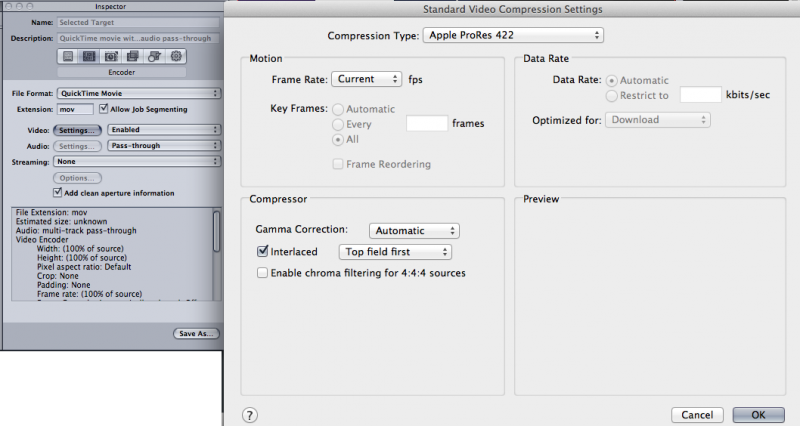
I'd "Send To Compressor", and pick ProRes or whatever codec you need. Inspector window, Encoder pane, Video "Settings", there's a place to specify interlaced or not.
If you're changing from progressive to interlace, you may have artifacts. That is just a bad way to go, period. Interlace to progressive is a much cleaner transcode.
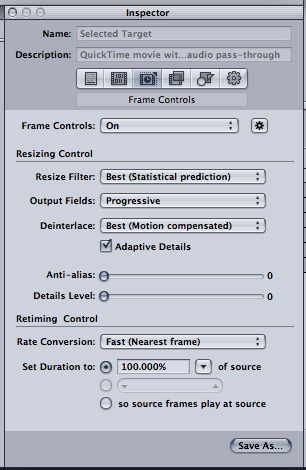
But, if you're going from one to the other, in the Inspector window, Frame Controls pane, you can set up how to handle the transcode from one to the other manually there. Sometimes you can get progressive to look good interlaced.
U.S. stations are digital now, and can handle progressive. I'd get specs from the specific station you need to deliver to from the engineer, not from the sales guy.
Encoding is very technical, and not always cut and dry.
I'd "Send To Compressor", and pick ProRes or whatever codec you need. Inspector window, Encoder pane, Video "Settings", there's a place to specify interlaced or not.
If you're changing from progressive to interlace, you may have artifacts. That is just a bad way to go, period. Interlace to progressive is a much cleaner transcode.
But, if you're going from one to the other, in the Inspector window, Frame Controls pane, you can set up how to handle the transcode from one to the other manually there. Sometimes you can get progressive to look good interlaced.
U.S. stations are digital now, and can handle progressive. I'd get specs from the specific station you need to deliver to from the engineer, not from the sales guy.
Encoding is very technical, and not always cut and dry.
Please Log in to join the conversation.
- Anaximandus
-
Topic Author
- Offline
- Junior Member
-
Less
More
- Posts: 33
- Thank you received: 1
24 Jan 2012 04:34 #3416
by Anaximandus
Replied by Anaximandus on topic Re: Interlaced Material... Driving Me Crazy
Dave,
right I have the same experience from DV-AVI days: Keeping the correct field order is essential. I am currently running a few export tests which I started after reading your hint about changing the field order.
FCP X has the field order wrong on all my files, I'm looking forward to further export tests.
Guess it'll be a few hours though, it's almost midnight here.
right I have the same experience from DV-AVI days: Keeping the correct field order is essential. I am currently running a few export tests which I started after reading your hint about changing the field order.
FCP X has the field order wrong on all my files, I'm looking forward to further export tests.
Guess it'll be a few hours though, it's almost midnight here.
Please Log in to join the conversation.
- Anaximandus
-
Topic Author
- Offline
- Junior Member
-
Less
More
- Posts: 33
- Thank you received: 1
24 Jan 2012 04:48 #3417
by Anaximandus
Replied by Anaximandus on topic Re: Interlaced Material... Driving Me Crazy
Ben,
do you have a screenshot of where I can tell Compressor to stay interlaced? I cannot seem to find it. :S
do you have a screenshot of where I can tell Compressor to stay interlaced? I cannot seem to find it. :S
Please Log in to join the conversation.
24 Jan 2012 04:58 #3418
by BenB
Replied by BenB on topic Re: Interlaced Material... Driving Me Crazy
Inspector window. Either the Encoder tab, "Settings" button for video. And/or the Frame Controls tab.
Please Log in to join the conversation.
24 Jan 2012 05:25 #3419
by NocoDave
Replied by NocoDave on topic Re: Interlaced Material... Driving Me Crazy
I got a bit more info for you, but hopefully someone who's done more research on AVCHD support in FCPX will be able to confirm.
Your problem seems to be relating to AVCHD support and your missing folder structure. AVCHD uses Macroblock-Level Adaptive Frame/Field interlacing and FCPX supports AVCHD import, either re-wrapping the file in a QT Container or converting to ProRes, it looks like it must need the lost AVCHD files to do this so I wouldn't be surprised if it is standard that there is information in those files that relate to the MBAFF interlacing, but hopefully someone will know more about this.
I got a clean interlaced export (directly from FCPX) from your clip as described above, so at least the tools are available in FCPX to tell it what to do with the interlacing, I can't imagine from there you should have problems getting it through compressor.
Your problem seems to be relating to AVCHD support and your missing folder structure. AVCHD uses Macroblock-Level Adaptive Frame/Field interlacing and FCPX supports AVCHD import, either re-wrapping the file in a QT Container or converting to ProRes, it looks like it must need the lost AVCHD files to do this so I wouldn't be surprised if it is standard that there is information in those files that relate to the MBAFF interlacing, but hopefully someone will know more about this.
I got a clean interlaced export (directly from FCPX) from your clip as described above, so at least the tools are available in FCPX to tell it what to do with the interlacing, I can't imagine from there you should have problems getting it through compressor.
Please Log in to join the conversation.
- Anaximandus
-
Topic Author
- Offline
- Junior Member
-
Less
More
- Posts: 33
- Thank you received: 1
24 Jan 2012 05:37 #3420
by Anaximandus
Replied by Anaximandus on topic Re: Interlaced Material... Driving Me Crazy
So far, so good.
What puzzles me most is that I can only tell Compressor to do Interlaced when I export QuickTime with ProRes.
H.264 or even plain ole' MPEG-4 do NOT allow me to set them Interlaced.
That is both astounding and disappointing.
I will now do tests with ProRes interlaced export, then try to convert that someplace else into a format I can distribute.
Stay tuned, more feedback tomorrow.
What puzzles me most is that I can only tell Compressor to do Interlaced when I export QuickTime with ProRes.
H.264 or even plain ole' MPEG-4 do NOT allow me to set them Interlaced.
That is both astounding and disappointing.
I will now do tests with ProRes interlaced export, then try to convert that someplace else into a format I can distribute.
Stay tuned, more feedback tomorrow.
Please Log in to join the conversation.
24 Jan 2012 06:02 #3422
by BenB
Replied by BenB on topic Re: Interlaced Material... Driving Me Crazy
And it is true, if you don't have the folder hierarchy of your original camera card in tact, you're screwed.
Please Log in to join the conversation.
- Anaximandus
-
Topic Author
- Offline
- Junior Member
-
Less
More
- Posts: 33
- Thank you received: 1
24 Jan 2012 06:07 #3423
by Anaximandus
Replied by Anaximandus on topic Re: Interlaced Material... Driving Me Crazy
Not here. Gotta catch some Zzzs now, I'll send screenshots tomorrow.BenB wrote: Yes you can, Frame Controls tab of the Inspector. I just verified this.
Please Log in to join the conversation.
- Anaximandus
-
Topic Author
- Offline
- Junior Member
-
Less
More
- Posts: 33
- Thank you received: 1
24 Jan 2012 06:12 #3424
by Anaximandus
Goodnite.
Replied by Anaximandus on topic Re: Interlaced Material... Driving Me Crazy
If that holds true, and I refuse to believe it does (technically, not personally), it would be a huge embarrassment for Apple. I know three editing applications on Windows that can handle MTS or M2TS natively without recoding and without those additional files...BenB wrote: And it is true, if you don't have the folder hierarchy of your original camera card in tact, you're screwed.
Goodnite.
Please Log in to join the conversation.
24 Jan 2012 06:15 #3425
by NocoDave
Replied by NocoDave on topic Re: Interlaced Material... Driving Me Crazy
You need to hit the little cog to turn "Frame Controls" on before you can make any changes, but try this. Instead of setting the "Field Dominance" in FCPX to "Upper First" set it to "Un-modified", then send it to compressor and export with the default "Same as Source" setting for "Output Fields". This will keep your MBAFF interlacing intact and should get you the cleanest transcode as you aren't making any changes at any time.
Please Log in to join the conversation.
24 Jan 2012 06:16 #3426
by NocoDave
It doesn't, there's always a way.
Replied by NocoDave on topic Re: Interlaced Material... Driving Me Crazy
If that holds true, and I refuse to believe it does
It doesn't, there's always a way.
Please Log in to join the conversation.
- Anaximandus
-
Topic Author
- Offline
- Junior Member
-
Less
More
- Posts: 33
- Thank you received: 1
24 Jan 2012 21:37 #3430
by Anaximandus
Replied by Anaximandus on topic Re: Interlaced Material... Driving Me Crazy
As far as Compressor allows me to explicitly set a movie as Interlaced...
(sorry for German screenshots)
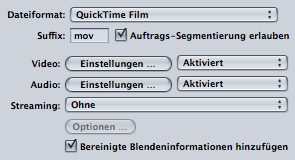
When I select "QuickTime Film" as a file format, I get the "Video Einstellungen" (Video Settings) button.
Behind that button, when I select Pro Res 422 HQ as codec, I can explicitly make it Interlaced.
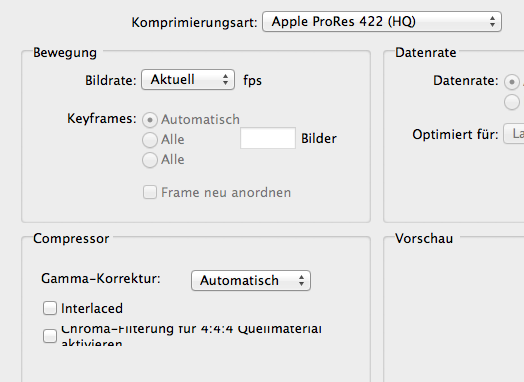
Selecting H.264 or MPEG-4, I cannot make the movie Interlaced.
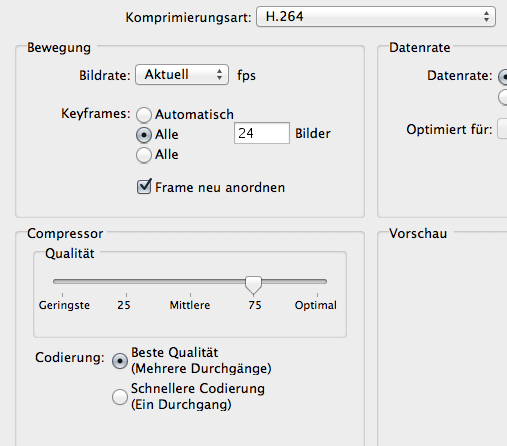
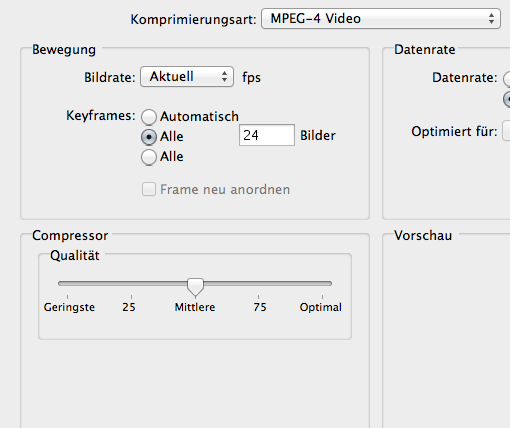
When I select a whole different file type for the export (which I desire to do), I don't even have the Video Settings button.
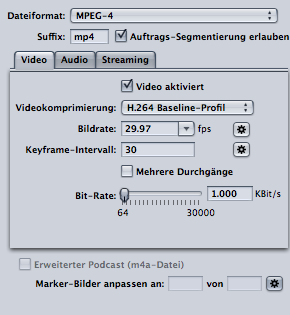
Maybe these settings will help me, when I set "Ausgabefelder".
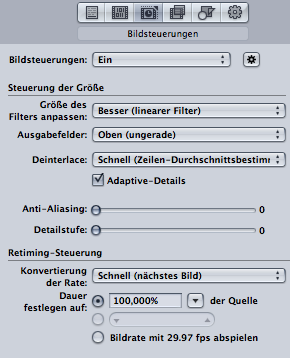
Problem is, there are only De-Interlacing options, no setting for "keep it" or something like that.
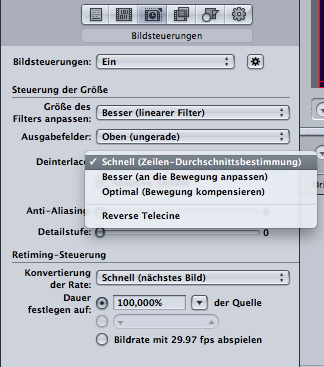
I will now continue my export tests, but it doesn't feel very sophisticated, needle-haystack situation...
(sorry for German screenshots)
When I select "QuickTime Film" as a file format, I get the "Video Einstellungen" (Video Settings) button.
Behind that button, when I select Pro Res 422 HQ as codec, I can explicitly make it Interlaced.
Selecting H.264 or MPEG-4, I cannot make the movie Interlaced.
When I select a whole different file type for the export (which I desire to do), I don't even have the Video Settings button.
Maybe these settings will help me, when I set "Ausgabefelder".
Problem is, there are only De-Interlacing options, no setting for "keep it" or something like that.
I will now continue my export tests, but it doesn't feel very sophisticated, needle-haystack situation...
Please Log in to join the conversation.
24 Jan 2012 21:43 #3431
by NocoDave
Replied by NocoDave on topic Re: Interlaced Material... Driving Me Crazy
It's the "Ausgabefelder:" ("Output fields" in English) setting above "Deinterlace" that has the options your looking for: "Same as Source", "Progressive", "Top First", or "Bottom First". I don't know what these would be in German.
Please Log in to join the conversation.
- Anaximandus
-
Topic Author
- Offline
- Junior Member
-
Less
More
- Posts: 33
- Thank you received: 1
24 Jan 2012 21:53 #3432
by Anaximandus
Replied by Anaximandus on topic Re: Interlaced Material... Driving Me Crazy
So we presume, if I set "Same As Source" or "Top First", the option below (for deinterlacing) is ignored?
Please Log in to join the conversation.
24 Jan 2012 22:03 #3433
by NocoDave
Replied by NocoDave on topic Re: Interlaced Material... Driving Me Crazy
I'm not sure, I've assumed that too. But hopefully someone with more experience with compressor can tell.
But you want "Same as Source" your rushes aren't really Upper Field dominant in the purest sense, along with deleting your AVCHD structure this is where your problems have been all along.
But you want "Same as Source" your rushes aren't really Upper Field dominant in the purest sense, along with deleting your AVCHD structure this is where your problems have been all along.
Please Log in to join the conversation.
