


- Posts: 2609
- Thank you received: 696
3 Post Moderation Rule for New Boarders (25 Jan 2021)
New boarders will have their posts moderated - Don't worry if you cannot see your post immediately.
HELP! Exporting h264 makes video colors washed out
05 May 2020 16:28 #106918
by joema
There is no difference whether I transcode with FCPX or Handbrake. The metadata of your original test file indicates codec ID mp4v-20, H.263, Rec 601, and it was written by Quicktime 7.7.3. I tested FCPX and Handbrake on two different iMac running Catalina and FCPX 10.4.8, and I don't see any difference between the original file and a transcoded H.264 file.
I suggest you copy your test file to an iPad or iPhone, upload to Youtube for playback and examine if there are any visible differences in color or gamma. If there are any differences, it might be a standardization issue with color or gamma metadata in the file and how various playback or encoding methods interpret that.
As Tom said it also would not hurt to check your Display profile. In System Preferences>Display>Color, if you hold the OPT key when pressing "Calibrate" it will show you an expert mode screen calibration sequence. You can save that as a separate display color profile and see if it makes any difference.
Replied by joema on topic HELP! Exporting h264 makes video colors washed out
cyanbaby101 wrote: ... Can you take the sample I gave you and export it h264 using handbrake and quicktime? Is it washed out for you? Because it is for me across all platforms FCP, Quicktime, Handbrake.
There is no difference whether I transcode with FCPX or Handbrake. The metadata of your original test file indicates codec ID mp4v-20, H.263, Rec 601, and it was written by Quicktime 7.7.3. I tested FCPX and Handbrake on two different iMac running Catalina and FCPX 10.4.8, and I don't see any difference between the original file and a transcoded H.264 file.
I suggest you copy your test file to an iPad or iPhone, upload to Youtube for playback and examine if there are any visible differences in color or gamma. If there are any differences, it might be a standardization issue with color or gamma metadata in the file and how various playback or encoding methods interpret that.
As Tom said it also would not hurt to check your Display profile. In System Preferences>Display>Color, if you hold the OPT key when pressing "Calibrate" it will show you an expert mode screen calibration sequence. You can save that as a separate display color profile and see if it makes any difference.
Please Log in to join the conversation.
06 May 2020 13:20 - 06 May 2020 13:21 #106947
by joema
I cannot see any difference between the two iPhone images you posted. Maybe it was changed during the upload process. Cases like this remind me a line from the movie Matrix: "what is real?" With image quality evaluation, achieving an independent reality is difficult. Every monitor, every decode process, every color profile, every display algorithm imparts changes. On many machines you can view a video in VLC vs Quicktime and due to differing gamma interpretation they may look different. There are color management standards to try to limit that but it can be difficult.
My Macs are color calibrated using X-Rite i1Display Pro, but even that is no guarantee. I still cross-check final products on a variety of playback devices, including smart phones, tablets, TVs, and re-verify after Youtube and Vimeo upload and re-encoding.
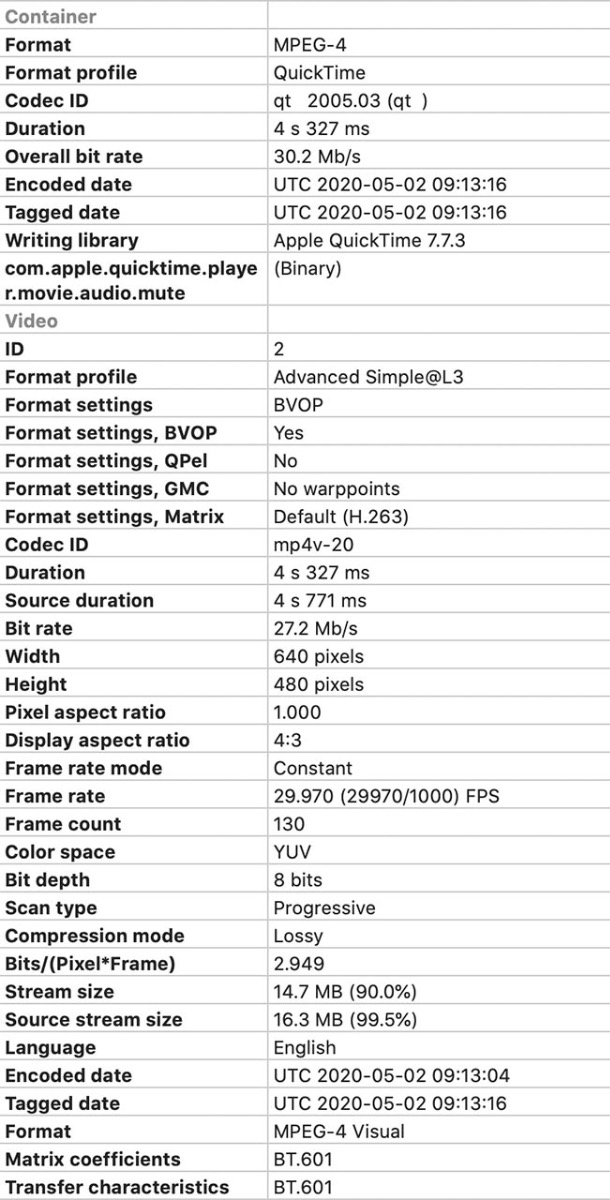
In your case the VHS tape was captured by some app and (if the sample you sent is original) encoded at 27.2 mbps, 640x480, apparently with an NTSC Rec 601 color profile (see attached). The metadata says "scan type: progressive", but NTSC is by definition interlaced, so something has already de-interlaced it. On my Macs running Catalina and FCPX 10.4.8 the exported H264 looks just like the input file. I tested it using Resolve 16.1 and it looks a bit different, but I don't have time to investigate why.
27.2 mbps is not that high, and by current standards 72 GB is not that big. My documentary team shoots 1 TB per day of 4k H264 and since we switched to ProRes that is several TB per day. Fortunately hard drives are cheaper nowadays.
If your decision is influenced by having a several-year-old hard drive (which was smaller and more expensive when purchased), that should probably be replaced. After 5 yrs the annual failure rate of a typical HDD is about 20%.
IF all you want is clip out sections, you can do that with Quicktime Player which DOES NOT re-encode. That is both a time and quality savings, since it is not re-encoding an already compressed format: support.apple.com/en-us/HT201066
If you want the whole thing transcoded to a smaller size for archiving, there is no single answer. If it was mine, I'd use Quicktime to trim out a 60 sec test clip, then do various quality tests with different transcoding methods. You want a test clip which has movement and scene complexity to stress the encoder. Do not commit the big transcoding job until you have thoroughly tested various methods on the original captured test clip.
The biggest risk with this type of material is if the original capture method damaged it some way such as "baked in" interlaced material within a progressive non-interlaced wrapper. That is why you often see period material on Youtube and other places with edge artifacts - it cannot be deinterlaced. Fortunately your test clip shows it was properly deinterlaced and appears to have not discarded 1/2 the scan lines, which is another common problem.
The smallest commonly-used codec is HEVC (H265), so that is an option. Recent versions of FCPX on newer Macs support this, including hardware acceleration for 8-bit encoding. However there are only fixed parameters.
Handbrake supports HEVC with many different adjustable parameters so you could also try several of those and see what looks best.
Replied by joema on topic HELP! Exporting h264 makes video colors washed out
cyanbaby101 wrote: ...Here is the compressed H264 and original on the iphone. Its not as washed out but there is a clear significance in the quality. As mentioned before my 4 hour video is a whopping 72 GB. I guess at this point I just want to know the best settings for compressing with the least amount of quality loss to drastically lower the file size. Is there any noticeable difference in compression quality with handbrake versus FCP? If not, what would be the optimal settings in Handbrake to compress this? If so, what are the optimal settings in FCP for this goal? H264 or H265? Thanks for your time.
I cannot see any difference between the two iPhone images you posted. Maybe it was changed during the upload process. Cases like this remind me a line from the movie Matrix: "what is real?" With image quality evaluation, achieving an independent reality is difficult. Every monitor, every decode process, every color profile, every display algorithm imparts changes. On many machines you can view a video in VLC vs Quicktime and due to differing gamma interpretation they may look different. There are color management standards to try to limit that but it can be difficult.
My Macs are color calibrated using X-Rite i1Display Pro, but even that is no guarantee. I still cross-check final products on a variety of playback devices, including smart phones, tablets, TVs, and re-verify after Youtube and Vimeo upload and re-encoding.
In your case the VHS tape was captured by some app and (if the sample you sent is original) encoded at 27.2 mbps, 640x480, apparently with an NTSC Rec 601 color profile (see attached). The metadata says "scan type: progressive", but NTSC is by definition interlaced, so something has already de-interlaced it. On my Macs running Catalina and FCPX 10.4.8 the exported H264 looks just like the input file. I tested it using Resolve 16.1 and it looks a bit different, but I don't have time to investigate why.
27.2 mbps is not that high, and by current standards 72 GB is not that big. My documentary team shoots 1 TB per day of 4k H264 and since we switched to ProRes that is several TB per day. Fortunately hard drives are cheaper nowadays.
If your decision is influenced by having a several-year-old hard drive (which was smaller and more expensive when purchased), that should probably be replaced. After 5 yrs the annual failure rate of a typical HDD is about 20%.
IF all you want is clip out sections, you can do that with Quicktime Player which DOES NOT re-encode. That is both a time and quality savings, since it is not re-encoding an already compressed format: support.apple.com/en-us/HT201066
If you want the whole thing transcoded to a smaller size for archiving, there is no single answer. If it was mine, I'd use Quicktime to trim out a 60 sec test clip, then do various quality tests with different transcoding methods. You want a test clip which has movement and scene complexity to stress the encoder. Do not commit the big transcoding job until you have thoroughly tested various methods on the original captured test clip.
The biggest risk with this type of material is if the original capture method damaged it some way such as "baked in" interlaced material within a progressive non-interlaced wrapper. That is why you often see period material on Youtube and other places with edge artifacts - it cannot be deinterlaced. Fortunately your test clip shows it was properly deinterlaced and appears to have not discarded 1/2 the scan lines, which is another common problem.
The smallest commonly-used codec is HEVC (H265), so that is an option. Recent versions of FCPX on newer Macs support this, including hardware acceleration for 8-bit encoding. However there are only fixed parameters.
Handbrake supports HEVC with many different adjustable parameters so you could also try several of those and see what looks best.
Last edit: 06 May 2020 13:21 by joema.
Please Log in to join the conversation.
- cyanbaby101
-
 Topic Author
- Offline
- New Member
-

Less
More
- Posts: 18
- Thank you received: 0
07 May 2020 02:45 - 07 May 2020 02:53 #106960
by cyanbaby101
Replied by cyanbaby101 on topic HELP! Exporting h264 makes video colors washed out
OK I sent you the iphone screenshots in your drop box link. Maybe something weird with FCP forum viewer.
OK. I will run some tests on h265 in handbrake.
Which Deinterlace option: Decomb, Yadif, or Off?
Which video option: H265, H265 10 Bit, or H265 12 Bit.
Thanks for your time!
OK. I will run some tests on h265 in handbrake.
Which Deinterlace option: Decomb, Yadif, or Off?
Which video option: H265, H265 10 Bit, or H265 12 Bit.
Thanks for your time!


Last edit: 07 May 2020 02:53 by cyanbaby101.
Please Log in to join the conversation.
