


- Posts: 29
- Thank you received: 1
3 Post Moderation Rule for New Boarders (25 Jan 2021)
New boarders will have their posts moderated - Don't worry if you cannot see your post immediately.
Importing videos with 5.1 audio
- Magnetic_dud
-
 Topic Author
- Offline
- Junior Member
-

Less
More
03 Jan 2012 14:44 #2932
by Magnetic_dud
Importing videos with 5.1 audio was created by Magnetic_dud
Hi, my camera (Panasonic AG-HSC1) records audio in 5.1
When I import in FCP X, i get stereo, right channel is right channel, but left channel is center channel
Definitely wrong, and I can't get surround audio even in surround projects (usually I just do stereo projects)
My workaround is to import in imovie, then import imovie events, but i don't like this very much
What I can do?
When I import in FCP X, i get stereo, right channel is right channel, but left channel is center channel
Definitely wrong, and I can't get surround audio even in surround projects (usually I just do stereo projects)
My workaround is to import in imovie, then import imovie events, but i don't like this very much
What I can do?
Please Log in to join the conversation.


07 Jan 2012 04:25 #3004
by dgwvideo
Creating history....one edit at a time !
Replied by dgwvideo on topic Re: Importing videos with 5.1 audio
Well, not sure this is anything you don't know already, but since it's been almost 3 days since you posted and nobody else replied, I'll take a stab.
I assume you are setting audio on the import screen for Surround (which I think defaults that way, but it's also changeable to stereo).
Possibly a setting in your camera? Not familiar with the AG-HSC1. You can check Apple's camera compatibility for FCPX and see if that model is OK.
Have you confirmed via playback off camera (not thru FCPX) that you actually recorded 5.1?
Finally, is FCPX updated to 10.0.2? OS updated also?
I assume you are setting audio on the import screen for Surround (which I think defaults that way, but it's also changeable to stereo).
Possibly a setting in your camera? Not familiar with the AG-HSC1. You can check Apple's camera compatibility for FCPX and see if that model is OK.
Have you confirmed via playback off camera (not thru FCPX) that you actually recorded 5.1?
Finally, is FCPX updated to 10.0.2? OS updated also?
Creating history....one edit at a time !
Please Log in to join the conversation.

07 Jan 2012 23:18 #3012
by BenB
Replied by BenB on topic Re: Importing videos with 5.1 audio
Go to the Audio tab of the Inspector, bottom is the channel configuration controls. Be sure it's set to stereo, as I'm sure you'll only see two channels of audio.
If you record surround, in the channels configuration section you'll actually see 6 audio channels.
If your channels are as you describe, your camera is set to record stereo, but you're trying to import as surround. Not good. Import stereo audio as stereo.
Double check the settings on the camera, I bet you'll find you're set to record stereo.
If you record surround, in the channels configuration section you'll actually see 6 audio channels.
If your channels are as you describe, your camera is set to record stereo, but you're trying to import as surround. Not good. Import stereo audio as stereo.
Double check the settings on the camera, I bet you'll find you're set to record stereo.
Please Log in to join the conversation.
- Magnetic_dud
-
Topic Author
- Offline
- Junior Member
-
Less
More
- Posts: 29
- Thank you received: 1
15 Jan 2012 17:52 #3170
by Magnetic_dud
Replied by Magnetic_dud on topic Re: Importing videos with 5.1 audio
Hi, sorry for the late reply, but I was a bit busy and I did not had time to check all the settings.
Both FCP and OSX are updated to the latest version
The AG-HSC1 records only in 5.1, there is no setting in the menu. Maybe it could record stereo if I connect a stereo mic via the jack connector, but I did not check, the onboard mic it's pretty good
Playback via HDMI it's 5.1 - also by playing the file via mplayerx
The files are AVCHD h264 1080i ac3 5.1
I import the files by directly connect the camera and selecting "camera import"
The import options are all deselected, including remove silent channels and separate mono and group stereo audio
In the channels configuration section i see 6 audio channels, but only 2 of them are playing, and they are wrong (left channel plays the surround channel, it's awful to listen)
Both FCP and OSX are updated to the latest version
The AG-HSC1 records only in 5.1, there is no setting in the menu. Maybe it could record stereo if I connect a stereo mic via the jack connector, but I did not check, the onboard mic it's pretty good
Playback via HDMI it's 5.1 - also by playing the file via mplayerx
The files are AVCHD h264 1080i ac3 5.1
I import the files by directly connect the camera and selecting "camera import"
The import options are all deselected, including remove silent channels and separate mono and group stereo audio
In the channels configuration section i see 6 audio channels, but only 2 of them are playing, and they are wrong (left channel plays the surround channel, it's awful to listen)
Please Log in to join the conversation.
15 Jan 2012 23:56 #3173
by dgwvideo
Creating history....one edit at a time !
Replied by dgwvideo on topic Re: Importing videos with 5.1 audio
A quick review of the operators manual for the AG-HSC1 didn't reveal anything specific regarding this, but I did notice it says for MAC OS versions 10.3 and 10.4, so there may be an issue with any later OS. Also, that camera is not on the list of supported cameras for FCPX, but that doesn't necessarily mean it won't work.
Creating history....one edit at a time !
Please Log in to join the conversation.
17 Jan 2012 03:04 #3192
by BenB
Replied by BenB on topic Re: Importing videos with 5.1 audio
Are you transcoding to ProRes?
And actually on Panasonic's site, they say it can record either 5.1 or 2 channel. That's why I mentioned double checking which mode it's recording in. "Audio recording format: Dolby Digital (5.1ch, 2ch)"
And actually on Panasonic's site, they say it can record either 5.1 or 2 channel. That's why I mentioned double checking which mode it's recording in. "Audio recording format: Dolby Digital (5.1ch, 2ch)"
Please Log in to join the conversation.
- Magnetic_dud
-
Topic Author
- Offline
- Junior Member
-
Less
More
- Posts: 29
- Thank you received: 1
17 Jan 2012 16:33 #3213
by Magnetic_dud
Replied by Magnetic_dud on topic Re: Importing videos with 5.1 audio
I'm not transcoding to ProRes
I see no option to select the channels in the camera, probably it autoselects stereo when an external stereo mic is connected
It looks like FCP does not support ac3 files... weird discussions.apple.com/thread/3141156?start=0&tstart=0
I'll continue to import video through imovie... at least the stereo downmix it's correct...
I see no option to select the channels in the camera, probably it autoselects stereo when an external stereo mic is connected
It looks like FCP does not support ac3 files... weird discussions.apple.com/thread/3141156?start=0&tstart=0
I'll continue to import video through imovie... at least the stereo downmix it's correct...
Please Log in to join the conversation.
17 Jan 2012 18:18 - 17 Jan 2012 18:20 #3215
by BenB
Replied by BenB on topic Re: Importing videos with 5.1 audio
Ah, AC3, odd, as when Optimizing to ProRes, it should recognize AC3 and convert it to the digital video standard of AIFF in ProRes. From that thread, it does seem there's a 5.1 issue.
I'd go into Compressor and tweak my own custom ProRes preset, and make it a Droplet for the time being.
And fill out the feedback page and let Apple know the trouble.
I'd go into Compressor and tweak my own custom ProRes preset, and make it a Droplet for the time being.
And fill out the feedback page and let Apple know the trouble.
Last edit: 17 Jan 2012 18:20 by BenB.
Please Log in to join the conversation.
- Magnetic_dud
-
Topic Author
- Offline
- Junior Member
-
Less
More
- Posts: 29
- Thank you received: 1
17 Jan 2012 20:41 #3221
by Magnetic_dud
Replied by Magnetic_dud on topic Re: Importing videos with 5.1 audio
Tried to transcode, no luck 
still downmixes the wrong channels
still downmixes the wrong channels
Please Log in to join the conversation.
17 Jan 2012 20:43 #3222
by BenB
Replied by BenB on topic Re: Importing videos with 5.1 audio
Yep, I'd try using Compressor, or MPEGStreamclip.
Please Log in to join the conversation.
- Magnetic_dud
-
Topic Author
- Offline
- Junior Member
-
Less
More
- Posts: 29
- Thank you received: 1
17 Jan 2012 20:51 #3224
by Magnetic_dud
Replied by Magnetic_dud on topic Re: Importing videos with 5.1 audio
I hope in fcp x 10.0.3 (even if I read that this bug it's there from ages)
Please Log in to join the conversation.
- Mikeybouchereau
-
- Offline
- Elite Member
-

Less
More
- Posts: 201
- Thank you received: 81
18 Jan 2012 08:22 #3231
by Mikeybouchereau
Replied by Mikeybouchereau on topic Re: Importing videos with 5.1 audio
Would you be willing to post a dmg of one of your cards? I would love to look and see whats happening. I am surprised FCPX can not handle it. If you shoot a short clip like 1 min on a fresh card then use FCPX camera archive feature. If you post it I would love to look at the issue and see if I can find a work around for you.
Please Log in to join the conversation.
18 Jan 2012 11:11 #3236
by BenB
Replied by BenB on topic Re: Importing videos with 5.1 audio
I'm finding lots of posts for many consumer 5.1 cameras that are having problems with FCP X. It's not professional 5.1, but AVCHD with 5.1 consumer cameras. Would be nice to mess with an actual card and see what could be done.
Please Log in to join the conversation.
- cliffkujala
-
- Offline
- New Member
-

Less
More
- Posts: 6
- Thank you received: 0
19 Jan 2012 02:02 - 19 Jan 2012 03:38 #3248
by cliffkujala
Replied by cliffkujala on topic Re: Importing videos with 5.1 audio
I am experiencing the same problem with Canon Vixia HF M41, and Canon SM-V1 5.1 surround mic.
Camera shows it is recording in 5.1, and manipulating the files outside of FCPX show surround audio, but when I bring the files into FCPX it is only stereo.
I am currently uploading a DMG that has 1 video clip on it, so those who are more skilled might be able to test. Give it some time to upload, as it is not yet done.
UPDATE:
Clip is uploaded and ready for download.
www.purekarting.com/CANON.dmg
Camera shows it is recording in 5.1, and manipulating the files outside of FCPX show surround audio, but when I bring the files into FCPX it is only stereo.
I am currently uploading a DMG that has 1 video clip on it, so those who are more skilled might be able to test. Give it some time to upload, as it is not yet done.
UPDATE:
Clip is uploaded and ready for download.
www.purekarting.com/CANON.dmg
Last edit: 19 Jan 2012 03:38 by cliffkujala.
Please Log in to join the conversation.
- Mikeybouchereau
-
- Offline
- Elite Member
-
Less
More
- Posts: 201
- Thank you received: 81
19 Jan 2012 10:39 #3256
by Mikeybouchereau
Replied by Mikeybouchereau on topic Re: Importing videos with 5.1 audio
Thank you cliffkujala
After playing with the card, I found a way to import the 5.1 audio but you can not (at least right now) import it directly into Final Cut Pro X.
So after a little looking around I found that both iMovie and Final Cut Pro X, well and Final Cut Pro 7 do not support importing the 5.1 audio. The reason for this is the Apple’s AVCHD converter reduces sound from 5.1 channels to 2 channels (stereo). From what I can tell apparently iMovie handles the mix down properly but Final Cut Pro X does not.
Well I did not want to use a mix down so I looked for a work around that would allow me to use the 5.1 audio. If you use Shedworx’s VoltaicHD you can extract the 5.1 audio, then you can run that audio through compressor. Once you have a 5.1 surround sound quicktime file you can connect that audio to your video.
I created a walkthrough PDF for Final Cut Pro X and Shedworx VoltaicHD, its on my website. I also posted my compressor settings in the form of a droplet. You can get to my blog here
I also attached a screen shot of the footage from cliffkujala using all 5.1 channels in FCPX.

After playing with the card, I found a way to import the 5.1 audio but you can not (at least right now) import it directly into Final Cut Pro X.
So after a little looking around I found that both iMovie and Final Cut Pro X, well and Final Cut Pro 7 do not support importing the 5.1 audio. The reason for this is the Apple’s AVCHD converter reduces sound from 5.1 channels to 2 channels (stereo). From what I can tell apparently iMovie handles the mix down properly but Final Cut Pro X does not.
Well I did not want to use a mix down so I looked for a work around that would allow me to use the 5.1 audio. If you use Shedworx’s VoltaicHD you can extract the 5.1 audio, then you can run that audio through compressor. Once you have a 5.1 surround sound quicktime file you can connect that audio to your video.
I created a walkthrough PDF for Final Cut Pro X and Shedworx VoltaicHD, its on my website. I also posted my compressor settings in the form of a droplet. You can get to my blog here
I also attached a screen shot of the footage from cliffkujala using all 5.1 channels in FCPX.
Please Log in to join the conversation.
- cliffkujala
-
- Offline
- New Member
-
Less
More
- Posts: 6
- Thank you received: 0
22 Jan 2012 11:51 - 23 Jan 2012 05:40 #3325
by cliffkujala
Replied by cliffkujala on topic Re: Importing videos with 5.1 audio
Can someone explain to me why this video, which was converted using Media Converter, and an available plugin that re-wraps AVCHD into .MOV files with uncompressed audio will import into FCPX as 5.1 audio, but no video? The video is clearly there, as seen when played back by Quicktime or VLC.
Re-wrapped Movie -> www.cliffkujala.com/00001.mov
Re-wrapped Movie -> www.cliffkujala.com/00001.mov
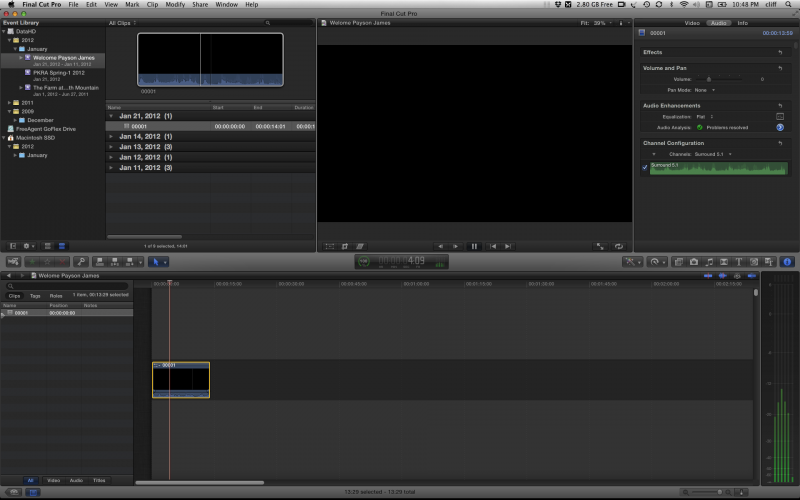
Last edit: 23 Jan 2012 05:40 by peteramwiggins.
Please Log in to join the conversation.
22 Jan 2012 12:04 #3326
by BenB
Replied by BenB on topic Re: Importing videos with 5.1 audio
1st, it's H.264, you should be converting it to ProRes 422, Dolby 5.1.
Not all H.264 files are created the same. There are various flavors of H.264.
".mov" doesn't mean anything, just that it's a QT file, not a "codec" or a "flavor" of a codec that FCP supports.
Not all H.264 files are created the same. There are various flavors of H.264.
".mov" doesn't mean anything, just that it's a QT file, not a "codec" or a "flavor" of a codec that FCP supports.
Please Log in to join the conversation.
- cliffkujala
-
- Offline
- New Member
-
Less
More
- Posts: 6
- Thank you received: 0
22 Jan 2012 12:29 #3328
by cliffkujala
Replied by cliffkujala on topic Re: Importing videos with 5.1 audio
Hi BenB,
Understood. I am looking for a way to get to ProRes 422 without buying additional software, and since FCPX has built in transcoding, it would be nice to just use that.
My system clearly has the correct video codec in place, as it can playback via QT, and the original H.264/AVCHD can be imported directly from the .MTS files, albeit with the incorrectly down converted audio.
I'd also like to avoid the need to perform a bunch of compound clipping. So far with the free media converter, I can accomplish a 5.1 audio and original video compound clip, but it is taking double the storage space, because the resulting file from media converter is audio and video.
Are there any good quality H.264/AVCHD to ProRes transcoders out there for free?
I do appreciate very much the time and effort that Mikeybouchereau put into this 5.1 FCPX issue, but his method requires 2 additional softwares to be purchased in order to achieve something that FCPX should be able to do natively.
Understood. I am looking for a way to get to ProRes 422 without buying additional software, and since FCPX has built in transcoding, it would be nice to just use that.
My system clearly has the correct video codec in place, as it can playback via QT, and the original H.264/AVCHD can be imported directly from the .MTS files, albeit with the incorrectly down converted audio.
I'd also like to avoid the need to perform a bunch of compound clipping. So far with the free media converter, I can accomplish a 5.1 audio and original video compound clip, but it is taking double the storage space, because the resulting file from media converter is audio and video.
Are there any good quality H.264/AVCHD to ProRes transcoders out there for free?
I do appreciate very much the time and effort that Mikeybouchereau put into this 5.1 FCPX issue, but his method requires 2 additional softwares to be purchased in order to achieve something that FCPX should be able to do natively.
Please Log in to join the conversation.
22 Jan 2012 13:40 #3329
by BenB
Replied by BenB on topic Re: Importing videos with 5.1 audio
You lost me. Not sure what you're talking about with Compound Clipping. What exactly do you mean by that?
Yes, FCP X seems to have an issue with importing 5.1 audio from Long-GOP formats, and we hope it's resolved in the next update.
But I have no idea what you mean by Compound Clipping.
Yes, FCP X seems to have an issue with importing 5.1 audio from Long-GOP formats, and we hope it's resolved in the next update.
But I have no idea what you mean by Compound Clipping.
Please Log in to join the conversation.
- Magnetic_dud
-
Topic Author
- Offline
- Junior Member
-
Less
More
- Posts: 29
- Thank you received: 1
22 Jan 2012 15:31 #3330
by Magnetic_dud
Replied by Magnetic_dud on topic Re: Importing videos with 5.1 audio
I found that FCP X is very picky in importing videos
for example, can import my AVCHD files using camera import, but can't import them by selecting the mts
for example, can import my AVCHD files using camera import, but can't import them by selecting the mts
Please Log in to join the conversation.
