


- Posts: 2609
- Thank you received: 696
3 Post Moderation Rule for New Boarders (25 Jan 2021)
New boarders will have their posts moderated - Don't worry if you cannot see your post immediately.
Interlaced MXFs messed up in 10.4
16 Jan 2018 22:48 #93391
by joema
Replied by joema on topic Interlaced MXFs messed up in 10.4
There's definitely a difference in 10.3.4 vs 10.4 behavior in how interlaced material is handled, and it's not unique to PAL or 50i material. It might be a bug but I'm not sure. Except for the "Big Buck" test clip which itself was encoded by Compressor, all the other test clips -- including those I tested from the above Grass Valley site -- seem to work OK.
But "OK" can still be different. E.g, prior to 10.4 for interlaced material in an interlaced project, this was displayed as interlaced and exported as interlaced -- even IF the deinterlace check box was set in Inspector>Settings for the clip. From a definitional standpoint that seemed logical -- an NTSC, ATSC or PAL project which is interlaced is by definition interlaced.
With 10.4 clicking the deinterlace checkbox deinterlaces the material -- both in the viewer and upon export. However the video header is still tagged interlaced. This seems wrong (and maybe it is). OTOH maybe they viewed "deinterlace" as an effect not a file characteristic.
There's also an issue with MediaInfo not identifying the scan type correctly for interlaced MXF material -- it calls it MBAFF, which is an encoding method not a scan type. I forwarded a test clip to the developer and explained this. I used the Windows tool MXFInspect to verify the MXF content is interlaced. The metadata item is GenericPictureEssenseDescriptor.FrameLayout. 00h=progressive, 01h=interlaced, 04h=PsF.
I spent another hour today searching for 1080/50i MXF material which will reproduce the problem and so far I haven't found it. This would be vastly easier if we had a test clip from a camera which demonstrates the problem. I'm not sure Apple will act on this based on a Compressor clip of unknown pedigree. They will need to see the input clip which generated that.
But "OK" can still be different. E.g, prior to 10.4 for interlaced material in an interlaced project, this was displayed as interlaced and exported as interlaced -- even IF the deinterlace check box was set in Inspector>Settings for the clip. From a definitional standpoint that seemed logical -- an NTSC, ATSC or PAL project which is interlaced is by definition interlaced.
With 10.4 clicking the deinterlace checkbox deinterlaces the material -- both in the viewer and upon export. However the video header is still tagged interlaced. This seems wrong (and maybe it is). OTOH maybe they viewed "deinterlace" as an effect not a file characteristic.
There's also an issue with MediaInfo not identifying the scan type correctly for interlaced MXF material -- it calls it MBAFF, which is an encoding method not a scan type. I forwarded a test clip to the developer and explained this. I used the Windows tool MXFInspect to verify the MXF content is interlaced. The metadata item is GenericPictureEssenseDescriptor.FrameLayout. 00h=progressive, 01h=interlaced, 04h=PsF.
I spent another hour today searching for 1080/50i MXF material which will reproduce the problem and so far I haven't found it. This would be vastly easier if we had a test clip from a camera which demonstrates the problem. I'm not sure Apple will act on this based on a Compressor clip of unknown pedigree. They will need to see the input clip which generated that.
Please Log in to join the conversation.

17 Jan 2018 09:22 #93398
by joenca
To be specific; did you try the MXF labeled PAL 1080i MPEG XDCAM-HD (file name PAL_1080i_MPEG_XDCAM-HD_colorbar.mxf) from Grass Valley in 10.4? With the viewer set to Show Both Fields, what does the last digit of the timecode look like? Is it a single number or a mix from two different frames?
Replied by joenca on topic Interlaced MXFs messed up in 10.4
joema wrote: There's definitely a difference in 10.3.4 vs 10.4 behavior in how interlaced material is handled, and it's not unique to PAL or 50i material. It might be a bug but I'm not sure. Except for the "Big Buck" test clip which itself was encoded by Compressor, all the other test clips -- including those I tested from the above Grass Valley site -- seem to work OK.
To be specific; did you try the MXF labeled PAL 1080i MPEG XDCAM-HD (file name PAL_1080i_MPEG_XDCAM-HD_colorbar.mxf) from Grass Valley in 10.4? With the viewer set to Show Both Fields, what does the last digit of the timecode look like? Is it a single number or a mix from two different frames?
Please Log in to join the conversation.
17 Jan 2018 09:24 #93399
by joenca
I have not seen this behavior. What are you transcoding and what Compressor settings are you using?
Replied by joenca on topic Interlaced MXFs messed up in 10.4
Tom Wolsky wrote: There's also something wrong with MXF 25p Compressor generated files. They look progressive in QT7 and are set as progressive in FCP settings, but they show interlacing in both .3.4 snd .4.
I have not seen this behavior. What are you transcoding and what Compressor settings are you using?
Please Log in to join the conversation.
- Tom Wolsky
-

- Offline
- Moderator
-

17 Jan 2018 13:15 #93411
by Tom Wolsky
Replied by Tom Wolsky on topic Interlaced MXFs messed up in 10.4
XDCAM 1080 25i converted to MXF 1080 25p AVC100 I think I used.
Please Log in to join the conversation.
17 Jan 2018 14:05 #93416
by joenca
Well, converting interlaced video to progressive will often leave interlacing artefacts, so that may very well be what you are seeing.
Replied by joenca on topic Interlaced MXFs messed up in 10.4
Tom Wolsky wrote: XDCAM 1080 25i converted to MXF 1080 25p AVC100 I think I used.
Well, converting interlaced video to progressive will often leave interlacing artefacts, so that may very well be what you are seeing.
Please Log in to join the conversation.
- Tom Wolsky
-
- Offline
- Moderator
-
17 Jan 2018 14:11 - 17 Jan 2018 14:12 #93417
by Tom Wolsky
Replied by Tom Wolsky on topic Interlaced MXFs messed up in 10.4
It’s actual interlacing, not artifacts. And again, like your clip it doesn’t appear in QT7.
Last edit: 17 Jan 2018 14:12 by Tom Wolsky.
Please Log in to join the conversation.
17 Jan 2018 14:47 #93418
by joenca
The correct look for the flapping bird is no visible interlacing. It is shown correctly in 10.3 and incorrectly in 10.4. The interlacing seen in 10.4 for the flapping bird is one field from the correct frame and one field from the next frame, which clearly is wrong.
If the bird clip is confusing, looked at the timecode and bars from Grass Valley that I linked above.
Replied by joenca on topic Interlaced MXFs messed up in 10.4
Tom Wolsky wrote: There is a problem with the media. I tested 25p media in a 25i project in both .4 and .3.4, and they both show interlacing correctly, which your media does not in those applications. If it's interlaced it will show interlacing on motion which doesn't appear in the media you sent except in .4, which seems to be the only application reading the interlacing correctly.
The correct look for the flapping bird is no visible interlacing. It is shown correctly in 10.3 and incorrectly in 10.4. The interlacing seen in 10.4 for the flapping bird is one field from the correct frame and one field from the next frame, which clearly is wrong.
If the bird clip is confusing, looked at the timecode and bars from Grass Valley that I linked above.
Please Log in to join the conversation.
17 Jan 2018 15:17 #93419
by joema
Yes that clip looks normal in the viewer on 10.3.4 and 10.4. It is interlaced material so should display as interlaced, which it does -- on both. This is viewing the clip in a default project which auto-IDs the clip as 1440 x 1080 25i.
I don't see any blending of the last timecode digit. The upper colon before the last digit shows every other line and the moving box has slight comb artifacts (on 10.3.4 and 10.4) unless I deinterlace that. I think that's as expected.
If you are not seeing that behavior when using that file, e.g, if the last timecode digit is blended, either we are doing something different or our systems are different.
As Tom said, I think there's some issue with Compressor encoding of interlaced material to progressive output. This is why using only a Compressor-encoded file to debug a perceived FCPX problem can be misleading. I'm still investigating...
Replied by joema on topic Interlaced MXFs messed up in 10.4
fb_527411383 wrote: ...did you try the MXF labeled PAL 1080i MPEG XDCAM-HD (file name PAL_1080i_MPEG_XDCAM-HD_colorbar.mxf) from Grass Valley in 10.4? With the viewer set to Show Both Fields, what does the last digit of the timecode look like? Is it a single number or a mix from two different frames?
Yes that clip looks normal in the viewer on 10.3.4 and 10.4. It is interlaced material so should display as interlaced, which it does -- on both. This is viewing the clip in a default project which auto-IDs the clip as 1440 x 1080 25i.
I don't see any blending of the last timecode digit. The upper colon before the last digit shows every other line and the moving box has slight comb artifacts (on 10.3.4 and 10.4) unless I deinterlace that. I think that's as expected.
If you are not seeing that behavior when using that file, e.g, if the last timecode digit is blended, either we are doing something different or our systems are different.
As Tom said, I think there's some issue with Compressor encoding of interlaced material to progressive output. This is why using only a Compressor-encoded file to debug a perceived FCPX problem can be misleading. I'm still investigating...
Please Log in to join the conversation.
17 Jan 2018 15:49 #93422
by joenca
That is interesting, but my issue is not primarily with Compressor generated files. As stated above I noticed the problem on broadcast material from different encoders, and I have triggered the same issue with the clip I created and with the files from Grass Valley. If there is something wrong with the Compressor clip, that would be interesting to find out, but my main problem is with how 10.4 handles the interlaced MXF files. For me it is present with all MXFs I've thrown at it on two machines (and not present in 10.3.4), but since your results are different there is something more to this than just 10.4. Since Compressor was not at all involved in the video I received from my clients, there is more to it than Compressor as well.
Replied by joenca on topic Interlaced MXFs messed up in 10.4
joema wrote: I don't see any blending of the last timecode digit. The upper colon before the last digit shows every other line and the moving box has slight comb artifacts (on 10.3.4 and 10.4) unless I deinterlace that. I think that's as expected.
If you are not seeing that behavior when using that file, e.g, if the last timecode digit is blended, either we are doing something different or our systems are different.
As Tom said, I think there's some issue with Compressor encoding of interlaced material to progressive output. This is why using only a Compressor-encoded file to debug a perceived FCPX problem can be misleading. I'm still investigating...
That is interesting, but my issue is not primarily with Compressor generated files. As stated above I noticed the problem on broadcast material from different encoders, and I have triggered the same issue with the clip I created and with the files from Grass Valley. If there is something wrong with the Compressor clip, that would be interesting to find out, but my main problem is with how 10.4 handles the interlaced MXF files. For me it is present with all MXFs I've thrown at it on two machines (and not present in 10.3.4), but since your results are different there is something more to this than just 10.4. Since Compressor was not at all involved in the video I received from my clients, there is more to it than Compressor as well.
Please Log in to join the conversation.
17 Jan 2018 15:58 - 17 Jan 2018 16:01 #93423
by joenca
Replied by joenca on topic Interlaced MXFs messed up in 10.4
Here is another process that triggers the bug for me, all within 10.4.
I have created a new project in FCPX 10.4. The settings are PAL SD, 720x576 Anamorphic, 25i.
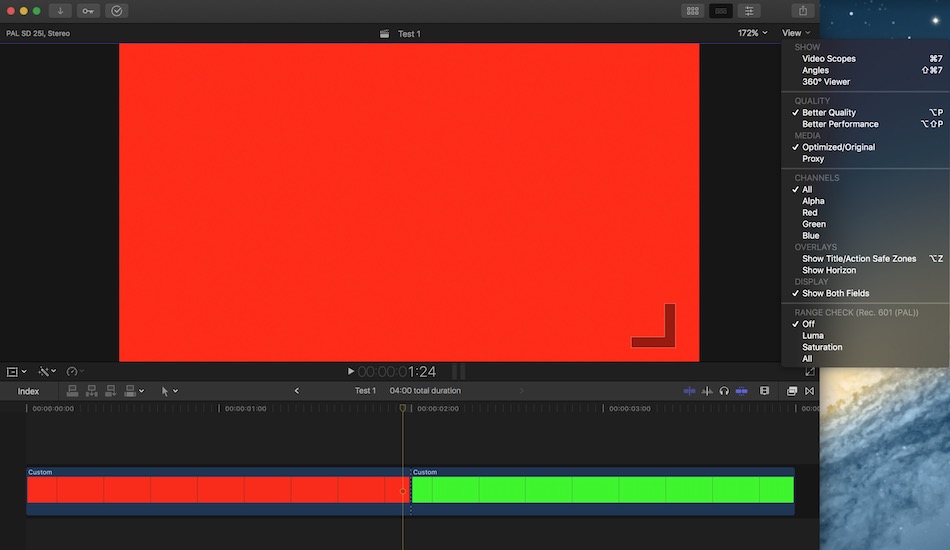
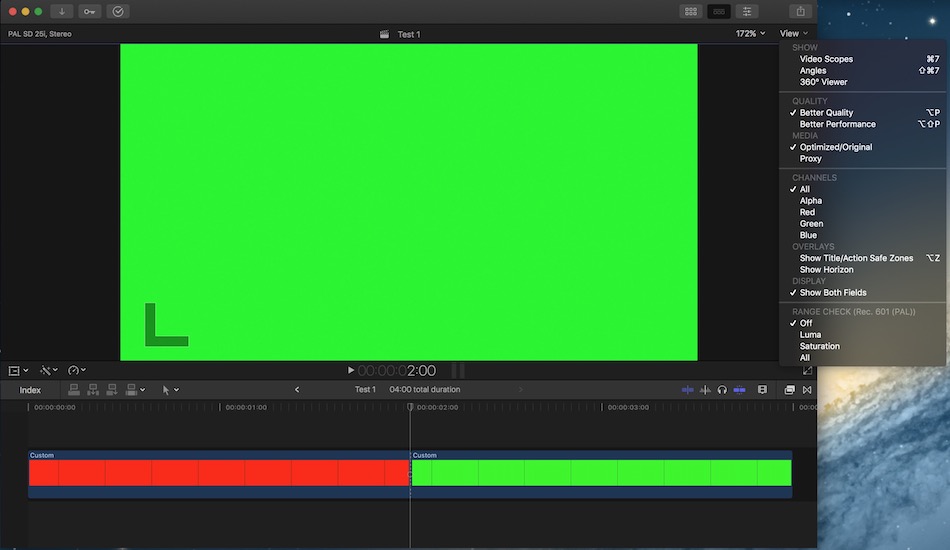
I inserted a 4 sec Custom Solid to the timeline and split it at 2:00. I changed the color of the first clip to red and the second color to green. At timecode 1:24 the image is thusly completely red, at 2:00 it is completely green.
This project is exported to MXF, video codec D-10 / IMX (30 MBps). The exported MXF is reimported to the same project and placed on the same timeline. At 1:24 the image is now red and green, interlaced. A green field from frame 2:00 is shown too early.
I have attached screenshots and the FCPX library.
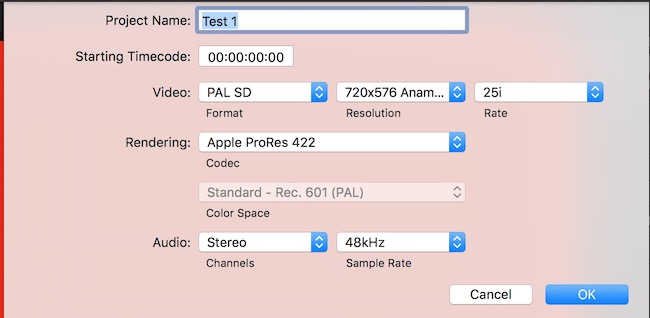
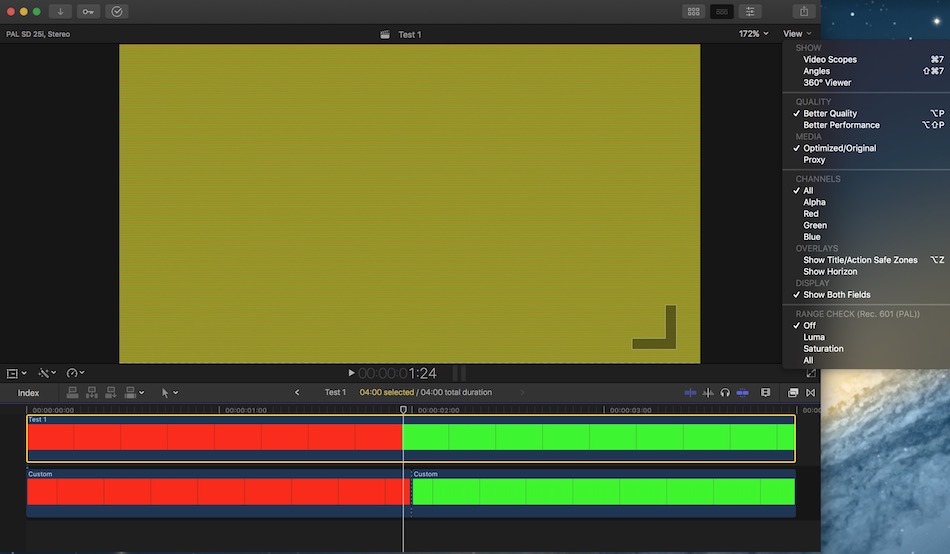
I have created a new project in FCPX 10.4. The settings are PAL SD, 720x576 Anamorphic, 25i.
I inserted a 4 sec Custom Solid to the timeline and split it at 2:00. I changed the color of the first clip to red and the second color to green. At timecode 1:24 the image is thusly completely red, at 2:00 it is completely green.
This project is exported to MXF, video codec D-10 / IMX (30 MBps). The exported MXF is reimported to the same project and placed on the same timeline. At 1:24 the image is now red and green, interlaced. A green field from frame 2:00 is shown too early.
I have attached screenshots and the FCPX library.
Last edit: 17 Jan 2018 16:01 by joenca.
Please Log in to join the conversation.
17 Jan 2018 19:15 - 17 Jan 2018 19:17 #93431
by joema
Replied by joema on topic Interlaced MXFs messed up in 10.4
It's not isolated to files exported on 10.4. I made a ver. 1.6 project XML, loaded it on 10.3.4 and exported the MXF clip, then played that file on 10.4 and it still shows the interleaved frame between the red and green clips (assuming show both fields is enabled). I attached the XML in case someone else wants an easy way to try it on different FCPX versions.
If I click the deinterlace checkbox on 10.4 it seems to go away on the red/green test also the Big Buck clip. You could argue that it's showing interlacing on an interlaced file unless you ask to deinterlace, but doing that leaves some aliasing on the tree branch which should not be there. Still requires more study...
If I click the deinterlace checkbox on 10.4 it seems to go away on the red/green test also the Big Buck clip. You could argue that it's showing interlacing on an interlaced file unless you ask to deinterlace, but doing that leaves some aliasing on the tree branch which should not be there. Still requires more study...
Last edit: 17 Jan 2018 19:17 by joema.
Please Log in to join the conversation.
17 Jan 2018 19:45 - 17 Jan 2018 19:46 #93433
by joenca
Replied by joenca on topic Interlaced MXFs messed up in 10.4
The bug is triggered when an MXF is viewed in 10.4, it doesn’t matter where it came from. The export you made from 10.3.4 is most likely fine, as confirmed when viewing the MXF anywhere but 10.4. If you view the MXF in 10.3.4 you won’t see the interlaced green/red frame (at least I don’t), it only shows up in 10.4, because that’s the version with the bug.
I have a hard time seeing how anyone could argue that having a frame that shows two interlaced fields that come from two different frames could be correct.
I have a hard time seeing how anyone could argue that having a frame that shows two interlaced fields that come from two different frames could be correct.
Last edit: 17 Jan 2018 19:46 by joenca.
Please Log in to join the conversation.
17 Jan 2018 21:25 #93434
by joema
I wasn't making a hard argument for that, just mulling over various possibilities.
I'm concerned it's a bigger problem than just the bird's wings. Playing the Big Buck clip on 10.4 I see aliasing (ie stair stepping) on the horizontal tree branch, which is not in motion. Do you see that? It's not supposed to be there. You might need to view it full screen to be sure.
It's not just an FCPX viewer problem because if that material is exported from either a 10.4 progressive project or an interlaced project with deinterlacing, the bird's wings look OK when played with VLC, QT7, or QT10 but the branch aliasing is then baked in. The image is permanently degraded.
Maybe there's only a single root problem but without understanding the symptom boundaries and properly phrasing the report, it might not get fully fixed on the first iteration.
Replied by joema on topic Interlaced MXFs messed up in 10.4
fb_527411383 wrote: ...I have a hard time seeing how anyone could argue that having a frame that shows two interlaced fields that come from two different frames could be correct.
I wasn't making a hard argument for that, just mulling over various possibilities.
I'm concerned it's a bigger problem than just the bird's wings. Playing the Big Buck clip on 10.4 I see aliasing (ie stair stepping) on the horizontal tree branch, which is not in motion. Do you see that? It's not supposed to be there. You might need to view it full screen to be sure.
It's not just an FCPX viewer problem because if that material is exported from either a 10.4 progressive project or an interlaced project with deinterlacing, the bird's wings look OK when played with VLC, QT7, or QT10 but the branch aliasing is then baked in. The image is permanently degraded.
Maybe there's only a single root problem but without understanding the symptom boundaries and properly phrasing the report, it might not get fully fixed on the first iteration.
Please Log in to join the conversation.
18 Jan 2018 00:56 #93437
by joenca
Replied by joenca on topic Interlaced MXFs messed up in 10.4
The issue to me seems quite clear. 10.4 does not handle interlaced MXFs (of some PAL variations, at least) correctly. Instead of displaying both fields of the current frame, 10.4 displays one field from the current frame and one field from the next frame. This bug was not present in earlier versions, it was introduced in 10.4.
All the issues I have seen can be traced back to this bug. The export is wrong because the preceding handling and playback is messed up. Aliasing issues are due to the top and bottom fields being from different frames. Any further processing will just propagate the error.
All the issues I have seen can be traced back to this bug. The export is wrong because the preceding handling and playback is messed up. Aliasing issues are due to the top and bottom fields being from different frames. Any further processing will just propagate the error.
Please Log in to join the conversation.
18 Jan 2018 18:23 #93472
by joema
After a lot more testing, I agree ingest and editing of interlaced 1080/25i MXF seems broken on 10.4 for all the codecs I tested, inc'l AVC-Intra, DVCPro-HD, XDCAM, Uncompressed and MPEG-4. MXF works OK on 29.97i.
You can ingest and edit 1080/25p and export that to MXF 1080/25i using Compressor and it looks OK. Since 25i and 29.97i is a common delivery format for broadcast TV maybe that helps in some cases.
However you apparently cannot edit MXF 25i material in 10.4 without damaging it. That seems very serious, considering it's a commercial delivery format. Deinterlacing suppresses most of the motion artifacts, but the vertical resolution has been permanently degraded, as can be seen from aliasing on near-horizontal objects.
I don't have much 25i camera content so most of my testing was with 25p material transcoded to 25i via Compressor 4.3.2, but (as you said) I don't think that matters because the resulting 25i content works OK on 10.3.4.
I am concerned people editing (and delivering) MXF 25i on 10.4 noticed the motion artifacts, clicked the deinterlace checkbox, observed it looked OK then delivered that content. You have to look very closely to see it has been degraded -- it's not like every other line was discarded. But it's been damaged.
Anybody wanting to examine this can take any 1080/25p material such as the Quicktime trailer shown here, export that as MXF (any codec) 1080/25i in either Compressor 4.3.2 or 4.4, and import to 10.4. peach.blender.org/trailer-page/
Replied by joema on topic Interlaced MXFs messed up in 10.4
fb_527411383 wrote: The issue to me seems quite clear. 10.4 does not handle interlaced MXFs (of some PAL variations, at least) correctly....All the issues I have seen can be traced back to this bug. The export is wrong because the preceding handling and playback is messed up. Aliasing issues are due to the top and bottom fields being from different frames. Any further processing will just propagate the error.
After a lot more testing, I agree ingest and editing of interlaced 1080/25i MXF seems broken on 10.4 for all the codecs I tested, inc'l AVC-Intra, DVCPro-HD, XDCAM, Uncompressed and MPEG-4. MXF works OK on 29.97i.
You can ingest and edit 1080/25p and export that to MXF 1080/25i using Compressor and it looks OK. Since 25i and 29.97i is a common delivery format for broadcast TV maybe that helps in some cases.
However you apparently cannot edit MXF 25i material in 10.4 without damaging it. That seems very serious, considering it's a commercial delivery format. Deinterlacing suppresses most of the motion artifacts, but the vertical resolution has been permanently degraded, as can be seen from aliasing on near-horizontal objects.
I don't have much 25i camera content so most of my testing was with 25p material transcoded to 25i via Compressor 4.3.2, but (as you said) I don't think that matters because the resulting 25i content works OK on 10.3.4.
I am concerned people editing (and delivering) MXF 25i on 10.4 noticed the motion artifacts, clicked the deinterlace checkbox, observed it looked OK then delivered that content. You have to look very closely to see it has been degraded -- it's not like every other line was discarded. But it's been damaged.
Anybody wanting to examine this can take any 1080/25p material such as the Quicktime trailer shown here, export that as MXF (any codec) 1080/25i in either Compressor 4.3.2 or 4.4, and import to 10.4. peach.blender.org/trailer-page/
Please Log in to join the conversation.
19 Jan 2018 14:32 - 19 Jan 2018 14:38 #93505
by joema
Replied by joema on topic Interlaced MXFs messed up in 10.4
Just wanted to clarify, this problem (serious as it is) only happens when *editing* MXF 25i material (any codec) on 10.4. You can edit 25p MXF material and export it as 25i MXF using either 10.4 or Compressor 4.4 no problem. You can also ingest MXF 25i material straight to Compressor 4.4 and export it as 25i MXF OK. But once MXF 25i is ingested to 10.4 it cannot be exported as anything (MXF or otherwise, from FCPX or sent to Compressor) without being degraded, regardless of whether it's deinterlaced before export.
Since most acquisition nowadays is progressive (even when final delivery is interlaced for submission to broadcast TV), this seems to limit the problem scope. You can edit any progressive content on 10.4 and export as MXF 25i no problem. You can edit any in other 25i format besides MXF and export as 25i MXF no problem. You just can't edit MXF 25i on 10.4.
A possible workaround is to rewrap the MXF 25i material using EditReady before ingest. This is extremely fast and does not transcode. The re-wrapped material can be edited and exported as MXF 25i with no problem. If the incoming MXF 25i material is in tree format, it cannot be imported with "leave files in place", whereas the re-wrapped version can be. Externally re-wrapping with EditReady before ingest is a common workflow with many tree-oriented formats, not to avoid bugs but because it's very fast and enables "lean libraries" by importing with files in place: www.divergentmedia.com/editready
This problem is unique to 25i MXF on 10.4, does not happen when editing 29.97i MXF, does not happen when editing 25i formats besides MXF.
It should definitely not be happening and this info has been forwarded to the necessary people.
Since most acquisition nowadays is progressive (even when final delivery is interlaced for submission to broadcast TV), this seems to limit the problem scope. You can edit any progressive content on 10.4 and export as MXF 25i no problem. You can edit any in other 25i format besides MXF and export as 25i MXF no problem. You just can't edit MXF 25i on 10.4.
A possible workaround is to rewrap the MXF 25i material using EditReady before ingest. This is extremely fast and does not transcode. The re-wrapped material can be edited and exported as MXF 25i with no problem. If the incoming MXF 25i material is in tree format, it cannot be imported with "leave files in place", whereas the re-wrapped version can be. Externally re-wrapping with EditReady before ingest is a common workflow with many tree-oriented formats, not to avoid bugs but because it's very fast and enables "lean libraries" by importing with files in place: www.divergentmedia.com/editready
This problem is unique to 25i MXF on 10.4, does not happen when editing 29.97i MXF, does not happen when editing 25i formats besides MXF.
It should definitely not be happening and this info has been forwarded to the necessary people.
Last edit: 19 Jan 2018 14:38 by joema.
Please Log in to join the conversation.
21 Jan 2018 00:45 #93542
by joenca
Replied by joenca on topic Interlaced MXFs messed up in 10.4
Yeah, as I've said a couple of times, this bug makes 10.4 a complete no-go for me. I’m slightly concerned that more people don’t seem to have noticed (or care about) this bug. This implies that it hasn’t been reported to Apple all that much, which might mean that the fix takes longer than I would like.
I guess I’ll see when 10.4.1 rolls around.
I guess I’ll see when 10.4.1 rolls around.
Please Log in to join the conversation.

21 Jan 2018 15:28 #93572
by JoeEditor
Replied by JoeEditor on topic Interlaced MXFs messed up in 10.4
I've not seen anyone needing to import MXF, that's usually simply an export for broadcast. And it may have been reported to Apple a LOT in the few weeks 10.4 has been out. But fixes take time, and enough have to be done to justify releasing a bug fix update. But I'm sure it'll be coming soon.
Please Log in to join the conversation.
10 Apr 2018 09:05 #95067
by joenca
Replied by joenca on topic Interlaced MXFs messed up in 10.4
For anyone affected by this bug, unfortunately it is NOT fixed in 10.4.1. Interlaced PAL MXFs are still not handled correctly by FCP.
Please Log in to join the conversation.

10 Apr 2018 11:24 #95069
by petersxs
Replied by petersxs on topic Interlaced MXFs messed up in 10.4
WHAT ?? really - confirmed that this bug is still there ? . APPLE whats wrong with you lazy nerds ??? oh i miss steve .
i am not going to update my system , the next unprofessional move . i really y loved FCPX but that does it .
we are talking about broadcast files here ! please write to apple , fill them up with posts & requests.
putting raw on the frontend and messing up the deliver end ? Basics like field order WTF ?
i am not going to update my system , the next unprofessional move . i really y loved FCPX but that does it .
we are talking about broadcast files here ! please write to apple , fill them up with posts & requests.
putting raw on the frontend and messing up the deliver end ? Basics like field order WTF ?
Please Log in to join the conversation.
