




- Posts: 97
- Thank you received: 9
3 Post Moderation Rule for New Boarders (25 Jan 2021)
New boarders will have their posts moderated - Don't worry if you cannot see your post immediately.
Interlaced MXFs messed up in 10.4
15 Jan 2018 15:19 - 15 Jan 2018 15:22 #93305
by joenca
Interlaced MXFs messed up in 10.4 was created by joenca
When using source material that is interlaced MXF, the interlacing on the exported output is wrong. When viewing frame by frame in Quicktime Player, it looks like the first frame consists of the bottom field of frame 1 and the top field of frame 2.
See attached screenshots. I have simply imported a AVC-Intra 50 file and exported it straight from the timeline. For reference, I did the same thing in 10.3.2 where it works fine.

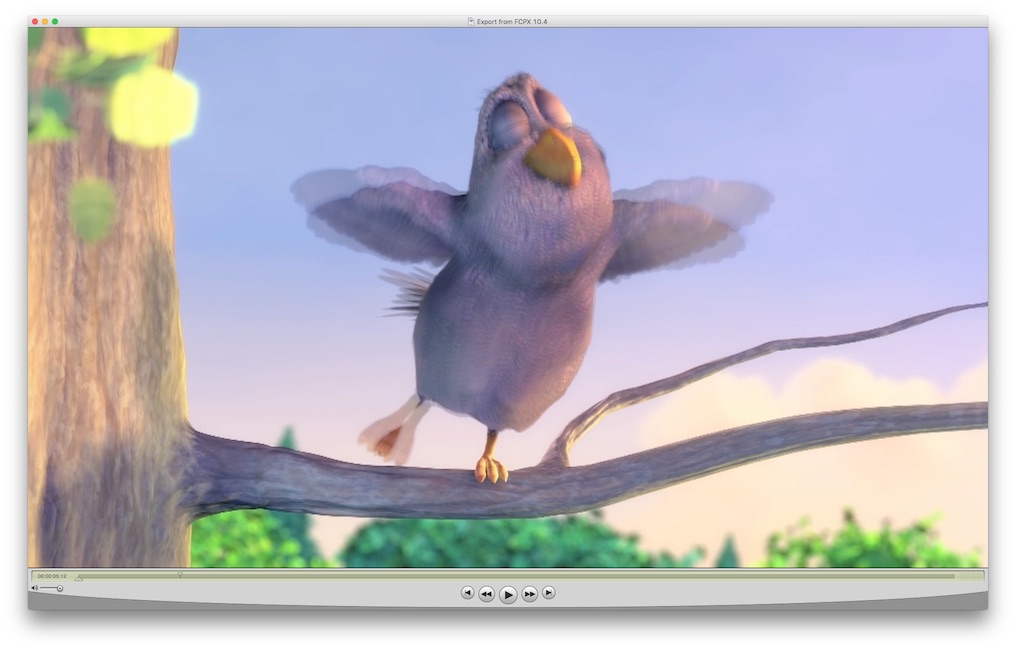

I have tried both AVC-Intra 50 (1080i50) and IMX 625/50 with the same result.
I have reproduced the error on two separate machines, one with Sierra and one with High Sierra. Has anyone else seen this?
See attached screenshots. I have simply imported a AVC-Intra 50 file and exported it straight from the timeline. For reference, I did the same thing in 10.3.2 where it works fine.
I have tried both AVC-Intra 50 (1080i50) and IMX 625/50 with the same result.
I have reproduced the error on two separate machines, one with Sierra and one with High Sierra. Has anyone else seen this?
Last edit: 15 Jan 2018 15:22 by joenca.
Please Log in to join the conversation.
- Tom Wolsky
-

- Offline
- Moderator
-

15 Jan 2018 15:22 #93306
by Tom Wolsky
Replied by Tom Wolsky on topic Interlaced MXFs messed up in 10.4
The QT player doesn’t display interlacing correctly or at all. Set the FCP viewer to display the interlacing.
Please Log in to join the conversation.
15 Jan 2018 15:29 #93307
by joenca
Replied by joenca on topic Interlaced MXFs messed up in 10.4
Not sure what you mean, QT7 does show top and bottom fields when stalled on a frame, as seen in the second screenshot above. Even if this is not reliable, what accounts for the differences between exports from 10.4 and 10.3?
Please Log in to join the conversation.
15 Jan 2018 15:34 #93308
by joenca
Replied by joenca on topic Interlaced MXFs messed up in 10.4
The same interlacing error is visible in VLC as well.

Please Log in to join the conversation.
- Tom Wolsky
-
- Offline
- Moderator
-
15 Jan 2018 16:06 #93313
by Tom Wolsky
Replied by Tom Wolsky on topic Interlaced MXFs messed up in 10.4
Sorry you didn’t say the QT7 player, and I didn’t see any images when I replied.
Please Log in to join the conversation.
- Tom Wolsky
-
- Offline
- Moderator
-
15 Jan 2018 16:09 #93314
by Tom Wolsky
Replied by Tom Wolsky on topic Interlaced MXFs messed up in 10.4
What do you see in the earlier version. Have to say that doesn’t look like interlacing.
Please Log in to join the conversation.
15 Jan 2018 16:24 #93318
by joenca
Replied by joenca on topic Interlaced MXFs messed up in 10.4
Ah, I should have specified QT7 in my original post. I never use QTX so I kinda forget it exists.
In any case, per your tip I checked in FCP and the error is present on playback as well, not just export. The screenshots are a bit small, but it is definitely an interlacing issue. The screenshot below is the same frame viewed in FCPX 10.4, zoomed in. The file in the timeline is made from a progressive source so there should be no movement between the top and bottom fields.

This started with 10.4, it was not present in the last version that I used, which was 10.3.2.
In any case, per your tip I checked in FCP and the error is present on playback as well, not just export. The screenshots are a bit small, but it is definitely an interlacing issue. The screenshot below is the same frame viewed in FCPX 10.4, zoomed in. The file in the timeline is made from a progressive source so there should be no movement between the top and bottom fields.
This started with 10.4, it was not present in the last version that I used, which was 10.3.2.
Please Log in to join the conversation.
- Tom Wolsky
-
- Offline
- Moderator
-
15 Jan 2018 16:30 #93320
by Tom Wolsky
Replied by Tom Wolsky on topic Interlaced MXFs messed up in 10.4
If it’s progressive it shouldn’t show any interlacing and that dies look interlaced. Could you post a piece of this media somewhere so it can be downloaded? Maybe WeTransfer?
Please Log in to join the conversation.
- Tom Wolsky
-
- Offline
- Moderator
-
15 Jan 2018 18:41 #93323
by Tom Wolsky
Replied by Tom Wolsky on topic Interlaced MXFs messed up in 10.4
The problem in .4 is that it sees the first frame as a single field, so it combines that field with the first field on the next frame. Change the Settings to progressive and it will look like it does in .3.4.
Please Log in to join the conversation.
15 Jan 2018 19:06 #93325
by joenca
Replied by joenca on topic Interlaced MXFs messed up in 10.4
Yes, that's the exact behavior I am seeing.
Changing settings to progressive is not a solution for me as the video I generally work with is in fact interlaced, and I need to trust FCP to handle the interlacing correctly, from import, through the edit, to export. This bug is a complete showstopper for me, I have to stay on 10.3 until this gets sorted.
Thanks for confirming the bug!
Changing settings to progressive is not a solution for me as the video I generally work with is in fact interlaced, and I need to trust FCP to handle the interlacing correctly, from import, through the edit, to export. This bug is a complete showstopper for me, I have to stay on 10.3 until this gets sorted.
Thanks for confirming the bug!
Please Log in to join the conversation.
- Tom Wolsky
-
- Offline
- Moderator
-
15 Jan 2018 19:38 #93326
by Tom Wolsky
Replied by Tom Wolsky on topic Interlaced MXFs messed up in 10.4
Not sure what you mean when you say you work with interlaced video. The original media is progressive. The file header isn't correct, and it starts with a single fame before the first shot change, which is always going to be a problem in a GOP structure format, bound to produce inconsistent errors in interlacing.
Not sure why it's a problem. You set the clip to progressive and put it in an interlaced project if you really need to output interlacing, which is such crap and really should die ASAP.
Not sure why it's a problem. You set the clip to progressive and put it in an interlaced project if you really need to output interlacing, which is such crap and really should die ASAP.
Please Log in to join the conversation.


15 Jan 2018 19:53 #93327
by joema
I don't think he sent original material. It looks like it was processed by Compressor, so it's impossible to say what the original looked like. If we could get a clip of the original material that might help figure it out.
Replied by joema on topic Interlaced MXFs messed up in 10.4
Tom Wolsky wrote: Not sure what you mean when you say you work with interlaced video. The original media is progressive. The file header isn't correct, and it starts with a single fame before the first shot change...
I don't think he sent original material. It looks like it was processed by Compressor, so it's impossible to say what the original looked like. If we could get a clip of the original material that might help figure it out.
Please Log in to join the conversation.

15 Jan 2018 21:48 #93329
by JoeEditor
Replied by JoeEditor on topic Interlaced MXFs messed up in 10.4
Images here look textbook interlaced to me.
Please Log in to join the conversation.
15 Jan 2018 22:39 #93331
by joenca
Let me clarify, you are missing my point. Firstly, the screenshots and supplied clip are not the video I am working with; I have no interest this particular video. I just made it to exemplify the issue I was seeing with other material (from a broadcast client). I do not wish to share that material so I made a short test clip from Big Buck Bunny. Yes, the source material is progressive, but when transcoded to an interlaced format the file itself becomes interlaced, even if it looks progressive when played back. The file format is dictated by what the broadcaster needs, delivering a progressive file format is not an option.
The problem is that the test file, and the other interlaced MXF files of various flavors that I have tested, are not correctly shown and exported in 10.4. To my mind, my original screenshots show the problem very clearly. The first screenshot is the original and the third one is that same clip just exported in the same format FCP 10.3.2. As expected, they are identical. The second screenshot is the same export, but from 10.4. Clearly FCP is mixing fields from two different frames, which seems undoubtedly wrong, and not how earlier versions of FCP worked.
FCP not being able to correctly show interlaced MXFs is a huge problem; for me at least.
Replied by joenca on topic Interlaced MXFs messed up in 10.4
Tom Wolsky wrote: Not sure what you mean when you say you work with interlaced video. The original media is progressive. The file header isn't correct, and it starts with a single fame before the first shot change, which is always going to be a problem in a GOP structure format, bound to produce inconsistent errors in interlacing.
Not sure why it's a problem. You set the clip to progressive and put it in an interlaced project if you really need to output interlacing, which is such crap and really should die ASAP.
Let me clarify, you are missing my point. Firstly, the screenshots and supplied clip are not the video I am working with; I have no interest this particular video. I just made it to exemplify the issue I was seeing with other material (from a broadcast client). I do not wish to share that material so I made a short test clip from Big Buck Bunny. Yes, the source material is progressive, but when transcoded to an interlaced format the file itself becomes interlaced, even if it looks progressive when played back. The file format is dictated by what the broadcaster needs, delivering a progressive file format is not an option.
The problem is that the test file, and the other interlaced MXF files of various flavors that I have tested, are not correctly shown and exported in 10.4. To my mind, my original screenshots show the problem very clearly. The first screenshot is the original and the third one is that same clip just exported in the same format FCP 10.3.2. As expected, they are identical. The second screenshot is the same export, but from 10.4. Clearly FCP is mixing fields from two different frames, which seems undoubtedly wrong, and not how earlier versions of FCP worked.
FCP not being able to correctly show interlaced MXFs is a huge problem; for me at least.
Please Log in to join the conversation.
- Tom Wolsky
-
- Offline
- Moderator
-
15 Jan 2018 22:46 #93332
by Tom Wolsky
Replied by Tom Wolsky on topic Interlaced MXFs messed up in 10.4
I can only go by what you sent, and the first frame is not correctly built. It’s one field before a shot change.
Please Log in to join the conversation.
- Tom Wolsky
-
- Offline
- Moderator
-
15 Jan 2018 22:46 - 15 Jan 2018 22:47 #93333
by Tom Wolsky
Replied by Tom Wolsky on topic Interlaced MXFs messed up in 10.4
...
Last edit: 15 Jan 2018 22:47 by Tom Wolsky.
Please Log in to join the conversation.
15 Jan 2018 23:44 #93337
by joema
We need to study a clip of the original camera material -- not just look at it, but examine the video file header and encoding details. This need not be sensitive stuff. All work has out takes where the camera is pointed at the floor, record button accidentally pressed for a few sec, etc. As an editor I spend lots of time discarding that stuff.
A short test file downloaded from Vimeo, the camera manufacturer, etc. would also work -- provided you've tested it in FCPX 10.4 and validated it has the same behavior. MXF is a wrapper format, the codec and internal file details can vary widely.
Yes we know technical delivery standards for broadcast TV often mandates interlaced content. Lots of people are delivering this using FCPX 10.4 so it can't be totally broken. We just need a representative sample of your material or other material you've verified exhibits this problem .
Replied by joema on topic Interlaced MXFs messed up in 10.4
fb_527411383 wrote: ...the screenshots and supplied clip are not the video I am working with..I do not wish to share that material so I made a short test clip from Big Buck Bunny..the other interlaced MXF files of various flavors that I have tested, are not correctly shown and exported in 10.4. To my mind, my original screenshots show the problem very clearly...
We need to study a clip of the original camera material -- not just look at it, but examine the video file header and encoding details. This need not be sensitive stuff. All work has out takes where the camera is pointed at the floor, record button accidentally pressed for a few sec, etc. As an editor I spend lots of time discarding that stuff.
A short test file downloaded from Vimeo, the camera manufacturer, etc. would also work -- provided you've tested it in FCPX 10.4 and validated it has the same behavior. MXF is a wrapper format, the codec and internal file details can vary widely.
Yes we know technical delivery standards for broadcast TV often mandates interlaced content. Lots of people are delivering this using FCPX 10.4 so it can't be totally broken. We just need a representative sample of your material or other material you've verified exhibits this problem .
Please Log in to join the conversation.
15 Jan 2018 23:45 #93338
by joenca
Nope, the first frame contains both fields, as seen when viewed in FCP 10.3, QT7 or VLC. Only in 10.4 is it a single field, which is wrong, which is my point.
Replied by joenca on topic Interlaced MXFs messed up in 10.4
Tom Wolsky wrote: I can only go by what you sent, and the first frame is not correctly built. It’s one field before a shot change.
Nope, the first frame contains both fields, as seen when viewed in FCP 10.3, QT7 or VLC. Only in 10.4 is it a single field, which is wrong, which is my point.
Please Log in to join the conversation.
- Tom Wolsky
-
- Offline
- Moderator
-
16 Jan 2018 00:19 #93340
by Tom Wolsky
Replied by Tom Wolsky on topic Interlaced MXFs messed up in 10.4
There is a problem with the media. I tested 25p media in a 25i project in both .4 and .3.4, and they both show interlacing correctly, which your media does not in those applications. If it's interlaced it will show interlacing on motion which doesn't appear in the media you sent except in .4, which seems to be the only application reading the interlacing correctly.
Please Log in to join the conversation.
