


- Posts: 2609
- Thank you received: 696
3 Post Moderation Rule for New Boarders (25 Jan 2021)
New boarders will have their posts moderated - Don't worry if you cannot see your post immediately.
Original Media Folder in FCP X Library Bundle
06 Mar 2017 11:56 #86312
by joema
In your case your highest priority is reducing storage requirements for your huge project. You don't want duplicate storage from the media files plus copying them to the library -- you want "leave files in place".
The problem with camera archives is it mandates duplicate storage. Both the camera archive and the imported files must be on disk simultaneously -- exactly what you don't want.
I also don't see how importing from a camera archive makes it any safer to manually delete things from within the library package. That is not an approved, documented workflow.
For our documentary work we are shooting with many cameras which must be downloaded and duplicated each day, so we don't have time to use FCPX to make archives. Any AVCHD is rewrapped with EditReady. XAVC-S is imported in place by copying the .mp4 files outside the folder tree. There is no good solution for this because FCPX refuses to import from a disk version of the camera card, even though it should be possible to programmatically determine it's not the SD card. Ideally I should rewrap the XAVC-S but we shoot up to 600 GB per day.
Replied by joema on topic Original Media Folder in FCP X Library Bundle
Videopixels wrote: Many thanks.
What is your workflow/software to create the camera archives?
In your case your highest priority is reducing storage requirements for your huge project. You don't want duplicate storage from the media files plus copying them to the library -- you want "leave files in place".
The problem with camera archives is it mandates duplicate storage. Both the camera archive and the imported files must be on disk simultaneously -- exactly what you don't want.
I also don't see how importing from a camera archive makes it any safer to manually delete things from within the library package. That is not an approved, documented workflow.
For our documentary work we are shooting with many cameras which must be downloaded and duplicated each day, so we don't have time to use FCPX to make archives. Any AVCHD is rewrapped with EditReady. XAVC-S is imported in place by copying the .mp4 files outside the folder tree. There is no good solution for this because FCPX refuses to import from a disk version of the camera card, even though it should be possible to programmatically determine it's not the SD card. Ideally I should rewrap the XAVC-S but we shoot up to 600 GB per day.
Please Log in to join the conversation.


06 Mar 2017 13:17 #86315
by spurratic
Replied by spurratic on topic Original Media Folder in FCP X Library Bundle
As soon as I take the card out of the camera, I put it into the Mac, open Final Cut, go to Import screen, and in the bottom left of the window, 'Create Camera Archive'
I save the camera archive to a different disk as my editing project, as a backup method.
Then I immediately take the camera card out of the computer to be sure I do not import from the card. (Explain in a moment)
Then I go to the import screen and select the camera archive, and import the footage.
After I have edited and delivered the project I generally 1. Upload the camera archive to Amazon drive for long term backup(cheap unlimited storage). 2. I delete all the imported footage from the 'Original Media' folder so now the library is very small. I also delete all renders and analysis files.
Then finally, I store the library and the Camera Archive together in the cloud. This is essentially the same amount of HD space as a library with imported footage, (or footage left in place), but with 2 major benefits. 1, the footage stays intact and 1 clip cannot be accidentally deleted. 2. The metadata of the camera is all preserved.
If I ever need to re-instate the project I simply use the 'reimport from camera archive' feature and it will restore everything.
This is just MY process. I know there are a bunch of Camera Archive haters (and misunderstanders) lurking around that always have to try and speak out against it......but it's just another way to work if you like metadata and don't always want to import entire clips.
I shoot a lot of concerts and only want to import 1 song in some instances, but want to always archive the Raw footage. This is my preferred method.
I save the camera archive to a different disk as my editing project, as a backup method.
Then I immediately take the camera card out of the computer to be sure I do not import from the card. (Explain in a moment)
Then I go to the import screen and select the camera archive, and import the footage.
After I have edited and delivered the project I generally 1. Upload the camera archive to Amazon drive for long term backup(cheap unlimited storage). 2. I delete all the imported footage from the 'Original Media' folder so now the library is very small. I also delete all renders and analysis files.
Then finally, I store the library and the Camera Archive together in the cloud. This is essentially the same amount of HD space as a library with imported footage, (or footage left in place), but with 2 major benefits. 1, the footage stays intact and 1 clip cannot be accidentally deleted. 2. The metadata of the camera is all preserved.
If I ever need to re-instate the project I simply use the 'reimport from camera archive' feature and it will restore everything.
This is just MY process. I know there are a bunch of Camera Archive haters (and misunderstanders) lurking around that always have to try and speak out against it......but it's just another way to work if you like metadata and don't always want to import entire clips.
I shoot a lot of concerts and only want to import 1 song in some instances, but want to always archive the Raw footage. This is my preferred method.
Please Log in to join the conversation.
06 Mar 2017 17:44 #86324
by VidGreg
Replied by VidGreg on topic Original Media Folder in FCP X Library Bundle
I think people need to understand some differences between "Camera Archive" and "Imported Original Media".
An archive is an exact duplicate of the camera card and file structure. This file structure format something Apple has no control of. It is up to the manufacture of the camera to provide the needed data and translation tools so Apple can incorporate the media into FCPX. Manufactures change this file formatting all the time. They are also free to discontinue support at any time.
When you "Import" the media, Apple is using the info provided by the manufacture to interpret the data and bring it into FCPX and OS file system and structure. Once it is transcoded into FCPX, then Apple can apply all the backend magic to the files. You don't want to edit off a drive formatted to FAT or NTFS (though you could) because it may cause problems, so why would you want to edit off a camera card file system?
My workflow is to create a camera archive on a separate large external hdd, then to immediately "Import Media" onto a separate external ssd media drive that I will be accessing to edit from. I make back ups of both these drives onto another hdd drive(s) for safety purposes. The camera archive is just a safety net in case there is any corrupted data in the imported media and I know the camera card will be erased.
After editing, if you want to save space, delete the Camera Archive, you don't really need it, and the imported media is already within the Apple sphere of influence/ecosystem. No relinking / reimporting needed if you ever need it. I tend to just buy additional hdd drives as I fill then up.
The new WORX4X app that will allow you to only save the portion of the original media clips looks to offer another way to save space on project storage, at the risk of not having all of the shot footage.
Just my 2 cents worth
Hope this helps, Greg
An archive is an exact duplicate of the camera card and file structure. This file structure format something Apple has no control of. It is up to the manufacture of the camera to provide the needed data and translation tools so Apple can incorporate the media into FCPX. Manufactures change this file formatting all the time. They are also free to discontinue support at any time.
When you "Import" the media, Apple is using the info provided by the manufacture to interpret the data and bring it into FCPX and OS file system and structure. Once it is transcoded into FCPX, then Apple can apply all the backend magic to the files. You don't want to edit off a drive formatted to FAT or NTFS (though you could) because it may cause problems, so why would you want to edit off a camera card file system?
My workflow is to create a camera archive on a separate large external hdd, then to immediately "Import Media" onto a separate external ssd media drive that I will be accessing to edit from. I make back ups of both these drives onto another hdd drive(s) for safety purposes. The camera archive is just a safety net in case there is any corrupted data in the imported media and I know the camera card will be erased.
After editing, if you want to save space, delete the Camera Archive, you don't really need it, and the imported media is already within the Apple sphere of influence/ecosystem. No relinking / reimporting needed if you ever need it. I tend to just buy additional hdd drives as I fill then up.
The new WORX4X app that will allow you to only save the portion of the original media clips looks to offer another way to save space on project storage, at the risk of not having all of the shot footage.
Just my 2 cents worth
Hope this helps, Greg
Please Log in to join the conversation.

06 Mar 2017 21:20 #86329
by JoeEditor
Replied by JoeEditor on topic Original Media Folder in FCP X Library Bundle
I'm totally with VidGreg on this one. Exactly my own thoughts.
Please Log in to join the conversation.
06 Mar 2017 23:15 #86332
by joema
We appreciate this perspective, however this does not address the issue raised by the OP and spurratic. They are using Finder to manually delete media from INSIDE the library package, then trying to relink it or repopulate the library.
The OP found after he manually deletes media from inside the library package, it only relinks one file at a time. spurratic advocates going ahead and deleting media inside the library package, just make an archive, reload from that and all the edits are preserved.
The mention of archives was solely in the context of reloading a library from which media had been manually deleted.
IMO that is not a good idea, and this has nothing to do with whether I like archives. I don't think it's wise to directly delete content from the library package as part of a standard procedure. Apple could change the internal structure of the library at any time. It is intended to be manipulated solely by FCPX.
The OP got into this situation because FCPX copied XAVC-L media to the library when he was trying to import with "leave files in place". That is expected behavior if the media folder tree was copied to hard disk from the camera card. Currently FCPX does not try to determine if that folder tree is on an SD card or the hard drive, although that appears programmatically doable.
Once undesired content is inside the library, I think the only approved way to shrink the library is by consolidation to an external storage location, using the FCPX procedure.
Replied by joema on topic Original Media Folder in FCP X Library Bundle
VidGreg wrote: ...Once it is transcoded into FCPX, then Apple can apply all the backend magic to the files....why would you want to edit off a camera card file system?...After editing, if you want to save space, delete the Camera Archive, you don't really need it, and the imported media is already within the Apple sphere of influence/ecosystem. No relinking / reimporting needed if you ever need it....
We appreciate this perspective, however this does not address the issue raised by the OP and spurratic. They are using Finder to manually delete media from INSIDE the library package, then trying to relink it or repopulate the library.
The OP found after he manually deletes media from inside the library package, it only relinks one file at a time. spurratic advocates going ahead and deleting media inside the library package, just make an archive, reload from that and all the edits are preserved.
The mention of archives was solely in the context of reloading a library from which media had been manually deleted.
IMO that is not a good idea, and this has nothing to do with whether I like archives. I don't think it's wise to directly delete content from the library package as part of a standard procedure. Apple could change the internal structure of the library at any time. It is intended to be manipulated solely by FCPX.
The OP got into this situation because FCPX copied XAVC-L media to the library when he was trying to import with "leave files in place". That is expected behavior if the media folder tree was copied to hard disk from the camera card. Currently FCPX does not try to determine if that folder tree is on an SD card or the hard drive, although that appears programmatically doable.
Once undesired content is inside the library, I think the only approved way to shrink the library is by consolidation to an external storage location, using the FCPX procedure.
Please Log in to join the conversation.
06 Mar 2017 23:58 #86333
by spurratic
Replied by spurratic on topic Original Media Folder in FCP X Library Bundle
Ok I should probably clarify. I was being a bit vague about deleting library media. I'm not advocating that as a normal practice. I was simply clarifying that it does work as advertised if you are looking to downsize old projects/footage rather than delete them to regain HD space.
Personally, I only do this for libraries that are 1 year past delivery and payment of the project.....and have little to no chance of needing a re-edit.
I would rather keep a camera archive of the raw original footage for safekeeping, than a library of partial or select clips. That way I could instead import the footage to a different NLE, or back into FCPX from the source. And if I need to re-instate the library, the reimport from Camera Archive function will very likely work fine for years to come. (I don't see how a change in library structure would in any way affect that?)
The main thing to remember is.....a camera archive is just a folder. If your workflow changes down the line and you decide to stop using camera archives.....you can simply remove the .fcparch extension and you have a plain folder with your footage in it.
So if anyone read my earlier post and were planning to delete library media as a regular practice....don't. Unless you really know what you are doing with it.
Personally, I only do this for libraries that are 1 year past delivery and payment of the project.....and have little to no chance of needing a re-edit.
I would rather keep a camera archive of the raw original footage for safekeeping, than a library of partial or select clips. That way I could instead import the footage to a different NLE, or back into FCPX from the source. And if I need to re-instate the library, the reimport from Camera Archive function will very likely work fine for years to come. (I don't see how a change in library structure would in any way affect that?)
The main thing to remember is.....a camera archive is just a folder. If your workflow changes down the line and you decide to stop using camera archives.....you can simply remove the .fcparch extension and you have a plain folder with your footage in it.
So if anyone read my earlier post and were planning to delete library media as a regular practice....don't. Unless you really know what you are doing with it.
Please Log in to join the conversation.

07 Mar 2017 02:18 - 07 Mar 2017 02:22 #86334
by PaulG
Replied by PaulG on topic Original Media Folder in FCP X Library Bundle
It's funny this topic should come up now, because I’ve just been investigating using Camera Archives instead of folders.
But I have seen several alarming bugs or inconsistencies that leave me wondering how robust this solution is. I've tested with footage from a Canon 6D, Sony A7s, Sony FS5, Blackmagic Ursa Mini, Blackmagic Pocket, and Blackmagic Cinema Camera.
I’m using 10.3.2 on a “champagne bucket” Mac Pro with a Thunderbolt Pegasus Raid. All libraries and media are stored on the raid.
The workflow test was as follows:
1 - Mount native camera card (SD, SSD, CFast 2.0)
2 - Invoke File/Import/Media window in FCPX
3 - Choose “Create Archive”
4 - Save the Archive to external Thunderbolt SSD
5 - Import full clips and portions of clips to the Library
6 - Unmount SSD drive containing Camera Archives
7 - Edit clips into a project
8 - Export a project XML
9 - Open XML in Resolve
Here’s what I’ve found:
1) A7s (SD Card):
Clips import normally, round trip normally to Resolve
One thing I learned is that portions of clips are named like this:
Clip0002 [12554912 +305].mov
So it’s the clip name and then appended with the timecode and the clip length (in this case 3:05 (3 secs 5 frames)) to make it a unique instance.
2) FS5 (SD Card):
Clips import normally, round trip normally
3) Canon 6D files (SD Card):
Clips import normally;
Resolve fails to connect to Canon files unless forced to in the Resolve timeline. This means the media must be imported before the XML is imported. (One interesting trick I learned today is that you can import an entire FCPX Library into Resolve and it will grab the media and put it in the media pool. Then an XML can reconnect the timeline if you uncheck “import media”.)
4) Blackmagic Ursa Mini (CFast 2.0 Card):
Full clips import correctly
Partial clips appear to import, but the option to “Reveal in Finder” is greyed out. If I look manually in the Original Media folder inside the Library bundle, there’s no reference to the clip, unlike a full clip, which will have been copied to this folder.
If I unmount the SSD drive which had the Camera Archives, this clip will show as “Offline” unlike full imported clips.
Resolve: Full clips show up in Resolve and partial clips do not show up in Resolve
5) Blackmagic Pocket (SD) and Blackmagic Cinema (SSD) (Same behavior for both cameras)
Here’s where it gets weird:
When I browse the original cards using the Import media window, I’m able to see all of the media on the card.
Create Archive: I’m able to use Creative Archive and store it on the SSD.
Import footage from Archive: Instead of seeing the media on the archive, I see only the first clip's thumbnail repeated for as many clips as are there (see attachment) The clips are correctly labeled but show the same time code but different creation dates.
Partial import: If I take a portion of a clip, the clip will show up as black in the browser.
What’s in the Camera Archive: if I check the archive bundle, the footage is there, safe and sound.
Import from original camera card: this works fine. It’s just the importing from the Camera Archives that is messed up.
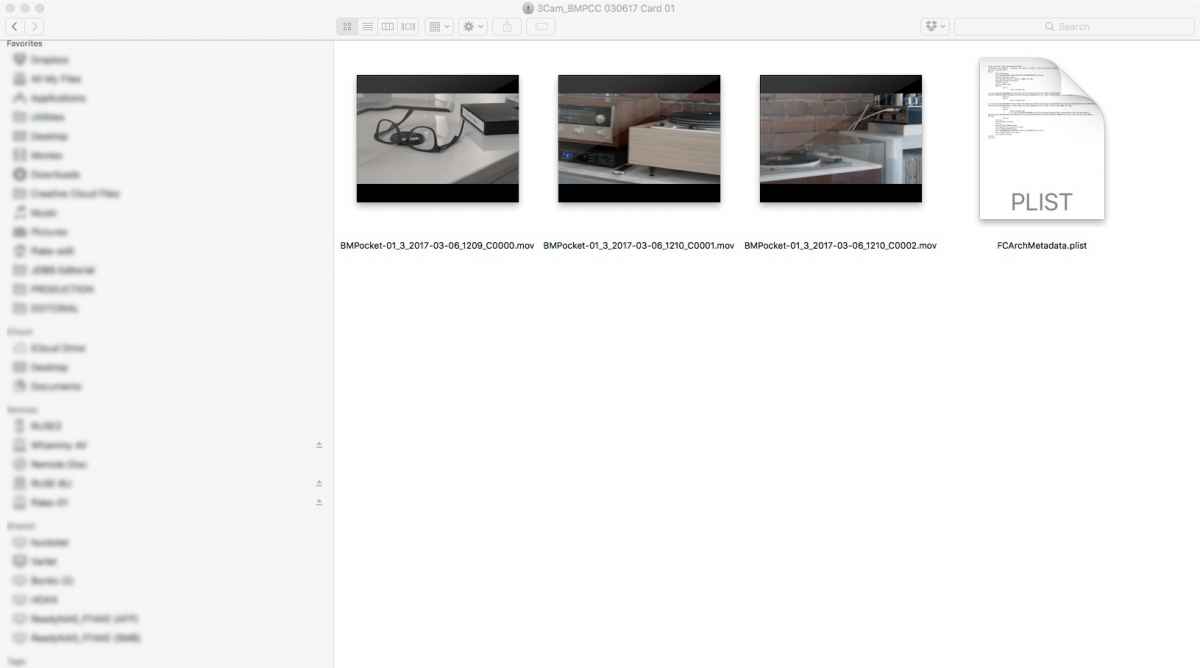
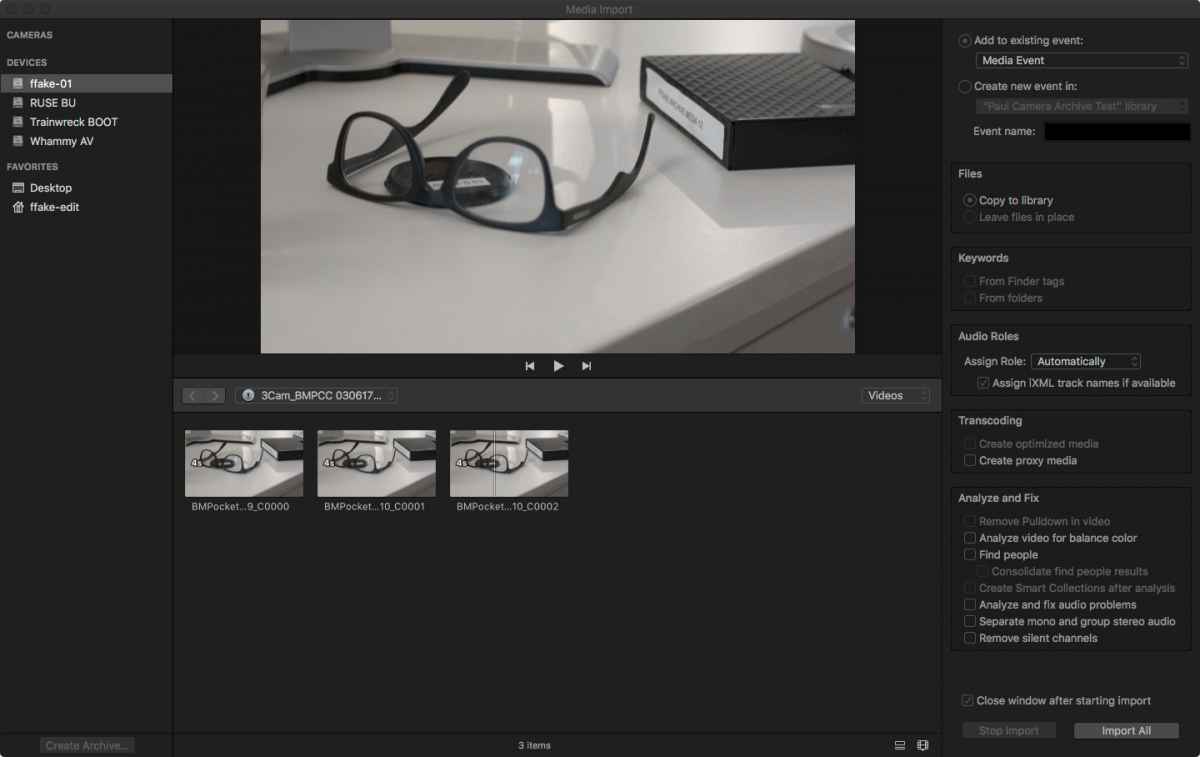
General notes:
1) The Camera Archive creation process needs a better positive indicator that the archive is being made and when it’s done. There’s a tiny clock on long imports, but no positive feedback when shorter archives are made (other than the Cancel Import button goes gray again). There is a text over the import screen which says “Loading”, but this is inconsistent with everything else in FCPX and not sufficiently informative.
2) On all three Blackmagic cards, whether formatted HFS+ or ExFat, FCPX treats them as mounted drives as opposed to camera cards. This means that it’s possible to “leave files in place” and then import them into a Library. Which means it’s possible to inadvertently wipe the camera card after importing footage and not have it safely imported to the media drive. One thought may be that the Blackmagic media is generally just a HFS+ volume with ProRes files, so FCPX does not correctly recognize it as a camera card. There’s no other metadata or folder structure and everything is at the root level.
3) The odd Blackmagic and Canon behavior is the same whether Original Media is stored with the Library or outside in another location.
4) Camera Archive storage location: I’ve heard various best practices for this. In my mind, it should be possible to keep the Archives on an external unmountable drive (or network storage) and only import locally to your RAID either full or partial clips as needed. If you need to keep the Camera Archives as online storage all the time, I don’t see the value in this amount of redundancy, since the media is copied to the Original media folder and can be re-imported as necessary.
Since I shoot primarily with the Blackmagic cameras, the camera archive system is too buggy and inconsistent to work reliably for me. If anyone has gotten this to work or would like to test this in a similar fashion, please let me know. I plan to make this information known to Apple through their bug reports.
But I have seen several alarming bugs or inconsistencies that leave me wondering how robust this solution is. I've tested with footage from a Canon 6D, Sony A7s, Sony FS5, Blackmagic Ursa Mini, Blackmagic Pocket, and Blackmagic Cinema Camera.
I’m using 10.3.2 on a “champagne bucket” Mac Pro with a Thunderbolt Pegasus Raid. All libraries and media are stored on the raid.
The workflow test was as follows:
1 - Mount native camera card (SD, SSD, CFast 2.0)
2 - Invoke File/Import/Media window in FCPX
3 - Choose “Create Archive”
4 - Save the Archive to external Thunderbolt SSD
5 - Import full clips and portions of clips to the Library
6 - Unmount SSD drive containing Camera Archives
7 - Edit clips into a project
8 - Export a project XML
9 - Open XML in Resolve
Here’s what I’ve found:
1) A7s (SD Card):
Clips import normally, round trip normally to Resolve
One thing I learned is that portions of clips are named like this:
Clip0002 [12554912 +305].mov
So it’s the clip name and then appended with the timecode and the clip length (in this case 3:05 (3 secs 5 frames)) to make it a unique instance.
2) FS5 (SD Card):
Clips import normally, round trip normally
3) Canon 6D files (SD Card):
Clips import normally;
Resolve fails to connect to Canon files unless forced to in the Resolve timeline. This means the media must be imported before the XML is imported. (One interesting trick I learned today is that you can import an entire FCPX Library into Resolve and it will grab the media and put it in the media pool. Then an XML can reconnect the timeline if you uncheck “import media”.)
4) Blackmagic Ursa Mini (CFast 2.0 Card):
Full clips import correctly
Partial clips appear to import, but the option to “Reveal in Finder” is greyed out. If I look manually in the Original Media folder inside the Library bundle, there’s no reference to the clip, unlike a full clip, which will have been copied to this folder.
If I unmount the SSD drive which had the Camera Archives, this clip will show as “Offline” unlike full imported clips.
Resolve: Full clips show up in Resolve and partial clips do not show up in Resolve
5) Blackmagic Pocket (SD) and Blackmagic Cinema (SSD) (Same behavior for both cameras)
Here’s where it gets weird:
When I browse the original cards using the Import media window, I’m able to see all of the media on the card.
Create Archive: I’m able to use Creative Archive and store it on the SSD.
Import footage from Archive: Instead of seeing the media on the archive, I see only the first clip's thumbnail repeated for as many clips as are there (see attachment) The clips are correctly labeled but show the same time code but different creation dates.
Partial import: If I take a portion of a clip, the clip will show up as black in the browser.
What’s in the Camera Archive: if I check the archive bundle, the footage is there, safe and sound.
Import from original camera card: this works fine. It’s just the importing from the Camera Archives that is messed up.
General notes:
1) The Camera Archive creation process needs a better positive indicator that the archive is being made and when it’s done. There’s a tiny clock on long imports, but no positive feedback when shorter archives are made (other than the Cancel Import button goes gray again). There is a text over the import screen which says “Loading”, but this is inconsistent with everything else in FCPX and not sufficiently informative.
2) On all three Blackmagic cards, whether formatted HFS+ or ExFat, FCPX treats them as mounted drives as opposed to camera cards. This means that it’s possible to “leave files in place” and then import them into a Library. Which means it’s possible to inadvertently wipe the camera card after importing footage and not have it safely imported to the media drive. One thought may be that the Blackmagic media is generally just a HFS+ volume with ProRes files, so FCPX does not correctly recognize it as a camera card. There’s no other metadata or folder structure and everything is at the root level.
3) The odd Blackmagic and Canon behavior is the same whether Original Media is stored with the Library or outside in another location.
4) Camera Archive storage location: I’ve heard various best practices for this. In my mind, it should be possible to keep the Archives on an external unmountable drive (or network storage) and only import locally to your RAID either full or partial clips as needed. If you need to keep the Camera Archives as online storage all the time, I don’t see the value in this amount of redundancy, since the media is copied to the Original media folder and can be re-imported as necessary.
Since I shoot primarily with the Blackmagic cameras, the camera archive system is too buggy and inconsistent to work reliably for me. If anyone has gotten this to work or would like to test this in a similar fashion, please let me know. I plan to make this information known to Apple through their bug reports.
Last edit: 07 Mar 2017 02:22 by PaulG.
Please Log in to join the conversation.
07 Mar 2017 03:19 #86336
by VidGreg
Replied by VidGreg on topic Original Media Folder in FCP X Library Bundle
Hi Paul
Thanks for posting this info, I find it very interesting.
Have you tried copying the BM cards in the Finder itself outside of FCPX? Does this change what and how FCPX shows in the Browser? Can you then "Leave Files In Place" from the copied camera card?
I think this just points to the fact that different manufactures create and control how the camera cards are formatted and the file structure is different on the various cards. Indeed some cameras allow you to shoot in various codecs so may be seen differently by FCPX.
If anything, I think this info makes creating a camera archive more important, but raises whether to create the archive inside of FCPX or via Finder a whole other issue. Interesting! I have done both at different times.
It also raises another issue not brought up before, and that is the dates created for creation date and modified dates. Wonder if this would mess up the inode IDs within Apple OS. I recently did a mid project FCPX update and had all the dates for numerous "Snapshots" all change to the date I updated instead of the date of actual snapshot.
Finally don't forget that Apple is poised to change the macOS file system to Apple File System (APFS) from HFS+ so there are lots of unknowns for the future as the underpinnings change. Might want to err on the cautionary side and create as many different data sets as possible for awhile.
Thanks for posting, looking forward to what others find out.
Hope this helps, Greg
Thanks for posting this info, I find it very interesting.
Have you tried copying the BM cards in the Finder itself outside of FCPX? Does this change what and how FCPX shows in the Browser? Can you then "Leave Files In Place" from the copied camera card?
I think this just points to the fact that different manufactures create and control how the camera cards are formatted and the file structure is different on the various cards. Indeed some cameras allow you to shoot in various codecs so may be seen differently by FCPX.
If anything, I think this info makes creating a camera archive more important, but raises whether to create the archive inside of FCPX or via Finder a whole other issue. Interesting! I have done both at different times.
It also raises another issue not brought up before, and that is the dates created for creation date and modified dates. Wonder if this would mess up the inode IDs within Apple OS. I recently did a mid project FCPX update and had all the dates for numerous "Snapshots" all change to the date I updated instead of the date of actual snapshot.
Finally don't forget that Apple is poised to change the macOS file system to Apple File System (APFS) from HFS+ so there are lots of unknowns for the future as the underpinnings change. Might want to err on the cautionary side and create as many different data sets as possible for awhile.
Thanks for posting, looking forward to what others find out.
Hope this helps, Greg
Please Log in to join the conversation.
07 Mar 2017 03:40 #86337
by VidGreg
Replied by VidGreg on topic Original Media Folder in FCP X Library Bundle
I do not recommend opening up the library package and deleting anything from there especially if you do not know what you are doing and what each file is inside. There is a lot of hidden info and metadata inside the library package that you can mess up. Not recommended at all.
You can consolidate the library and media and then you can move the entire library pkg to any drive you want for archival purposes, so why not just keep it all intact using the "imported media" instead of having to reimport from camera card archives? In all practical terms the total file size should be approximately the same size, so no real size reduction. You can of course delete all generated proxy and optimized files. The only reason I see for using the camera archive files instead of FCPX imported media may be if you want to edit using a different NLE sometime in the future.
Paul G's post on how camera archives behave would make me hesitant to rely on camera archives for recreating the projects.
I will still continue to create and save the camera card archives on a separate external drive just as a safety measure. Call me paranoid.
Hope this helps, Paranoid Greg
You can consolidate the library and media and then you can move the entire library pkg to any drive you want for archival purposes, so why not just keep it all intact using the "imported media" instead of having to reimport from camera card archives? In all practical terms the total file size should be approximately the same size, so no real size reduction. You can of course delete all generated proxy and optimized files. The only reason I see for using the camera archive files instead of FCPX imported media may be if you want to edit using a different NLE sometime in the future.
Paul G's post on how camera archives behave would make me hesitant to rely on camera archives for recreating the projects.
I will still continue to create and save the camera card archives on a separate external drive just as a safety measure. Call me paranoid.
Hope this helps, Paranoid Greg
Please Log in to join the conversation.
07 Mar 2017 04:12 #86338
by PaulG
If you copy the BM card to the Finder (i.e. option-drag), it's just a normal folder and FCPX reads the footage correctly. This is how I normally work with the footage. The anomaly comes in making Camera Archives. FCPX does not correctly interpret the BM cards in making an Archive. I tested on another machine to see if it was some sort of corruption on my system. I was able to replicate this behavior elsewhere.
The folder structure of the Camera Archive Bundle is not all that mysterious; it's the same as the camera card. The Library package is also pretty straightforward as regards the Original media folder.
I'm curious if any other BMD camera owners have played with Camera Archives and they're having different results.
Replied by PaulG on topic Original Media Folder in FCP X Library Bundle
VidGreg wrote: Hi Paul
Thanks for posting this info, I find it very interesting.
Have you tried copying the BM cards in the Finder itself outside of FCPX? Does this change what and how FCPX shows in the Browser? Can you then "Leave Files In Place" from the copied camera card?
If you copy the BM card to the Finder (i.e. option-drag), it's just a normal folder and FCPX reads the footage correctly. This is how I normally work with the footage. The anomaly comes in making Camera Archives. FCPX does not correctly interpret the BM cards in making an Archive. I tested on another machine to see if it was some sort of corruption on my system. I was able to replicate this behavior elsewhere.
The folder structure of the Camera Archive Bundle is not all that mysterious; it's the same as the camera card. The Library package is also pretty straightforward as regards the Original media folder.
I'm curious if any other BMD camera owners have played with Camera Archives and they're having different results.
Please Log in to join the conversation.
