


- Posts: 119
- Thank you received: 2
3 Post Moderation Rule for New Boarders (25 Jan 2021)
New boarders will have their posts moderated - Don't worry if you cannot see your post immediately.
Original Media Folder in FCP X Library Bundle
- Videopixels
-
 Topic Author
- Offline
- Premium Member
-

Less
More
24 Feb 2017 13:36 #86090
by Videopixels
Original Media Folder in FCP X Library Bundle was created by Videopixels
Hi there
So I'm a little irritated. I did this huge project and chose to leave media in place when I imported then created proxy media to edit the 4K footage.
When I was done I deleted all generated media files but opening the Project Bundle the original media folder is still full.
Not sure why it copied but nervous to delete that media, will FCP X's project still be fine when relinking to the original media not in the bundle?
So I'm a little irritated. I did this huge project and chose to leave media in place when I imported then created proxy media to edit the 4K footage.
When I was done I deleted all generated media files but opening the Project Bundle the original media folder is still full.
Not sure why it copied but nervous to delete that media, will FCP X's project still be fine when relinking to the original media not in the bundle?
Please Log in to join the conversation.
- Tom Wolsky
-

- Offline
- Moderator
-

24 Feb 2017 13:41 #86091
by Tom Wolsky
Replied by Tom Wolsky on topic Original Media Folder in FCP X Library Bundle
FCP will not leave media in place that's coming from a camera, archive, or camera structure.
Please Log in to join the conversation.
- Videopixels
-
Topic Author
- Offline
- Premium Member
-
Less
More
- Posts: 119
- Thank you received: 2
24 Feb 2017 16:09 #86100
by Videopixels
Replied by Videopixels on topic Original Media Folder in FCP X Library Bundle
Thats not correct.
What I'm trying to get across is if you choose NOT to copy the media and leave files in place - so no optomized or proxy media selected the files are still copied to the .fcpbundle duplicating the source media.
I deleted this folder and have to manually link files one by one, it cant search or find all the files at once.
So my question is. If you open the package contents of a library is it safe to delete the original media folder which is a duplicate from the actual media.
What I'm trying to get across is if you choose NOT to copy the media and leave files in place - so no optomized or proxy media selected the files are still copied to the .fcpbundle duplicating the source media.
I deleted this folder and have to manually link files one by one, it cant search or find all the files at once.
So my question is. If you open the package contents of a library is it safe to delete the original media folder which is a duplicate from the actual media.
Please Log in to join the conversation.
- Tom Wolsky
-
- Offline
- Moderator
-
24 Feb 2017 16:21 - 24 Feb 2017 16:22 #86101
by Tom Wolsky
Replied by Tom Wolsky on topic Original Media Folder in FCP X Library Bundle
Sorry that is correct.
Leave in place only controls original media. It does not control proxies or optimized media which is controlled by the library properties. If library properties are set for media and cache files to be inside the library than leave in place will have no affect on where the generated files are located.
The original media folder doesn't not contain generated media only original media. Proxies and optimized are in the Transcoded Media folder. If the original media is in the original media folder, and not just symlinks, it is not safe to delete the media.
Leave in place only controls original media. It does not control proxies or optimized media which is controlled by the library properties. If library properties are set for media and cache files to be inside the library than leave in place will have no affect on where the generated files are located.
The original media folder doesn't not contain generated media only original media. Proxies and optimized are in the Transcoded Media folder. If the original media is in the original media folder, and not just symlinks, it is not safe to delete the media.
Last edit: 24 Feb 2017 16:22 by Tom Wolsky.
Please Log in to join the conversation.
- Videopixels
-
Topic Author
- Offline
- Premium Member
-
Less
More
- Posts: 119
- Thank you received: 2
24 Feb 2017 16:36 #86102
by Videopixels
Replied by Videopixels on topic Original Media Folder in FCP X Library Bundle
Thanks Tom
My biggest challenge is space. I love FCP X incredibly much but this duplication of media is really a serious issue, it has financial implications.
I am thinking of deleting it anyway and relinking file by file if the project is ever needed in the future, which of course would be a pain but would free up 50% of my 6 hard drives space.
My biggest challenge is space. I love FCP X incredibly much but this duplication of media is really a serious issue, it has financial implications.
I am thinking of deleting it anyway and relinking file by file if the project is ever needed in the future, which of course would be a pain but would free up 50% of my 6 hard drives space.
Please Log in to join the conversation.


24 Feb 2017 18:48 #86103
by Nico_D
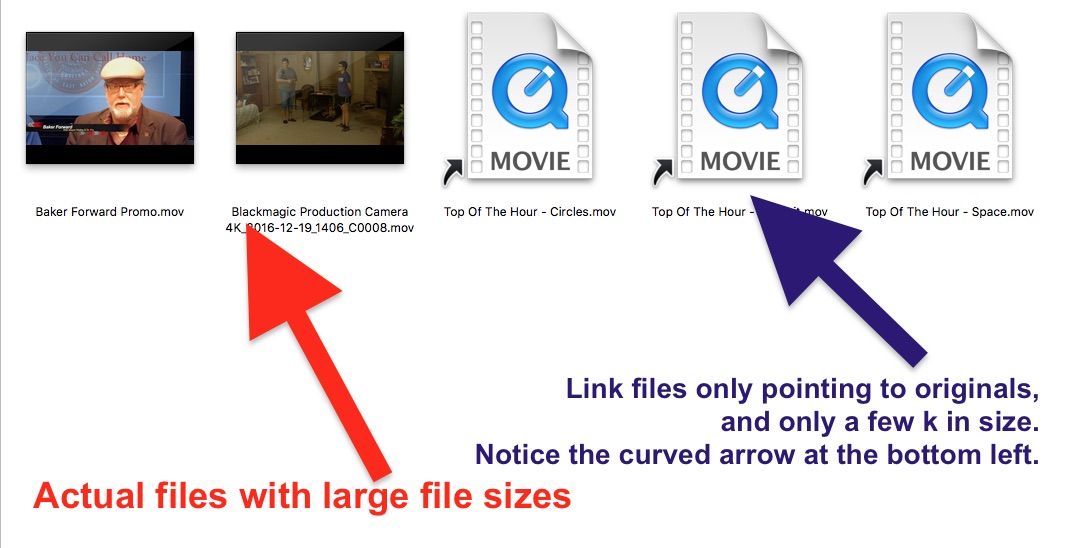
If you imported with leaving files in place those files should be just the Symclips which you shouldn't delete. Don't get confused by the name „original files“ – the folder can be „full“ of just references/Symclips. Having this in mind, the folder is not necessarily a duplicate from the actual media but a reference to it. Keep it!
It sounds to me as you were mixing things together which are separate. Leaving in place/copying has nothing to do with generated optimized or proxy media.
Replied by Nico_D on topic Original Media Folder in FCP X Library Bundle
When I was done I deleted all generated media files but opening the Project Bundle the original media folder is still full.
If you imported with leaving files in place those files should be just the Symclips which you shouldn't delete. Don't get confused by the name „original files“ – the folder can be „full“ of just references/Symclips. Having this in mind, the folder is not necessarily a duplicate from the actual media but a reference to it. Keep it!
What I'm trying to get across is if you choose NOT to copy the media and leave files in place - so no optomized or proxy media selected the files are still copied to the .fcpbundle duplicating the source media.
It sounds to me as you were mixing things together which are separate. Leaving in place/copying has nothing to do with generated optimized or proxy media.
Please Log in to join the conversation.


- Videopixels
-
Topic Author
- Offline
- Premium Member
-
Less
More
- Posts: 119
- Thank you received: 2
26 Feb 2017 16:30 #86136
by Videopixels
Replied by Videopixels on topic Original Media Folder in FCP X Library Bundle
Hi and thanks so much.
I am understanding the process . I did a test and this is what happened.
- No proxy
- No transcoded optomised media
- Original Source Media on external
- Deleted "Original Media" in FCP Bundle project file
Everything went offline, I tried relinking to the original shot media but had to do one file at a time.
Please check your projects by opening your bundles and let me know.
Thanks
I am understanding the process . I did a test and this is what happened.
- No proxy
- No transcoded optomised media
- Original Source Media on external
- Deleted "Original Media" in FCP Bundle project file
Everything went offline, I tried relinking to the original shot media but had to do one file at a time.
Please check your projects by opening your bundles and let me know.
Thanks
Please Log in to join the conversation.
27 Feb 2017 13:57 #86151
by JoeEditor
Replied by JoeEditor on topic Original Media Folder in FCP X Library Bundle
Never delete the Original Media folders! Just verify if the content are actual video files, or link files.
Please Log in to join the conversation.
- Videopixels
-
Topic Author
- Offline
- Premium Member
-
Less
More
- Posts: 119
- Thank you received: 2
27 Feb 2017 18:03 #86159
by Videopixels
Replied by Videopixels on topic Original Media Folder in FCP X Library Bundle
Actual video files but copies of actual source media - doubling up on space even thou not choosing to copy to library.
Looking for reason why it's taking twice as much space?
Looking for reason why it's taking twice as much space?
Please Log in to join the conversation.

27 Feb 2017 18:24 - 27 Feb 2017 18:26 #86160
by joema
That is obviously what went wrong. However it is understandable how people get confused about this. They can't figure out why FCPX imported a bunch of stuff to the library when they are trying hard to maintain "leave files in place". In desperation they start poking around the Library and mess something up.
FCPX media management behavior during import is inconsistent, nonintuitive and poorly documented. Strictly maintaining unmanaged external-only media can be difficult and confusing. With some common camera codecs and file structures, you have to extract the video files from the enclosing folder tree, else FCPX will copy those to the library. This is a poor practice but FCPX encourages this by not allowing "leave files in place" from a hard drive copy of the camera card.
I don't buy the explanation that Apple must do this because a hard disk tree copy of the camera card looks just like the card, and they don't want people doing "leave files in place" on an SD card. It is obviously easy to identify an SD card vs a hard drive programatically. This can even be done in Terminal with the command "diskutil info /dev/disk2", where /dev/disk2 is (for example) the SD card reader. The returned data clearly identifies this as "Device: SD Card Reader". FCPX would simply have to enumerate the connected drives and disallow "in place" only for the SD card.
In the case of AVCHD, copying the bare .MTS files out of the package then importing in place can cause major library performance problems. So far in my testing of XAVC-S files, it does not cause this. The problem is you never know what the consequences will be. Ideally you shouldn't remove the bare video files, but with large media sizes we are forced to do this since FCPX will not allow -- even with a special override -- importing "in place" from a hard drive copy of the camera card.
FCPX import behavior is a bewildering tangle of special cases, exceptions and quirks. I have seen it allow "in place" with XAVC-S, highlight this in the UI, then go ahead and copy the files to the library anyway. If you have any MP3 audio files in the import tree (say from a field recorder) those will be transcoded and copied to the library -- despite "leave files in place". The moment this happens the library becomes non-portable.
Apple does document the MP3 exception but to my knowledge they don't document the other cases or a credible rationale behind each of them: support.apple.com/kb/PH12702?locale=en_US&viewlocale=en_US
It would be nice if there was a white paper or well-written KB article from Apple which comprehensively documents this area. I have the latest Ripple Training 10.3 Media Management class -- a great product but they don't discuss it either. This is not some fringe area. It is a common, frequent, mainstream operational issue.
There is code within FCPX which is taking specific action in these cases. There is a conditional test which essentially says "If this file type do THIS, else do THAT". There are likely source code comments which explain this. There is also likely a programming spec which elaborates on why the code was written that way. Why no escalation or tier 3 support engineer has written an article about this, I don't know. Maybe Apple feels documenting this would look bad, but by not documenting it they are leaving customers uninformed and confused -- just like the OP.
Replied by joema on topic Original Media Folder in FCP X Library Bundle
FCPX.guru wrote: Never delete the Original Media folders!...
That is obviously what went wrong. However it is understandable how people get confused about this. They can't figure out why FCPX imported a bunch of stuff to the library when they are trying hard to maintain "leave files in place". In desperation they start poking around the Library and mess something up.
FCPX media management behavior during import is inconsistent, nonintuitive and poorly documented. Strictly maintaining unmanaged external-only media can be difficult and confusing. With some common camera codecs and file structures, you have to extract the video files from the enclosing folder tree, else FCPX will copy those to the library. This is a poor practice but FCPX encourages this by not allowing "leave files in place" from a hard drive copy of the camera card.
I don't buy the explanation that Apple must do this because a hard disk tree copy of the camera card looks just like the card, and they don't want people doing "leave files in place" on an SD card. It is obviously easy to identify an SD card vs a hard drive programatically. This can even be done in Terminal with the command "diskutil info /dev/disk2", where /dev/disk2 is (for example) the SD card reader. The returned data clearly identifies this as "Device: SD Card Reader". FCPX would simply have to enumerate the connected drives and disallow "in place" only for the SD card.
In the case of AVCHD, copying the bare .MTS files out of the package then importing in place can cause major library performance problems. So far in my testing of XAVC-S files, it does not cause this. The problem is you never know what the consequences will be. Ideally you shouldn't remove the bare video files, but with large media sizes we are forced to do this since FCPX will not allow -- even with a special override -- importing "in place" from a hard drive copy of the camera card.
FCPX import behavior is a bewildering tangle of special cases, exceptions and quirks. I have seen it allow "in place" with XAVC-S, highlight this in the UI, then go ahead and copy the files to the library anyway. If you have any MP3 audio files in the import tree (say from a field recorder) those will be transcoded and copied to the library -- despite "leave files in place". The moment this happens the library becomes non-portable.
Apple does document the MP3 exception but to my knowledge they don't document the other cases or a credible rationale behind each of them: support.apple.com/kb/PH12702?locale=en_US&viewlocale=en_US
It would be nice if there was a white paper or well-written KB article from Apple which comprehensively documents this area. I have the latest Ripple Training 10.3 Media Management class -- a great product but they don't discuss it either. This is not some fringe area. It is a common, frequent, mainstream operational issue.
There is code within FCPX which is taking specific action in these cases. There is a conditional test which essentially says "If this file type do THIS, else do THAT". There are likely source code comments which explain this. There is also likely a programming spec which elaborates on why the code was written that way. Why no escalation or tier 3 support engineer has written an article about this, I don't know. Maybe Apple feels documenting this would look bad, but by not documenting it they are leaving customers uninformed and confused -- just like the OP.
Last edit: 27 Feb 2017 18:26 by joema.
Please Log in to join the conversation.
- Tom Wolsky
-
- Offline
- Moderator
-
27 Feb 2017 19:15 - 27 Feb 2017 19:20 #86162
by Tom Wolsky
Replied by Tom Wolsky on topic Original Media Folder in FCP X Library Bundle
I disagree with you joema. It sounds as if you're trying to create exceptional cases. Apple says simply anything in any camera folder structure, regardless of where it is, cannot be left in place. No exceptions. Formats like MXF and DSLR formats can be used just as they are in the camera folder, but you can't import them like that. You can copy them out of the folder structure and import and leave in place, or you can use the application to copy out of the folder structure to either library or the designated storage location. I've never seen the XAVC-S situation you describe from inside a camera structure. Audio field recorders don't have a camera structure. MP3 shouldn't be used for recording anyway, but I guess people do.
P.S. Just to ads I think a major confusion comes with importing preferences. Users set leave in place there and assume that will always be the case in the import window when it isn't.
P.S. Just to ads I think a major confusion comes with importing preferences. Users set leave in place there and assume that will always be the case in the import window when it isn't.
Last edit: 27 Feb 2017 19:20 by Tom Wolsky.
Please Log in to join the conversation.
27 Feb 2017 20:04 #86166
by JoeEditor
Replied by JoeEditor on topic Original Media Folder in FCP X Library Bundle
I'm with Tom.
Please Log in to join the conversation.
28 Feb 2017 00:13 #86173
by joema
In general if you select "leave files in place" in the import dialog and it allows that choice -- IOW not greyed out -- they should be immediately imported in place without copying to the library. It is very fast and does not take 2x the space. However I know of two exceptions:
(1) If MP3 files are in your source tree, those files (but not other video files) will be transcoded to MOV and copied to the library. Those will be much larger than the original file and take lots of space.
(2) If importing XAVC-S files from a copy of the SD card, there is a UI glitch that in some cases can allow selection of "leave files in place", yet will copy them to the library. The file copying is expected behavior but it should not allow selection of "leave files in place".
If you are using AVCHD, XAVC, or other tree-oriented media and don't want the media duplicated into the library, you will have to copy the bare video files outside the folder tree and import "in place" from there. However this is generally poor practice since the associated metadata may be needed for clip spanning or other reasons.
Also AVCHD .MTS files can cause significant I/O performance problems if imported "in place". It is better to rewrap them externally with EditReady before importing.
It's also a good idea to install Pro Video Formats 2.0.5: support.apple.com/kb/DL1898?locale=en_US
If you state your camera, resolution, frame rate, file suffix, codec and other info I'll investigate further. If you don't know these it is often helpful to use the Invisor utility which allows side-by-side display of video parameters from several files, plus easy drag-and-drop adding of additional files to the comparison: itunes.apple.com/us/app/invisor-media-fi...or/id442947586?mt=12
Replied by joema on topic Original Media Folder in FCP X Library Bundle
Videopixels wrote: No proxy...No transcoded optomised media...copies of actual source media - doubling up on space even thou not choosing to copy to library....Looking for reason why it's taking twice as much space?
In general if you select "leave files in place" in the import dialog and it allows that choice -- IOW not greyed out -- they should be immediately imported in place without copying to the library. It is very fast and does not take 2x the space. However I know of two exceptions:
(1) If MP3 files are in your source tree, those files (but not other video files) will be transcoded to MOV and copied to the library. Those will be much larger than the original file and take lots of space.
(2) If importing XAVC-S files from a copy of the SD card, there is a UI glitch that in some cases can allow selection of "leave files in place", yet will copy them to the library. The file copying is expected behavior but it should not allow selection of "leave files in place".
If you are using AVCHD, XAVC, or other tree-oriented media and don't want the media duplicated into the library, you will have to copy the bare video files outside the folder tree and import "in place" from there. However this is generally poor practice since the associated metadata may be needed for clip spanning or other reasons.
Also AVCHD .MTS files can cause significant I/O performance problems if imported "in place". It is better to rewrap them externally with EditReady before importing.
It's also a good idea to install Pro Video Formats 2.0.5: support.apple.com/kb/DL1898?locale=en_US
If you state your camera, resolution, frame rate, file suffix, codec and other info I'll investigate further. If you don't know these it is often helpful to use the Invisor utility which allows side-by-side display of video parameters from several files, plus easy drag-and-drop adding of additional files to the comparison: itunes.apple.com/us/app/invisor-media-fi...or/id442947586?mt=12
Please Log in to join the conversation.
- Videopixels
-
Topic Author
- Offline
- Premium Member
-
Less
More
- Posts: 119
- Thank you received: 2
05 Mar 2017 08:27 #86291
by Videopixels
Replied by Videopixels on topic Original Media Folder in FCP X Library Bundle
Thanks so much, this is a great response and yes I have these file formats.
I shoot on a Sony PXW-X70 4K (3840x2160) 100Mbit. I do have the Pro Video Format Codecs installed.
I am considering with these projects to delete the media within the libaray when I am done but of course keep the projects and re-import, re-link if I ever need to work on it again, do you think that would be advisable? With Avid, Premier and FCP 7 it would work.
I shoot on a Sony PXW-X70 4K (3840x2160) 100Mbit. I do have the Pro Video Format Codecs installed.
I am considering with these projects to delete the media within the libaray when I am done but of course keep the projects and re-import, re-link if I ever need to work on it again, do you think that would be advisable? With Avid, Premier and FCP 7 it would work.
Please Log in to join the conversation.

05 Mar 2017 15:04 #86292
by spurratic
Replied by spurratic on topic Original Media Folder in FCP X Library Bundle
If you are creating camera archives of your cards and then importing from the camera archive.....(not the card itself)......then clearing out the Original Media folder is safe and simple.
Following that process preserves all the card metadata and Final Cut will remember any ranges of media you selected on Import, etc. Then you can use the 'Reimport from Archive' feature.
It can be done without that.....but you will always be stuck importing entire clips. And this can be troublesome if you film a 1hr clip and only need 5 mins as an example.
So the easiest way to guarantee that you can later rebuild the project is to use camera archives. (IMHO)
Following that process preserves all the card metadata and Final Cut will remember any ranges of media you selected on Import, etc. Then you can use the 'Reimport from Archive' feature.
It can be done without that.....but you will always be stuck importing entire clips. And this can be troublesome if you film a 1hr clip and only need 5 mins as an example.
So the easiest way to guarantee that you can later rebuild the project is to use camera archives. (IMHO)
Please Log in to join the conversation.
05 Mar 2017 19:55 - 05 Mar 2017 19:58 #86294
by joema
That is XAVC-L which FCPX will not import with "leave files in place" unless you copy the video files out of the folder tree before import.
Your original question is how did all that media get inside the library since you believe you selected "leave files in place". The answer is FCPX will copy media to the library for XAVC-L if imported from the camera folder tree or a disk copy of that tree. The UI has a glitch where in one case it may erroneously allow selection of "leave files in place", when that choice should be greyed out. Maybe that's what you encountered.
If you don't want the content inside the library there are two issues:
(1) How to avoid this: One option is Copy the video files outside the folder tree before importing. This is generally considered poor practice because it deprives FCPX of potentially-important metadata. However I do this frequently with XAVC-S files and so far don't see a problem. Never do this with AVCHD files. A second option is rewrap the XAVC-L files with EditReady before importing. This is very fast and creates stand-alone .mov files which contain the needed metadata:
www.divergentmedia.com/editready
(2) If content has already been copied to the library during import and you don't want this, the only approved method is consolidating that content outside the library. The procedure is mentioned in this MacBreak Studio # 272 (below). I would not suggest deleting files from the library then trying to fix that.
The MacBreak studio episode covers some basic items but it's better to get a complete training class on FCPX media management. Ripple has one which is updated to 10.3.x:
www.rippletraining.com/products/final-cu...-final-cut-pro-10-3/
Replied by joema on topic Original Media Folder in FCP X Library Bundle
Videopixels wrote: ...I shoot on a Sony PXW-X70 4K (3840x2160) 100Mbit...I am considering with these projects to delete the media within the libaray when I am done but of course keep the projects and re-import, re-link if I ever need to work on it again, do you think that would be advisable? With Avid, Premier and FCP 7 it would work.
That is XAVC-L which FCPX will not import with "leave files in place" unless you copy the video files out of the folder tree before import.
Your original question is how did all that media get inside the library since you believe you selected "leave files in place". The answer is FCPX will copy media to the library for XAVC-L if imported from the camera folder tree or a disk copy of that tree. The UI has a glitch where in one case it may erroneously allow selection of "leave files in place", when that choice should be greyed out. Maybe that's what you encountered.
If you don't want the content inside the library there are two issues:
(1) How to avoid this: One option is Copy the video files outside the folder tree before importing. This is generally considered poor practice because it deprives FCPX of potentially-important metadata. However I do this frequently with XAVC-S files and so far don't see a problem. Never do this with AVCHD files. A second option is rewrap the XAVC-L files with EditReady before importing. This is very fast and creates stand-alone .mov files which contain the needed metadata:
www.divergentmedia.com/editready
(2) If content has already been copied to the library during import and you don't want this, the only approved method is consolidating that content outside the library. The procedure is mentioned in this MacBreak Studio # 272 (below). I would not suggest deleting files from the library then trying to fix that.
The MacBreak studio episode covers some basic items but it's better to get a complete training class on FCPX media management. Ripple has one which is updated to 10.3.x:
www.rippletraining.com/products/final-cu...-final-cut-pro-10-3/
Last edit: 05 Mar 2017 19:58 by joema.
Please Log in to join the conversation.
- Videopixels
-
Topic Author
- Offline
- Premium Member
-
Less
More
- Posts: 119
- Thank you received: 2
06 Mar 2017 10:03 #86309
by Videopixels
Replied by Videopixels on topic Original Media Folder in FCP X Library Bundle
Many thanks.
What is your workflow/software to create the camera archives?
What is your workflow/software to create the camera archives?
Please Log in to join the conversation.
- Videopixels
-
Topic Author
- Offline
- Premium Member
-
Less
More
- Posts: 119
- Thank you received: 2
06 Mar 2017 10:03 #86310
by Videopixels
Replied by Videopixels on topic Original Media Folder in FCP X Library Bundle
I will check it out, thank you.
Please Log in to join the conversation.
