


- Posts: 452
- Thank you received: 75
3 Post Moderation Rule for New Boarders (25 Jan 2021)
New boarders will have their posts moderated - Don't worry if you cannot see your post immediately.
10.3 issues
22 Nov 2016 12:45 #83083
by anickt
Replied by anickt on topic 10.3 issues
I have been using 10.3 since it came out and I would not call it extremely buggy at all.
Some minor things like interface settings not sticking but nothing that is keeping me from getting my work done quickly and efficiently.
It's too easy to blame FCPX and not look for the real problem which is most likely elsewhere.
Some minor things like interface settings not sticking but nothing that is keeping me from getting my work done quickly and efficiently.
It's too easy to blame FCPX and not look for the real problem which is most likely elsewhere.
Please Log in to join the conversation.
- Threefold Films
-

- Offline
- Senior Member
-

Less
More
- Posts: 45
- Thank you received: 9
22 Nov 2016 14:14 #83093
by Threefold Films
Replied by Threefold Films on topic 10.3 issues
I had a few issues early on only on existing projects updated to 10.3, One was actually a permissions problem with a RAID.
Most weirdness has been fixed by deleting the render files and letting it sit for a while re-generating thumbnails on a project before getting stuck in.
Otherwise stability has been similar to 10.2.x for me
Most weirdness has been fixed by deleting the render files and letting it sit for a while re-generating thumbnails on a project before getting stuck in.
Otherwise stability has been similar to 10.2.x for me
Please Log in to join the conversation.
23 Nov 2016 09:31 - 23 Nov 2016 09:31 #83145
by Schnurr
Its so "funny" as such a youtube link in case Apple reads this forum )
)
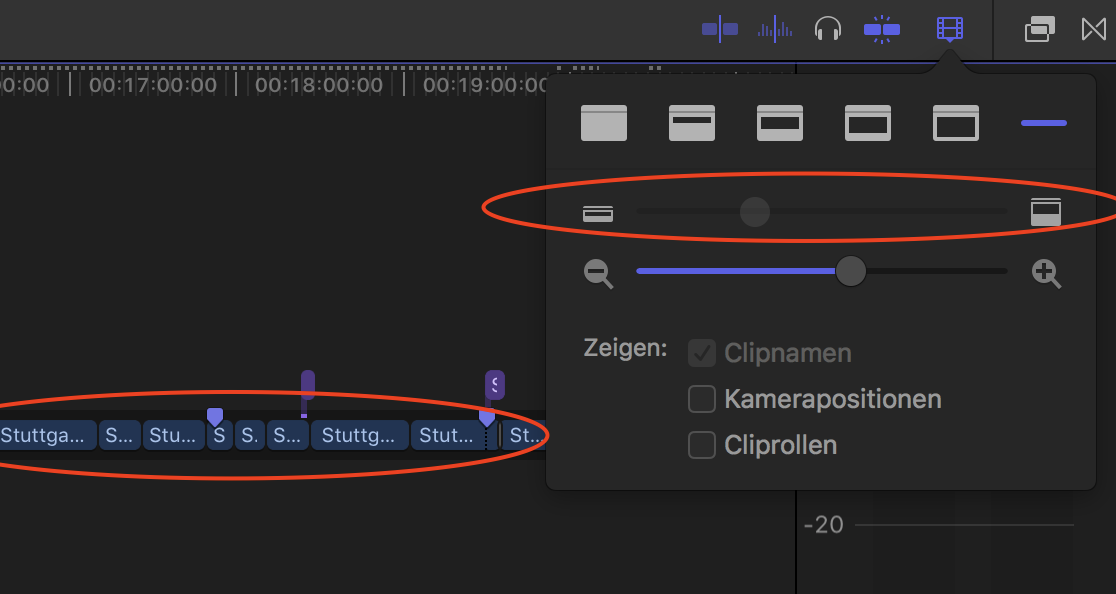
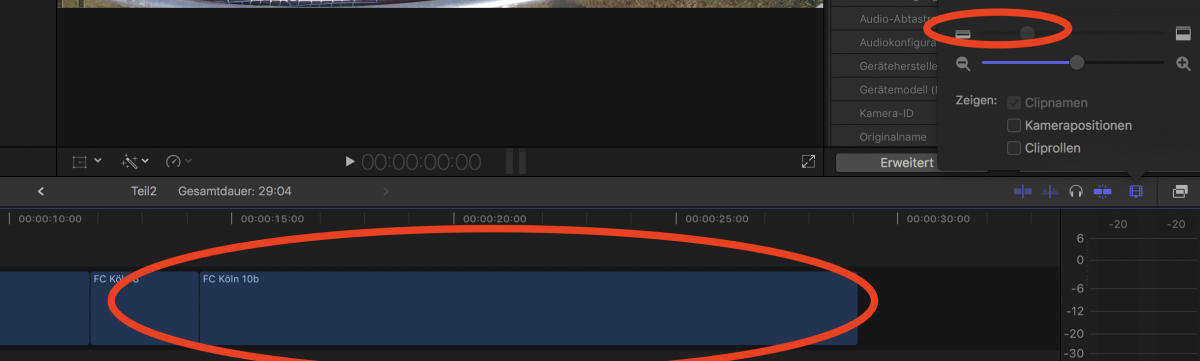
Funny too is as well that you can't change the size of the clips in the timeline preview but in some instances they appear bigger
Replied by Schnurr on topic 10.3 issues
Tom Wolsky wrote: Can anyone reproduce this?
Its so "funny" as such a youtube link in case Apple reads this forum
)Funny too is as well that you can't change the size of the clips in the timeline preview but in some instances they appear bigger
Last edit: 23 Nov 2016 09:31 by Schnurr.
Please Log in to join the conversation.
23 Nov 2016 13:35 #83147
by anickt
Replied by anickt on topic 10.3 issues
I use png files all the time with no issues.
I have noticed that when I open a project that was created in 10.2.3 the clip view does not always change properly using my key commands. Once I go into the Change Appearance dropdown and reset the slider there are no more problems.
I have noticed that when I open a project that was created in 10.2.3 the clip view does not always change properly using my key commands. Once I go into the Change Appearance dropdown and reset the slider there are no more problems.
Please Log in to join the conversation.
- nils.dettmann
-
- Offline
- Elite Member
-

Less
More
- Posts: 161
- Thank you received: 13
23 Nov 2016 14:09 #83148
by nils.dettmann
Replied by nils.dettmann on topic 10.3 issues
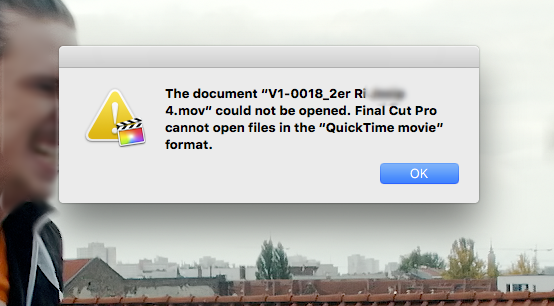
For the record: I wouldn´t call FCP 10.3 "extremely buggy" though there are quite some little glitches.
My new favourite error message:
My new favourite error message:
Please Log in to join the conversation.
- Tom Wolsky
-

- Offline
- Moderator
-

23 Nov 2016 14:40 #83149
by Tom Wolsky
Replied by Tom Wolsky on topic 10.3 issues
That's not new at all. FCP doesn't open any file types except library bundles. You can import QT Movies, but you cannot open them with the application.
Please Log in to join the conversation.
- nils.dettmann
-
- Offline
- Elite Member
-
Less
More
- Posts: 161
- Thank you received: 13
23 Nov 2016 15:00 #83150
by nils.dettmann
I obviously havent´t tried to import a movie by dragging it on the FCPX icon before. Thought it were possible.
It´s not.
Replied by nils.dettmann on topic 10.3 issues
A Thanks.Tom Wolsky wrote: That's not new at all. FCP doesn't open any file types except library bundles. You can import QT Movies, but you cannot open them with the application.
I obviously havent´t tried to import a movie by dragging it on the FCPX icon before. Thought it were possible.
It´s not.
Please Log in to join the conversation.
23 Nov 2016 15:05 #83152
by chrisb
Replied by chrisb on topic 10.3 issues
Here is a vimeo link to a screencast from a colleague also suffering from Drag-lag, just to show that this is not an isolated issue.
This is on an
iMac 2013
Core i7
3,4GHz
32GB ram.
Original media is on external thunderbolt raid, but made offline here to show that it's not the media and drive-speed itself that's the problem.
vimeo.com/192641847
This is on an
iMac 2013
Core i7
3,4GHz
32GB ram.
Original media is on external thunderbolt raid, but made offline here to show that it's not the media and drive-speed itself that's the problem.
vimeo.com/192641847
Please Log in to join the conversation.
23 Nov 2016 15:24 #83153
by anickt
Replied by anickt on topic 10.3 issues
@chrisb
I saw drag lag in a couple of projects that were updated from 10.2.3 but it's all pretty much gone away. A couple of isolated instances that I chalk up to several text layers and video with 3rd party plugins.
Kind of hard to verify anything with a bunch of missing files as in the Vimeo video. That could be anything.
Trash preferences and delete render files will usually fix it.
I have an iMac of similar spec that I haven't upgraded yet. I'll give it a shot and see what happens. What video card is in the one in your post?
I saw drag lag in a couple of projects that were updated from 10.2.3 but it's all pretty much gone away. A couple of isolated instances that I chalk up to several text layers and video with 3rd party plugins.
Kind of hard to verify anything with a bunch of missing files as in the Vimeo video. That could be anything.
Trash preferences and delete render files will usually fix it.
I have an iMac of similar spec that I haven't upgraded yet. I'll give it a shot and see what happens. What video card is in the one in your post?
Please Log in to join the conversation.
23 Nov 2016 22:18 #83161
by chrisb
I got the XML from my colleague and am experiencing the same issues, even without media.
It is actually easier to "verify" this phenomenon, issue, bug or what have you without media as that would be an indicator of something besides media being an issue - in this case the handling of FCPX of long(er) timelines.
There is no trashing of preferences, re-installing FCPX or the OS that will remedy this. We have tried.
The project in this case is a 40min doc, containing 2471 items, and 10.3 doesn't seem to be able to handle this kind of timeline.
I don't know the specific video card in that iMac (not mine), but this XML has been tested on at least 3 macs so far, all with the same drag-lag issue. And it's not the only project that exhibits this.
Here is my own experience with my colleague's timeline
Replied by chrisb on topic 10.3 issues
anickt wrote: @chrisb
I saw drag lag in a couple of projects that were updated from 10.2.3 but it's all pretty much gone away. A couple of isolated instances that I chalk up to several text layers and video with 3rd party plugins.
Kind of hard to verify anything with a bunch of missing files as in the Vimeo video. That could be anything.
Trash preferences and delete render files will usually fix it.
I have an iMac of similar spec that I haven't upgraded yet. I'll give it a shot and see what happens. What video card is in the one in your post?
I got the XML from my colleague and am experiencing the same issues, even without media.
It is actually easier to "verify" this phenomenon, issue, bug or what have you without media as that would be an indicator of something besides media being an issue - in this case the handling of FCPX of long(er) timelines.
There is no trashing of preferences, re-installing FCPX or the OS that will remedy this. We have tried.
The project in this case is a 40min doc, containing 2471 items, and 10.3 doesn't seem to be able to handle this kind of timeline.
I don't know the specific video card in that iMac (not mine), but this XML has been tested on at least 3 macs so far, all with the same drag-lag issue. And it's not the only project that exhibits this.
Here is my own experience with my colleague's timeline
Please Log in to join the conversation.

23 Nov 2016 23:21 #83166
by Redifer
This is nothing new at all. FCPX has ALWAYS been laggy. To me this version seems snappier than previous versions, but the lag will probably always be there with this app unless they rebuild it from the ground up. Which they REALLY need to do.
Replied by Redifer on topic 10.3 issues
10.3 doesn't seem to be able to handle this kind of timeline.
This is nothing new at all. FCPX has ALWAYS been laggy. To me this version seems snappier than previous versions, but the lag will probably always be there with this app unless they rebuild it from the ground up. Which they REALLY need to do.
Please Log in to join the conversation.
- ronny courtens
-

- Offline
- Moderator
-
Less
More
- Posts: 4455
- Thank you received: 962
23 Nov 2016 23:42 #83167
by ronny courtens
Replied by ronny courtens on topic 10.3 issues
We are going to publish an article with two videos about a major feature film to be released in 2017, cut with FCP X. The Library for this movie contains no less than 280 hours of raw footage, shot with different ARRI cameras in 4K, and the editor (an award-winning Finnish/English editor) is working on a 5-hour long timeline in FCP X without any lag.
The huge Library of this production was updated from 10.2.3 to 10.3 two weeks ago, again without any issues.
This makes we wonder why some people talk about lag issues with FCP X, while others who work on much more complex projects don't seem to have these issues.
- Ronny
The huge Library of this production was updated from 10.2.3 to 10.3 two weeks ago, again without any issues.
This makes we wonder why some people talk about lag issues with FCP X, while others who work on much more complex projects don't seem to have these issues.
- Ronny
Please Log in to join the conversation.

24 Nov 2016 01:09 #83170
by joema
I'd be very interested in that. I assume the ARRI content was transcoded to ProRes and edited in proxy? How many TB was the library and what kind of hardware?
I have 160 hr of mixed 1080 and 4k H264 content comprising 7,000 clips in an approx. 5 TB library. I upgraded it from 10.2.3 to 10.3 with no major problems, although it did invalidate many of the proxy files which I had to rebuild.
Using a mere 6 minute 1080p test project containing mostly four lanes of video for a split screen, it's usable but not "like butter", even in proxy mode. That's on a top-spec 2015 iMac 27 with the content on a 16TB OWC Thunderbay 4. In general 10.3 feels a little slower than 10.2.3, mainly from an I/O standpoint, but there are some odd UI lags. E.g, the thread that handles filter entry gets behind if I'm typing a search item while it's doing lots of I/O, and instead of storing up the user input then echoing it, the input is just discarded. 10.2.3 never did that.
FCPX (both 10.2.3 and 10.3) does a lot of random small I/Os in certain scenarios, which a spinning drive array has a difficult time handling. Fast sequential performance such as tested by BlackMagic doesn't really help much in those cases. I'll be testing an 8TB Thunderbolt SSD array next week so maybe that will help.
I don't understand the differing performance reports, but it can be subjective. What one person perceives as slow and laggy another may not. However I've never experienced the severe "drag lag" previously mentioned. Anyone would rightly complain about that if it happened.
Perspective is also needed. Unlike a more rudimentary editor which does no media management, FCPX is managing (in my case) a 5 terabyte video database. As recently as 2000, Microsoft's "TerraServer" required the largest multiprocessor server hardware then available to serve a 1 terabyte still image database; now we have much large video databases on our desktop: en.wikipedia.org/wiki/Microsoft_Research_Maps
Replied by joema on topic 10.3 issues
ronny courtens wrote: ...The Library for this movie contains no less than 280 hours of raw footage, shot with different ARRI cameras in 4K, and the editor (an award-winning Finnish/English editor) is working on a 5-hour long timeline in FCP X without any lag...This makes we wonder why some people talk about lag issues with FCP X, while others who work on much more complex projects don't seem to have these issues....
I'd be very interested in that. I assume the ARRI content was transcoded to ProRes and edited in proxy? How many TB was the library and what kind of hardware?
I have 160 hr of mixed 1080 and 4k H264 content comprising 7,000 clips in an approx. 5 TB library. I upgraded it from 10.2.3 to 10.3 with no major problems, although it did invalidate many of the proxy files which I had to rebuild.
Using a mere 6 minute 1080p test project containing mostly four lanes of video for a split screen, it's usable but not "like butter", even in proxy mode. That's on a top-spec 2015 iMac 27 with the content on a 16TB OWC Thunderbay 4. In general 10.3 feels a little slower than 10.2.3, mainly from an I/O standpoint, but there are some odd UI lags. E.g, the thread that handles filter entry gets behind if I'm typing a search item while it's doing lots of I/O, and instead of storing up the user input then echoing it, the input is just discarded. 10.2.3 never did that.
FCPX (both 10.2.3 and 10.3) does a lot of random small I/Os in certain scenarios, which a spinning drive array has a difficult time handling. Fast sequential performance such as tested by BlackMagic doesn't really help much in those cases. I'll be testing an 8TB Thunderbolt SSD array next week so maybe that will help.
I don't understand the differing performance reports, but it can be subjective. What one person perceives as slow and laggy another may not. However I've never experienced the severe "drag lag" previously mentioned. Anyone would rightly complain about that if it happened.
Perspective is also needed. Unlike a more rudimentary editor which does no media management, FCPX is managing (in my case) a 5 terabyte video database. As recently as 2000, Microsoft's "TerraServer" required the largest multiprocessor server hardware then available to serve a 1 terabyte still image database; now we have much large video databases on our desktop: en.wikipedia.org/wiki/Microsoft_Research_Maps
Please Log in to join the conversation.
24 Nov 2016 05:05 - 24 Nov 2016 05:06 #83171
by Redifer
Replied by Redifer on topic 10.3 issues
Chris B can you post the XML file here so we can all try it on our various systems to see if there is any difference among hardware?
Last edit: 24 Nov 2016 05:06 by Redifer.
Please Log in to join the conversation.
24 Nov 2016 08:41 #83178
by chrisb
Replied by chrisb on topic 10.3 issues
For anyone (which should be most of you) interested, here is the XML of a project with severe drag-lag.
www.dropbox.com/s/gg6mupp6l2pdhh9/PGM-6-Final.fcpxml.zip?dl=0
@Ronny, You could have a million hours of footage and a 100 hour long timeline and *not* experience drag-lag the way we do. What seems to be the main culprit here, is the amount of items on the timeline. More items = more lag.
I would encourage anyone to try out the XML and, i possible, screen record it with quicktime and share it here.
At least try it out, it won't take but a couple of minutes.
www.dropbox.com/s/gg6mupp6l2pdhh9/PGM-6-Final.fcpxml.zip?dl=0
@Ronny, You could have a million hours of footage and a 100 hour long timeline and *not* experience drag-lag the way we do. What seems to be the main culprit here, is the amount of items on the timeline. More items = more lag.
I would encourage anyone to try out the XML and, i possible, screen record it with quicktime and share it here.
At least try it out, it won't take but a couple of minutes.
Please Log in to join the conversation.
- ronny courtens
-
- Offline
- Moderator
-
Less
More
- Posts: 4455
- Thank you received: 962
24 Nov 2016 08:51 #83179
by ronny courtens
Replied by ronny courtens on topic 10.3 issues
@Chris:
The number of clips on the timeline could indeed be the culprit. That's worth investing.
@Joema:
The article will be online soon now. Yes, they used external proxies because they only had direct attached drives and no real storage server for editing on-set. Once the shoot is over they will start doing the final editing using the original media, for which they will use a shared storage system.
- Ronny
The number of clips on the timeline could indeed be the culprit. That's worth investing.
@Joema:
The article will be online soon now. Yes, they used external proxies because they only had direct attached drives and no real storage server for editing on-set. Once the shoot is over they will start doing the final editing using the original media, for which they will use a shared storage system.
- Ronny
Please Log in to join the conversation.

24 Nov 2016 09:10 #83181
by Kyster
Replied by Kyster on topic 10.3 issues
I have worked professionally with FCPX since 2012 (on multiple machines) and I have to admit that DRAG LAG always have been a problem on long format productions.
This is from a 43 min long timeline:
vimeo.com/192894133
Like chrisb I have decided not to include media in the test. Simply to show that the issue is hidden somewhere in Final Cut.
Mac specs:
iMac
Core i7
3.4GHz
32GB ram
2GB vram
FCPX 10.3
My library is on an external CalDigit thunderbolt raid0 disk with plenty of read & write speeds.
This is from a 43 min long timeline:
vimeo.com/192894133
Like chrisb I have decided not to include media in the test. Simply to show that the issue is hidden somewhere in Final Cut.
Mac specs:
iMac
Core i7
3.4GHz
32GB ram
2GB vram
FCPX 10.3
My library is on an external CalDigit thunderbolt raid0 disk with plenty of read & write speeds.
Please Log in to join the conversation.
24 Nov 2016 09:19 - 24 Nov 2016 09:25 #83182
by chrisb
Replied by chrisb on topic 10.3 issues
Yet another video.
It's a bit long, but here I'm showing how reducing the number of items on the timeline through compound clips minimises drag-lag. It also shows how scrolling through the timeline lots of items is jerky and laggy - something that also goes away when reducing the number of items on the timeline.
I really think it speaks for itself.
In a previous thread I started on this very issue, I also compared the same timeline in other NLEs (Premiere, Resolve) showing that those apps had no issues compared to FCPX.
I personally think this is a bigger issue, as manipulating clips (in this case dragging clips around a timeline and scrolling + zooming) is a core functionality of any NLE.
It's a bit long, but here I'm showing how reducing the number of items on the timeline through compound clips minimises drag-lag. It also shows how scrolling through the timeline lots of items is jerky and laggy - something that also goes away when reducing the number of items on the timeline.
I really think it speaks for itself.
In a previous thread I started on this very issue, I also compared the same timeline in other NLEs (Premiere, Resolve) showing that those apps had no issues compared to FCPX.
I personally think this is a bigger issue, as manipulating clips (in this case dragging clips around a timeline and scrolling + zooming) is a core functionality of any NLE.
Last edit: 24 Nov 2016 09:25 by chrisb. Reason: adding info
Please Log in to join the conversation.
24 Nov 2016 09:55 #83183
by Redifer
Replied by Redifer on topic 10.3 issues
Thanks for posting that, Chris. Wow, that was bad. And I mean BAD! FCPX cannot handle such a project and that much is irrefutably proven by your XML. I got similar results to your video, but I'm using a Mac Pro 2013 (the trash can). Moving the titles around was ALMOST acceptable. I had to do it slowly but if I did they would obey my drag in almost real time (updating maybe four or five times a second). Dragging any clips, video or sound around was unacceptably slow and I often got the rainbow wheel.
I watched my Activity Monitor while doing this. My CPU use never came close to maxing out. The Final Cut Pro X application never even used 3GB of RAM. I wonder if FCPX is even really 64-bit. I have 64GB of RAM in my system, but FCP never uses anything more than 4GB from what I've seen. This XML sure could have benefited from it. Also there was not a lot of disk activity either. Just some writes, probably updating the project file.
I feel this is a memory management issue within the application. Can you leave the XML file online for a while? I feel we should all report this to Apple and send them the link to the XML as an example. Thanks again, Chris.
I watched my Activity Monitor while doing this. My CPU use never came close to maxing out. The Final Cut Pro X application never even used 3GB of RAM. I wonder if FCPX is even really 64-bit. I have 64GB of RAM in my system, but FCP never uses anything more than 4GB from what I've seen. This XML sure could have benefited from it. Also there was not a lot of disk activity either. Just some writes, probably updating the project file.
I feel this is a memory management issue within the application. Can you leave the XML file online for a while? I feel we should all report this to Apple and send them the link to the XML as an example. Thanks again, Chris.
Please Log in to join the conversation.
- ronny courtens
-
- Offline
- Moderator
-
Less
More
- Posts: 4455
- Thank you received: 962
24 Nov 2016 10:02 - 24 Nov 2016 10:04 #83184
by ronny courtens
Replied by ronny courtens on topic 10.3 issues
Chris,
We are looking at your project. It is indeed very laggy.
What I am noticing:
Most of the clips on the timeline are multicam clips with anything between 4 and 8 GoPro clips + a number of stills inside the mutlicam clip. Furthermore, many of these multicam clips also contain a lot of cut up clips on the same angle. Multicam clips in FCP X always stay "live". This means that any of these multicam clips on the timeline holds a multitude of different references inside them, which FCP X needs to keep track of. So it's not only about the number of clips on the timeline, it's also about the number of clips inside clips on the timeline that the NLE needs to track.
This could explain why you are seeing lag while we don't see any lag on a feature film timeline that is much longer and with with many more clips than yours. And it would explain why reducing the number of clips on the timeline also reduces the lag: each clip actually represents dozens of clips inside them.
Of course you also have lots of animated titles and effects and a quite lot of picture animations. But that should not be the real culprit. I will send your XML to some people I know.
- Ronny
We are looking at your project. It is indeed very laggy.
What I am noticing:
Most of the clips on the timeline are multicam clips with anything between 4 and 8 GoPro clips + a number of stills inside the mutlicam clip. Furthermore, many of these multicam clips also contain a lot of cut up clips on the same angle. Multicam clips in FCP X always stay "live". This means that any of these multicam clips on the timeline holds a multitude of different references inside them, which FCP X needs to keep track of. So it's not only about the number of clips on the timeline, it's also about the number of clips inside clips on the timeline that the NLE needs to track.
This could explain why you are seeing lag while we don't see any lag on a feature film timeline that is much longer and with with many more clips than yours. And it would explain why reducing the number of clips on the timeline also reduces the lag: each clip actually represents dozens of clips inside them.
Of course you also have lots of animated titles and effects and a quite lot of picture animations. But that should not be the real culprit. I will send your XML to some people I know.
- Ronny
Last edit: 24 Nov 2016 10:04 by ronny courtens.
Please Log in to join the conversation.
