


- Posts: 333
- Thank you received: 40
3 Post Moderation Rule for New Boarders (25 Jan 2021)
New boarders will have their posts moderated - Don't worry if you cannot see your post immediately.
No audio from Garage Band or Logic in my FCPX
02 Nov 2016 17:16 #82000
by Overturf
No audio from Garage Band or Logic in my FCPX was created by Overturf
Hi guys,
oops, something's just not right here. Working on my first little project in 10.3 I am pretty amazed so far. Only trouble is, that all my audio effects and music does not show up in FCPX. I am aware that audio content has been moved from down right to top left but no matter whether I choose Garage Band or Logic, the media browser stays empty.
The files are on my machine. Most of them in /library/Audio/Apple Loops.
What do I have to do to make them show up in the media browser?
Thanks!
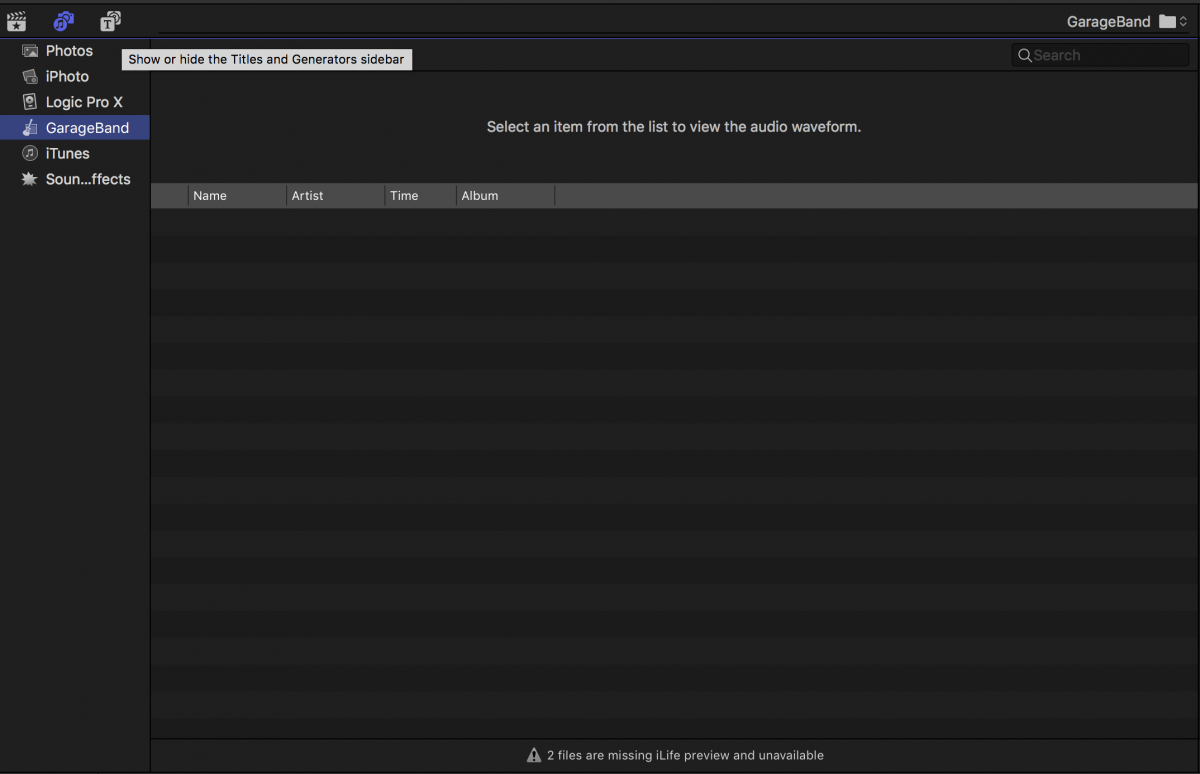
oops, something's just not right here. Working on my first little project in 10.3 I am pretty amazed so far. Only trouble is, that all my audio effects and music does not show up in FCPX. I am aware that audio content has been moved from down right to top left but no matter whether I choose Garage Band or Logic, the media browser stays empty.
The files are on my machine. Most of them in /library/Audio/Apple Loops.
What do I have to do to make them show up in the media browser?
Thanks!
Please Log in to join the conversation.
- willypimentel
-

- Offline
- Senior Member
-

Less
More
- Posts: 68
- Thank you received: 3
02 Nov 2016 17:44 #82002
by willypimentel
Replied by willypimentel on topic No audio from Garage Band or Logic in my FCPX
once you open garageband. It will download 11 gigs of loops and place it into the apple loops folder in the start up disk :ohmy: :ohmy:

Please Log in to join the conversation.
02 Nov 2016 17:59 #82004
by Overturf
Replied by Overturf on topic No audio from Garage Band or Logic in my FCPX
Thanks but I don't think that is my issue. I have downloaded virtually all the Apple Loops already. Soundtrack Pro, Mainstage, GarageBand, Logic - it's all there on my machine. The apps themselves have all the loops I need available. They just do not show up inside FCPX. Of course I can workaround but would love to use the media browser to skim through stuff an so on.
Tried trashing prefs to no avail.
Ideas? Thanks!
Tried trashing prefs to no avail.
Ideas? Thanks!
Please Log in to join the conversation.

02 Nov 2016 18:47 - 02 Nov 2016 18:48 #82008
by thinkfilm
Replied by thinkfilm on topic No audio from Garage Band or Logic in my FCPX
I have the same problem as Overturf - I have all the GarageBand and Logic X loops installed and available in both those apps but they don't show in FCPX 10.3
Last edit: 02 Nov 2016 18:48 by thinkfilm.
Please Log in to join the conversation.
02 Nov 2016 19:23 #82011
by Overturf
Replied by Overturf on topic No audio from Garage Band or Logic in my FCPX
I tried uninstalling FCPX and all remains from STP using FCS Remover and then installed FCPX 10.3 from scratch. Doesn't help. I have the same issue on my 2.5 MBPr mid 2015 and my 5K iMac. Both are on Sierra and everything else works fine.
Not nice.
Not nice.
Please Log in to join the conversation.
- Nervebroke
-
- Offline
- Elite Member
-

Less
More
- Posts: 177
- Thank you received: 12
02 Nov 2016 20:15 - 02 Nov 2016 20:16 #82015
by Nervebroke
Replied by Nervebroke on topic No audio from Garage Band or Logic in my FCPX
I have the same issue. I have ALL the Garageband and Logic additional downloads installed and I have nothing in either as Overturf and thinkfilm
Last edit: 02 Nov 2016 20:16 by Nervebroke. Reason: added info
Please Log in to join the conversation.
02 Nov 2016 20:20 #82016
by Overturf
Replied by Overturf on topic No audio from Garage Band or Logic in my FCPX
Wonder what the little badge on the bottom of my screenshot means. "2 files are missing iLife preview and unavailable". It shows up under the GarageBand tab, not under Logic. Both machines. I sent feedback to Apple.
Please Log in to join the conversation.
- Nervebroke
-
- Offline
- Elite Member
-
Less
More
- Posts: 177
- Thank you received: 12
02 Nov 2016 20:21 #82018
by Nervebroke
Replied by Nervebroke on topic No audio from Garage Band or Logic in my FCPX
Ha Ha mine says 4. Now I am really confused.
Please Log in to join the conversation.


02 Nov 2016 21:17 #82023
by BCH
Replied by BCH on topic No audio from Garage Band or Logic in my FCPX
This does't link to logic apple loops but to logic bounce (user/music/logic/bounces)
Please Log in to join the conversation.
02 Nov 2016 21:35 #82024
by Overturf
Replied by Overturf on topic No audio from Garage Band or Logic in my FCPX
Interesting. I did not have a folder "bounces", my folder "music/logic" was empty. So I created a folder user/music/logic/bounces and copied some .caf-files from "Apple Loops" to that folder. Boom, they showed up in Final Cut.
Here's the BUT: This does not work with aliases, it requires the complete file in the folder. This means to either have duplicates en masse or remove the files from the "Apple Loops" folder which I think the other apps might not like.
Does anyone know how to deal with this? What might have caused the problem? One should think that Garage Band and Logic integrate seamlessly?
Any advice once again much appreciated. Thanks Bruno for pointing me in the right direction!
Here's the BUT: This does not work with aliases, it requires the complete file in the folder. This means to either have duplicates en masse or remove the files from the "Apple Loops" folder which I think the other apps might not like.
Does anyone know how to deal with this? What might have caused the problem? One should think that Garage Band and Logic integrate seamlessly?
Any advice once again much appreciated. Thanks Bruno for pointing me in the right direction!
Please Log in to join the conversation.
02 Nov 2016 22:22 #82028
by Overturf
Replied by Overturf on topic No audio from Garage Band or Logic in my FCPX
Bruno, how did you find out where that Logic library points to? Do you also know where the Garage Band library points to? I tried creating a folder user/music/garage band/bounces but that does not work.
Thanks!
Thanks!
Please Log in to join the conversation.
02 Nov 2016 22:35 #82029
by BCH
Replied by BCH on topic No audio from Garage Band or Logic in my FCPX
I found because I have some files in my bounces folder (it was automatically create by logic). By default, this folder is where your logic's projects export are being and it was automatically create by logic at the first export. Bounces is the name of sound export files of logic. For garageband make a project and export it in the default location.
Please Log in to join the conversation.
02 Nov 2016 23:20 #82032
by Overturf
Replied by Overturf on topic No audio from Garage Band or Logic in my FCPX
Okay! So now this starts to make sense. This might mean that the "Logic" and "Garage Band" thingies in the media browser are for exported projects only. I thought it would show all the effects and things that came the app and as extra downloadable content. Where can I find and apply that? I still have a lot of old stuff from Soundtrack Pro, iMovie, Mainstage and the like. Used to have it all in subfolders in 10.2.3s bottom right. All the Apple tracks (for reference a track called "Adrenalin Electronica" in short, medium and long.
What would be a proper way to get all soundfiles from at least Garage Band, Logic, Mainstage into FCPX? I don't mind uninstalling, reinstalling and whatever but so far none of my attempts worked
What would be a proper way to get all soundfiles from at least Garage Band, Logic, Mainstage into FCPX? I don't mind uninstalling, reinstalling and whatever but so far none of my attempts worked
Please Log in to join the conversation.
02 Nov 2016 23:40 #82033
by archhill
Replied by archhill on topic No audio from Garage Band or Logic in my FCPX
One way is to create a Sound Effects Library. since you can have multiple libraries open, you would open this one when needed. Any effects needed would be dragged into the new Current Library to work.
Please Log in to join the conversation.
02 Nov 2016 23:58 #82037
by Overturf
Replied by Overturf on topic No audio from Garage Band or Logic in my FCPX
That's possible of course. But would that not take that whole Music-Effects-Tab sort of ad absurdum? I just think it's there now, so let's use it. But how?
Please Log in to join the conversation.
03 Nov 2016 06:08 #82050
by archhill
Replied by archhill on topic No audio from Garage Band or Logic in my FCPX
Send a request to Apple with FCPX Feedback. It seems that the Tab should/would be the place to import those files.
Please Log in to join the conversation.
03 Nov 2016 11:24 #82069
by Overturf
Replied by Overturf on topic No audio from Garage Band or Logic in my FCPX
I did indeed send feedback to Apple. Problem is that even if they are listening (and they are, 10.3 shows that) they do not give an instant reply. So far I was not able to find out what's actually meant to show up in the browser - only bounces/exports or all loops and stuff.
Maybe Ronny Courtens might know? He seems to know close to everything FCPX. Ronny, where are you?
Maybe Ronny Courtens might know? He seems to know close to everything FCPX. Ronny, where are you?
Please Log in to join the conversation.
03 Nov 2016 16:06 - 03 Nov 2016 16:14 #82080
by thinkfilm
Replied by thinkfilm on topic No audio from Garage Band or Logic in my FCPX
Over in Rippletraining's "Ask The Experts" section Steve Martin answered as similar question about how to show content (loops) from GarageBand in the FCP audio tab.
Here's Steve's reply: "In order for Garage band music loops to appear in the sidebar, they must live in a valid Garage Band Libary in your Home Users folder."
It would be great if he would elaborate on the path and/or folder info for this. I will try and follow-up and report back.
Here's Steve's reply: "In order for Garage band music loops to appear in the sidebar, they must live in a valid Garage Band Libary in your Home Users folder."
It would be great if he would elaborate on the path and/or folder info for this. I will try and follow-up and report back.
Last edit: 03 Nov 2016 16:14 by thinkfilm.
Please Log in to join the conversation.
- DmitriZigany
-
- Offline
- Platinum Member
-

Less
More
- Posts: 730
- Thank you received: 26
03 Nov 2016 16:19 #82082
by DmitriZigany
Replied by DmitriZigany on topic No audio from Garage Band or Logic in my FCPX
And in reverse, I don't think you can easily access the FCPX/iMovie sound effects in Logic, am I wrong?
I also see nothing in the Logic/Garageband thing in FCPX...
Seems like an example of Apple's "it works great if you only do it the way we designed it, if not it's not working at all"
In FCPX 10.2.3 and earlier you could add your own folders to the Audio, is that no longer possible?
I also see nothing in the Logic/Garageband thing in FCPX...
Seems like an example of Apple's "it works great if you only do it the way we designed it, if not it's not working at all"
In FCPX 10.2.3 and earlier you could add your own folders to the Audio, is that no longer possible?
Please Log in to join the conversation.

03 Nov 2016 20:08 #82125
by dgwvideo
See this thread : www.fcp.co/forum/4-final-cut-pro-x-fcpx/...ar-for-sound-effects
Creating history....one edit at a time !
Replied by dgwvideo on topic No audio from Garage Band or Logic in my FCPX
DmitriZigany wrote: In FCPX 10.2.3 and earlier you could add your own folders to the Audio, is that no longer possible?
See this thread : www.fcp.co/forum/4-final-cut-pro-x-fcpx/...ar-for-sound-effects
Creating history....one edit at a time !
Please Log in to join the conversation.
