


- Posts: 3790
- Thank you received: 718
3 Post Moderation Rule for New Boarders (25 Jan 2021)
New boarders will have their posts moderated - Don't worry if you cannot see your post immediately.
Confusing Buttons: Browser-Timeline-Inspector
- Karsten Schlüter
-

- Offline
- Moderator
-

Less
More
04 Nov 2016 19:31 #82210
by Karsten Schlüter
Replied by Karsten Schlüter on topic Confusing Buttons: Browser-Timeline-Inspector
when you click the SHARE button, upper right, it doesn't change its color, active or not.
In Motion it does.
reg. Motion:
e.g. the HUD asks for F7 … didn't we learn recently, F-keys are soooo 20cent?
Motion has a bunch of F-keys as short-cuts ............

Who's in charge for UI …?
maybe less fashion-shows and … oops, me nasty German.-
In Motion it does.
reg. Motion:
e.g. the HUD asks for F7 … didn't we learn recently, F-keys are soooo 20cent?
Motion has a bunch of F-keys as short-cuts ............
Who's in charge for UI …?
maybe less fashion-shows and … oops, me nasty German.-
Please Log in to join the conversation.
- Jonathan Levin
-

- Offline
- Platinum Member
-

Less
More
- Posts: 786
- Thank you received: 21
07 Nov 2016 17:05 #82353
by Jonathan Levin
Replied by Jonathan Levin on topic Confusing Buttons: Browser-Timeline-Inspector
Trashing Preferences seems to have cured my issue with the Background tasks window.
Please Log in to join the conversation.
- nils.dettmann
-

- Offline
- Elite Member
-

Less
More
- Posts: 161
- Thank you received: 13
07 Nov 2016 20:17 #82370
by nils.dettmann
Replied by nils.dettmann on topic Confusing Buttons: Browser-Timeline-Inspector
Found another one:
Look at the three buttons top left
Libraries
Sound Effects
Titles+Generators
Won´t go into details here but any interested party will noticed that here the background of the buttons will turn dark if the top level (sidebar?) of the corresponding content browser is hidden.
Quite the opposite of the three buttons top right.
Happy clicking!
Look at the three buttons top left
Libraries
Sound Effects
Titles+Generators
Won´t go into details here but any interested party will noticed that here the background of the buttons will turn dark if the top level (sidebar?) of the corresponding content browser is hidden.
Quite the opposite of the three buttons top right.
Happy clicking!
Please Log in to join the conversation.
- Tom Wolsky
-

- Offline
- Moderator
-
07 Nov 2016 20:20 #82371
by Tom Wolsky
Replied by Tom Wolsky on topic Confusing Buttons: Browser-Timeline-Inspector
Wonder how many committee meetings it took to come upon with this mess. Way, way, way overthought.
Please Log in to join the conversation.
- Jonathan Levin
-
- Offline
- Platinum Member
-
Less
More
- Posts: 786
- Thank you received: 21
07 Nov 2016 20:33 #82374
by Jonathan Levin
Replied by Jonathan Levin on topic Confusing Buttons: Browser-Timeline-Inspector
Even more weirdness:
Click on Photos and Audio sidebar, click ITunes, select a song, use space bar to play. Then click on the audio skimming option. On my machine, the ITunes audio that was playing stops and you can't start it again without clicking the Audio sidebar button and re-selecting the song in ITunes.
So there is no way to skim an audio sample???
Click on Photos and Audio sidebar, click ITunes, select a song, use space bar to play. Then click on the audio skimming option. On my machine, the ITunes audio that was playing stops and you can't start it again without clicking the Audio sidebar button and re-selecting the song in ITunes.
So there is no way to skim an audio sample???
Please Log in to join the conversation.
- EdgarRothermich
-
Topic Author
- Offline
- Senior Member
-

Less
More
- Posts: 45
- Thank you received: 5
08 Nov 2016 02:10 #82403
by EdgarRothermich
Replied by EdgarRothermich on topic Confusing Buttons: Browser-Timeline-Inspector
And the saga (insanity) continues.
So far I have a total of seven (as in one, two, three, four, five, seven) different appearances of the Browser and Timeline Button. Three different button colors (black, dark gray, light gray) and three different symbol colors (purple, white, gray).
The Keyword Editor adds to the already confusing mess. Here is a new graphics that shows what buttons change to what when you click where:

And here are all the seven combination of the button color and symbol color:
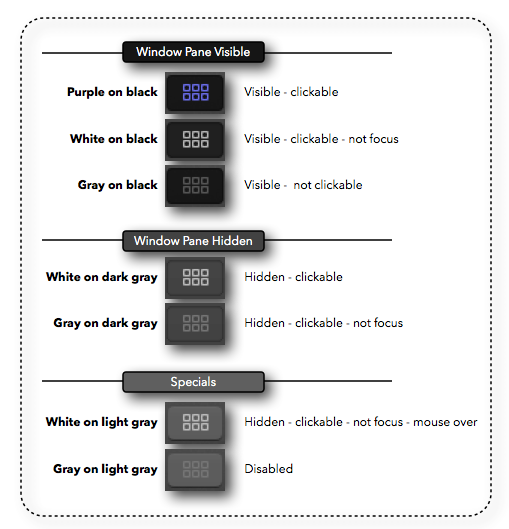
If everything would be logical across the various buttons then you can just ignore everything and click on the button to show or hide a specific pane. However, the way the buttons react and the information the show (key focus vs. no key focus) is too buggy, so it seems at the moment we just have a lot of different looking buttons with no coherent meaning what the different looks mean.
So far I have a total of seven (as in one, two, three, four, five, seven) different appearances of the Browser and Timeline Button. Three different button colors (black, dark gray, light gray) and three different symbol colors (purple, white, gray).
The Keyword Editor adds to the already confusing mess. Here is a new graphics that shows what buttons change to what when you click where:
And here are all the seven combination of the button color and symbol color:
If everything would be logical across the various buttons then you can just ignore everything and click on the button to show or hide a specific pane. However, the way the buttons react and the information the show (key focus vs. no key focus) is too buggy, so it seems at the moment we just have a lot of different looking buttons with no coherent meaning what the different looks mean.
Please Log in to join the conversation.
- Karsten Schlüter
-
- Offline
- Moderator
-
Less
More
- Posts: 3790
- Thank you received: 718
08 Nov 2016 07:35 #82412
by Karsten Schlüter
Edgar, chapeau, your endurance on this topic is impressive!
In [strike]one[/strike] two words :
What nonsense!
In any dimension of usability, interface design, remindabilty (<< does this word exist?) , 'design' at all - itsibitsi tiny buttons in seven different states do what? 'Inform' me? What is - partly - as obvious as an open timeline???
Buttons, in my humble understanding, have two states - on/off, or for heavens sake clickable/clicked …
… someone in charge of Interface-design has no clue, or was a week off .......
:evil:
We shall all provide feedback, linking to this thread …
… and Motion has some similar craziness to offer ..............
Who dares to check Compressor, LogicX … ? :huh:
Replied by Karsten Schlüter on topic Confusing Buttons: Browser-Timeline-Inspector
EdgarRothermich wrote: … And here are all the seven combination of the button color and symbol color:
..
Edgar, chapeau, your endurance on this topic is impressive!
In [strike]one[/strike] two words :
What nonsense!
In any dimension of usability, interface design, remindabilty (<< does this word exist?) , 'design' at all - itsibitsi tiny buttons in seven different states do what? 'Inform' me? What is - partly - as obvious as an open timeline???
Buttons, in my humble understanding, have two states - on/off, or for heavens sake clickable/clicked …
… someone in charge of Interface-design has no clue, or was a week off .......
:evil:
We shall all provide feedback, linking to this thread …
… and Motion has some similar craziness to offer ..............
Who dares to check Compressor, LogicX … ? :huh:
Please Log in to join the conversation.
