


- Posts: 141
- Thank you received: 2
3 Post Moderation Rule for New Boarders (25 Jan 2021)
New boarders will have their posts moderated - Don't worry if you cannot see your post immediately.
A newbie asks: how to export clips from within FCP X to Finder?
25 Oct 2016 14:29 - 25 Oct 2016 14:32 #81186
by AlexMaxim
You're absolutely right. That is precisely the problem! These are great solutions but they will take a long time given that there are hundreds of sound clips in the projects.
I went through the FCPX manual ( varmlandsfilmforbund.se/uploads/manualer...pro_x_user_guide.pdf , pp.354-356) and apparently there is a way to export audio files from an entire project as long as these have been assigned roles via an 'Export Media' option. (I checked the sound clips, and these have in fact been assigned roles automatically.)
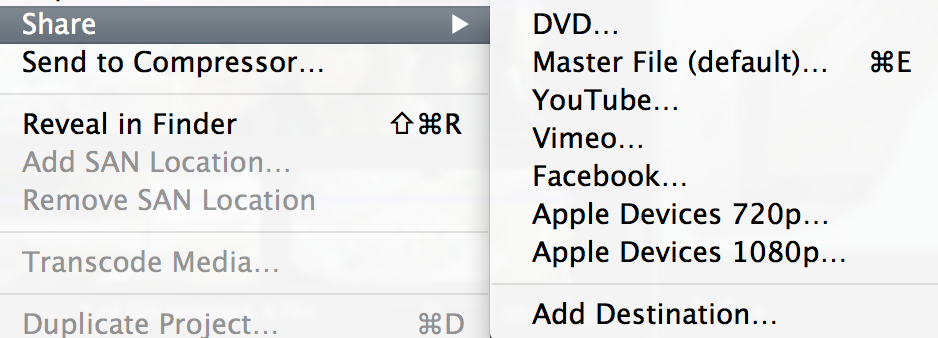
However, when I select the project and click File>Share (or press Command + E), there is no 'Export Media' option (please see screenshot). It is simply not appearing.
I have no clue why - I am running FCP 10.0.9, so this feature should be there.
Any ideas, guys, on where 'Export Media' has got to? I would be really grateful for any guidance as being able to use this command will save me days of clicking.
Replied by AlexMaxim on topic A newbie asks: how to export clips from within FCP X to Finder?
manoucho wrote: I have the feeling there is a small misunderstanding here.
Alex seems to have a lot of clips and is basically asking for batch exporting. The solution proposed works but is not batch exporting at all, it is rather long if you have many clips.
Batch Exporting cannot be done within FCPX. As far as I know there are only two ways to do this:
- Get a copy of PrimariesExporter (it also exports audio files as long as they are on the primary storyline, I checked with the developper)
- Use frame.io, upload all the clips on the website and download them back (it's the free option, a little bit more annoying of course)
Good luck!
You're absolutely right. That is precisely the problem! These are great solutions but they will take a long time given that there are hundreds of sound clips in the projects.
I went through the FCPX manual ( varmlandsfilmforbund.se/uploads/manualer...pro_x_user_guide.pdf , pp.354-356) and apparently there is a way to export audio files from an entire project as long as these have been assigned roles via an 'Export Media' option. (I checked the sound clips, and these have in fact been assigned roles automatically.)
However, when I select the project and click File>Share (or press Command + E), there is no 'Export Media' option (please see screenshot). It is simply not appearing.
I have no clue why - I am running FCP 10.0.9, so this feature should be there.
Any ideas, guys, on where 'Export Media' has got to? I would be really grateful for any guidance as being able to use this command will save me days of clicking.
Last edit: 25 Oct 2016 14:32 by AlexMaxim.
Please Log in to join the conversation.
25 Oct 2016 14:37 #81188
by AlexMaxim
Replied by AlexMaxim on topic A newbie asks: how to export clips from within FCP X to Finder?
Here is another tutorial which explains the same 'Export Media' option:
www.premiumbeat.com/blog/export-stems-ou...imeline-using-roles/
www.premiumbeat.com/blog/export-stems-ou...imeline-using-roles/
Please Log in to join the conversation.

25 Oct 2016 14:44 #81190
by lichinho
The name was changed somewhere along the line.
Try Share->Master File and then click on Settings and make your choices there.
Replied by lichinho on topic A newbie asks: how to export clips from within FCP X to Finder?
AlexMaxim wrote: You're absolutely right. That is precisely the problem! These are great solutions but they will take a long time given that there are hundreds of sound clips in the projects.
I went through the FCPX manual ( varmlandsfilmforbund.se/uploads/manualer...pro_x_user_guide.pdf , pp.354-356) and apparently there is a way to export audio files from an entire project as long as these have been assigned roles via an 'Export Media' option. (I checked the sound clips, and these have in fact been assigned roles automatically.)
However, when I select the project and click File>Share (or press Command + E), there is no 'Export Media' option (please see screenshot). It is simply not appearing.
I have no clue why - I am running FCP 10.0.9, so this feature should be there.
Any ideas, guys, on where 'Export Media' has got to? I would be really grateful for any guidance as being able to use this command will save me days of clicking.
The name was changed somewhere along the line.
Try Share->Master File and then click on Settings and make your choices there.
Please Log in to join the conversation.

25 Oct 2016 16:25 #81193
by Emmanuel
Replied by Emmanuel on topic A newbie asks: how to export clips from within FCP X to Finder?
Alex, roles are not designed for batch exporting.
Do the following.
- Go to frame.io and open a free account.
- Download the free frame.io companion from the AppStore
- Place all your clips in the main timeline and add all the effects you want etc.
- Use Share -> frame.io source
- The frame.io companion will open and ask whether you want to export Timeline or Clips. Choose Clips.
- All your individual clips will be exported and uploaded to frame.io
- Go to the website and click on the top left button and Download All
That's it. It is a workaround if you don't want to buy the plugin PrimariesExporter.
Good luck
Do the following.
- Go to frame.io and open a free account.
- Download the free frame.io companion from the AppStore
- Place all your clips in the main timeline and add all the effects you want etc.
- Use Share -> frame.io source
- The frame.io companion will open and ask whether you want to export Timeline or Clips. Choose Clips.
- All your individual clips will be exported and uploaded to frame.io
- Go to the website and click on the top left button and Download All
That's it. It is a workaround if you don't want to buy the plugin PrimariesExporter.
Good luck
Please Log in to join the conversation.

02 Nov 2016 08:18 #81931
by DFPete
Frame.io is indeed a perfect solution for exporting dailies (also mentioned in the latest FinalCutUserGroup). But there is one problem I think a lot of people have: internet bandwidth! If I want to export hundreds of hours of dailies and have a poor internet connection I tend to take the stuff with me on a harddrive and drive to the person it belongs to to get this stuff in time. I cannot figure out where frame.io stores the temp exports for uploading. Anybody?
Replied by DFPete on topic A newbie asks: how to export clips from within FCP X to Finder?
manoucho wrote: Alex, roles are not designed for batch exporting.
Do the following.
- Go to frame.io and open a free account.
- Download the free frame.io companion from the AppStore
- Place all your clips in the main timeline and add all the effects you want etc.
- Use Share -> frame.io source
- The frame.io companion will open and ask whether you want to export Timeline or Clips. Choose Clips.
- All your individual clips will be exported and uploaded to frame.io
- Go to the website and click on the top left button and Download All
That's it. It is a workaround if you don't want to buy the plugin PrimariesExporter.
Good luck
Frame.io is indeed a perfect solution for exporting dailies (also mentioned in the latest FinalCutUserGroup). But there is one problem I think a lot of people have: internet bandwidth! If I want to export hundreds of hours of dailies and have a poor internet connection I tend to take the stuff with me on a harddrive and drive to the person it belongs to to get this stuff in time. I cannot figure out where frame.io stores the temp exports for uploading. Anybody?
Please Log in to join the conversation.
02 Nov 2016 09:57 - 02 Nov 2016 09:59 #81938
by Emmanuel
Replied by Emmanuel on topic A newbie asks: how to export clips from within FCP X to Finder?
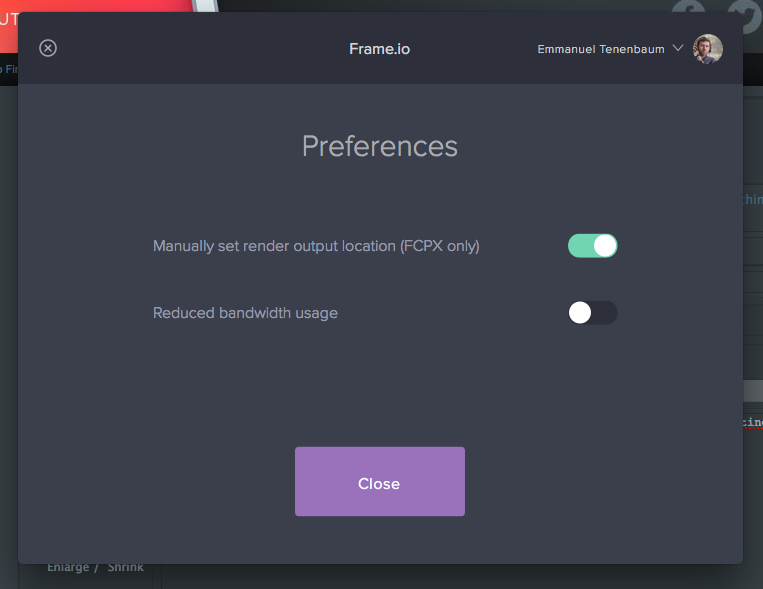
Actually you don't need the bandwith. You can indeed get the local copy, actinvating this option:
Last edit: 02 Nov 2016 09:59 by Emmanuel.
Please Log in to join the conversation.
02 Nov 2016 11:29 #81946
by DFPete
Replied by DFPete on topic A newbie asks: how to export clips from within FCP X to Finder?
Oh cool, thank you. But when I have 5 clips in my timeline I wanto export as frame.io source I only get one file and a xml...
Please Log in to join the conversation.
02 Nov 2016 12:17 #81953
by Emmanuel
Replied by Emmanuel on topic A newbie asks: how to export clips from within FCP X to Finder?
You have to choose Clips and not Timeline.
Please Log in to join the conversation.
02 Nov 2016 12:18 #81954
by DFPete
Replied by DFPete on topic A newbie asks: how to export clips from within FCP X to Finder?
Of course I did that
Please Log in to join the conversation.
02 Nov 2016 12:19 #81955
by Emmanuel
Replied by Emmanuel on topic A newbie asks: how to export clips from within FCP X to Finder?
I don't know then  I never had any trouble with it. It only exports the Primary storyline clips, that's normal.
Maybe a 10.3 related issue ?
I never had any trouble with it. It only exports the Primary storyline clips, that's normal.Maybe a 10.3 related issue ?
Please Log in to join the conversation.
02 Nov 2016 12:19 #81956
by Emmanuel
Replied by Emmanuel on topic A newbie asks: how to export clips from within FCP X to Finder?
You can write them they are always fast to answer.
Please Log in to join the conversation.
02 Nov 2016 12:20 #81958
by DFPete
Yes, it seems like. Thank you
Replied by DFPete on topic A newbie asks: how to export clips from within FCP X to Finder?
manoucho wrote: I don't know then
Maybe a 10.3 related issue ?
Yes, it seems like. Thank you
Please Log in to join the conversation.
21 Nov 2016 14:59 #83047
by AlexMaxim
Guys,
An update: we ended up using the following method to export sound clips in FCP X:
1. Within FCP X: File>Share>Master File.
2. The Master File menu displays. Click the 'Settings' tab on the right.
3. In the 'Roles as' tab, select 'Audio Roles Only As Separate Files'.
4. Depending on your production, one or more of the following will display: Dialogue, Music, Effects. Deselect those categories you do not want to export by clicking the roll-over minus sign to the right of the Mono/Stereo/Surround option. Note: you might have to manually deselect some pieces of music and effects as FCP X sometimes still exports these if even the category has been deselected.
5. Click 'Next' in the bottom right corner to select your export destination.
The exported file will be one long audio file which contains the desired audio in identical chronological order to that in your project. In the final version of your project, you can just drop back in the edited version of the same (and disable/delete the individual clips if and as necessary).
This solution worked with Mac 10.8.5 and FCP X 10.0.9. Hope it helps someone!
Replied by AlexMaxim on topic A newbie asks: how to export clips from within FCP X to Finder?
lichinho wrote:
AlexMaxim wrote: You're absolutely right. That is precisely the problem! These are great solutions but they will take a long time given that there are hundreds of sound clips in the projects.
I went through the FCPX manual ( varmlandsfilmforbund.se/uploads/manualer...pro_x_user_guide.pdf , pp.354-356) and apparently there is a way to export audio files from an entire project as long as these have been assigned roles via an 'Export Media' option. (I checked the sound clips, and these have in fact been assigned roles automatically.)
However, when I select the project and click File>Share (or press Command + E), there is no 'Export Media' option (please see screenshot). It is simply not appearing.
I have no clue why - I am running FCP 10.0.9, so this feature should be there.
Any ideas, guys, on where 'Export Media' has got to? I would be really grateful for any guidance as being able to use this command will save me days of clicking.
The name was changed somewhere along the line.
Try Share->Master File and then click on Settings and make your choices there.
Guys,
An update: we ended up using the following method to export sound clips in FCP X:
1. Within FCP X: File>Share>Master File.
2. The Master File menu displays. Click the 'Settings' tab on the right.
3. In the 'Roles as' tab, select 'Audio Roles Only As Separate Files'.
4. Depending on your production, one or more of the following will display: Dialogue, Music, Effects. Deselect those categories you do not want to export by clicking the roll-over minus sign to the right of the Mono/Stereo/Surround option. Note: you might have to manually deselect some pieces of music and effects as FCP X sometimes still exports these if even the category has been deselected.
5. Click 'Next' in the bottom right corner to select your export destination.
The exported file will be one long audio file which contains the desired audio in identical chronological order to that in your project. In the final version of your project, you can just drop back in the edited version of the same (and disable/delete the individual clips if and as necessary).
This solution worked with Mac 10.8.5 and FCP X 10.0.9. Hope it helps someone!
Please Log in to join the conversation.
