


- Posts: 141
- Thank you received: 2
3 Post Moderation Rule for New Boarders (25 Jan 2021)
New boarders will have their posts moderated - Don't worry if you cannot see your post immediately.
A newbie asks: how to export clips from within FCP X to Finder?
14 Oct 2016 18:15 #80768
by AlexMaxim
Hey there guys,
I hope that this post finds you all having a great weekend.
I was just wondering: Is there a way to export a bunch of selected sound clips (i.e. .wav files) from the FCPX timeline to a specified location in Finder?
This would save me a lot of time because although I have a copy of the original unedited clips in Finder, these files have since undergone editing within FCP X.
Many thanks for any suggestions!
I hope that this post finds you all having a great weekend.
I was just wondering: Is there a way to export a bunch of selected sound clips (i.e. .wav files) from the FCPX timeline to a specified location in Finder?
This would save me a lot of time because although I have a copy of the original unedited clips in Finder, these files have since undergone editing within FCP X.
Many thanks for any suggestions!
Please Log in to join the conversation.

14 Oct 2016 19:08 #80770
by EditorGuy
Replied by EditorGuy on topic A newbie asks: how to export clips from within FCP X to Finder?
There's no real batch export inside of FCPX. But once you start an export, you don't have to wait, you can line up each one, as many as you want.
What I do is select a clip, File > Send To Compressor. I do that for each clip. In Compressor, select them all at once, apply the preset, set the destination, and submit the batch.
What I do is select a clip, File > Send To Compressor. I do that for each clip. In Compressor, select them all at once, apply the preset, set the destination, and submit the batch.
Please Log in to join the conversation.
14 Oct 2016 20:06 #80778
by AlexMaxim
So you send the clips to an external application (Compressor) and then send them to Finder from there? Have I understood this correctly?
Replied by AlexMaxim on topic A newbie asks: how to export clips from within FCP X to Finder?
EditorGuy wrote: There's no real batch export inside of FCPX. But once you start an export, you don't have to wait, you can line up each one, as many as you want.
What I do is select a clip, File > Send To Compressor. I do that for each clip. In Compressor, select them all at once, apply the preset, set the destination, and submit the batch.
So you send the clips to an external application (Compressor) and then send them to Finder from there? Have I understood this correctly?
Please Log in to join the conversation.


14 Oct 2016 22:31 #80783
by Emmanuel
Replied by Emmanuel on topic A newbie asks: how to export clips from within FCP X to Finder?
The external plugin PrimariesExporter would allow you to do that.
Please Log in to join the conversation.
15 Oct 2016 00:03 #80786
by EditorGuy
Yes, Compressor simply transcodes media files. It allows you to create Batches, which contain multiple files, all of which can have the same or different encoding settings.
FCPX has a function to send a Project timeline directly to Compressor. Rather than export a ProRes file, then take that into Compressor.
Replied by EditorGuy on topic A newbie asks: how to export clips from within FCP X to Finder?
AlexMaxim wrote: So you send the clips to an external application (Compressor) and then send them to Finder from there? Have I understood this correctly?
Yes, Compressor simply transcodes media files. It allows you to create Batches, which contain multiple files, all of which can have the same or different encoding settings.
FCPX has a function to send a Project timeline directly to Compressor. Rather than export a ProRes file, then take that into Compressor.
Please Log in to join the conversation.
15 Oct 2016 14:08 #80789
by AlexMaxim
Many thanks! I will check this out.
Replied by AlexMaxim on topic A newbie asks: how to export clips from within FCP X to Finder?
manoucho wrote: The external plugin PrimariesExporter would allow you to do that.
Many thanks! I will check this out.
Please Log in to join the conversation.
15 Oct 2016 14:08 #80790
by AlexMaxim
That's great! Thank you so much for this kind overview.
Replied by AlexMaxim on topic A newbie asks: how to export clips from within FCP X to Finder?
EditorGuy wrote:
AlexMaxim wrote: So you send the clips to an external application (Compressor) and then send them to Finder from there? Have I understood this correctly?
Yes, Compressor simply transcodes media files. It allows you to create Batches, which contain multiple files, all of which can have the same or different encoding settings.
FCPX has a function to send a Project timeline directly to Compressor. Rather than export a ProRes file, then take that into Compressor.
That's great! Thank you so much for this kind overview.
Please Log in to join the conversation.
18 Oct 2016 10:53 #80869
by AlexMaxim
Thanks so much once again for your help!
I just wanted to confirm three things before I press ahead with downloading the latest version of macOS and buying Compressor:
1. Can you send standalone audio files (i.e. with no video component at all, just .wav) to Compressor directly from the FCPX project timeline (i.e. in their trimmed and optimised state)?
2. Can you send multiple audio files simultaneously from FCPX to Compressor using File>Send to Compressor (i.e. by highlighting more than one file in the timeline)?
3. I am running OSX 10.8.5. I am really happy with this OS as it has been super-reliable - the only reason I am considering upgrading is to download Compressor. Is it advisable to directly install macOS Sierra on my Macintosh HD, or should I d/l it to an external drive and run the OS from there?
Replied by AlexMaxim on topic A newbie asks: how to export clips from within FCP X to Finder?
EditorGuy wrote:
AlexMaxim wrote: So you send the clips to an external application (Compressor) and then send them to Finder from there? Have I understood this correctly?
Yes, Compressor simply transcodes media files. It allows you to create Batches, which contain multiple files, all of which can have the same or different encoding settings.
FCPX has a function to send a Project timeline directly to Compressor. Rather than export a ProRes file, then take that into Compressor.
Thanks so much once again for your help!
I just wanted to confirm three things before I press ahead with downloading the latest version of macOS and buying Compressor:
1. Can you send standalone audio files (i.e. with no video component at all, just .wav) to Compressor directly from the FCPX project timeline (i.e. in their trimmed and optimised state)?
2. Can you send multiple audio files simultaneously from FCPX to Compressor using File>Send to Compressor (i.e. by highlighting more than one file in the timeline)?
3. I am running OSX 10.8.5. I am really happy with this OS as it has been super-reliable - the only reason I am considering upgrading is to download Compressor. Is it advisable to directly install macOS Sierra on my Macintosh HD, or should I d/l it to an external drive and run the OS from there?
Please Log in to join the conversation.
18 Oct 2016 11:50 #80872
by EditorGuy
Replied by EditorGuy on topic A newbie asks: how to export clips from within FCP X to Finder?
1 - No, just one at a time, but it's fast, and you can build a Batch before transcoding.
2 - Use the Range Tool to select a Range in the timeline. The whole timeline is sent to Compressor, but what is in that Range will be automatically marked with In and Out points in Compressor. Compressor will only transcode what is between the In and Out points. And you can give Compressor an audio only codec to export. Such as the WAV preset in the Audio Formats group.
3 - Makea backup of your system drive with TimeMachine or Carbon Copy Cloner. Upgrade. BUT, wait until the Sierra compatible versions of all your apps and plugins are released. I assume Apple will be releasing updates for the pro video apps very soon to make them compatible.
2 - Use the Range Tool to select a Range in the timeline. The whole timeline is sent to Compressor, but what is in that Range will be automatically marked with In and Out points in Compressor. Compressor will only transcode what is between the In and Out points. And you can give Compressor an audio only codec to export. Such as the WAV preset in the Audio Formats group.
3 - Makea backup of your system drive with TimeMachine or Carbon Copy Cloner. Upgrade. BUT, wait until the Sierra compatible versions of all your apps and plugins are released. I assume Apple will be releasing updates for the pro video apps very soon to make them compatible.
Please Log in to join the conversation.
18 Oct 2016 12:12 #80874
by AlexMaxim
1. Cool, but these are standalone .wav files rather than codecs. Can I still send these .wav files directly from the FCP X project timeline to Compressor using File>Send tp Compressor, and will they include any modifications that I've already made to them?
The reason I ask is that I can already select them in the timeline, reveal them in the event browser and then see them in Finder from there. The problem is that in Finder, they will be in their original state, without trimming etc. So this is why I am having to consider Compressor and the macOS upgrade.
2. Okay.
3. Great - I have made a backup in Time Machine.
Many thanks once again for your kind assistance!
Replied by AlexMaxim on topic A newbie asks: how to export clips from within FCP X to Finder?
EditorGuy wrote: 1 - No, just one at a time, but it's fast, and you can build a Batch before transcoding.
2 - Use the Range Tool to select a Range in the timeline. The whole timeline is sent to Compressor, but what is in that Range will be automatically marked with In and Out points in Compressor. Compressor will only transcode what is between the In and Out points. And you can give Compressor an audio only codec to export. Such as the WAV preset in the Audio Formats group.
3 - Makea backup of your system drive with TimeMachine or Carbon Copy Cloner. Upgrade. BUT, wait until the Sierra compatible versions of all your apps and plugins are released. I assume Apple will be releasing updates for the pro video apps very soon to make them compatible.
1. Cool, but these are standalone .wav files rather than codecs. Can I still send these .wav files directly from the FCP X project timeline to Compressor using File>Send tp Compressor, and will they include any modifications that I've already made to them?
The reason I ask is that I can already select them in the timeline, reveal them in the event browser and then see them in Finder from there. The problem is that in Finder, they will be in their original state, without trimming etc. So this is why I am having to consider Compressor and the macOS upgrade.
2. Okay.
3. Great - I have made a backup in Time Machine.
Many thanks once again for your kind assistance!
Please Log in to join the conversation.
18 Oct 2016 12:29 #80877
by EditorGuy
Replied by EditorGuy on topic A newbie asks: how to export clips from within FCP X to Finder?
Yes, Send To Compressor includes all adjustments you've made.
Please Log in to join the conversation.
18 Oct 2016 12:43 #80879
by AlexMaxim
Brilliant!
And this works with standalone .wav files? Sorry to labour the point, but I really need to know this because this process will mean at least one day's extra work, the purchase of Compressor and the installation of a whole new OS.
Thanks so much once again for your kind help!
Replied by AlexMaxim on topic A newbie asks: how to export clips from within FCP X to Finder?
EditorGuy wrote: Yes, Send To Compressor includes all adjustments you've made.
Brilliant!
And this works with standalone .wav files? Sorry to labour the point, but I really need to know this because this process will mean at least one day's extra work, the purchase of Compressor and the installation of a whole new OS.
Thanks so much once again for your kind help!
Please Log in to join the conversation.
18 Oct 2016 14:41 #80887
by Emmanuel
Replied by Emmanuel on topic A newbie asks: how to export clips from within FCP X to Finder?
As I stated earlier, to my knowledge the only way to get a timeline exported as all the individual clips is with PrimariesExporter. But it's not free.
itunes.apple.com/app/primariesexporter/id955128031#
itunes.apple.com/app/primariesexporter/id955128031#
Please Log in to join the conversation.
18 Oct 2016 16:01 #80890
by AlexMaxim
It's a great idea, but AFAIK PrimariesExporter is for video, images and metadata - but not sound.
Replied by AlexMaxim on topic A newbie asks: how to export clips from within FCP X to Finder?
manoucho wrote: As I stated earlier, to my knowledge the only way to get a timeline exported as all the individual clips is with PrimariesExporter. But it's not free.
itunes.apple.com/app/primariesexporter/id955128031#
It's a great idea, but AFAIK PrimariesExporter is for video, images and metadata - but not sound.
Please Log in to join the conversation.
18 Oct 2016 16:57 #80894
by EditorGuy
Replied by EditorGuy on topic A newbie asks: how to export clips from within FCP X to Finder?
Yes, works with stand alone WAV files.
At this point, you simply need to do one, and see what the results are. Test it, see how it works out for you. Most of your questions will be answered with a simple test.
At this point, you simply need to do one, and see what the results are. Test it, see how it works out for you. Most of your questions will be answered with a simple test.
Please Log in to join the conversation.
18 Oct 2016 19:58 #80903
by AlexMaxim
That's brilliant to hear!
De acuerdo. Testing is needed!
Thank you so much once again for taking the time and trouble to answer my queries! This is sincerely appreciated.
Replied by AlexMaxim on topic A newbie asks: how to export clips from within FCP X to Finder?
EditorGuy wrote: Yes, works with stand alone WAV files.
At this point, you simply need to do one, and see what the results are. Test it, see how it works out for you. Most of your questions will be answered with a simple test.
That's brilliant to hear!
De acuerdo. Testing is needed!
Thank you so much once again for taking the time and trouble to answer my queries! This is sincerely appreciated.
Please Log in to join the conversation.
23 Oct 2016 12:21 #81119
by AlexMaxim
Replied by AlexMaxim on topic A newbie asks: how to export clips from within FCP X to Finder?
Hi there guys,
I hope that you are all well, and having a wonderful weekend.
Update: we have finished identifying the sound clips which need cleaning up.
We are now trying to export from FCPX to Compressor via the following steps:
1. Selecting a sound clip (i.e. a .wav file); and
2. Clicking File>Send to Compressor.
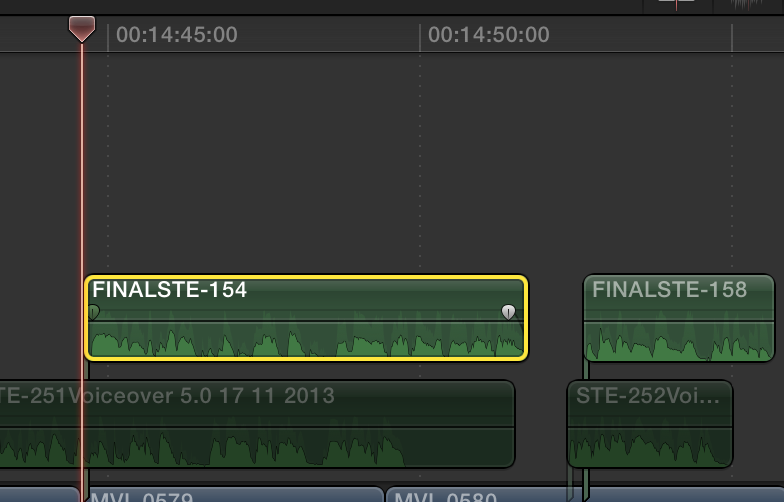
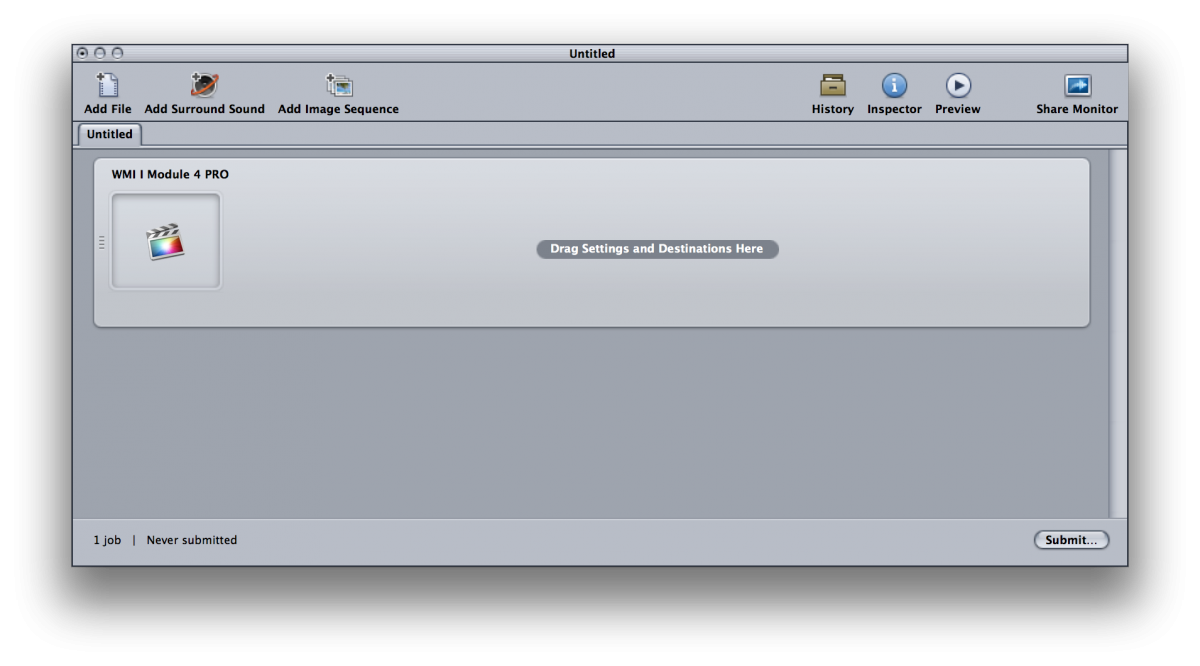
However, there is a problem: on completing the above two steps, Compressor opens the entire FCPX project, not the individual .wav file. We can't see the .wav file anywhere in Compressor.
Are we doing something wrong?
Any help would be sincerely appreciated!
I hope that you are all well, and having a wonderful weekend.
Update: we have finished identifying the sound clips which need cleaning up.
We are now trying to export from FCPX to Compressor via the following steps:
1. Selecting a sound clip (i.e. a .wav file); and
2. Clicking File>Send to Compressor.
However, there is a problem: on completing the above two steps, Compressor opens the entire FCPX project, not the individual .wav file. We can't see the .wav file anywhere in Compressor.
Are we doing something wrong?
Any help would be sincerely appreciated!
Please Log in to join the conversation.
- MarkNelsonMovies
-

- Offline
- Elite Member
-

Less
More
- Posts: 256
- Thank you received: 48
23 Oct 2016 18:38 #81130
by MarkNelsonMovies
Replied by MarkNelsonMovies on topic A newbie asks: how to export clips from within FCP X to Finder?
Rather than clicking to select the clip, make sure clip skimming and snaping is on, move the playhead over the first frame of the clip and press 'i' then export from there.
Please Log in to join the conversation.
23 Oct 2016 19:40 #81132
by EditorGuy
Replied by EditorGuy on topic A newbie asks: how to export clips from within FCP X to Finder?
Select (or place playhead over) the clip in the Timeline, X to make it a Range, Send To Compressor.
Now, you'll get the whole Timeline in Compressor, but only that Range will have In and Out points isolating it. Compressor will only encode what is in between In and Out points.
This also works the same when doing Send To Compressor from the Browser.
Now, you'll get the whole Timeline in Compressor, but only that Range will have In and Out points isolating it. Compressor will only encode what is in between In and Out points.
This also works the same when doing Send To Compressor from the Browser.
Please Log in to join the conversation.
25 Oct 2016 14:05 #81180
by Emmanuel
Replied by Emmanuel on topic A newbie asks: how to export clips from within FCP X to Finder?
I have the feeling there is a small misunderstanding here.
Alex seems to have a lot of clips and is basically asking for batch exporting. The solution proposed works but is not batch exporting at all, it is rather long if you have many clips.
Batch Exporting cannot be done within FCPX. As far as I know there are only two ways to do this:
- Get a copy of PrimariesExporter (it also exports audio files as long as they are on the primary storyline, I checked with the developper)
- Use frame.io, upload all the clips on the website and download them back (it's the free option, a little bit more annoying of course)
Good luck!
Alex seems to have a lot of clips and is basically asking for batch exporting. The solution proposed works but is not batch exporting at all, it is rather long if you have many clips.
Batch Exporting cannot be done within FCPX. As far as I know there are only two ways to do this:
- Get a copy of PrimariesExporter (it also exports audio files as long as they are on the primary storyline, I checked with the developper)
- Use frame.io, upload all the clips on the website and download them back (it's the free option, a little bit more annoying of course)
Good luck!
Please Log in to join the conversation.
