


- Posts: 3790
- Thank you received: 718
3 Post Moderation Rule for New Boarders (25 Jan 2021)
New boarders will have their posts moderated - Don't worry if you cannot see your post immediately.
Color Grade seems to be too red on DVD
- Karsten Schlüter
-

- Offline
- Moderator
-

Less
More
01 Jun 2016 10:00 - 01 Jun 2016 10:00 #77321
by Karsten Schlüter
@Greg
can you elaborate on that?
I'm making only a handful of disks a year, but noticed no diff in usage when updated to ElCap...
all my dirty iDVD tricks still working :woohoo:
btw: VERY interesting thread!
I don't care for nuances in the few projects which go to disk, but - habitually, for years - put a broadcast-safe filter over final export ... avoids 'blooming' on very bright and saturated colors ....
Replied by Karsten Schlüter on topic Color Grade seems to be too red on DVD
VidGreg wrote: … iDVD which is now only partially functional in El Capitan. ..
@Greg
can you elaborate on that?
I'm making only a handful of disks a year, but noticed no diff in usage when updated to ElCap...
all my dirty iDVD tricks still working :woohoo:
btw: VERY interesting thread!
I don't care for nuances in the few projects which go to disk, but - habitually, for years - put a broadcast-safe filter over final export ... avoids 'blooming' on very bright and saturated colors ....
Last edit: 01 Jun 2016 10:00 by Karsten Schlüter.
Please Log in to join the conversation.


01 Jun 2016 14:49 - 01 Jun 2016 15:01 #77330
by dgwvideo
Creating history....one edit at a time !
Replied by dgwvideo on topic Color Grade seems to be too red on DVD
Oliver,
To save a preset, choose Save Preset at the bottom of the video inspector. In the resulting dialog box, choose which parameter(s) to save as a preset. See the attached screen grabs.
Secondly, there is an easy way to see which clips have already been graded for broadcast levels without having to select each clip and go to the inspector. Turn the scopes on and then scrub the playhead across the timeline and you can see in realtime which waveforms need to be corrected and where you previously left off. I do this frequently when grading a large number of clips sequentially. If you have very minor adjustments then this may not show as well if scrubbing too fast.
As for DVD creation, I still to this day use DVD Studio Pro, which works on El Capitan. If you own the original FCP Studio or a version with the universal binary installer for DVD SP you can use Pacifist to install it. UPDATE: I should add that I use either Compressor or Sorenson Squeeze Pro to encode for DVD and I import those assets into DVD Studio Pro to do any authoring and to create the DVD disc.
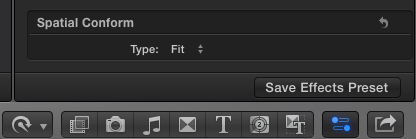
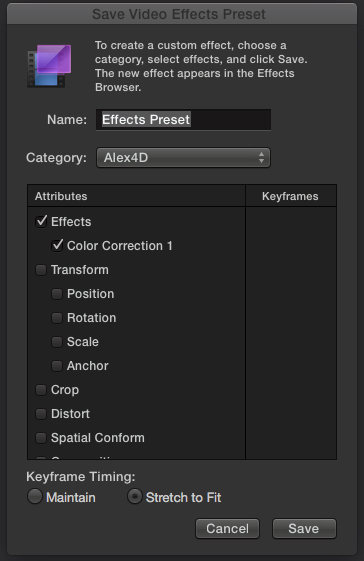
To save a preset, choose Save Preset at the bottom of the video inspector. In the resulting dialog box, choose which parameter(s) to save as a preset. See the attached screen grabs.
Secondly, there is an easy way to see which clips have already been graded for broadcast levels without having to select each clip and go to the inspector. Turn the scopes on and then scrub the playhead across the timeline and you can see in realtime which waveforms need to be corrected and where you previously left off. I do this frequently when grading a large number of clips sequentially. If you have very minor adjustments then this may not show as well if scrubbing too fast.
As for DVD creation, I still to this day use DVD Studio Pro, which works on El Capitan. If you own the original FCP Studio or a version with the universal binary installer for DVD SP you can use Pacifist to install it. UPDATE: I should add that I use either Compressor or Sorenson Squeeze Pro to encode for DVD and I import those assets into DVD Studio Pro to do any authoring and to create the DVD disc.
Creating history....one edit at a time !
Last edit: 01 Jun 2016 15:01 by dgwvideo.
Please Log in to join the conversation.
01 Jun 2016 17:26 #77345
by VidGreg
Replied by VidGreg on topic Color Grade seems to be too red on DVD
Hi Karsten
You asked… "
… iDVD which is now only partially functional in El Capitan. ..
@Greg
can you elaborate on that?"
Only time for quick reply, so doing this from memory. Dodgy that, now a days. Corrupted hdd for a brain.
So the last time I made extensive use of iDVD was on Mavericks which already suffered a few minor things.
El Capitan is breaking or truncating more features in iDVD.
First off, Photos does not work via the media browser inside iDVD. I think this is due to new Library structure for Photos vs iPhoto and most likely, iDVD is coded to look for "iPhotoLibrary/…" in user library.
Likewise slideshows are messed up and sometimes adding "Addition" content to DVD.
The work around is drag and drop photos from a folder to iDVD. You can export a slideshow out as a movie and drag that in.
iTunes no longer accessible via Media browser icon inside iDVD. You can drag and drop Music/ audio from iTunes into the Media Browser list to make available.
There is at least one comment on Apple Support Forums saying you can no longer burn DVDs if you use iTunes music in the drop zones, or maybe only the drop zone for the initial launching Menu screen. Haven't tried it yet. Poster said it would burn if you deleted music from the drop zone.
Speaking of drop zones, many don't work and some of the Themes no longer work or only work if not using the drop zones. I wonder if the above statement applies here??? Could it be the audio files or associated drop zone/well??
Chapter names and associated chapter picture. Chapter markers seem to work out of FCPX, but the chapter names don't so you have to manually re-enter names. You may need to manually place chapter picture frames into the chapter navigation pane. You used to be able to change and reselect what frame is used.
There are some other issues, but not remembering off the top of corrupted brain.
Another work around worth exploring is using iMovie as an intermediary for iDVD. I haven't used it in a while, but it does interface with Photos and the new iTunes.
Lots of threads in Apple Support community. Seen your Max(Karsten)Headroom avatar in many threads :silly:
Here are just a couple I have bookmarked, no time to re-read them, so that is for you gentile readers…
discussions.apple.com/thread/7251191?start=0&tstart=0
discussions.apple.com/thread/7535165?start=0&tstart=0
discussions.apple.com/thread/7572572
Off to do morning Ranch chores… (I just noticed last night that fpc.co logs posts using London time? So I am able to respond a day ahead late at night )
Happy editing!
Hope this helps, Greg
p.s. Hope the moderator doesn't get mad for hi-jacking thread.
You asked… "
… iDVD which is now only partially functional in El Capitan. ..
@Greg
can you elaborate on that?"
Only time for quick reply, so doing this from memory. Dodgy that, now a days. Corrupted hdd for a brain.
So the last time I made extensive use of iDVD was on Mavericks which already suffered a few minor things.
El Capitan is breaking or truncating more features in iDVD.
First off, Photos does not work via the media browser inside iDVD. I think this is due to new Library structure for Photos vs iPhoto and most likely, iDVD is coded to look for "iPhotoLibrary/…" in user library.
Likewise slideshows are messed up and sometimes adding "Addition" content to DVD.
The work around is drag and drop photos from a folder to iDVD. You can export a slideshow out as a movie and drag that in.
iTunes no longer accessible via Media browser icon inside iDVD. You can drag and drop Music/ audio from iTunes into the Media Browser list to make available.
There is at least one comment on Apple Support Forums saying you can no longer burn DVDs if you use iTunes music in the drop zones, or maybe only the drop zone for the initial launching Menu screen. Haven't tried it yet. Poster said it would burn if you deleted music from the drop zone.
Speaking of drop zones, many don't work and some of the Themes no longer work or only work if not using the drop zones. I wonder if the above statement applies here??? Could it be the audio files or associated drop zone/well??
Chapter names and associated chapter picture. Chapter markers seem to work out of FCPX, but the chapter names don't so you have to manually re-enter names. You may need to manually place chapter picture frames into the chapter navigation pane. You used to be able to change and reselect what frame is used.
There are some other issues, but not remembering off the top of corrupted brain.
Another work around worth exploring is using iMovie as an intermediary for iDVD. I haven't used it in a while, but it does interface with Photos and the new iTunes.
Lots of threads in Apple Support community. Seen your Max(Karsten)Headroom avatar in many threads :silly:
Here are just a couple I have bookmarked, no time to re-read them, so that is for you gentile readers…
discussions.apple.com/thread/7251191?start=0&tstart=0
discussions.apple.com/thread/7535165?start=0&tstart=0
discussions.apple.com/thread/7572572
Off to do morning Ranch chores… (I just noticed last night that fpc.co logs posts using London time? So I am able to respond a day ahead late at night
)Happy editing!
Hope this helps, Greg
p.s. Hope the moderator doesn't get mad for hi-jacking thread.
Please Log in to join the conversation.
- Karsten Schlüter
-
- Offline
- Moderator
-
Less
More
- Posts: 3790
- Thank you received: 718
01 Jun 2016 18:05 - 01 Jun 2016 18:06 #77347
by Karsten Schlüter
I AM a moderator !! :huh:
thanks for sharing!
no wonder I had no issues, cause I'm using iDVD without any integration of iLife ...
which reminds me, I announced 'years ago' a short overview of FCPX+iDVD
... be warned: examples from a wedding video! :sick:
LOL
<cough> back to topic, gentlemen!!
Replied by Karsten Schlüter on topic Color Grade seems to be too red on DVD
VidGreg wrote: .. Hope the moderator doesn't get mad for hi-jacking thread.
I AM a moderator !! :huh:
thanks for sharing!
no wonder I had no issues, cause I'm using iDVD without any integration of iLife ...
which reminds me, I announced 'years ago' a short overview of FCPX+iDVD
... be warned: examples from a wedding video! :sick:
LOL
<cough> back to topic, gentlemen!!
Last edit: 01 Jun 2016 18:06 by Karsten Schlüter.
Please Log in to join the conversation.
- oliver.bloch
-
 Topic Author
- Offline
- Junior Member
-

Less
More
- Posts: 23
- Thank you received: 0
14 Jun 2016 13:53 - 14 Jun 2016 13:58 #77826
by oliver.bloch
Replied by oliver.bloch on topic Color Grade seems to be too red on DVD
guys - thank you all! color problem seems to be resolved... actually on fcpx it looks ugly but output in dvd looks ok now... sadly for all those hours in color... sadly i don't have the older version or dvd studio pro... so i have to use idvd... which for creating menus is really the fastest... quality wise maybe not the best...
have some other issues now with flickering titles but this is a new thread...
a never ending story
oliver
have some other issues now with flickering titles but this is a new thread...
a never ending story
oliver
Last edit: 14 Jun 2016 13:58 by oliver.bloch.
Please Log in to join the conversation.
