


- Posts: 23
- Thank you received: 0
3 Post Moderation Rule for New Boarders (25 Jan 2021)
New boarders will have their posts moderated - Don't worry if you cannot see your post immediately.
Color Grade seems to be too red on DVD
- oliver.bloch
-
 Topic Author
- Offline
- Junior Member
-

Less
More
24 May 2016 09:11 #77055
by oliver.bloch
Color Grade seems to be too red on DVD was created by oliver.bloch
Hi guys... I did a bigger project and did some basic color grading without applying to much of a look just a little bit more pop. Everything looks fine in FCPX so I played it out - this time not via Compressor - direct in FCPX (h264) - and brought it into idvd to get the menu and everything else done... So I play it to control the DVD and everything is much darker - to dark - for my opinion and too red! So ist that compression wise? Is there something I can do? I used the same monitor - and I color grade with the specs on - so the grading should be just fine...
thx for the help
thx for the help
Please Log in to join the conversation.
24 May 2016 20:01 #77084
by BenB
Replied by BenB on topic Color Grade seems to be too red on DVD
Did you only eye up your color grades and luma levels, or did you use scopes?
Please Log in to join the conversation.
- Unfenswinger
-
- Offline
- Banned
-

Less
More
- Posts: 58
- Thank you received: 5
25 May 2016 09:23 #77096
by Unfenswinger
Replied by Unfenswinger on topic Color Grade seems to be too red on DVD
Correct me if I'm wrong but doesn't iDVD predate all the current colour management in the OS? I'd take what iDVD is showing you with a pinch of salt. I suspect that iDVD is anticipating a different monitor gamma and adjusting the image gamma darker which saturates the colours. Red is often more noticeable than other colours.
There can issues during compression when you're going from a full range RGB image to a video legal YUV image as there's a luma shift and the YUV space is not capable of displaying all of the RGB colours. Codecs can cause hue shifts and in the past I've actually created an 'output LUT' to correct for certain codecs.
The thing with colour management you have to go through the whole process from input to output to isolate the reason for any unanticipated result that is your workflow or out in the real world.
Post some screen grabs.
There can issues during compression when you're going from a full range RGB image to a video legal YUV image as there's a luma shift and the YUV space is not capable of displaying all of the RGB colours. Codecs can cause hue shifts and in the past I've actually created an 'output LUT' to correct for certain codecs.
The thing with colour management you have to go through the whole process from input to output to isolate the reason for any unanticipated result that is your workflow or out in the real world.
Post some screen grabs.
Please Log in to join the conversation.
- oliver.bloch
-
Topic Author
- Offline
- Junior Member
-
Less
More
- Posts: 23
- Thank you received: 0
25 May 2016 10:36 #77097
by oliver.bloch
Replied by oliver.bloch on topic Color Grade seems to be too red on DVD
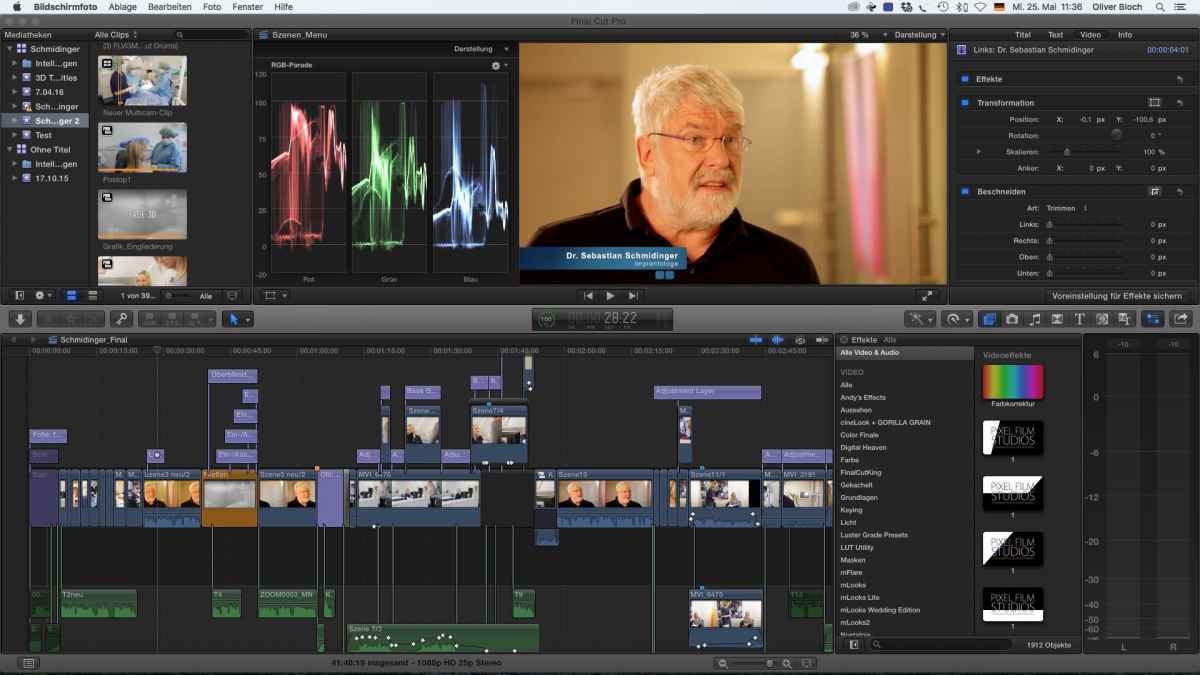
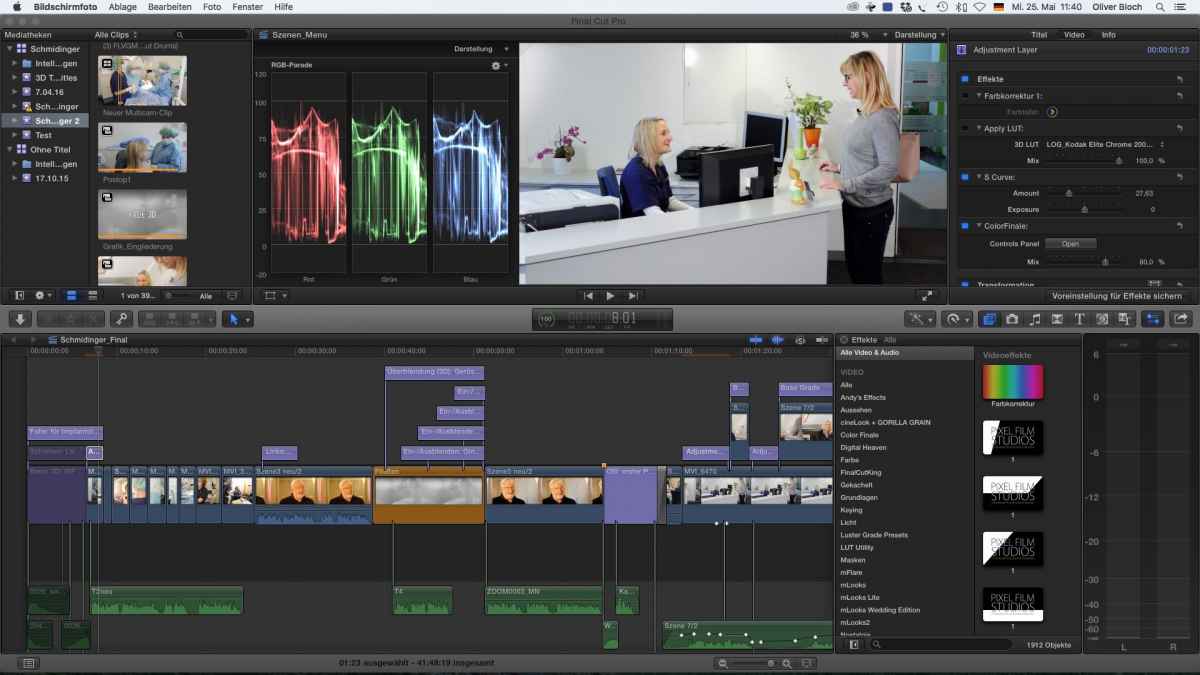
Ok here are 2 screenshots - fc means final cut - I left the rgb scale open, which I mainly use @BenB. I graded with the color board, as well as color finale just to put a little more punch in the picture. It seems really that the dvd pushes as well. Which it should not or? It should loose some quality. I burned a DVD and tested it on my samsung flat, with a BluRay Player which does an nice upscale. So the picture quality is just fine - and in standard picture mode it is too saturated and way to red. In "Film" Mode it looks fine. I know that every monitor and TV looks different BUT I presume at least if you sit down hours with color grading to get all even and set it right on the scopes it should at least look good! I don't presume that it should look equal on my grading but somewhere near. And I really don't wanna sit down again - getting the red out - so the dvd can push it in... this would be trial and error - horror on 45 minutes... thx. again to both on you .
I use an iMac I7- with raids... Maybe I can do an Layer above with an broadcast safe filter?
I use an iMac I7- with raids... Maybe I can do an Layer above with an broadcast safe filter?
Please Log in to join the conversation.
- oliver.bloch
-
Topic Author
- Offline
- Junior Member
-
Less
More
- Posts: 23
- Thank you received: 0
25 May 2016 10:56 #77098
by oliver.bloch
Replied by oliver.bloch on topic Color Grade seems to be too red on DVD
grabs

Please Log in to join the conversation.
- oliver.bloch
-
Topic Author
- Offline
- Junior Member
-
Less
More
- Posts: 23
- Thank you received: 0
25 May 2016 10:57 #77099
by oliver.bloch
Replied by oliver.bloch on topic Color Grade seems to be too red on DVD
2. grabs
Please Log in to join the conversation.
- Tom Wolsky
-

- Offline
- Moderator
-

25 May 2016 12:39 #77103
by Tom Wolsky
Replied by Tom Wolsky on topic Color Grade seems to be too red on DVD
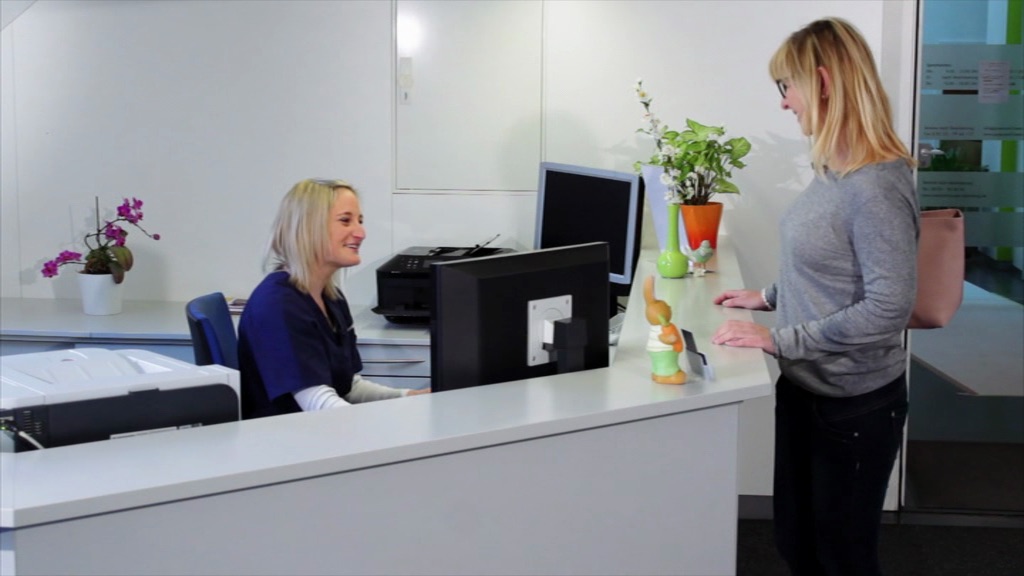
What are the screen shots showing? I see the FCP one, though it makes the image quite small. What are the second and fourth shots. In the third and fourth short I can really see any difference, though it's hard too tell with size of the FCP shot. The first image has too much red in in and a marked red cast in the shadows. Would like to see the vectorscopes for these. The second image definitely is too red, which is compounding the excessive red in the first image.
Most TV work to standardized delivery specifications, which your media looks as if it's exceeding. Because of delivery standards most TV add vibrance to the input, which does exactly what you're seeing here.
What broadcast safe effects are you applying with what settings?
Most TV work to standardized delivery specifications, which your media looks as if it's exceeding. Because of delivery standards most TV add vibrance to the input, which does exactly what you're seeing here.
What broadcast safe effects are you applying with what settings?
Please Log in to join the conversation.
- Tom Wolsky
-
- Offline
- Moderator
-
25 May 2016 12:39 #77104
by Tom Wolsky
Replied by Tom Wolsky on topic Color Grade seems to be too red on DVD
What are the screen shots showing? I see the FCP one, though it makes the image quite small. What are the second and fourth shots. In the third and fourth short I can really see any difference, though it's hard too tell with size of the FCP shot. The first image has too much red in in and a marked red cast in the shadows. Would like to see the vectorscopes for these. The second image definitely is too red, which is compounding the excessive red in the first image.
Most TV work to standardized delivery specifications, which your media looks as if it's exceeding. Because of delivery standards most TV add vibrance to the input, which does exactly what you're seeing here.
What broadcast safe effects are you applying with what settings?
Most TV work to standardized delivery specifications, which your media looks as if it's exceeding. Because of delivery standards most TV add vibrance to the input, which does exactly what you're seeing here.
What broadcast safe effects are you applying with what settings?
Please Log in to join the conversation.
25 May 2016 12:45 #77105
by BenB
Replied by BenB on topic Color Grade seems to be too red on DVD
I agree with Tom. Looks like a saturation issue, and from the FCPX scopes I see, you're not meeting broadcast safe standards. Thus, DVDs won't look right.
Please Log in to join the conversation.
- Unfenswinger
-
- Offline
- Banned
-
Less
More
- Posts: 58
- Thank you received: 5
25 May 2016 12:45 #77106
by Unfenswinger
With colour management it is important you at least start with a reliable datum and that means ensuring your grading monitor is calibrated and the OS is using the correct colour profile from the calibration process.
Can you confirm you do have a calibrated iMac screen and you've selected the correct colour profile? Are you using the latest iMac with wide gamut screen by any chance?
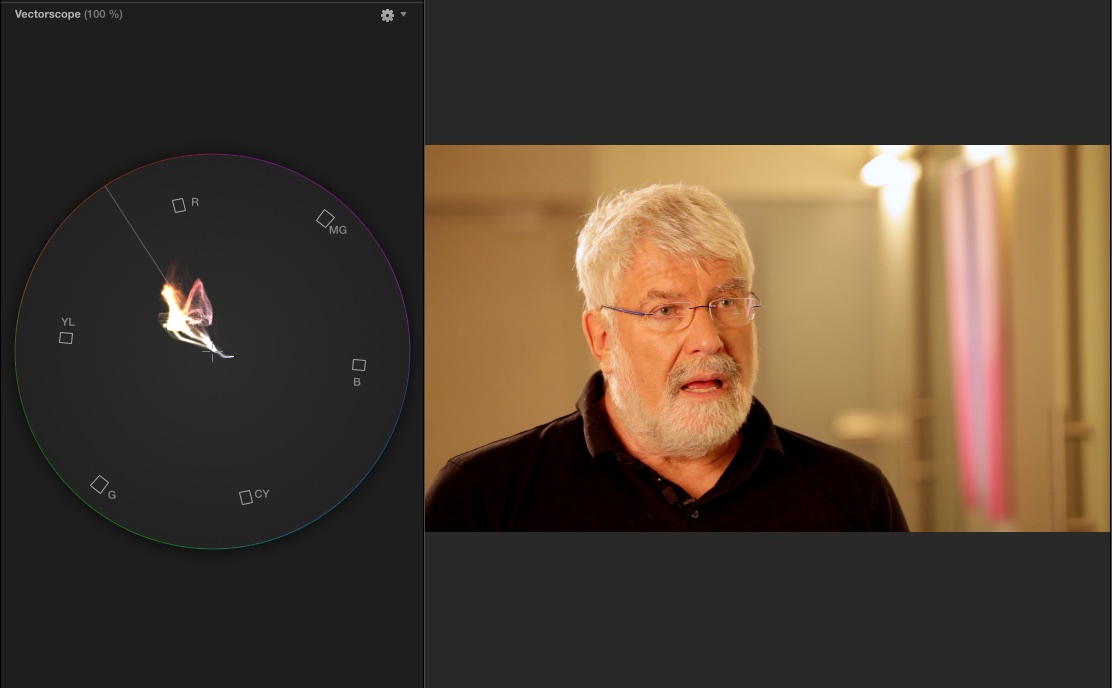
The talking head of the gentleman is very obviously warm as seen by the grabs and clearly measured in the scopes, his black tee-shirt shows a clear red lift in the blacks. The second pair of grabs are slightly cool which you can see with the curve line in the upper mid-tones is lifted in the blue channel.
I hoped you were going to post an fop grab and an iDVD grab. I don't know what to make of the screen shots other than the first grabs are very warm and the white balance looks off because the gentleman's skin is merging into the background. I'd certainly like to cool off his background to separate him and give the image a bit of depth from an aesthetic point of view.
Replied by Unfenswinger on topic Color Grade seems to be too red on DVD
oliver.bloch wrote: Ok here are 2 screenshots - fc means final cut - I left the rgb scale open, which I mainly use @BenB. I graded with the color board, as well as color finale just to put a little more punch in the picture. It seems really that the dvd pushes as well. Which it should not or? It should loose some quality. I burned a DVD and tested it on my samsung flat, with a BluRay Player which does an nice upscale. So the picture quality is just fine - and in standard picture mode it is too saturated and way to red. In "Film" Mode it looks fine. I know that every monitor and TV looks different BUT I presume at least if you sit down hours with color grading to get all even and set it right on the scopes it should at least look good! I don't presume that it should look equal on my grading but somewhere near. And I really don't wanna sit down again - getting the red out - so the dvd can push it in... this would be trial and error - horror on 45 minutes... thx. again to both on you .
I use an iMac I7- with raids... Maybe I can do an Layer above with an broadcast safe filter?
With colour management it is important you at least start with a reliable datum and that means ensuring your grading monitor is calibrated and the OS is using the correct colour profile from the calibration process.
Can you confirm you do have a calibrated iMac screen and you've selected the correct colour profile? Are you using the latest iMac with wide gamut screen by any chance?
The talking head of the gentleman is very obviously warm as seen by the grabs and clearly measured in the scopes, his black tee-shirt shows a clear red lift in the blacks. The second pair of grabs are slightly cool which you can see with the curve line in the upper mid-tones is lifted in the blue channel.
I hoped you were going to post an fop grab and an iDVD grab. I don't know what to make of the screen shots other than the first grabs are very warm and the white balance looks off because the gentleman's skin is merging into the background. I'd certainly like to cool off his background to separate him and give the image a bit of depth from an aesthetic point of view.
Please Log in to join the conversation.
- oliver.bloch
-
Topic Author
- Offline
- Junior Member
-
Less
More
- Posts: 23
- Thank you received: 0
31 May 2016 09:26 #77271
by oliver.bloch
Replied by oliver.bloch on topic Color Grade seems to be too red on DVD
Hey Tom, hey all, sorry for the late response, didn't get the email from fcpo... ok - first shot is the grading of the Itv in final cut - i posted that - so u can have also a look at the scopes which are a little off in the blu highlights but the image looks good to me - the second one is the output on dvd. Too red, too dark! its a vlc shot because Idvd doesn't let me make a grab... but it looks the same... did even a test burn and go on my blu ray player with samsung led and its the same... to dark to red! (the 3./4. is a scene shot... but you can see the problems better in the itv shot)
So the setting was a warm setting in the itv - therefore I know that it is warmer that it would look like normally but I tried to grade it... and in fcpx it looks fine to me... the problem is the output... (there was another problem on the burned dvd with a frame or two sound delay, which is also awkward.)
BenB means that if I burn it DVD cuts off the blue highlights and therefore everything is darker and more red?
I didnt use any safe standards yet... it was a question if I apply one everything will turn better/ or worse?
It is a DVD but not for Broadcast... and last but not least... nope no calibrated monitor it is an iMac! I know that this is not the best monitor to do this things - BUT if I cut and edit on the same monitor that I playback - it should look always the same... and it doesn't matter if its calibrated or not because red is always the same red on the same monitor right? Too easy to say its the monitor... if that you shouldn't use an iMac at all... too bright too colorful too everything... but thats what I got... thanks again...
So the setting was a warm setting in the itv - therefore I know that it is warmer that it would look like normally but I tried to grade it... and in fcpx it looks fine to me... the problem is the output... (there was another problem on the burned dvd with a frame or two sound delay, which is also awkward.)
BenB means that if I burn it DVD cuts off the blue highlights and therefore everything is darker and more red?
I didnt use any safe standards yet... it was a question if I apply one everything will turn better/ or worse?
It is a DVD but not for Broadcast... and last but not least... nope no calibrated monitor it is an iMac! I know that this is not the best monitor to do this things - BUT if I cut and edit on the same monitor that I playback - it should look always the same... and it doesn't matter if its calibrated or not because red is always the same red on the same monitor right? Too easy to say its the monitor... if that you shouldn't use an iMac at all... too bright too colorful too everything... but thats what I got... thanks again...
Please Log in to join the conversation.
- oliver.bloch
-
Topic Author
- Offline
- Junior Member
-
Less
More
- Posts: 23
- Thank you received: 0
31 May 2016 09:29 #77272
by oliver.bloch
Replied by oliver.bloch on topic Color Grade seems to be too red on DVD
here is a vectorscope
Please Log in to join the conversation.
- oliver.bloch
-
Topic Author
- Offline
- Junior Member
-
Less
More
- Posts: 23
- Thank you received: 0
31 May 2016 09:31 #77273
by oliver.bloch
Replied by oliver.bloch on topic Color Grade seems to be too red on DVD
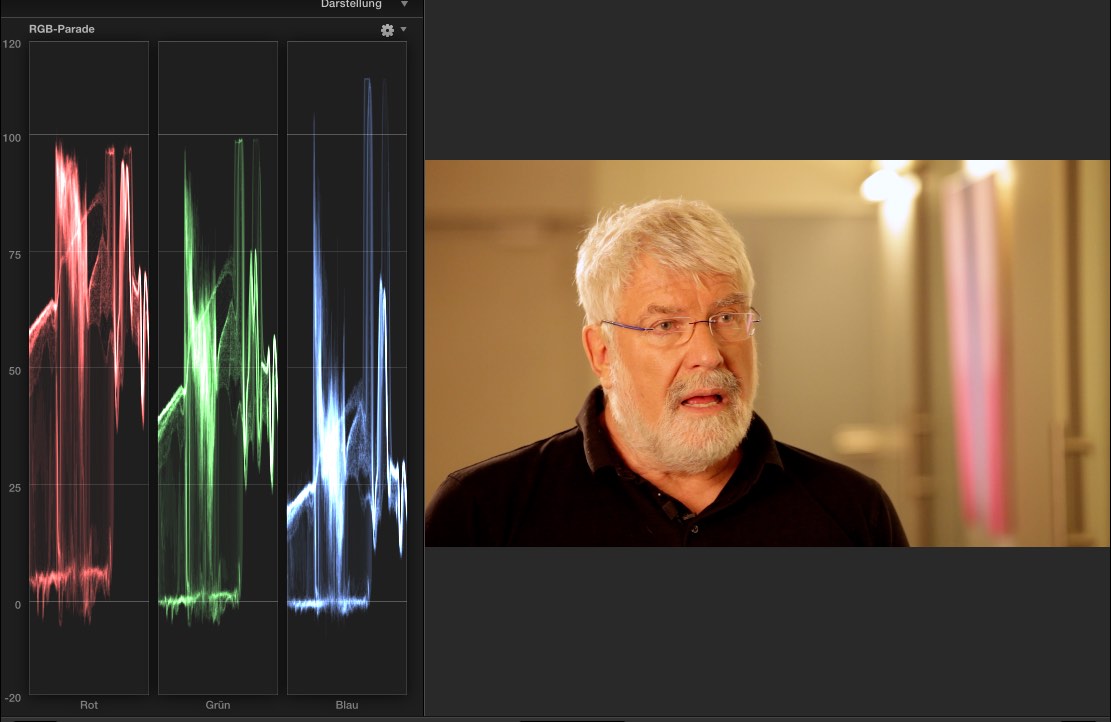
and the rgb shot bigger...
Please Log in to join the conversation.
- MarkNelsonMovies
-
- Offline
- Elite Member
-

Less
More
- Posts: 256
- Thank you received: 48
31 May 2016 14:55 #77283
by MarkNelsonMovies
Replied by MarkNelsonMovies on topic Color Grade seems to be too red on DVD
To my knowledge, DVD's have a more limited color space than video from a modern HD camera, so a DVD can't look the same, even on the same monitor, because red is not the same red, and all the info simply isn't there.
I'd definitely apply a broadcast safe filter to the footage, and while I don't have anything to do with broadcast, I'm sure that some other members that do could explain it's proper use, and what to do to the color grade before and/or after applying it, or you could search the forum for more info.
I'd definitely apply a broadcast safe filter to the footage, and while I don't have anything to do with broadcast, I'm sure that some other members that do could explain it's proper use, and what to do to the color grade before and/or after applying it, or you could search the forum for more info.
Please Log in to join the conversation.

31 May 2016 15:07 #77286
by VidGreg
Replied by VidGreg on topic Color Grade seems to be too red on DVD
Hi Oliver
Your RGB parade is showing several things.
1 You are crushing Blacks (dark/shadows) You could raise the exposure and readjust the mids.
2 The super whites is due to the light fixture to the right of subject. Apply a shape mask in the Color Correction and reduce exposure inside the mask, you could also reduce some color or saturation inside the mask as well. Goal is to knock down the overexposure due to the light. This gives you more room to correct the rest of the area.
3 Reds are too high, mostly showing up in the face/skin tones. Try reducing the mid tones red. Changing the saturation levels will help and then it is just finessing back and forth.
If you have more clips from same camera shoot/set, you can create a custom preset and apply it to the other clips to correct them and keep a consistent look.
Hope you do realize that RGB parade along with some of the other scopes represent spatially the clip. You can clearly see the shoulder, hair/face and the light as you go left to right.
DVD is a 20+ year old "standard" that creates abilities and limitations on optical disk delivery. This includes not only file formats/structures, but also data bandwidth, maximum delivery speed, and resolution/ratios. The various disk players also have to interpret and convert to screen the video. Upscaling by a player will most likely change the original images.
Combine this with different versions of DVD "standards" used by different manufactures and "allowable" exceptions to those standards, there really is only a general "idea" of DVD, not total conformance.
Apple with iDVD uses allowable non conformance. Apple version of HD 16X9.
Finally, when you exceed the DVD standards in the video side, it affects the audio side too. Normally audio static/distortion. This relates to how many bits can be stored and read on a DVD and is one reason why Blu-ray is so much better.
Hope this helps, Greg
Your RGB parade is showing several things.
1 You are crushing Blacks (dark/shadows) You could raise the exposure and readjust the mids.
2 The super whites is due to the light fixture to the right of subject. Apply a shape mask in the Color Correction and reduce exposure inside the mask, you could also reduce some color or saturation inside the mask as well. Goal is to knock down the overexposure due to the light. This gives you more room to correct the rest of the area.
3 Reds are too high, mostly showing up in the face/skin tones. Try reducing the mid tones red. Changing the saturation levels will help and then it is just finessing back and forth.
If you have more clips from same camera shoot/set, you can create a custom preset and apply it to the other clips to correct them and keep a consistent look.
Hope you do realize that RGB parade along with some of the other scopes represent spatially the clip. You can clearly see the shoulder, hair/face and the light as you go left to right.
DVD is a 20+ year old "standard" that creates abilities and limitations on optical disk delivery. This includes not only file formats/structures, but also data bandwidth, maximum delivery speed, and resolution/ratios. The various disk players also have to interpret and convert to screen the video. Upscaling by a player will most likely change the original images.
Combine this with different versions of DVD "standards" used by different manufactures and "allowable" exceptions to those standards, there really is only a general "idea" of DVD, not total conformance.
Apple with iDVD uses allowable non conformance. Apple version of HD 16X9.
Finally, when you exceed the DVD standards in the video side, it affects the audio side too. Normally audio static/distortion. This relates to how many bits can be stored and read on a DVD and is one reason why Blu-ray is so much better.
Hope this helps, Greg
Please Log in to join the conversation.
- oliver.bloch
-
Topic Author
- Offline
- Junior Member
-
Less
More
- Posts: 23
- Thank you received: 0
31 May 2016 15:22 #77287
by oliver.bloch
Replied by oliver.bloch on topic Color Grade seems to be too red on DVD
Hi Greg, thx so much! first reply with useful hands ons... I already was experimenting with adjustment layers... reducing red; saturation in the mids and so on... burn it on dvd and control it...  And Im almost there I hope... I will try some of your suggestions as well... thing is... DVD is still out there and a lot of people want it still... I know a file would be much better or blu ray... but a menu structure is still nice to have... its just it doesn't make sense... having a editing system and color grading on a complete new level and then u think ur done but ur not! thx for the help... I will try to convince my clients from now on to forget about DVD...
 Please Log in to join the conversation.

31 May 2016 16:41 #77291
by dgwvideo
Creating history....one edit at a time !
Replied by dgwvideo on topic Color Grade seems to be too red on DVD
Just to add a few additional comments to Greg's excellent advice and your comment about adjustment layers. Since the color correction in FCPX is an effect, you can have multiple instances of it applied to a single clip, such as primary and secondary grades and additional corrections. There is no real need to place these color corrections on an adjustment layer which would affect every clip underneath the layer and limit any individual different adjustment that might need to be done to a specific clip. The saved preset as mentioned is a better alternative in my view.
Secondly, even though you are not going to broadcast, you should still grade your DVD to be broadcast compliant with respect to legal video and audio levels. If you find your finished color corrections still leave a few over the limit levels on some clips, then a broadcast safe luma filter and/or chroma filter should be placed in the project. This can be done on an adjustment layer to span whatever clips need them, or individually per clip.
Secondly, even though you are not going to broadcast, you should still grade your DVD to be broadcast compliant with respect to legal video and audio levels. If you find your finished color corrections still leave a few over the limit levels on some clips, then a broadcast safe luma filter and/or chroma filter should be placed in the project. This can be done on an adjustment layer to span whatever clips need them, or individually per clip.
Creating history....one edit at a time !
Please Log in to join the conversation.
31 May 2016 19:28 #77297
by VidGreg
Replied by VidGreg on topic Color Grade seems to be too red on DVD
You're welcome Oliver.
I totally agree with you that Optical disc in general and DVDs in particular are still distribution method of choice for lots of folks. I help families and groups produce "Family" movies that are scripted, costumed and often feature length. These are then mostly delivered by DVDs ~(80-90%) BDs ~(10-20%) and a small number via USB stick and only occasionally electronic or streaming via a service. So still have to "burn" discs.
I lament the lack of support for iDVD which is now only partially functional in El Capitan. Still the best simple but nice authoring program for DVDs.
Blu-ray can be burned on Macs, but Apple support of BD is very limited. If you export out of FCPX as a BD disc, you can right click the .img file and burn on a supported BD R/W drive.
Creating USB sticks have issues all their own. Streaming while a very real possibility and perhaps the most universal, is rarely wanted in what I do. People just seem to want a tangible disc to put on the shelf. I'm still burning 100s every year.
Dan's (dgwvideo) advice about using multiple color corrections for various corrections is a good one. I routinely do this.
Not sure when you talk about using an "adjustment" layer if you mean just addition levels of color corrections, or did you mean using an actual "Adjustment Layer" in the Timeline and applying Color Correction and Broadcast Safe filter to that. ??
An Adjustment Layer is in essence an empty Title clip that you can add filters or correction to and it affects all layers below it in the Timeline.
I have applied Broadcast Safe (BS) filters to the entire Timeline via an Adjustment Layer so I could make new adjustments to Color Corrections and being able to turn BS on and off. I ran into some issues doing it this way and mean to pose the question here at some point.
What I found in the project I was doing was that when I applied the BS filter to the entire Timeline via an Adjustment Layer, the various clips responded differently. It seemed to aggregate the amount of filtering to the greatest level of any one clip in the Timeline to all clips, in at least some of the clips, instead of only applying a minimum amount of compression to each clip. BS is in essence a compression algorithm to prevent super whites and blacks.
I have not figured out if this was due to some of the plug-ins I was using or if it is intrinsic to how Apple wrote the BS Filter. If I viewed the same clip in the scopes when BS was applied to the entire Timeline via an AL the compression or dynamic range would be squashed more than if I applied the BS Filter to the individual clip. YMMV so proceed with caution.
Anyone else notice this?
The one thing I would say about BS Filters is that it is important to do Color Corrections first and then the BS as a safety feature. Don't use it for an easy shortcut for CC.
I burn both DVD and BD test discs and then view them on a couple of TV/monitors and verify the quality of the disc. This leads to a couple of revisions at least till I am happy with them. The disc will also look different on different TVs/players.
I always "Share" export the DVD/BD file to the desktop and "Burn" the .img from there and don't use the direct burning inside of FCPX. Less problems, and you can also then make(burn) extra copies without opening up FCPX and re-export.
If you use iDVD, then you want a QT or .mov file instead from FCPX. (there are additional file formats supported by iDVD, my point here is that iDVD will create the disc image file with the needed support file structure for DVDs )
Lots of great free tutorials on Color Grading on the internet, well worth the time to watch.
Here's a link to Denver Riddle's channel which has good videos… www.youtube.com/channel/UCAYVd0fXmRJFkBAaQJRvcuw
Happy Editing, have fun
Hope this helps, Greg
I totally agree with you that Optical disc in general and DVDs in particular are still distribution method of choice for lots of folks. I help families and groups produce "Family" movies that are scripted, costumed and often feature length. These are then mostly delivered by DVDs ~(80-90%) BDs ~(10-20%) and a small number via USB stick and only occasionally electronic or streaming via a service. So still have to "burn" discs.
I lament the lack of support for iDVD which is now only partially functional in El Capitan. Still the best simple but nice authoring program for DVDs.
Blu-ray can be burned on Macs, but Apple support of BD is very limited. If you export out of FCPX as a BD disc, you can right click the .img file and burn on a supported BD R/W drive.
Creating USB sticks have issues all their own. Streaming while a very real possibility and perhaps the most universal, is rarely wanted in what I do. People just seem to want a tangible disc to put on the shelf. I'm still burning 100s every year.
Dan's (dgwvideo) advice about using multiple color corrections for various corrections is a good one. I routinely do this.
Not sure when you talk about using an "adjustment" layer if you mean just addition levels of color corrections, or did you mean using an actual "Adjustment Layer" in the Timeline and applying Color Correction and Broadcast Safe filter to that. ??
An Adjustment Layer is in essence an empty Title clip that you can add filters or correction to and it affects all layers below it in the Timeline.
I have applied Broadcast Safe (BS) filters to the entire Timeline via an Adjustment Layer so I could make new adjustments to Color Corrections and being able to turn BS on and off. I ran into some issues doing it this way and mean to pose the question here at some point.
What I found in the project I was doing was that when I applied the BS filter to the entire Timeline via an Adjustment Layer, the various clips responded differently. It seemed to aggregate the amount of filtering to the greatest level of any one clip in the Timeline to all clips, in at least some of the clips, instead of only applying a minimum amount of compression to each clip. BS is in essence a compression algorithm to prevent super whites and blacks.
I have not figured out if this was due to some of the plug-ins I was using or if it is intrinsic to how Apple wrote the BS Filter. If I viewed the same clip in the scopes when BS was applied to the entire Timeline via an AL the compression or dynamic range would be squashed more than if I applied the BS Filter to the individual clip. YMMV so proceed with caution.
Anyone else notice this?
The one thing I would say about BS Filters is that it is important to do Color Corrections first and then the BS as a safety feature. Don't use it for an easy shortcut for CC.
I burn both DVD and BD test discs and then view them on a couple of TV/monitors and verify the quality of the disc. This leads to a couple of revisions at least till I am happy with them. The disc will also look different on different TVs/players.
I always "Share" export the DVD/BD file to the desktop and "Burn" the .img from there and don't use the direct burning inside of FCPX. Less problems, and you can also then make(burn) extra copies without opening up FCPX and re-export.
If you use iDVD, then you want a QT or .mov file instead from FCPX. (there are additional file formats supported by iDVD, my point here is that iDVD will create the disc image file with the needed support file structure for DVDs )
Lots of great free tutorials on Color Grading on the internet, well worth the time to watch.
Here's a link to Denver Riddle's channel which has good videos… www.youtube.com/channel/UCAYVd0fXmRJFkBAaQJRvcuw
Happy Editing, have fun
Hope this helps, Greg
Please Log in to join the conversation.
- oliver.bloch
-
Topic Author
- Offline
- Junior Member
-
Less
More
- Posts: 23
- Thank you received: 0
01 Jun 2016 08:29 #77314
by oliver.bloch
Replied by oliver.bloch on topic Color Grade seems to be too red on DVD
Hey Dan, hey Greg
thanks again! I know the difference of these to possibilities of grading. I got into this with Dever Riddle and Color Finale and watched a lot of tutorials and moreover graded a lot. I do also weddings and these I shoot always in Cinestyle so I have to grade a lot - but good practice... This work was shot in a modified standard look (canons) to match the 2 cams... so there was just to pop a little the colors and also blacks... I know I tend to crush them a little... I´m not a fan of lifted blacks even not for weddings... I have done a general color corrections, then a cam matching and then a shot matching... this time with adjustment layers (different layers for different cams and scenes) - so the scenes themselves and the cams would match... if there was something off, I got into the file itself and corrected it... it was everything fine till I burned it... that was all the fuss about... right now Im quite there - will have a look again on the changes... I applied an adjustment layer and turned down red generally like -5 and some mid saturation also -5 and it looks already good... and applied the bs filter overall... (I did all this on a small part of the film to see how it would work out). So Now I have to go over the full peace to see if it does everything correct... Hence everything was already graded and matched I think the adjustment layer is just fine and much faster... what I like on this workflow ( I did this the first time with adjustment layers ) it shows u direct in the timeline where u corrected something and what and where not... so on 45 min its quite easy to catch up where u still have to work and where not - while with "inside" corrections u have to highlight the clip itself to see what u have done.. this is just a little thought but it helps...
again thank u and yes greg... I love idvd.. because u can create fast a nice menu while adobes encore (for blu ray) is horrible complicated to work with and u have to include ae for the menus... sadly apple has tossed away the pro version and doesn't care about dvd´s in general...
oh greg: how do u create a preset that u mentioned? I always copy and paste (part) of the effects... a preset would be really fine... (moreover for the dvd output) and did u notice also that right out of fcpx the space gets used on a dvd while i dvd seems to put on another compression and use just parts of the dvd (leaves more space... but to my understanding this means more compression = less quality) ...
cheers
thanks again! I know the difference of these to possibilities of grading. I got into this with Dever Riddle and Color Finale and watched a lot of tutorials and moreover graded a lot. I do also weddings and these I shoot always in Cinestyle so I have to grade a lot - but good practice... This work was shot in a modified standard look (canons) to match the 2 cams... so there was just to pop a little the colors and also blacks... I know I tend to crush them a little...
I´m not a fan of lifted blacks even not for weddings... I have done a general color corrections, then a cam matching and then a shot matching... this time with adjustment layers (different layers for different cams and scenes) - so the scenes themselves and the cams would match... if there was something off, I got into the file itself and corrected it... it was everything fine till I burned it... that was all the fuss about... right now Im quite there - will have a look again on the changes... I applied an adjustment layer and turned down red generally like -5 and some mid saturation also -5 and it looks already good... and applied the bs filter overall... (I did all this on a small part of the film to see how it would work out). So Now I have to go over the full peace to see if it does everything correct... Hence everything was already graded and matched I think the adjustment layer is just fine and much faster... what I like on this workflow ( I did this the first time with adjustment layers ) it shows u direct in the timeline where u corrected something and what and where not... so on 45 min its quite easy to catch up where u still have to work and where not - while with "inside" corrections u have to highlight the clip itself to see what u have done.. this is just a little thought but it helps...again thank u and yes greg... I love idvd.. because u can create fast a nice menu while adobes encore (for blu ray) is horrible complicated to work with and u have to include ae for the menus... sadly apple has tossed away the pro version and doesn't care about dvd´s in general...
oh greg: how do u create a preset that u mentioned? I always copy and paste (part) of the effects... a preset would be really fine... (moreover for the dvd output)
and did u notice also that right out of fcpx the space gets used on a dvd while i dvd seems to put on another compression and use just parts of the dvd (leaves more space... but to my understanding this means more compression = less quality) ...cheers
Please Log in to join the conversation.
- oliver.bloch
-
Topic Author
- Offline
- Junior Member
-
Less
More
- Posts: 23
- Thank you received: 0
01 Jun 2016 09:40 #77319
by oliver.bloch
Replied by oliver.bloch on topic Color Grade seems to be too red on DVD
just saw that my first color corrections where inside! too much this project... - I came cross the adjustment layers to get everything fast right now for the dvd export and not to dive into every single clip and adjust it from there... but I still think what I wrote above especially for this 2 cam multi scene project which was a perfect playground for fcpx and its possibllities...
too much this project... - I came cross the adjustment layers to get everything fast right now for the dvd export and not to dive into every single clip and adjust it from there... but I still think what I wrote above especially for this 2 cam multi scene project which was a perfect playground for fcpx and its possibllities... Please Log in to join the conversation.
