


- Posts: 4455
- Thank you received: 962
3 Post Moderation Rule for New Boarders (25 Jan 2021)
New boarders will have their posts moderated - Don't worry if you cannot see your post immediately.
Any Clever Way for a "Clean" Non-Magnetic Delete?
- ronny courtens
-

- Offline
- Moderator
-

Less
More
14 Apr 2016 11:20 #75373
by ronny courtens
Replied by ronny courtens on topic Any Clever Way for a "Clean" Non-Magnetic Delete?
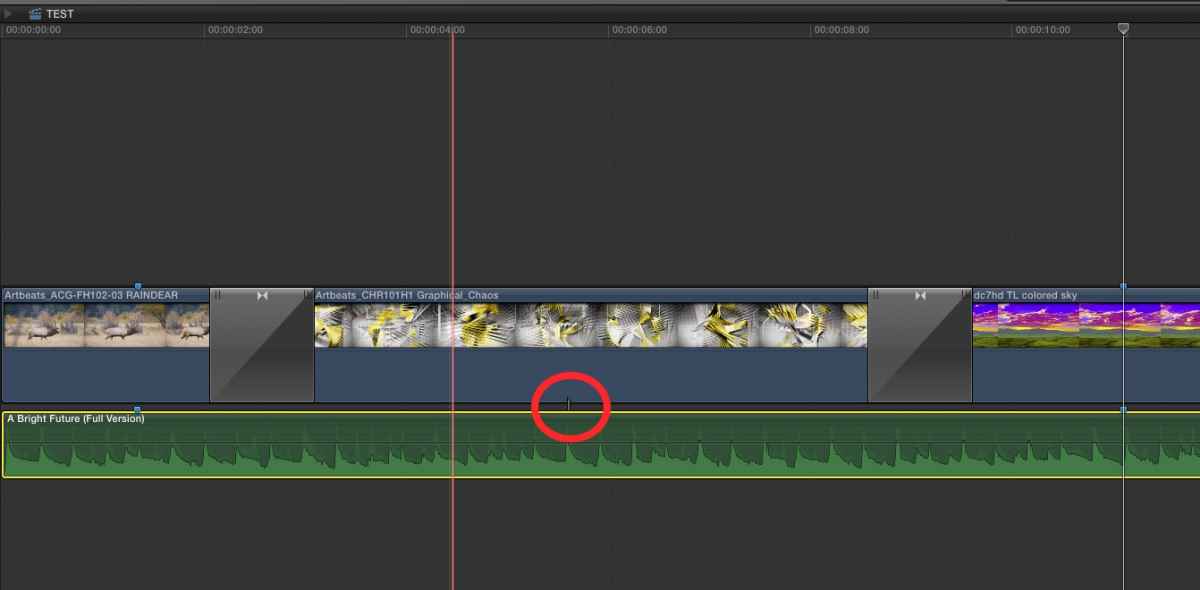
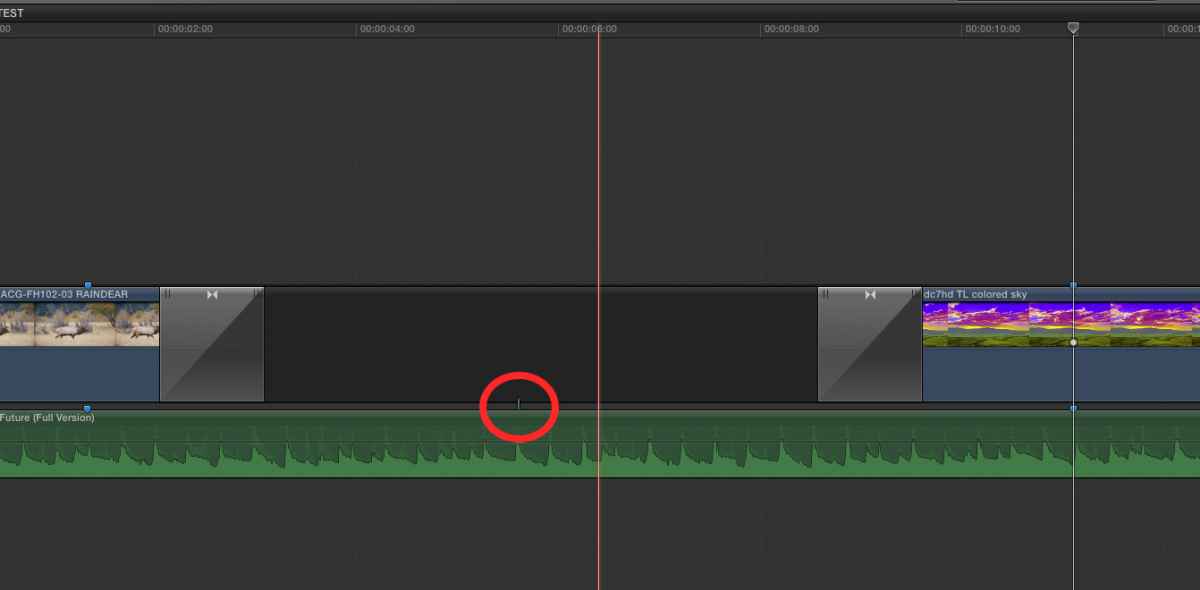
Good thinking, Karsten. But not necessary when you use Shift-Delete and the P tool.
Audio attached to middle clip:
Shift-Delete middle clip:
- Ronny
Audio attached to middle clip:
Shift-Delete middle clip:
- Ronny
Please Log in to join the conversation.
- Karsten Schlüter
-

- Offline
- Moderator
-
Less
More
- Posts: 3790
- Thank you received: 718
14 Apr 2016 12:03 #75374
by Karsten Schlüter
some folks in Cupertino are way too smart for me ... :lol:
THANKS again, Ronny!
Replied by Karsten Schlüter on topic Any Clever Way for a "Clean" Non-Magnetic Delete?
ronny courtens wrote: Good thinking, Karsten. But not necessary when you use Shift-Delete and the P tool.
…
some folks in Cupertino are way too smart for me ... :lol:
THANKS again, Ronny!
Please Log in to join the conversation.
- Carsten Orlt
-

- Offline
- Platinum Member
-

Less
More
- Posts: 422
- Thank you received: 82
14 Apr 2016 12:21 #75375
by Carsten Orlt
Replied by Carsten Orlt on topic Any Clever Way for a "Clean" Non-Magnetic Delete?
You're not wrong there 
Two take aways: always more than one way to skin the cat and I have to explore the position tool a bit more which I must admit I'm not using at all really.
Happy editing
Carsten
Two take aways: always more than one way to skin the cat and I have to explore the position tool a bit more which I must admit I'm not using at all really.
Happy editing
Carsten
Please Log in to join the conversation.


14 Apr 2016 19:46 #75390
by Shane M
Ronny, this is a great method. I had no idea you can extend a clip in to a transition with the P tool. So many "hidden" little things in FCPX...love discovering them.
I really appreciate it!
Replied by Shane M on topic Any Clever Way for a "Clean" Non-Magnetic Delete?
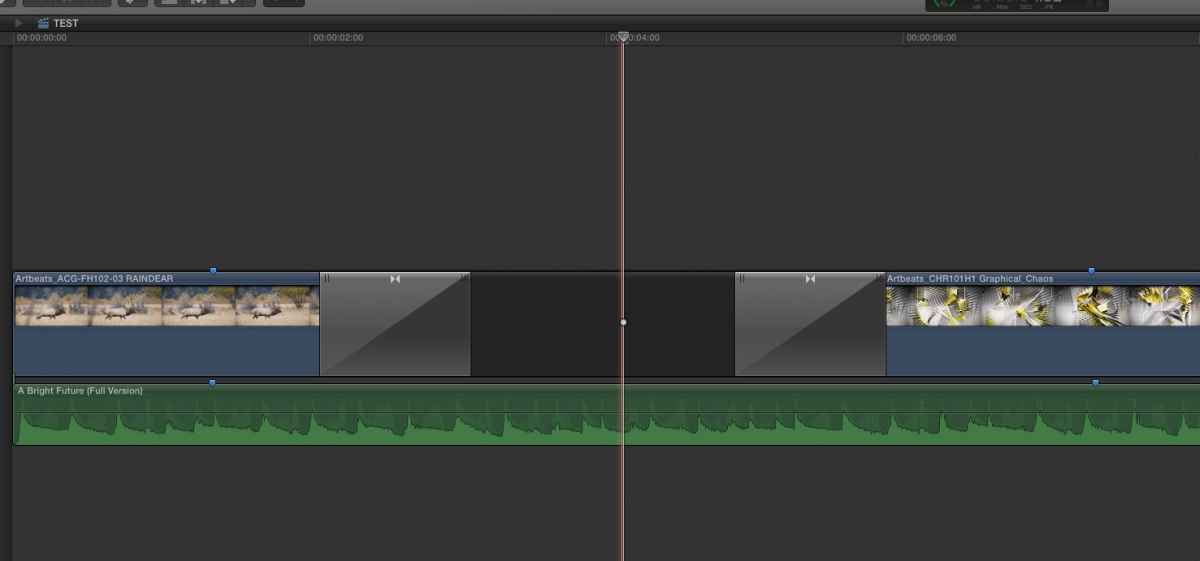
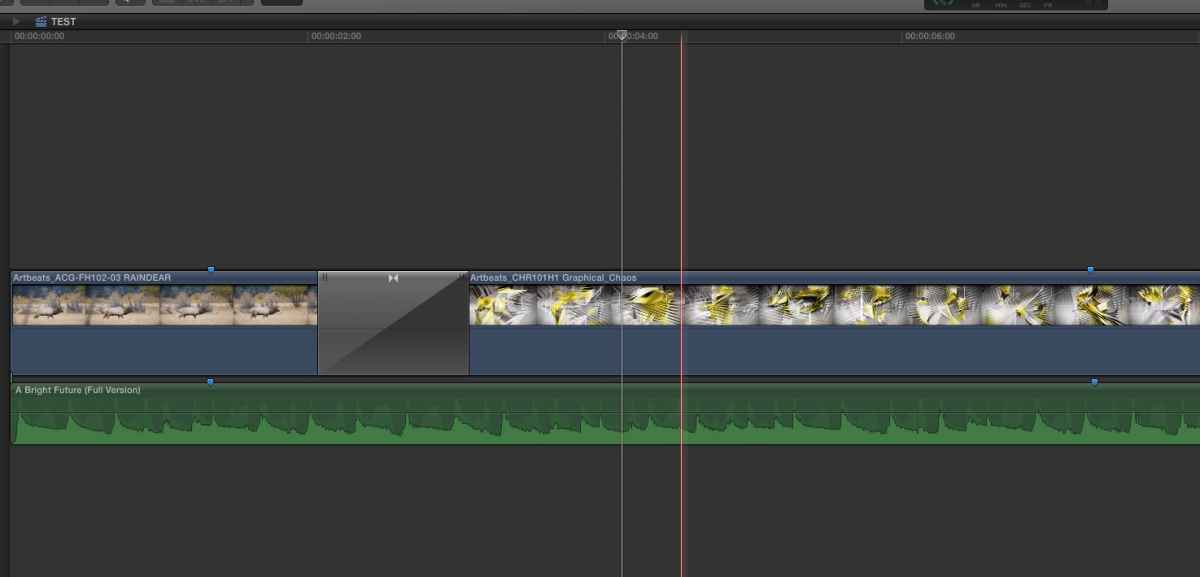
ronny courtens wrote: You are correct, Shane asked how he could make the third clip fill the gap with its front handle, without getting out of sync with the music score. But that is exactly the same workflow:
1. Select the Position tool ("P") and Shift-Delete the middle clip:
2. Delete the transition from the third clip and just drag (extend) the start of the third clip under the transition:
Ronny
Ronny, this is a great method. I had no idea you can extend a clip in to a transition with the P tool. So many "hidden" little things in FCPX...love discovering them.
I really appreciate it!
Please Log in to join the conversation.

15 Apr 2016 13:04 #75414
by BenB
Replied by BenB on topic Any Clever Way for a "Clean" Non-Magnetic Delete?
Why is the position tool needed with shift-delete? Or to trim with a transition? I'm missing something.
Please Log in to join the conversation.
- Joris Vertenten
-

- Offline
- Junior Member
-

Less
More
- Posts: 24
- Thank you received: 2
15 Apr 2016 13:20 - 15 Apr 2016 14:00 #75416
by Joris Vertenten
Replied by Joris Vertenten on topic Any Clever Way for a "Clean" Non-Magnetic Delete?
It seems you need the P tool to drag under the transition, if you do it with your mouse.
If you use keyboard shortcuts, select with bracket, put playhead on transition, trim to position playhead....
You don't need the P.
If you use keyboard shortcuts, select with bracket, put playhead on transition, trim to position playhead....
You don't need the P.
Last edit: 15 Apr 2016 14:00 by Joris Vertenten.
Please Log in to join the conversation.
- ronny courtens
-
- Offline
- Moderator
-
Less
More
- Posts: 4455
- Thank you received: 962
15 Apr 2016 16:59 #75422
by ronny courtens
Replied by ronny courtens on topic Any Clever Way for a "Clean" Non-Magnetic Delete?
Yep, you only need the P tool to extend the clip under the transition. Press P and drag. Much faster than using keyboard shortcuts.
- Ronny
- Ronny
Please Log in to join the conversation.
- Joris Vertenten
-
- Offline
- Junior Member
-
Less
More
- Posts: 24
- Thank you received: 2
15 Apr 2016 17:05 #75424
by Joris Vertenten
Replied by Joris Vertenten on topic Any Clever Way for a "Clean" Non-Magnetic Delete?
indeed, faster
I thought first 'depends of where your hands are', but you'd have to use the mouse anyway to select the transition before you can delete it... .
I thought first 'depends of where your hands are', but you'd have to use the mouse anyway to select the transition before you can delete it... .
Please Log in to join the conversation.
15 Apr 2016 17:08 #75426
by BenB
Replied by BenB on topic Any Clever Way for a "Clean" Non-Magnetic Delete?
OK, I'm lost. Are you guys operating on that audio clip, or on the transition directly? Are you doing roll or ripple edits? I'm not finding much difference in behavior between A tool and P tool when trimming with a transition. I'm totally lost.
Please Log in to join the conversation.
- ronny courtens
-
- Offline
- Moderator
-
Less
More
- Posts: 4455
- Thank you received: 962
15 Apr 2016 17:15 #75428
by ronny courtens
Replied by ronny courtens on topic Any Clever Way for a "Clean" Non-Magnetic Delete?
None of these, Ben. Shift-Delete the middle clip, delete the transition on the third clip, press P and extend the start of the third clip under the transition of clip 1.
- Ronny
- Ronny
Please Log in to join the conversation.

15 Apr 2016 18:34 - 15 Apr 2016 18:35 #75430
by Kripa
Replied by Kripa on topic Any Clever Way for a "Clean" Non-Magnetic Delete?
This is great stuff, really helpful.
This is going to save me so much time, as I'm always doing this kind of edit, where everything else needs to stay in sync to the music.
This is going to save me so much time, as I'm always doing this kind of edit, where everything else needs to stay in sync to the music.
Last edit: 15 Apr 2016 18:35 by Kripa.
Please Log in to join the conversation.
15 Apr 2016 20:33 #75438
by BenB
Replied by BenB on topic Any Clever Way for a "Clean" Non-Magnetic Delete?
Ah, OK, I got it. That "under the transition" phrase got me. I normally think of clips as being "inside" of a transition, not "below" the transition. But yeah, right, that's always been a great trick in FCPX. Try doing that in Media Composer! HA!
Please Log in to join the conversation.
- Joris Vertenten
-
- Offline
- Junior Member
-
Less
More
- Posts: 24
- Thank you received: 2
15 Apr 2016 20:54 #75439
by Joris Vertenten
Replied by Joris Vertenten on topic Any Clever Way for a "Clean" Non-Magnetic Delete?
Indeed to call the clip in/inside a transition makes more sense and is more clear.
English is not our native tongue.
Thanks for the correction, will remember next time.
English is not our native tongue.
Thanks for the correction, will remember next time.
Please Log in to join the conversation.
15 Apr 2016 21:08 #75440
by Shane M
Yeah, I had a feeling that others would be running in to the same issue...
Once again, the Magnetic Timeline and FCPX seems to have an answer for just about anything you can throw at it...even if its not quite obvious at first.
Replied by Shane M on topic Any Clever Way for a "Clean" Non-Magnetic Delete?
Kripa wrote: This is great stuff, really helpful.
This is going to save me so much time, as I'm always doing this kind of edit, where everything else needs to stay in sync to the music.
Yeah, I had a feeling that others would be running in to the same issue...
Once again, the Magnetic Timeline and FCPX seems to have an answer for just about anything you can throw at it...even if its not quite obvious at first.
Please Log in to join the conversation.
15 Apr 2016 21:09 #75441
by BenB
Replied by BenB on topic Any Clever Way for a "Clean" Non-Magnetic Delete?
My native tongue is not my native tongue... really... 
Please Log in to join the conversation.
- Joris Vertenten
-
- Offline
- Junior Member
-
Less
More
- Posts: 24
- Thank you received: 2
15 Apr 2016 21:51 #75442
by Joris Vertenten
Replied by Joris Vertenten on topic Any Clever Way for a "Clean" Non-Magnetic Delete?
Not yours, Ronny's, he is from Belgium too. 
Please Log in to join the conversation.
15 Apr 2016 23:55 #75443
by BenB
Replied by BenB on topic Any Clever Way for a "Clean" Non-Magnetic Delete?
I know...
Please Log in to join the conversation.
22 Apr 2016 02:42 #75811
by Shane M
Replied by Shane M on topic Any Clever Way for a "Clean" Non-Magnetic Delete?
Not sure if this is the best/most descriptive title, but either way, I decided to do a short blog post and made a little demo video of this technique just to illustrate it a bit more visually...hopefully it helps someone in the future.
BLOG: elevatevisuals.com/blog/2016/4/14/fcpx-d...he-magnetic-timeline
BLOG: elevatevisuals.com/blog/2016/4/14/fcpx-d...he-magnetic-timeline
Please Log in to join the conversation.
