


3 Post Moderation Rule for New Boarders (25 Jan 2021)
New boarders will have their posts moderated - Don't worry if you cannot see your post immediately.
Export help please. Youtube is killing me
- Duncan Craig
-

- Offline
- Senior Member
-

- duncancraig.co.uk
I'm pretty confident that you need to master in 1080p and above 10Mbps to get to quality that you want.
The 9.5Mbps h264 that you've Dropboxed is pretty rough, and when I compare it side by side with the same file I uploaded to YT is even worse. I've tried uprezzing it to 1080p then encoding, but the fact it's already a heavily compressed h264 isn't helping.
Did you film this on a DSLR, if so the original footage is probably heavily compressed?
Please Log in to join the conversation.
- MarkNelsonMovies
-
- Offline
- Elite Member
-

- Posts: 256
- Thank you received: 48
It is not just a Final Cut problem either, I've found the same issue on Adobe Premiere forums.
If anyone could actually provide a link to a recently posted YT video that has the same level of water detail, but no glitches,
then maybe there is something we can do, otherwise we are wasting our time, I've seen this glitch in a ton of YT videos, and I've uploaded a video with the same issue in a ton of different formats, including matching all YT's recommendations perfectly, and they all produce the same result.
I'm almost certainly sure this issue is with YT's current encoder, and the only thing we can do if optimizing the compression like BenB said doesn't work, is to reduce the amount of detail in the videos, either by adding Gaussian and/or motion blur in post, or by shooting with a shallower depth of field and/or longer shutter speed.
It may be possible that YT partners get better encoding, but I have no idea, as most of YT's information is very vague, and there is almost no communication between them and their end users.
Please Log in to join the conversation.
- Duncan Craig
-
- Offline
- Senior Member
-
- duncancraig.co.uk
Is that fair representation of your ProRes master?
If so, then that's your part of the problem. It's horrible.
9Mbps for 720p60 is way too low.
I think you should shoot in 60fps and edit in 30fps.
Have you tried dropping your ProRes into a 1080p25 timeline, exporting ProRes then encoding to a high bitrate x264, then uploading? I'd try if for you, but until you upload a proper master file I can't.
Please Log in to join the conversation.
- Karsten Schlüter
-

- Offline
- Moderator
-

- Posts: 3790
- Thank you received: 718
Duncan Craig wrote: The h264 that you put on DropBox earlier, is that what you've been uploading to YouTube?….
If so, then that's your part of the problem. It's horrible.
9Mbps for 720p60 is way too low.….
Excellent diagnosis.
Case closed. Finally.
That easy…
(i remember vaguely, we had that assumption pages before.... :silly: )
Please Log in to join the conversation.
- Duncan Craig
-
- Offline
- Senior Member
-
- duncancraig.co.uk
And yes, we did have this discussion earlier.
7 months ago I suggested uploading a proper ProRes file.
I'll unsubscribe from this thread now.
Please Log in to join the conversation.
- Unfenswinger
-
- Offline
- Banned
-

- Posts: 58
- Thank you received: 5
Karsten Schlüter wrote:
Duncan Craig wrote: The h264 that you put on DropBox earlier, is that what you've been uploading to YouTube?….
If so, then that's your part of the problem. It's horrible.
9Mbps for 720p60 is way too low.….
Excellent diagnosis.
Case closed. Finally.
That easy…
(i remember vaguely, we had that assumption pages before.... :silly: )
So easy was the diagnosis no one thought to mention that DSLR codecs are incredibly inefficient and the video was obviously shot with a fast shutter which would have thrown far more data at a brittle codec. This is where the project got off on the wrong foot and seriously limited the downstream quality that the OP is experiencing.
We only have the OPs word that the video looked OK on the timeline. I've tried to follow the thread but cannot see any link to a camera original only a horrific h264. The camera original may have looked OK to the eye but it is very likely riddled with macro blocking and aliasing which may appear OK to the eye but to a downstream codec just looks like an abundance of detail and with such low bitrates is put through the video blender.
Not all camera codecs are created equal, the DSLRs are inefficient and are easily beaten in IQ terms by much lower bitrate AVCHD variants. But there's also a big difference between consumer level codecs and professional camera codecs especially when it comes to handling motion. AVCHD will tend to favour stationary objects and will break up with complex motion. In the case of Sony's XAVC the reverse is true, the codec will allocate as much bandwidth to moving objects as it can until it runs out of puff and then compress stationary areas.
Delivery codecs used in broadcasting and on web delivery platforms have more in common with consumer camera codecs i.e. they break up on moving detail so if you can feed these downstream codecs with clean (free from macroblocks and aliasing) moving moving detail like you'd get from a more professional level codec like XAVC you get a better result at delivery because the generation loss on the moving detail is far less.
So Duncan Craig is right, the output is only part of the problem.
Turning in camera sharpening off, using a shallow depth of field and not using a fast shutter as motion blur is easier to compress than moving detail land limiting the number of pixels in motion on screen you get the very best from your camera's codec which can make a big difference downstream.
I was told by someone in the know that if you meet YT's upload criteria they won't recompress your footage they'll just rewrap it so there should be no benefit from uploading a gazillion GBs over a H264 to YT spec, they'll only recompress it for lower resolution versions. This seems to ring true for my testing.
Please Log in to join the conversation.

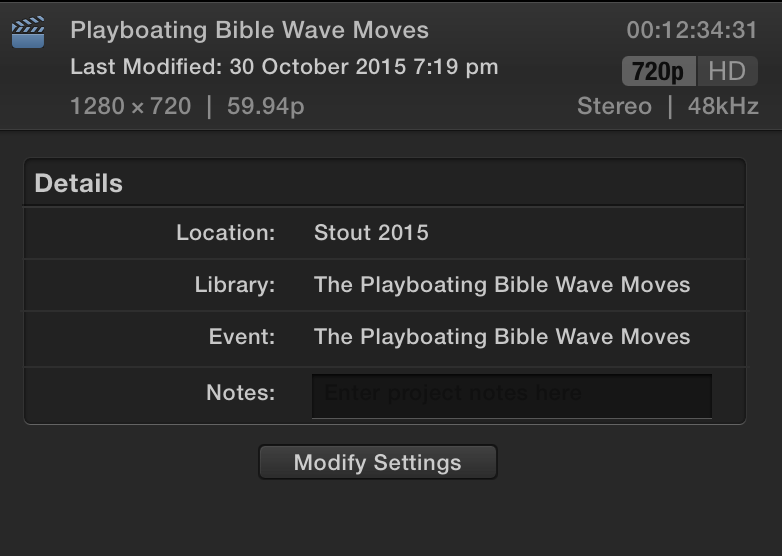
Duncan, thank you for your advice, I actually do shoot in 60fps and edit it on the FCP timeline saying use automatic setting when I drop the first 60fps video on the timeline. Would you suggest I set the timeline to 30fps instead? As you can see from the attachment the time line is in 60fps.
I am not sure of the mbps
The proress 422 version looks great on my desktop but looks terrible when i place it up on dropbox too. So I think I might be doing something wrong and someone here soon is going to call me out on it.
 I just don't know what it is I am doing.
www.dropbox.com/s/6a4ajtqhedeovsj/Testofprores.mov?dl=0
Please Log in to join the conversation.
- Unfenswinger
-
- Offline
- Banned
-
- Posts: 58
- Thank you received: 5
I hope you don't consider what I say to be 'calling you out' Im just trying to help.
I have downloaded the clip, given it a view and I have a few comments that may help.
1. Even this prores version has a lot of macro blocking already and down the compression chain this will only get worse as the next codec will see this as detail.
2. There's a heck of a lot of detail in the fast moving white water and spray droplets which I think could have been mitigated against by shooting with a more typical 1/60 or 180 deg shutter. The lack of motion blur in these clips which means your camera's codec sees an exceptional amount of detail. It is running out of steam hence the macro blocking in the prores clips which becomes an order of magnitude worse for the even more constrained bandwidth of YT.
3. In your slo-mo clips they have been retimed as every other frame is blurred, this skipping from sharp frame to blurred frame will be an absolute nightmare for a long gop codec to compress. I think you need to make sure you're conforming these correctly before doing retiming. This could be one big reason for poor YT quality. Long GOP codecs need subsequent frames to be similar to the last one if the frame is changing so dramatically every other frame....you're screwed...
4. You shot the video at 60fps so you could edit the video at 30fps which FCPX will interpret and drop every other frame and when you want to use the clip for a slo-mo example get fcpx to conform the footage to 30p thus giving you a 2x slo-mo. If you need to go even more slo-mo then go for the optical flow. I'm not sure why your slo-mo footage has the odd artefacts in it as I've never seen that in FCPX.
5. To cut down the amount of detail the YT codec sees you could consider pulling a luma key on the whites and blurring them, you'll be surprised what liberties you can take with such fast moving pixels. Blur the heck out of them until they look more foamy.
6. The shots are incredibly challenging for YT compression no matter what you so there's no miracle cure. The content is far more important the technical limitations of YT and I thought the content was great.
Please Log in to join the conversation.


I don't think it can be fixed in Firefox unless Mozilla changes something. Or Youtube sends out the same stream to all browsers and not just their own.
EDIT: It's the technology in the other browsers that's making it look bad. I tried changing the user agent on my Firefox to see if Youtube would send a better stream. It sent me a mobile stream when it thought I was using a mobile browser, but it looked just as bad when it thought it was Chrome on Windows or Mac. Youtube might be holding something to themselves on how their streams work that other developers just don't get. I'm gonna report this to Mozilla. Please leave this video up because that's the example I'm gonna send them:
Please Log in to join the conversation.
- Duncan Craig
-
- Offline
- Senior Member
-
- duncancraig.co.uk
At my end Safari won't even play the 720p60 I've made.
But my 1080p30 version does look much better:
I'm not seeing any difference in Firefox or Chrome playback quality.
(By the way I manually set 1080p playback each time, and don't leave it in 'auto' - I thought there was a setting for that somewhere...)
Jez, regarding the original edit, If you prefer my 1080p version then you can remake the video in 1080p30 fairly easily.
Try cutting and pasting a few minutes of the original 720p60 timeline into a 1080p30 timeline.
(To be clear, use the various individual segments of clips them the original timeline, don't just drop the master ProRes on a new timeline!)
You'll find that you need to fix a few elements, and you probably won't need to render all those slow motion sections anymore - if you originally set them to 50% they will now run at their original frame rate and don't need optical flow processing.
Also your master ProRes files can be ProRes LT, as I guess it's 8bit material?
Duncan.
Please Log in to join the conversation.
Please Log in to join the conversation.
forums.appleinsider.com/discussion/11661...-chrome-to-push-webm
Please Log in to join the conversation.
- Steve McGarrigle
-

- Offline
- Premium Member
-

"Last August, the MPEG Licensing Authority announced that it would indefinitely extend royalty-free Internet broadcasting licensing of its H.264 video codec to end users, erasing a key advantage of Google's WebM rival and cementing Apple's preferred H.264 as the video format for modern HTML5 video on the web."
With Googles response being...
"an apparent effort to force developers to support the WebM codec that has been largely ignored over the past year as content publishers have increasingly standardized upon H.264."
Please Log in to join the conversation.
- Steve McGarrigle
-
- Offline
- Premium Member
-
The best codec for web delivery could be a whole new topic for discussion and WebM development is very promising.
Please Log in to join the conversation.
Visit this page to see if the browser you're using is good. All checks should be blue.
www.youtube.com/html5
Please Log in to join the conversation.
