


- Posts: 256
- Thank you received: 48
3 Post Moderation Rule for New Boarders (25 Jan 2021)
New boarders will have their posts moderated - Don't worry if you cannot see your post immediately.
Export help please. Youtube is killing me
- MarkNelsonMovies
-

- Offline
- Elite Member
-

Less
More
06 Nov 2015 20:17 - 06 Nov 2015 20:22 #70305
by MarkNelsonMovies
Replied by MarkNelsonMovies on topic Export help please. Youtube is killing me
Another thing you could try is up-scaling it to 1080p and then uploading it, youtube seems to think that high resolution is the way forward and that anything less than 1080 is just junk for people with a slow internet connection, so their encoders might be optimized for 1080 video.
Also, shooting with a slower shutter speed/adding some blur in post might reduce the visual information enough to allow You-tube's encoders to work properly.
Everything I've uploaded to youtube so far has been 1080 30p and I haven't had any problems, I will be uploading some 720p material in the future and will let you know how that turns out, any 360p video uploaded to youtube looks like junk, even if it was a very high bit rate to start with.
Also, shooting with a slower shutter speed/adding some blur in post might reduce the visual information enough to allow You-tube's encoders to work properly.
Everything I've uploaded to youtube so far has been 1080 30p and I haven't had any problems, I will be uploading some 720p material in the future and will let you know how that turns out, any 360p video uploaded to youtube looks like junk, even if it was a very high bit rate to start with.
Last edit: 06 Nov 2015 20:22 by MarkNelsonMovies. Reason: add information
Please Log in to join the conversation.
23 Nov 2015 03:35 #70877
by jez
Replied by jez on topic Export help please. Youtube is killing me
Bugger,
Prores 422 didn't seem to work.
YT is now officially getting a visit by a 'friend' who has a passion for making people sleep with the fishes. He is quite talented at making people disappear and I do believe it is time for YT to meet their maker. I am not saying that YT isn't a good person, it's just YT has finally stepped over the line clearly outlined by our Italian 'Family'
I am just heading out now to purchase a large amount of lime, talk soon.
Prores 422 didn't seem to work.
YT is now officially getting a visit by a 'friend' who has a passion for making people sleep with the fishes. He is quite talented at making people disappear and I do believe it is time for YT to meet their maker. I am not saying that YT isn't a good person, it's just YT has finally stepped over the line clearly outlined by our Italian 'Family'
I am just heading out now to purchase a large amount of lime, talk soon.
Please Log in to join the conversation.
- Karsten Schlüter
-

- Offline
- Moderator
-

Less
More
- Posts: 3790
- Thank you received: 718
23 Nov 2015 07:27 #70878
by Karsten Schlüter
you're disappointed, ok, strong language, ok ... but consider to edit your post after a good sleep ...
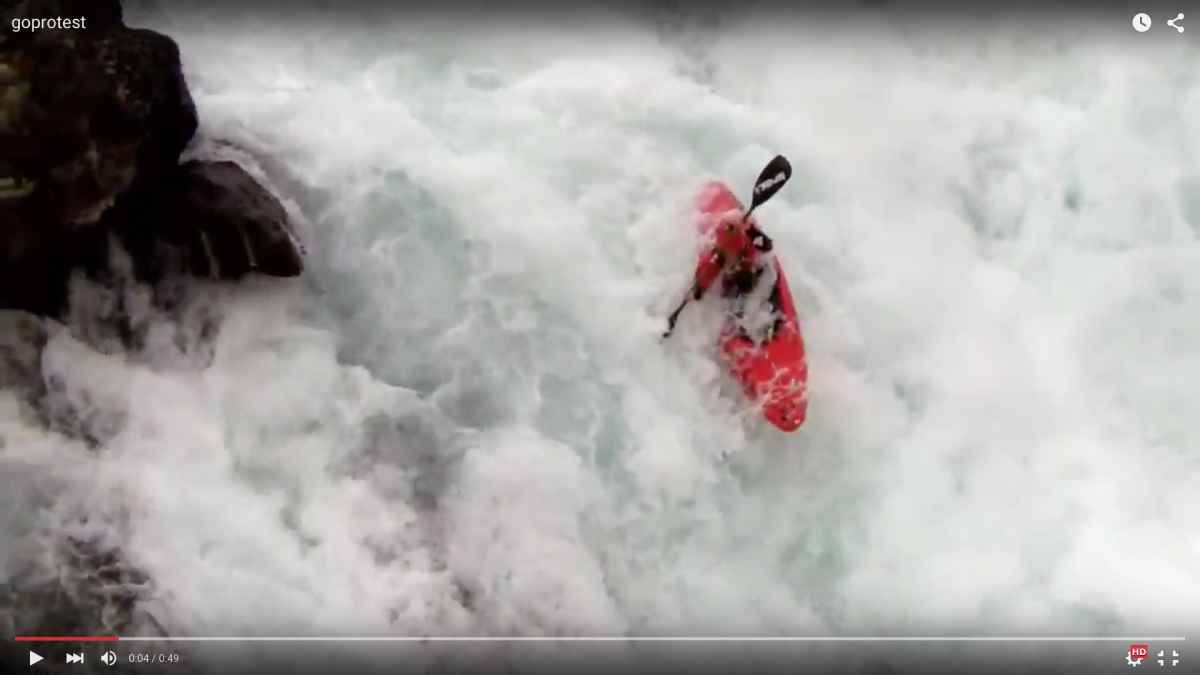
just to feed my curiosity, I downloaded some wildwater scene from GoPros YTchannel, and uploaded it again ... all videos on YT (incl. my persomal ones) have on playback the same codec settings&bitrates ....
noticeable:
the GoPro material is 'soft' - but no blocks. Your material, esp in the beginning, looks horrible.
.... sooooo, verdict of the German jury:
YT can deliver without artefacts/blocks ...
Which leads us, again, to the very beginning:
What settings are you using - in camera, on import (how do you import anyhow? Using any converters?), in your project?
Esp. cam settings and the long way from cam to FCPX are of high interest ....
Replied by Karsten Schlüter on topic Export help please. Youtube is killing me
jez wrote: .... YT is now officially getting a visit by a 'friend' who....
you're disappointed, ok, strong language, ok ... but consider to edit your post after a good sleep ...
just to feed my curiosity, I downloaded some wildwater scene from GoPros YTchannel, and uploaded it again ... all videos on YT (incl. my persomal ones) have on playback the same codec settings&bitrates ....
noticeable:
the GoPro material is 'soft' - but no blocks. Your material, esp in the beginning, looks horrible.
.... sooooo, verdict of the German jury:
YT can deliver without artefacts/blocks ...
Which leads us, again, to the very beginning:
What settings are you using - in camera, on import (how do you import anyhow? Using any converters?), in your project?
Esp. cam settings and the long way from cam to FCPX are of high interest ....
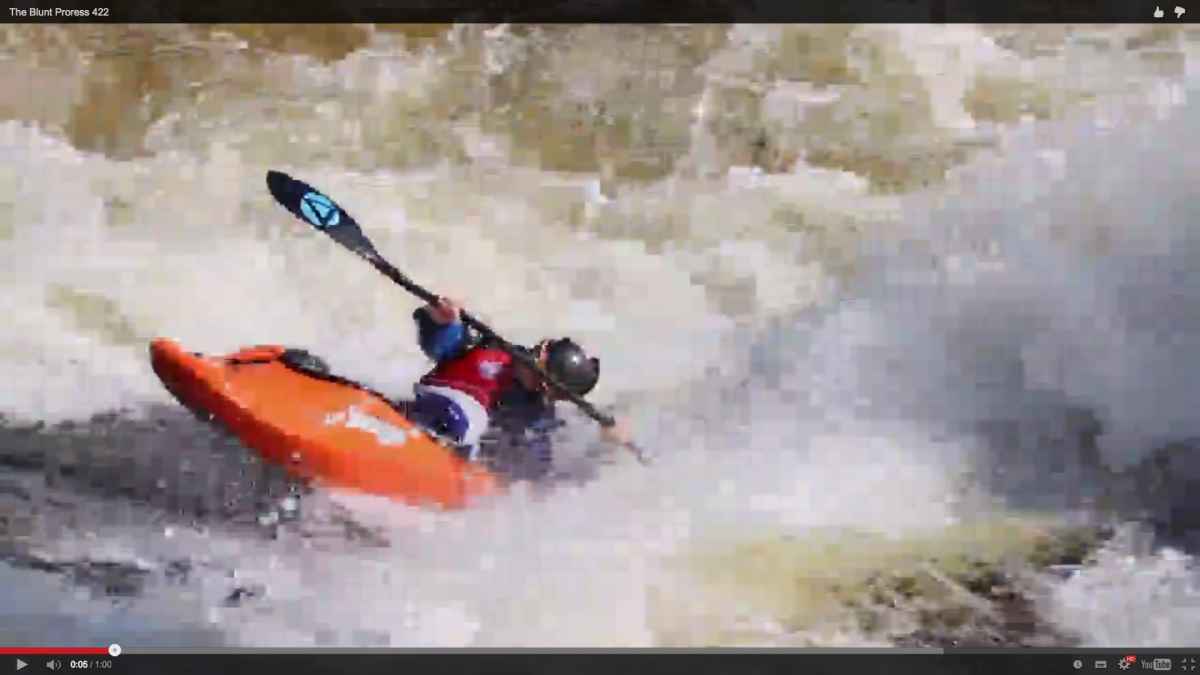
Please Log in to join the conversation.
23 Nov 2015 08:17 #70882
by jez
Replied by jez on topic Export help please. Youtube is killing me
Ok, thank you for your reply mate.
Which leads us, again, to the very beginning:
What settings are you using - in camera, on import (how do you import anyhow? Using any converters?), in your project?
Esp. cam settings and the long way from cam to FCPX are of high interest ....
In my camera setting, I am using
60fps
720
I import by the setting on FCP which is Video Properties - set based on first video clip.
Thanks for the info, I have to admit now that my 'friend' has his target, I am not sure I can call him back so don't be surprised if YT goes offline sometime soon.
Cheers mate
Which leads us, again, to the very beginning:
What settings are you using - in camera, on import (how do you import anyhow? Using any converters?), in your project?
Esp. cam settings and the long way from cam to FCPX are of high interest ....
In my camera setting, I am using
60fps
720
I import by the setting on FCP which is Video Properties - set based on first video clip.
Thanks for the info, I have to admit now that my 'friend' has his target, I am not sure I can call him back so don't be surprised if YT goes offline sometime soon.
Cheers mate
Please Log in to join the conversation.
- Karsten Schlüter
-
- Offline
- Moderator
-
Less
More
- Posts: 3790
- Thank you received: 718
23 Nov 2015 08:35 - 23 Nov 2015 08:40 #70884
by Karsten Schlüter
Replied by Karsten Schlüter on topic Export help please. Youtube is killing me
hmm, that's too basic...
download the tiny (it's REALLY tiny) app
www.iffmpeg.com/iMediaHUD/
and we have to break down any further:
the 'on first clip' is for project settings... ok.
But how does you material come into your Mac?
insert SDcard into Mac, in FCPX cmd-I.... ?
Or, any other routine?
if so…
2nd: right-click in the Event browser on a clip, 'reveal in Finder', than drag the clip onto iMediaHud, post a screenshot, should result in something like that /s.attached file/
3rd question:
What camera?Any further settings, such as HQ/XQ....?
Q#4:
Do you edit in Proxy?
download the tiny (it's REALLY tiny) app
www.iffmpeg.com/iMediaHUD/
and we have to break down any further:
the 'on first clip' is for project settings... ok.
But how does you material come into your Mac?
insert SDcard into Mac, in FCPX cmd-I.... ?
Or, any other routine?
if so…
2nd: right-click in the Event browser on a clip, 'reveal in Finder', than drag the clip onto iMediaHud, post a screenshot, should result in something like that /s.attached file/
3rd question:
What camera?Any further settings, such as HQ/XQ....?
Q#4:
Do you edit in Proxy?
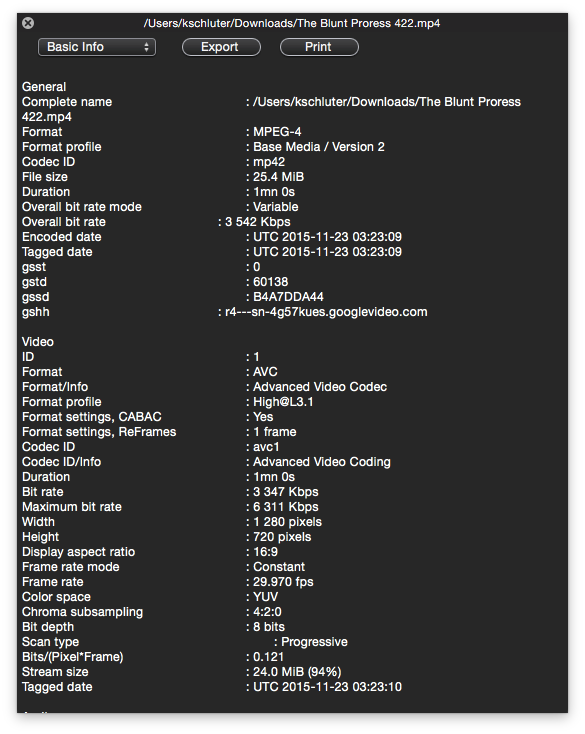
Last edit: 23 Nov 2015 08:40 by Karsten Schlüter.
Please Log in to join the conversation.
03 Jan 2016 01:16 - 03 Jan 2016 22:46 #71894
by jez
Replied by jez on topic Export help please. Youtube is killing me
Hello Karsten mate, I have intentionally had a break from editing anything for a while as I felt I was going a little loopy. Wanting to throw my laptop across the room screaming "death to all that is youtube" was a common day for me. I went on a health retreat and started to learn about the ways of bringing inner peace to my life which made me a much better person, but now I am back, better than ever, ready to fight this scourge on society that is the problems with uploading files. So take my hand Karsten mate, let's work together to try to bring about a new world, one that anyone can click with one button to bring about beautiful videos that don't have any pixelation issues. It's going to be a tough fight, but it might be just what the world was looking for.
download the tiny (it's REALLY tiny) app
www.iffmpeg.com/iMediaHUD/
and we have to break down any further:
the 'on first clip' is for project settings... ok.
But how does you material come into your Mac?
insert SDcard into Mac, in FCPX cmd-I.... ?
Or, any other routine?
Alright, so I insert the sd card into my mac, then I drag the whole file to my external HDD, then I press the import button on FCP and bring it into the project that way.
if so…
2nd: right-click in the Event browser on a clip, 'reveal in Finder', than drag the clip onto iMediaHud, post a screenshot, should result in something like that /s.attached file/
Ok, I have done this and it is attached.
3rd question:
What camera?Any further settings, such as HQ/XQ....?
I am not sure about this question. I am shooting on standard 720/60fps I have attached a picture of the settings on FCP
Q#4:
Do you edit in Proxy?
Um, no I do not think that I am editing in proxy.
The exported version looks amazing and great, I believe that after I upload it to youtube there is a terrible conversion that is going on which downsizes it to a yt version and makes it look like a dogs breakfast. I am totally up for any suggestions that you might have.
Thanks mate, I will take a few more deep breaths and sit in a yoga pose awaiting your reply.
download the tiny (it's REALLY tiny) app
www.iffmpeg.com/iMediaHUD/
and we have to break down any further:
the 'on first clip' is for project settings... ok.
But how does you material come into your Mac?
insert SDcard into Mac, in FCPX cmd-I.... ?
Or, any other routine?
Alright, so I insert the sd card into my mac, then I drag the whole file to my external HDD, then I press the import button on FCP and bring it into the project that way.
if so…
2nd: right-click in the Event browser on a clip, 'reveal in Finder', than drag the clip onto iMediaHud, post a screenshot, should result in something like that /s.attached file/
Ok, I have done this and it is attached.
3rd question:
What camera?Any further settings, such as HQ/XQ....?
I am not sure about this question. I am shooting on standard 720/60fps I have attached a picture of the settings on FCP
Q#4:
Do you edit in Proxy?
Um, no I do not think that I am editing in proxy.
The exported version looks amazing and great, I believe that after I upload it to youtube there is a terrible conversion that is going on which downsizes it to a yt version and makes it look like a dogs breakfast. I am totally up for any suggestions that you might have.
Thanks mate, I will take a few more deep breaths and sit in a yoga pose awaiting your reply.
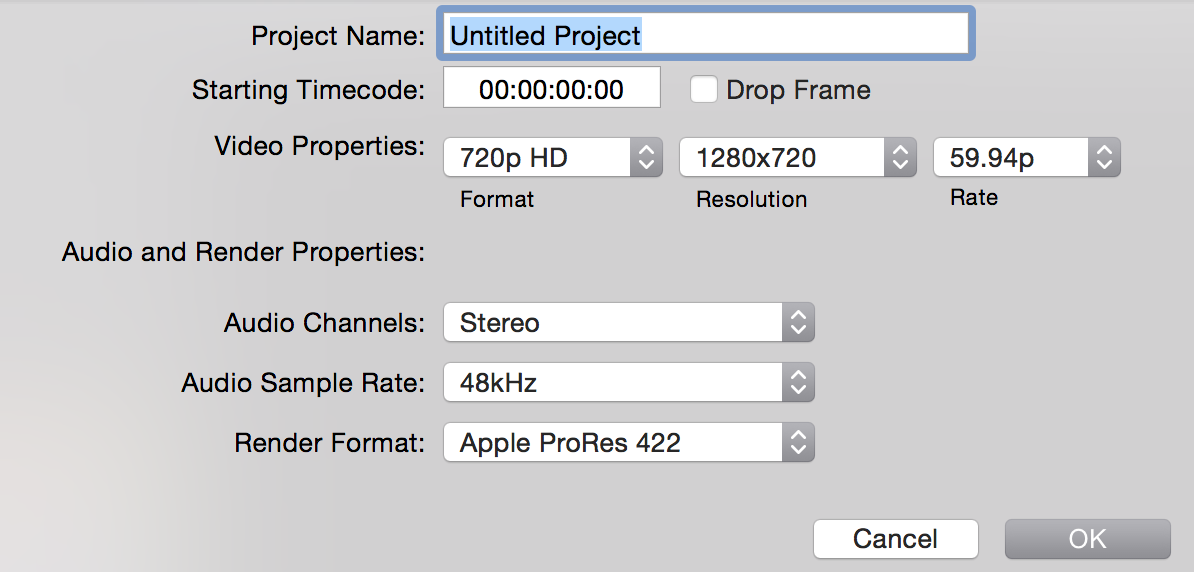
Last edit: 03 Jan 2016 22:46 by jez.
Please Log in to join the conversation.
03 Jan 2016 01:26 #71897
by jez
Replied by jez on topic Export help please. Youtube is killing me
General
Complete name : /Volumes/Stout 2015/2015/World Championships/19152/MVI_9886.MOV
Format : MPEG-4
Format profile : QuickTime
Codec ID : qt
File size : 232 MiB
Duration : 40s 908ms
Overall bit rate : 47.6 Mbps
Encoded date : UTC 2015-08-25 13:21:45
Tagged date : UTC 2015-08-25 13:21:45
Video
ID : 1
Format : AVC
Format/Info : Advanced Video Codec
Format profile : Baseline@L5.0
Format settings, CABAC : No
Format settings, ReFrames : 1 frame
Format settings, GOP : M=1, N=15
Codec ID : avc1
Codec ID/Info : Advanced Video Coding
Duration : 40s 908ms
Bit rate : 46.0 Mbps
Width : 1 280 pixels
Height : 720 pixels
Display aspect ratio : 16:9
Frame rate mode : Constant
Frame rate : 59.940 fps
Color space : YUV
Chroma subsampling : 4:2:0
Bit depth : 8 bits
Scan type : Progressive
Bits/(Pixel*Frame) : 0.833
Stream size : 224 MiB (97%)
Language : English
Encoded date : UTC 2015-08-25 13:21:45
Tagged date : UTC 2015-08-25 13:21:45
Color primaries : BT.709
Transfer characteristics : BT.709
Matrix coefficients : BT.601
Audio
ID : 2
Format : PCM
Format settings, Endianness : Little
Format settings, Sign : Signed
Codec ID : sowt
Duration : 40s 908ms
Bit rate mode : Constant
Bit rate : 1 536 Kbps
Channel(s) : 2 channels
Channel positions : Front: L R
Sampling rate : 48.0 KHz
Bit depth : 16 bits
Stream size : 7.49 MiB (3%)
Language : English
Complete name : /Volumes/Stout 2015/2015/World Championships/19152/MVI_9886.MOV
Format : MPEG-4
Format profile : QuickTime
Codec ID : qt
File size : 232 MiB
Duration : 40s 908ms
Overall bit rate : 47.6 Mbps
Encoded date : UTC 2015-08-25 13:21:45
Tagged date : UTC 2015-08-25 13:21:45
Video
ID : 1
Format : AVC
Format/Info : Advanced Video Codec
Format profile : Baseline@L5.0
Format settings, CABAC : No
Format settings, ReFrames : 1 frame
Format settings, GOP : M=1, N=15
Codec ID : avc1
Codec ID/Info : Advanced Video Coding
Duration : 40s 908ms
Bit rate : 46.0 Mbps
Width : 1 280 pixels
Height : 720 pixels
Display aspect ratio : 16:9
Frame rate mode : Constant
Frame rate : 59.940 fps
Color space : YUV
Chroma subsampling : 4:2:0
Bit depth : 8 bits
Scan type : Progressive
Bits/(Pixel*Frame) : 0.833
Stream size : 224 MiB (97%)
Language : English
Encoded date : UTC 2015-08-25 13:21:45
Tagged date : UTC 2015-08-25 13:21:45
Color primaries : BT.709
Transfer characteristics : BT.709
Matrix coefficients : BT.601
Audio
ID : 2
Format : PCM
Format settings, Endianness : Little
Format settings, Sign : Signed
Codec ID : sowt
Duration : 40s 908ms
Bit rate mode : Constant
Bit rate : 1 536 Kbps
Channel(s) : 2 channels
Channel positions : Front: L R
Sampling rate : 48.0 KHz
Bit depth : 16 bits
Stream size : 7.49 MiB (3%)
Language : English
Please Log in to join the conversation.
- MarkNelsonMovies
-
- Offline
- Elite Member
-
Less
More
- Posts: 256
- Thank you received: 48
03 Jan 2016 01:51 - 03 Jan 2016 01:53 #71898
by MarkNelsonMovies
Replied by MarkNelsonMovies on topic Export help please. Youtube is killing me
Ok, somethings fishy here,
I usually Use chrome as my web browser
I watched the 422 pro-res video on the forum page, the quality was bad even when set to 720p
watched on youtube page in safari, - same
watched on youtube page in chrome - quality is good ?!?!?! some of the better water I've seen in youtube videos ?!?!
youtube app on ipod 4th gen - also bad
not sure what this means, a conspiracy to get youtube users to switch to chrome? I'll try to test that video and my own videos on some other devices and see what kind of result I get.
I usually Use chrome as my web browser
I watched the 422 pro-res video on the forum page, the quality was bad even when set to 720p
watched on youtube page in safari, - same
watched on youtube page in chrome - quality is good ?!?!?! some of the better water I've seen in youtube videos ?!?!
youtube app on ipod 4th gen - also bad
not sure what this means, a conspiracy to get youtube users to switch to chrome? I'll try to test that video and my own videos on some other devices and see what kind of result I get.
Last edit: 03 Jan 2016 01:53 by MarkNelsonMovies.
Please Log in to join the conversation.
- MarkNelsonMovies
-
- Offline
- Elite Member
-
Less
More
- Posts: 256
- Thank you received: 48
03 Jan 2016 02:23 #71899
by MarkNelsonMovies
Replied by MarkNelsonMovies on topic Export help please. Youtube is killing me
I think when youtube switched over to VP9 they may have downgraded their .h264 encoding quality.
Does anyone have an example video newer than October 21 (the OP's upload date) that has high quality water?
I think I may start thinking about putting my stuff on Vimeo
Does anyone have an example video newer than October 21 (the OP's upload date) that has high quality water?
I think I may start thinking about putting my stuff on Vimeo
Please Log in to join the conversation.


03 Jan 2016 03:22 - 03 Jan 2016 03:38 #71901
by Redifer
Replied by Redifer on topic Export help please. Youtube is killing me
If your video is 60fps why aren't you uploading it at 60fps? Youtube will run at a higher bit rate for the higher framerate. Please make sure it stays at 60fps the entire way.
EDIT: It actually IS 60fps on Youtube, you just can't view it embedded that way on the forum even when you increase the resolution. It does look better at 60fps when watched on the actual Youtube watch page but yeah it still looks like ass. I'd recommend against Vimeo because there is no audience there at all. If you want people to actually see it, don't put it on Vimeo. Also you need to pay for Vimeo if you actually want 1080p. And they don't like it if your video becomes popular and actually starts getting lots of views. They actually allot the amount of views you can have. Vimeo is not an option for me. Ever. Also, I actually like using the word "actually".
EDIT: It actually IS 60fps on Youtube, you just can't view it embedded that way on the forum even when you increase the resolution. It does look better at 60fps when watched on the actual Youtube watch page but yeah it still looks like ass. I'd recommend against Vimeo because there is no audience there at all. If you want people to actually see it, don't put it on Vimeo. Also you need to pay for Vimeo if you actually want 1080p. And they don't like it if your video becomes popular and actually starts getting lots of views. They actually allot the amount of views you can have. Vimeo is not an option for me. Ever. Also, I actually like using the word "actually".
Last edit: 03 Jan 2016 03:38 by Redifer.
Please Log in to join the conversation.
- Karsten Schlüter
-
- Offline
- Moderator
-
Less
More
- Posts: 3790
- Thank you received: 718
03 Jan 2016 08:31 #71902
by Karsten Schlüter
Replied by Karsten Schlüter on topic Export help please. Youtube is killing me
Hi Jez,
yep, Yoga… and less RedBull. No RedBull for a week…-
Check your posts before hit "submit", your last attachment doesn't show what you tell .... anyhow.
Do me/us a favor, avoid fullquotes....
And sign quotes as quotes (select text, hit the little speech-bubble in the formatting menu), I waste time to detect what I've written, what's yours...
What camera are your using? (we probably had the question before, but still unanswered)
720/60 with 40mbps is an … exotic value combo. At last for me. So, manufacturer, type...?
I guess a Canon DSLR…?
What's interesting:
your latest YTvideo shows artifacts in the real-time section, the slowmos are much better, less 'blocky'.... Part of encoding is 'motion detection/prediction' (don't ask me for details! just talking smart) - which brings back Q#2: Are you in Proxy-mode?
No think, just check: Upper right of the Viewer, Options, Media - what's checked, Optimized/Original or Proxy?
3rd Q:
I'm lost - which video is the proRes upload, add link?
yep, Yoga… and less RedBull. No RedBull for a week…-
Check your posts before hit "submit", your last attachment doesn't show what you tell .... anyhow.
Do me/us a favor, avoid fullquotes....
And sign quotes as quotes (select text, hit the little speech-bubble in the formatting menu), I waste time to detect what I've written, what's yours...
What camera are your using? (we probably had the question before, but still unanswered)
720/60 with 40mbps is an … exotic value combo. At last for me. So, manufacturer, type...?
I guess a Canon DSLR…?
What's interesting:
your latest YTvideo shows artifacts in the real-time section, the slowmos are much better, less 'blocky'.... Part of encoding is 'motion detection/prediction' (don't ask me for details! just talking smart) - which brings back Q#2: Are you in Proxy-mode?
Um, no I do not think that I am editing in proxy.
No think, just check: Upper right of the Viewer, Options, Media - what's checked, Optimized/Original or Proxy?
3rd Q:
I'm lost - which video is the proRes upload, add link?
Please Log in to join the conversation.
- fb_696650432
-
- Offline
- New Member
-

Less
More
- Posts: 5
- Thank you received: 1
03 Jan 2016 19:31 - 03 Jan 2016 19:48 #71909
by fb_696650432
Replied by fb_696650432 on topic Export help please. Youtube is killing me
I opened your video in Youtube on Safari and the playback quality was as you describe - terrible. However the default playback quality is set at 240p. After manually changing it to 720p it all looks much better. I could still spot bits of blockiness but that isn't surprising considering the sheer amount of movement going on within the shots. At 60fps and with that much movement, compression which you probably know relies on being able to reuse information from adjacent frames stands very little chance of compressing anything given that all that white water is completely different in every frame. The interview clip where there is by contrast very little movement looks great. You could try doing a multi pass H.264 prior to uploading it. Youtube's compression may cope better with interpreting this rather than using ProRes where every frame is an intraframe - just an idea. Also looking in the trouble shooting guide on Youtube it states. Frame Rate: 30 is preferred. 23.98, 24, 25, 29.97 are also acceptable.
Quick edit. I just viewed the same video in Chrome and the playback is significantly better. The artifacts are significantly reduced - barely noticeable for the most part and the 60fps playback at 720p came up by default and looked smooth.
Quick edit. I just viewed the same video in Chrome and the playback is significantly better. The artifacts are significantly reduced - barely noticeable for the most part and the 60fps playback at 720p came up by default and looked smooth.
Last edit: 03 Jan 2016 19:48 by fb_696650432.
Please Log in to join the conversation.
03 Jan 2016 23:50 #71911
by jez
Replied by jez on topic Export help please. Youtube is killing me
Thank you guys for getting back to me here. I am still in ultimate zen mode and have safely secured my weapons for the time being, Youtube is currently safe from my rants. In saying this, if YT did happen to knock on my door at some time I would not hesitate to smash the first thing I see (which most likely would be a glass vase full of flowers) over his pompous square head. A size 12 boot imprint might also be permanently over his forehead too, while I relieve myself as he looks up with his smug face, but I digress, I am at the moment in a happy place and will do my best to stop myself from initiating such a conflict, my zipper is done up and I am breathing in with the good and out with the bad.
Hey mate, I also agree with this, the chrome looks great in 720. That is weird, every other browser looks terrible. That is annoying indeed.
I am using a cannon 60d. 60fps in 720
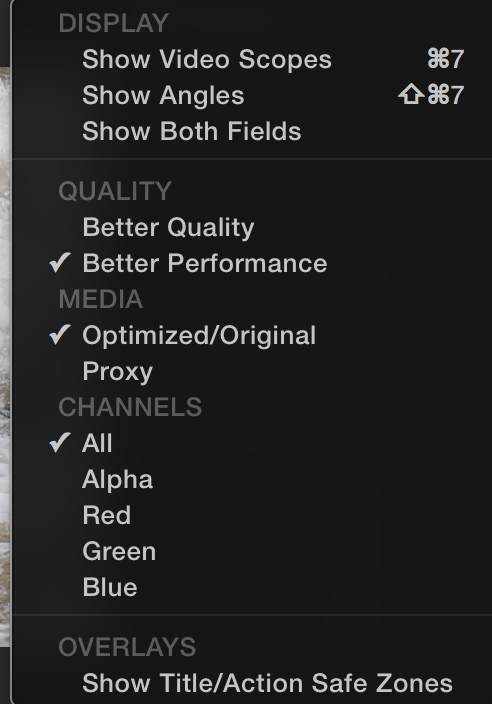
Ok, I just checked that proxy question and it is set for optimized/original as you can see in the attachment.
It does look great in chrome but that is it. All other browsers look like a dog has thrown up on your nice new carpet and you know that there is no possible way that stain is coming out, no matter how much you scrub or use your new stain remover, while your dog looks at you in a "I really don't care that your new carpet has my vomit on it, in fact inside I am quite happy to have ruined my masters life" kind of way.
Actually, I think what you are saying makes sense, actually. Vimeo is cool, but no one watches it compared to YT. Actually, I think the other day when I visited Vimeo at his house I saw a tumble weed drift by, I called out to see if anyone was home but all I could hear was the echo of my voice as I yelled out "Where are you...." I also now understand keeping it all in 60fps, cheers for your help
Yea I agree, it is totally weird, I wish I knew why it kept screwing up my videos, why does it treat me with so much disrespect. What have I done to deserve such crappy quality.
watched the 422 pro-res video on the forum page, the quality was bad even when set to 720p
watched on youtube page in safari, - same
watched on youtube page in chrome - quality is good ?!?!?! some of the better water I've seen in youtube videos ?!?!
youtube app on ipod 4th gen - also bad
not sure what this means, a conspiracy to get youtube users to switch to chrome? I'll try to test that video and my own videos on some other devices and see what kind of result I get.
Hey mate, I also agree with this, the chrome looks great in 720. That is weird, every other browser looks terrible. That is annoying indeed.
Ok, I can do that. Sounds like a plan. Can I quote Yoda in these quotes too?Check your posts before hit "submit", your last attachment doesn't show what you tell .... anyhow.
Do me/us a favor, avoid fullquotes....
And sign quotes as quotes (select text, hit the little speech-bubble in the formatting menu), I waste time to detect what I've written, what's yours...
Thanks Yoda, but I feel that I must war with YT, otherwise the dark side might rise up.Wars not make one great.
All right yoda, just relax, you look like a smashed crab buddy.A Jedi uses the Force for knowledge and defense, never for attack.
True mate, true. I am just a bit fearful of what YT might become if I do not slay this beast.When nine hundred years old you reach, look as good you will not.
Come on Yoda, who's side are you on???? I am trying to make a difference hereFear is the path to the dark side…fear leads to anger…anger leads to hate…hate leads to suffering.
Mate, I am done with you Yoda, go and jump in the Great Pit of Carkoon. Geez.Do. Or do not. There is no try.
What camera are your using? (we probably had the question before, but still unanswered)
720/60 with 40mbps is an … exotic value combo. At last for me. So, manufacturer, type...?
I guess a Canon DSLR…?
I am using a cannon 60d. 60fps in 720
What's interesting:
your latest YTvideo shows artifacts in the real-time section, the slowmos are much better, less 'blocky'.... Part of encoding is 'motion detection/prediction' (don't ask me for details! just talking smart) - which brings back Q#2: Are you in Proxy-mode?
Um, no I do not think that I am editing in proxy.
No think, just check: Upper right of the Viewer, Options, Media - what's checked, Optimized/Original or Proxy?
Ok, I just checked that proxy question and it is set for optimized/original as you can see in the attachment.
3rd Q:
I'm lost - which video is the proRes upload, add link?
It does look great in chrome but that is it. All other browsers look like a dog has thrown up on your nice new carpet and you know that there is no possible way that stain is coming out, no matter how much you scrub or use your new stain remover, while your dog looks at you in a "I really don't care that your new carpet has my vomit on it, in fact inside I am quite happy to have ruined my masters life" kind of way.
If your video is 60fps why aren't you uploading it at 60fps? Youtube will run at a higher bit rate for the higher framerate. Please make sure it stays at 60fps the entire way.
EDIT: It actually IS 60fps on Youtube, you just can't view it embedded that way on the forum even when you increase the resolution. It does look better at 60fps when watched on the actual Youtube watch page but yeah it still looks like ass. I'd recommend against Vimeo because there is no audience there at all. If you want people to actually see it, don't put it on Vimeo. Also you need to pay for Vimeo if you actually want 1080p. And they don't like it if your video becomes popular and actually starts getting lots of views. They actually allot the amount of views you can have. Vimeo is not an option for me. Ever. Also, I actually like using the word "actually".
Actually, I think what you are saying makes sense, actually. Vimeo is cool, but no one watches it compared to YT. Actually, I think the other day when I visited Vimeo at his house I saw a tumble weed drift by, I called out to see if anyone was home but all I could hear was the echo of my voice as I yelled out "Where are you...." I also now understand keeping it all in 60fps, cheers for your help
Quick edit. I just viewed the same video in Chrome and the playback is significantly better. The artifacts are significantly reduced - barely noticeable for the most part and the 60fps playback at 720p came up by default and looked smooth.
Yea I agree, it is totally weird, I wish I knew why it kept screwing up my videos, why does it treat me with so much disrespect. What have I done to deserve such crappy quality.
Please Log in to join the conversation.
- Karsten Schlüter
-
- Offline
- Moderator
-
Less
More
- Posts: 3790
- Thank you received: 718
04 Jan 2016 09:12 - 04 Jan 2016 09:12 #71916
by Karsten Schlüter
Replied by Karsten Schlüter on topic Export help please. Youtube is killing me
only two arrows left in my quiver:
• you're using a fast sdcard? class10? (it's printed on it...)
• find the info, the 60D records with a variable bit-rate (of up to 44mbps)
a) VBR makes FCPX stumble, when it comes e.g. from an iPhone, which utilizes VBR too. No clue, if that solves your prob, but, you can try to smuggle your original clip thru MpegStreamclip: open (a copy) of that ORIGINAL clip, go straight to Export, Quciktime/proRes. That 'flattens' VBR to some insanely huge CBR mov...
b) I have no clue, how a camera 'decides' what bit-rate to use while using VBR; I could imagine, that the Japanese engineers put some cam settings into calculation… do you use any presets/'motifs', like 'Sport'? << which implifies 'fast action/fast changes/high bitrate'.....
c) …. no, no #3. use a fast SDcard. Try to find out, how to force your cam to utlize highest possible BR .....
… guess, I'm outta here …
• you're using a fast sdcard? class10? (it's printed on it...)
• find the info, the 60D records with a variable bit-rate (of up to 44mbps)
a) VBR makes FCPX stumble, when it comes e.g. from an iPhone, which utilizes VBR too. No clue, if that solves your prob, but, you can try to smuggle your original clip thru MpegStreamclip: open (a copy) of that ORIGINAL clip, go straight to Export, Quciktime/proRes. That 'flattens' VBR to some insanely huge CBR mov...
b) I have no clue, how a camera 'decides' what bit-rate to use while using VBR; I could imagine, that the Japanese engineers put some cam settings into calculation… do you use any presets/'motifs', like 'Sport'? << which implifies 'fast action/fast changes/high bitrate'.....
c) …. no, no #3. use a fast SDcard. Try to find out, how to force your cam to utlize highest possible BR .....
… guess, I'm outta here …
Last edit: 04 Jan 2016 09:12 by Karsten Schlüter.
Please Log in to join the conversation.
11 Feb 2016 03:52 #73204
by ed.ford
Replied by ed.ford on topic Export help please. Youtube is killing me
How do u export 720 @ 60 fps to youtube if a 5 min file is 5 gb in my iac??
Please Log in to join the conversation.
14 May 2016 09:36 #76691
by jez
Replied by jez on topic Export help please. Youtube is killing me
Hello everyone, well I went away for a few months to reconsider my youtube live. I realised that there is way more to life than this issue and sat pondering what is the true meaning of life. I didn't come up with an answer, but it did entertain me for a few months.
On a side note, this issue is still not resolved. I have tried countless different ways, it seems that the video looks amazing here on the desktop but then youtube loves to crap all over it with massive pixels and just an all round poop fest.
I am wondering what I can do to make it look better. I mean, gopro footage looks fine when I upload that, my Canon 60D footage however seems to be covered in foul smelling excrement that comes from Youtube. I wanted to ask one more time if there is a work around this problem because I have seen other videos of similar nature, showing water and such that look fine from a 60d on YT, I believe that YT has some kind of personal vendetta against me, maybe from one of my earlier rants that I went off at, I agree, I might have said some things that were possibly completely inappropriate and out of line, but this is what happens when you spend years having the same problem.
I am going out on a limb here, the first person to find a solution to my problem will get one free hi five, Yep, totally going to be giving out one of those big ones here for a limited time only.
Your free hifive will not come with a high ten, nor will it be interchangeable with any kind of feet high fives, those things are just stupid.
Thanks folk, feel free to read the previous work around to let you know what we have all tried here.
Enjoy, and good luck everyone, may the odd be ever in your favor.
On a side note, this issue is still not resolved. I have tried countless different ways, it seems that the video looks amazing here on the desktop but then youtube loves to crap all over it with massive pixels and just an all round poop fest.
I am wondering what I can do to make it look better. I mean, gopro footage looks fine when I upload that, my Canon 60D footage however seems to be covered in foul smelling excrement that comes from Youtube. I wanted to ask one more time if there is a work around this problem because I have seen other videos of similar nature, showing water and such that look fine from a 60d on YT, I believe that YT has some kind of personal vendetta against me, maybe from one of my earlier rants that I went off at, I agree, I might have said some things that were possibly completely inappropriate and out of line, but this is what happens when you spend years having the same problem.
I am going out on a limb here, the first person to find a solution to my problem will get one free hi five, Yep, totally going to be giving out one of those big ones here for a limited time only.
Your free hifive will not come with a high ten, nor will it be interchangeable with any kind of feet high fives, those things are just stupid.
Thanks folk, feel free to read the previous work around to let you know what we have all tried here.
Enjoy, and good luck everyone, may the odd be ever in your favor.
Please Log in to join the conversation.
- Karsten Schlüter
-
- Offline
- Moderator
-
Less
More
- Posts: 3790
- Thank you received: 718
14 May 2016 09:48 #76692
by Karsten Schlüter
A 100% I will not!!
This is a technical board, no seminar course English ....
Upload 10secs of your source material, wetransfer, dropbox, drive.google et al.
Post a link to the YT material of yours you don't like.
Attach screenshots instead that Kiddie speak ....
Replied by Karsten Schlüter on topic Export help please. Youtube is killing me
jez wrote: … feel free to read the previous work around to let you know what we have all tried here.
....
A 100% I will not!!
This is a technical board, no seminar course English ....
Upload 10secs of your source material, wetransfer, dropbox, drive.google et al.
Post a link to the YT material of yours you don't like.
Attach screenshots instead that Kiddie speak ....
Please Log in to join the conversation.
14 May 2016 12:00 #76693
by jez
Replied by jez on topic Export help please. Youtube is killing me
Hey mate, thanks for your reply. You were helping me through this before, but no need to be negative here. I am not meaning to use kiddie speak, I am just no expert in this kind of thing so I thought a light hearted post would be fun, I didn't mean to make you mad here, not my intention at all.
Anyway, My
proress 422
264
Handbreak 422
You can see pixelation in all of them. I have attached a screenshot
It looks fine on my desktop but when it uploads to YT it pixels.
Dropbox - It always is clean at my end.
www.dropbox.com/sh/tyb21g7iidrdb7g/AAB9b...mqB4ryAwxQfmLma?dl=0
Anyway, My
proress 422
264
Handbreak 422
You can see pixelation in all of them. I have attached a screenshot
It looks fine on my desktop but when it uploads to YT it pixels.
Dropbox - It always is clean at my end.
www.dropbox.com/sh/tyb21g7iidrdb7g/AAB9b...mqB4ryAwxQfmLma?dl=0
Please Log in to join the conversation.

14 May 2016 12:08 #76694
by BenB
Replied by BenB on topic Export help please. Youtube is killing me
If you upload a ProRes 422, full resolution file to YT, and you get pixelation, that's on the YouTube end for sure. Being caused by the water (rather undefined edges) moving too fast, and the YT compression system can't deal with it very well.
Only think I can think of it take this from FCPX directly into Compressor. Place "Compression Markers" just before each shot of the boats spinning in the water. Export ProRes, upload that to YT.
Or do the same, export as H.264 according to YT guideline settings. See if you see the pixelation then.
May not be anything you can do about it, if it is on the YT end. Unless maybe contact YT tech support. Do they have such thing?
Only think I can think of it take this from FCPX directly into Compressor. Place "Compression Markers" just before each shot of the boats spinning in the water. Export ProRes, upload that to YT.
Or do the same, export as H.264 according to YT guideline settings. See if you see the pixelation then.
May not be anything you can do about it, if it is on the YT end. Unless maybe contact YT tech support. Do they have such thing?
Please Log in to join the conversation.

14 May 2016 14:40 #76697
by dgwvideo
Creating history....one edit at a time !
Replied by dgwvideo on topic Export help please. Youtube is killing me
YouTube does have tags that can be added which are supposed to affect playback. The high quality tag is "ytquality=high" and according to YouTube ensures the video plays back at a better quality. I have applied this on several videos but can honestly say I haven't really noticed any difference. It's easy enough to add the tag, so you might try it. Create the tag including the quotes as shown above.
Creating history....one edit at a time !
Please Log in to join the conversation.
