


- Posts: 3790
- Thank you received: 718
3 Post Moderation Rule for New Boarders (25 Jan 2021)
New boarders will have their posts moderated - Don't worry if you cannot see your post immediately.
How to make things move without touching
- Karsten Schlüter
-

- Offline
- Moderator
-

Less
More
17 Nov 2015 07:12 - 17 Nov 2015 07:21 #70729
by Karsten Schlüter
as in my rough demo: a thick, soft, fluffy blanket isn't good either !
shadows are killer for keying
the concept of keying asks for a solid color, black, white, blue, green, pink…
I love your idea of using a morphsuit to make you invisble, but that gives high demands on perfect lighthing:
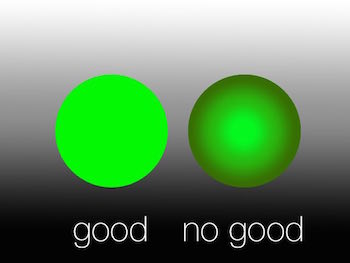
so, thin paper (as used in my Lego example years ago), sticks (for a school project, we'll animate a skeleton with painted bamboo sticks), or s perfect lit stage (morphsuit) are key for keying (ba-dum).
You're aware, you can teach the keyer what colors are key, what not?
There are several buttosn and sliders to play with...............
consider my Plan , using thin strings/wires/fishing lines, your cams resolution will 'vanish' it within inches .....
just imagined myself in such a morphsuit - OMG!!!!! :sick:
would you send/upload me a a few seconds of your material? just to have an impression?
My heroes Mark&Steve have an excellent turorial on that:
Replied by Karsten Schlüter on topic How to make things move without touching
… I can easily the edges …
as in my rough demo: a thick, soft, fluffy blanket isn't good either
!shadows are killer for keying
the concept of keying asks for a solid color, black, white, blue, green, pink…
I love your idea of using a morphsuit to make you invisble, but that gives high demands on perfect lighthing:
so, thin paper (as used in my Lego example years ago), sticks (for a school project, we'll animate a skeleton with painted bamboo sticks), or s perfect lit stage (morphsuit) are key for keying (ba-dum).
You're aware, you can teach the keyer what colors are key, what not?
There are several buttosn and sliders to play with...............
consider my Plan
, using thin strings/wires/fishing lines, your cams resolution will 'vanish' it within inches .....just imagined myself in such a morphsuit - OMG!!!!! :sick:
would you send/upload me a a few seconds of your material? just to have an impression?
My heroes Mark&Steve have an excellent turorial on that:
Last edit: 17 Nov 2015 07:21 by Karsten Schlüter.
Please Log in to join the conversation.

17 Nov 2015 21:37 #70750
by Neguah
Replied by Neguah on topic How to make things move without touching
Yep, I noticed that the morphsuit needs some serious adjustments to be perfect. It's also very revealing... :whistle:
I will go for your fishing line idea. It's more suitable, I think. I might also think of a green stick, or any other solid color. But I think I will have some trouble with shadow... I tried some extra lights, but there were still to much shadow.
Yup, I made some adjustments to the keyer to make my dic...I mean my self more invisible.
Here's the clip:
Sorry for the bad blur, but there are some pictures of the kids, including some names. Since it's public, I can't reveal anything. It's very strict.
I will go for your fishing line idea. It's more suitable, I think. I might also think of a green stick, or any other solid color. But I think I will have some trouble with shadow... I tried some extra lights, but there were still to much shadow.
Yup, I made some adjustments to the keyer to make my dic...I mean my self more invisible.
Here's the clip:
Sorry for the bad blur, but there are some pictures of the kids, including some names. Since it's public, I can't reveal anything. It's very strict.
Please Log in to join the conversation.
- MarkNelsonMovies
-

- Offline
- Elite Member
-

Less
More
- Posts: 256
- Thank you received: 48
18 Nov 2015 18:59 #70765
by MarkNelsonMovies
Replied by MarkNelsonMovies on topic How to make things move without touching
You could also try key-framing a draw mask effect on the top layer instead of using the keyer effect.
Please Log in to join the conversation.
- Karsten Schlüter
-
- Offline
- Moderator
-
Less
More
- Posts: 3790
- Thank you received: 718
21 Nov 2015 05:43 - 21 Nov 2015 05:54 #70854
by Karsten Schlüter
Replied by Karsten Schlüter on topic How to make things move without touching
… played with your clip, neguah:
just two more color samples, and using Mark's suggestion of a 'dirt mask' gives an awesome result! The tricky part are drop shadows ... but masking them is a solution.
Fully automatically! <breathless> <highfive> <crowd going ballistic> ......... :silly:
…hmm, considering, ... do I get such a morph suits in XXL … ?
<from distant, voice of son: "Dad!! you don't dare!!!">
just two more color samples, and using Mark's suggestion of a 'dirt mask' gives an awesome result! The tricky part are drop shadows ... but masking them is a solution.
Fully automatically! <breathless> <highfive> <crowd going ballistic> ......... :silly:
…hmm, considering, ... do I get such a morph suits in XXL … ?
<from distant, voice of son: "Dad!! you don't dare!!!">
Last edit: 21 Nov 2015 05:54 by Karsten Schlüter.
Please Log in to join the conversation.

21 Nov 2015 06:26 #70855
by Endoh935
Replied by Endoh935 on topic How to make things move without touching
I can't believe I watched those tutorial video's Karsten... hahahaha  dude, you are very helpful like Benb
 Please Log in to join the conversation.
- Karsten Schlüter
-
- Offline
- Moderator
-
Less
More
- Posts: 3790
- Thank you received: 718
21 Nov 2015 06:52 #70856
by Karsten Schlüter
glad you like it!
But don't compare me with Ben - he's a real sensei, not only incredible in depth knowledge of FCPX/M5/etc, but teaching it it he's doing for living!
I'm good in explaining things, thats indeed my talent, and, although German, manage to add some humor .... my 'hobby' is teaching that stuff at a school, as a volunteer, ... kids like it simple, and like to have fun. And nothing's better than a smile from a kid.
... ok, perhaps, a glas of beer sometimes better.
Or a smile from a woman … with a beer? sorry, losing track.

Replied by Karsten Schlüter on topic How to make things move without touching
Endoh935 wrote: I …Karsten... hahahaha
glad you like it!
But don't compare me with Ben - he's a real sensei, not only incredible in depth knowledge of FCPX/M5/etc, but teaching it it he's doing for living!
I'm good in explaining things, thats indeed my talent, and, although German, manage to add some humor .... my 'hobby' is teaching that stuff at a school, as a volunteer, ... kids like it simple, and like to have fun. And nothing's better than a smile from a kid.
... ok, perhaps, a glas of beer sometimes better.
Or a smile from a woman … with a beer? sorry, losing track.
Please Log in to join the conversation.

28 Nov 2015 14:37 #70997
by Neguah
Replied by Neguah on topic How to make things move without touching
Sorry for my really late answer. But I have crazy much to do...
Well, that video turned out really good, Karsten. I can almost use it. I will try the fish string first to see how that works out. But I really like how good the keying in FCPX is!
Thank you very, very much for your effort in this, Karsten!
Well, that video turned out really good, Karsten. I can almost use it. I will try the fish string first to see how that works out. But I really like how good the keying in FCPX is!
Thank you very, very much for your effort in this, Karsten!
Please Log in to join the conversation.
28 Nov 2015 14:39 #70998
by Neguah
I'm not sure how this is done, so I can't picture how it will turn out.
Replied by Neguah on topic How to make things move without touching
MarkNelsonMovies wrote: You could also try key-framing a draw mask effect on the top layer instead of using the keyer effect.
I'm not sure how this is done, so I can't picture how it will turn out.
Please Log in to join the conversation.
- Karsten Schlüter
-
- Offline
- Moderator
-
Less
More
- Posts: 3790
- Thank you received: 718
28 Nov 2015 15:24 #71003
by Karsten Schlüter
.... at the end of my lil' movie I show it - for a splitsecond....
And I'mactually realizing, my two heroes from rippletraining explain masks only in context with color-correction or keying not as in its origin use masking=hiding parts of the picture!
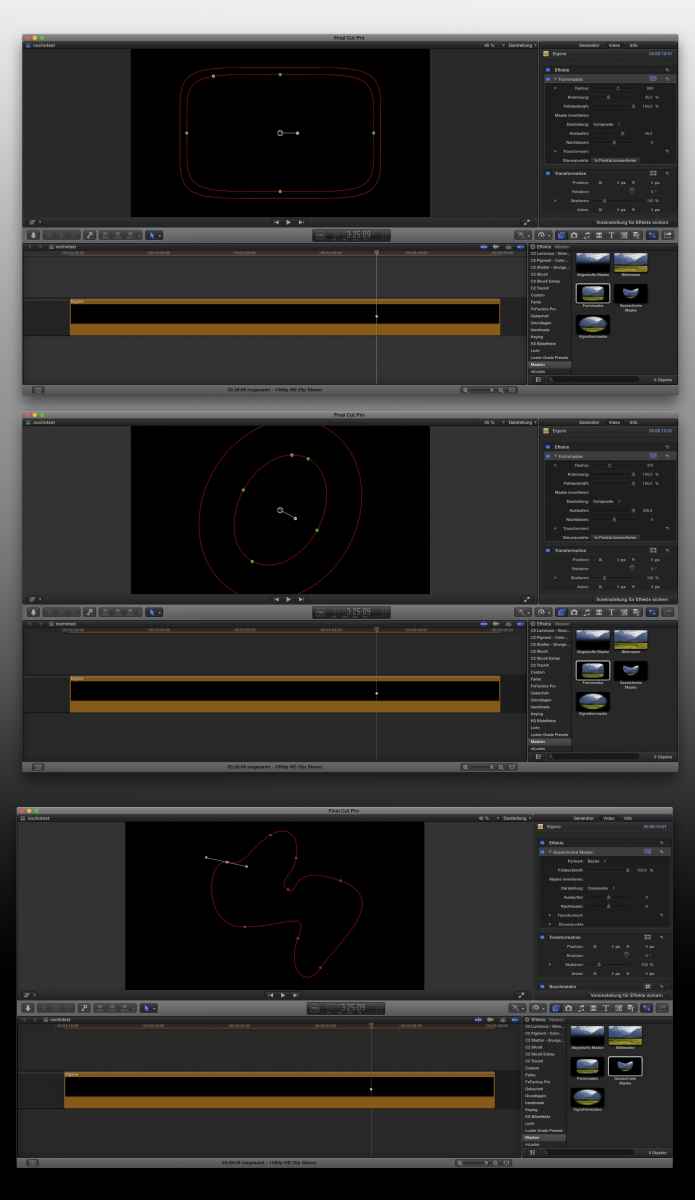
the basic is as with color-keying, two clips over each other, the upper gets some transparent parts - not by a selective color, but with a mask. FCPX comes with several options, a ready made for square or oval shapes, and, new in v10.2. a freehand mask, you can actually paint onto the canvas - very handy.
And if you know to handle handles and bezier points, you can animate this masks....
For a walk-thru effect, with a static camera, no animation needed ...
(wasn't able to do trick #3, busy week here too plus <cough< some <cough> trouble with <cough> ... the weather)
Replied by Karsten Schlüter on topic How to make things move without touching
Neguah wrote: ... I'm not sure how this is done, so I can't picture how it will turn out.
.... at the end of my lil' movie I show it - for a splitsecond....
And I'mactually realizing, my two heroes from rippletraining explain masks only in context with color-correction or keying not as in its origin use masking=hiding parts of the picture!
the basic is as with color-keying, two clips over each other, the upper gets some transparent parts - not by a selective color, but with a mask. FCPX comes with several options, a ready made for square or oval shapes, and, new in v10.2. a freehand mask, you can actually paint onto the canvas - very handy.
And if you know to handle handles and bezier points, you can animate this masks....
For a walk-thru effect, with a static camera, no animation needed ...
(wasn't able to do trick #3, busy week here too plus <cough< some <cough> trouble with <cough> ... the weather)
Please Log in to join the conversation.
- TheIceSide
-
- Offline
- New Member
-

Less
More
- Posts: 2
- Thank you received: 0
12 Mar 2017 15:26 #86459
by TheIceSide
Replied by TheIceSide on topic How to make things move without touching
Hello, I am new to this website and i have a orange and green morphsuit for my lego animation and i want to us my morphsuit to make my legos move sometimes when talking or a action scene like if a character is gonna fall or maybe fly. But i saw your example with the circle with the solid color and i was thinking to buy this to help with black spots
www.aliexpress.com/item/Photography-Stud...6i0dICFUQHhgodrPcNMA
This is a website for lighting with softboxes but i also found a video that said for me to use this lighting but i want to do reverse green screen without green screening and to make it invisible so no one can see it. this is the video:
I hope you can help me because i've had this morphsuit since last summer and i need a way to fix this problem without black spots. Please and thank you
www.aliexpress.com/item/Photography-Stud...6i0dICFUQHhgodrPcNMA
This is a website for lighting with softboxes but i also found a video that said for me to use this lighting but i want to do reverse green screen without green screening and to make it invisible so no one can see it. this is the video:
I hope you can help me because i've had this morphsuit since last summer and i need a way to fix this problem without black spots. Please and thank you
Please Log in to join the conversation.
- Karsten Schlüter
-
- Offline
- Moderator
-
Less
More
- Posts: 3790
- Thank you received: 718
14 Mar 2017 09:08 - 14 Mar 2017 09:09 #86481
by Karsten Schlüter
What problem? I'm a bit lost in your … hasty description what you like accomplish.
You like to use a morphsuit for reverse-green-screening?
easy:
you need a 'clean plate' of your scene = without you , and the record you're inside the scene, in a second timeline above the clean-plate.
Here's the tricky part: FCPX can key out any green in the scenery, but when you create shadows (floor, wall, table, props) = the shadows stay visible.
Two options:
• best: avoid shadows - by lighting, by cam angle, by arrangement of scene.
• mask-out the shadows/black spots - as described above.
The two soft-boxs you linked to don't do magically avoid any shadows… -
Is that what you're asking for?
oh, and Welcome, Kirstien, to fcp.co
Replied by Karsten Schlüter on topic How to make things move without touching
TheIceSide wrote: … I hope you can help me because i've had this morphsuit since last summer and i need a way to fix this problem without black spots. Please and thank you
What problem? I'm a bit lost in your … hasty description what you like accomplish.
You like to use a morphsuit for reverse-green-screening?
easy:
you need a 'clean plate' of your scene = without you , and the record you're inside the scene, in a second timeline above the clean-plate.
Here's the tricky part: FCPX can key out any green in the scenery, but when you create shadows (floor, wall, table, props) = the shadows stay visible.
Two options:
• best: avoid shadows - by lighting, by cam angle, by arrangement of scene.
• mask-out the shadows/black spots - as described above.
The two soft-boxs you linked to don't do magically avoid any shadows… -
Is that what you're asking for?
oh, and Welcome, Kirstien, to fcp.co
Last edit: 14 Mar 2017 09:09 by Karsten Schlüter.
Please Log in to join the conversation.

14 Mar 2017 13:59 - 14 Mar 2017 14:03 #86484
by JoeEditor
Replied by JoeEditor on topic How to make things move without touching
To avoid shadows on greenscreen, you need to have: 1- lighting on the greenscreen itself first bright enough to override minor shadows,2- lighting on the subject your filming, 3- back lights to kill off shadows and green spillover. That back light is a light that is very bright and shines on the subject from behind.
www.litepanels.com/en-US/Explore/five-ti...hting-a-green-screen
To do greenscreen like composites without shooting greenscreen, like Karsten said, that's a clean plate composite. There used to be specific plugins for that by a company, can't recall the name, I did tutorials for their plugins back in the FCP 7 days. But yeah, you need a specific plugin for clean-plate compositing. But not sure how clean-plate composite fits in with your lego greenscreen shots. Like Karsten said, we'd need more detail.
www.litepanels.com/en-US/Explore/five-ti...hting-a-green-screen
To do greenscreen like composites without shooting greenscreen, like Karsten said, that's a clean plate composite. There used to be specific plugins for that by a company, can't recall the name, I did tutorials for their plugins back in the FCP 7 days. But yeah, you need a specific plugin for clean-plate compositing. But not sure how clean-plate composite fits in with your lego greenscreen shots. Like Karsten said, we'd need more detail.
Last edit: 14 Mar 2017 14:03 by JoeEditor.
Please Log in to join the conversation.
14 Mar 2017 14:07 - 14 Mar 2017 14:12 #86485
by JoeEditor
Replied by JoeEditor on topic How to make things move without touching
Phyx is the company I was trying to remember. Great products, their chroma key collection includes clean-plate plugins. Their clean-plate, if memory serves, allows you to shoot a scene without an actor, reshoot with the actor, and be able to key out the actor or the background, either way. No green/blue screen involved.
www.phyx.biz/phyxkeyer.html
CHV is also another long time FCP plugin developer company with good quality stuff. Their chroma key collection includes a clean-plate plugin that actually repairs bad green screen. I've not used their stuff in several years, and it has all undergone vast changes, so not sure what they offer today. But check them out, could be something useful there.
www.chv-plugins.com/cms/FxPlug/KeyPro/KeyPro.php5
www.phyx.biz/phyxkeyer.html
CHV is also another long time FCP plugin developer company with good quality stuff. Their chroma key collection includes a clean-plate plugin that actually repairs bad green screen. I've not used their stuff in several years, and it has all undergone vast changes, so not sure what they offer today. But check them out, could be something useful there.
www.chv-plugins.com/cms/FxPlug/KeyPro/KeyPro.php5
Last edit: 14 Mar 2017 14:12 by JoeEditor.
Please Log in to join the conversation.
- Karsten Schlüter
-
- Offline
- Moderator
-
Less
More
- Posts: 3790
- Thank you received: 718
14 Mar 2017 14:13 #86486
by Karsten Schlüter
Replied by Karsten Schlüter on topic How to make things move without touching
for the method I'm referring to, Reverse Green Screen, there's no plug-in needed.
Have a look, this method isn't too common…
What you are talking about is a Diff-Keyer - like Photobooth offers.
But both methods ask for a clean-plate, indeed…
Have a look, this method isn't too common…
What you are talking about is a Diff-Keyer - like Photobooth offers.
But both methods ask for a clean-plate, indeed…
Please Log in to join the conversation.
- TheIceSide
-
- Offline
- New Member
-
Less
More
- Posts: 2
- Thank you received: 0
19 Mar 2017 22:08 #86615
by TheIceSide
Replied by TheIceSide on topic How to make things move without touching
Yes thank you, this is what i am asking for! But to avoid the shadows, you said the solution was by lighting but is there any type of lighting that i should use?
Please Log in to join the conversation.
- Karsten Schlüter
-
- Offline
- Moderator
-
Less
More
- Posts: 3790
- Thank you received: 718
20 Mar 2017 07:59 #86620
by Karsten Schlüter
"where there is light, there is shadows" - so, what should I recommend?
Sure, soft lights (boxes, filters, bounced) reduce shadows, but don't vanish them. Using two of them, reduces shadows - to the price of a 'boring' flat look . In macro photography, they use 'light tents' - no shadows at all, but of lil' use for recording actors … You could get close-up your subject, so shadows are off frame. Using a black background… ok, I start to act silly…. :silly:
There is no general advice possible - it depends way too much on individual scene.
If you have any lights avail on set - try it.
Setting light is a life-long education…
Replied by Karsten Schlüter on topic How to make things move without touching
TheIceSide wrote: … you said the solution was by lighting but is there any type of lighting that i should use?
"where there is light, there is shadows" - so, what should I recommend?
Sure, soft lights (boxes, filters, bounced) reduce shadows, but don't vanish them. Using two of them, reduces shadows - to the price of a 'boring' flat look . In macro photography, they use 'light tents' - no shadows at all, but of lil' use for recording actors … You could get close-up your subject, so shadows are off frame. Using a black background… ok, I start to act silly…. :silly:
There is no general advice possible - it depends way too much on individual scene.
If you have any lights avail on set - try it.
Setting light is a life-long education…
Please Log in to join the conversation.
