


- Posts: 582
- Thank you received: 5
3 Post Moderation Rule for New Boarders (25 Jan 2021)
New boarders will have their posts moderated - Don't worry if you cannot see your post immediately.
How to make things move without touching
21 Oct 2015 21:27 #69668
by Neguah
How to make things move without touching was created by Neguah
I'm making somewhat horror-movie at work. And I want to be able to move things without the audience see the line I'm using to drag the thing I want to move.
I attached a blue line to a doll, and then wanted to key it out. But the blue line didn't disappear when used the keying in FCPX. What do I need to do to pull this of? I have seen a video with some lego on top of a green paper. When editing the editor was able to remove the green paper so it looked like the lego was moving on it's own. But I can't find it.
Any idea on how to do it?
I attached a blue line to a doll, and then wanted to key it out. But the blue line didn't disappear when used the keying in FCPX. What do I need to do to pull this of? I have seen a video with some lego on top of a green paper. When editing the editor was able to remove the green paper so it looked like the lego was moving on it's own. But I can't find it.
Any idea on how to do it?
Please Log in to join the conversation.
- Karsten Schlüter
-

- Offline
- Moderator
-

Less
More
- Posts: 3790
- Thank you received: 718
21 Oct 2015 21:39 - 21 Oct 2015 21:41 #69670
by Karsten Schlüter
I'm the maker of that demo ....
keying a video means 'punching a hole to see what's underneath'
so, just a single track doesn't do the trick.
you need TWO recordings, a 'plate', showing the whole scene, and a 2nd track with the green parts.
to make things easy- use a tripod.
that demo is +2y old, meanwhile techniqué (and my skills) developed .... but all based upon you have material to replace the green … or blue or pink (for color keying in a djungle for Predator, they used pink)
late here - more tommorrow ... my tommorrow ...
Replied by Karsten Schlüter on topic How to make things move without touching
Neguah wrote: ....I have seen a video with some lego on top of a green paper.
I'm the maker of that demo ....
keying a video means 'punching a hole to see what's underneath'
so, just a single track doesn't do the trick.
you need TWO recordings, a 'plate', showing the whole scene, and a 2nd track with the green parts.
to make things easy- use a tripod.
that demo is +2y old, meanwhile techniqué (and my skills) developed .... but all based upon you have material to replace the green … or blue or pink (for color keying in a djungle for Predator, they used pink)
late here - more tommorrow ... my tommorrow ...
Last edit: 21 Oct 2015 21:41 by Karsten Schlüter.
Please Log in to join the conversation.

22 Oct 2015 00:02 #69674
by BenB
Replied by BenB on topic How to make things move without touching
There is also an object remover in SliceX that works great, too.
Please Log in to join the conversation.
- Karsten Schlüter
-
- Offline
- Moderator
-
Less
More
- Posts: 3790
- Thank you received: 718
22 Oct 2015 04:06 #69681
by Karsten Schlüter
Replied by Karsten Schlüter on topic How to make things move without touching
<yawn> good morning!
So, how to move things without touching ...
a) Practical
You can learn a lot by magicians, they move things without touching AND without software. They use several concepts
• 'Black on Black' (funniest example, those Shaolin Ping Pong players)
• 'beyond resolution': a piece of grey sewing cotton is within inches 'invisible', magicians use that e.g. for hovering a tiny ball between their hands
• 'within axis': imagine a ball on a stick ... no, nowadays example: imagine one of those silly selfie sticks: when someone points at you, the phone covers the stick - a flying phone!; a widely used technique from still photographers to make things hover without touching ground
b) key
(as a non-native speaker, it should be called key-hole, I'd say?...) key or matte, both related: a luma-key means anything below some thresholdof black gets 'transparent', imagine a layer of glas, you look from top, all 'empty' parts allow to look beneath
in this thread at ASC, Luis and I explain in our words the concept ...
which is: you need TWO shots: the one with a green screen, or for the reverse-greenscreening, green parts, AND one which shows the replacing parts - a whole map for the weather man, or the same set, now empty, without green, to look 'behind' what the green covered
Going to the extreme:

Hurdles:
things get complicated, when you move the camera; again options...
• fake the cam movement; produce the scene rock-solid from tripod, then, after keying, add 'movements', camera shakes, pans ('Ken Burns' << he didn't invented it!) ... here comes 4k handy, its res allows re-framing 1080 without (almost no ..) quality loss
• tracking; Hollywood tracks cam-movements 'mechanically' on set (and re-enacts them with robot-tripods), or you use software trackers. Apples own Motion has one, which - professionals look away! - is fine for lots of stuff.
And, esp. for FCPX, there are the coremelt products, which do marvel in tracking.
but, BUT for your needs, you always need a clean-plate, that part, which should replace the green AND should fit seemlessly into scenery...
Try it; don't touch the camera while recording, take one Chucky in place, moved by cables, take two: set without Chucky (basically, you need one frame of the clean set) … no witchcraft - oops, horror-movie, wrong phrase, no rocketscience....
And consider practicals, sewing-cotton; low light, lots of shadows and nobody will notice strings-attached.
And consider the Magic of editing: short cuts, jump cuts, 5-frame-cuts, tons of shaky close-ups ... best horror happens in your head, not before it ........
<phew> lengthy answer...... :silly:
So, how to move things without touching ...
a) Practical
You can learn a lot by magicians, they move things without touching AND without software. They use several concepts
• 'Black on Black' (funniest example, those Shaolin Ping Pong players)
• 'beyond resolution': a piece of grey sewing cotton is within inches 'invisible', magicians use that e.g. for hovering a tiny ball between their hands
• 'within axis': imagine a ball on a stick ... no, nowadays example: imagine one of those silly selfie sticks: when someone points at you, the phone covers the stick - a flying phone!; a widely used technique from still photographers to make things hover without touching ground
b) key
(as a non-native speaker, it should be called key-hole, I'd say?...) key or matte, both related: a luma-key means anything below some thresholdof black gets 'transparent', imagine a layer of glas, you look from top, all 'empty' parts allow to look beneath
in this thread at ASC, Luis and I explain in our words the concept ...
which is: you need TWO shots: the one with a green screen, or for the reverse-greenscreening, green parts, AND one which shows the replacing parts - a whole map for the weather man, or the same set, now empty, without green, to look 'behind' what the green covered
Going to the extreme:
Hurdles:
things get complicated, when you move the camera; again options...
• fake the cam movement; produce the scene rock-solid from tripod, then, after keying, add 'movements', camera shakes, pans ('Ken Burns' << he didn't invented it!) ... here comes 4k handy, its res allows re-framing 1080 without (almost no ..) quality loss
• tracking; Hollywood tracks cam-movements 'mechanically' on set (and re-enacts them with robot-tripods), or you use software trackers. Apples own Motion has one, which - professionals look away! - is fine for lots of stuff.
And, esp. for FCPX, there are the coremelt products, which do marvel in tracking.
but, BUT for your needs, you always need a clean-plate, that part, which should replace the green AND should fit seemlessly into scenery...
Try it; don't touch the camera while recording, take one Chucky in place, moved by cables, take two: set without Chucky (basically, you need one frame of the clean set) … no witchcraft - oops, horror-movie, wrong phrase, no rocketscience....
And consider practicals, sewing-cotton; low light, lots of shadows and nobody will notice strings-attached.
And consider the Magic of editing: short cuts, jump cuts, 5-frame-cuts, tons of shaky close-ups ... best horror happens in your head, not before it ........
<phew> lengthy answer...... :silly:
Please Log in to join the conversation.
08 Nov 2015 18:31 #70370
by Neguah
Replied by Neguah on topic How to make things move without touching
Oh wow, Karsten! I'm so happy for your detailed answer. Theoretical I'm learning so much from you!
I have a lobby where I want things to move, giving the audience the feeling of that there is someone coming. I have tied a small, green cotton rope to the object, but I'm not able to remove it in FCPX. Perhaps the color isn't strong enough?
But I just remembered that I have a green morphsuit. I will give that one a try.
And again, I really appreciate your answer. Thank you very much!
I have a lobby where I want things to move, giving the audience the feeling of that there is someone coming. I have tied a small, green cotton rope to the object, but I'm not able to remove it in FCPX. Perhaps the color isn't strong enough?
But I just remembered that I have a green morphsuit. I will give that one a try.
And again, I really appreciate your answer. Thank you very much!
Please Log in to join the conversation.
- Karsten Schlüter
-
- Offline
- Moderator
-
Less
More
- Posts: 3790
- Thank you received: 718
08 Nov 2015 19:14 #70375
by Karsten Schlüter
Replied by Karsten Schlüter on topic How to make things move without touching
again - you need TWO identically recordings of the same scene!
one WITH green parts, one withOUT...
And, although the keyer in FCPX can do marvel, the green should be even as possible.
If the green string is partly shadowed, or starts with screamish green near a light and then, in the distance gets muddy greyish green, the keyer doesn't work.
Make tests, try different things.
Maybe you have to record in bright daylight to get a clean key, and then in post 'dim the lights'...-
And keep my other advice in mind:
no single long take, edit it. perhaps you need just a few inches, rest is close-ups, and you move your objects with bare hands .. off camera ....-
happy movie making!
one WITH green parts, one withOUT...
And, although the keyer in FCPX can do marvel, the green should be even as possible.
If the green string is partly shadowed, or starts with screamish green near a light and then, in the distance gets muddy greyish green, the keyer doesn't work.
Make tests, try different things.
Maybe you have to record in bright daylight to get a clean key, and then in post 'dim the lights'...-
And keep my other advice in mind:
no single long take, edit it. perhaps you need just a few inches, rest is close-ups, and you move your objects with bare hands .. off camera ....-
happy movie making!
Please Log in to join the conversation.
10 Nov 2015 20:13 #70462
by Neguah
Replied by Neguah on topic How to make things move without touching
Thanks Karsten! Thank you very much!
I have done some tests. And indoor light with normal lights won't do it. With the second clip (with the green part - morphsuit) on top, both clip together turns quite dark. Also, my morphsuit is dark green. And removing it is nearly impossible. But I'm impressed by the keyer. It automatically does a really good job.
So, I need to fetch some extra lights, perhaps over expose the scene a bit in and dim it in post, as you said.
Also the morphsuit is a bit reflective, so that's also a bit challenging.
And I will take your advice and have lots of cut aways to minimise flaws.
Thanks!
I have done some tests. And indoor light with normal lights won't do it. With the second clip (with the green part - morphsuit) on top, both clip together turns quite dark. Also, my morphsuit is dark green. And removing it is nearly impossible. But I'm impressed by the keyer. It automatically does a really good job.
So, I need to fetch some extra lights, perhaps over expose the scene a bit in and dim it in post, as you said.
Also the morphsuit is a bit reflective, so that's also a bit challenging.
And I will take your advice and have lots of cut aways to minimise flaws.
Thanks!
Please Log in to join the conversation.
- Karsten Schlüter
-
- Offline
- Moderator
-
Less
More
- Posts: 3790
- Thank you received: 718
11 Nov 2015 06:45 #70474
by Karsten Schlüter
hu?
stacking two clips, top with a Keyer effect has NO effect on brightness!
... uhm, well, should not have an effect ...
Trick FCPX:
timeline = clip with NO green
on top = clip WITH green
now, before applying the keyer, crop the top clip to just a green part, probably just a tiny dot... well should be a bit more ......
then apply the keyer, then reset/undo the crop .....
when there's too much non-green in the frame, FCPX has no clue what color to key ....
Replied by Karsten Schlüter on topic How to make things move without touching
Neguah wrote: .... With the second clip (with the green part - morphsuit) on top, both clip together turns quite dark. …!
hu?
stacking two clips, top with a Keyer effect has NO effect on brightness!
... uhm, well, should not have an effect ...
Trick FCPX:
timeline = clip with NO green
on top = clip WITH green
now, before applying the keyer, crop the top clip to just a green part, probably just a tiny dot... well should be a bit more ......
then apply the keyer, then reset/undo the crop .....
when there's too much non-green in the frame, FCPX has no clue what color to key ....
Please Log in to join the conversation.
11 Nov 2015 13:02 #70482
by BenB
Replied by BenB on topic How to make things move without touching
"when there's too much non-green in the frame, FCPX has no clue what color to key ...."
No, FCPX keys the color it is told to key, specifically, always, it is never clueless or wayward in any fashion.
No, FCPX keys the color it is told to key, specifically, always, it is never clueless or wayward in any fashion.
Please Log in to join the conversation.
- Karsten Schlüter
-
- Offline
- Moderator
-
Less
More
- Posts: 3790
- Thank you received: 718
11 Nov 2015 15:35 #70490
by Karsten Schlüter
Who am I, to doubt your expertise, Ben - but at our schools filmclub we noticed, you can ...
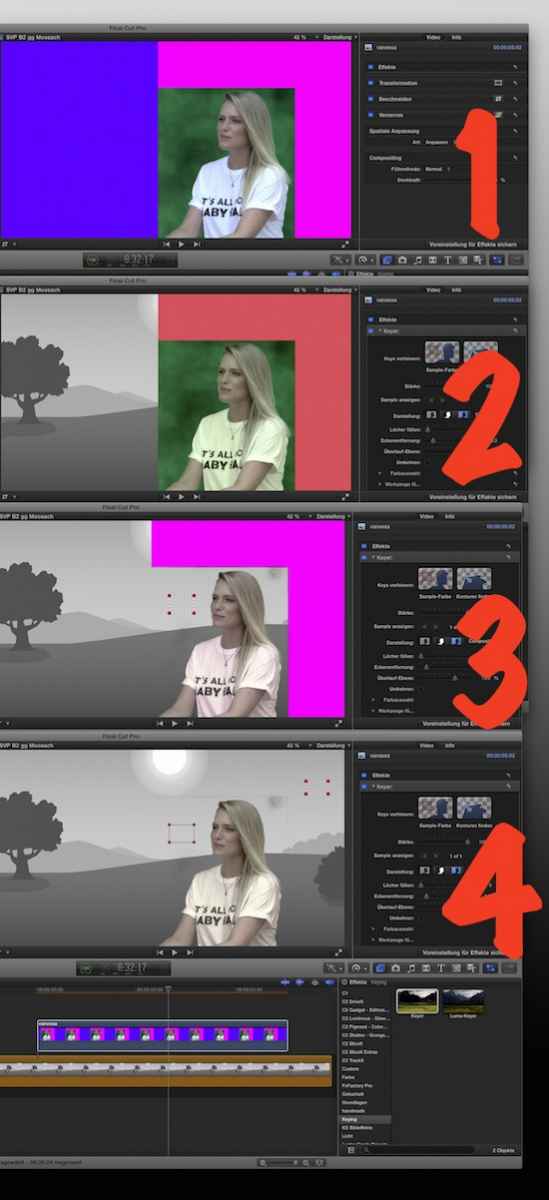
original. #1
dropping the Keyer Effect onto it, results in #2: Not the greenish mud gets keyed, but the 'majority' blue. Plus, the magenta gets pink.... #2
Now, using the Keyers Color Selector, the green mud gets keyed (awesome, so lil' green,so much key) - but Blue is still keyed, therefor pink gets back to magenta. #3
.. and, for Gods sake, selecting the magenta part finally all colors get keyed. #4
(mystery for me, why isn't the girls face 'keyed'??)
no real lfe example, none at hand right now, but we noticed with our 'worse green screen ever'-videos, when the screen is just a part of the frame, the 'other' parts DO have an effect on the Keyer.
And I haven't found a way yet, maybe you can tell me, to set a key-color BEFORE applying the effect ("irgnore the Blue, focus on Green!")
Maybe advice is just old, we haven't update at school for quit a while (=schools filters don't allow access to AppStore), .. when I think of it, I'll try to fetch some grabs at our schools Mac on Friday....
Replied by Karsten Schlüter on topic How to make things move without touching
BenB wrote: ...No, FCPX keys the color it is told to key, specifically, always, it is never clueless or wayward in any fashion.
Who am I, to doubt your expertise, Ben - but at our schools filmclub we noticed, you can ...
original. #1
dropping the Keyer Effect onto it, results in #2: Not the greenish mud gets keyed, but the 'majority' blue. Plus, the magenta gets pink.... #2
Now, using the Keyers Color Selector, the green mud gets keyed (awesome, so lil' green,so much key) - but Blue is still keyed, therefor pink gets back to magenta. #3
.. and, for Gods sake, selecting the magenta part finally all colors get keyed. #4
(mystery for me, why isn't the girls face 'keyed'??)
no real lfe example, none at hand right now, but we noticed with our 'worse green screen ever'-videos, when the screen is just a part of the frame, the 'other' parts DO have an effect on the Keyer.
And I haven't found a way yet, maybe you can tell me, to set a key-color BEFORE applying the effect ("irgnore the Blue, focus on Green!")
Maybe advice is just old, we haven't update at school for quit a while (=schools filters don't allow access to AppStore), .. when I think of it, I'll try to fetch some grabs at our schools Mac on Friday....
Please Log in to join the conversation.
11 Nov 2015 22:51 #70528
by BenB
Replied by BenB on topic How to make things move without touching
It defaults to chroma green or blue, which ever it detects. You have mostly blue. Using the square selector is actually selecting the color you want it to zoom in on. For manual selections like you're trying to do, set the Strength slider to zero to override the automatic detection. Click and drag to make the square over the color to sample. To "add" to that sample, hold the shift key while drawing a square. Otherwise you're selecting a new color. Also be aware that the frame you're doing this in, is making keyframes! That is so you can adjust the key over time, when the camera pans across a large green screen (we do that often). There's tons of more controls that make a lot of this specialized use a snap. It's all in the user manual.
help.apple.com/finalcutpro/mac/10.2/#/ver40b003bc
help.apple.com/finalcutpro/mac/10.2/#/ver40b003bc
Please Log in to join the conversation.
- Karsten Schlüter
-
- Offline
- Moderator
-
Less
More
- Posts: 3790
- Thank you received: 718
12 Nov 2015 05:04 - 12 Nov 2015 07:46 #70543
by Karsten Schlüter
Thanks for sharing, Ben!
Replied by Karsten Schlüter on topic How to make things move without touching
BenB wrote: // full qoute //
Thanks for sharing, Ben!
Last edit: 12 Nov 2015 07:46 by Karsten Schlüter.
Please Log in to join the conversation.
12 Nov 2015 07:10 #70546
by Neguah
Replied by Neguah on topic How to make things move without touching
That's weird. Stacking two images with the green on top, it had an effect on the brightness. I haven't had the chance to try again in a brighter environment, but I'll get it done as soon as possible.
Please Log in to join the conversation.
- Karsten Schlüter
-
- Offline
- Moderator
-
Less
More
- Posts: 3790
- Thank you received: 718
12 Nov 2015 11:22 #70550
by Karsten Schlüter
Replied by Karsten Schlüter on topic How to make things move without touching
Neguah,
This morning I've recorded a few clips in my cellar and stapled them together. Maybe this afternoon, larely tommorrow morning I'll upload a tiny sort-of tutorial. Imho, showing is always better than talking - esp in a foreign language. :woohoo:
Title of that shocker: Odie Attack .... Yep, frightening yet!
I was a bit in ahurry, so the results are far from perfect, but to demo what I'm talking about, good enough.
Please hold the line........
This morning I've recorded a few clips in my cellar and stapled them together. Maybe this afternoon, larely tommorrow morning I'll upload a tiny sort-of tutorial. Imho, showing is always better than talking - esp in a foreign language. :woohoo:
Title of that shocker: Odie Attack .... Yep, frightening yet!
I was a bit in ahurry, so the results are far from perfect, but to demo what I'm talking about, good enough.
Please hold the line........
Please Log in to join the conversation.
- Karsten Schlüter
-
- Offline
- Moderator
-
Less
More
- Posts: 3790
- Thank you received: 718
13 Nov 2015 00:38 #70587
by Karsten Schlüter
Replied by Karsten Schlüter on topic How to make things move without touching
not a real a how-to tutorial, just to show you, Neguah, how i would do it. Or did it...
yes, an inch-thick blanket is sub-prime for such an effect, but yióu can see, with pasting tons of filters over a scenery (I don't call that grading, that is filters, like in the old days), you can hide a lot of fialures, my hand for example, pulling the blanket etc ......
.... enjoy!
yes, an inch-thick blanket is sub-prime for such an effect, but yióu can see, with pasting tons of filters over a scenery (I don't call that grading, that is filters, like in the old days), you can hide a lot of fialures, my hand for example, pulling the blanket etc ......
.... enjoy!
Please Log in to join the conversation.
- Squamish ed
-

- Offline
- Elite Member
-

Less
More
- Posts: 238
- Thank you received: 20
13 Nov 2015 02:15 #70589
by Squamish ed
Ed
Replied by Squamish ed on topic How to make things move without touching
Nice imaginative tutorial Karsten! There's nothing like a suspenseful thriller at the end of long day.
Ed
Please Log in to join the conversation.
13 Nov 2015 03:43 #70590
by BenB
Replied by BenB on topic How to make things move without touching
I do stop motion. Man, I miss doing stop motion on an daily basis. Gotta find a stop motion project.
Please Log in to join the conversation.
13 Nov 2015 12:08 #70600
by Neguah
Replied by Neguah on topic How to make things move without touching
Wow, thank you very much Karsten! You're just to good! And I mean as a person. And of course, you know what you're doing. It's very kind of you to take your time to do this. Very much appreciated! Don't know how to thank you!
I understand the concept, but I don't understand why my stacking of to clips turned dark. But I'll try again, and I will put on my morphsuit to blend in
Another question, "walk through wall effect". I have a pirate which is a ghost who I want to walk through a door. I have seen a "transition effect", which actually works ok:
Also seen bunch of effect done in after effect. But since this is about masking an all and my computer isn't working properly I wan't to avoid this.
A can also to an easy one and croping half the clip. But is there any other way to do this in Fcpx?
Should I start a new tread for this one?
I understand the concept, but I don't understand why my stacking of to clips turned dark. But I'll try again, and I will put on my morphsuit to blend in
Another question, "walk through wall effect". I have a pirate which is a ghost who I want to walk through a door. I have seen a "transition effect", which actually works ok:
Also seen bunch of effect done in after effect. But since this is about masking an all and my computer isn't working properly I wan't to avoid this.
A can also to an easy one and croping half the clip. But is there any other way to do this in Fcpx?
Should I start a new tread for this one?
Please Log in to join the conversation.
- Karsten Schlüter
-
- Offline
- Moderator
-
Less
More
- Posts: 3790
- Thank you received: 718
13 Nov 2015 17:38 #70616
by Karsten Schlüter
I guess, Peter, our friendly host here would appreciate that ...
That YT video you posted touches me in an odd way: I used the same iMovieJingle last year for my (soccer) openers and the method I described on my long forgotton iM website 250y ago ...
sites.google.com/site/karstenschluter/walkthruwall
... looks familiar
(just noticed: google killed the links to my demo-videos! ... should I fix that ... naah, other things to do)
I don't complain!
No, no I.P. on a fast dissolve!! ... but ... odd.
Neguah, post your new question in a new thread, and I know at last 3 methods to diffuse thru a wall/door/whatever......... from too-simple to complex... looks like, tomorrow morning I have to record a few clips ... and again my neighbors will worry "what the heck is the old man doin' there??" :silly:
Replied by Karsten Schlüter on topic How to make things move without touching
Should I start a new tread for this one?
I guess, Peter, our friendly host here would appreciate that ...
That YT video you posted touches me in an odd way: I used the same iMovieJingle last year for my (soccer) openers and the method I described on my long forgotton iM website 250y ago ...
sites.google.com/site/karstenschluter/walkthruwall
... looks familiar
(just noticed: google killed the links to my demo-videos! ... should I fix that ... naah, other things to do)
I don't complain!
No, no I.P. on a fast dissolve!! ... but ... odd.
Neguah, post your new question in a new thread, and I know at last 3 methods to diffuse thru a wall/door/whatever......... from too-simple to complex... looks like, tomorrow morning I have to record a few clips ... and again my neighbors will worry "what the heck is the old man doin' there??" :silly:
Please Log in to join the conversation.
17 Nov 2015 06:52 #70727
by Neguah
Replied by Neguah on topic How to make things move without touching
I did a new green screen-recording with my morphsuit. Sadly I wasn't invisible. I can easily the edges, both when I'm standing and laying down. So I need to figure out a new way without putting on to much effect. It's for kindergarten and the employees and parents, but I want to make it somehow realistic.
But I know the concept, so I just have to keep trying.
Thank you for your help, Karsten! Really happy for you contribution!
As for the "walk-through", I will start a new tread.
But I know the concept, so I just have to keep trying.
Thank you for your help, Karsten! Really happy for you contribution!
As for the "walk-through", I will start a new tread.
Please Log in to join the conversation.
