


- Posts: 786
- Thank you received: 21
3 Post Moderation Rule for New Boarders (25 Jan 2021)
New boarders will have their posts moderated - Don't worry if you cannot see your post immediately.
Youtube upload...can you look at this?
- Jonathan Levin
-
 Topic Author
- Offline
- Platinum Member
-

Less
More
21 Sep 2015 22:11 - 22 Oct 2015 15:15 #68790
by Jonathan Levin
Youtube upload...can you look at this? was created by Jonathan Levin
Hi all.
I just uploaded to YT for the third time a short 6 minute video. Just some personal stuff. I am having an issue where somehow YT does not like a couple of seconds of video and chokes, but then after that, it plays through.
Everything plays nice in FCP 10.2.2. Project properties 1080p 29.97 48k audio. The clip that this happens on is a ProRes 422 clip. The clips before this are the same and they play fine. It's just this short section.
I exported a ProRes 422 master file which alos play through everything fine. I then sent that file to Compressor using my YT 1080p preset, and that file also played through just fine. The problem is just in playback on Youtube.
The start of this is at about 4:30 into the video. Here is a link to the video:
This happens at all resolutions. Anyone else every have a very short section flake out on YouTube, and if so how did you fix it?
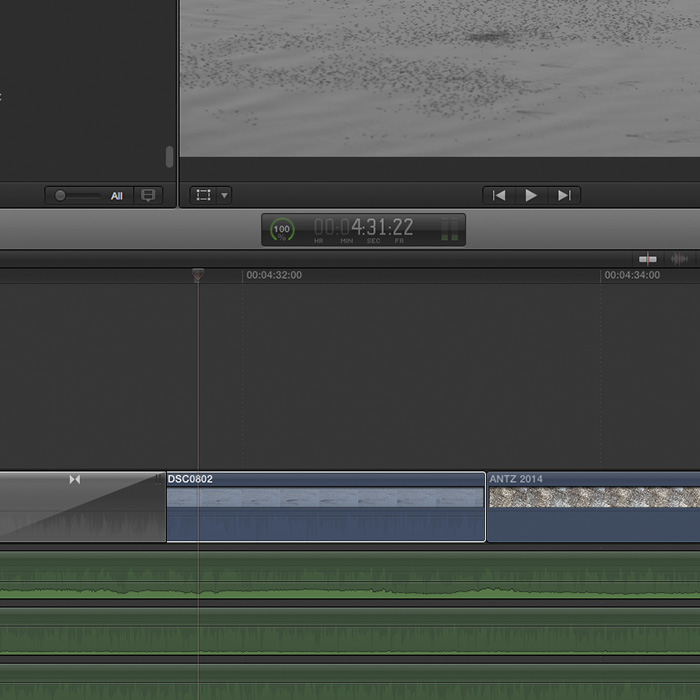
Attached a screen grab of project too.
I just uploaded to YT for the third time a short 6 minute video. Just some personal stuff. I am having an issue where somehow YT does not like a couple of seconds of video and chokes, but then after that, it plays through.
Everything plays nice in FCP 10.2.2. Project properties 1080p 29.97 48k audio. The clip that this happens on is a ProRes 422 clip. The clips before this are the same and they play fine. It's just this short section.
I exported a ProRes 422 master file which alos play through everything fine. I then sent that file to Compressor using my YT 1080p preset, and that file also played through just fine. The problem is just in playback on Youtube.
The start of this is at about 4:30 into the video. Here is a link to the video:
This happens at all resolutions. Anyone else every have a very short section flake out on YouTube, and if so how did you fix it?
Attached a screen grab of project too.
Last edit: 22 Oct 2015 15:15 by Jonathan Levin.
Please Log in to join the conversation.
- Jonathan Levin
-
Topic Author
- Offline
- Platinum Member
-
Less
More
- Posts: 786
- Thank you received: 21
21 Sep 2015 22:20 #68791
by Jonathan Levin
Replied by Jonathan Levin on topic Youtube upload...can you look at this?
If it is any help. The video of the bugs on the lake were retimed in FCP 200% and immediately following those shot is the time-lapse (Antz2014 in screen grab) and that also plays rather weirdly.
That time-lapse is a ProRes 422 30p clip in my 29.97 project. not sure if that matters. Again, I think this may be more of a YT problem but I thought I'd ask here.
Jonathan
That time-lapse is a ProRes 422 30p clip in my 29.97 project. not sure if that matters. Again, I think this may be more of a YT problem but I thought I'd ask here.
Jonathan
Please Log in to join the conversation.

21 Sep 2015 23:36 #68792
by dgwvideo
Creating history....one edit at a time !
Replied by dgwvideo on topic Youtube upload...can you look at this?
Hey, Jonathan. I just watched your entire video on my iPad and it played thru without any hiccups. I didn't see the issue you described. Not sure what resolution I was watching as the player offered no options to select that, but it didn't appear to be HD. There was a lot of the YouTube typical processing artifacts, but it did play though without stuttering.
BTW, I have been to Chain of Lakes and Palasades many times when I lived in Northern Illinois.
BTW, I have been to Chain of Lakes and Palasades many times when I lived in Northern Illinois.
Creating history....one edit at a time !
Please Log in to join the conversation.

22 Sep 2015 00:27 #68795
by BenB
Replied by BenB on topic Youtube upload...can you look at this?
I saw it, very clearly, on a Thunderbolt Display. Very odd.
Please Log in to join the conversation.
22 Sep 2015 01:00 #68796
by dgwvideo
Creating history....one edit at a time !
Replied by dgwvideo on topic Youtube upload...can you look at this?
Well the iPad has a Retina display but maybe the wifi connection was slow and YouTube delivered a lower resolution video based on what speed it sensed. Either way, I didn't notice the video choking and then starting as Jonathan indicated.
Creating history....one edit at a time !
Please Log in to join the conversation.
- Tom Wolsky
-

- Offline
- Moderator
-

22 Sep 2015 07:30 #68805
by Tom Wolsky
Replied by Tom Wolsky on topic Youtube upload...can you look at this?
That is some of the most incredibly difficult video for a codec to compress. It needs a very high data rate in the area to work well. It's really pushing the limits to get that to work with a GOP structure codec. If you use Compressor and increase the keyframes you might get a better result. In legacy Compressor you could add specific I-frame points, not sure if you can do it in the current version.
Please Log in to join the conversation.
- Jonathan Levin
-
Topic Author
- Offline
- Platinum Member
-
Less
More
- Posts: 786
- Thank you received: 21
22 Sep 2015 16:14 - 22 Sep 2015 16:20 #68819
by Jonathan Levin
Replied by Jonathan Levin on topic Youtube upload...can you look at this?
Thank you all for your thoughts. For those of you who watched the entire video....there is 7 minutes of your life that you won't get back! And for those who watched twice...oye vey.
So, YouTube doesn't like a lot of motion type stuff? I have not had this before with any of my other videos. Here are my Compressor settings:
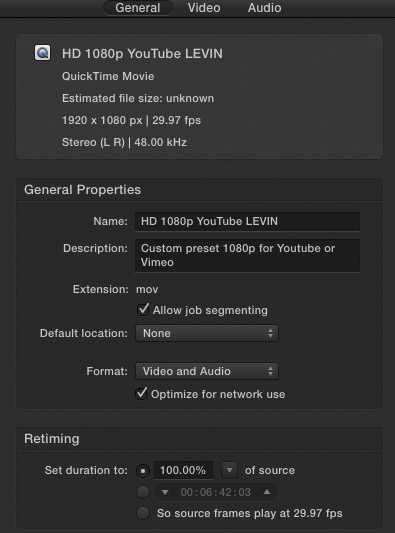
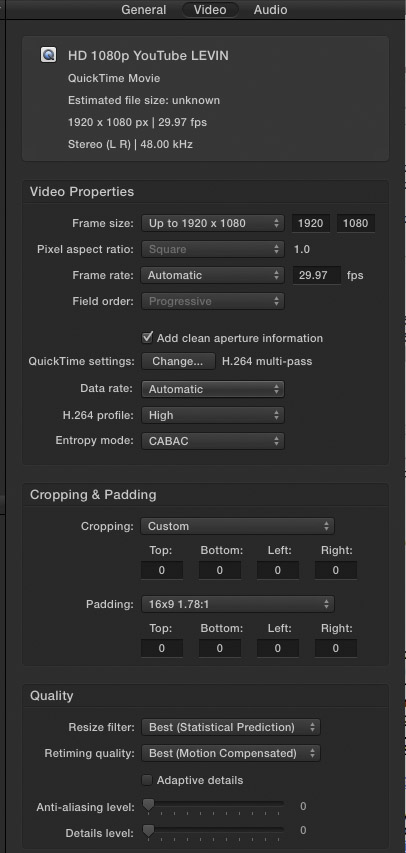
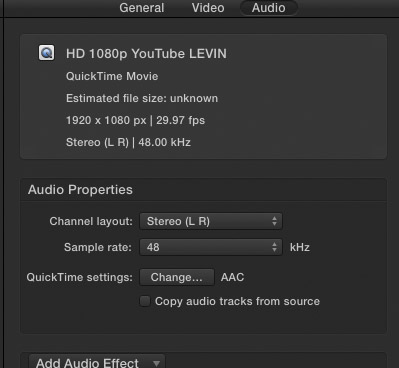
So ultimately is this a YT issue? And can anyone suggest settings that might work better than what I have?
The offending frames (between 4:30 to 4:34 are only on the screen for a split second before it goes into the 30p time-lapse of the ants which also looks odd.
Thanks so much for looking. My personal stuff uses alot of film grain effects, some re-timing, clips over clips (double exposure effect and so on.
So, YouTube doesn't like a lot of motion type stuff? I have not had this before with any of my other videos. Here are my Compressor settings:
So ultimately is this a YT issue? And can anyone suggest settings that might work better than what I have?
The offending frames (between 4:30 to 4:34 are only on the screen for a split second before it goes into the 30p time-lapse of the ants which also looks odd.
Thanks so much for looking. My personal stuff uses alot of film grain effects, some re-timing, clips over clips (double exposure effect and so on.
Last edit: 22 Sep 2015 16:20 by Jonathan Levin. Reason: forgot captures
Please Log in to join the conversation.
- Karsten Schlüter
-

- Offline
- Moderator
-
Less
More
- Posts: 3790
- Thank you received: 718
22 Sep 2015 18:14 #68826
by Karsten Schlüter
Replied by Karsten Schlüter on topic Youtube upload...can you look at this?
I'm with Tom: grey gradients, 'flowing', moving .... that's where an encoder takes his hat and says good-bye
sidenote: twirling waters in some fast flowing creek = best test material to test encoder settings.Or to demo its limits.
Those blocky compression artefacts are most probably YT fault; you can give it a push by changing your ocmpressor settings.
bitrate not auto but ... 10.000 kbps? 15.000? yepp, the resulting file is huge and on first sight doesn't differ with the actual one ... but that's the isssue with compression: it 'multiply' its errors ...
sidenote: twirling waters in some fast flowing creek = best test material to test encoder settings.Or to demo its limits.
Those blocky compression artefacts are most probably YT fault; you can give it a push by changing your ocmpressor settings.
bitrate not auto but ... 10.000 kbps? 15.000? yepp, the resulting file is huge and on first sight doesn't differ with the actual one ... but that's the isssue with compression: it 'multiply' its errors ...
Please Log in to join the conversation.
- Jonathan Levin
-
Topic Author
- Offline
- Platinum Member
-
Less
More
- Posts: 786
- Thank you received: 21
22 Sep 2015 19:19 #68832
by Jonathan Levin
Replied by Jonathan Levin on topic Youtube upload...can you look at this?
Hi Karsten,
Good to hear from you!
Just for the hell of it, I'll try re doing the Master file in Compressor at a bitrate of 15000 and then upload that and see what happens.
Before I do that, any other changes I should try? Between transcoding and uploading, this 7 minute video takes about four hours!
Jonathan
Good to hear from you!
Just for the hell of it, I'll try re doing the Master file in Compressor at a bitrate of 15000 and then upload that and see what happens.
Before I do that, any other changes I should try? Between transcoding and uploading, this 7 minute video takes about four hours!
Jonathan
Please Log in to join the conversation.
- Karsten Schlüter
-
- Offline
- Moderator
-
Less
More
- Posts: 3790
- Thank you received: 718
22 Sep 2015 21:53 #68840
by Karsten Schlüter
Hi Jo,
the night of the long renderings: my brave Mini tries to de-shake a 10min phone-video, and export and upload two 10min yt uploads........ but not 4h! thats very slow ... what does your IP tell, what upload speed does he promise..?
no, the bitrate is the main factor; your workflow seems to avoid useless intermediates, no codec-hopping ... try the high (superhigh) bitrates... if bandwidth is no prob
...
Replied by Karsten Schlüter on topic Youtube upload...can you look at this?
Jonathan Levin wrote: …any other changes I should try? Between transcoding and uploading, this 7 minute video takes about four hours!
...
Hi Jo,
the night of the long renderings: my brave Mini tries to de-shake a 10min phone-video, and export and upload two 10min yt uploads........ but not 4h! thats very slow ... what does your IP tell, what upload speed does he promise..?
no, the bitrate is the main factor; your workflow seems to avoid useless intermediates, no codec-hopping ... try the high (superhigh) bitrates... if bandwidth is no prob
...
Please Log in to join the conversation.
- Jonathan Levin
-
Topic Author
- Offline
- Platinum Member
-
Less
More
- Posts: 786
- Thank you received: 21
23 Sep 2015 15:11 #68858
by Jonathan Levin
Replied by Jonathan Levin on topic Youtube upload...can you look at this?
Hi Karsten.
I created a new YT file in Compressor using the setting of 15000 bit rate uploaded to YT, and it plays exactly the same at the same spot, as you mentioned it might.
Tom mentioned something about key framing a section but I'm afraid I don't quite understand how to do this. I'm just wondering if there is anything that can be done here to make this work? Is this something I should chat about with someone at YouTube since this is clearly happening on their end when the file is uploaded and processed.
And just to clarify, it is not just me seeing this right?
Thanks.
JL
I created a new YT file in Compressor using the setting of 15000 bit rate uploaded to YT, and it plays exactly the same at the same spot, as you mentioned it might.
Tom mentioned something about key framing a section but I'm afraid I don't quite understand how to do this. I'm just wondering if there is anything that can be done here to make this work? Is this something I should chat about with someone at YouTube since this is clearly happening on their end when the file is uploaded and processed.
And just to clarify, it is not just me seeing this right?
Thanks.
JL
Please Log in to join the conversation.
23 Sep 2015 16:21 #68860
by dgwvideo
Creating history....one edit at a time !
Replied by dgwvideo on topic Youtube upload...can you look at this?
Jonathan.
I just watched your video again, this time from a desktop rather than iPad where I could set for 1080HD. I do see one spot at 4:32 that appears to be a bad frame, corrupt compression piece, or something. I have attached the screenshot of that spot. I did not notice that occurring anywhere else in the video. I would suggest a few things:
1: Step through your original that you uploaded to be sure this is not in there.
2: Try to delete that video from YouTube and upload it again, in the event YT processing made an error.
3: The compressor preset you show in this thread looks very similar to the one I sent you, however, mine did not have "Add clean Aperture info" checked. I never check that and don't know if it is relevant to your issue, but other posts on this forum suggest NOT to have that checked.
4: Try uploading to VIMEO and see if the issue is still there.
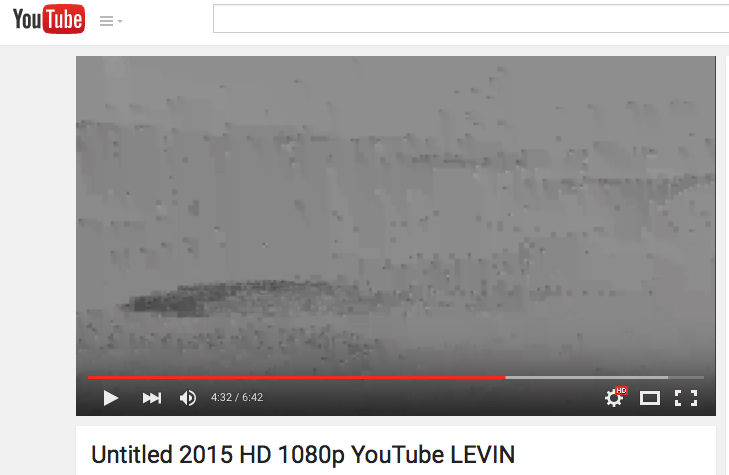
I just watched your video again, this time from a desktop rather than iPad where I could set for 1080HD. I do see one spot at 4:32 that appears to be a bad frame, corrupt compression piece, or something. I have attached the screenshot of that spot. I did not notice that occurring anywhere else in the video. I would suggest a few things:
1: Step through your original that you uploaded to be sure this is not in there.
2: Try to delete that video from YouTube and upload it again, in the event YT processing made an error.
3: The compressor preset you show in this thread looks very similar to the one I sent you, however, mine did not have "Add clean Aperture info" checked. I never check that and don't know if it is relevant to your issue, but other posts on this forum suggest NOT to have that checked.
4: Try uploading to VIMEO and see if the issue is still there.
Creating history....one edit at a time !
Please Log in to join the conversation.
- Jonathan Levin
-
Topic Author
- Offline
- Platinum Member
-
Less
More
- Posts: 786
- Thank you received: 21
23 Sep 2015 17:15 #68865
by Jonathan Levin
Replied by Jonathan Levin on topic Youtube upload...can you look at this?
Hi DGW,
Thanks so much fro trying to assist with this.
I looked at both the master file and the compressed version at that exact frame and it appears fine. Oddly, as I mentioned before the time-lapse immediately after that on the youtube file plays a little oddly though.
I have uploaded to YT three different variations of this and each time the same artifact shows up in the frame that you have a screen shot of. I will re-compress the master file again with the Clean Aperture option unchecked and see if that makes a difference. As for Vimeo, I am on a basic Vimeo account that allows only upt o 500mb per upload. I would need to upgrade to one of their other paid plans, which I would like to do sometime.
Thanks again for your help. Let's see if unchecking the Aperture thing does anything.
I'll report back....
Jonathan
Thanks so much fro trying to assist with this.
I looked at both the master file and the compressed version at that exact frame and it appears fine. Oddly, as I mentioned before the time-lapse immediately after that on the youtube file plays a little oddly though.
I have uploaded to YT three different variations of this and each time the same artifact shows up in the frame that you have a screen shot of. I will re-compress the master file again with the Clean Aperture option unchecked and see if that makes a difference. As for Vimeo, I am on a basic Vimeo account that allows only upt o 500mb per upload. I would need to upgrade to one of their other paid plans, which I would like to do sometime.
Thanks again for your help. Let's see if unchecking the Aperture thing does anything.
I'll report back....
Jonathan
Please Log in to join the conversation.
- Jonathan Levin
-
Topic Author
- Offline
- Platinum Member
-
Less
More
- Posts: 786
- Thank you received: 21
23 Sep 2015 20:46 #68869
by Jonathan Levin
Replied by Jonathan Levin on topic Youtube upload...can you look at this?
Well the new version still has the odd frame artifacts at 4:33. It looks like I'll have to live with this, but sure looks bad.
Thanks for all your help and replies.
Jonathan
Thanks for all your help and replies.
Jonathan
Please Log in to join the conversation.
- MarkNelsonMovies
-

- Offline
- Elite Member
-

Less
More
- Posts: 256
- Thank you received: 48
23 Sep 2015 22:19 #68874
by MarkNelsonMovies
Replied by MarkNelsonMovies on topic Youtube upload...can you look at this?
I Think it has something to do with the ANTZ clip, which appears to me to be a clip that's impossible to compress to a fixed bitrate (YouTube) -- fast jumping random motion is not predictable, and therefor is very hard to compress, a test would be to upload just those 2 clips together to youtube (export range) and see if it still has the problem, then upload them to youtube with about 5 seconds of black between them. if the problem goes away I would blame it on the ANTZ clip and try to modify it to make it more compressible (slow it down, add vignette blur, etc...)
hope this helps,
-Mark
hope this helps,
-Mark
Please Log in to join the conversation.
- Karsten Schlüter
-
- Offline
- Moderator
-
Less
More
- Posts: 3790
- Thank you received: 718
24 Sep 2015 05:46 #68880
by Karsten Schlüter
Replied by Karsten Schlüter on topic Youtube upload...can you look at this?
Good morning Jonathan,
hmm, odd story ...
I'm no expert concerning Compressor, did years ago wrestle with ffmpg and x264 .... came soon to my llmits of understanding (and willing spending time on that).
Flipping thru its Manual help.apple.com/compressor/mac/4.2/ I can not find what I vaguely remember too: you are (were?) able to set 'markers' tellling Compresor "hey, here some special treatment please, advice as follows:..." (imagine me writing Manuals LOL)
but ....
3 versions = 3x same error ... proability tells, the mistake is on yours, not YT....
You have tried a diff. codc for export from FCPX? Export just a feew minutes around 4:30, try 'exotic' asnimation ....or, if installed antiue appleinteermediate: Why? My dea is to 'force' the encoder on your site to 'start from 0' for thiss specific segment.
What Tom allready told us: could be some faulty GOP structure, which locally plays fine, but stat to stumble YTs encoders .... (??)
And, final cliffhanger in todays episode:
watched your original linked video this minute - NO BLOCKS at 4:30 ..... ?????
... some young Youtube elf smiles, had read this thread and did repair yor stream by hand ...
Wot?
no, sorry - end of my options.
one very last try:
replace this both clips (dips+ants) by any other ... export, upload, sooooo...?
'cause 'ants' could be have some hidden damage, OR the welding-seam btw both (dips>>ants) has something, which makes YT stumble.....
hmm, odd story ...
Jonathan Levin wrote: …
Tom mentioned something about key framing a section but I'm afraid I don't quite understand how to do this. I'm just wondering if there is anything that can be done here to make this work?…
I'm no expert concerning Compressor, did years ago wrestle with ffmpg and x264 .... came soon to my llmits of understanding (and willing spending time on that).
Flipping thru its Manual help.apple.com/compressor/mac/4.2/ I can not find what I vaguely remember too: you are (were?) able to set 'markers' tellling Compresor "hey, here some special treatment please, advice as follows:..." (imagine me writing Manuals LOL)
but ....
.....uploaded to YT three different variations of this and each time the same artifact shows up in the frame that you have a screen shot of....
3 versions = 3x same error ... proability tells, the mistake is on yours, not YT....
You have tried a diff. codc for export from FCPX? Export just a feew minutes around 4:30, try 'exotic' asnimation ....or, if installed antiue appleinteermediate: Why? My dea is to 'force' the encoder on your site to 'start from 0' for thiss specific segment.
What Tom allready told us: could be some faulty GOP structure, which locally plays fine, but stat to stumble YTs encoders .... (??)
And, final cliffhanger in todays episode:
watched your original linked video this minute - NO BLOCKS at 4:30 ..... ?????
... some young Youtube elf smiles, had read this thread and did repair yor stream by hand ...
Wot?
no, sorry - end of my options.
one very last try:
replace this both clips (dips+ants) by any other ... export, upload, sooooo...?
'cause 'ants' could be have some hidden damage, OR the welding-seam btw both (dips>>ants) has something, which makes YT stumble.....
Please Log in to join the conversation.
24 Sep 2015 10:54 #68887
by BenB
Replied by BenB on topic Youtube upload...can you look at this?
Compression Markers are still in Compressor, but won't help here. They only tell Compressor where to pay attention, but once that file is created, there are no more Compression Markers in the file.
I have to disagree with you Karsten, that the problem is definitely with YouTube. His files from FCPX playback just fine, which proves it is not on his end.
YouTube transcodes everything you upload. Their encoder is having a consistent problem, just like Compressor would with a troubled spot. Difference is YT's transcoder is garbage, as we all know.
The fact that some of us see the artifacts, and some don't, is further proof it is on YT's end.
I have to disagree with you Karsten, that the problem is definitely with YouTube. His files from FCPX playback just fine, which proves it is not on his end.
YouTube transcodes everything you upload. Their encoder is having a consistent problem, just like Compressor would with a troubled spot. Difference is YT's transcoder is garbage, as we all know.
The fact that some of us see the artifacts, and some don't, is further proof it is on YT's end.
Please Log in to join the conversation.
- MarkNelsonMovies
-
- Offline
- Elite Member
-
Less
More
- Posts: 256
- Thank you received: 48
24 Sep 2015 14:46 #68895
by MarkNelsonMovies
Replied by MarkNelsonMovies on topic Youtube upload...can you look at this?
I'll confirm what Karsten said, I watched the section and the artifacts are gone at 1080 but still there at low resolutions,
This may have to do with what others have said, (not sure if it was this forum, or another one), 'When you first upload to youtube it does a fast low-quality render, then after a while updates the video with a higher quality version.'
This may have to do with what others have said, (not sure if it was this forum, or another one), 'When you first upload to youtube it does a fast low-quality render, then after a while updates the video with a higher quality version.'
Please Log in to join the conversation.
- Jonathan Levin
-
Topic Author
- Offline
- Platinum Member
-
Less
More
- Posts: 786
- Thank you received: 21
24 Sep 2015 15:24 - 24 Sep 2015 15:26 #68897
by Jonathan Levin
Replied by Jonathan Levin on topic Youtube upload...can you look at this?
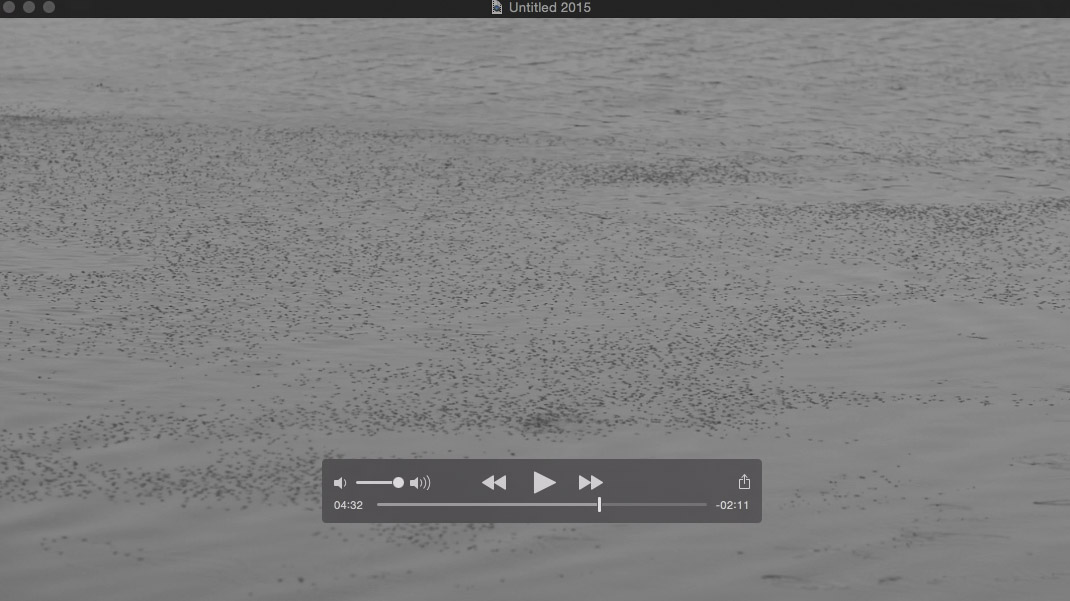
Here is how the frame looks in the original master file at 4:32. You can se the difference from dgwvideo's post of the frame grab from YT:
My plan now id to run a few tests. I am going to test that range from 4:06 to 4:41.
Here is my plan:
1) Test as is, just to make sure that the problem can be reproduced and the range didn't affect anything.
2) Same as above but with re-timing set to normal in FCP from 200% to see if retiming is messing things up.
3) Same as 2 but with no cross-disolves
Can you guys think of anything else I should try before going ahead with this?
My plan is to create a new project with same properties as original, 1080p, paste the range from the original project to new project. I would then copy and paste that a few times to do tests 1 through 3. Export master file, to Compressor and then to YT. Do you think I need to include the audio? Or is that not necessary?
I wait to hear your responses and then proceed. As BenB said, it could just be the F***ked encoders so maybe I'm beating a dead horse and wasting my time.
Jonathan
My plan now id to run a few tests. I am going to test that range from 4:06 to 4:41.
Here is my plan:
1) Test as is, just to make sure that the problem can be reproduced and the range didn't affect anything.
2) Same as above but with re-timing set to normal in FCP from 200% to see if retiming is messing things up.
3) Same as 2 but with no cross-disolves
Can you guys think of anything else I should try before going ahead with this?
My plan is to create a new project with same properties as original, 1080p, paste the range from the original project to new project. I would then copy and paste that a few times to do tests 1 through 3. Export master file, to Compressor and then to YT. Do you think I need to include the audio? Or is that not necessary?
I wait to hear your responses and then proceed. As BenB said, it could just be the F***ked encoders so maybe I'm beating a dead horse and wasting my time.
Jonathan
Last edit: 24 Sep 2015 15:26 by Jonathan Levin.
Please Log in to join the conversation.
24 Sep 2015 16:24 #68902
by BenB
Replied by BenB on topic Youtube upload...can you look at this?
If you so a Share using Master File to a ProRes video, and upload that, and there is still the issue, there's not much you'll be able to do about it.
Please Log in to join the conversation.
