


- Posts: 127
- Thank you received: 1
3 Post Moderation Rule for New Boarders (25 Jan 2021)
New boarders will have their posts moderated - Don't worry if you cannot see your post immediately.
Animated stories
15 Jul 2015 14:59 #66500
by jayan
Animated stories was created by jayan
hai can anybody help how to create small animated stories in Mac
using which software like this video
plse help to create my own stories
using which software like this video
plse help to create my own stories
Please Log in to join the conversation.
- Karsten Schlüter
-

- Offline
- Moderator
-

Less
More
- Posts: 3790
- Thank you received: 718
15 Jul 2015 16:49 #66508
by Karsten Schlüter
Replied by Karsten Schlüter on topic Animated stories
pen, paper, a camera, an edit app....
or
a Wacom, a stylus, any paint app, an edit app
not to forget: talent, creativity, humor, craftmanship ....

or
a Wacom, a stylus, any paint app, an edit app
not to forget: talent, creativity, humor, craftmanship ....
Please Log in to join the conversation.
16 Jul 2015 07:48 #66527
by jayan
Replied by jayan on topic Animated stories
ya Thankyou
all are ready which edit app should use?
and also from png or vector is we can use?
plse tell me detail
all are ready which edit app should use?
and also from png or vector is we can use?
plse tell me detail
Please Log in to join the conversation.
- Jonathan Levin
-

- Offline
- Platinum Member
-

Less
More
- Posts: 786
- Thank you received: 21
16 Jul 2015 14:48 #66552
by Jonathan Levin
Replied by Jonathan Levin on topic Animated stories
+1 for Karsten's suggestion but add patience to that list too :blink:
Please Log in to join the conversation.

16 Jul 2015 15:42 - 16 Jul 2015 15:44 #66557
by PaulG
Replied by PaulG on topic Animated stories
Your reference is not what I'd call animation, but animated storyboards.
If you already have Photoshop (you need the extended or pro versions), you can use the Animation timeline function. Make sure to use video-based rather than frame-based modes. Here's a tutorial:
If you have an existing piece of audio, this will be possible here.
Alternatively, you can draw your frames in Photoshop, export them as individual JPGs or PNGs and edit them in FCPX. It will be easier to edit your audio track and you will have more control on the timeline. This is how I create animatics for commercials. Be sure to use Layer Comps to control layer order and stacking, especially if you have static backgrounds that cover multiple frames.
Another place to do this would be After Effects or Motion, if you have either of these.
If you're doing actual frame-by-frame hand-drawn cel animation, the pros use either Toonboom Harmony or TV Paint for pixel-based work, or Adobe Flash for vector-based work.
If you already have Photoshop (you need the extended or pro versions), you can use the Animation timeline function. Make sure to use video-based rather than frame-based modes. Here's a tutorial:
If you have an existing piece of audio, this will be possible here.
Alternatively, you can draw your frames in Photoshop, export them as individual JPGs or PNGs and edit them in FCPX. It will be easier to edit your audio track and you will have more control on the timeline. This is how I create animatics for commercials. Be sure to use Layer Comps to control layer order and stacking, especially if you have static backgrounds that cover multiple frames.
Another place to do this would be After Effects or Motion, if you have either of these.
If you're doing actual frame-by-frame hand-drawn cel animation, the pros use either Toonboom Harmony or TV Paint for pixel-based work, or Adobe Flash for vector-based work.
Last edit: 16 Jul 2015 15:44 by PaulG. Reason: Enhanced explanation!
Please Log in to join the conversation.
16 Jul 2015 17:22 #66560
by jayan
Replied by jayan on topic Animated stories
Thankyou very much
and now i saw in app store that
ANIME STUDIO PRO,
what about this software is it worth to buy
plse suggest
and now i saw in app store that
ANIME STUDIO PRO,
what about this software is it worth to buy
plse suggest
Please Log in to join the conversation.
16 Jul 2015 17:39 - 16 Jul 2015 17:40 #66561
by PaulG
Replied by PaulG on topic Animated stories
I don't know much about Anime Studio Pro, partially because I haven't see professionals using it. It's $300 vs $1,500 to $2,000 for Harmony or TV Paint, but FCPX is also $300 and no-one ever claims FCPX is "not professional".
You might also look into ToonBooms Storyboard Pro, which is not a full-blow animation program, but can create animatics and limited animation.
It really depends on how much time (& $) you want to invest in becoming an animator. If you have a passion for drawing and see yourself spending A LOT of time doing it, then good software is an investment.
If this is a one-time project and you don't really want to spend a ton of time learning the ins and outs, then hire a real animator and get a better result. Especially if this is a paying job.
Animation is like playing the piano. It's easy to make noises but hard to play well.
You might also look into ToonBooms Storyboard Pro, which is not a full-blow animation program, but can create animatics and limited animation.
It really depends on how much time (& $) you want to invest in becoming an animator. If you have a passion for drawing and see yourself spending A LOT of time doing it, then good software is an investment.
If this is a one-time project and you don't really want to spend a ton of time learning the ins and outs, then hire a real animator and get a better result. Especially if this is a paying job.
Animation is like playing the piano. It's easy to make noises but hard to play well.
Last edit: 16 Jul 2015 17:40 by PaulG. Reason: grammar
Please Log in to join the conversation.
16 Jul 2015 18:39 #66564
by jayan
Replied by jayan on topic Animated stories
Thankyou
i mean i don't need as professional for kids, volunterly i want to do short stories
with moral.
so that is my need,
i thought from png is it possible to build story with animation,
is there any possible
i mean i don't need as professional for kids, volunterly i want to do short stories
with moral.
so that is my need,
i thought from png is it possible to build story with animation,
is there any possible
Please Log in to join the conversation.
16 Jul 2015 19:06 #66565
by PaulG
Replied by PaulG on topic Animated stories
If you want to work from PNGs, first you need a drawing program like Photoshop to export each frame.
Then you need an edit program like FCPX to put them together in sequence and make movies.
Then you need an edit program like FCPX to put them together in sequence and make movies.
Please Log in to join the conversation.

16 Jul 2015 20:56 #66566
by BenB
Replied by BenB on topic Animated stories
There is also the MotionVFX solution
And other things like Magna Studio. I wouldn't worry if "professionals" use it for Hollywood or Disney/Pixar films, just as long as the app does what you need it to do. 75% of the software they use is developed custom in-house anyway. Lots of cheap alternatives to do what you want to do.
Or, still camera (iPhone will do it), tripod, draw on white paper, shoot a photo of each picture. After you have all the photos, just drop them in a timeline, and trim them as needed. Pretty cheap and simple.
And other things like Magna Studio. I wouldn't worry if "professionals" use it for Hollywood or Disney/Pixar films, just as long as the app does what you need it to do. 75% of the software they use is developed custom in-house anyway. Lots of cheap alternatives to do what you want to do.
Or, still camera (iPhone will do it), tripod, draw on white paper, shoot a photo of each picture. After you have all the photos, just drop them in a timeline, and trim them as needed. Pretty cheap and simple.
Please Log in to join the conversation.
17 Jul 2015 14:04 #66597
by jayan
Replied by jayan on topic Animated stories
Thankyou so much all who helped me
i will try with ur steps
Thanks a lot
i will try with ur steps
Thanks a lot
Please Log in to join the conversation.
17 Jul 2015 18:24 #66602
by dkag7
Replied by dkag7 on topic Animated stories
I use crazy talk animator pro 2 for cartoon animations.
I am not good at it yet, and I am far from any toon artist, but it does do the job
You can see some of it here that I've done.
(there are many more up there as well I have done for this same person)
For the white board stuff, there is easy scetch pro 2 and I think FXfactory has a plugin for it as well (for downloadable software).. There are other web based apps, but I never use web based apps.
Kurt
I am not good at it yet, and I am far from any toon artist, but it does do the job
You can see some of it here that I've done.
(there are many more up there as well I have done for this same person)
For the white board stuff, there is easy scetch pro 2 and I think FXfactory has a plugin for it as well (for downloadable software).. There are other web based apps, but I never use web based apps.
Kurt
Please Log in to join the conversation.
17 Jul 2015 19:47 #66604
by Soundwise
Replied by Soundwise on topic Animated stories
Sorry Kurt, but the poor audio just kills the message.
Please Log in to join the conversation.
17 Jul 2015 20:07 #66605
by dkag7
Replied by dkag7 on topic Animated stories
you get what you pay for.
Please Log in to join the conversation.
17 Jul 2015 22:29 #66612
by BenB
First, that audio is honestly100% unacceptable, even for free. You'll never get anything but free gigs. Get what you pay for? Those type of companies die because they only attract the quality they produce, even for free jobs, which is crap audio.
Hate to be harsh, but it needs to be said here, amongst friends who will be honest and supportive.
That said, the very basics of Motion or FCPX compositing & this is super easy to do.
Shoot person on green screen. Key over the slides, which are behind a good frame/mask.
I think I see my next tutorial video...
Replied by BenB on topic Animated stories
dkag7 wrote: you get what you pay for.
First, that audio is honestly100% unacceptable, even for free. You'll never get anything but free gigs. Get what you pay for? Those type of companies die because they only attract the quality they produce, even for free jobs, which is crap audio.
Hate to be harsh, but it needs to be said here, amongst friends who will be honest and supportive.
That said, the very basics of Motion or FCPX compositing & this is super easy to do.
Shoot person on green screen. Key over the slides, which are behind a good frame/mask.
I think I see my next tutorial video...
Please Log in to join the conversation.
17 Jul 2015 22:55 #66614
by Overturf
Replied by Overturf on topic Animated stories
+1 about the audio but you miss the point of the OP, Ben. It's not about the green screen, its about the animations inside the frame 
Please Log in to join the conversation.
17 Jul 2015 23:05 #66616
by dkag7
Replied by dkag7 on topic Animated stories
"First, that audio is honestly100% unacceptable, even for free. You'll never get anything but free gigs. Get what you pay for? Those type of companies die because they only attract the quality they produce, even for free jobs, which is crap audio."
Wrong.
#1. Garbage in = garbage out.
#2. Yes, you do get what you pay for. If the customer dont want it fixed, or dont want to pay for it, then thats the way it stays.
#3. "those type of companies".. are the ones that stay in business because they dont waste time un un-needed or un wanted work.
#4. Its youtube, SD, Lowres, just what the customer ordered.
#5. This company been doing such bad work that its been in business for 10 years, on only editing work.
"That said, the very basics of Motion or FCPX compositing & this is super easy to do.
Shoot person on green screen. Key over the slides, which are behind a good frame/mask."
Have no clue what you are talking about here..? What is your complaint about keying.. or something?
Wrong.
#1. Garbage in = garbage out.
#2. Yes, you do get what you pay for. If the customer dont want it fixed, or dont want to pay for it, then thats the way it stays.
#3. "those type of companies".. are the ones that stay in business because they dont waste time un un-needed or un wanted work.
#4. Its youtube, SD, Lowres, just what the customer ordered.
#5. This company been doing such bad work that its been in business for 10 years, on only editing work.
"That said, the very basics of Motion or FCPX compositing & this is super easy to do.
Shoot person on green screen. Key over the slides, which are behind a good frame/mask."
Have no clue what you are talking about here..? What is your complaint about keying.. or something?
Please Log in to join the conversation.
17 Jul 2015 23:14 #66617
by dkag7
Replied by dkag7 on topic Animated stories
'Sorry Kurt, but the poor audio just kills the message. '
Other than being on the treble side, what is the issue with the audio?
thanks
kurt
Other than being on the treble side, what is the issue with the audio?
thanks
kurt
Please Log in to join the conversation.
18 Jul 2015 06:37 - 18 Jul 2015 06:38 #66622
by Soundwise
The terrible room echo makes it sound amateurish no matter how great the graphics are. Sounds like only camera mike was used.
Does not cost much to use a decent lav or a boom. It takes the audio to the level of your nice animations.
Replied by Soundwise on topic Animated stories
dkag7 wrote: Other than being on the treble side, what is the issue with the audio?
thanks
kurt
The terrible room echo makes it sound amateurish no matter how great the graphics are. Sounds like only camera mike was used.
Does not cost much to use a decent lav or a boom. It takes the audio to the level of your nice animations.
Last edit: 18 Jul 2015 06:38 by Soundwise.
Please Log in to join the conversation.
- Karsten Schlüter
-
- Offline
- Moderator
-
Less
More
- Posts: 3790
- Thank you received: 718
18 Jul 2015 07:36 #66623
by Karsten Schlüter
Indeed: the 'film-club' at my sons school is on a shoestring budget, but has high ambitions…
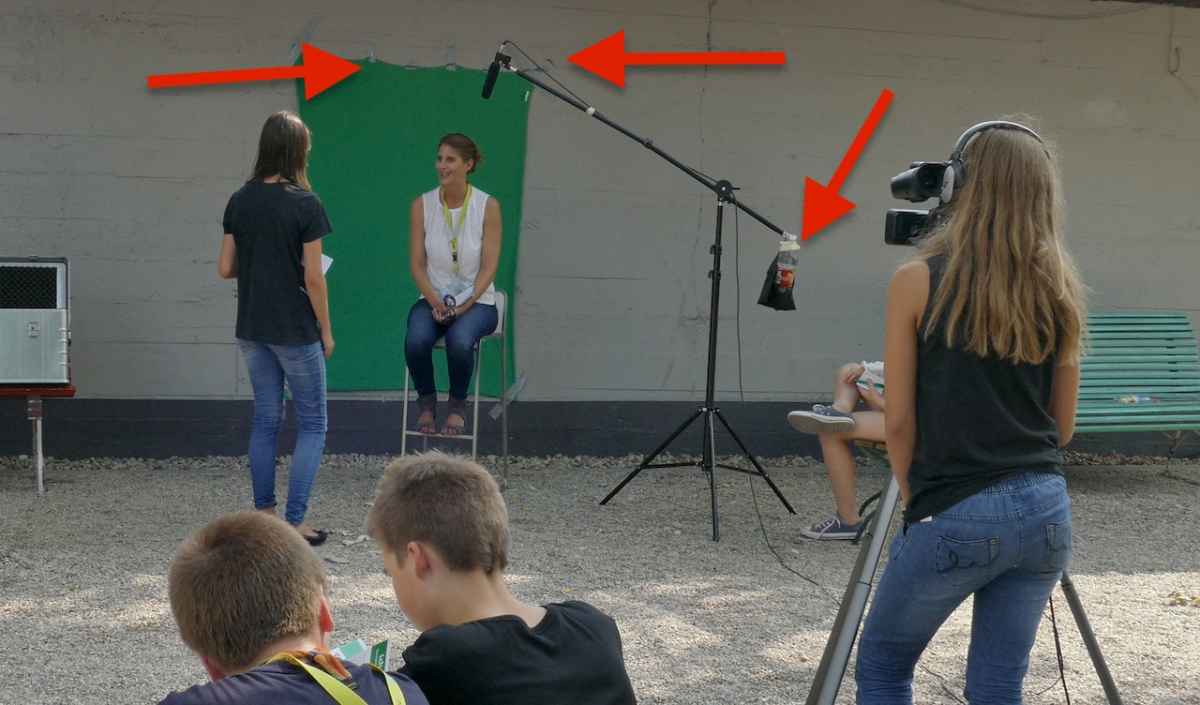
Pricelist:
green blanket from 99¢ store = 99¢
some gaffa_tape, same source = 99¢
'head light tripod', amazon = 39€ (incl. a softbox + ESL, not in use here)
Mic set (mic, 5m xlr cable, dead cat, clamp = 29€
light = free, from the sun
(we know about bouncers, but that day it was way too hot to use them - we fix that in the post :silly: )
… and yes, that's a soda bottle as counter weight - when empty, easy to carry in the tripods bag; and you get water anywhere .... saw at B&H, they sell 'professional' counter weights for 40 bucks ... hmm, well...
the shotgun mic, it's position plus recording outside minimized any 'room' - ok, and it sometimes adds birds, a barking dog or a plane flyby to the audio track ..... :lol:
It's quiet 'easy' to pimp a pic, giving it a look, grading it (using presets/templates); but it is very hard to improve audio in the post...
What I'm teaching my crew:
"If the cam operator does NOT start to yell 'get outta frame!', you're not close enough!"
The cam mic is just for reference ......
Finally: you get lavs for really small money; and in the OPs set-up, no need for a wireless solution ...
Replied by Karsten Schlüter on topic Animated stories
Soundwise wrote: ....The terrible room echo makes it sound amateurish no matter how great the graphics are. Sounds like only camera mike was used.
Does not cost much to use a decent lav or a boom. It takes the audio to the level of your nice animations.
Indeed: the 'film-club' at my sons school is on a shoestring budget, but has high ambitions…
Pricelist:
green blanket from 99¢ store = 99¢
some gaffa_tape, same source = 99¢
'head light tripod', amazon = 39€ (incl. a softbox + ESL, not in use here)
Mic set (mic, 5m xlr cable, dead cat, clamp = 29€
light = free, from the sun
(we know about bouncers, but that day it was way too hot to use them - we fix that in the post :silly: )
… and yes, that's a soda bottle as counter weight - when empty, easy to carry in the tripods bag; and you get water anywhere .... saw at B&H, they sell 'professional' counter weights for 40 bucks ... hmm, well...
the shotgun mic, it's position plus recording outside minimized any 'room' - ok, and it sometimes adds birds, a barking dog or a plane flyby to the audio track ..... :lol:
It's quiet 'easy' to pimp a pic, giving it a look, grading it (using presets/templates); but it is very hard to improve audio in the post...
What I'm teaching my crew:
"If the cam operator does NOT start to yell 'get outta frame!', you're not close enough!"
The cam mic is just for reference ......
Finally: you get lavs for really small money; and in the OPs set-up, no need for a wireless solution ...
Please Log in to join the conversation.
