


3 Post Moderation Rule for New Boarders (25 Jan 2021)
New boarders will have their posts moderated - Don't worry if you cannot see your post immediately.
Will FCP X work on this old Mac Pro?
- NealF
-
 Topic Author
- Offline
- Senior Member
-

- I'm a composer, producer, performer and multimedia artist and activist.Not much to say. I'll leave that up to whoever gives a crap after I'm dead.Go to The Real Neal Fox ( http://TheRealNealFox.com ) to find out more than you'd ever want to know.
Model Name: Mac Pro
Model Identifier: MacPro4,1
Processor Name: Quad-Core Intel Xeon
Processor Speed: 2.66 GHz
Number Of Processors: 1
Total Number Of Cores: 4
L2 Cache (per core): 256 KB
L3 Cache: 8 MB
Memory: 16 GB
I want to upgrade my OS. So I know I'll have to upgrade FCP from 6 to X. Will it work okay on my old Mac Pro?
Thanks.
Please Log in to join the conversation.


Creating history....one edit at a time !
Please Log in to join the conversation.
I also heard I might need 1G of VRAM to make it work. Is that so? Is it possible to upgrade the VRAM on this machine?
Please Log in to join the conversation.
If you are going to work with FCPX 10.2, I strongly recommend upgrading to dual GPUs.
Please Log in to join the conversation.
- Tom Wolsky
-

- Offline
- Moderator
-

Please Log in to join the conversation.
The recent update to Color Finale that added dual GPU support provided a significant performance boost on my system as well.
Please Log in to join the conversation.
- Tom Wolsky
-
- Offline
- Moderator
-
Please Log in to join the conversation.
I'm using video for strange and artful music videos of my own. So a little slower is not a problem.
Or is this a case of - it ain't gonna work so don't even think about it?
Please Log in to join the conversation.
Is this what you mean by 2 GPUs?
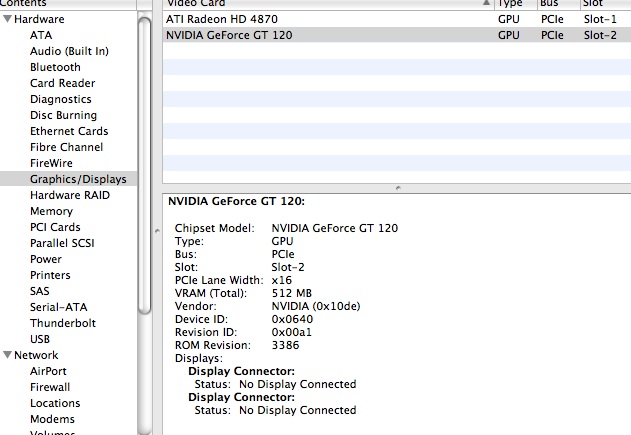
Please Log in to join the conversation.
Please Log in to join the conversation.
Take a look at Dual GPUs in old (Classic!) Mac Pros for a more extended discussion of this.
Please Log in to join the conversation.

1- Have two GPUs installed
2- Both GPUs must be identical
3- Motion requires 2 GB VRAM for full resolution 3D text
Please Log in to join the conversation.
Thanks, all.
Please Log in to join the conversation.
It was a dog with FCPX and any other app that uses OpenCL and demands a ton of vram.
(FCPX & PS and others use the gpu more then the cpu for graphics processing.)
So I upgraded my 4,1 with a Radeon 7950 which has 3 gigs vram (more then enough unless you're doing 4k or production all day every day)... and now it FLYs!!! I Love the dramatic difference..
I did some old Alex4d speed test and before with the GT120 it was so slow I gave up after 3 min... with the 7950 it was under 30 secs. (if I remember right).
I also have 20 gigs ram. 16 is the min. these days.
And recently I added a AngelBird SSD for the system (the best one that doesn't need any memory fix (forgot the name) for mac). The SSD with the GPU made it so I work just fine and won't update to a new Mac until there's a big jump in a year or 2.
Please Log in to join the conversation.


support.apple.com/en-ca/HT202239
Please Log in to join the conversation.
Please Log in to join the conversation.
Creating history....one edit at a time !
Please Log in to join the conversation.
Vram is video ram and is soldered onto the vid card GPU. So when you replace you GPU you are installing new vram with whatever is on the card you buy.
Ram is just the system ram, says you have 16GB installed now. You can upgrade that yourself.
Seemed that you were confusing the 2 types of ram.
Your system will run latest versions fine.
You should upgrade your GPU, but this is just a simple swap. You could go all out and install something like a 980 or dual GPUs. You will see some big speed boosts for some processes. A number of sites like BareFeats have great comparisons between cards. You can pretty much use any card, PC or Mac, but with a non flashed PC card you will not see a boot screen until the login window.
There are some features of Yosemite that will not work on your computer, unless you also swap out other components like the bluetooth, wifi cards for things like Handoff/Continuity.
One of the wonderful things about the older towers is the user upgradability. They can still hold their own. Here is a BareFeats comparison to get you started… barefeats.com/mpt5k1.html
Hope this helps, Greg
Please Log in to join the conversation.
+ I use Yosemite, FCPX 10.2 with stock bluetooth & wifi,
+ 7950 gpu (roughly $400) (can be much cheaper for PC ver.. but has a few small issues noted elsewhere),
+ an Acorn pci card ($89) holding a 512 AngelBird SSD (aprox $300, only SSD that's seen as a Apple SSD so no need for Trim mods).. This combo according to BlackMagicSpeedTest delivers write Write=400+ and Read 500+ MB/s!!!!!
+ an Inatek 4 port USB 3 card ($35)...
+ And NO special drivers for any of this!! So basically for under $850 bucks I was able to wait years just fine for the next gen CPU and MacPro.
I'm not doing Handoff so don't know if that's an issue because of bluetooth chips ver. used.
www.angelbird.com/en/prod/ssd-wrk-for-mac-pro-937/
www.amazon.com/gp/product/B0090IA3GY/ref...05_s00?ie=UTF8&psc=1
www.amazon.com/gp/product/B00I027GPC/ref...08_s00?ie=UTF8&psc=1
Please Log in to join the conversation.
Very helpful.
Please Log in to join the conversation.
