


- Posts: 34
- Thank you received: 7
3 Post Moderation Rule for New Boarders (25 Jan 2021)
New boarders will have their posts moderated - Don't worry if you cannot see your post immediately.
Audio monitoring BUG
- simon_hutchings
-
 Topic Author
- Offline
- Junior Member
-

Less
More
14 Apr 2015 12:47 - 14 Apr 2015 13:04 #62676
by simon_hutchings
Audio monitoring BUG was created by simon_hutchings
Has anyone come across this? I have sent a report to Apple. I have tried this on 2 systems now with the same result.
This is for FCPX 10.2..
When I play/scrub a clip in the Event Browser and the clip's channel audio config is set to Stereo i hear the audio and see meter movement. I change the clip's config to Dual Mono, and there is no audio leaving the system BUT there is audio meter movement. I put it the clip in the Project (with Dual Mono config) and I can hear it.
Any suggestions?
This is for FCPX 10.2..
When I play/scrub a clip in the Event Browser and the clip's channel audio config is set to Stereo i hear the audio and see meter movement. I change the clip's config to Dual Mono, and there is no audio leaving the system BUT there is audio meter movement. I put it the clip in the Project (with Dual Mono config) and I can hear it.
Any suggestions?
Last edit: 14 Apr 2015 13:04 by simon_hutchings.
Please Log in to join the conversation.
- ronny courtens
-

- Offline
- Moderator
-

Less
More
- Posts: 4455
- Thank you received: 962
14 Apr 2015 14:00 #62682
by ronny courtens
Replied by ronny courtens on topic Audio monitoring BUG
Hey Simon,
Just tested this here, i don't have that problem. Tested on an iMac and a new MP. Maybe delete preferences could help? Always useful after any update.
- Ronny
Just tested this here, i don't have that problem. Tested on an iMac and a new MP. Maybe delete preferences could help? Always useful after any update.
- Ronny
Please Log in to join the conversation.
- simon_hutchings
-
Topic Author
- Offline
- Junior Member
-
Less
More
- Posts: 34
- Thank you received: 7
14 Apr 2015 14:07 #62684
by simon_hutchings
Replied by simon_hutchings on topic Audio monitoring BUG
Thanks Ronny..
I will try that right after I finish my export and I will post the result.
Not sure if it makes any difference but both of the computers that did it here are early 2009's MP's... either way... the prefs are first on the list of things to try.
Thanks again.
I will try that right after I finish my export and I will post the result.
Not sure if it makes any difference but both of the computers that did it here are early 2009's MP's... either way... the prefs are first on the list of things to try.
Thanks again.
Please Log in to join the conversation.

14 Apr 2015 14:59 #62692
by rickytin
Replied by rickytin on topic Audio monitoring BUG
I have the same mono audio problem.
I delete preference and still have the problem.
I open a library that have a voiceover that was recorded with FCP X and all of them are mono and none of them playback from the event browser or in the channel configuration if they are set to mono, to be able to here the audio I have to set them to left channel or right channel.
If I add the audio to a project I can play back the audio without problem.
I delete preference and still have the problem.
I open a library that have a voiceover that was recorded with FCP X and all of them are mono and none of them playback from the event browser or in the channel configuration if they are set to mono, to be able to here the audio I have to set them to left channel or right channel.
If I add the audio to a project I can play back the audio without problem.
Please Log in to join the conversation.
- ronny courtens
-
- Offline
- Moderator
-
Less
More
- Posts: 4455
- Thank you received: 962
14 Apr 2015 15:22 #62695
by ronny courtens
Replied by ronny courtens on topic Audio monitoring BUG
Hey Ricky,
What are your system specs?
- Ronny
What are your system specs?
- Ronny
Please Log in to join the conversation.
14 Apr 2015 15:27 #62696
by rickytin
Replied by rickytin on topic Audio monitoring BUG
Mac Pro (Early 2009)
2 x 2.93 GHz Quad-Core Intel Xeon
20 GB 1066 MHz DDR3 ECC
ATI Radeon HD 5870 1024 MB
AJA Kona LHi
2 x 8TB G-SPEED eS Pro RAID 5
2 x 2.93 GHz Quad-Core Intel Xeon
20 GB 1066 MHz DDR3 ECC
ATI Radeon HD 5870 1024 MB
AJA Kona LHi
2 x 8TB G-SPEED eS Pro RAID 5
Please Log in to join the conversation.
- ronny courtens
-
- Offline
- Moderator
-
Less
More
- Posts: 4455
- Thank you received: 962
14 Apr 2015 15:33 #62697
by ronny courtens
Replied by ronny courtens on topic Audio monitoring BUG
Thanks!! So the common denominator for the issue so far seems to be the 2009 MacPro, which both of you use. If anyone else has this issue, please post here with your system specs.
- Ronny
- Ronny
Please Log in to join the conversation.
- simon_hutchings
-
Topic Author
- Offline
- Junior Member
-
Less
More
- Posts: 34
- Thank you received: 7
14 Apr 2015 15:58 #62700
by simon_hutchings
Replied by simon_hutchings on topic Audio monitoring BUG
Same here... didn't work after trashing prefs... here is my system specs...
Mac Pro (Early 2009)
2 x 2.26 GHz Quad-Core Intel Xeon
40 GB 1066 MHz DDR3 ECC
ATI Radeon HD 5870 1024 MB
Mac Pro (Early 2009)
2 x 2.26 GHz Quad-Core Intel Xeon
40 GB 1066 MHz DDR3 ECC
ATI Radeon HD 5870 1024 MB
Please Log in to join the conversation.
- ronny courtens
-
- Offline
- Moderator
-
Less
More
- Posts: 4455
- Thank you received: 962
14 Apr 2015 16:04 #62701
by ronny courtens
Replied by ronny courtens on topic Audio monitoring BUG
Thank you, Simon. That's two early 2009 MacPros with the ATI 5870. Let's wait if we get any other reports to see if we have a pattern.
- Ronny
- Ronny
Please Log in to join the conversation.

14 Apr 2015 17:50 #62715
by thegwyn
Replied by thegwyn on topic Audio monitoring BUG
Same issue here on 2013 New style MP. Had to roll back to 10.1.4 as in the middle of a job... Didn't try trashing prefs - might try later and report back... Using ext UAD audio interface - that may be the issue? I notice FCP 10.2 switches to a mono audio meter when playing back dual mono clips now - where previously it seemed to play dual mono back in stereo until it was 'mixed' in the timeline... Perhaps this new mono 'output' isn't routing to the stereo interface for some reason?
Please Log in to join the conversation.
14 Apr 2015 18:03 #62716
by thegwyn
Replied by thegwyn on topic Audio monitoring BUG
Trashing prefs makes no difference. Seems to be a bug with FCP 10.2's new mono audio monitor not outputting to the stereo audio outputs... Weirdly - if I switch to HDMI audio on the system sound so that audio comes out of my monitor - it works fine... Unfortunately I need audio to come out of the audio interface to my monitor speakers. Typical - just as I was *finally* coming round to using (and liking) FCPX....
Please Log in to join the conversation.
- Jonathan Levin
-

- Offline
- Platinum Member
-

Less
More
- Posts: 786
- Thank you received: 21
14 Apr 2015 20:05 #62728
by Jonathan Levin
Replied by Jonathan Levin on topic Audio monitoring BUG
Simon, Ronny et al.
I too can confirm that this is a problem.
My specs:
Mac Pro Mid 2010 2 x 2.4 GHz Quad-Core Intel Xeon
Graphics ATI Radeon HD 5870 1024 MB
If I play a clip in browser set to dual mono, I get one audio meter and no sound. If I then set the audio to stereo, sound will play as expected and there is a L/R audio meter.
So the issue s that audio won't play when set to dual mono, but will if set to stereo. This is in the event browser only. Otherwise everything works when placed in Project
I also trashed prefs.
I too can confirm that this is a problem.
My specs:
Mac Pro Mid 2010 2 x 2.4 GHz Quad-Core Intel Xeon
Graphics ATI Radeon HD 5870 1024 MB
If I play a clip in browser set to dual mono, I get one audio meter and no sound. If I then set the audio to stereo, sound will play as expected and there is a L/R audio meter.
So the issue s that audio won't play when set to dual mono, but will if set to stereo. This is in the event browser only. Otherwise everything works when placed in Project
I also trashed prefs.
Please Log in to join the conversation.
- Tom Wolsky
-

- Offline
- Moderator
-
14 Apr 2015 20:13 #62730
by Tom Wolsky
Replied by Tom Wolsky on topic Audio monitoring BUG
Is there sound on both channels? Same sound, different sound? Left or right?
Please Log in to join the conversation.
14 Apr 2015 20:52 #62732
by thegwyn
Replied by thegwyn on topic Audio monitoring BUG
No sound comes out of either channel and the audio meters now switch to mono, unless you make the clip stereo, then sound comes out fine
Please Log in to join the conversation.
- Jonathan Levin
-
- Offline
- Platinum Member
-
Less
More
- Posts: 786
- Thank you received: 21
14 Apr 2015 21:23 #62741
by Jonathan Levin
Replied by Jonathan Levin on topic Audio monitoring BUG
Tom and the gwyn.
Here is what I have. Again. This is only when a clip is selected in the browser/event.
Here there is no sound:
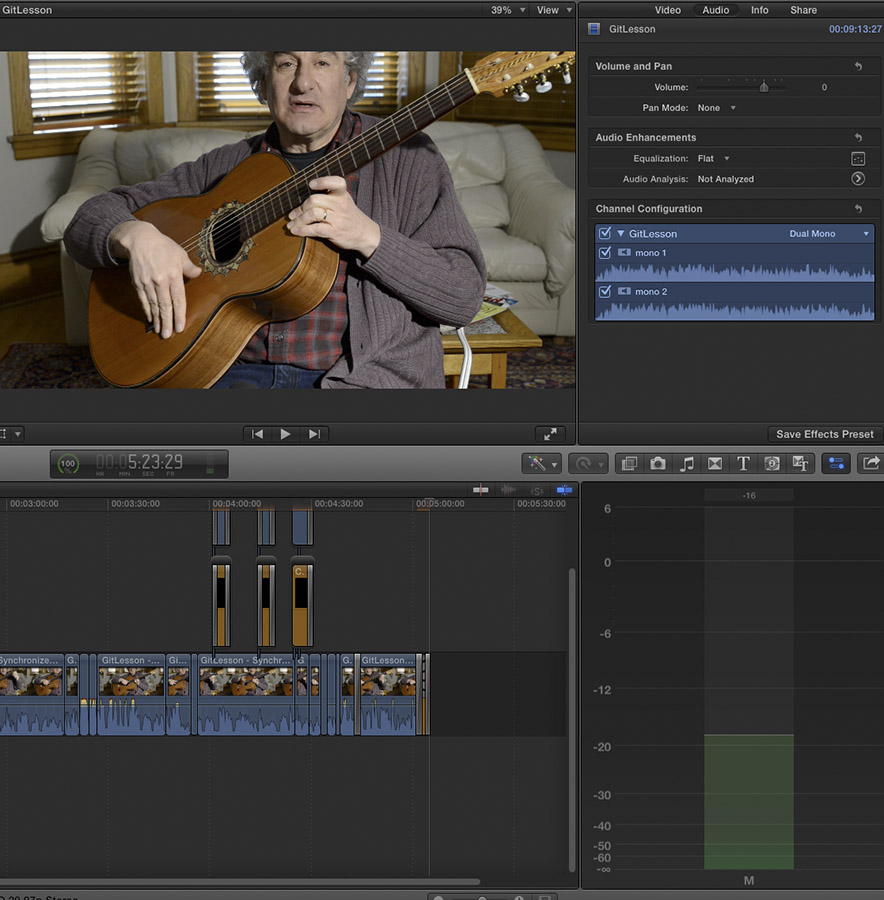
And here the audio works:
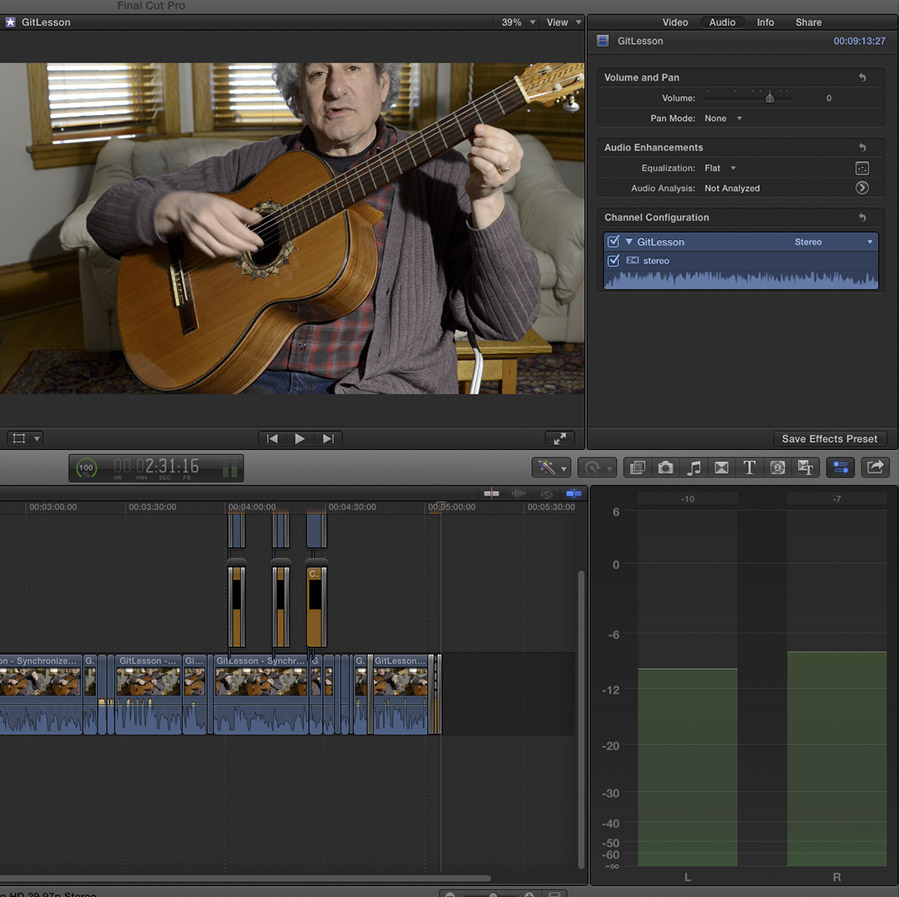
Here is what I have. Again. This is only when a clip is selected in the browser/event.
Here there is no sound:
And here the audio works:
Please Log in to join the conversation.
- Tom Wolsky
-
- Offline
- Moderator
-
14 Apr 2015 21:37 #62744
by Tom Wolsky
Replied by Tom Wolsky on topic Audio monitoring BUG
The single meter is the normal display for dual mono. I've gone through all the different types of file formats I have and can't reproduce the problem. It seems to be specific to a certain group of machines.
Please Log in to join the conversation.
- Jonathan Levin
-
- Offline
- Platinum Member
-
Less
More
- Posts: 786
- Thank you received: 21
14 Apr 2015 22:01 #62750
by Jonathan Levin
Replied by Jonathan Levin on topic Audio monitoring BUG
Tom,
If I recall correctly, and I just spent a good amount of time trying to work out my confusion with dual mono versus stereo:
Even if you set the audio to dual mono, there should (or I thought there should) be a two column meter.
Say I;ve recorded using a mixer using two mics in to different inputs. And then I pan one mic hard left and the other hard right. In then have sound left and right.
In FC if I converted that audio to dual mono, I would still see the two column meter as well as the two seperate channels if expanded in my project. I could then adjust either channel, left or right in dual mono to get the proper levels of audio from one or the other.
With the single column meter, it does not work that way. I think that with either Stereo or dual mono there should be a two column audio meter.
Maybe I'm losing my mind. :woohoo:
Here is what I have seen in the past:
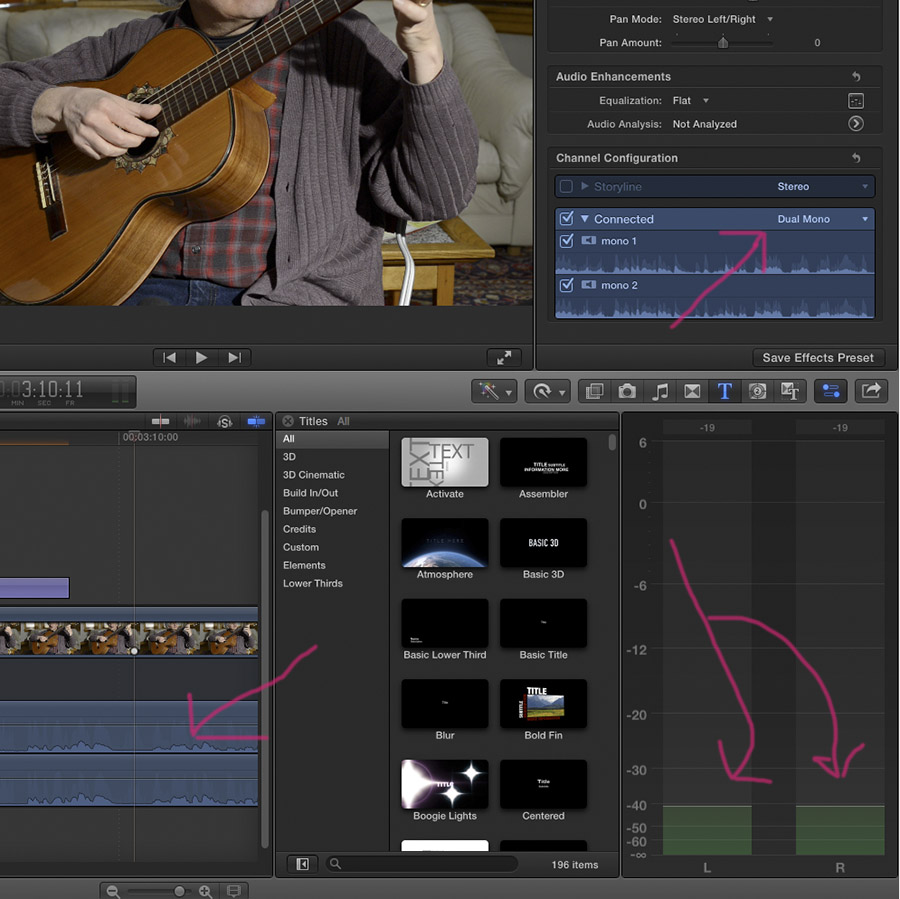
If I recall correctly, and I just spent a good amount of time trying to work out my confusion with dual mono versus stereo:
Even if you set the audio to dual mono, there should (or I thought there should) be a two column meter.
Say I;ve recorded using a mixer using two mics in to different inputs. And then I pan one mic hard left and the other hard right. In then have sound left and right.
In FC if I converted that audio to dual mono, I would still see the two column meter as well as the two seperate channels if expanded in my project. I could then adjust either channel, left or right in dual mono to get the proper levels of audio from one or the other.
With the single column meter, it does not work that way. I think that with either Stereo or dual mono there should be a two column audio meter.
Maybe I'm losing my mind. :woohoo:
Here is what I have seen in the past:
Please Log in to join the conversation.
14 Apr 2015 22:50 #62752
by thegwyn
Replied by thegwyn on topic Audio monitoring BUG
Can confirm having gone back to 10.1.4 there's definitely a two channel stereo meter when looking at dual mono clips. The mono meter seems to be a new feature of 10.2 but it isn't sending sound to my interface
Please Log in to join the conversation.
- Tom Wolsky
-
- Offline
- Moderator
-
14 Apr 2015 23:40 #62755
by Tom Wolsky
Replied by Tom Wolsky on topic Audio monitoring BUG
That's not what I see or have seen in the past. In the browser dual mono only shows a single meter. That's only in the browser. It shows two meters in the project. I even booted into Mavericks so I could go back to 10.1.1. It's always been like this in the browser since 10.1.
Please Log in to join the conversation.
- Dustin Hoye
-
- Offline
- Junior Member
-
- I can't stand the state of affairs right now but I am too darn busy playing Wii to do anything about it. "Let my armies be the rocks and the trees and the birds in the sky... " [Charlemagne] It's a pirates life for me.
Less
More
- Posts: 34
- Thank you received: 7
14 Apr 2015 23:51 - 15 Apr 2015 00:03 #62756
by Dustin Hoye
Replied by Dustin Hoye on topic Audio monitoring BUG
I am experiencing the same issue.
MBP Retina
10.10.3
2.7 GHz Intel Core i7
16 GB 1600 MHz DDR3
NVIDIA GeForce GT 650M 1024 MB
I haven't tested on my 2013 Mac Pro yet..
I see movement in the meters w timeline playback, as well after switching a GH4 Stereo clip (only right channel has audio) to Dual Mono, but it's like the sound level doesn't match the meter level- especially if you turn up the volume on the clip in the timeline. Inspector plays back fine..
The discussion on the meters being single or dual depends on the playback selected. Mine is two if in my Stereo timeline and one, if from the Browser, as expected.
* I tested this with the Apple stinger Space Log.caf as a control and receive the same results, -12DB in timeline meters, but the sound output doesn't seem relative.. report submitted, also.
MBP Retina
10.10.3
2.7 GHz Intel Core i7
16 GB 1600 MHz DDR3
NVIDIA GeForce GT 650M 1024 MB
I haven't tested on my 2013 Mac Pro yet..
I see movement in the meters w timeline playback, as well after switching a GH4 Stereo clip (only right channel has audio) to Dual Mono, but it's like the sound level doesn't match the meter level- especially if you turn up the volume on the clip in the timeline. Inspector plays back fine..
The discussion on the meters being single or dual depends on the playback selected. Mine is two if in my Stereo timeline and one, if from the Browser, as expected.
* I tested this with the Apple stinger Space Log.caf as a control and receive the same results, -12DB in timeline meters, but the sound output doesn't seem relative.. report submitted, also.
Last edit: 15 Apr 2015 00:03 by Dustin Hoye. Reason: more info
Please Log in to join the conversation.
