


- Posts: 3790
- Thank you received: 718
3 Post Moderation Rule for New Boarders (25 Jan 2021)
New boarders will have their posts moderated - Don't worry if you cannot see your post immediately.
Green screen
- Karsten Schlüter
-

- Offline
- Moderator
-

Less
More
31 Mar 2015 14:15 #62125
by Karsten Schlüter
Replied by Karsten Schlüter on topic Green screen
thanks, Benny, for sharing some details … The community here at fcp.co is an aesome mixture of talent&skills, I learn new very day.
I once needed a mobile solution, and stumbled upon one of those:
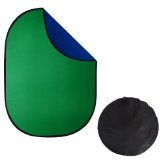
You can tell ahunded times your subjects "Don't wear green!"; they do.One lady once told me "This isn't green, this is fir!" ... ahhhh, yes, I should have kown that.-
These pop-up thingies come in two colors, just a turn and you have a blue screen.
HINT: to fold it back to its pocket needs at last a 7th Dan in Origami!! You have to watch a video 10times, to understand, how its done.
concerning your interviews:
before creating a MultiCam (cam1,cam2, audio), compound each angle with its corresponding background - when you switch angle, you instantly have the correct 'angle' for that. …in case, you have a 'real' bg, no abstract grpahics or so...
A very smart plan doing it that way! For interviewees who can not come to you, you can offer the studio comee to them - and you still have the same 'look' (if lighting does some magic) .
I once needed a mobile solution, and stumbled upon one of those:
You can tell ahunded times your subjects "Don't wear green!"; they do.One lady once told me "This isn't green, this is fir!" ... ahhhh, yes, I should have kown that.-
These pop-up thingies come in two colors, just a turn and you have a blue screen.
HINT: to fold it back to its pocket needs at last a 7th Dan in Origami!! You have to watch a video 10times, to understand, how its done.
concerning your interviews:
before creating a MultiCam (cam1,cam2, audio), compound each angle with its corresponding background - when you switch angle, you instantly have the correct 'angle' for that. …in case, you have a 'real' bg, no abstract grpahics or so...
A very smart plan doing it that way! For interviewees who can not come to you, you can offer the studio comee to them - and you still have the same 'look' (if lighting does some magic) .
Please Log in to join the conversation.

31 Mar 2015 15:57 #62127
by VidGreg
Replied by VidGreg on topic Green screen
Benny
If I might add a few of suggestions…
Make sure to instruct your talent (interviewees/host) not to wear any green at all. Nothing is more fun than having someone show up on set wearing a green shirt/jacket etc… to ruin your day. Gotta love the floating head. Really they won't know better.
Dark clothing is better, white and very light makes spill worse. Same goes for furniture. No chrome, shiny metal, white surfaces, if you can avoid it.
If you can, shoot some footage beforehand and try editing. During the trial shoot, go for your best set up and a worst case set up so you can play with fixing issues in post. Great to practice on a clip that is not part of final vid. No fears to get it right and lessons learned are for a lifetime.
Make sure to white balance both cameras prior to shoot.
Careful lighting will make the experience easy.
Have fun!
Hope this helps, Greg
If I might add a few of suggestions…
Make sure to instruct your talent (interviewees/host) not to wear any green at all. Nothing is more fun than having someone show up on set wearing a green shirt/jacket etc… to ruin your day. Gotta love the floating head. Really they won't know better.
Dark clothing is better, white and very light makes spill worse. Same goes for furniture. No chrome, shiny metal, white surfaces, if you can avoid it.
If you can, shoot some footage beforehand and try editing. During the trial shoot, go for your best set up and a worst case set up so you can play with fixing issues in post. Great to practice on a clip that is not part of final vid. No fears to get it right and lessons learned are for a lifetime.
Make sure to white balance both cameras prior to shoot.
Careful lighting will make the experience easy.
Have fun!
Hope this helps, Greg
Please Log in to join the conversation.
31 Mar 2015 16:14 #62129
by bbrunner
Replied by bbrunner on topic Green screen
Great pink Vespa you have there Greg 
Thank you for the tips.
We've planned a test shoot and edit before the real shoot.
Thank you for the tips.
We've planned a test shoot and edit before the real shoot.
Please Log in to join the conversation.

31 Mar 2015 21:01 #62135
by BenB
Replied by BenB on topic Green screen
We use a 12'x24' cloth green screen a lot, and never iron it. Much easier and more reliable is to use clamps on the backdrop holder pipes, to pull the cloth tight. Even the worst wrinkles disappear easily.
Another trick, move your camera as far from the subject as possible and zoom in, to help defocus the green screen, helping with lighting issues. Lighting properly is the single most important element of a good keying shot.
Put a back light on the back of the person, too. This can help separate them from the background green, plus helps kill off any green spill.
Finally, we use VeeScope Live to help us find and correct issue before we ever hit the record button.
Another trick, move your camera as far from the subject as possible and zoom in, to help defocus the green screen, helping with lighting issues. Lighting properly is the single most important element of a good keying shot.
Put a back light on the back of the person, too. This can help separate them from the background green, plus helps kill off any green spill.
Finally, we use VeeScope Live to help us find and correct issue before we ever hit the record button.
Please Log in to join the conversation.
- MetalJesusRocks
-
- Offline
- Junior Member
-

Less
More
- Posts: 21
- Thank you received: 1
31 Mar 2015 21:17 #62138
by MetalJesusRocks
Replied by MetalJesusRocks on topic Green screen
I shoot green screen about once a month in my musty basement and I'm always blown away by how easy FCPX is with keying out the backgrounds. It's amazing software for that.
Please Log in to join the conversation.
- damiangrady
-

- Offline
- Elite Member
-

Less
More
- Posts: 233
- Thank you received: 6
31 Mar 2015 23:23 - 31 Mar 2015 23:24 #62144
by damiangrady
Replied by damiangrady on topic Green screen
Hawaiki Keyer blows FCPX's keyer out of the water which is no mean feat. At $49 too, it's an absolute bargain.
Last edit: 31 Mar 2015 23:24 by damiangrady.
Please Log in to join the conversation.

01 Apr 2015 00:11 #62146
by Redifer
I dunno about that. I saw people here talking about it and saw it was only $50. So I downloaded the trial and messed with it quite a bit. I could not achieve a better key on the stuff that I usually key than I can with FCPX's built-in keyer. But then again I have 5 lights all pointed at my green screen and we stay about 4 feet in front if it. Still I usually get a thin white line around the matte (usually where our shirts are) that I must get rid of and Hawaii didn't do any better in that regard no matter what I did. I'm assuming it's just the nature of Canon H.264 4:2:0 video.
Replied by Redifer on topic Green screen
damiangrady wrote: Hawaiki Keyer blows FCPX's keyer out of the water which is no mean feat. At $49 too, it's an absolute bargain.
I dunno about that. I saw people here talking about it and saw it was only $50. So I downloaded the trial and messed with it quite a bit. I could not achieve a better key on the stuff that I usually key than I can with FCPX's built-in keyer. But then again I have 5 lights all pointed at my green screen and we stay about 4 feet in front if it. Still I usually get a thin white line around the matte (usually where our shirts are) that I must get rid of and Hawaii didn't do any better in that regard no matter what I did. I'm assuming it's just the nature of Canon H.264 4:2:0 video.
Please Log in to join the conversation.
01 Apr 2015 02:49 #62150
by BenB
Replied by BenB on topic Green screen
I would not consider 4-5 feet nearly enough distance from the screen. We do more like 10-15. But that much space isn't always available in every situation. We're lucky enough to have that much space to work with.
Here's three good articles, each has a nice tip or two.
www.directorofphotographyblog.com/2010/1...-screen-11-top-tips/
www.premiumbeat.com/blog/tips-shooting-blue-green-screen/
www.videomaker.com/videonews/2013/11/5-green-screen-tips
Here's three good articles, each has a nice tip or two.
www.directorofphotographyblog.com/2010/1...-screen-11-top-tips/
www.premiumbeat.com/blog/tips-shooting-blue-green-screen/
www.videomaker.com/videonews/2013/11/5-green-screen-tips
Please Log in to join the conversation.
