


- Posts: 37
- Thank you received: 0
3 Post Moderation Rule for New Boarders (25 Jan 2021)
New boarders will have their posts moderated - Don't worry if you cannot see your post immediately.
Green screen
30 Mar 2015 16:06 #62089
by bbrunner
Green screen was created by bbrunner
Hi all,
I'm about to shoot a project in a studio with green screen. I'll use 2 cameras, one filming the interviewee frontal, the other in profile. The background of both cameras will be a green screen. During editing I'll place on the green screen various archival material.
My questions;
- Does the latest FCP X come with a plug-in for this purpose? If yes, is it any good?
- Are their any known issues with FCP X and material shot against a green screen?
- Do I need to know things I shouldn't do before I start shooting?
Thanks,
Benny Brunner
I'm about to shoot a project in a studio with green screen. I'll use 2 cameras, one filming the interviewee frontal, the other in profile. The background of both cameras will be a green screen. During editing I'll place on the green screen various archival material.
My questions;
- Does the latest FCP X come with a plug-in for this purpose? If yes, is it any good?
- Are their any known issues with FCP X and material shot against a green screen?
- Do I need to know things I shouldn't do before I start shooting?
Thanks,
Benny Brunner
Please Log in to join the conversation.
- ronny courtens
-

- Offline
- Moderator
-

Less
More
- Posts: 4455
- Thank you received: 962
30 Mar 2015 18:31 - 30 Mar 2015 18:32 #62093
by ronny courtens
Replied by ronny courtens on topic Green screen
Hi Benny,
- Does the latest FCP X come with a plug-in for this purpose? If yes, is it any good?
FCP X has a built-in keyer and it is a really good one. If you have experience with keying and you would like more subtle control over difficult shots (fine hair detail, glass etc...) you also can try the Hawaiki keyer plugin. It has amazing controls. But if your green key footage is good the built-in keyer will be just fine.
- Are their any known issues with FCP X and material shot against a green screen?
No. The better your green screen is shot the easier it will be to get a perfect key, as with any other keyer.
- Do I need to know things I shouldn't do before I start shooting?
If you are familiar with how to shoot green key there is nothing special you should know. The keyer in FCP X is just like any other quality keyer. If you don't have experience with shooting green key, just say so and a lot of people here will be happy to give you some tips.
- Ronny
- Does the latest FCP X come with a plug-in for this purpose? If yes, is it any good?
FCP X has a built-in keyer and it is a really good one. If you have experience with keying and you would like more subtle control over difficult shots (fine hair detail, glass etc...) you also can try the Hawaiki keyer plugin. It has amazing controls. But if your green key footage is good the built-in keyer will be just fine.
- Are their any known issues with FCP X and material shot against a green screen?
No. The better your green screen is shot the easier it will be to get a perfect key, as with any other keyer.
- Do I need to know things I shouldn't do before I start shooting?
If you are familiar with how to shoot green key there is nothing special you should know. The keyer in FCP X is just like any other quality keyer. If you don't have experience with shooting green key, just say so and a lot of people here will be happy to give you some tips.
- Ronny
Last edit: 30 Mar 2015 18:32 by ronny courtens.
Please Log in to join the conversation.
30 Mar 2015 18:44 #62095
by bbrunner
Replied by bbrunner on topic Green screen
Many thanks Ronny.
This is my first project to use green screen. My initial research told me that the key is lighting the green screen properly. The subject has to be well lit as well. That is why I picked up a camera person with experience in shooting with a green screen.
Thanks again,
Benny
This is my first project to use green screen. My initial research told me that the key is lighting the green screen properly. The subject has to be well lit as well. That is why I picked up a camera person with experience in shooting with a green screen.
Thanks again,
Benny
Please Log in to join the conversation.
- ronny courtens
-
- Offline
- Moderator
-
Less
More
- Posts: 4455
- Thank you received: 962
30 Mar 2015 18:49 #62096
by ronny courtens
Replied by ronny courtens on topic Adding another sound effects library ?
If you don't have experience with green key shooting it is a very wise decision to take a camera person who has done this before. An evenly lit screen is indeed important. Also make sure your subject stands or sits far enough from the screen to avoid getting green color reflections on the subject (called "spill") which can make keying more difficult. But if your camera person has experience with this, I think you will be quite safe.
Good luck!
- Ronny
Good luck!
- Ronny
Please Log in to join the conversation.
- damiangrady
-

- Offline
- Elite Member
-

Less
More
- Posts: 233
- Thank you received: 6
30 Mar 2015 21:04 #62101
by damiangrady
Replied by damiangrady on topic Green screen
A good rule of thumb is to make sure your subject is at least 5 feet away from the green screen to minimise 'spill' as Ronny says but also to minimise shadows from the subject lighting hitting the green screen and causing a non uniform green.
Also make sure, if you're using a cloth green screen to either steam it or iron it to get the creases out or this will also introduce other shades of green when you light it and make keying more difficult.
Also make sure, if you're using a cloth green screen to either steam it or iron it to get the creases out or this will also introduce other shades of green when you light it and make keying more difficult.
Please Log in to join the conversation.

30 Mar 2015 22:04 #62102
by dfphoto
Replied by dfphoto on topic Green screen
Benny,
I shot something last week in a studio that had a green screen but a semi-gloss black floor, I am seeing two issues I didn't think about when I was shooting. (I was not aware of the green screen until I arrived)
1. The green in my wall is too bright and keying is a problem as per my post.
2. I am also seeing some spill on the floor due to the semi gloss shine.
Have enough lights so you can have separate lighting for the green and for the subject.
FX factory (which I don't love) has a keying software for green screen available for 49.00
Last thing, the stock keyer in fcpx is pretty good and there are advanced features that are available but obviously take time to learn.
Good luck, DF
I shot something last week in a studio that had a green screen but a semi-gloss black floor, I am seeing two issues I didn't think about when I was shooting. (I was not aware of the green screen until I arrived)
1. The green in my wall is too bright and keying is a problem as per my post.
2. I am also seeing some spill on the floor due to the semi gloss shine.
Have enough lights so you can have separate lighting for the green and for the subject.
FX factory (which I don't love) has a keying software for green screen available for 49.00
Last thing, the stock keyer in fcpx is pretty good and there are advanced features that are available but obviously take time to learn.
Good luck, DF
Please Log in to join the conversation.
30 Mar 2015 22:14 - 30 Mar 2015 22:23 #62103
by bbrunner
Replied by bbrunner on topic Green screen
Thanks damiangrady.
The studio has dedicated small TL (neon) lights for the green screen which is a painted plastered rounded wall. 5 feet is just under 2 meters, right?
The studio has dedicated small TL (neon) lights for the green screen which is a painted plastered rounded wall. 5 feet is just under 2 meters, right?
Last edit: 30 Mar 2015 22:23 by bbrunner.
Please Log in to join the conversation.
30 Mar 2015 22:20 #62105
by bbrunner
Replied by bbrunner on topic Green screen
Thanks for sharing dfphoto.
I've no intention to include the studio's floor in my frame.
There enough lights in the studio for both, green screen and subject.
I watched a number of tutorials on FCP X's build-in keyer; it seems more than enough for my needs.
I've no intention to include the studio's floor in my frame.
There enough lights in the studio for both, green screen and subject.
I watched a number of tutorials on FCP X's build-in keyer; it seems more than enough for my needs.
Please Log in to join the conversation.
- ronny courtens
-
- Offline
- Moderator
-
Less
More
- Posts: 4455
- Thank you received: 962
30 Mar 2015 22:22 #62106
by ronny courtens
Replied by ronny courtens on topic Green screen
Correct. 5ft = 1.52 meter. If the wall is high and wide enough and you have good key lights for the subject there is no harm in placing the subject even further from the screen. As dfphoto said: anything in your scene that can reflect the green background is a risk.
- Ronny
- Ronny
Please Log in to join the conversation.
30 Mar 2015 22:26 #62107
by bbrunner
Replied by bbrunner on topic Green screen
Thanks Ronny.
I do have enough room to place the subject about 2.5-3 meters from the green screen and will do so!
I do have enough room to place the subject about 2.5-3 meters from the green screen and will do so!
Please Log in to join the conversation.
30 Mar 2015 22:27 #62108
by dfphoto
Replied by dfphoto on topic Green screen
Ok that's great, if you have time, go to the studio early about 1 hour earlier than you wanted and do a quick test on your laptop then you'll know for sure, I was not that lucky since the client hired the studio but ultimately my fault being the director...
Make sure your lights are color balanced to each other roughly meaning don't use daylight kino flo or led and have tungsten on the green that will create some yellowish green not green. You'll do fine since you asked questions before unlike myself!!!
Make sure your lights are color balanced to each other roughly meaning don't use daylight kino flo or led and have tungsten on the green that will create some yellowish green not green. You'll do fine since you asked questions before unlike myself!!!
Please Log in to join the conversation.
30 Mar 2015 22:32 #62109
by bbrunner
Replied by bbrunner on topic Green screen
Thanks dfphoto.
I value your and everyone else input on this thread. I'll send your tips to my camera person - just in case he doesn't know or forgot...
I value your and everyone else input on this thread. I'll send your tips to my camera person - just in case he doesn't know or forgot...
Please Log in to join the conversation.
- Karsten Schlüter
-

- Offline
- Moderator
-
Less
More
- Posts: 3790
- Thank you received: 718
31 Mar 2015 04:54 - 31 Mar 2015 05:04 #62110
by Karsten Schlüter
Replied by Karsten Schlüter on topic Green screen
… should I participate here, when the Big Boys discuss an issue? … I dare! :ohmy:
From the non-pro-side, some reallife experiences:
at our school, we do use the worse green-screens ever, e.g. this one:
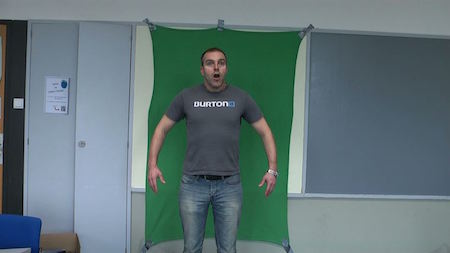
(a green blanket from the 0.99$ shop, gaffa-tape, no extra light…)
… and FCPX keys like marvel! Even in full auto-mode, results are perfect (for our needs).
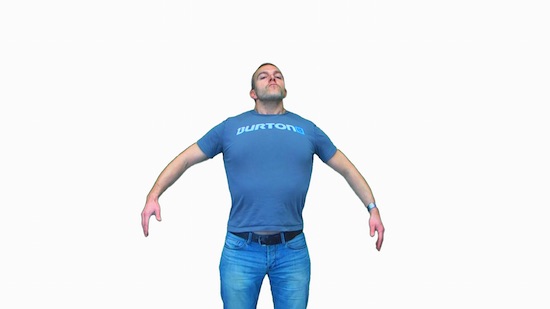
(yep, some spill and a 'line' ... as mentioned: for our needs ,we do it 'quick'n dirty' ...… you could adjust that)
Two remarks:
a) there's an app called Green-Screener <<linkt to App Store , which helps to find hot-spots, dark spots, or wirnkles, or ...
b) there's a 3rd party plug-in, which claims to be even better than the FCPX built-in keyer:
hawaiki.co/index.html
maybe you should check this out ..
From the non-pro-side, some reallife experiences:
at our school, we do use the worse green-screens ever, e.g. this one:
(a green blanket from the 0.99$ shop, gaffa-tape, no extra light…)
… and FCPX keys like marvel! Even in full auto-mode, results are perfect (for our needs).
(yep, some spill and a 'line' ... as mentioned: for our needs ,we do it 'quick'n dirty' ...… you could adjust that)
Two remarks:
a) there's an app called Green-Screener <<linkt to App Store , which helps to find hot-spots, dark spots, or wirnkles, or ...
b) there's a 3rd party plug-in, which claims to be even better than the FCPX built-in keyer:
hawaiki.co/index.html
maybe you should check this out ..
Last edit: 31 Mar 2015 05:04 by Karsten Schlüter.
Please Log in to join the conversation.
31 Mar 2015 09:06 #62113
by bbrunner
Replied by bbrunner on topic Green screen
Thank you Karsten Schlüter. Your post and tips are reassuring a first time green screen user like myself 
Please Log in to join the conversation.
- Karsten Schlüter
-
- Offline
- Moderator
-
Less
More
- Posts: 3790
- Thank you received: 718
31 Mar 2015 11:58 #62118
by Karsten Schlüter
Replied by Karsten Schlüter on topic Green screen
follow advice given by Ronny - he's from the Premier league ...
I'm the enthusiastic hobbyist (=high amibitions, low budget) here, and when I can do it, a professional studio, with some thousands watts of soft boxes and a crew knowing to handle it, should manage it easy!
OK, the (in)famous blonde mane plus a ventilator ask for more expertise …
And you can do it easy or complicated:
green screen and the subject wears a white shirt ... hmmm? not that smart.-
green screen and transparent cloths/materials ... hmm? Not for a first timer.
For our school projects we sometimes go outdoors: lots of light, preferred a cloudy day, and perfectly easy to stay 5-10meters aways from the green...
… and FCPX is really very much forgiven .. I should post for your amusement some of our green-screens, it's really worse!
Have fun with your interviews.
Just to feed my curiosity: why green screen?
'beaming' the subject to other places?
Or, as in my example, to create an infinite-white?
I'm the enthusiastic hobbyist (=high amibitions, low budget) here, and when I can do it, a professional studio, with some thousands watts of soft boxes and a crew knowing to handle it, should manage it easy!
OK, the (in)famous blonde mane plus a ventilator ask for more expertise …
And you can do it easy or complicated:
green screen and the subject wears a white shirt ... hmmm? not that smart.-
green screen and transparent cloths/materials ... hmm? Not for a first timer.
For our school projects we sometimes go outdoors: lots of light, preferred a cloudy day, and perfectly easy to stay 5-10meters aways from the green...
… and FCPX is really very much forgiven .. I should post for your amusement some of our green-screens, it's really worse!
Have fun with your interviews.
Just to feed my curiosity: why green screen?
'beaming' the subject to other places?
Or, as in my example, to create an infinite-white?
Please Log in to join the conversation.
- jjsanderson
-
- Offline
- Elite Member
-
31 Mar 2015 12:13 #62119
by jjsanderson
Replied by jjsanderson on topic Green screen
You know, I'd love to see a thread on rubbish chromakey situations. A couple of years ago I spent a weekend with a some cosmologists playing around with a large planetarium. We made a few short test pieces for a show which sadly never went anywhere, but did involve me cobbling together absolutely the worst chromakey setup I've personally seen.
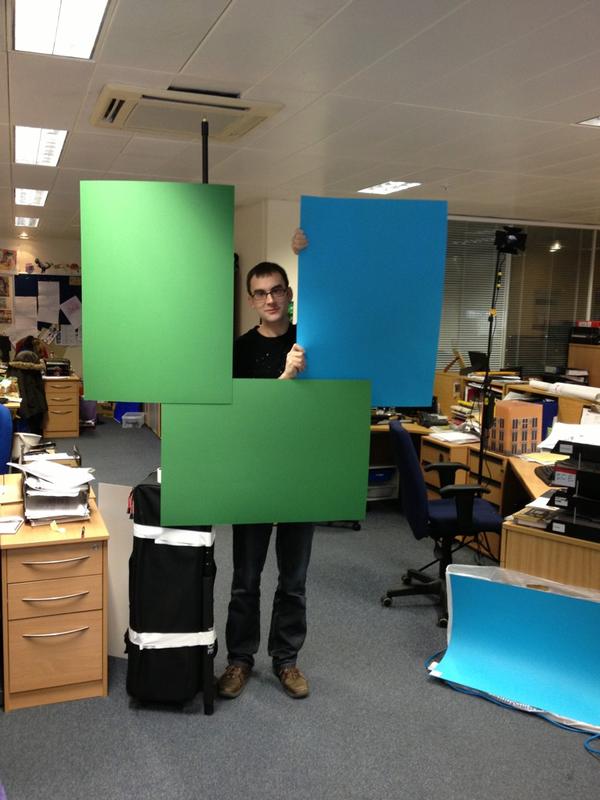
Yes, that's a sheet of (green!) cardboard taped to a boom pole, itself strapped to my lighting kit bag. I think we physically held another sheet behind the performer, then another performer sat in front of the card.
I won't say the resulting key was good, as such, but it was adequate for our purposes.
Yes, that's a sheet of (green!) cardboard taped to a boom pole, itself strapped to my lighting kit bag. I think we physically held another sheet behind the performer, then another performer sat in front of the card.
I won't say the resulting key was good, as such, but it was adequate for our purposes.
Please Log in to join the conversation.
- damiangrady
-
- Offline
- Elite Member
-
Less
More
- Posts: 233
- Thank you received: 6
31 Mar 2015 12:23 #62120
by damiangrady
Replied by damiangrady on topic Green screen
This is a GREAT quick, easy and VERY mobile solution for Green Screen
www.fjwestcott.com/5-x-7-green-chroma-key-x-drop-backdrop-kit
We just got one and it's incredibly easy to set up and light as a feather if you need to move it around.
We just got one and it's incredibly easy to set up and light as a feather if you need to move it around.
Please Log in to join the conversation.
- Karsten Schlüter
-
- Offline
- Moderator
-
Less
More
- Posts: 3790
- Thank you received: 718
31 Mar 2015 12:25 #62121
by Karsten Schlüter
Replied by Karsten Schlüter on topic Green screen
A patchwork screen! That indeed tops our situation! LOL
We have a 6x4m cloth and two poles - but no lights
I love those ..... Creative solutions :lol:
We have a 6x4m cloth and two poles - but no lights
I love those ..... Creative solutions :lol:
Please Log in to join the conversation.
31 Mar 2015 13:22 - 31 Mar 2015 13:23 #62122
by bbrunner
Replied by bbrunner on topic Green screen
Karsten Schlüter, I'm doing an hour long documentary.
I decided to film all my interviewees in a studio against green screen and with two cameras because the locations I've had in mind aren't accessible anymore. This way, I can create a unifying visual look and feel, and in addition, have much more option when editing. I can cut between the two cameras and into the archival footage that will run behind the subject. No more need of silly "cut away" shots that are meaningless, e.g., hands, eyes, etc.
I decided to film all my interviewees in a studio against green screen and with two cameras because the locations I've had in mind aren't accessible anymore. This way, I can create a unifying visual look and feel, and in addition, have much more option when editing. I can cut between the two cameras and into the archival footage that will run behind the subject. No more need of silly "cut away" shots that are meaningless, e.g., hands, eyes, etc.
Last edit: 31 Mar 2015 13:23 by bbrunner.
Please Log in to join the conversation.

31 Mar 2015 13:36 #62123
by rjvddoes
Replied by rjvddoes on topic Green screen
Hi Benny,
In this thread is some more useful information, including some pictures of the setup I use for interviews.
Robbert-Jan
In this thread is some more useful information, including some pictures of the setup I use for interviews.
Robbert-Jan
Please Log in to join the conversation.
