


- Posts: 141
- Thank you received: 2
3 Post Moderation Rule for New Boarders (25 Jan 2021)
New boarders will have their posts moderated - Don't worry if you cannot see your post immediately.
How to Remove Plosives in FCP X Voiceover?
19 Mar 2015 14:58 #61579
by AlexMaxim
How to Remove Plosives in FCP X Voiceover? was created by AlexMaxim
Hi there guys,
I have recorded a voiceover for a documentary, and the voiceover is contained in numerous small audio clips which I have loaded into Final Cut Pro X.
The sound quality is fine apart from one major issue: there are plosives galore, mostly when the letter 'p' is pronounced. For example, in the phrase 'this is a dangerous passion', at the start of the word 'passion' there is a popping sound.
I have searched the Internet for hours trying to find a solution to this riddle, but almost all of the tutorials deal with removing isolated pops - not pops which are occurring as part of the voiceover, and where a simple blade/trim correction will not work.
Any suggestions on how to solve this problem would be sincerely appreciated. I am enclosing a snapshot of a typical waveform formation in case this is of any use.
I am a near-total newbie, so please forgive my ignorance in advance.
Many thanks!
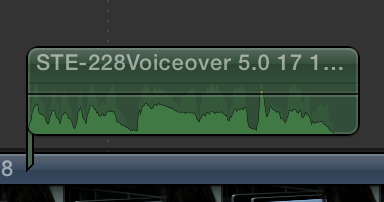
I have recorded a voiceover for a documentary, and the voiceover is contained in numerous small audio clips which I have loaded into Final Cut Pro X.
The sound quality is fine apart from one major issue: there are plosives galore, mostly when the letter 'p' is pronounced. For example, in the phrase 'this is a dangerous passion', at the start of the word 'passion' there is a popping sound.
I have searched the Internet for hours trying to find a solution to this riddle, but almost all of the tutorials deal with removing isolated pops - not pops which are occurring as part of the voiceover, and where a simple blade/trim correction will not work.
Any suggestions on how to solve this problem would be sincerely appreciated. I am enclosing a snapshot of a typical waveform formation in case this is of any use.
I am a near-total newbie, so please forgive my ignorance in advance.
Many thanks!
Please Log in to join the conversation.

19 Mar 2015 16:35 #61580
by BenB
Replied by BenB on topic How to Remove Plosives in FCP X Voiceover?
OOooooo... An audio engineer's worst nightmare! No quick, easy trick. Something like Sound Soap maybe. When recording VO work, you should always use a professional grade pop-filter, and test for proximity effect. Not sure there's any really easy fix for this. I'm not sure a compressor or EQ would help, but maybe. Compress it a bit, use an EQ to roll off the lowest frequencies.
Please Log in to join the conversation.

19 Mar 2015 16:58 #61581
by joema
These can often be removed using Izotope RX3/RX4, but that is an expensive complex tool. You might be able to find a technician to do the repair; I don't know what the going rate is for this. Here is an example of removing plosive 'p' sound:
Replied by joema on topic How to Remove Plosives in FCP X Voiceover?
AlexMaxim wrote: ...there are plosives galore, mostly when the letter 'p' is pronounced...
These can often be removed using Izotope RX3/RX4, but that is an expensive complex tool. You might be able to find a technician to do the repair; I don't know what the going rate is for this. Here is an example of removing plosive 'p' sound:
Please Log in to join the conversation.
19 Mar 2015 17:15 #61582
by AlexMaxim
Yes, I was considering Sound Soap...I have no idea exactly how effective it is, so I am loath to spend the £60.00 without a better idea of how it works, but if it can solve this problem then it could be perfect.
I did use a pop-filter with an H4n handy recorder, but the proximity effect looks to be the problem.
Is there any way that the tall bit of the waveform can be somehow clipped?
Replied by AlexMaxim on topic How to Remove Plosives in FCP X Voiceover?
BenB wrote: OOooooo... An audio engineer's worst nightmare! No quick, easy trick. Something like Sound Soap maybe. When recording VO work, you should always use a professional grade pop-filter, and test for proximity effect. Not sure there's any really easy fix for this. I'm not sure a compressor or EQ would help, but maybe. Compress it a bit, use an EQ to roll off the lowest frequencies.
Yes, I was considering Sound Soap...I have no idea exactly how effective it is, so I am loath to spend the £60.00 without a better idea of how it works, but if it can solve this problem then it could be perfect.
I did use a pop-filter with an H4n handy recorder, but the proximity effect looks to be the problem.
Is there any way that the tall bit of the waveform can be somehow clipped?
Please Log in to join the conversation.
19 Mar 2015 17:17 #61583
by AlexMaxim
Replied by AlexMaxim on topic How to Remove Plosives in FCP X Voiceover?
Many thanks for this! Sadly the budget for this tool is probably beyond the project.
I have read that tall waveforms can be clipped ( discussions.apple.com/thread/2198102 ) but I don't know how to do this. Can anyone help me out?
I have read that tall waveforms can be clipped ( discussions.apple.com/thread/2198102 ) but I don't know how to do this. Can anyone help me out?
Please Log in to join the conversation.
- peteramwiggins
-

- Offline
- Administrator
-

- The Administrator :)
Less
More
- Posts: 1049
- Thank you received: 404
19 Mar 2015 18:05 #61586
by peteramwiggins
Administrator
Replied by peteramwiggins on topic How to Remove Plosives in FCP X Voiceover?
Find the AUDynamics Processor in the effects. Apply to clip, then open up the GUI from the little icon in the inspector.
Then drag the 'knee' down so it catches the peak and reduces the gain.
Have a good tweak to get exactly what you want.
Peter
Then drag the 'knee' down so it catches the peak and reduces the gain.
Have a good tweak to get exactly what you want.
Peter
Administrator
Please Log in to join the conversation.
19 Mar 2015 18:21 #61587
by AlexMaxim
Replied by AlexMaxim on topic How to Remove Plosives in FCP X Voiceover?
Many thanks for this kind tip!
Unfortunately, for some reason it was not possible to edit the sound levels dynamically (i.e. one frame at a time, so that I could isolate the peak).
Does anyone have any experience of SoundSoap? Does it remove plosives effortlessly?
Unfortunately, for some reason it was not possible to edit the sound levels dynamically (i.e. one frame at a time, so that I could isolate the peak).
Does anyone have any experience of SoundSoap? Does it remove plosives effortlessly?
Please Log in to join the conversation.
19 Mar 2015 18:59 #61590
by BenB
Replied by BenB on topic How to Remove Plosives in FCP X Voiceover?
If you used a proper pop filter, how did you get plosives? That shouldn't happen. Anyway, if I could get a copy of the sound file, I'll play around, see what I can do.
Please Log in to join the conversation.
19 Mar 2015 19:15 - 19 Mar 2015 19:16 #61591
by AlexMaxim
Replied by AlexMaxim on topic How to Remove Plosives in FCP X Voiceover?
My mistake - today I realised that I used a standard microphone filter (the one issued with the Zoom H4n) rather than a pop filter. I didn't know the difference.
Thank you very much for your kind offer of looking at the file! A typical sound file is attached. Any guidance on how to resolve this problem would be sincerely appreciated.
Thank you very much for your kind offer of looking at the file! A typical sound file is attached. Any guidance on how to resolve this problem would be sincerely appreciated.
Last edit: 19 Mar 2015 19:16 by AlexMaxim.
Please Log in to join the conversation.
19 Mar 2015 19:23 #61592
by BenB
Replied by BenB on topic How to Remove Plosives in FCP X Voiceover?
Got it, let me fool around with it a bit, I'll post back.
Please Log in to join the conversation.
19 Mar 2015 19:27 #61593
by AlexMaxim
Replied by AlexMaxim on topic How to Remove Plosives in FCP X Voiceover?
Many thanks!
Please Log in to join the conversation.

20 Mar 2015 04:45 - 20 Mar 2015 04:47 #61609
by dgwvideo
Creating history....one edit at a time !
Replied by dgwvideo on topic How to Remove Plosives in FCP X Voiceover?
Try this...I did a quick processing in Soundtrack Pro. I also reduced the level to a more suitable gain for film, but you can boost it easily if you like. The plosive is still there slightly but the track is much more useable. There was actually a lot of noise prior to the speaking and then again afterwards which I removed. Spending a bit more time in STP would probably yield better results still.
EDIT: sorry, the attachment is now there !
EDIT: sorry, the attachment is now there !
Creating history....one edit at a time !
Last edit: 20 Mar 2015 04:47 by dgwvideo.
Please Log in to join the conversation.
20 Mar 2015 11:39 #61614
by AlexMaxim
Replied by AlexMaxim on topic How to Remove Plosives in FCP X Voiceover?
Thank you so much for your kind efforts! Yes, there is a significant improvement in the quality of the clip.
I have tried Larry Jordan's tutorial on the limiter effect, and this is very effective in reducing the plosive, though not eliminating it. I am going to download a free trial of SoundSoap and see where I go from there.
Many thanks once again!
I have tried Larry Jordan's tutorial on the limiter effect, and this is very effective in reducing the plosive, though not eliminating it. I am going to download a free trial of SoundSoap and see where I go from there.
Many thanks once again!
Please Log in to join the conversation.
20 Mar 2015 11:55 #61615
by BenB
Replied by BenB on topic How to Remove Plosives in FCP X Voiceover?
Free trial is your best bet. I can't touch this for a few days. Just had an Apogee Quartet blow up, kids have bowling championship out of town, and other fires that just burst into flame around me. When it rains is pours.
I think Sound Soap will do about all anything will do for this. You won't make it go away totally, just make it more easy to live with.
I think Sound Soap will do about all anything will do for this. You won't make it go away totally, just make it more easy to live with.
Please Log in to join the conversation.
- BrendanJTR
-

- Offline
- New Member
-

Less
More
- Posts: 5
- Thank you received: 1
20 Mar 2015 15:24 - 20 Mar 2015 15:25 #61620
by BrendanJTR
Replied by BrendanJTR on topic How to Remove Plosives in FCP X Voiceover?
Hey Alex,
Plosives are a burst of air, usually from hard Bs and Ps, hitting the microphone capsule. The little foam cover for the Zoom won't do much unfortunately. A proper pop filter is a mesh that will diffract the air burst, minimising it's energy.
Compressing and limiting will not remove a plosive, as the 'pop' sound you hear is the air hitting the capsule.
A good trick is to cut just the plosive pop, and use a hi-pass filter on it to remove the bass, leaving the rest of the word unaffected.
YMMV though, and if you have a lot of them your results would be much better using a proper tool such as RX.
I used RX on it and you can hear the results.
Plosives are a burst of air, usually from hard Bs and Ps, hitting the microphone capsule. The little foam cover for the Zoom won't do much unfortunately. A proper pop filter is a mesh that will diffract the air burst, minimising it's energy.
Compressing and limiting will not remove a plosive, as the 'pop' sound you hear is the air hitting the capsule.
A good trick is to cut just the plosive pop, and use a hi-pass filter on it to remove the bass, leaving the rest of the word unaffected.
YMMV though, and if you have a lot of them your results would be much better using a proper tool such as RX.
I used RX on it and you can hear the results.
Last edit: 20 Mar 2015 15:25 by BrendanJTR.
Please Log in to join the conversation.
20 Mar 2015 16:45 #61621
by BenB
Replied by BenB on topic How to Remove Plosives in FCP X Voiceover?
Just FYI, for the future. This is the one we've used for years and love it.
www.sweetwater.com/store/detail/PopFilter6DS
www.sweetwater.com/store/detail/PopFilter6DS
Please Log in to join the conversation.
- DmitriZigany
-
- Offline
- Platinum Member
-

Less
More
- Posts: 730
- Thank you received: 26
20 Mar 2015 16:48 #61622
by DmitriZigany
Replied by DmitriZigany on topic How to Remove Plosives in FCP X Voiceover?
As Brendan said, it's just not that the "Ps" are louder, it's the sound of the air. So you need both level control and EQing. Even so, it's not gonna sound right. But you might get it to the point where it's usable.
If it's something really critical, and you have words with Ps and Bs that not cause plosives, you could take those and copy and replace (or blend) the ones that are plosive. This is a time consuming and tedious process though and has to be done manually. And also takes some audio editing experience to get right.
Pop filters, but also mic placement and technique are crucial to good vocal recordings.
I can usually sing without a pop filter into a large diaphragm condenser mic without cause more than an occasional pop. A good friend of mine, who in most other regards is a better singer and musician than me, cause very frequent pops even using a Shure SM58. He come from a live/punk background, I started my music career by recording myself.
That leads us to the sensibilities of different types of microphones, but that is a topic for some other day
If it's something really critical, and you have words with Ps and Bs that not cause plosives, you could take those and copy and replace (or blend) the ones that are plosive. This is a time consuming and tedious process though and has to be done manually. And also takes some audio editing experience to get right.
Pop filters, but also mic placement and technique are crucial to good vocal recordings.
I can usually sing without a pop filter into a large diaphragm condenser mic without cause more than an occasional pop. A good friend of mine, who in most other regards is a better singer and musician than me, cause very frequent pops even using a Shure SM58. He come from a live/punk background, I started my music career by recording myself.
That leads us to the sensibilities of different types of microphones, but that is a topic for some other day
Please Log in to join the conversation.
20 Mar 2015 18:30 - 20 Mar 2015 18:37 #61625
by AlexMaxim
Replied by AlexMaxim on topic How to Remove Plosives in FCP X Voiceover?
@Ben B: Cool cookies. I agree that even SoundSoap isn't going to make this issue disappear, just ameliorate it somewhat.
Best of luck with the bowling championship! And many thanks for the superb pop filter recommendation!
Best of luck with the bowling championship! And many thanks for the superb pop filter recommendation!
Last edit: 20 Mar 2015 18:37 by AlexMaxim.
Please Log in to join the conversation.
20 Mar 2015 18:32 - 20 Mar 2015 18:33 #61626
by AlexMaxim
Replied by AlexMaxim on topic How to Remove Plosives in FCP X Voiceover?
@BrendanJTR: Thank you so much for this brilliant work! You have done an amazing job.
RX is indeed a wonderful solution. I will definitely consider it if I can't solve it another way.
Cheers once again!
RX is indeed a wonderful solution. I will definitely consider it if I can't solve it another way.
Cheers once again!
Last edit: 20 Mar 2015 18:33 by AlexMaxim.
Please Log in to join the conversation.
20 Mar 2015 18:36 #61627
by AlexMaxim
Replied by AlexMaxim on topic How to Remove Plosives in FCP X Voiceover?
@DmitriZigany, thanks so much for the kind explication! I agree that the manual approach could be very time-consuming, especially given that this is a large project with a lot of voice files. I will probably end up rerecording the offending clips with a better setup as having done some research on this topic I realise that there is a lot of other aspects to the soundtrack that could be improved.
Please Log in to join the conversation.
