


- Posts: 238
- Thank you received: 20
3 Post Moderation Rule for New Boarders (25 Jan 2021)
New boarders will have their posts moderated - Don't worry if you cannot see your post immediately.
DVD-How'd they do that?
- Squamish ed
-
 Topic Author
- Offline
- Elite Member
-

Less
More
01 Mar 2015 22:21 #60652
by Squamish ed
Ed
DVD-How'd they do that? was created by Squamish ed
I have a project that's 10 minutes long & just under 20GB. When I write it to a DVD it gets compressed to approximately 620 MB. My blank DVD-Rs have a 4.7 GB capacity. When I play back a DVD the compression artifacts are obvious and the quality unacceptable.
I've tried using Compressor with all the 'best' settings as well as FCPX and iDVD and can't find a way to make the file bigger and the artifacts less. When I watch a Hollywood movie on a DVD the quality is fine. My question is how'd they do that and what can I do to improve mine?
I've tried using Compressor with all the 'best' settings as well as FCPX and iDVD and can't find a way to make the file bigger and the artifacts less. When I watch a Hollywood movie on a DVD the quality is fine. My question is how'd they do that and what can I do to improve mine?
Ed
Please Log in to join the conversation.
- Tom Wolsky
-

- Offline
- Moderator
-

01 Mar 2015 23:25 #60656
by Tom Wolsky
Replied by Tom Wolsky on topic DVD-How'd they do that?
In iDVD use best performance. In Compressor try a preset that's constant bit rate that's just under 7.5.
Please Log in to join the conversation.
- Squamish ed
-
Topic Author
- Offline
- Elite Member
-
Less
More
- Posts: 238
- Thank you received: 20
01 Mar 2015 23:37 #60658
by Squamish ed
Ed
Replied by Squamish ed on topic DVD-How'd they do that?
Thanks Tom. How does the bit rate affect the compression and/or quality of the DVD? I'm completely new to making discs and really don't understand what's going on. I'd appreciate it if you (or anyone else) could elaborate.
Ed
Ed
Ed
Please Log in to join the conversation.
- Tom Wolsky
-
- Offline
- Moderator
-
01 Mar 2015 23:47 - 01 Mar 2015 23:48 #60659
by Tom Wolsky
Replied by Tom Wolsky on topic DVD-How'd they do that?
The higher the bit rate the better the compression. DVDs are constrained by two factor, limit in the amount of data they can hold, which doesn't really effect you, and limitation in th throughput, how fast the data can be read off the disc. DVD is old technology and the throughput is very limited. Some DVD players can do better than 7.5, but generally 7-7.5 is usually the safe limit for what the discs can sustain without skipping. Make sure you compress the audio as well. Uncompressed audio puts a huge hit on the player's capabilities.
Last edit: 01 Mar 2015 23:48 by Tom Wolsky.
Please Log in to join the conversation.
- Squamish ed
-
Topic Author
- Offline
- Elite Member
-
Less
More
- Posts: 238
- Thank you received: 20
01 Mar 2015 23:52 #60660
by Squamish ed
Ed
Replied by Squamish ed on topic DVD-How'd they do that?
That clarifies a lot Tom - I appreciate it. It never occurred to me to compress the audio too. I'll fire up Compressor and see what happens.
Ed
Please Log in to join the conversation.
- Tom Wolsky
-
- Offline
- Moderator
-
02 Mar 2015 00:04 #60661
by Tom Wolsky
Replied by Tom Wolsky on topic DVD-How'd they do that?
The Create DVD group has a Dolby Digital preset to compress the sound.
Please Log in to join the conversation.
- Squamish ed
-
Topic Author
- Offline
- Elite Member
-
Less
More
- Posts: 238
- Thank you received: 20
04 Mar 2015 04:26 #60798
by Squamish ed
Ed
Replied by Squamish ed on topic DVD-How'd they do that?
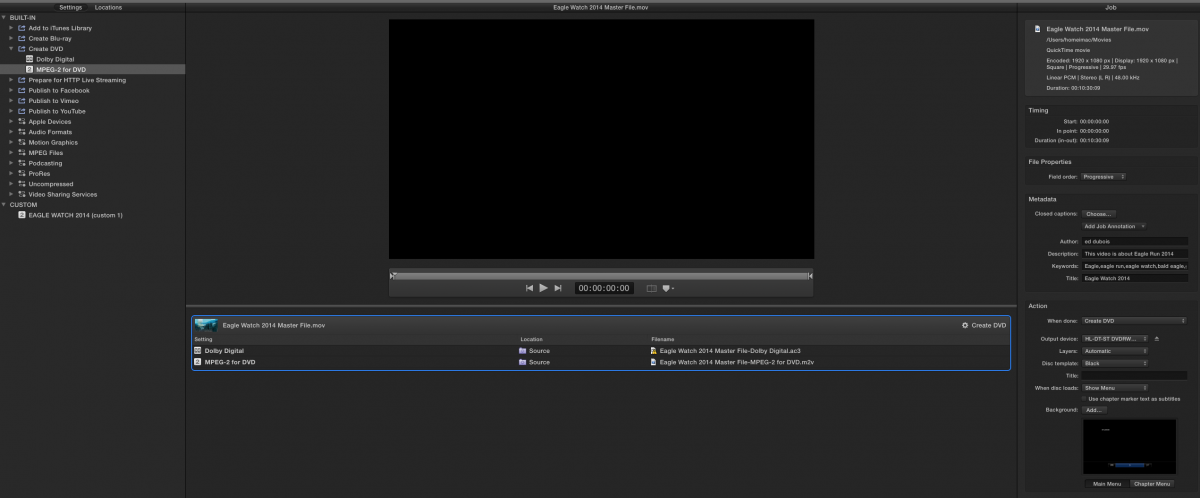
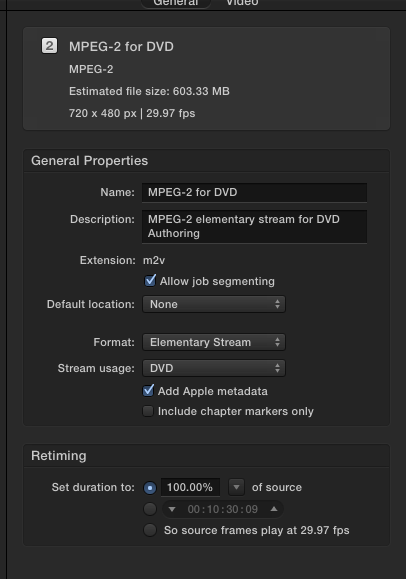
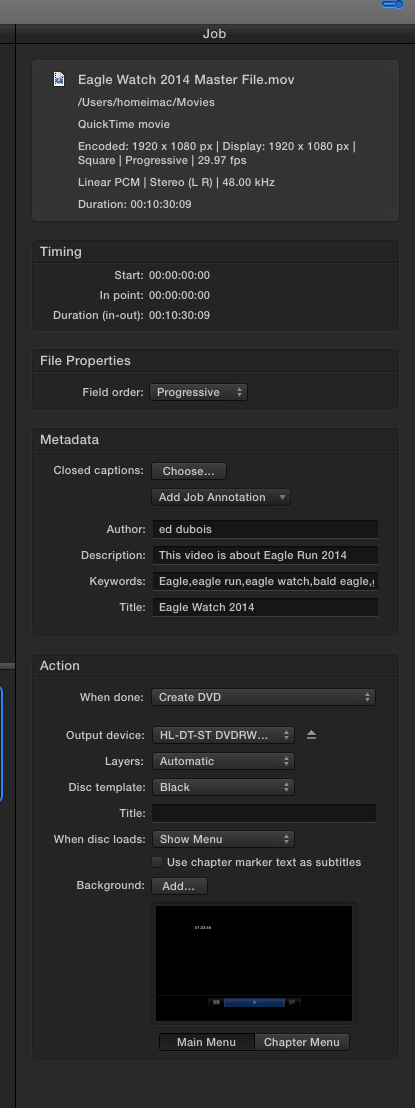
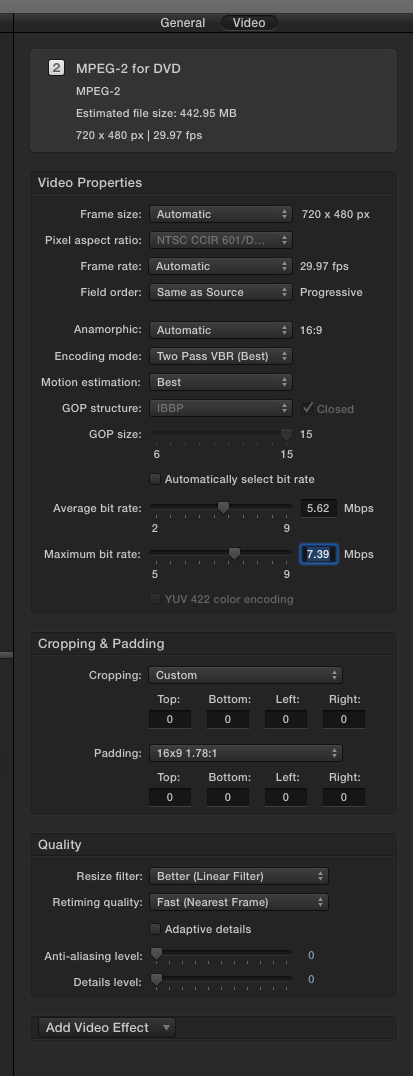
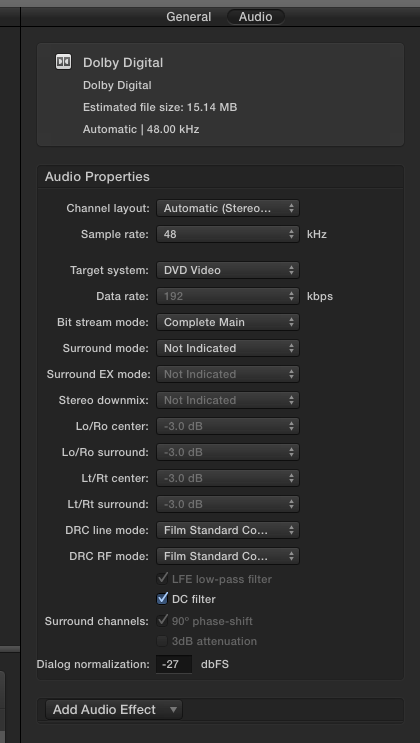
I thought I was following instructions carefully but I still can't seem to get any better quality. I used automatic bit rate selection and that didn't work well so I've tried setting the average & max bit rates. Rather than try to explain I've attached some screen captures.
One thing that caught my eye is the output seems to be 720X480 with no other option available. Am I running into the limits of this technology?
One thing that caught my eye is the output seems to be 720X480 with no other option available. Am I running into the limits of this technology?
Ed
Please Log in to join the conversation.

04 Mar 2015 10:11 #60813
by BenB
Replied by BenB on topic DVD-How'd they do that?
You're taking HD and compressing the heck out of it into SD-DVD. Yes, regular DVD is only standard definition. If you want to get the best quality out of it, you'll need to go Blu-Ray DVD.
In the video settings, I'd set the Average Bit Rate to 7. Heck, it is only 10 minutes long, that's hardly anything, thus just turn on "Automatically set bit rate" and give that a try. I'd also change the Resize Filter to Best.
In the audio settings, Surround Sound Mode should be set to Not Encoded, and turn of the DC Filter.
But going 1080 to SD, especially in a DVD MPEG-2, that's a lot of compression.
In the video settings, I'd set the Average Bit Rate to 7. Heck, it is only 10 minutes long, that's hardly anything, thus just turn on "Automatically set bit rate" and give that a try. I'd also change the Resize Filter to Best.
In the audio settings, Surround Sound Mode should be set to Not Encoded, and turn of the DC Filter.
But going 1080 to SD, especially in a DVD MPEG-2, that's a lot of compression.
Please Log in to join the conversation.
- Squamish ed
-
Topic Author
- Offline
- Elite Member
-
Less
More
- Posts: 238
- Thank you received: 20
05 Mar 2015 02:07 #60866
by Squamish ed
Ed
Replied by Squamish ed on topic DVD-How'd they do that?
Thanks Ben. It looks like I'm just expecting too much from this older technology. I haven't needed a DVD in recent memory but a recent project appealed to the executive of a local non-profit society who thought they could use it for fundraising. While I'm happy to contribute I'm not happy to release it with all the compression artifacts I've encountered.
Do you have any suggestions for another medium that might work? I wondered about USB thumb drives or SD cards or ...? What they're hoping to do is to place something tangible in a local tourism gift shop so customers can donate and leave with something in their pockets. Given the nature of this endeavour production costs need to be kept minimal.
Do you have any suggestions for another medium that might work? I wondered about USB thumb drives or SD cards or ...? What they're hoping to do is to place something tangible in a local tourism gift shop so customers can donate and leave with something in their pockets. Given the nature of this endeavour production costs need to be kept minimal.
Ed
Please Log in to join the conversation.
- Karsten Schlüter
-

- Offline
- Moderator
-
Less
More
- Posts: 3790
- Thank you received: 718
05 Mar 2015 09:28 #60874
by Karsten Schlüter
Volvo offered years ago nice designed usb-sticks, containing a whole website, clickable, tons of photos, videos ... that was before Internet via 6GB/fire optics into every household...
Disks <sigh> ... on my side of the pond, less and less DVDPlayers are in the shops.- When you're used to HDef, esp. on those gigantic flatTVs, a DVD looks poor… look, how much it gets [strike]d[/strike]zoomed

on the other hand: DVD is such an old standard, it is worldwide avail. .... oops, stop: There are computers without disk drives Or tablets. Or phones. Or ...
… SDcards - I'm using them, when sharing data via [strike]Pony Express[/strike] post; most people are not aware, that those stamps are data-Medium as disk, stick, drive. I assume, sharing your videos on SDcard will confuse most customers, as a sharing medium SDCard is too exotic.
Stick - => format wars :woohoo:
To make videos avail via stick, for compatibility reasons, it should be formatted as fat32 = which limits the single file size to 4GB… and video as mp4; for me, this is the only universal format.
Stream - you reach much more people via YouTube/Vimeo/etc.
OK, the ones still using acustic couplers are 'out'...
I would combine stick + net ..............
Replied by Karsten Schlüter on topic DVD-How'd they do that?
Squamish ed wrote: … I wondered about USB thumb drives or SD cards or ...? ….
Volvo offered years ago nice designed usb-sticks, containing a whole website, clickable, tons of photos, videos ... that was before Internet via 6GB/fire optics into every household...
Disks <sigh> ... on my side of the pond, less and less DVDPlayers are in the shops.- When you're used to HDef, esp. on those gigantic flatTVs, a DVD looks poor… look, how much it gets [strike]d[/strike]zoomed
on the other hand: DVD is such an old standard, it is worldwide avail. .... oops, stop: There are computers without disk drives
Or tablets. Or phones. Or ...… SDcards - I'm using them, when sharing data via [strike]Pony Express[/strike] post; most people are not aware, that those stamps are data-Medium as disk, stick, drive. I assume, sharing your videos on SDcard will confuse most customers, as a sharing medium SDCard is too exotic.
Stick - => format wars :woohoo:
To make videos avail via stick, for compatibility reasons, it should be formatted as fat32 = which limits the single file size to 4GB… and video as mp4; for me, this is the only universal format.
Stream - you reach much more people via YouTube/Vimeo/etc.
OK, the ones still using acustic couplers are 'out'...
I would combine stick + net ..............
Please Log in to join the conversation.


05 Mar 2015 11:40 #60882
by joema
What is wrong with exFAT? It has no file size limit, has been supported on OS X since Snow Leopard, on Windows since XP, and most cameras and other devices using SDXC cards.
Replied by joema on topic DVD-How'd they do that?
Karsten Schlüter wrote: ...To make videos avail via stick, for compatibility reasons, it should be formatted as fat32 = which limits the single file size to 4GB… and video as mp4; for me, this is the only universal format...
What is wrong with exFAT? It has no file size limit, has been supported on OS X since Snow Leopard, on Windows since XP, and most cameras and other devices using SDXC cards.
Please Log in to join the conversation.
- Tom Wolsky
-
- Offline
- Moderator
-
05 Mar 2015 11:52 #60884
by Tom Wolsky
Replied by Tom Wolsky on topic DVD-How'd they do that?
ExFAT still has permission issues when used with the Mac OS which aren't as simply dealt with as Mac formatted drives.
Please Log in to join the conversation.
05 Mar 2015 12:06 #60885
by joema
The problem isn't compression artifacts as much as the reduced resolution. DVD is 720x480 vs 1920x1080 for HD, which means DVD is throwing away 5/6ths of the pixels.
Your situation -- wanting to deliver a tangible product for fund raising -- is increasingly a dilemma as optical media dies out, and as HD production is now universal.
Unfortunately there is nothing exactly like a DVD in an "Amaray" or jewel case with polished graphics for presentation value. Also with DVD the user experience continues with the splash screen, background music, and menu system.
However you can have USB sticks gift packaged in little cases with printed graphics. This retains some of the physical presentation style of a DVD. Here's one example: www.premiumusb.com/catalog/custom-usb-packaging_36.htm
Maybe a better approach is using streaming video and crafting an artistic, decorative glossy gift card with QR code. Vimeo Pro allows ad-free presentation in several different customizable styles. This also bypasses the hassle & expense of replicating the DVD. On the card and/or in the program you could discretely place information for viewers wanting to contribute to the fund raising.
Unfortunately there's currently no universal method with streaming media for the "living room" viewing experience. Increasingly people have streaming capability (of some sort) on their smart TVs, but this isn't yet ubiquitous.
However as content producers there's no choice but go in that direction since optical media is rapidly dying out, and many portable devices don't even have USB ports.
Replied by joema on topic DVD-How'd they do that?
Squamish ed wrote: ...a local non-profit society who thought they could use it for fundraising. While I'm happy to contribute I'm not happy to release it with all the compression artifacts I've encountered....Do you have any suggestions for another medium that might work? I wondered about USB thumb drives or SD cards or ...? What they're hoping to do is to place something tangible in a local tourism gift shop so customers can donate and leave with something in their pockets. Given the nature of this endeavour production costs need to be kept minimal.
The problem isn't compression artifacts as much as the reduced resolution. DVD is 720x480 vs 1920x1080 for HD, which means DVD is throwing away 5/6ths of the pixels.
Your situation -- wanting to deliver a tangible product for fund raising -- is increasingly a dilemma as optical media dies out, and as HD production is now universal.
Unfortunately there is nothing exactly like a DVD in an "Amaray" or jewel case with polished graphics for presentation value. Also with DVD the user experience continues with the splash screen, background music, and menu system.
However you can have USB sticks gift packaged in little cases with printed graphics. This retains some of the physical presentation style of a DVD. Here's one example: www.premiumusb.com/catalog/custom-usb-packaging_36.htm
Maybe a better approach is using streaming video and crafting an artistic, decorative glossy gift card with QR code. Vimeo Pro allows ad-free presentation in several different customizable styles. This also bypasses the hassle & expense of replicating the DVD. On the card and/or in the program you could discretely place information for viewers wanting to contribute to the fund raising.
Unfortunately there's currently no universal method with streaming media for the "living room" viewing experience. Increasingly people have streaming capability (of some sort) on their smart TVs, but this isn't yet ubiquitous.
However as content producers there's no choice but go in that direction since optical media is rapidly dying out, and many portable devices don't even have USB ports.
Please Log in to join the conversation.
05 Mar 2015 12:17 #60886
by joema
I don't understand this. The question was about one-way distribution of video content via USB stick to a variety of consumption devices. I have never had any problem on OS X reading an exFAT-formatted USB stick or SDXC camera card.
Since SDXC cards are exFAT-format by default, if there was some problem with this Mac users would be unable to download and view photos and videos from their camera cards. I don't see why exFAT formatting a USB stick would be any different for video content distribution.
Replied by joema on topic DVD-How'd they do that?
Tom Wolsky wrote: ExFAT still has permission issues when used with the Mac OS which aren't as simply dealt with as Mac formatted drives.
I don't understand this. The question was about one-way distribution of video content via USB stick to a variety of consumption devices. I have never had any problem on OS X reading an exFAT-formatted USB stick or SDXC camera card.
Since SDXC cards are exFAT-format by default, if there was some problem with this Mac users would be unable to download and view photos and videos from their camera cards. I don't see why exFAT formatting a USB stick would be any different for video content distribution.
Please Log in to join the conversation.
05 Mar 2015 12:36 #60887
by BenB
Replied by BenB on topic DVD-How'd they do that?
Why not go Blu-Ray?
Please Log in to join the conversation.
05 Mar 2015 13:03 #60896
by joema
Unfortunately Blu-Ray market penetration has stagnated at a fairly low level: www.digital-digest.com/blog/DVDGuy/wp-co...201412_condensed.png
In a for-profit, higher-end production, you could assume the viewing base would more frequently have Blu-Ray playback. However this case was a non-profit fundraiser. In that situation you might want to cast as wide a viewing net as possible, not exclude 60 or 70% of the possible viewers.
People increasingly want to view it on their portable device, which obviously cannot read Blu-Ray. Nowadays, lower-end non-profit productions will obtain a lot more viewing eyeballs from streaming video than production and distribution of optical disks. The presentation polish and tangible "in the hand" value is obviously less than for optical media, but you get a lot more viewers.
For this type of production if you compare the uptake for optical media to the viewership statistics available from similar content on streaming media, in general streaming will be far ahead -- maybe 20x in my experience. Each of those may be less motivated to contribute since they didn't open a shrink-wrapped Amaray case, but there are a lot more of them.
Replied by joema on topic DVD-How'd they do that?
BenB wrote: Why not go Blu-Ray?
Unfortunately Blu-Ray market penetration has stagnated at a fairly low level: www.digital-digest.com/blog/DVDGuy/wp-co...201412_condensed.png
In a for-profit, higher-end production, you could assume the viewing base would more frequently have Blu-Ray playback. However this case was a non-profit fundraiser. In that situation you might want to cast as wide a viewing net as possible, not exclude 60 or 70% of the possible viewers.
People increasingly want to view it on their portable device, which obviously cannot read Blu-Ray. Nowadays, lower-end non-profit productions will obtain a lot more viewing eyeballs from streaming video than production and distribution of optical disks. The presentation polish and tangible "in the hand" value is obviously less than for optical media, but you get a lot more viewers.
For this type of production if you compare the uptake for optical media to the viewership statistics available from similar content on streaming media, in general streaming will be far ahead -- maybe 20x in my experience. Each of those may be less motivated to contribute since they didn't open a shrink-wrapped Amaray case, but there are a lot more of them.
Please Log in to join the conversation.
- Tom Wolsky
-
- Offline
- Moderator
-
05 Mar 2015 13:08 #60897
by Tom Wolsky
Replied by Tom Wolsky on topic DVD-How'd they do that?
There was a lengthy thread about this very recently, started with copying off an ExFAT drive producing error 36. I think you participated in it.
Please Log in to join the conversation.
05 Mar 2015 13:27 #60899
by joema
That thread covered a wide range of topics, inc'l how many of the diverse file system features (symlinks, etc) might be supported on exFAT.
In this thread the statement was FAT32 is better than exFAT for one-way distribution of video content on USB sticks. I don't see how FAT32 is any better than exFAT re permissions or anything else in that scenario. The fact that exFAT is used by default on all SDXC camera cards shows there can't be any great problem, else all Mac users would have difficulty reading their own camera cards.
I often download 200GB per shooting weekend on my MacBook from many different camera cards, most of which are exFAT formatted. It never presents any problem.
Replied by joema on topic DVD-How'd they do that?
Tom Wolsky wrote: There was a lengthy thread about this very recently, started with copying off an ExFAT drive producing error 36. I think you participated in it.
That thread covered a wide range of topics, inc'l how many of the diverse file system features (symlinks, etc) might be supported on exFAT.
In this thread the statement was FAT32 is better than exFAT for one-way distribution of video content on USB sticks. I don't see how FAT32 is any better than exFAT re permissions or anything else in that scenario. The fact that exFAT is used by default on all SDXC camera cards shows there can't be any great problem, else all Mac users would have difficulty reading their own camera cards.
I often download 200GB per shooting weekend on my MacBook from many different camera cards, most of which are exFAT formatted. It never presents any problem.
Please Log in to join the conversation.
- Tom Wolsky
-
- Offline
- Moderator
-
05 Mar 2015 13:44 #60900
by Tom Wolsky
Replied by Tom Wolsky on topic DVD-How'd they do that?
Downloading or importing from SD cards has nothing to do with this. Karsten suggested FAT32 as a format, but I cannot see anywhere someone sayng FAT32 is better than ExFAT. We'll leave it at that. ExFAT drives have been nothing but a pain in the neck for me. That's my experience.
Please Log in to join the conversation.
05 Mar 2015 13:52 #60902
by joema
The topic was distributing one-way video content via USB stick, and Karsten's statement was use FAT32, despite the possible constraints on file size.
My suggestion was simply consider exFAT instead. The stated scenario -- one-way content distribution -- is exactly the same as downloading content from exFAT-formatted SDXC camera cards.
I'm not saying exFAT is generally preferable to HFS+ on portable drives, or that exFAT is without complications vs HFS+, only in this scenario exFAT should be considered over FAT32.
Replied by joema on topic DVD-How'd they do that?
Tom Wolsky wrote: Downloading or importing from SD cards has nothing to do with this. Karsten suggested FAT32 as a format, but I cannot see anywhere someone sayng FAT32 is better than ExFAT.
The topic was distributing one-way video content via USB stick, and Karsten's statement was use FAT32, despite the possible constraints on file size.
My suggestion was simply consider exFAT instead. The stated scenario -- one-way content distribution -- is exactly the same as downloading content from exFAT-formatted SDXC camera cards.
I'm not saying exFAT is generally preferable to HFS+ on portable drives, or that exFAT is without complications vs HFS+, only in this scenario exFAT should be considered over FAT32.
Please Log in to join the conversation.
