


3 Post Moderation Rule for New Boarders (25 Jan 2021)
New boarders will have their posts moderated - Don't worry if you cannot see your post immediately.
Choppy dolly track movement

Waiting for the final confirmation then.
Thanks
Please Log in to join the conversation.
- ronny courtens
-

- Offline
- Moderator
-

- Posts: 4455
- Thank you received: 962
- Ronny
Please Log in to join the conversation.
Thank you so much again.
There's one doubt left, is that I've seen the ProRes 422 version being choppy as well when it was played in some festivals.
(And it is on my Mac mini).
Would you be so kind to also play that file on your powerful computer ? If it's choppy, then I've probably made a mistake importing the DPX from l'equipe to fcp7.
Here are the files:
mab.to/vwsGG9NfE
- The conversion from DPX to ProRes 4444 (done by me, not l'equipe)
- The final Prores 422 master out of FCP
- An H264 version compressed by compressor
Thank you so much


 :lol:


Please Log in to join the conversation.
- Andreas Kiel
-

- Offline
- Platinum Member
-

- Posts: 1077
- Thank you received: 189
Here the tracker result for the first dolly (across the photos). Tracker confidence is 99.7 %.
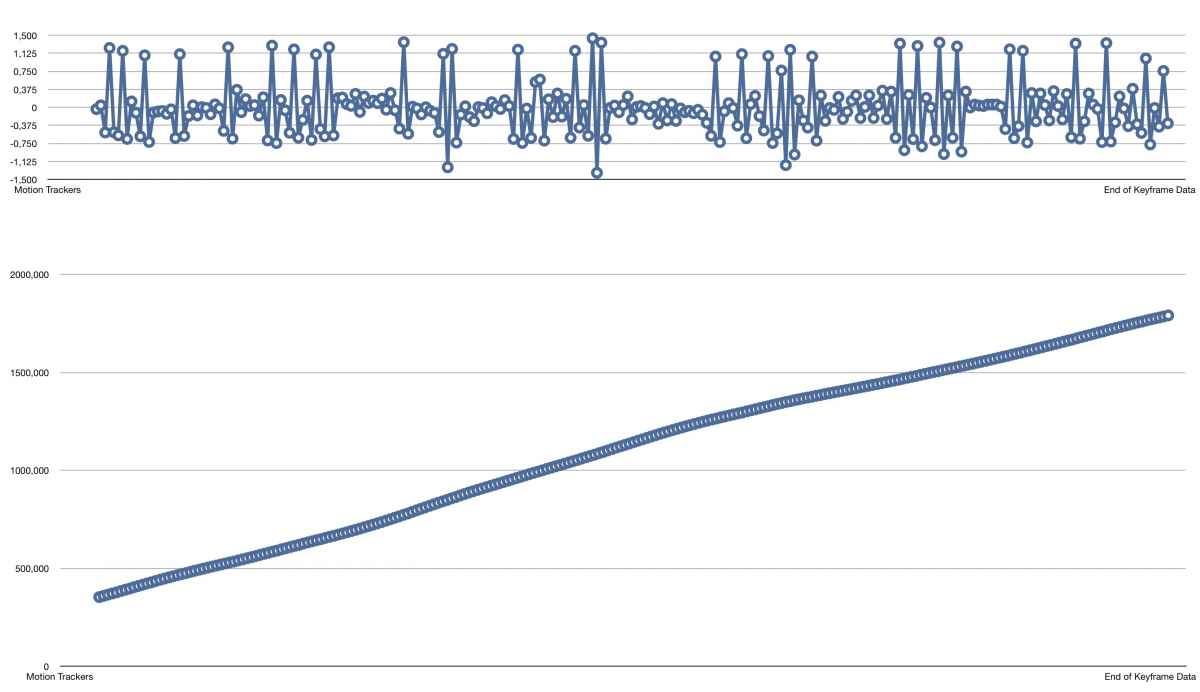
The acceleration differs about max. 1.5 pixel, that's not an amount which can cause a real choppy movie.
The movement is more or less constant and smooth, no real jumps.
So the choppy playback must have another reason.
- Andreas
Please Log in to join the conversation.
- Andreas Kiel
-
- Offline
- Platinum Member
-
- Posts: 1077
- Thank you received: 189
I took your first FCPX 4444 movie and used the method I described earlier to create a flattened superwide image and animated it again.
Image
dl.dropboxusercontent.com/u/63959366/Comp%201_00090.tga
Movie
dl.dropboxusercontent.com/u/63959366/pan%202%20new.mov
But also this new movie doesn't play back smooth on my machine even though the tracker data show perfect movement.
- Andreas
Edit:
I uploaded a simple movie where I applied the tracking data of the original movie to a little red square.
dl.dropboxusercontent.com/u/63959366/pan...ied%20to%20solid.mov
It shows the horizontal move is totally okay - except the speed changes maybe.
Also a "professional speed smoothed" version of the original movie which keeps the perspective depth. That needed some scale up to get rid of the "pillar box" on the right side.
dl.dropboxusercontent.com/u/63959366/Com...Stab%20Reverse_1.mov
But also this movie doesn't play smoothly on my machine, but this seems to be video card issue.
Please Log in to join the conversation.
Thanks a lot for the in-depth analysis. I am a little confused though. The 4444 file is not playing smooth on your machine, right ?
I've downloaded the files you sent, but they also play choppy here.
Please Log in to join the conversation.
- Andreas Kiel
-
- Offline
- Platinum Member
-
- Posts: 1077
- Thank you received: 189
As I said the files play back choppy here as well.
But the "red square" movie shows that the dolly mov is smooth and more or less fine.
Andreas
Please Log in to join the conversation.
Can it be that the problem appeared when I transcoded DPX into 4444 ?
Please Log in to join the conversation.
- Andreas Kiel
-
- Offline
- Platinum Member
-
- Posts: 1077
- Thank you received: 189
Definitively not.
- Andreas
Please Log in to join the conversation.
- ronny courtens
-
- Offline
- Moderator
-
- Posts: 4455
- Thank you received: 962
I finally had the time to examine the three files in detail. As I expected, and as Andreas has confirmed, all three files are perfect.
The problem is not with the video. The impression of choppy movement in the dolly track is solely due to the refresh rate of computer monitors. These are the tests I did:
1. Play back the 3 files in QT7 from a fast SATA RAID on an old 12-core MacPro with a 30" ACD.
Most of the times all files play reasonably well. Sometimes the dolly movement looks a little choppy.
2. On the same machine, import the 3 files in FCP7, match sequence to first clip and play the timeline.
- None of the clips play fluent in the FCP7 viewer.
- But when I connect a broadcast reference monitor to the system via a Decklink card all clips play perfectly smooth on the monitor.
3. Play back the 3 files in QT7 from a fast Thunderbolt RAID on a new maxed out 12-core MacPro with a 50Hz HDMI monitor.
All files play smoothly, sometimes you can notice some very small hiccups.
4. On the same machine, import the 3 files in FCP X, match Project settings to first clip and play the timeline.
- All 3 clips play smoothly in the FCP X viewer.
- When I connect a broadcast reference monitor over an AJA video interface the movement is constantly perfect on the monitor, never one hiccup.
What does this mean?
There is absolutely nothing wrong neither with the video files nor with the dolly movement. The apparent choppiness only shows on computer screens. This is due to the fact that the computer screen refresh rate cannot cope with the fast horizontal movement in the dolly track shots (especially in the first one).
Whenever the files are played over a dedicated video card to a professional monitor there never is any choppiness anywhere in the video. I have even tried it with an old CRT monitor and the image remained perfect.
So no worries, there is nothing wrong with your film. Hook a cheap BM Intensity or the likes to your system, attach a video monitor and you will see that beautiful movement.
- Ronny
Please Log in to join the conversation.
- JPM Editor
-
- Offline
- Premium Member
-

ronny courtens wrote: There is absolutely nothing wrong neither with the video files nor with the dolly movement. The apparent choppiness only shows on computer screens. This is due to the fact that the computer screen refresh rate cannot cope with the fast horizontal movement in the dolly track shots (especially in the first one).
Whenever the files are played over a dedicated video card to a professional monitor there never is any choppiness anywhere in the video. I have even tried it with an old CRT monitor and the image remained perfect.
So no worries, there is nothing wrong with your film. Hook a cheap BM Intensity or the likes to your system, attach a video monitor and you will see that beautiful movement.
- Ronny
Both, the original files and the project, are 25p, right?
Then, maybe the problem is that the Refresh Rate of the computer monitor is 60 Hz by default instead of 50 Hz?
I don't think OS X Display preferences allow us to change the Refresh Rate of the screen to fit our needs (unless you are using an external display), but maybe software like SwitchResX does: www.madrau.com
If you don't have a BM Intensity and a video monitor, like Ronny suggested, I guess you could connect your computer to a 50 Hz compatible TV through an HDMI connection, open the Display Preferences and set the Refresh Rate to 50 Hz.
Or, you could use SwitchResX to change the Refresh Rate of your regular computer screen to 50 Hz.
I hope that helps.
Cheers,
Jesús
@jesus_edits
Jesús Pérez-Miranda
Cut People CEO & Founder
www.cutpeople.es
Please Log in to join the conversation.
Thanks to all of you for the help. Another epic thread in my learning.
Please Log in to join the conversation.
